【AI】06 AI agent决策原理--Tool定义三种方式|LangChain|Memory|RAG认知串联
文章目录
- 1. LangChain中定义 Tool 的三种方式
- 2.从 tool到 LangChain / LangGraph
-
- 一、从 Python 最基础开始:docstring 到底是什么
- 二、LangChain 做的第一件事:把 docstring 交给 LLM
- 核心思想(非常重要)
- 三、Tool 的本质结构(脑子里必须有这个模型)
- 四、第一种方式:@tool(最直观)
- 示例:一个“数学计算 Tool”
- 五、为什么 description(docstring)决定 Tool 能否被选中
- Agent 实际看到的是类似这样的 prompt(简化)
- 六、StructuredTool:工程上更安全的方式
- 七、Agent:Tool 的“使用者”,不是执行者
- Agent 的真实职责
- 一个最小 Agent 示例(简化)
- 八、为什么 LangGraph 会出现(这是关键跃迁)
- LangChain Agent 的问题
- 九、LangGraph:把“想法”变成结构
- LangGraph 的核心概念
- 一个最小 LangGraph 示例(重点)
- 十、把所有东西“穿起来”的最终视图
- 十一、总结
- 3. 生产级 Agent 从 0 到 1
- 一、先给出最终工程目录(全局视角)
- 二、Memory:不是“记住一切”,而是“可控记忆”
- 三、RAG:外部知识系统,而不是 Tool
- 四、LangGraph:把 Memory 与 RAG 串成可控流程
- 五、最终 Graph 构建(完整闭环)
- 六、主程序:把一切接起来
- 七、最终工程认知(非常重要)
定位是:学习者 → 进阶者,覆盖 Tool 全链路知识点(“架构理解图”)。
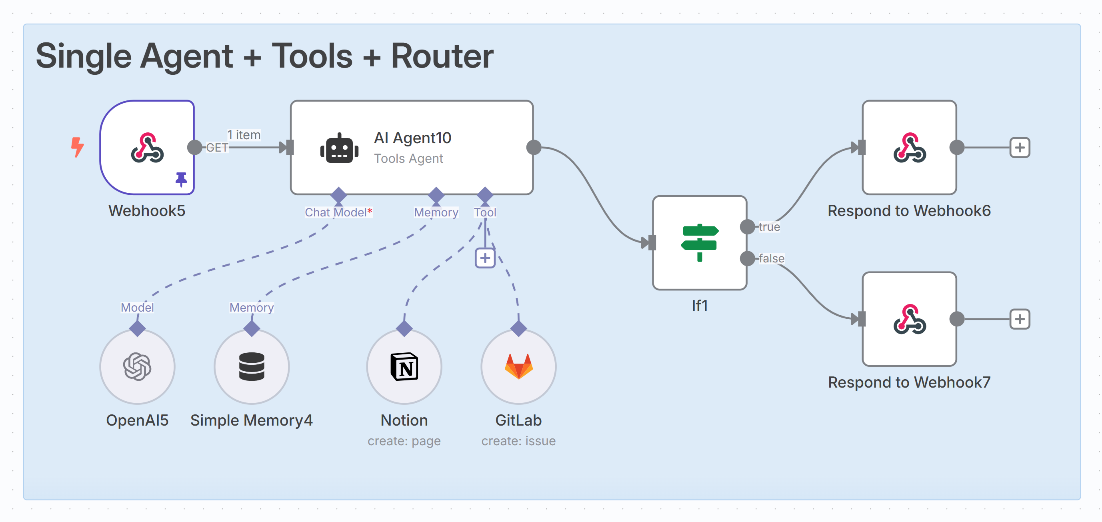
1. LangChain中定义 Tool 的三种方式
在 LangChain 的 Agent 体系中,Tool 是最容易“会写但不理解”的模块之一。
很多学习者可以很快写出一个 Tool,却无法解释:
- Tool 是如何被 Agent 选中的?
- 为什么有的 Tool 永远不会被调用?
- description、name、参数 schema 各自起什么作用?
@tool、StructuredTool、BaseTool到底差在哪?
本文试图给出一篇**“一次讲清楚”的完整答案**。
一、什么是 Tool(先建立正确的抽象)
在 LangChain / Tool Calling 体系中:
Tool ≠ 函数
Tool = 给 LLM 阅读并做决策用的“函数说明书”
一个 Tool 至少包含三类信息:
| 类别 | 作用 |
|---|---|
| name | 工具的唯一标识 |
| description | 给 LLM 做语义判断用 |
| args schema | 参数结构与约束 |
⚠️ 关键点:
LLM 永远不会读你的函数实现代码
它只能“看到” Tool 的元信息
二、定义 Tool 的三种方式(完整对比)
方式一:StructuredTool.from_function(最推荐)
from langchain.tools import StructuredTool

def calculate(a: int, b: int, operation: str) -> float:
    if operation == "add":
        return a + b
    if operation == "subtract":
        return a - b
    if operation == "multiply":
        return a * b
    if operation == "divide":
        return a / b
    raise ValueError("invalid operation")

calculate_tool = StructuredTool.from_function(
    func=calculate,
    name="math_calculator",
    description=(
        "当用户需要进行明确的数学计算时使用,"
        "例如加法、减法、乘法或除法。"
        "适用于“帮我算一下”“结果是多少”等请求。"
    ),
)
特点
- 强制结构完整
- schema 自动生成
- 几乎不踩坑
- 正式项目首选
方式二:@tool 装饰器(最容易出问题)
from langchain.tools import tool

@tool("math_calculator")
def calculate(a: int, b: int, operation: str) -> float:
    """
    用于执行明确的数学运算。
    当用户请求计算、求和、相减、相乘、相除时使用。
    operation 支持 add / subtract / multiply / divide。
    """
    ...
⚠️ 关键规则(必须记住):
-
description 通常来自 docstring
-
没有 docstring → 很多版本会:
- 报错
- 或 Tool 无法被 Agent 正确使用
方式三:继承 BaseTool(高级 / 框架级)
from langchain.tools import BaseTool

class MathCalculatorTool(BaseTool):
    name = "math_calculator"
    description = "当用户需要进行数学计算时使用"

    def _run(self, a: int, b: int, operation: str) -> float:
        return a + b
适用场景
- 高度定制
- 框架 / 中间层开发
- 一般业务开发不推荐
2.从 tool到 LangChain / LangGraph
一、从 Python 最基础开始:docstring 到底是什么
1️⃣ 最原始的 Python 函数
def add(a: int, b: int) -> int:
    """
    返回 a 和 b 的和
    """
    return a + b
你需要明确的 3 件事
""" """是 docstring- docstring 是 运行时可读取的
- Python 把它当成 数据,不是注释
print(add.__doc__)
输出:
返回 a 和 b 的和
⚠️ 到这里为止,一切都还只是 Python。
二、LangChain 做的第一件事:把 docstring 交给 LLM
核心思想(非常重要)
LangChain 并没有发明新概念
它只是:
👉 把 Python 的“可读元信息”喂给了 LLM
三、Tool 的本质结构(脑子里必须有这个模型)
┌─────────────┐
│   Tool      │
├─────────────┤
│ name        │  ← 给 LLM 看
│ description │  ← docstring → 给 LLM 看
│ args schema │  ← 给 LLM + 程序看
│ function    │  ← 只给程序跑
└─────────────┘
⚠️ LLM 永远不会看到 function 的实现代码。
四、第一种方式:@tool(最直观)
示例:一个“数学计算 Tool”
from langchain.tools import tool

@tool("math_calculator")
def calculate(a: int, b: int, operation: str) -> float:
    """
    用于执行明确的数学运算。
    当用户请求计算、求和、相减、相乘、相除时使用。

    参数说明:
    - a: 第一个数字
    - b: 第二个数字
    - operation: 运算类型,可选 add / subtract / multiply / divide
    """
    if operation == "add":
        return a + b
    if operation == "subtract":
        return a - b
    if operation == "multiply":
        return a * b
    if operation == "divide":
        return a / b
    raise ValueError("不支持的 operation")
逐行解释(非常关键)
@tool("math_calculator")
- 注册一个 Tool
"math_calculator"会注入成为 tool name,不写的话,默认就是函数名字calculate
def calculate(...)
- 函数签名 → 自动生成 args schema
"""
用于执行明确的数学运算...
"""
👉 这段 docstring 会直接进入 prompt,给 LLM 读
五、为什么 description(docstring)决定 Tool 能否被选中
Agent 实际看到的是类似这样的 prompt(简化)
你可以使用以下工具:

Tool name: math_calculator
Description:
用于执行明确的数学运算。
当用户请求计算、求和、相减、相乘、相除时使用。
然后用户说:
帮我算一下 3 乘以 5
LLM 会做的事是:
“用户在请求 乘法 → description 命中 → 使用 tool”
六、StructuredTool:工程上更安全的方式
from langchain.tools import StructuredTool

def calculate(
    a: int,
    b: int,
    operation: str
) -> float:
    """
    当用户需要进行数学计算时使用。
    适用于加减乘除等明确计算场景。
    """
    if operation == "add":
        return a + b
    if operation == "subtract":
        return a - b
    if operation == "multiply":
        return a * b
    if operation == "divide":
        return a / b
    raise ValueError("invalid operation")
calculate_tool = StructuredTool.from_function(
    func=calculate,
    name="math_calculator",
    description=calculate.__doc__,  # 显式传入
)
为什么更推荐它?
- 强制你思考 description
- schema 更严格
- 在大型系统中更稳定
七、Agent:Tool 的“使用者”,不是执行者
Agent 的真实职责
Agent 不干活,只做决策
一个最小 Agent 示例(简化)
from langchain.agents import initialize_agent
from langchain.chat_models import ChatOpenAI

llm = ChatOpenAI()

agent = initialize_agent(
    tools=[calculate_tool],
    llm=llm,
    agent="zero-shot-react-description",
    verbose=True,
)
发生了什么?
- Tool 的 description 被塞进 prompt
- LLM 决定是否调用 Tool
- Agent 只是“中转站”
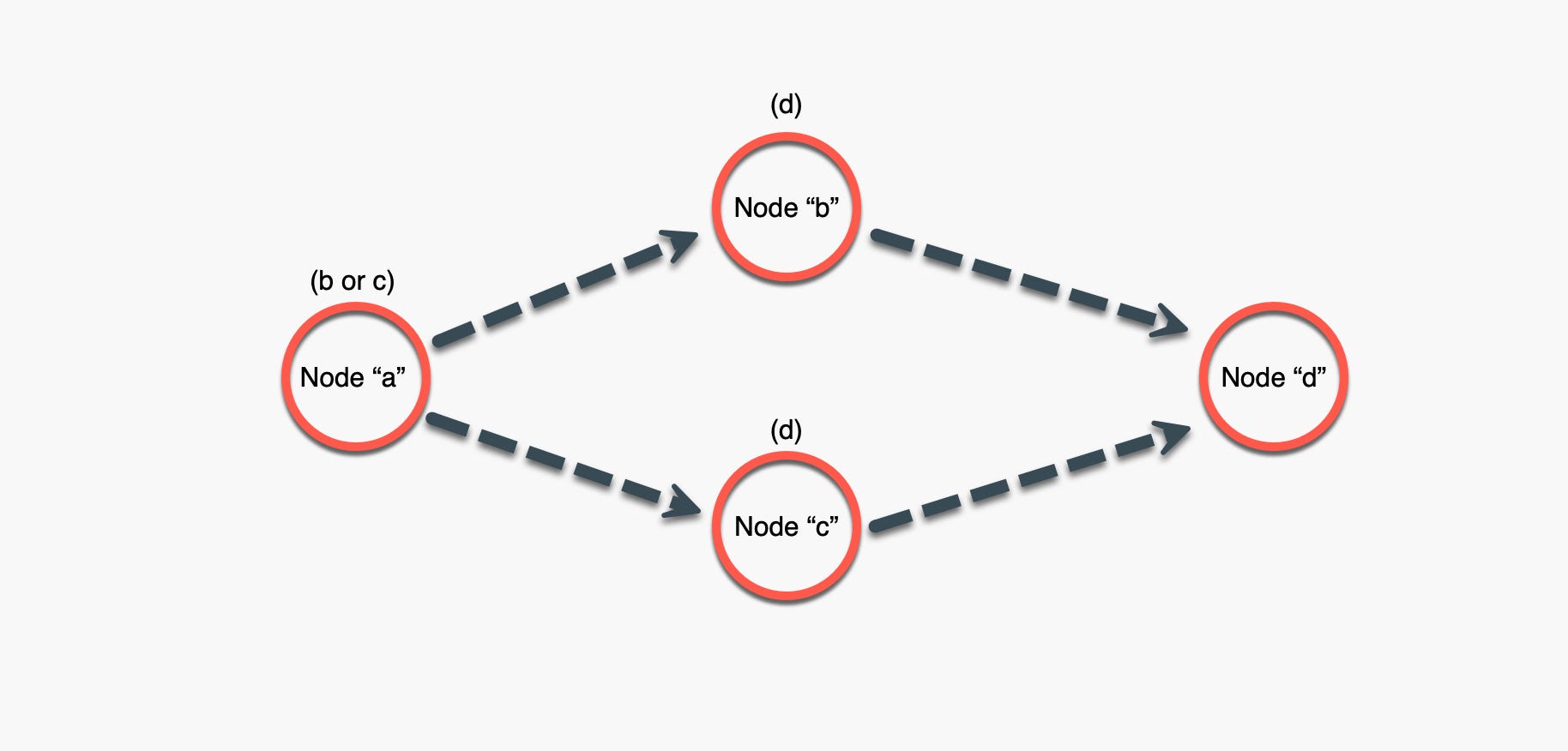
八、为什么 LangGraph 会出现(这是关键跃迁)
LangChain Agent 的问题
- 思考过程隐式
- 多步骤流程难以控制
- 调试困难
九、LangGraph:把“想法”变成结构
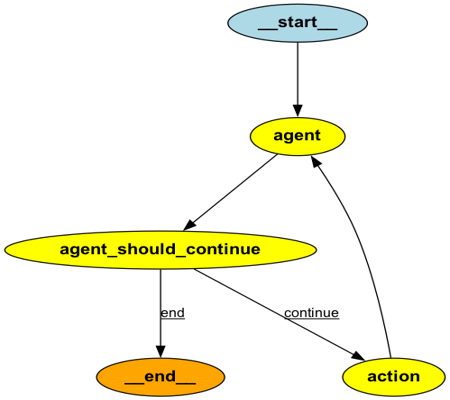
LangGraph 的核心概念
State  → 保存信息
Node   → 执行一步逻辑
Edge   → 决定下一步走哪
一个最小 LangGraph 示例(重点)
1️⃣ 定义 State
from typing import TypedDict

class AgentState(TypedDict):
    user_input: str
    result: str
2️⃣ 定义 Node(这里仍然可以用 Tool)
def decide_and_calculate(state: AgentState) -> AgentState:
    """
    根据用户输入决定是否进行计算,
    并返回计算结果。
    """
    text = state["user_input"]

    if "乘" in text:
        result = 3 * 5  # 示例
        return {
            "user_input": text,
            "result": str(result)
        }

    return {
        "user_input": text,
        "result": "未执行计算"
    }
👉 注意:Node 的 docstring 也是“行为说明”
3️⃣ 构建 Graph
from langgraph.graph import StateGraph

graph = StateGraph(AgentState)

graph.add_node("calc", decide_and_calculate)
graph.set_entry_point("calc")

app = graph.compile()
4️⃣ 执行
output = app.invoke({
    "user_input": "帮我算一下 3 乘 5"
})

print(output["result"])
十、把所有东西“穿起来”的最终视图
Python Function
   ↓
docstring(语义说明)
   ↓
Tool(能力描述)
   ↓
Prompt(LLM 可读)
   ↓
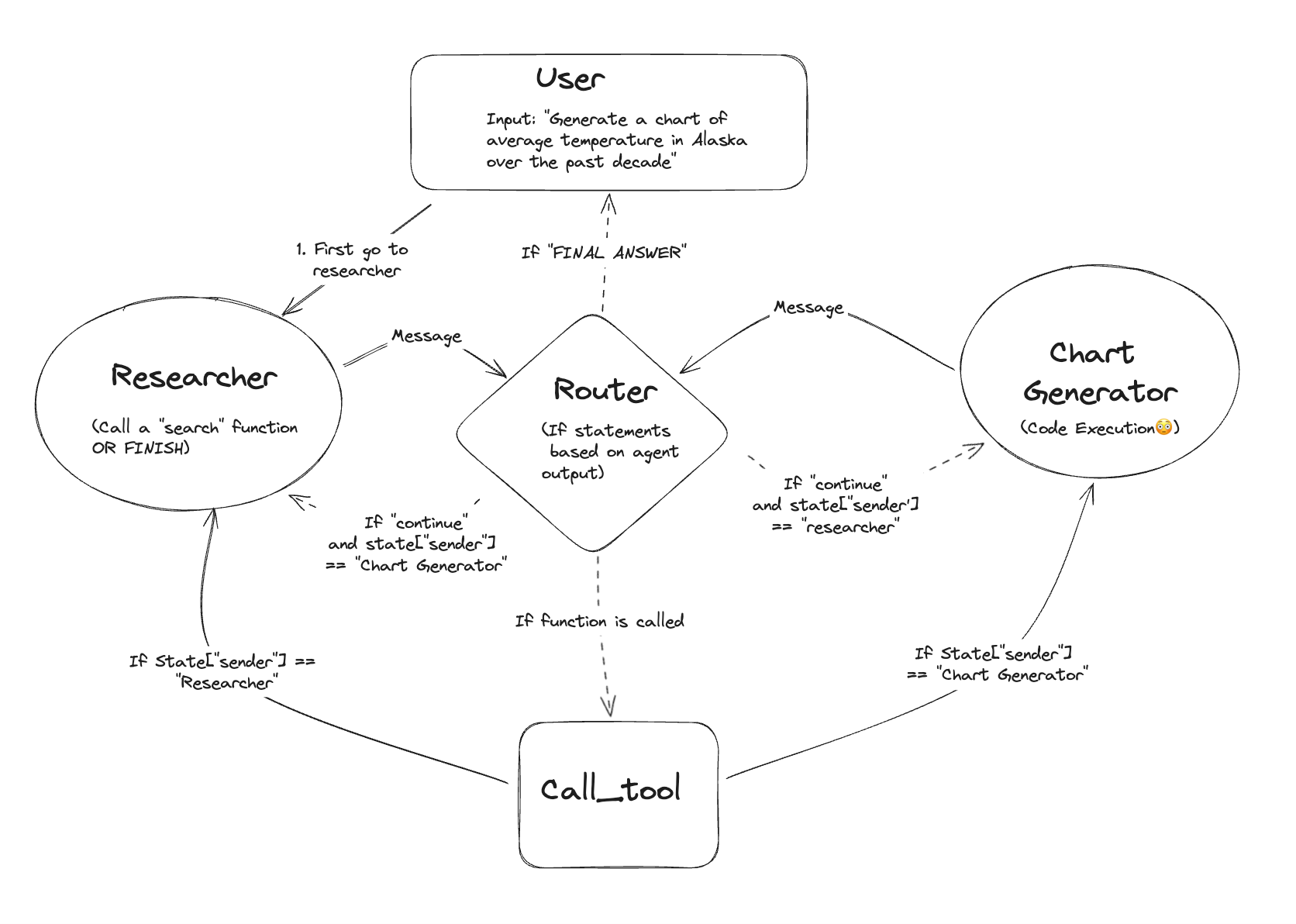
Agent / LangGraph Node(决策)
   ↓
Tool Execution
   ↓
State 更新
十一、总结
我们现在的阶段,能理解:
- docstring 是 prompt
- Tool 是“能力边界”
- Agent 是“决策循环”
- LangGraph 是“显式流程控制”
已经:
从“用框架”升级到了“理解框架设计的人”
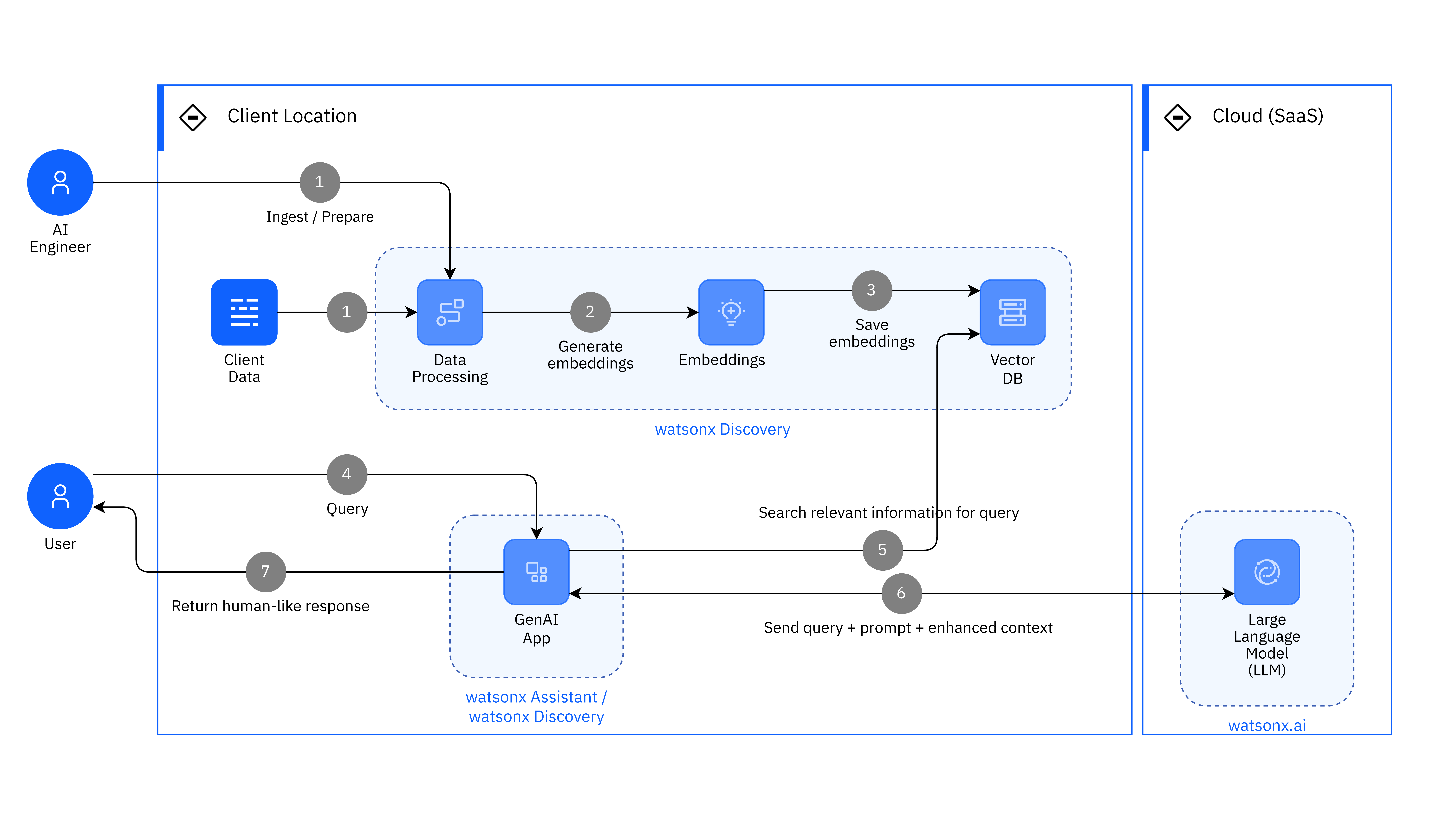
3. 生产级 Agent 从 0 到 1
——目录结构、Memory、RAG 的完整工程实践
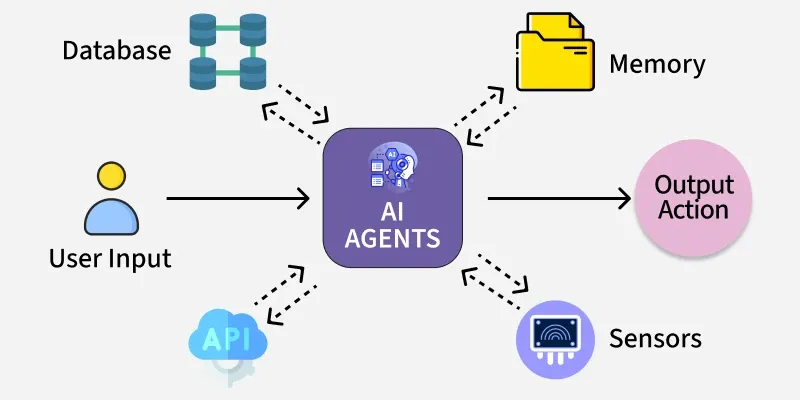
在真实工程中,我们构建的不是一个 Demo Agent,而是一个具备以下特征的系统:
- 能长期对话(Memory)
- 能访问外部知识(RAG)
- 能稳定决策与回退(LangGraph)
- 能扩展、维护、调试(工程结构)
整体架构 → 目录设计 → Memory → RAG → LangGraph 串联
一、先给出最终工程目录(全局视角)
这是一个生产级最小可扩展结构:
agent_app/
├─ app/
│  ├─ main.py              # 程序入口
│  ├─ config.py            # 模型 / 路径 / 参数配置
│
│  ├─ llm/
│  │  └─ model.py          # LLM 初始化
│
│  ├─ memory/
│  │  ├─ base.py           # Memory 抽象
│  │  ├─ conversation.py  # 对话记忆
│  │  └─ summary.py       # 压缩记忆
│
│  ├─ rag/
│  │  ├─ retriever.py      # 检索
│  │  ├─ index.py          # 向量索引
│  │  └─ formatter.py     # 文档整理
│
│  ├─ tools/
│  │  ├─ calculator.py
│  │  └─ search.py
│
│  ├─ graph/
│  │  ├─ state.py          # LangGraph State
│  │  ├─ nodes.py          # Graph Nodes
│  │  └─ build.py          # Graph 构建
│
│  └─ prompts/
│     ├─ system.txt
│     └─ answer.txt
核心原则:
👉 Memory、RAG、Tool、Graph 必须物理分离
二、Memory:不是“记住一切”,而是“可控记忆”
1. Memory 的工程定义
在生产环境中:
Memory = 跨调用保留的信息 + 可控策略
Memory 不是聊天记录,而是状态管理系统。
2. Memory 的三种典型形态
| 类型 | 作用 | 适合 |
|---|---|---|
| 原始对话 | 保留上下文 | 短对话 |
| Summary | 压缩历史 | 长对话 |
| 结构化状态 | 决策依赖 | LangGraph |
3. 对话 Memory(conversation)
# app/memory/conversation.py
class ConversationMemory:
    """
    保存最近 N 轮对话,用于上下文连贯。
    """

    def __init__(self, max_turns: int = 5):
        self.max_turns = max_turns
        self.buffer: list[tuple[str, str]] = []

    def add(self, user: str, assistant: str):
        self.buffer.append((user, assistant))
        self.buffer = self.buffer[-self.max_turns:]

    def load(self) -> str:
        """
        返回可注入 prompt 的文本
        """
        return "\n".join(
            f"User: {u}\nAssistant: {a}"
            for u, a in self.buffer
        )
👉 只保留“近期上下文”,避免 prompt 爆炸
4. Summary Memory(长期对话的关键)
# app/memory/summary.py
class SummaryMemory:
    """
    使用 LLM 对历史对话进行语义压缩。
    """

    def __init__(self):
        self.summary = ""

    def update(self, new_dialogue: str, llm):
        prompt = f"""
        请将以下对话压缩为事实摘要:
        {self.summary}
        {new_dialogue}
        """
        self.summary = llm.invoke(prompt)

    def load(self) -> str:
        return self.summary
👉 Summary 是“长期记忆”,不是聊天记录
三、RAG:外部知识系统,而不是 Tool
1. RAG 的工程定位
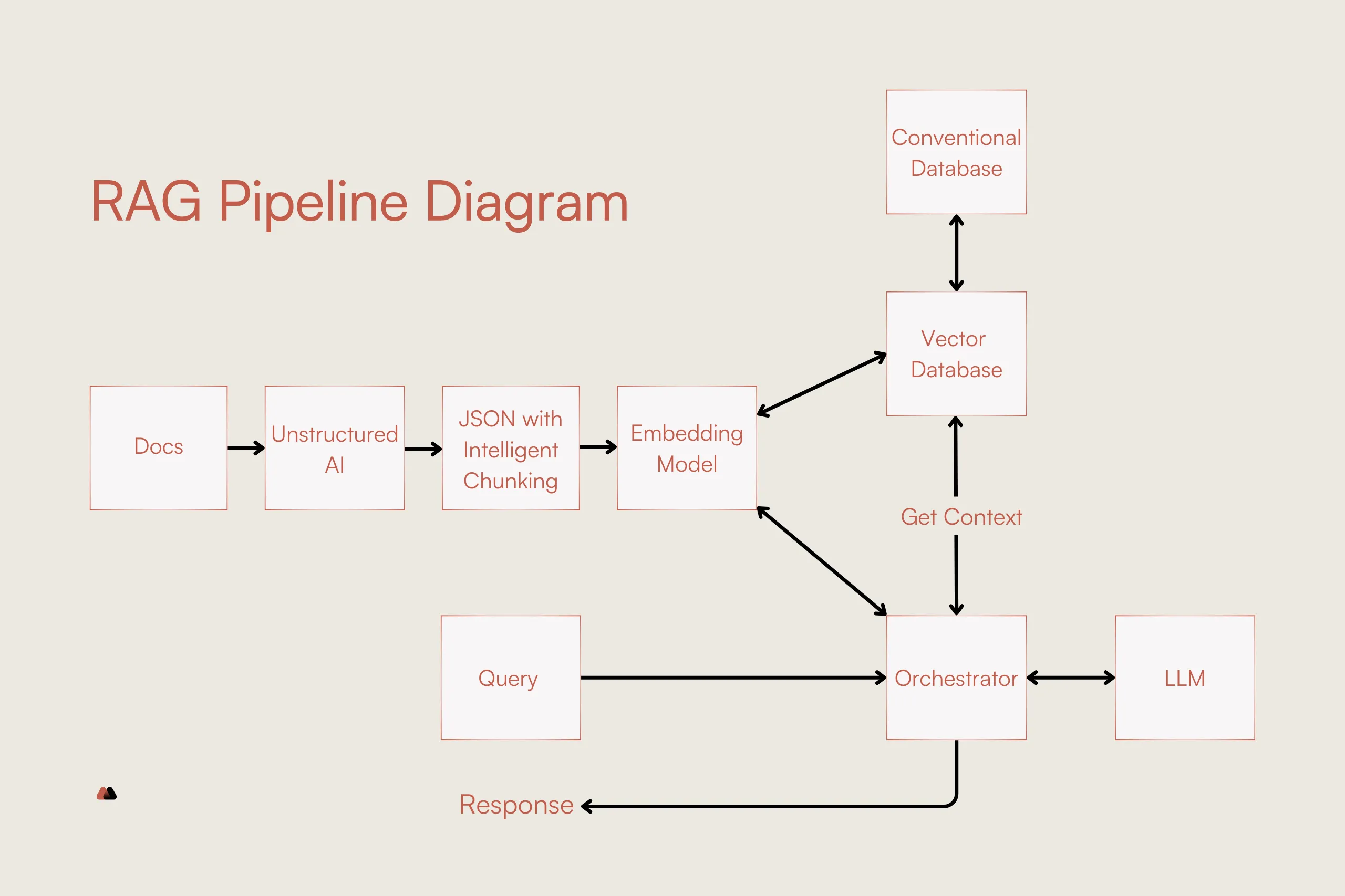
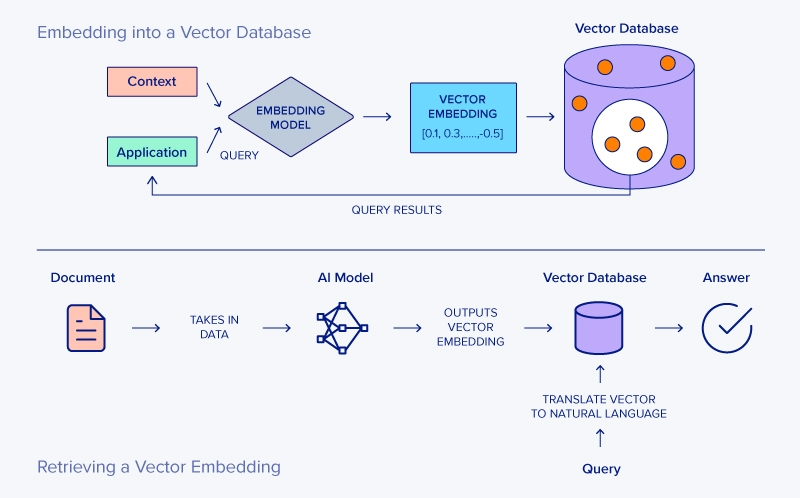
RAG = 可查询的外部事实系统
它只做三件事:
- 检索
- 过滤
- 格式化
2. Retriever(检索层)
# app/rag/retriever.py
class Retriever:
    """
    根据 query 返回相关文档。
    """

    def __init__(self, vector_store):
        self.vector_store = vector_store

    def retrieve(self, query: str) -> list[str]:
        docs = self.vector_store.similarity_search(query, k=5)
        return [d.page_content for d in docs]
3. Formatter(为 LLM 整理材料)
# app/rag/formatter.py
def format_docs(docs: list[str]) -> str:
    """
    将检索结果整理为 prompt 可读格式。
    """
    return "\n\n".join(
        f"[资料]\n{doc}" for doc in docs
    )
👉 RAG 的输出是“材料”,不是答案
四、LangGraph:把 Memory 与 RAG 串成可控流程
1. State:统一上下文
# app/graph/state.py
from typing import TypedDict, Optional

class AgentState(TypedDict):
    question: str
    memory: str
    docs: Optional[str]
    answer: Optional[str]
    error: Optional[str]
2. Node:每个 Node 只做一件事
判断是否需要 RAG
def decide_need_rag(state: AgentState) -> str:
    """
    决定是否依赖外部知识。
    """
    if "公司" in state["question"]:
        return "rag"
    return "direct"
RAG Node(可失败)
def rag_node(state: AgentState, retriever) -> AgentState:
    try:
        docs = retriever.retrieve(state["question"])
        return {**state, "docs": format_docs(docs)}
    except Exception as e:
        return {**state, "error": str(e)}
回退 Node(工程必备)
def fallback_node(state: AgentState) -> AgentState:
    return {
        **state,
        "answer": "当前无法访问外部知识,请稍后再试。"
    }
五、最终 Graph 构建(完整闭环)
# app/graph/build.py
from langgraph.graph import StateGraph

def build_graph():
    graph = StateGraph(AgentState)

    graph.add_node("rag", rag_node)
    graph.add_node("fallback", fallback_node)

    graph.add_conditional_edges(
        "rag",
        lambda s: "fallback" if s.get("error") else "direct"
    )

    graph.set_entry_point("rag")
    return graph.compile()
六、主程序:把一切接起来
# app/main.py
def run(question: str):
    memory_text = conversation_memory.load()
    state = {
        "question": question,
        "memory": memory_text,
        "docs": None,
        "answer": None,
        "error": None,
    }
    result = app.invoke(state)
    return result["answer"]
七、最终工程认知(非常重要)
Memory、RAG、Tool、Graph 的正确分工
| 模块 | 职责 |
|---|---|
| Memory | 状态延续 |
| RAG | 提供事实 |
| Tool | 执行动作 |
| LangGraph | 决策与回退 |
最终结论(工程级)
1️⃣ Memory 是状态,不是聊天记录
2️⃣ RAG 是知识系统,不是 Tool
3️⃣ LangGraph 是控制器,不是 Agent 包装
4️⃣ 失败路径必须被显式建模
如果我们按这套结构构建 Agent,那么系统将具备:
可预测、可扩展、可维护、可演进

有“AI”的1024 = 2048,欢迎大家加入2048 AI社区
更多推荐
 20
20 0
0- 0


 已为社区贡献6条内容

所有评论(0)