【Laya 教程】经典UI List 使用方式
·
LayaAir 列表组件 List 使用教程
本教程介绍 LayaAir 3.3 中的 List 列表组件使用方法。(在项目设置中使用经典UI系统)
目录
演示效果
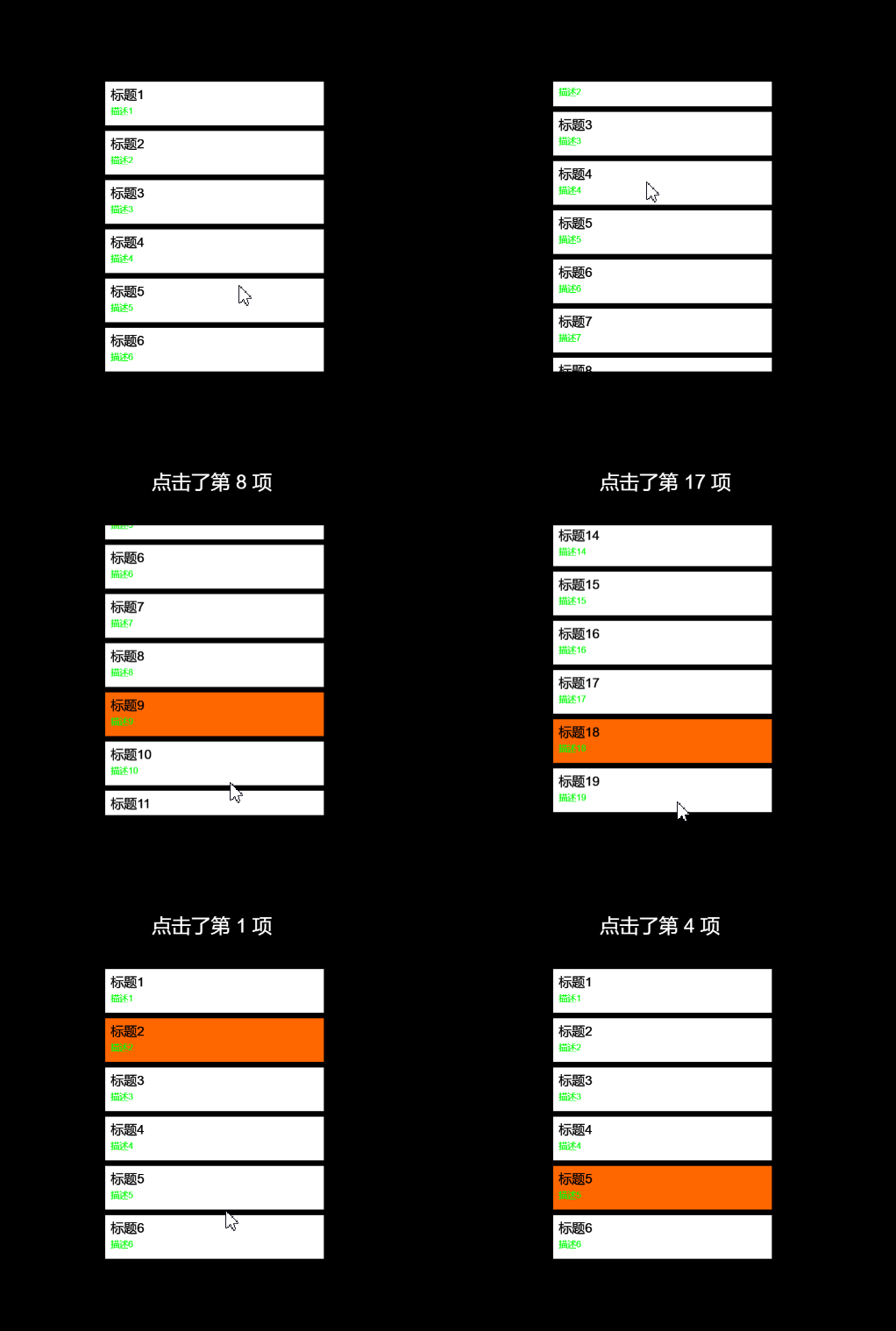
一、List 组件概述
1.1 组件简介
List 是 LayaAir 中用于显示项目列表的组件。List 通过复用单元格来优化性能,适合展示大量数据。
继承关系:
Sprite
  ↑
Box (UIComponent)
  ↑
List
1.2 List 的组成
| 组成部分 | 说明 |
|---|---|
| 列表渲染项(Cell) | 列表中的每一个项目,通常是 Box 或自定义页面对象 |
| 滚动条 | 可选,支持垂直滚动、水平滚动或同时滚动 |
| 数据源 | 通过 array 属性设置,数据与单元格自动绑定 |
1.3 List 核心特性
- 虚拟列表技术,只渲染可见区域单元格
- 支持垂直、水平、双向滚动
- 支持橡皮筋回弹效果
- 支持选中状态管理
- 支持动态数据更新
二、通过 IDE 创建 List
2.1 创建 List 组件
操作步骤:
1. 在 UI 场景的层级窗口右键 → UI组件 → List
2. 或从小部件窗口拖拽 List 组件到场景
2.2 创建列表项模板
步骤:
1. 在 List 组件下添加一个 Box 组件作为列表项模板
2. 调整 Box 大小(如:width=300, height=60)
3. 在 Box 下添加 Label、Image 等组件
4. 将 Box 拖入 List 的 itemTemplate 属性
IDE 中的结构示例:
List (根节点)
├── Box (列表项模板,命名为 ItemBox)
│   ├── Image (m_icon) - 图标
│   └── Label (m_label) - 文本
└── 属性设置
    ├── itemTemplate: ItemBox
    ├── repeatX: 1
    ├── repeatY: 6
    └── scrollType: Vertical
2.3 设置滚动属性
| 属性 | 值 | 说明 |
|---|---|---|
| scrollType | Vertical | 垂直滚动 |
| repeatX | 1 | 水平显示1列 |
| repeatY | 6 | 垂直显示6行,超出可滚动 |
| vScrollBarSkin | 资源路径 | 垂直滚动条皮肤 |
2.4 数据源设置
const { regClass, property } = Laya;

@regClass()
export class ListScript extends Laya.Script {
    @property({ type: Laya.List })
    list: Laya.List;

    onEnable(): void {
        // 构造数据源
        const data: any[] = [];
        for (let i = 0; i < 20; i++) {
            // m_label 和 m_icon 需要与列表项中组件的 name 属性一致
            data.push({
                m_label: `项目 ${i}`,
                m_icon: "atlas/comp/image.png"
            });
        }
        // 设置数据源
        this.list.array = data;
    }
}
2.5 列表项命名规则
列表项中的组件 name 属性必须与数据源中的键名一致:
// 列表项中的组件命名(在 IDE 中设置)
Box (ItemBox)
├── Label → name = "m_label"
└── Image → name = "m_icon"

// 对应的数据源
data.push({
    m_label: "文本内容",
    m_icon: "icon.png"
});
三、通过代码创建 List
3.1 基础代码创建
const {regClass} = Laya;

@regClass()
export class CodeCreateList extends Laya.Script {
    private list: Laya.List;

    onAwake(): void {
        // 创建 List
        this.list = new Laya.List();
        this.list.size(400, 300);
        this.list.pos(50, 50);

        // 设置列表项渲染器
        this.list.itemRender = ListItem;
        this.list.repeatX = 1;
        this.list.repeatY = 5;

        // 设置滚动
        this.list.scrollType = Laya.ScrollType.Vertical;
        this.list.vScrollBarSkin = ""; // 空字符串表示无滚动条皮肤

        // 添加到场景
        this.owner.addChild(this.list);

        // 设置数据源
        const data: string[] = [];
        for (let i = 0; i < 20; i++) {
            data.push(`项目 ${i}`);
        }
        this.list.array = data;
    }
}

// 自定义列表项
class ListItem extends Laya.Box {
    private label: Laya.Label;

    constructor() {
        super();
        this.size(400, 50);

        this.label = new Laya.Label();
        this.label.fontSize = 24;
        this.label.color = "#FFFFFF";
        this.label.pos(10, 10);
        this.addChild(this.label);
    }

    // 重写 set dataSource
    set dataSource(value: any) {
        this.label.text = value;
    }
}
3.2 使用 renderHandler 自定义渲染
const {regClass} = Laya;

@regClass()
export class ListScript extends Laya.Script {
    onAwake(): void {
        super.onAwake();

        const list = new Laya.List();
        list.itemRender = MyItem;
        list.repeatX = 1;
        list.repeatY = 6;
        list.scrollType = Laya.ScrollType.Vertical;
        list.elasticEnabled = true;
        list.spaceY = 10;

        // 设置渲染处理器
        list.renderHandler = new Laya.Handler(this, (cell: MyItem, index: number) => {
            cell.setData(cell.dataSource, index);
        });

        // 设置选择处理器
        list.selectHandler = new Laya.Handler(this, (index: number) => {
            console.log(`选中了第 ${index} 项`);
        });

        // 设置鼠标事件处理器
        list.mouseHandler = new Laya.Handler(this, (e: Event, index: number) => {
            if (e.type === Laya.Event.CLICK) {
                console.log(`点击了第 ${index} 项`);
                list.selectedIndex = index;
            }
        });

        this.owner.addChild(list);

        // 设置数据源
        list.array = [
            {title: "标题1", desc: "描述1"},
            {title: "标题2", desc: "描述2"}
        ];

    }

}

class MyItem extends Laya.Box {
    private titleLabel: Laya.Label;
    private descLabel: Laya.Label;

    constructor() {
        super();
        this.size(400, 80);
        // 测试使用,添加背景色
        this.bgColor = "#737373";

        this.titleLabel = new Laya.Label();
        this.titleLabel.fontSize = 24;
        this.titleLabel.pos(10, 10);
        this.addChild(this.titleLabel);

        this.descLabel = new Laya.Label();
        this.descLabel.fontSize = 16;
        this.descLabel.color = "#00ff04";
        this.descLabel.pos(10, 45);
        this.addChild(this.descLabel);
    }

    setData(data: any, index: number): void {
        if (data) {
            this.titleLabel.text = data.title;
            this.descLabel.text = data.desc;
        }
    }
}
四、List 属性详解
4.1 数据相关属性
| 属性 | 类型 | 说明 |
|---|---|---|
| array | any[] | 列表数据源 |
| selectedItem | any | 当前选中的单元格数据源 |
| selection | UIComponent | 当前选择的单元格对象 |
| selectedIndex | number | 当前选中项的索引 |
| length | number | 列表数据总个数(只读) |
4.2 布局相关属性
| 属性 | 类型 | 说明 |
|---|---|---|
| repeatX | number | 水平方向单元格数量 |
| repeatY | number | 垂直方向单元格数量 |
| spaceX | number | 水平方向单元格间距(像素) |
| spaceY | number | 垂直方向单元格间距(像素) |
| itemRender | any | 单元格渲染器(类) |
4.3 滚动相关属性
| 属性 | 类型 | 说明 |
|---|---|---|
| scrollType | ScrollType | 滚动类型:None(0), Horizontal(1), Vertical(2), Both(3) |
| vScrollBarSkin | string | 垂直滚动条皮肤 |
| hScrollBarSkin | string | 水平滚动条皮肤 |
| scrollBar | ScrollBar | 滚动条组件引用 |
| elasticEnabled | boolean | 是否开启橡皮筋回弹效果 |
| disableStopScroll | boolean | 更新数据时是否停止滚动 |
4.4 选择相关属性
| 属性 | 类型 | 说明 |
|---|---|---|
| selectEnable | boolean | 是否可以选择 |
| selectHandler | Handler | 选择改变时的处理器 |
| selectedIndex | number | 当前选中项索引 |
4.5 渲染相关属性
| 属性 | 类型 | 说明 |
|---|---|---|
| renderHandler | Handler | 单元格渲染处理器 (cell, index) |
| mouseHandler | Handler | 单元格鼠标事件处理器 (e, index) |
| cacheContent | boolean | 是否缓存内容(数据少时提高性能) |
| cacheAs | string | 缓存模式 |
4.6 其他属性
| 属性 | 类型 | 说明 |
|---|---|---|
| content | Box | 内容容器 Box 组件引用 |
| cells | UIComponent[] | 单元格集合(只读) |
| page | number | 当前页码 |
| totalPage | number | 总页数 |
| startIndex | number | 当前显示的起始索引 |
五、List 事件处理
5.1 选择事件
// 方式一:使用 selectHandler
list.selectHandler = new Laya.Handler(this, (index: number) => {
    console.log(`选中索引: ${index}`);
    const data = list.array[index];
    console.log(`选中数据:`, data);
});

// 方式二:监听 change 事件
list.on(Laya.Event.CHANGE, this, () => {
    console.log(`当前选中: ${list.selectedIndex}`);
    console.log(`选中数据:`, list.selectedItem);
});
5.2 鼠标事件
// 使用 mouseHandler
list.mouseHandler = new Laya.Handler(this, (e: Event, index: number) => {
    switch (e.type) {
        case Laya.Event.CLICK:
            console.log(`点击第 ${index} 项`);
            break;
        case Laya.Event.MOUSE_DOWN:
            console.log(`按下第 ${index} 项`);
            break;
        case Laya.Event.MOUSE_UP:
            console.log(`抬起第 ${index} 项`);
            break;
        case Laya.Event.MOUSE_OVER:
            console.log(`悬停第 ${index} 项`);
            break;
    }
});
5.3 渲染事件
// 方式一:使用 renderHandler
list.renderHandler = new Laya.Handler(this, (cell: UIComponent, index: number) => {
    const data = list.array[index];
    const label = cell.getChildByName("titleLabel") as Laya.Label;
    label.text = data.title;
});

// 方式二:监听 RENDER 事件
list.on(Laya.Event.RENDER, this, (cell: UIComponent, index: number) => {
    const data = list.array[index];
    // 自定义渲染逻辑
});
5.4 滚动事件
// 监听滚动条变化
list.scrollBar.on(Laya.Event.CHANGE, this, () => {
    console.log(`滚动位置: ${list.scrollBar.value}`);
});

// 获取滚动信息
console.log(`起始索引: ${list.startIndex}`);
六、List 高级用法
6.1 动态更新数据
// 方式一:直接替换整个数据源
list.array = newData;

// 方式二:追加数据(不会停止滚动)
const currentData = list.array || [];
const newData = [...currentData, ...moreData];
list.updateArray(newData);

// 方式三:修改单条数据后刷新
list.array[5] = { ...list.array[5], title: "新标题" };
list.refresh(); // 触发重新渲染
6.2 设置橡皮筋效果
// 开启橡皮筋效果
list.elasticEnabled = true;

// 设置橡皮筋回弹时间(毫秒)
list.scrollBar.elasticBackTime = 200;

// 设置橡皮筋极限距离
list.scrollBar.elasticDistance = 50;

// 隐藏滚动条皮肤但保留滚动功能
list.vScrollBarSkin = "";
6.3 分页功能
class PagedList {
    private list: Laya.List;
    private allData: any[] = [];
    private currentPage: number = 0;
    private pageSize: number = 20;

    constructor(list: Laya.List) {
        this.list = list;
        this.list.repeatY = 10;

        // 监听滚动到底部
        this.list.scrollBar.on(Laya.Event.END, this, this.onScrollEnd);
    }

    private onScrollEnd(): void {
        const maxPage = Math.ceil(this.allData.length / this.pageSize);
        if (this.currentPage < maxPage - 1) {
            this.loadNextPage();
        }
    }

    loadNextPage(): void {
        this.currentPage++;
        const start = this.currentPage * this.pageSize;
        const end = start + this.pageSize;
        const pageData = this.allData.slice(start, end);

        // 追加数据
        const currentData = this.list.array || [];
        this.list.array = [...currentData, ...pageData];
    }

    setTotalData(data: any[]): void {
        this.allData = data;
        this.list.array = data.slice(0, this.pageSize);
    }
}
6.4 多列布局
// 水平多列列表
const list = new Laya.List();
list.size(600, 400);

// 设置 3 列
list.repeatX = 3;
list.repeatY = 4;
list.spaceX = 10;
list.spaceY = 10;

// 水平滚动
list.scrollType = Laya.ScrollType.Horizontal;

// 数据按行排列
list.array = data;
6.5 自定义选中效果
list.selectEnable = true;

// 在 renderHandler 中处理选中样式
list.renderHandler = new Laya.Handler(this, (cell: MyItem, index: number) => {
    cell.setData(list.array[index], index);

    // 设置选中样式
    if (list.selectedIndex === index) {
        cell.bgColor = "#FF6600";
    } else {
        cell.bgColor = "#ffffff";
    }
});
6.6 性能优化
// 小数据量时开启内容缓存
list.cacheContent = true;

// 设置缓存模式
list.cacheAs = "normal";

// 禁用滚动停止,实现平滑更新
list.disableStopScroll = true;

// 使用对象池复用单元格
class ItemPool {
    private static pool: MyItem[] = [];

    static get(): MyItem {
        return this.pool.pop() || new MyItem();
    }

    static recover(item: MyItem): void {
        this.pool.push(item);
    }
}
七、常见问题
Q1: 列表项显示空白?
// 检查以下几点:

// 1. 确认数据源已设置
console.log(list.array); // 不为空

// 2. 确认列表项组件的 name 与数据键名匹配
// IDE中:Label的name = "m_label"
// 数据中:{ m_label: "内容" }

// 3. 确认列表项尺寸正确
itemBox.size(400, 50);

// 4. 确认 repeatX/repeatY 设置
list.repeatX = 1;
list.repeatY = 5;
Q2: 滚动条不显示?
// 确认滚动类型和皮肤设置
list.scrollType = Laya.ScrollType.Vertical; // 必须设置为滚动类型
list.vScrollBarSkin = "resources/vscroll_bar.png"; // 设置皮肤

// 隐藏滚动条但保留滚动功能
list.vScrollBarSkin = "";
Q3: 更新数据后列表不刷新?
// 方式一:重新赋值 array
list.array = [...list.array];

// 方式二:使用修改后的数据
const newData = list.array.map(item => ({ ...item, updated: true }));
list.array = newData;

// 方式三:调用 refresh(如果有的话)
list.refresh();
Q4: 橡皮筋效果不生效?
// 必须同时设置以下属性
list.elasticEnabled = true;              // 开启橡皮筋
list.scrollBar.elasticBackTime = 200;    // 回弹时间
list.scrollBar.elasticDistance = 50;     // 极限距离
Q5: 如何获取当前可见的单元格?
// 获取所有单元格
const cells = list.cells;

// 获取可见范围
const startIndex = list.startIndex;
const endIndex = startIndex + list.repeatX * list.repeatY;

// 获取可见单元格数据
const visibleData = list.array.slice(startIndex, endIndex);
Q6: 选择事件不触发?
// 确认开启了选择功能
list.selectEnable = true;

// 设置选择处理器
list.selectHandler = new Laya.Handler(this, (index: number) => {
    console.log("选中:", index);
});

// 或者监听事件
list.on(Laya.Event.CHANGE, this, () => {
    console.log("选中:", list.selectedIndex);
});
八、实战示例
8.1 排行榜列表
interface RankItemData {
    rank: number;
    name: string;
    score: number;
    avatar: string;
}

class RankList extends Laya.Box {
    private list: Laya.List;

    onAwake(): void {
        this.createList();
        this.loadData();
    }

    private createList(): void {
        this.list = new Laya.List();
        this.list.size(500, 600);
        this.list.repeatX = 1;
        this.list.repeatY = 8;
        this.list.spaceY = 5;
        this.list.scrollType = Laya.ScrollType.Vertical;
        this.list.vScrollBarSkin = "";
        this.list.elasticEnabled = true;

        this.list.itemRender = RankItem;
        this.list.renderHandler = new Laya.Handler(this, this.renderItem);

        this.addChild(this.list);
    }

    private renderItem(cell: RankItem, index: number): void {
        const data = this.list.array[index] as RankItemData;
        cell.setData(data, index);
    }

    private loadData(): void {
        const data: RankItemData[] = [];
        for (let i = 0; i < 50; i++) {
            data.push({
                rank: i + 1,
                name: `玩家${i + 1}`,
                score: Math.floor(Math.random() * 10000),
                avatar: "atlas/comp/image.png"
            });
        }
        this.list.array = data;
    }
}

class RankItem extends Laya.Box {
    private bg: Laya.Image;
    private rankLabel: Laya.Label;
    private nameLabel: Laya.Label;
    private scoreLabel: Laya.Label;
    private avatarImage: Laya.Image;

    constructor() {
        super();
        this.size(500, 70);

        // 背景
        this.bg = new Laya.Image();
        this.bg.sizeGrid = "10,10,10,10";
        this.bg.size(500, 70);
        this.addChild(this.bg);

        // 排名
        this.rankLabel = new Laya.Label();
        this.rankLabel.pos(20, 20);
        this.rankLabel.fontSize = 28;
        this.rankLabel.bold = true;
        this.addChild(this.rankLabel);

        // 名称
        this.nameLabel = new Laya.Label();
        this.nameLabel.pos(150, 22);
        this.nameLabel.fontSize = 24;
        this.addChild(this.nameLabel);

        // 分数
        this.scoreLabel = new Laya.Label();
        this.scoreLabel.pos(400, 22);
        this.scoreLabel.fontSize = 30;
        this.scoreLabel.color = "#00ff8c";
        this.addChild(this.scoreLabel);

        this.avatarImage = new Laya.Image();
        this.avatarImage.pos(70, 10);
        this.avatarImage.size(70, 50);
        this.addChild(this.avatarImage);
    }

    setData(data: RankItemData, index: number): void {
        this.rankLabel.text = data.rank.toString();
        this.nameLabel.text = data.name;
        this.scoreLabel.text = data.score.toString();
        this.avatarImage.skin = data.avatar;

        // 前三名特殊样式
        if (data.rank <= 3) {
            this.rankLabel.color = "#FFD700";
            this.bg.skin = "atlas/comp/img_bg2.png";
        } else {
            this.rankLabel.color = "#FFFFFF";
            this.bg.skin = "atlas/comp/img_bg3.png";
        }
    }
}

// 测试用例
Laya.stage.addChild(new RankList());
8.2 聊天消息列表
interface ChatMessage {
    sender: string;
    content: string;
    time: string;
    isSelf: boolean;
}

class ChatList extends Laya.Box {
    private list: Laya.List;

    onAwake(): void {
        this.list = new Laya.List();
        this.list.size(400, 500);
        this.list.repeatX = 1;
        this.list.repeatY = 6;
        this.list.spaceY = 10;
        this.list.scrollType = Laya.ScrollType.Vertical;

        this.list.itemRender = ChatItem;
        this.list.renderHandler = new Laya.Handler(this, this.renderItem);

        this.addChild(this.list);
    }

    private renderItem(cell: ChatItem, index: number): void {
        cell.setData(this.list.array[index] as ChatMessage);
    }

    addMessage(msg: ChatMessage): void {
        const data = this.list.array || [];
        this.list.array = [...data, msg];

        // 滚动到底部
        Laya.timer.once(100, this, () => {
            this.list.scrollBar.value = this.list.scrollBar.max;
        });
    }
}

class ChatItem extends Laya.Box {
    private senderLabel: Laya.Label;
    private msgLabel: Laya.Label;
    private timeLabel: Laya.Label;
    private bg: Laya.Image;

    constructor() {
        super();
        this.size(380, 80);

        this.bg = new Laya.Image();
        this.bg.sizeGrid = "10,10,10,10";
        this.bg.size(380, 80);
        this.addChild(this.bg);

        this.senderLabel = new Laya.Label();
        this.senderLabel.pos(10, 5);
        this.senderLabel.fontSize = 16;
        this.senderLabel.color = "#00BFFF";
        this.addChild(this.senderLabel);

        this.msgLabel = new Laya.Label();
        this.msgLabel.pos(10, 30);
        this.msgLabel.fontSize = 20;
        this.msgLabel.wordWrap = true;
        this.msgLabel.width = 360;
        this.addChild(this.msgLabel);

        this.timeLabel = new Laya.Label();
        this.timeLabel.pos(300, 5);
        this.timeLabel.fontSize = 14;
        this.timeLabel.color = "#999999";
        this.addChild(this.timeLabel);
    }

    setData(data: ChatMessage): void {
        this.senderLabel.text = data.sender + ":";
        this.msgLabel.text = data.content;
        this.timeLabel.text = data.time;

        if (data.isSelf) {
            this.bg.skin = "atlas/comp/img_bg2.png";
        } else {
            this.bg.skin = "atlas/comp/img_bg3.png";
        }
    }
}
// 测试用例
let chatList =  Laya.stage.addChild(new ChatList());
chatList.addMessage({sender: "旁白", content: "故事开始于一个阳光明媚的早晨...", time: "2021-01-01 00:00:00", isSelf: false});
chatList.addMessage({sender: "主角", content: "今天是个好日子!", time: "2021-01-01 00:00:00", isSelf: true});
chatList.addMessage({sender: "主角", content: "我要去冒险了!", time: "2021-01-01 00:00:00", isSelf: true});
8.3 使用 IDE 场景+运行时脚本的示例
// 假设在 IDE 中创建了 List 预制体,并添加了运行时脚本

// 运行时脚本基类(自动生成)
export class MyListSceneBase extends Laya.Scene {
    public List!: Laya.List;
}

// 运行时脚本
import regClass = Laya.regClass;
import {MyListSceneBase} from "./MyListScene.generated";

// 运行时脚本,添加到测试场景根目录Runtime中
@regClass()
export class MyListScene extends MyListSceneBase {
    onAwake(): void {
        this.setupList();
        this.loadData();
    }

    private setupList(): void {
        // 基础设置
        this.List.repeatX = 1;
        this.List.repeatY = 6;
        this.List.spaceY = 5;
        this.List.selectEnable = true;

        // 橡皮筋效果
        this.List.elasticEnabled = true;
        this.List.scrollBar.elasticBackTime = 200;
        this.List.scrollBar.elasticDistance = 50;

        // 隐藏滚动条
        this.List.vScrollBarSkin = "";

        // 设置处理器
        this.List.renderHandler = new Laya.Handler(this, this.onRender);
        this.List.selectHandler = new Laya.Handler(this, this.onSelect);
        this.List.mouseHandler = new Laya.Handler(this, this.onMouse);
    }

    private onRender(cell: Laya.Box, index: number): void {
        const data = this.List.array[index];
        const title = cell.getChildByName("title") as Laya.Label;
        const icon = cell.getChildByName("icon") as Laya.Image;

        if (title) title.text = data.title;
        if (icon) icon.skin = data.icon;
    }

    private onSelect(index: number): void {
        console.log("选中:", index);
    }

    private onMouse(e: Event, index: number): void {
        if (e.type === Laya.Event.CLICK) {
            console.log("点击:", index);
        }
    }

    private loadData(): void {
        const data = [];
        for (let i = 0; i < 50; i++) {
            data.push({
                title: `项目 ${i}`,
                icon: "atlas/comp/image.png"
            });
        }
        this.List.array = data;
    }
}
参考文档

有“AI”的1024 = 2048,欢迎大家加入2048 AI社区
更多推荐

 21
21 0
0- 0


 已为社区贡献35条内容

所有评论(0)