50天50个小项目 (React19 + Tailwindcss V4) ✨ | PasswordGenerator(密码生成器)
基于React19 + Tailwindcss V4的密码生成器组件,该组件允许用户自定义密码长度(1-100位)并选择包含的字符类型(大小写字母、数字、符号)。利用TailwindCSS快速构建响应式UI界面。核心功能通过generatePassword函数实现,根据用户选择的字符集随机生成密码。
📅 我们继续 50 个小项目挑战!——PasswordGenerator组件
仓库地址:https://gitee.com/hhm-hhm/50days50projects.git
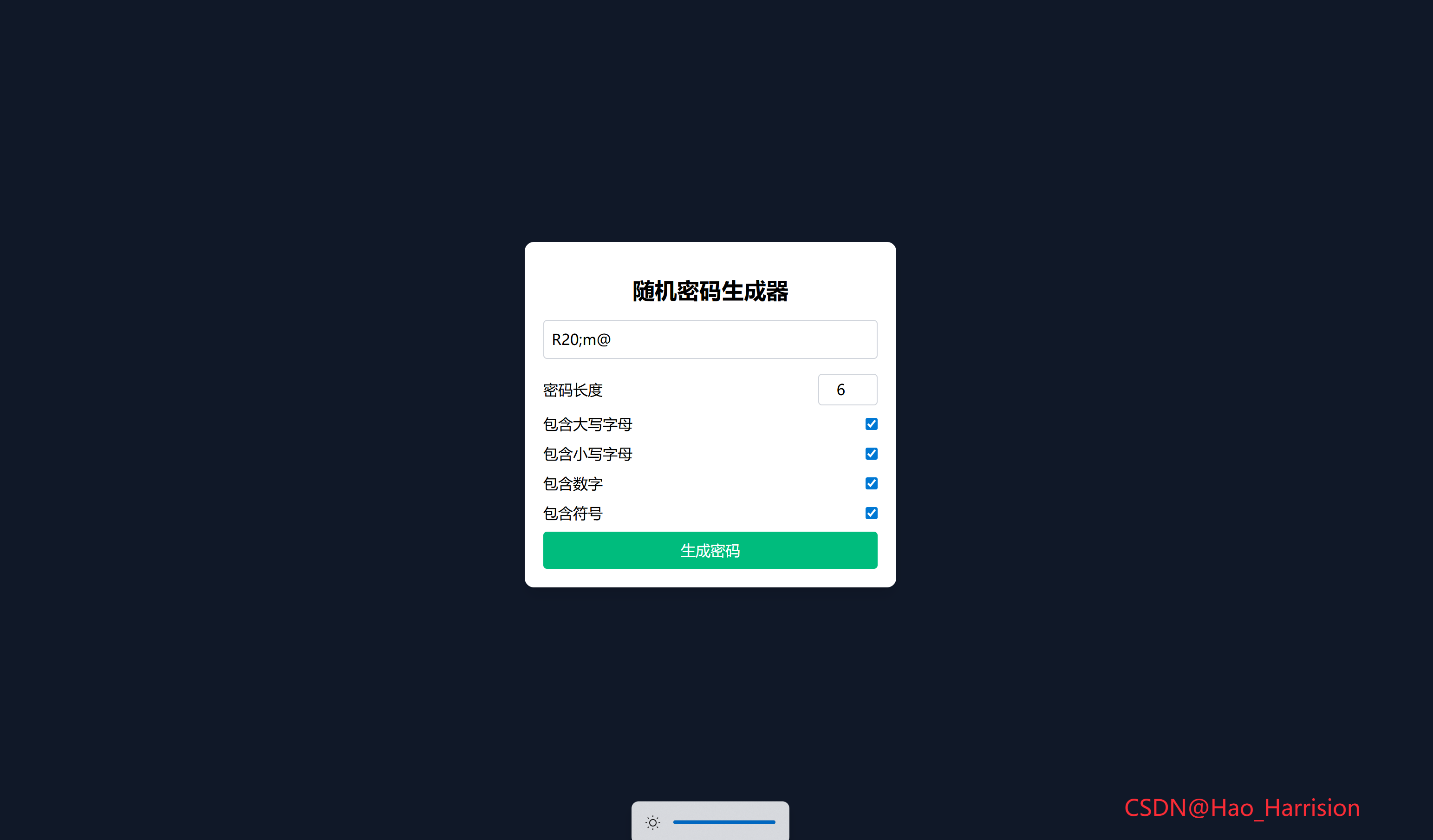
创建一个简单的密码生成器。这个应用允许用户自定义密码长度以及选择是否包含大写字母、小写字母、数字和符号,从而生成满足特定需求的密码。
🌀 组件目标
- 允许用户指定密码长度
- 提供选项以选择密码应包含的字符类型(大写字母、小写字母、数字、符号)
- 实时生成并显示符合要求的密码
- 使用
TailwindCSS快速构建 UI 样式
🔧 PasswordGenerator.tsx组件实现
import React, { useState } from 'react'

const PasswordGenerator: React.FC = () => {
    // 状态定义
    const [generatedPassword, setGeneratedPassword] = useState<string>('')
    const [passwordLength, setPasswordLength] = useState<number>(20)
    const [includeUppercase, setIncludeUppercase] = useState<boolean>(true)
    const [includeLowercase, setIncludeLowercase] = useState<boolean>(true)
    const [includeNumbers, setIncludeNumbers] = useState<boolean>(true)
    const [includeSymbols, setIncludeSymbols] = useState<boolean>(true)

    // 字符集常量(可提升到组件外部,但放这里更清晰)
    const UPPERCASE_CHARS = 'ABCDEFGHIJKLMNOPQRSTUVWXYZ'
    const LOWERCASE_CHARS = 'abcdefghijklmnopqrstuvwxyz'
    const NUMBER_CHARS = '0123456789'
    const SYMBOL_CHARS = '!@#$%^&*()_+-=[]{}|;:,.<>?'

    const generatePassword = () => {
        let charSet = ''
        if (includeUppercase) charSet += UPPERCASE_CHARS
        if (includeLowercase) charSet += LOWERCASE_CHARS
        if (includeNumbers) charSet += NUMBER_CHARS
        if (includeSymbols) charSet += SYMBOL_CHARS

        if (charSet.length === 0) {
            setGeneratedPassword('')
            return
        }

        let password = ''
        for (let i = 0; i < passwordLength; i++) {
            const randomIndex = Math.floor(Math.random() * charSet.length)
            password += charSet[randomIndex]
        }

        setGeneratedPassword(password)
    }

    return (
        <div className="flex min-h-screen items-center justify-center bg-gray-900">
            <div className="w-[400px] rounded-lg bg-white p-5 shadow-md transition-shadow hover:shadow-lg">
                <div className="p-4 text-center text-2xl font-bold">随机密码生成器</div>
                <div>
                    <input
                        type="text"
                        value={generatedPassword}
                        readOnly
                        placeholder="生成的密码将显示在这里"
                        className="mb-4 w-full rounded border border-gray-300 p-2"
                    />
                </div>
                <div className="flex flex-col gap-2">
                    <div className="flex items-center justify-between">
                        <label>密码长度</label>
                        <input
                            type="number"
                            min="1"
                            max="100"
                            value={passwordLength}
                            onChange={(e) => setPasswordLength(Number(e.target.value))}
                            className="w-16 rounded border border-gray-300 p-1 text-center"
                        />
                    </div>

                    <div className="flex items-center justify-between">
                        <label>包含大写字母</label>
                        <input
                            type="checkbox"
                            checked={includeUppercase}
                            onChange={(e) => setIncludeUppercase(e.target.checked)}
                        />
                    </div>

                    <div className="flex items-center justify-between">
                        <label>包含小写字母</label>
                        <input
                            type="checkbox"
                            checked={includeLowercase}
                            onChange={(e) => setIncludeLowercase(e.target.checked)}
                        />
                    </div>

                    <div className="flex items-center justify-between">
                        <label>包含数字</label>
                        <input
                            type="checkbox"
                            checked={includeNumbers}
                            onChange={(e) => setIncludeNumbers(e.target.checked)}
                        />
                    </div>

                    <div className="flex items-center justify-between">
                        <label>包含符号</label>
                        <input
                            type="checkbox"
                            checked={includeSymbols}
                            onChange={(e) => setIncludeSymbols(e.target.checked)}
                        />
                    </div>

                    <button
                        onClick={generatePassword}
                        className="cursor-pointer rounded bg-emerald-500 p-2 text-white transition-colors hover:bg-emerald-600">
                        生成密码
                    </button>
                </div>
            </div>
            <div className="fixed right-20 bottom-5 z-100 text-2xl text-red-500">
                CSDN@Hao_Harrision
            </div>
        </div>
    )
}

export default PasswordGenerator
🔄 核心转换对照表
| 功能 | Vue 3 | React + TS |
|---|---|---|
| 响应式数据 | ref() |
useState() |
| 双向绑定 | v-model |
value + onChange |
| 事件绑定 | @click |
onClick |
| 只读属性 | readonly |
readOnly(JSX 驼峰) |
| 条件拼接字符集 | 直接访问 .value |
直接使用状态变量 |
| 样式系统 | Tailwind(相同) | Tailwind(相同) |
1. 状态管理:
ref → useState
| Vue | React |
|---|---|
const generatedPassword = ref('') |
const [generatedPassword, setGeneratedPassword] = useState('') |
| 其他布尔/数字状态同理 | 全部使用 useState 声明 |
✅ 所有状态都与 UI 相关,因此全部使用 useState 是正确选择。
2. 受控组件:
v-model → value + onChange
Vue 的 v-model 是语法糖
<input v-model="passwordLength" type="number" />React 中需手动绑定:
<input
  type="number"
  value={passwordLength}
  onChange={(e) => setPasswordLength(Number(e.target.value))}
/>
对于复选框:
<input
  type="checkbox"
  checked={includeUppercase}
  onChange={(e) => setIncludeUppercase(e.target.checked)}
/>
⚠️ 注意:
e.target.value对 checkbox 是字符串,应使用e.target.checked获取布尔值。
3. 只读输入框
<input
  type="text"
  value={generatedPassword}
  readOnly  // 注意是 readOnly(驼峰),不是 readonly
  ...
/>
✅ readOnly 是 React 的合法 prop,等效于 HTML 的 readonly。
4. 事件处理:@click → onClick
vue
<button @click="generatePassword">tsx
<button onClick={generatePassword}>函数直接传递引用,无需括号。
5. 样式与布局:Tailwind 完全兼容
- 所有类名(
rounded-lg,bg-emerald-500,hover:shadow-lg等)直接复用; w-100在 Tailwind 中不存在(标准宽度类最大到w-96),已修正为w-[400px];- 添加了
text-center到数字输入框提升体验; - 补充
transition-colors使按钮悬停更平滑(可选)。
6. 逻辑一致性
- 密码生成逻辑完全一致:
- 拼接用户选择的字符集;
- 若字符集为空,清空密码;
- 使用
Math.random()随机选取字符;
- 支持长度 1~100;
- 默认启用所有字符类型。
7. TypeScript 类型安全
- 所有状态显式标注类型(
string,number,boolean); Number(e.target.value)确保输入为数字;- 避免运行时类型错误。
🎯 最终效果
- 居中卡片式 UI;
- 可配置密码长度和字符类型;
- 点击“生成密码”按钮实时生成;
- 输入框只读,防止误编辑;
- 响应式良好,支持所有现代浏览器;
- 代码类型安全、结构清晰、符合 React 最佳实践。
🎨 TailwindCSS 样式重点讲解
| 类名 | 作用 |
|---|---|
flex, min-h-screen, items-center, justify-center |
创建全屏垂直居中的布局 |
bg-gray-100 |
设置背景颜色为浅灰色,增加视觉层次感 |
rounded-lg, bg-white, p-5, shadow-md, transition-shadow, hover:shadow-lg |
定义卡片样式的边框圆角、内边距、阴影及悬停效果 |
text-center, text-2xl, font-bold |
控制文本对齐方式、字体大小及加粗效果 |
w-full, rounded, border, border-gray-300, p-2 |
输入框样式设置,包括宽度、边框圆角、边框颜色及内边距 |
flex, flex-col, gap-2 |
使用Flexbox进行布局,并设置元素间的间距 |
cursor-pointer, rounded, bg-emerald-500, p-2, text-white, hover:bg-emerald-600 |
按钮样式设置,包括指针样式、背景颜色、文本颜色及悬停效果 |
🦌 路由组件 + 常量定义
router/index.tsx 中 children数组中添加子路由
{
    path: '/',
    element: <App />,
    children: [
       ...
      {
                path: '/PasswordGenerator',
                lazy: () =>
                    import('@/projects/PasswordGenerator').then((mod) => ({
                        Component: mod.default,
                    })),
            },
    ],
 },
constants/index.tsx 添加组件预览常量
import demo31Img from '@/assets/pic-demo/demo-31.png'
省略部分....
export const projectList: ProjectItem[] = [
    省略部分....
     {
        id: 31,
        title: 'Password Generator',
        image: demo31Img,
        link: 'PasswordGenerator',
    },
]
🚀 小结
不仅实现了美观且功能性的用户界面设计,同时也保证了良好的响应式布局体验.
我们能够快速搭建出具有高互动性的用户界面。
你可以扩展以下功能:
- ✅ 添加更多复杂的字符集,如特殊语言字符。
- ✅ 提供查看之前生成密码的功能。
- ✅ 允许用户复制生成的密码到剪贴板或直接下载为文本文件。
📅 明日预告: 我们将完成GoodCheapFast组件,实现了一个 Good-Cheap-Fast三选一互斥开关组件 ,用于演示项目管理中的经典权衡问题:一个项目无法同时满足高质量(Good)、低成本(Cheap)和快速交付(Fast)三个条件,必须牺牲其中一个。🚀
感谢阅读,欢迎点赞、收藏和分享 😊
原文链接:https://blog.csdn.net/qq_44808710/article/details/149408300
每天造一个轮子,码力暴涨不是梦!🚀

有“AI”的1024 = 2048,欢迎大家加入2048 AI社区
更多推荐

 25
25 0
0- 0


 已为社区贡献34条内容

所有评论(0)