【Laya】拖尾特效(非引擎组件)
·
TrailEffect 拖尾粒子特效
基于 LayaAir 的高性能拖尾粒子特效系统,使用对象池和乘法衰减实现流畅的拖尾效果。
功能特点
- 对象池机制 - 避免频繁创建/销毁对象,性能优异
- 统一更新循环 - 单一循环管理所有粒子
- 乘法衰减 - 使用
scale *= 0.97实现自然的淡出效果 - 追踪模式 - 可自动跟随目标对象
- 完全可配置 - 形状、颜色、大小、衰减速度等参数可调
- 混合模式支持 - 可使用
lighter实现发光效果
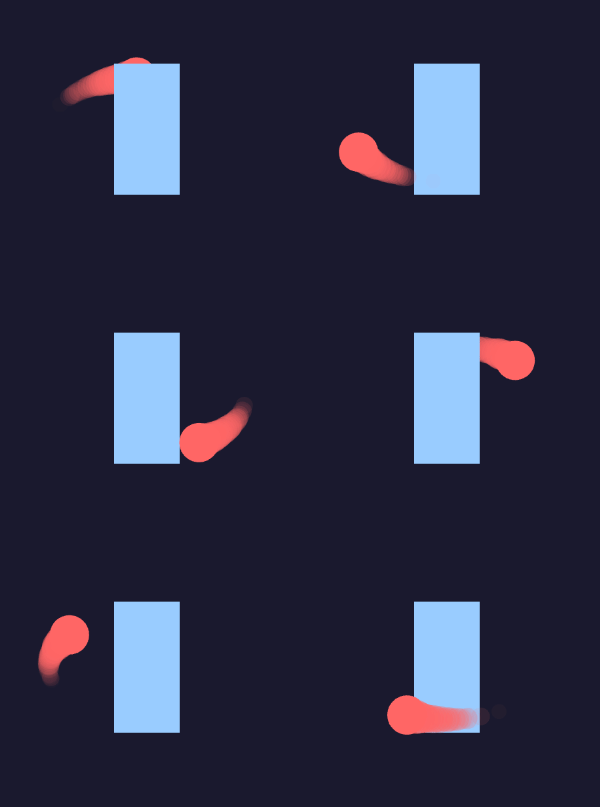
演示效果
快速开始
基础用法
import { TrailEffect } from "./test/TrailEffect";

// 创建跟随鼠标的拖尾特效
const trail = new TrailEffect();
trail.startTracking({ x: Laya.stage.mouseX, y: Laya.stage.mouseY });

// 每帧更新目标位置
Laya.timer.frameLoop(1, this, () => {
    trail.updateTarget(Laya.stage.mouseX, Laya.stage.mouseY);
});
使用测试脚本
import {
    testTrailDefault,
    testTrailOrbit,
    testTrailGlowing,
    testTrailRect,
    testTrailLong
} from "./test/TrailEffectTest";

// 选择一种预设模式
testTrailDefault();   // 默认圆形拖尾
testTrailOrbit();     // 椭圆轨道演示
testTrailGlowing();   // 发光拖尾
testTrailRect();      // 方形粒子拖尾
testTrailLong();      // 长拖尾
配置参数
TrailConfig 接口
| 参数 | 类型 | 默认值 | 说明 |
|---|---|---|---|
shape | “circle” | “rect” | “circle” | 粒子形状 |
color | string | “#ff6666” | 粒子颜色 |
radius | number | 20 | 粒子半径 |
initAlpha | number | 0.6 | 初始透明度 |
initScaleX | number | 0.9 | 初始缩放X |
initScaleY | number | 0.9 | 初始缩放Y |
scaleRandom | number | 0.1 | 缩放随机范围 |
minDecay | number | 0.015 | 最小alpha衰减速度 |
maxDecay | number | 0.025 | 最大alpha衰减速度 |
scaleDecay | number | 0.97 | 缩放衰减因子(每帧乘以这个值) |
blendMode | string | “normal” | 混合模式 |
poolSize | number | 50 | 对象池大小 |
particlesPerFrame | number | 1 | 每帧生成粒子数 |
API 方法
TrailEffect 类
| 方法 | 参数 | 说明 |
|---|---|---|
startTracking(target) | {x, y} | 开始追踪目标 |
stopTracking() | - | 停止追踪 |
updateTarget(x, y) | x, y | 更新追踪目标位置 |
addTrail(x, y) | x, y | 手动添加拖尾粒子 |
setColor(color) | color | 设置颜色 |
setSize(radius) | radius | 设置粒子大小 |
getActiveCount() | - | 获取当前活跃粒子数量 |
getPoolStatus() | - | 获取对象池状态 {pool, active} |
clear() | - | 清除所有拖尾粒子 |
destroy() | - | 销毁特效,释放资源 |
使用示例
示例 1: 跟随鼠标的拖尾
const trail = new TrailEffect({
    shape: "circle",
    color: "#00d4ff",
    radius: 15,
    initAlpha: 0.7,
    scaleDecay: 0.97,
});
Laya.stage.addChild(trail);

trail.startTracking({ x: 0, y: 0 });

Laya.timer.frameLoop(1, this, () => {
    trail.updateTarget(Laya.stage.mouseX, Laya.stage.mouseY);
});
示例 2: 发光拖尾
const trail = new TrailEffect({
    shape: "circle",
    color: "#ffaa00",
    radius: 20,
    initAlpha: 0.8,
    scaleDecay: 0.96,
    blendMode: "lighter",  // 关键:使用 lighter 混合模式
    particlesPerFrame: 2,
});
示例 3: 方形粒子拖尾
const trail = new TrailEffect({
    shape: "rect",  // 方形粒子
    color: "#ff0066",
    radius: 12,
    initAlpha: 0.6,
    scaleDecay: 0.97,
});
示例 4: 长拖尾
const trail = new TrailEffect({
    shape: "circle",
    color: "#00ff88",
    radius: 18,
    initAlpha: 0.5,
    minDecay: 0.005,   // 慢衰减
    maxDecay: 0.012,
    scaleDecay: 0.985, // 慢缩放衰减
    poolSize: 150,     // 更大的对象池
    particlesPerFrame: 2,
});
示例 5: 手动添加拖尾
const trail = new TrailEffect();
Laya.stage.addChild(trail);

// 不使用追踪模式,手动在指定位置添加拖尾
Laya.timer.frameLoop(1, this, () => {
    const x = Math.sin(Laya.timer.currTimer * 0.001) * 200 + Laya.stage.width / 2;
    const y = Math.cos(Laya.timer.currTimer * 0.001) * 200 + Laya.stage.height / 2;
    trail.addTrail(x, y);
});
衰减方式说明
Alpha 衰减(透明度)
this.alpha -= this.alphaDecay; // 固定值衰减
- 每帧减少固定的透明度值
minDecay/maxDecay控制衰减速度范围
缩放衰减(大小)
this.scaleX *= this.scaleDecay;  // 乘法衰减
this.scaleY *= this.scaleDecay;
- 每帧乘以衰减因子(如 0.97)
- 比线性衰减更自然流畅
scaleDecay越接近 1,拖尾越长
| scaleDecay 值 | 效果 |
|---|---|
| 0.95 | 快速消失 |
| 0.97 | 标准(默认) |
| 0.985 | 长拖尾 |
| 0.99 | 超长拖尾 |
预设模式对比
| 模式 | 形状 | 颜色 | scaleDecay | 适用场景 |
|---|---|---|---|---|
| default | 圆形 | 青色 | 0.97 | 通用跟随效果 |
| glowing | 圆形 | 金色 | 0.96 | 发光拖尾(lighter混合) |
| rect | 方形 | 粉红 | 0.97 | 硬朗风格拖尾 |
| long | 圆形 | 绿色 | 0.985 | 长拖尾效果 |
| orbit | 圆形 | 红色 | 0.97 | 椭圆轨道演示 |
性能优化建议
-
对象池大小 - 根据最大粒子数调整
poolSize- 标准拖尾:50
- 长拖尾:150+
-
粒子数量 -
particlesPerFrame控制密度- 值越大效果越强但消耗越高
- 建议 1-2 之间
-
衰减速度 - 影响粒子存活时间
- 衰减越快,内存占用越低
- 衰减越慢,拖尾越长
-
混合模式 -
lighter会增加性能消耗- 仅在需要发光效果时使用
技术实现
乘法衰减 vs 线性衰减
// 线性衰减(不够自然)
this.scaleX = this.baseScale * life;  // life: 1 → 0

// 乘法衰减(更自然)
this.scaleX *= 0.97;  // 每帧缩小3%
乘法衰减会产生类似指数曲线的效果,起始变化快、后期变化慢,更符合视觉直觉。
对象池模式
// 初始化时预创建粒子
private initPool(): void {
    for (let i = 0; i < this.config.poolSize; i++) {
        const p = new TrailParticle();
        p.reset();
        this.pool.push(p);
    }
}

// 使用时从池中获取
private getParticle(): TrailParticle | null {
    return this.pool.pop()!;
}

// 回收到池中
private recycleParticle(p: TrailParticle): void {
    p.reset();
    this.pool.push(p);
}
文件结构
src/test/
├── TrailEffect.ts    # 拖尾特效核心类
├── TrailEffectTest.ts # 测试脚本和预设配置
└── Tuowei.ts         # 椭圆轨道演示(使用拖尾特效)
依赖
- LayaAir 3.3
- TypeScript
许可
内部项目使用

有“AI”的1024 = 2048,欢迎大家加入2048 AI社区
更多推荐


 13
13 0
0- 0


 已为社区贡献35条内容

所有评论(0)