【Laya】火焰粒子特效(非粒子系统)
·
Huoyan 火焰粒子特效
基于 LayaAir 的高性能火焰粒子特效(非粒子系统),使用对象池和统一更新循环优化性能。
功能特点
- 对象池机制 - 避免频繁创建/销毁对象,性能优异
- 统一更新循环 - 单一循环管理所有粒子,避免大量定时器
- 火焰颜色渐变 - 白色→黄色→橙色→橙红,真实火焰效果
- 完全可配置 - 速度、大小、衰减、扩散角度等参数可调
- 混合模式 - 使用
lighter混合模式实现发光叠加效果
演示效果
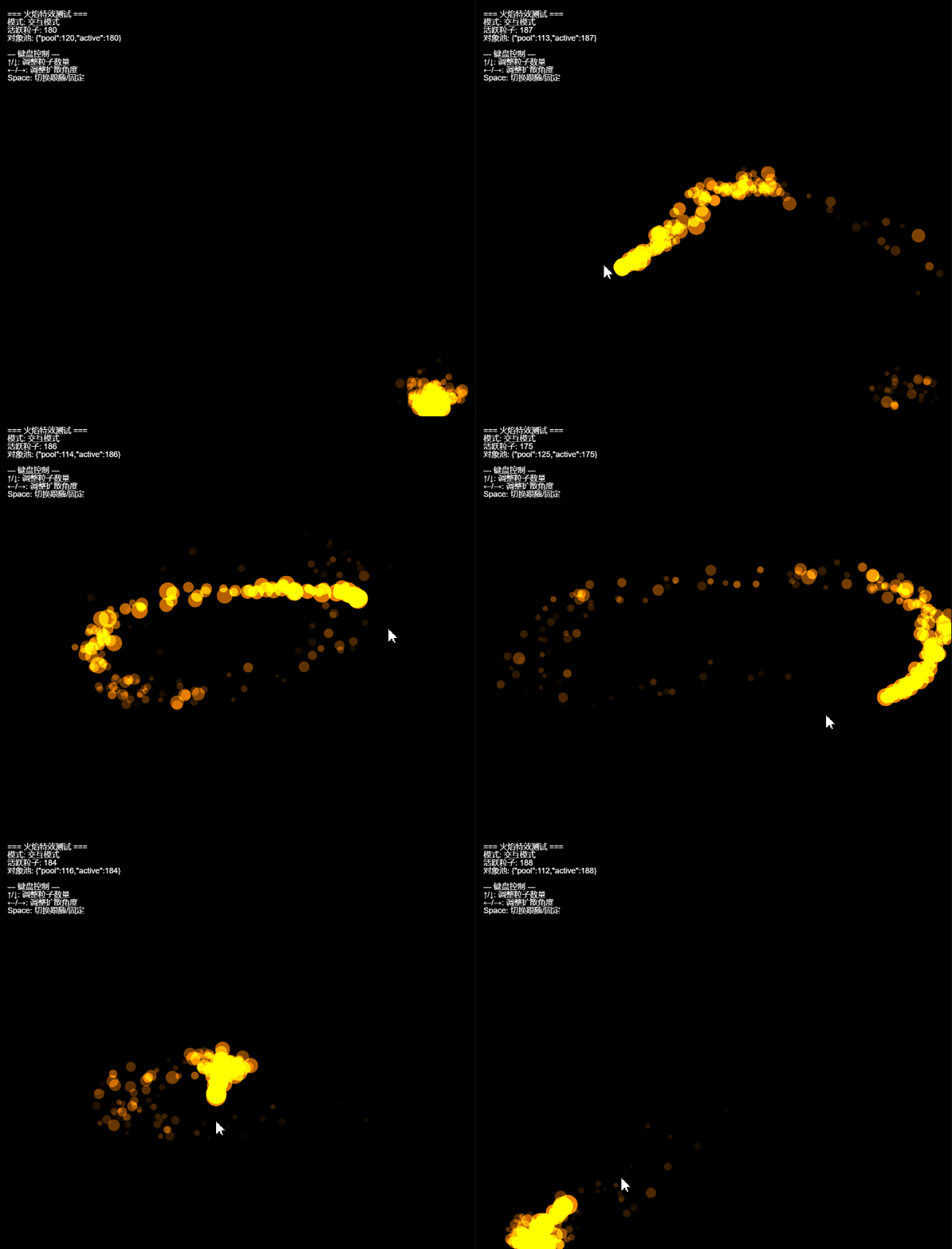
快速开始
基础用法
import { Huoyan } from "./test/Huoyan";

// 创建默认火焰特效(跟随鼠标)
new Huoyan();
使用测试脚本
import { testFireDefault, testFireSmall, testFireBig, testFireCampfire, testFireInteractive } from "./test/HuoyanTest";

// 选择一种预设模式
testFireDefault();       // 默认模式
testFireSmall();         // 小火焰
testFireBig();           // 大火焰
testFireCampfire();      // 篝火(固定底部)
testFireInteractive();   // 交互模式(支持键盘控制)
配置参数
FireConfig 接口
| 参数 | 类型 | 默认值 | 说明 |
|---|---|---|---|
particlesPerFrame | number | 3 | 每帧生成的粒子数量 |
minSpeed | number | 1 | 粒子最小速度 |
maxSpeed | number | 3 | 粒子最大速度 |
spreadAngle | number | π × 0.8 | 扩散角度(弧度) |
minScale | number | 0.5 | 粒子最小缩放 |
maxScale | number | 1.2 | 粒子最大缩放 |
minDecay | number | 0.01 | 最小生命衰减速度 |
maxDecay | number | 0.025 | 最大生命衰减速度 |
particleRadius | number | 20 | 粒子半径 |
poolSize | number | 300 | 对象池大小 |
followMouse | boolean | true | 是否跟随鼠标 |
fixedX | number | 0 | 固定位置 X(不跟随鼠标时) |
fixedY | number | 0 | 固定位置 Y(不跟随鼠标时) |
API 方法
Huoyan 类
| 方法 | 参数 | 说明 |
|---|---|---|
setFollowMouse(follow) | follow: boolean | 设置是否跟随鼠标 |
setFixedPosition(x, y) | x: number, y: number | 设置固定生成位置 |
setParticlesPerFrame(count) | count: number | 设置每帧粒子数量 |
getActiveCount() | - | 获取当前活跃粒子数量 |
getPoolStatus() | - | 获取对象池状态 {pool, active} |
destroy() | - | 销毁特效,释放资源 |
使用示例
示例 1: 固定位置的火焰
const fire = new Huoyan({
    followMouse: false,
    fixedX: Laya.stage.width / 2,
    fixedY: Laya.stage.height * 0.7,
    particlesPerFrame: 4,
});
示例 2: 豪华大火焰
const fire = new Huoyan({
    particlesPerFrame: 6,
    minSpeed: 2,
    maxSpeed: 5,
    spreadAngle: Math.PI * 1.2,
    minScale: 0.8,
    maxScale: 2,
    particleRadius: 30,
    poolSize: 500,
});
示例 3: 精细小火焰
const fire = new Huoyan({
    particlesPerFrame: 2,
    minSpeed: 0.5,
    maxSpeed: 2,
    spreadAngle: Math.PI * 0.5,
    minScale: 0.3,
    maxScale: 0.7,
    particleRadius: 12,
});
示例 4: 动态控制
const fire = new Huoyan();

// 切换到固定位置
fire.setFixedPosition(500, 400);

// 调整粒子密度
fire.setParticlesPerFrame(5);

// 查看性能
console.log(fire.getActiveCount());      // 活跃粒子数
console.log(fire.getPoolStatus());       // 池状态
交互模式
使用 testFireInteractive() 启用交互模式后,可通过键盘控制:
| 按键 | 功能 |
|---|---|
↑ | 增加每帧粒子数量 |
↓ | 减少每帧粒子数量 |
← | 减小扩散角度 |
→ | 增大扩散角度 |
Space | 切换跟随鼠标/固定中心 |
性能优化建议
- 对象池大小 - 根据最大粒子数调整
poolSize - 粒子数量 -
particlesPerFrame控制密度,值越大效果越强但消耗越高 - 粒子半径 -
particleRadius影响视觉大小,大半径需要更大对象池 - 衰减速度 - 衰减越快,粒子存活时间越短,内存占用越低
预设模式对比
| 模式 | 粒子数/帧 | 速度 | 大小 | 适用场景 |
|---|---|---|---|---|
| default | 3 | 1-3 | 0.5-1.2 | 通用跟随效果 |
| small | 2 | 0.5-2 | 0.3-0.7 | 轻量装饰效果 |
| big | 6 | 2-5 | 0.8-2 | 豪华视觉表现 |
| campfire | 4 | 1.5-4 | 0.6-1.5 | 固定位置篝火 |
技术实现
对象池模式
// 初始化时预创建粒子
private initPool(): void {
    for (let i = 0; i < this.config.poolSize; i++) {
        const p = new FireParticle();
        p.reset();
        this.pool.push(p);
    }
}

// 使用时从池中获取
private getParticle(): FireParticle {
    return this.pool.pop()!;
}

// 回收到池中
private recycleParticle(p: FireParticle): void {
    p.reset();
    this.pool.push(p);
}
统一更新循环
// 单一循环更新所有粒子(而非每个粒子一个定时器)
private updateParticles(): void {
    for (let i = this.activeParticles.length - 1; i >= 0; i--) {
        const p = this.activeParticles[i];
        if (!p.update()) {
            this.activeParticles.splice(i, 1);
            this.recycleParticle(p);
        }
    }
}
文件结构
src/test/
├── Huoyan.ts        # 火焰特效核心类
└── HuoyanTest.ts    # 测试脚本和预设配置
依赖
- LayaAir 3.3
- TypeScript
许可
内部项目使用

有“AI”的1024 = 2048,欢迎大家加入2048 AI社区
更多推荐

 21
 0
- 0


 已为社区贡献35条内容

所有评论(0)