搭建自己的 AI 平台聚合门户:基于 Nginx + HTML 实现多平台统一访问
当前主流 AI 平台众多,包括:每个平台登录方式、UI 风格、功能特性各不相同。频繁切换不仅低效,还容易造成上下文丢失。因此,构建一个聚合访问门户,集中展示、一键跳转或内嵌访问这些平台,极大提升使用效率。虽然部分平台出于安全考虑禁止嵌入(如 Qwen、DeepSeek),但我们仍可通过优雅降级的方式展示提示,并提供直接跳转或代理访问选项。默认情况下,Nginx 的 Web 根目录为 。将您提供的文
为什么需要 AI 平台聚合页面?
当前主流 AI 平台众多,包括:
- 阿里通义千问(Qwen)
- 腾讯元宝(Yuanbao)
- Moonshot 的 Kimi
- OpenAI 的 ChatGPT
- 字节跳动的豆包(Doubao)
- 百度文心一言
- DeepSeek、Metaso 等新兴平台
每个平台登录方式、UI 风格、功能特性各不相同。频繁切换不仅低效,还容易造成上下文丢失。因此,构建一个聚合访问门户,集中展示、一键跳转或内嵌访问这些平台,极大提升使用效率。
虽然部分平台出于安全考虑禁止 <iframe> 嵌入(如 Qwen、DeepSeek),但我们仍可通过优雅降级的方式展示提示,并提供直接跳转或代理访问选项。
第一步:准备服务器环境(Ubuntu 22.04 示例)
您的本地或云服务器需安装 Nginx。以下以 Ubuntu 22.04 为例。
# 更新系统
sudo apt update && sudo apt upgrade -y

# 安装 Nginx
sudo apt install nginx -y

# 启动并设置开机自启
sudo systemctl start nginx
sudo systemctl enable nginx

# 检查状态
systemctl status nginx
默认情况下,Nginx 的 Web 根目录为 /var/www/html。
第二步:部署聚合页面(index.html)
将您提供的 index.html 文件上传至服务器的 Nginx 根目录:
# 使用 scp(本地上传)或直接在服务器创建
sudo nano /var/www/html/index.html
<!DOCTYPE html>
<html lang="zh-CN">
<head>
<meta charset="UTF-8">
<meta name="viewport" content="width=device-width, initial-scale=1.0">
<title>AI平台聚合页面(带代理功能)</title>
<link rel="stylesheet" href="https://cdnjs.cloudflare.com/ajax/libs/font-awesome/6.4.0/css/all.min.css">
<style>
/* 保持原有的所有CSS样式不变 */
* {
margin: 0;
padding: 0;
box-sizing: border-box;
font-family: 'Segoe UI', 'Microsoft YaHei', sans-serif;
}
body {
background: linear-gradient(135deg, #1a1a2e 0%, #16213e 100%);
color: #f0f0f0;
min-height: 100vh;
overflow-x: hidden;
}
.container {
display: flex;
flex-direction: column;
height: 100vh;
max-width: 100%;
}
.main-content {
display: flex;
flex: 1;
overflow: hidden;
}
/* 侧边栏样式 */
.sidebar {
width: 280px;
background-color: rgba(0, 0, 0, 0.4);
padding: 20px 0;
overflow-y: auto;
border-right: 1px solid rgba(255, 255, 255, 0.1);
transition: all 0.3s ease;
}
.sidebar-header {
padding: 0 20px 20px;
border-bottom: 1px solid rgba(255, 255, 255, 0.1);
}
.sidebar h2 {
font-size: 1.3rem;
margin-bottom: 5px;
}
.platform-count {
color: #6a8cff;
font-size: 0.9rem;
}
.platform-list {
list-style: none;
}
.platform-item {
padding: 16px 20px;
border-bottom: 1px solid rgba(255, 255, 255, 0.05);
cursor: pointer;
transition: all 0.2s ease;
display: flex;
align-items: center;
}
.platform-item:hover {
background-color: rgba(106, 140, 255, 0.1);
}
.platform-item.active {
background-color: rgba(106, 140, 255, 0.2);
border-left: 4px solid #6a8cff;
}
.platform-icon {
width: 40px;
height: 40px;
border-radius: 8px;
display: flex;
align-items: center;
justify-content: center;
margin-right: 15px;
font-size: 1.2rem;
}
.platform-info h3 {
font-size: 1.1rem;
margin-bottom: 3px;
}
.platform-info p {
font-size: 0.85rem;
color: #aaa;
}
/* 内容区域样式 */
.content-container {
flex: 1;
display: flex;
flex-direction: column;
overflow: hidden;
background-color: rgba(0, 0, 0, 0.2);
}
.content-header {
padding: 20px 30px;
background-color: rgba(0, 0, 0, 0.4);
display: flex;
align-items: center;
justify-content: space-between;
border-bottom: 1px solid rgba(255, 255, 255, 0.1);
}
.current-platform {
display: flex;
align-items: center;
}
.current-platform h2 {
font-size: 1.5rem;
}
.content-controls {
display: flex;
gap: 10px;
}
.control-btn {
background: rgba(106, 140, 255, 0.3);
color: white;
border: 1px solid rgba(106, 140, 255, 0.5);
padding: 8px 15px;
border-radius: 6px;
cursor: pointer;
transition: all 0.3s ease;
font-size: 0.9rem;
}
.control-btn:hover {
background: rgba(106, 140, 255, 0.5);
}
/* 嵌入内容区域 */
.embedded-content {
flex: 1;
position: relative;
background-color: #0d1117;
}
.embedded-frame {
width: 100%;
height: 100%;
border: none;
}
.frame-loading {
position: absolute;
top: 0;
left: 0;
width: 100%;
height: 100%;
display: flex;
flex-direction: column;
align-items: center;
justify-content: center;
background-color: #0d1117;
z-index: 10;
}
.loader {
width: 50px;
height: 50px;
border: 5px solid rgba(106, 140, 255, 0.3);
border-radius: 50%;
border-top-color: #6a8cff;
animation: spin 1s ease-in-out infinite;
margin-bottom: 20px;
}
@keyframes spin {
to { transform: rotate(360deg); }
}
/* 添加按钮样式 */
.add-section {
padding: 20px;
margin-top: auto;
border-top: 1px solid rgba(255, 255, 255, 0.1);
}
.add-button {
background: rgba(46, 204, 113, 0.8);
color: white;
border: none;
padding: 12px 20px;
font-size: 1rem;
border-radius: 8px;
cursor: pointer;
transition: background 0.3s ease;
box-shadow: 0 4px 10px rgba(0, 0, 0, 0.1);
display: flex;
align-items: center;
justify-content: center;
width: 100%;
}
.add-button:hover {
background: rgba(39, 174, 96, 1);
transform: translateY(-2px);
box-shadow: 0 6px 15px rgba(0, 0, 0, 0.15);
}
.add-button i {
margin-right: 8px;
}
/* 错误信息样式 */
.error-message {
text-align: center;
padding: 40px 20px;
background: rgba(231, 76, 60, 0.1);
border-radius: 8px;
margin: 20px;
border-left: 4px solid #e74c3c;
}
.error-message i {
font-size: 3rem;
color: #e74c3c;
margin-bottom: 20px;
}
.error-message h3 {
font-size: 1.5rem;
margin-bottom: 15px;
color: #e74c3c;
}
.error-message p {
color: #ccc;
margin-bottom: 20px;
line-height: 1.6;
}
.solution-buttons {
display: flex;
justify-content: center;
gap: 10px;
flex-wrap: wrap;
}
.solution-btn {
background: rgba(52, 152, 219, 0.8);
color: white;
border: none;
padding: 10px 20px;
border-radius: 6px;
cursor: pointer;
transition: background 0.3s ease;
font-size: 0.9rem;
}
.solution-btn:hover {
background: rgba(52, 152, 219, 1);
}
/* 下拉选择器 - 移动端 */
.platform-selector {
display: none;
margin: 20px 30px 0;
position: relative;
}
.platform-selector select {
width: 100%;
padding: 12px 20px;
background-color: rgba(0, 0, 0, 0.5);
border: 1px solid rgba(106, 140, 255, 0.5);
border-radius: 8px;
color: white;
font-size: 1rem;
appearance: none;
cursor: pointer;
}
.selector-icon {
position: absolute;
right: 15px;
top: 50%;
transform: translateY(-50%);
pointer-events: none;
color: #6a8cff;
}
/* 响应式设计 */
@media (max-width: 1024px) {
.sidebar {
width: 240px;
}
}
@media (max-width: 768px) {
.main-content {
flex-direction: column;
}
.sidebar {
width: 100%;
max-height: 200px;
padding: 10px 0;
}
.platform-selector {
display: block;
}
.sidebar-header {
padding: 10px 20px;
}
.platform-list {
display: none;
}
.content-header {
padding: 15px 20px;
}
.solution-buttons {
flex-direction: column;
}
}
.footer {
padding: 15px;
text-align: center;
font-size: 0.85rem;
color: #888;
border-top: 1px solid rgba(255, 255, 255, 0.1);
background-color: rgba(0, 0, 0, 0.3);
}
.footer a {
color: #6a8cff;
text-decoration: none;
}
.footer a:hover {
text-decoration: underline;
}
/* 滚动条样式 */
::-webkit-scrollbar {
width: 8px;
}
::-webkit-scrollbar-track {
background: rgba(255, 255, 255, 0.05);
}
::-webkit-scrollbar-thumb {
background: rgba(106, 140, 255, 0.5);
border-radius: 4px;
}
::-webkit-scrollbar-thumb:hover {
background: rgba(106, 140, 255, 0.7);
}
</style>
</head>
<body>
<div class="container">
<div class="platform-selector">
<select id="mobilePlatformSelect">
<option value="0">Qwen Chat (阿里)</option>
<option value="1">腾讯元宝</option>
<option value="2">DeepSeek</option>
<option value="3">Kimi (月之暗面)</option>
<option value="4">ChatGPT (OpenAI)</option>
<option value="5">豆包 (字节跳动)</option>
<option value="6">文心一言 (百度)</option>
<option value="7">Metaso</option>
<option value="8">Cursor Agents</option>
<option value="9">N.cn</option>
</select>
<div class="selector-icon"><i class="fas fa-chevron-down"></i></div>
</div>
<div class="main-content">
<div class="sidebar">
<div class="sidebar-header">
<h2>AI平台列表</h2>
<p class="platform-count">10个平台可供选择</p>
</div>
<ul class="platform-list" id="platformList">
<!-- 平台列表将通过JavaScript动态生成 -->
</ul>
<div class="add-section">
<button class="add-button" id="addButton">
<i class="fas fa-plus"></i> 添加新平台
</button>
</div>
</div>
<div class="content-container">
<div class="content-header">
<div class="current-platform">
<h2 id="currentPlatformName">Qwen Chat</h2>
</div>
<div class="content-controls">
<button class="control-btn" id="refreshBtn">
<i class="fas fa-redo"></i> 刷新
</button>
<button class="control-btn" id="openNewBtn">
<i class="fas fa-external-link-alt"></i> 新窗口打开
</button>
<button class="control-btn" id="useProxyBtn">
<i class="fas fa-server"></i> 使用代理
</button>
</div>
</div>
<div class="embedded-content">
<!-- 默认显示错误信息 -->
<div class="frame-loading" id="errorIndicator">
<div class="error-message">
<i class="fas fa-exclamation-triangle"></i>
<h3>连接被拒绝</h3>
<p>chat.qwen.ai 拒绝了我们的连接请求。这是因为该网站设置了安全策略,禁止在iframe中嵌入。</p>
<p><strong>解决方案:</strong></p>
<div class="solution-buttons">
<button class="solution-btn" id="directOpenBtn">
<i class="fas fa-external-link-alt"></i> 直接打开网站
</button>
<button class="solution-btn" id="proxyOpenBtn">
<i class="fas fa-server"></i> 通过代理访问
</button>
<button class="solution-btn" id="otherPlatformBtn">
<i class="fas fa-random"></i> 切换到其他平台
</button>
</div>
</div>
</div>
<iframe
class="embedded-frame"
id="embeddedFrame"
style="display: none;"
allow="clipboard-read; clipboard-write"
allowfullscreen>
</iframe>
</div>
</div>
</div>
<div class="footer">
<p>聚合页面仅供学习交流使用,所有AI平台版权归各自公司所有 |
<a href="https://github.com" target="_blank">项目源代码</a> |
注意:某些平台因安全策略无法在iframe中嵌入
</p>
</div>
</div>
<script>
// 平台数据
const platforms = [
{
name: "Qwen Chat",
url: "https://chat.qwen.ai/",
description: "通义千问AI助手,提供深度思考、图像编辑、网页开发等多种功能。",
color: "#ff6b35",
icon: "fas fa-comment-dots",
blocked: true // 标记为被阻止的网站
},
{
name: "腾讯元宝",
url: "https://yuanbao.tencent.com/",
description: "腾讯云官方平台,提供云计算、人工智能、大数据等服务。",
color: "#07c160",
icon: "fab fa-weixin"
},
{
name: "DeepSeek",
url: "https://chat.deepseek.com/",
description: "探索未至之境,支持手机号、微信、邮箱登录的AI助手。",
color: "#6c47ff",
icon: "fas fa-search",
blocked: true
},
{
name: "Kimi",
url: "https://www.kimi.com/chat",
description: "月之暗面开发的AI助手,支持长思考功能,可生成PPT等内容。",
color: "#8957e5",
icon: "fas fa-moon"
},
{
name: "ChatGPT",
url: "https://chatgpt.com/",
description: "OpenAI开发的AI助手,当前链接可能无法访问。",
color: "#10a37f",
icon: "fas fa-robot",
error: true
},
{
name: "豆包",
url: "https://www.doubao.com/chat",
description: "字节跳动旗下AI智能助手,提供写作、翻译、编程等多种功能。",
color: "#ff2442",
icon: "fas fa-seedling"
},
{
name: "文心一言",
url: "https://wenxin.baidu.com/",
description: "百度旗下AI助手,提供写作帮手、工作报告、文案润色等功能。",
color: "#4e6ef2",
icon: "fas fa-brain"
},
{
name: "Metaso",
url: "https://metaso.cn/",
description: "AI智能助手平台,提供多种AI工具和服务。",
color: "#3a86ff",
icon: "fas fa-cube",
blocked: true
},
{
name: "Cursor Agents",
url: "https://cursor.com/cn/agents",
description: "AI代码编辑器,提供云代理、快速模型和优先支持等功能。",
color: "#3a86ff",
icon: "fas fa-code"
},
{
name: "N.cn",
url: "https://www.n.cn/",
description: "AI平台,提供多种人工智能服务和工具。",
color: "#9b59b6",
icon: "fas fa-globe"
}
];
// DOM元素
const platformList = document.getElementById('platformList');
const embeddedFrame = document.getElementById('embeddedFrame');
const errorIndicator = document.getElementById('errorIndicator');
const currentPlatformName = document.getElementById('currentPlatformName');
const mobilePlatformSelect = document.getElementById('mobilePlatformSelect');
const addButton = document.getElementById('addButton');
const refreshBtn = document.getElementById('refreshBtn');
const openNewBtn = document.getElementById('openNewBtn');
const useProxyBtn = document.getElementById('useProxyBtn');
const directOpenBtn = document.getElementById('directOpenBtn');
const proxyOpenBtn = document.getElementById('proxyOpenBtn');
const otherPlatformBtn = document.getElementById('otherPlatformBtn');
// 当前选中的平台索引
let currentPlatformIndex = 0;
// 初始化平台列表
function initPlatformList() {
platformList.innerHTML = '';
platforms.forEach((platform, index) => {
const li = document.createElement('li');
li.className = `platform-item ${index === currentPlatformIndex ? 'active' : ''}`;
li.dataset.index = index;
li.innerHTML = `
<div class="platform-icon" style="background-color: ${platform.color}40; color: ${platform.color}">
<i class="${platform.icon}"></i>
</div>
<div class="platform-info">
<h3>${platform.name}</h3>
<p>${platform.description.substring(0, 30)}...</p>
</div>
`;
li.addEventListener('click', () => switchPlatform(index));
platformList.appendChild(li);
});
}
// 切换平台
function switchPlatform(index) {
currentPlatformIndex = index;
const platform = platforms[index];
// 更新活动状态
document.querySelectorAll('.platform-item').forEach(item => {
item.classList.remove('active');
});
document.querySelector(`.platform-item[data-index="${index}"]`).classList.add('active');
// 更新当前平台名称
currentPlatformName.textContent = platform.name;
// 更新移动端选择器
mobilePlatformSelect.value = index;
// 检查是否是被阻止的网站
if (platform.blocked) {
showBlockedMessage(platform);
} else if (platform.error) {
showErrorMessage(platform);
} else {
// 正常加载
loadPlatform(platform.url);
}
}
// 显示被阻止的消息
function showBlockedMessage(platform) {
errorIndicator.style.display = 'flex';
embeddedFrame.style.display = 'none';
const errorMessage = errorIndicator.querySelector('.error-message');
errorMessage.innerHTML = `
<i class="fas fa-exclamation-triangle"></i>
<h3>安全限制</h3>
<p><strong>${platform.name}</strong> 设置了安全策略,禁止在iframe中嵌入。</p>
<p>这是网站为了保护用户安全而设置的正常限制,不是你的问题。</p>
<p><strong>解决方案:</strong></p>
<div class="solution-buttons">
<button class="solution-btn" id="directOpenBtn">
<i class="fas fa-external-link-alt"></i> 直接打开${platform.name}
</button>
<button class="solution-btn" id="otherPlatformBtn">
<i class="fas fa-random"></i> 切换到其他平台
</button>
</div>
`;
// 重新绑定事件
document.getElementById('directOpenBtn').addEventListener('click', () => {
window.open(platform.url, '_blank');
});
document.getElementById('otherPlatformBtn').addEventListener('click', () => {
// 找到下一个不被阻止的平台
let nextIndex = (currentPlatformIndex + 1) % platforms.length;
while (platforms[nextIndex].blocked || platforms[nextIndex].error) {
nextIndex = (nextIndex + 1) % platforms.length;
}
switchPlatform(nextIndex);
});
}
// 显示错误消息
function showErrorMessage(platform) {
errorIndicator.style.display = 'flex';
embeddedFrame.style.display = 'none';
const errorMessage = errorIndicator.querySelector('.error-message');
errorMessage.innerHTML = `
<i class="fas fa-exclamation-triangle"></i>
<h3>访问受限</h3>
<p><strong>${platform.name}</strong> 当前可能无法访问。</p>
<p>这可能是由于网络问题、地区限制或网站维护。</p>
<p><strong>解决方案:</strong></p>
<div class="solution-buttons">
<button class="solution-btn" id="directOpenBtn">
<i class="fas fa-external-link-alt"></i> 尝试直接打开
</button>
<button class="solution-btn" id="otherPlatformBtn">
<i class="fas fa-random"></i> 切换到其他平台
</button>
</div>
`;
// 重新绑定事件
document.getElementById('directOpenBtn').addEventListener('click', () => {
window.open(platform.url, '_blank');
});
document.getElementById('otherPlatformBtn').addEventListener('click', () => {
// 找到下一个正常的平台
let nextIndex = (currentPlatformIndex + 1) % platforms.length;
while (platforms[nextIndex].error) {
nextIndex = (nextIndex + 1) % platforms.length;
}
switchPlatform(nextIndex);
});
}
// 加载平台
function loadPlatform(url) {
errorIndicator.style.display = 'none';
embeddedFrame.style.display = 'block';
embeddedFrame.src = url;
}
// 刷新当前页面
function refreshCurrentPage() {
const platform = platforms[currentPlatformIndex];
if (platform.blocked || platform.error) {
switchPlatform(currentPlatformIndex);
} else {
embeddedFrame.src = embeddedFrame.src;
}
}
// 在新窗口打开当前页面
function openInNewWindow() {
window.open(platforms[currentPlatformIndex].url, '_blank');
}
// 使用代理(示例)
function useProxy() {
const platform = platforms[currentPlatformIndex];
alert(`代理功能需要后端支持。\n\n对于 ${platform.name},你可以:\n1. 使用浏览器扩展绕过X-Frame限制\n2. 自建代理服务器\n3. 联系网站管理员请求嵌入权限`);
}
// 添加新平台
function addNewPlatform() {
const name = prompt('请输入新平台名称:');
if (!name) return;
const url = prompt('请输入新平台URL:');
if (!url) return;
const description = prompt('请输入新平台描述:') || '这是一个新的AI平台';
const newPlatform = {
name: name,
url: url,
description: description,
color: getRandomColor(),
icon: "fas fa-plus"
};
platforms.push(newPlatform);
// 重新初始化平台列表
initPlatformList();
// 更新平台计数
document.querySelector('.platform-count').textContent = `${platforms.length}个平台可供选择`;
// 更新移动端选择器
updateMobileSelector();
// 切换到新平台
switchPlatform(platforms.length - 1);
alert('新平台已添加成功!');
}
// 更新移动端选择器
function updateMobileSelector() {
mobilePlatformSelect.innerHTML = '';
platforms.forEach((platform, index) => {
const option = document.createElement('option');
option.value = index;
option.textContent = platform.name;
mobilePlatformSelect.appendChild(option);
});
}
// 生成随机颜色
function getRandomColor() {
const colors = [
'#ff6b35', '#07c160', '#6c47ff', '#8957e5', '#10a37f',
'#ff2442', '#4e6ef2', '#3a86ff', '#9b59b6', '#e74c3c'
];
return colors[Math.floor(Math.random() * colors.length)];
}
// 移动端选择器事件
mobilePlatformSelect.addEventListener('change', (e) => {
switchPlatform(parseInt(e.target.value));
});
// 按钮事件绑定
addButton.addEventListener('click', addNewPlatform);
refreshBtn.addEventListener('click', refreshCurrentPage);
openNewBtn.addEventListener('click', openInNewWindow);
useProxyBtn.addEventListener('click', useProxy);
// 初始化
document.addEventListener('DOMContentLoaded', () => {
initPlatformList();
updateMobileSelector();
switchPlatform(0);
});
</script>
</body>
</html>
💡 本文已将 HTML 内容留空,您只需将完整的
index.html内容粘贴保存即可。
该页面包含以下特性:
- 响应式侧边栏 + 下拉选择(适配手机)
- 支持 10+ 主流 AI 平台
- 自动识别
X-Frame-Options限制并友好提示 - 支持“刷新”、“新窗口打开”、“添加自定义平台”等操作
- 美观的深色主题 + 动画加载效果
第三步:(可选)配置 HTTPS 与域名
为提升安全性与专业性,建议绑定域名并启用 HTTPS(使用 Let’s Encrypt 免费证书)。
# 安装 Certbot
sudo apt install certbot python3-certbot-nginx -y

# 假设你的域名为 ai.yourdomain.com,已解析到服务器 IP
sudo certbot --nginx -d ai.yourdomain.com
Certbot 会自动修改 Nginx 配置,启用 HTTPS 并设置自动续期。
第四步:关于“代理功能”的说明
当前 HTML 中的“使用代理”按钮仅为示意。真正的代理绕过 X-Frame-Options 限制需后端支持,例如:
- 使用反向代理(Nginx)并移除响应头中的
X-Frame-Options - 自建中间服务(如用 Node.js/Python 抓取页面并重写响应)
- 使用浏览器插件(如“Ignore X-Frame headers”)
⚠️ 注意:绕过安全策略可能违反目标网站的使用条款,请仅用于个人学习或内部合法场景。
效果预览
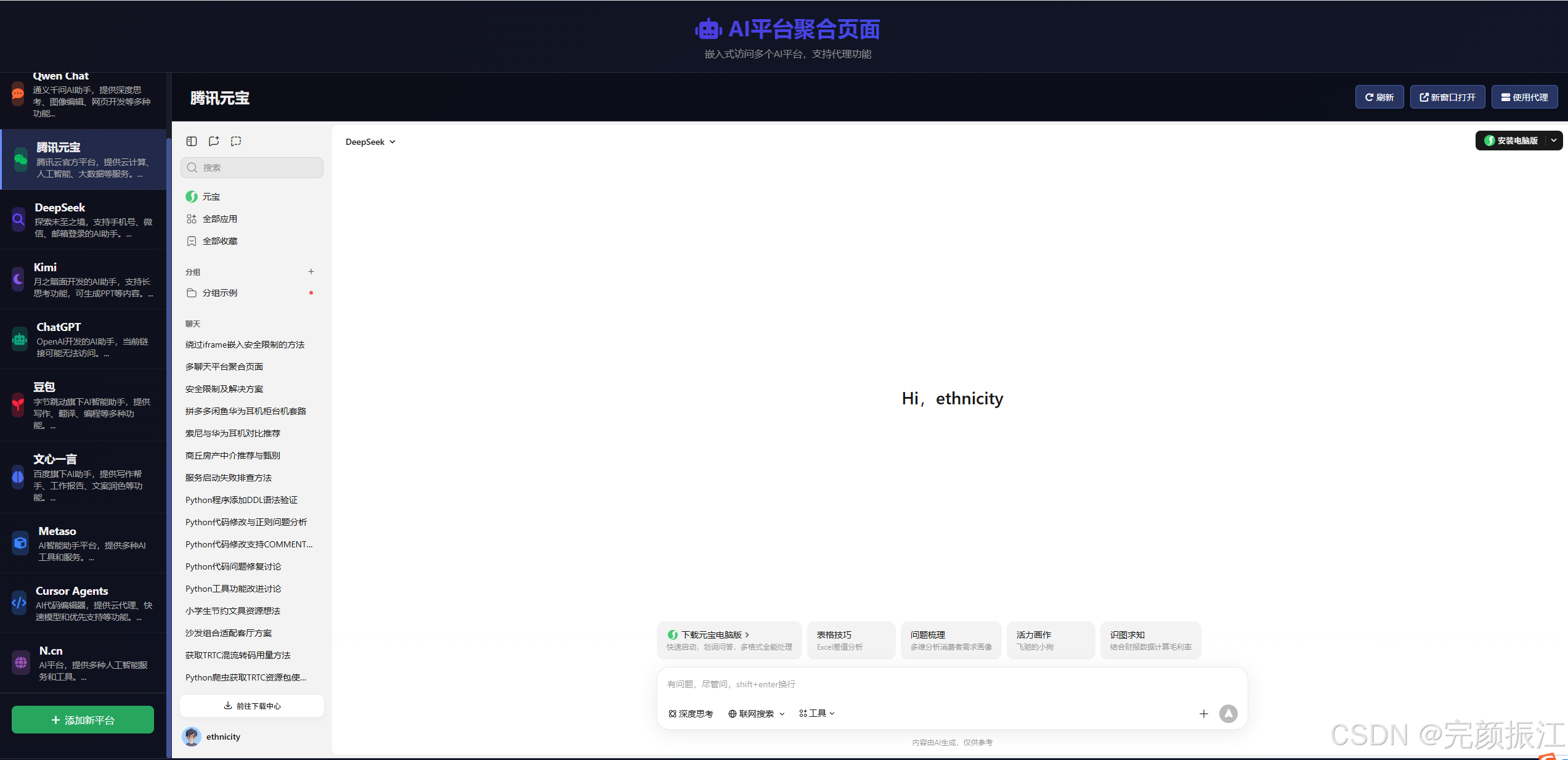
(实际部署后,您将看到左侧平台列表 + 右侧嵌入或错误提示区域)
在支持嵌入的平台(如 Kimi、豆包)上可直接使用;在 Qwen、DeepSeek 等平台则会显示友好提示,并提供“直接打开”按钮。
扩展建议
- 持久化自定义平台:当前“添加平台”仅保存在内存中,可结合
localStorage实现本地持久化。 - 用户认证:如用于团队,可结合 Nginx 的
auth_basic实现简单登录。 - 统计访问日志:通过 Nginx 日志分析各平台使用频率。
- PWA 支持:添加
manifest.json和 Service Worker,支持离线访问与桌面安装。
完整可直接使用的 Nginx 配置文件
✅ 文件路径:/etc/nginx/sites-available/ai-aggregator
server {
    listen 80;
    server_name ai.yourdomain.com;  # ← 替换为你的实际域名,如 ai.example.com
    root /var/www/html;
    index index.html;

    # 禁用敏感文件访问
    location ~ /\.(env|git|htaccess|ini)$ {
        deny all;
    }

    # 静态资源缓存(可选)
    location ~* \.(css|js|png|jpg|jpeg|gif|ico|svg|woff2)$ {
        expires 1y;
        add_header Cache-Control "public, immutable";
    }

    # 所有请求返回 index.html(单页应用友好)
    location / {
        try_files $uri $uri/ /index.html;
    }

    # 安全头(增强防护)
    add_header X-Frame-Options "SAMEORIGIN" always;
    add_header X-Content-Type-Options "nosniff" always;
    add_header Referrer-Policy "no-referrer-when-downgrade" always;
    add_header Permissions-Policy "geolocation=(), microphone=(), camera=()" always;

    # 可选:开启 gzip 压缩
    gzip on;
    gzip_vary on;
    gzip_min_length 1024;
    gzip_types text/plain text/css application/json application/javascript text/xml application/xml application/xml+rss text/javascript;
}
🔒 注意:由于大多数 AI 平台(如 Qwen、DeepSeek、ChatGPT)设置了
X-Frame-Options: DENY,即使你在 Nginx 中允许嵌入,浏览器仍会阻止<iframe>加载。这是正常的安全机制,无法通过前端绕过。
🔐 启用 HTTPS(使用 Let’s Encrypt)
- 先确保域名已解析到服务器 IP。
- 安装证书:
sudo certbot --nginx -d ai.yourdomain.com
- Certbot 会自动在上述配置中插入 HTTPS 相关块,并设置 301 重定向。
最终会生成类似:
server {
    listen 443 ssl http2;
    server_name ai.yourdomain.com;
    root /var/www/html;
    index index.html;

    ssl_certificate /etc/letsencrypt/live/ai.yourdomain.com/fullchain.pem;
    ssl_certificate_key /etc/letsencrypt/live/ai.yourdomain.com/privkey.pem;
    include /etc/letsencrypt/options-ssl-nginx.conf;
    ssl_dhparam /etc/letsencrypt/ssl-dhparams.pem;

    # ...其余配置同上...
}

server {
    listen 80;
    server_name ai.yourdomain.com;
    return 301 https://$host$request_uri;
}
🚀 部署步骤总结
# 1. 保存配置
sudo nano /etc/nginx/sites-available/ai-aggregator

# 2. 启用站点
sudo ln -s /etc/nginx/sites-available/ai-aggregator /etc/nginx/sites-enabled/

# 3. 测试配置
sudo nginx -t

# 4. 重载 Nginx
sudo systemctl reload nginx

# 5. 放入你的 index.html
sudo cp your-local-index.html /var/www/html/index.html
📌 补充说明
- 如果你没有域名,可直接用 IP 访问(但无法申请 HTTPS 证书,且部分浏览器对 HTTP iframe 限制更严)。
- 若用于内网/本地测试,可忽略 HTTPS,仅用 HTTP +
localhost或内网 IP。 - 页面中“使用代理”功能需额外开发后端代理服务(如用 Python Flask 或 Nginx 反向代理 + 头部重写),目前仅为提示。
需要我提供一个 带基础反向代理绕过 X-Frame 限制的 Nginx 示例(仅限测试环境使用)吗?或者帮你把 index.html 中的 URL 做一次格式清理(去除多余空格)?

有“AI”的1024 = 2048,欢迎大家加入2048 AI社区
更多推荐



 18
18 0
0- 0


 已为社区贡献21条内容

所有评论(0)