smolagent框架
什么是 smolagents?
smolagents 是一个简单而强大的用于构建 AI Agent 的框架。它为大语言模型 (LLM) 提供了与现实世界互动的 自主性,例如搜索或生成图像。
正如我们在第一单元中学到的,AI Agent 是使用 LLM 根据 “观察” 来生成 “思考”,从而执行 “动作” 的程序。让我们来探讨一下这在 smolagents 中是如何实现的。
smolagents 的主要优势
- 简洁性: 最小化的代码复杂度和抽象,使框架易于理解、采用和扩展。
- 灵活的 LLM 支持: 通过与 Hugging Face 工具和外部 API 集成,可与任何 LLM 配合使用。
- 代码优先的方法: 对直接用代码编写动作的 Code Agent 提供一流支持,无需解析并简化了工具调用。
- HF Hub 集成: 与 Hugging Face Hub 无缝集成,允许将 Gradio Spaces 用作工具。
何时使用 smolagents?
考虑到这些优势,我们应该在什么时候选择 smolagents 而不是其他框架呢?
smolagents 是以下情况的理想选择
- 您需要一个 轻量级且极简的解决方案。
- 您想 快速进行实验,而不需要复杂的配置。
- 您的 应用程序逻辑简单明了。
构建使用代码的 Agent
代码 Agent 是 smolagents 中的默认 Agent 类型。它们生成 Python 工具调用来执行动作,从而实现高效、富有表现力且准确的动作表示。
为何选择代码 Agent?
在多步 Agent 流程中,LLM 编写并执行动作,通常涉及外部工具调用。传统方法使用 JSON 格式指定工具名称和参数(作为字符串),系统必须解析这些信息才能确定执行哪个工具。
然而,研究表明,直接使用代码能让工具调用型 LLM 更有效地工作。
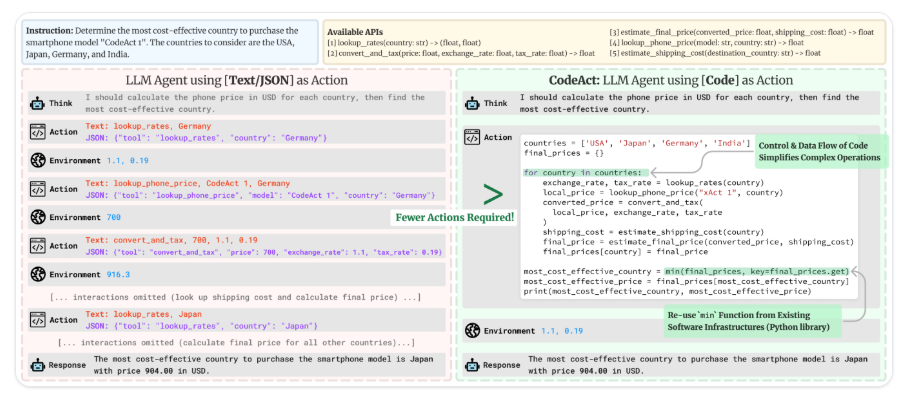
用代码而非 JSON 编写动作有以下几个关键优势:
- 可组合性:轻松组合和重用动作
- 对象管理:直接处理复杂结构,如图像
- 通用性:能够表达任何计算上可能的任务
- 对 LLM 更自然:高质量的代码已经存在于 LLM 的训练数据中
代码 Agent 如何工作?
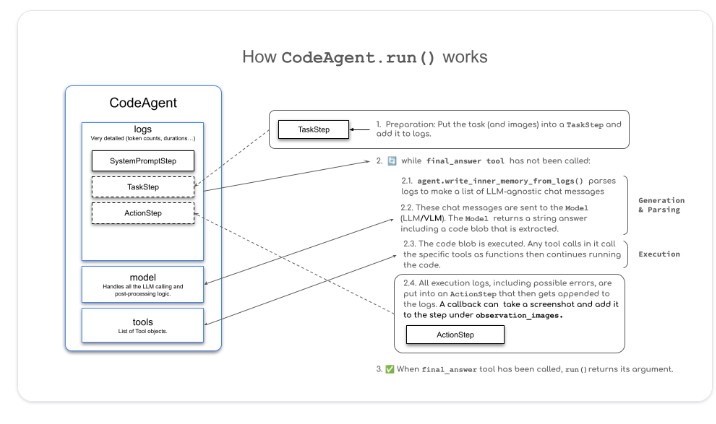
上图展示了 CodeAgent.run() 的工作方式,它遵循了我们在第一单元中提到的 ReAct 框架。smolagents 中 Agent 的主要抽象是 MultiStepAgent,它是核心构建块。CodeAgent 是一种特殊的 MultiStepAgent,我们将在下面的例子中看到。
一个 CodeAgent 通过一系列步骤的循环来执行动作,现有的变量和知识被整合到 Agent 的上下文中,并保存在执行日志中。
-
系统提示存储在
SystemPromptStep中,用户查询则记录在TaskStep中。 -
然后,执行以下 while 循环:
2.1 方法
agent.write_memory_to_messages()将 Agent 的日志写入一个 LLM 可读的聊天消息列表。2.2 这些消息被发送给一个
Model,该模型生成一个补全。2.3 解析补全以提取动作,在我们的例子中,由于我们使用的是
CodeAgent,这个动作应该是一个代码片段。2.4 执行该动作。
2.5 结果被记录到内存中的一个
ActionStep里。
使用 smolagents 为派对选择播放列表
对于模型,我们将依赖 InferenceClientModel,它提供了对 Hugging Face 的无服务器推理 API 的访问。默认模型是 "Qwen/Qwen2.5-Coder-32B-Instruct",它性能优越且可用于快速推理,但你也可以从 Hub 中选择任何兼容的模型。
运行一个 Agent :
from smolagents import CodeAgent, DuckDuckGoSearchTool, InferenceClientModel

agent = CodeAgent(tools=[DuckDuckGoSearchTool()], model=InferenceClientModel())

agent.run("Search for the best music recommendations for a party at the Wayne's mansion.")
示例:运行一个工具调用 Agent(Tool Calling Agents)
from smolagents import ToolCallingAgent, DuckDuckGoSearchTool, InferenceClientModel

agent = ToolCallingAgent(tools=[DuckDuckGoSearchTool()], model=InferenceClientModel())

agent.run("Search for the best music recommendations for a party at the Wayne's mansion.")
工具
要与工具交互,LLM 需要一个包含以下关键组件的接口描述:
- 名称:工具的名称
- 工具描述:工具的功能
- 输入类型和描述:工具接受的参数
- 输出类型:工具返回的内容
工具创建方法
在 `smolagents` 中,可以通过两种方式定义工具:
- 使用 `@tool` 装饰器,适用于简单的基于函数的工具
- 创建 `Tool` 的子类,适用于更复杂的功能
@tool 装饰器
`@tool` 装饰器是定义简单工具的推荐方式。在底层,smolagents 会从 Python 中解析函数的基本信息。因此,如果你给函数起一个清晰的名称并编写一个好的文档字符串,LLM 会更容易使用它。
使用这种方法,我们定义一个函数时需要:
- 一个清晰且描述性的函数名,以帮助 LLM 理解其用途。
- 为输入和输出提供类型提示,以确保正确使用。
- 详细的描述,包括一个 `Args:` 部分,其中明确描述了每个参数。这些描述为 LLM 提供了宝贵的上下文,因此仔细编写它们非常重要。
示例
from smolagents import CodeAgent, InferenceClientModel, tool

# Let's pretend we have a function that fetches the highest-rated catering services.

def catering_service_tool(query: str) -> str:
    """
    This tool returns the highest-rated catering service in Gotham City.

    Args:
        query: A search term for finding catering services.
    """
    # Example list of catering services and their ratings
    services = {
        "Gotham Catering Co.": 4.9,
        "Wayne Manor Catering": 4.8,
        "Gotham City Events": 4.7,
    }

    # Find the highest rated catering service (simulating search query filtering)
    best_service = max(services, key=services.get)

    return best_service


agent = CodeAgent(tools=[catering_service_tool], model=InferenceClientModel())

# Run the agent to find the best catering service
result = agent.run(
    "Can you give me the name of the highest-rated catering service in Gotham City?"
)

print(result)   # Output: Gotham Catering Co.
将工具定义为 Python 类
这种方法涉及创建 Tool 的一个子类。对于复杂的工具,我们可以实现一个类而不是一个 Python 函数。该类将函数与元数据包装在一起,帮助 LLM 理解如何有效地使用它。在这个类中,我们定义了
name:工具的名称。description:用于填充 Agent 系统提示的描述。inputs:一个包含type和description键的字典,为 Python 解释器处理输入提供信息。output_type:指定预期的输出类型。forward:包含要执行的推理逻辑的方法。
下面,我们可以看到一个使用 Tool 构建的工具示例,以及如何将其集成到 CodeAgent 中。
from smolagents import Tool, CodeAgent, InferenceClientModel

class SuperheroPartyThemeTool(Tool):
    name = "superhero_party_theme_generator"
    description = """
    This tool suggests creative superhero-themed party ideas based on a category.
    It returns a unique party theme idea."""

    inputs = {
        "category": {
            "type": "string",
            "description": "The type of superhero party (e.g., 'classic heroes', 'villain masquerade', 'futuristic Gotham').",
        }
    }

    output_type = "string"

    def forward(self, category: str):
        themes = {
            "classic heroes": "Justice League Gala: Guests come dressed as their favorite DC heroes with themed cocktails like 'The Kryptonite Punch'.",
            "villain masquerade": "Gotham Rogues' Ball: A mysterious masquerade where guests dress as classic Batman villains.",
            "futuristic Gotham": "Neo-Gotham Night: A cyberpunk-style party inspired by Batman Beyond, with neon decorations and futuristic gadgets."
        }

        return themes.get(category.lower(), "Themed party idea not found. Try 'classic heroes', 'villain masquerade', or 'futuristic Gotham'.")

# Instantiate the tool
party_theme_tool = SuperheroPartyThemeTool()
agent = CodeAgent(tools=[party_theme_tool], model=InferenceClientModel())

# Run the agent to generate a party theme idea
result = agent.run(
    "What would be a good superhero party idea for a 'villain masquerade' theme?"
)

print(result)  # Output: "Gotham Rogues' Ball: A mysterious masquerade where guests dress as classic Batman villains."
导入 LangChain 工具
LangChain 是什么?
👉 LLM 应用开发框架
它解决的是:
「我怎么把 大模型 + 工具 + 数据 + 逻辑 串起来?」
LangChain 能做什么?
-
管理 Prompt
-
调用 大模型(OpenAI / 本地模型 / HF)
-
连接 工具(搜索 / 计算器 / API)
-
连接 知识库(向量数据库)
-
做 Agent(会自己决定用哪个工具)
通过使用 `Tool.from_langchain()`,阿尔弗雷德毫不费力地为他的 smolagent 添加了高级搜索功能,使他能够仅用几条命令就发现独家的派对创意和服务。
from langchain.agents import load_tools
from smolagents import CodeAgent, InferenceClientModel, Tool

search_tool = Tool.from_langchain(load_tools(["serpapi"])[0])

agent = CodeAgent(tools=[search_tool], model=model)

agent.run("Search for luxury entertainment ideas for a superhero-themed event, such as live performances and interactive experiences.")
多智能体系统
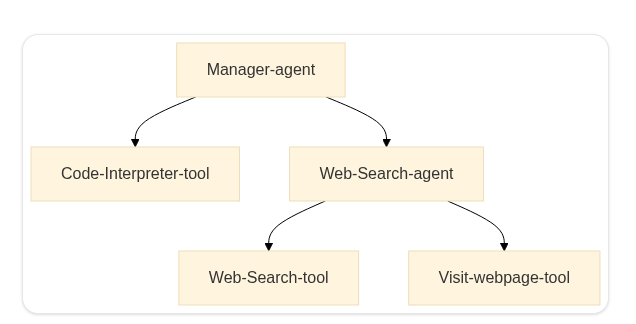
多智能体系统使 专门的智能体能够协作完成复杂任务,从而提高了模块性、可扩展性和鲁棒性。它不是依赖单个智能体,而是将任务分配给具有不同能力的多个智能体。
在 smolagents 中,可以组合不同的智能体来生成 Python 代码、调用外部工具、执行网页搜索等。通过协调这些智能体,我们可以创建强大的工作流。
一个典型的设置可能包括
- 一个用于任务委派的 管理者智能体
- 一个用于代码执行的 代码解释器智能体
- 一个用于信息检索的 网页搜索智能体
下图展示了一个简单的多智能体架构,其中一个 管理者智能体 协调一个 代码解释器工具 和一个 网页搜索智能体,而后者又利用像 DuckDuckGoSearchTool 和 VisitWebpageTool 这样的工具来收集相关信息。
多智能体系统的实际应用
一个多智能体系统由多个专门的智能体组成,它们在一个 协调器智能体 的协调下协同工作。这种方法通过将任务分配给具有不同角色的智能体,使得复杂的工作流成为可能。
例如,一个 多智能体 RAG 系统 可以集成
- 一个用于浏览互联网的 网页智能体。
- 一个用于从知识库中获取信息的 检索器智能体。
- 一个用于生成视觉内容的 图像生成智能体。
所有这些智能体都在一个协调器的管理下运行,该协调器负责任务的委派和交互。
FINAL QUIZ
Question 1: Create a Basic Code Agent with Web Search Capability
Reference Solution:
Assessment Criteria:
- Correct imports are included
- DuckDuckGoSearchTool is added to tools list
- HfApiModel is properly configured
- Model ID is correctly specified
from smolagents import CodeAgent, DuckDuckGoSearchTool, HfApiModel

agent = CodeAgent(
    tools=[DuckDuckGoSearchTool()],
    model=HfApiModel("Qwen/Qwen2.5-Coder-32B-Instruct")
)
Question 2: Set Up a Multi-Agent System with Manager and Web Search Agents
Assessment Criteria:
- Web agent has correct tools configured
- Manager agent properly references web agent
- Appropriate max_steps value is set
- Required imports are authorized
Reference Solution:
web_agent = ToolCallingAgent(
    tools=[DuckDuckGoSearchTool(), visit_webpage],
    model=model,
    max_steps=10,
    name="search",
    description="Runs web searches for you."
)

manager_agent = CodeAgent(
    tools=[],
    model=model,
    managed_agents=[web_agent],
    additional_authorized_imports=["time", "numpy", "pandas"]
)
Question 3: Configure Agent Security Settings
Assessment Criteria:
- E2B sandbox is properly configured
- Authorized imports are appropriately limited
- Security settings are correctly implemented
- Basic agent configuration is maintained
Reference Solution:
from smolagents import CodeAgent, E2BSandbox

agent = CodeAgent(
    tools=[],
    model=model,
    sandbox=E2BSandbox(),
    additional_authorized_imports=["numpy"]
)
Question 4: Implement a Tool-Calling Agent
Assessment Criteria:
- Tools are properly configured
- Step limit is set appropriately
- Agent name and description are provided
- Basic configuration is complete
Reference Solution:
from smolagents import ToolCallingAgent

agent = ToolCallingAgent(
    tools=[custom_tool],
    model=model,
    max_steps=5,
    name="tool_agent",
    description="Executes specific tools based on input"
)
Question 5: Set Up Model Integration
Assessment Criteria:
- Correct model imports are included
- Model is properly initialized
- Model ID is correctly specified
- Alternative model option is provided
from smolagents import HfApiModel, LiteLLMModel

# Hugging Face model
hf_model = HfApiModel("Qwen/Qwen2.5-Coder-32B-Instruct")

# Alternative model via LiteLLM
other_model = LiteLLMModel("anthropic/claude-3-sonnet")
有“AI”的1024 = 2048,欢迎大家加入2048 AI社区
更多推荐
 20
20 0
0- 0


 已为社区贡献2条内容

所有评论(0)