FastGPT使用api调用
·
通过接口的方式调用需要应用到三个fastgpt的元素:
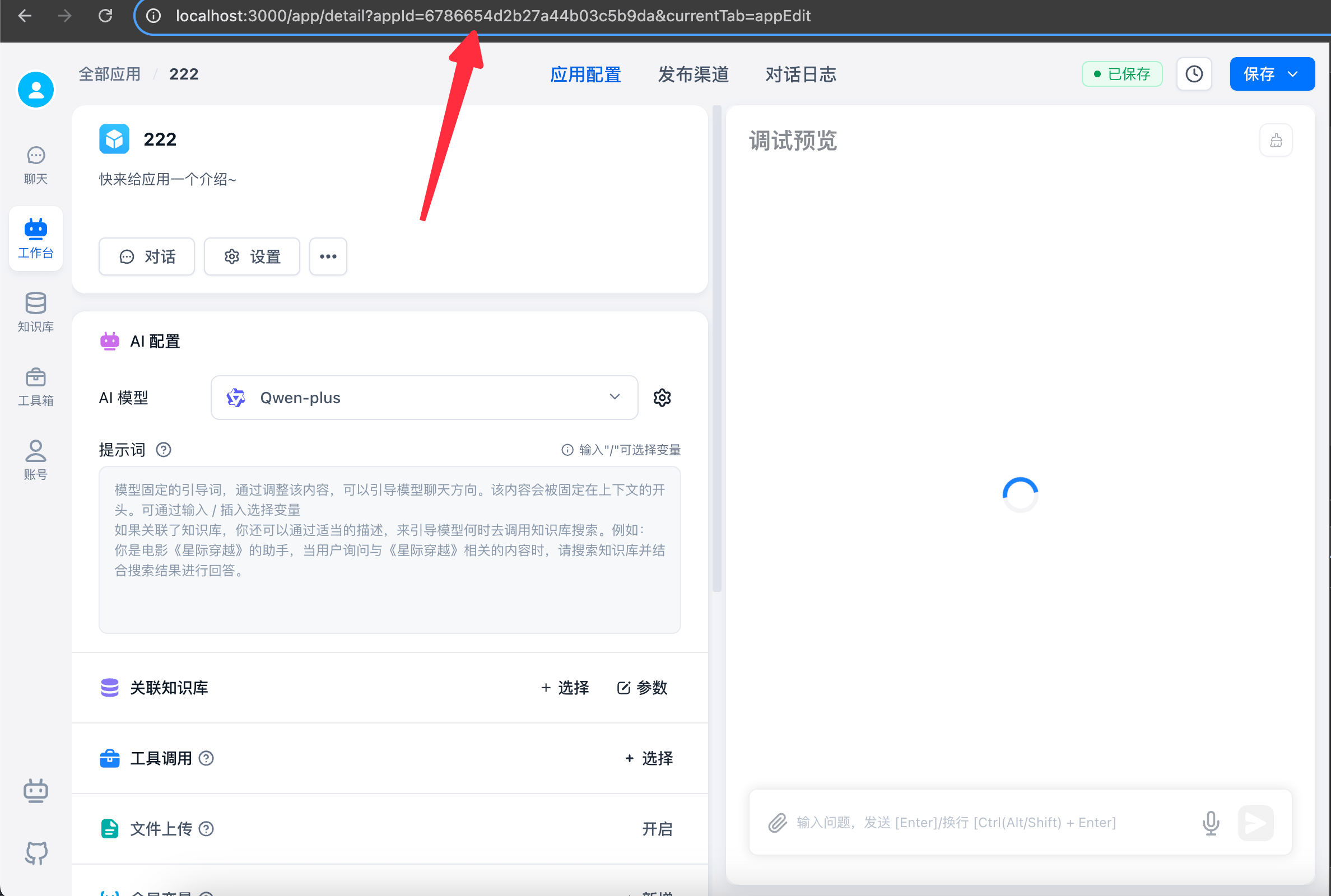
1、appId:我本人使用的版本不是很需要这个,但是为了规范化我还是给添加上了获取方式如下:
你自己构建的工作流或者agent页面网址上面的参数,如下截图:appId=6786654d2b27a44b03c5b9da
2、Authorization:这个是用来鉴权的,提供你访问的(工作流/agent),来源如下图:
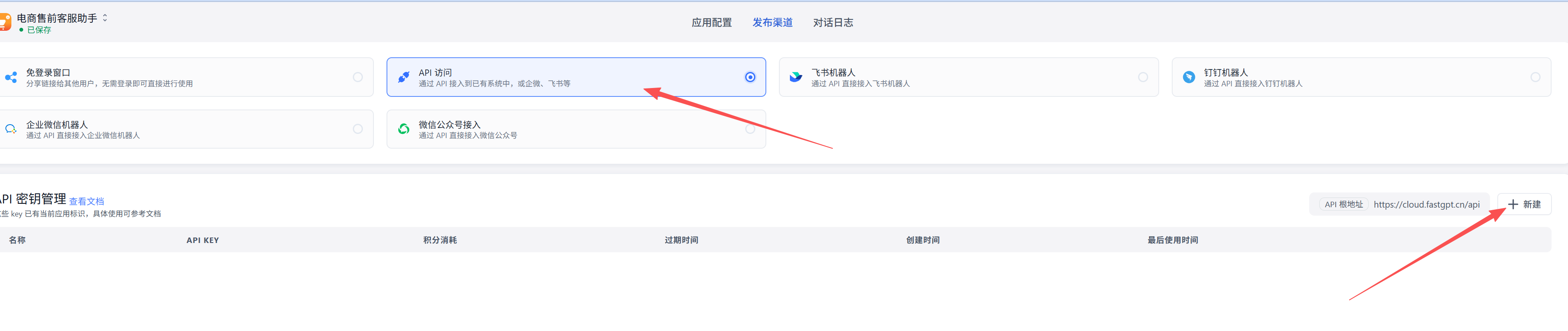
第一步:从你自己构建的工作流/agent应用里,点击发布渠道

第二步:选择api访问窗口
第三步:新建一个api key,这个api key就是Authorization的关键元素
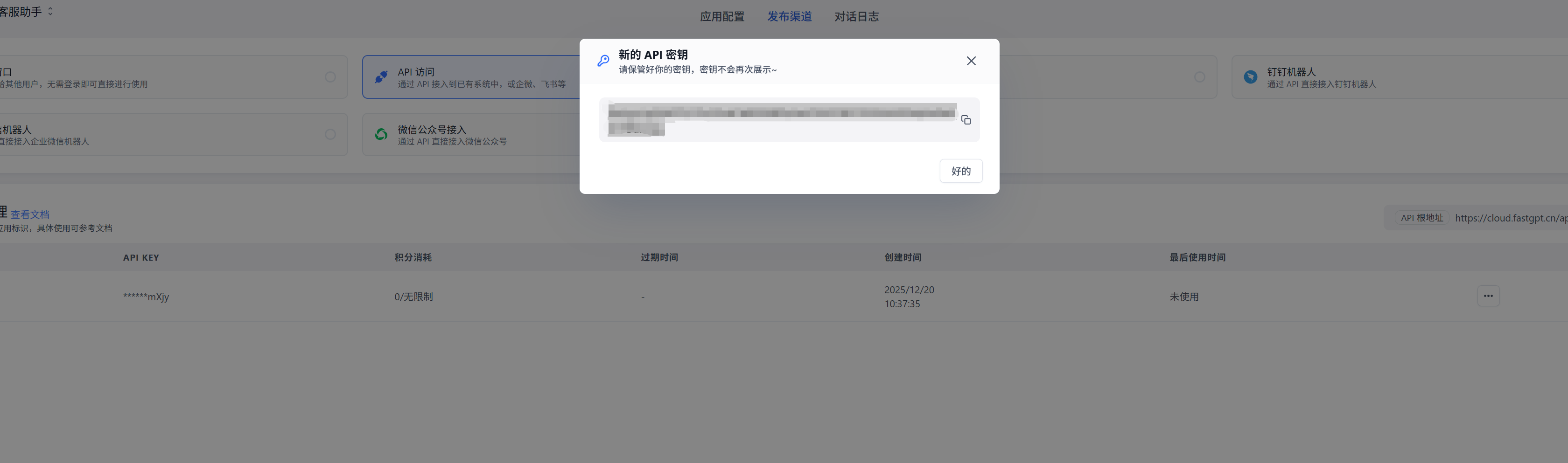
第四步:按照官方要求拼接 Authorization=Bearer fastgpt-xxxxxx,注意--> Bearer和key之间有个空格
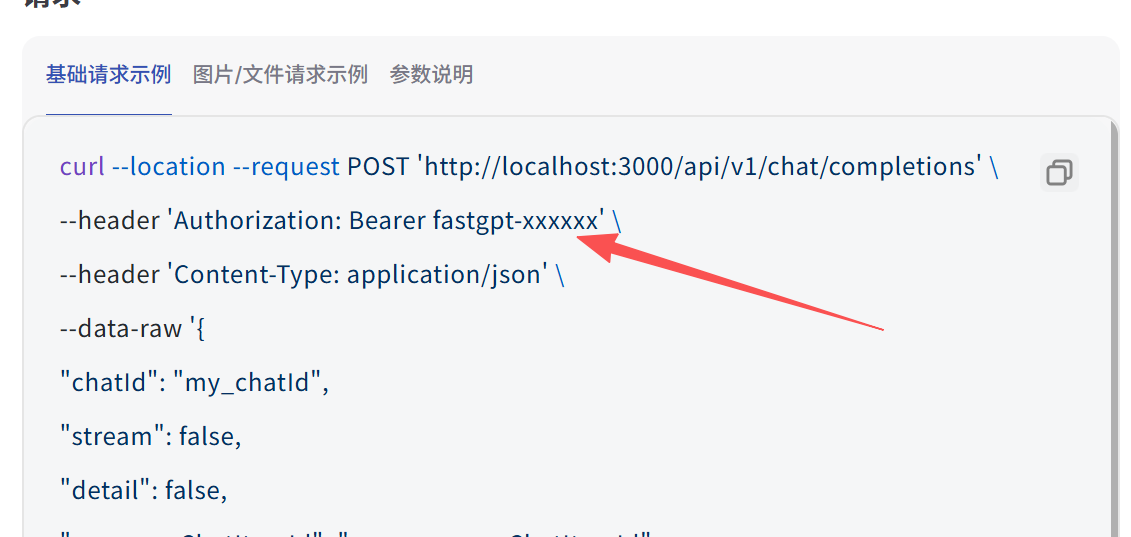
3、获取url地址(请求地址):
在创建api key的位置有个根地址,先获取到:
再拼接上你调用的应用所需要的路径:
日志(一般不会用):/proApi/core/app/logs/getChartData
工作流和agent:/v1/chat/completions
拼接完成的地址应该是如下:
工作流和Agent:https://cloud.fastgpt.cn/api/v1/chat/completions

三个元素就准备完毕:
appId:
6786654d2b27a44b03c5b9da
Authorization:
Bearer fastgpt-xxxxxx
url:
https://cloud.fastgpt.cn/api/v1/chat/completions
调用案例:
本人使用的postman:
headers:
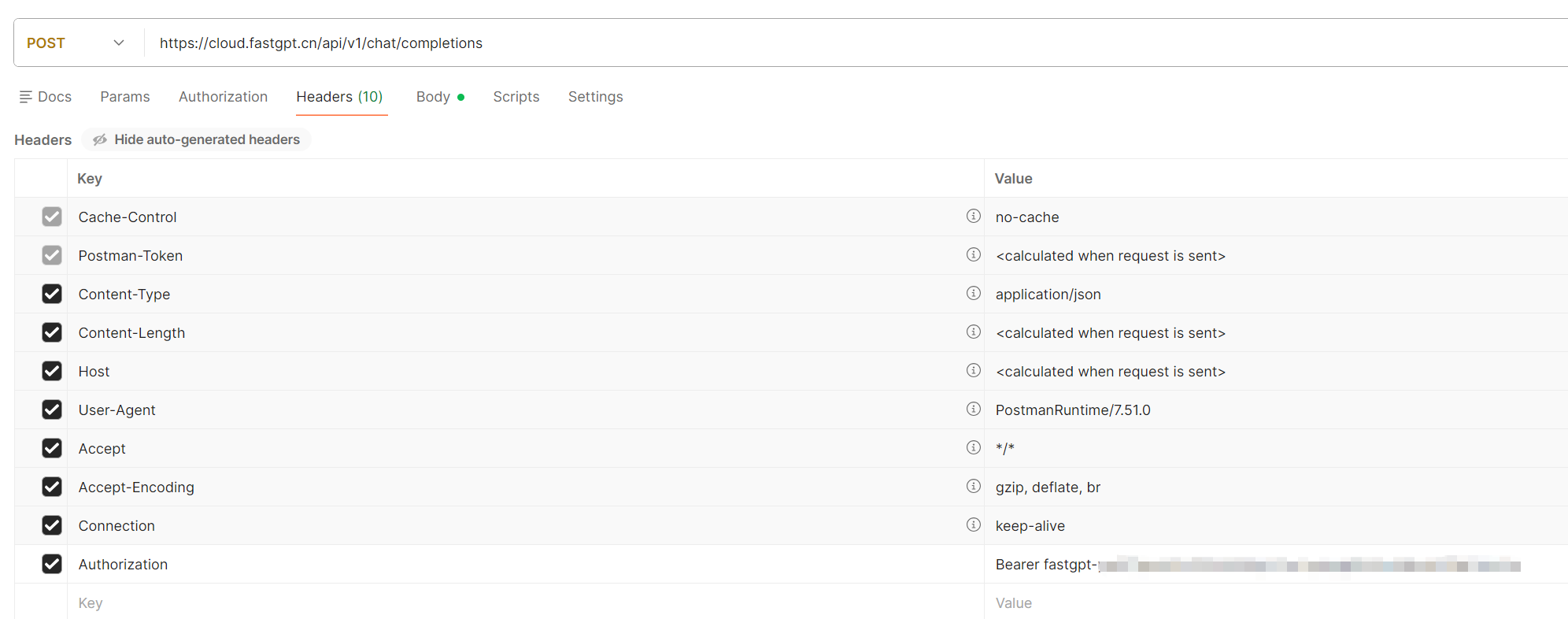
body:
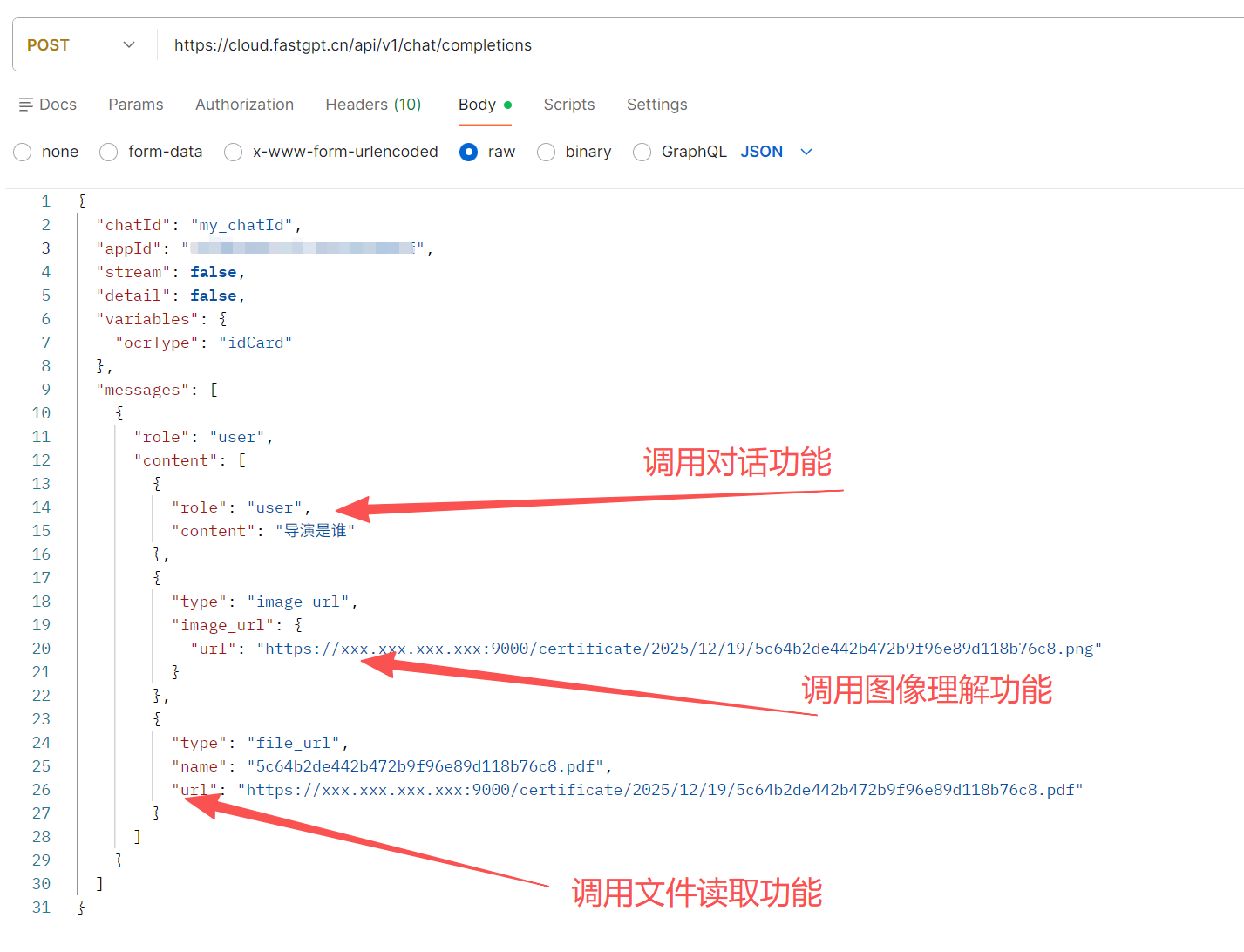
{
  "chatId": "my_chatId",
  "appId": "6786654d2b27a44b03c5b9da",
  "stream": false,
  "detail": false,
  "variables": {
    "ocrType": "idCard"
  },
  "messages": [
    {
      "role": "user",
      "content": [
        {
          "role": "user",
          "content": "导演是谁"
        },
        {
          "type": "image_url",
          "image_url": {
            "url": "https://xxx.xxx.xxx.xxx:9000/certificate/2025/12/19/5c64b2de442b472b9f96e89d118b76c8.png"
          }
        },
        {
          "type": "file_url",
          "name": "5c64b2de442b472b9f96e89d118b76c8.pdf",
          "url": "https://xxx.xxx.xxx.xxx:9000/certificate/2025/12/19/5c64b2de442b472b9f96e89d118b76c8.pdf"
        }
      ]
    }
  ]
}
使用java进行调用案例
添加必要的依赖(如果使用Maven)
<!-- 如果使用Jackson进行JSON处理 --> <dependency> <groupId>com.fasterxml.jackson.core</groupId> <artifactId>jackson-databind</artifactId> <version>2.15.2</version> </dependency> <!-- 如果使用OkHttp作为HTTP客户端 --> <dependency> <groupId>com.squareup.okhttp3</groupId> <artifactId>okhttp</artifactId> <version>4.12.0</version> </dependency> <!-- 或者使用Apache HttpClient --> <dependency> <groupId>org.apache.httpcomponents.client5</groupId> <artifactId>httpclient5</artifactId> <version>5.2.1</version> </dependency>
创建请求模型类
import com.fasterxml.jackson.annotation.JsonInclude;
import com.fasterxml.jackson.annotation.JsonProperty;
import java.util.List;
import java.util.Map;
/**
* FastGPT聊天请求体
*/
@JsonInclude(JsonInclude.Include.NON_NULL)
public class FastGPTChatRequest {
@JsonProperty("chatId")
private String chatId;
@JsonProperty("appId")
private String appId;
@JsonProperty("stream")
private Boolean stream;
@JsonProperty("detail")
private Boolean detail;
@JsonProperty("responseChatItemId")
private String responseChatItemId;
@JsonProperty("variables")
private Map<String, Object> variables;
@JsonProperty("messages")
private List<Message> messages;
// 构造函数
public FastGPTChatRequest() {
this.stream = false;
this.detail = false;
}
public FastGPTChatRequest(String appId, List<Message> messages) {
this.appId = appId;
this.messages = messages;
this.stream = false;
this.detail = false;
}
// Getter和Setter方法
public String getChatId() {
return chatId;
}
public void setChatId(String chatId) {
this.chatId = chatId;
}
public String getAppId() {
return appId;
}
public void setAppId(String appId) {
this.appId = appId;
}
public Boolean getStream() {
return stream;
}
public void setStream(Boolean stream) {
this.stream = stream;
}
public Boolean getDetail() {
return detail;
}
public void setDetail(Boolean detail) {
this.detail = detail;
}
public String getResponseChatItemId() {
return responseChatItemId;
}
public void setResponseChatItemId(String responseChatItemId) {
this.responseChatItemId = responseChatItemId;
}
public Map<String, Object> getVariables() {
return variables;
}
public void setVariables(Map<String, Object> variables) {
this.variables = variables;
}
public List<Message> getMessages() {
return messages;
}
public void setMessages(List<Message> messages) {
this.messages = messages;
}
/**
* 消息对象
*/
public static class Message {
@JsonProperty("role")
private String role;
@JsonProperty("content")
private String content;
public Message() {
}
public Message(String role, String content) {
this.role = role;
this.content = content;
}
public String getRole() {
return role;
}
public void setRole(String role) {
this.role = role;
}
public String getContent() {
return content;
}
public void setContent(String content) {
this.content = content;
}
}
/**
* 构建器模式
*/
public static class Builder {
private FastGPTChatRequest request;
public Builder() {
request = new FastGPTChatRequest();
}
public Builder appId(String appId) {
request.appId = appId;
return this;
}
public Builder chatId(String chatId) {
request.chatId = chatId;
return this;
}
public Builder stream(Boolean stream) {
request.stream = stream;
return this;
}
public Builder detail(Boolean detail) {
request.detail = detail;
return this;
}
public Builder responseChatItemId(String responseChatItemId) {
request.responseChatItemId = responseChatItemId;
return this;
}
public Builder variables(Map<String, Object> variables) {
request.variables = variables;
return this;
}
public Builder messages(List<Message> messages) {
request.messages = messages;
return this;
}
public Builder addMessage(String role, String content) {
if (request.messages == null) {
request.messages = new java.util.ArrayList<>();
}
request.messages.add(new Message(role, content));
return this;
}
public FastGPTChatRequest build() {
return request;
}
}
}
创建响应模型类
import com.fasterxml.jackson.annotation.JsonProperty;
import java.util.List;
/**
* FastGPT聊天响应体
*/
public class FastGPTChatResponse {
@JsonProperty("id")
private String id;
@JsonProperty("choices")
private List<Choice> choices;
@JsonProperty("created")
private Long created;
@JsonProperty("model")
private String model;
@JsonProperty("object")
private String object;
@JsonProperty("usage")
private Usage usage;
// Getter和Setter方法
public String getId() {
return id;
}
public void setId(String id) {
this.id = id;
}
public List<Choice> getChoices() {
return choices;
}
public void setChoices(List<Choice> choices) {
this.choices = choices;
}
public Long getCreated() {
return created;
}
public void setCreated(Long created) {
this.created = created;
}
public String getModel() {
return model;
}
public void setModel(String model) {
this.model = model;
}
public String getObject() {
return object;
}
public void setObject(String object) {
this.object = object;
}
public Usage getUsage() {
return usage;
}
public void setUsage(Usage usage) {
this.usage = usage;
}
/**
* 获取第一条回复内容
*/
public String getFirstContent() {
if (choices != null && !choices.isEmpty()) {
Choice choice = choices.get(0);
if (choice != null && choice.getMessage() != null) {
return choice.getMessage().getContent();
}
}
return null;
}
/**
* 选择项
*/
public static class Choice {
@JsonProperty("index")
private Integer index;
@JsonProperty("message")
private ResponseMessage message;
@JsonProperty("finish_reason")
private String finishReason;
public Integer getIndex() {
return index;
}
public void setIndex(Integer index) {
this.index = index;
}
public ResponseMessage getMessage() {
return message;
}
public void setMessage(ResponseMessage message) {
this.message = message;
}
public String getFinishReason() {
return finishReason;
}
public void setFinishReason(String finishReason) {
this.finishReason = finishReason;
}
}
/**
* 响应消息
*/
public static class ResponseMessage {
@JsonProperty("role")
private String role;
@JsonProperty("content")
private String content;
public String getRole() {
return role;
}
public void setRole(String role) {
this.role = role;
}
public String getContent() {
return content;
}
public void setContent(String content) {
this.content = content;
}
}
/**
* 使用情况
*/
public static class Usage {
@JsonProperty("prompt_tokens")
private Integer promptTokens;
@JsonProperty("completion_tokens")
private Integer completionTokens;
@JsonProperty("total_tokens")
private Integer totalTokens;
public Integer getPromptTokens() {
return promptTokens;
}
public void setPromptTokens(Integer promptTokens) {
this.promptTokens = promptTokens;
}
public Integer getCompletionTokens() {
return completionTokens;
}
public void setCompletionTokens(Integer completionTokens) {
this.completionTokens = completionTokens;
}
public Integer getTotalTokens() {
return totalTokens;
}
public void setTotalTokens(Integer totalTokens) {
this.totalTokens = totalTokens;
}
}
}
HTTP客户端封装(使用OkHttp)
import com.fasterxml.jackson.databind.ObjectMapper;
import okhttp3.*;
import java.io.IOException;
import java.util.concurrent.TimeUnit;
/**
* FastGPT客户端
*/
public class FastGPTClient {
private static final String BASE_URL = "https://api.fastgpt.in/api/v1";
private static final MediaType JSON = MediaType.get("application/json; charset=utf-8");
private final String apiKey;
private final OkHttpClient httpClient;
private final ObjectMapper objectMapper;
/**
* 构造函数
* @param apiKey FastGPT API密钥
*/
public FastGPTClient(String apiKey) {
this.apiKey = apiKey;
this.objectMapper = new ObjectMapper();
this.httpClient = new OkHttpClient.Builder()
.connectTimeout(30, TimeUnit.SECONDS)
.readTimeout(60, TimeUnit.SECONDS)
.writeTimeout(30, TimeUnit.SECONDS)
.build();
}
/**
* 发送聊天请求
* @param request 请求对象
* @return 响应对象
* @throws FastGPTException 异常
*/
public FastGPTChatResponse sendChatRequest(FastGPTChatRequest request) throws FastGPTException {
try {
// 构建请求体
String requestBody = objectMapper.writeValueAsString(request);
RequestBody body = RequestBody.create(requestBody, JSON);
// 构建请求
Request httpRequest = new Request.Builder()
.url(BASE_URL + "/chat/completions")
.header("Authorization", "Bearer " + apiKey)
.header("Content-Type", "application/json")
.post(body)
.build();
// 执行请求
try (Response response = httpClient.newCall(httpRequest).execute()) {
if (!response.isSuccessful()) {
throw new FastGPTException("HTTP请求失败: " + response.code() + " - " + response.message());
}
String responseBody = response.body().string();
return objectMapper.readValue(responseBody, FastGPTChatResponse.class);
}
} catch (IOException e) {
throw new FastGPTException("请求处理失败", e);
}
}
/**
* 简化调用方法
* @param appId 应用ID
* @param userMessage 用户消息
* @return 响应内容
* @throws FastGPTException 异常
*/
public String sendSimpleMessage(String appId, String userMessage) throws FastGPTException {
FastGPTChatRequest request = new FastGPTChatRequest.Builder()
.appId(appId)
.addMessage("user", userMessage)
.build();
FastGPTChatResponse response = sendChatRequest(request);
return response.getFirstContent();
}
/**
* 自定义HTTP客户端(可选)
* @param client 自定义的OkHttpClient
*/
public void setHttpClient(OkHttpClient client) {
this.httpClient.dispatcher().executorService().shutdown();
// 注意:这里只是简单示例,实际使用时需要更谨慎地管理资源
}
/**
* 自定义异常类
*/
public static class FastGPTException extends Exception {
public FastGPTException(String message) {
super(message);
}
public FastGPTException(String message, Throwable cause) {
super(message, cause);
}
}
}
使用示例
import java.util.*;
/**
* 使用示例
*/
public class FastGPTExample {
public static void main(String[] args) {
// 1. 初始化客户端
String apiKey = "fastgpt-fhMEKvEQ6SBYmufttXWj5BlrfoqkiGw3hoD2JmgqL2P2YhY3EuS05GdWxIAUeDik";
String appId = "693fc66c0941c63d3826a65d";
FastGPTClient client = new FastGPTClient(apiKey);
try {
// 2. 简单调用
String response = client.sendSimpleMessage(appId, "帮我查看文档内部的规定!");
System.out.println("简单调用响应: " + response);
// 3. 完整调用示例
Map<String, Object> variables = new HashMap<>();
variables.put("uid", "asdfadsfasfd2323");
variables.put("name", "张三");
List<FastGPTChatRequest.Message> messages = new ArrayList<>();
messages.add(new FastGPTChatRequest.Message("user", "帮我查看文档内部的规定!"));
FastGPTChatRequest request = new FastGPTChatRequest.Builder()
.appId(appId)
.chatId("my_chatId")
.stream(false)
.detail(false)
.responseChatItemId("my_responseChatItemId")
.variables(variables)
.messages(messages)
.build();
FastGPTChatResponse fullResponse = client.sendChatRequest(request);
System.out.println("完整调用响应: " + fullResponse.getFirstContent());
System.out.println("Token使用情况: " + fullResponse.getUsage().getTotalTokens());
} catch (FastGPTClient.FastGPTException e) {
System.err.println("调用失败: " + e.getMessage());
e.printStackTrace();
}
}
}
异步版本(可选)
import java.util.concurrent.CompletableFuture;
/**
* 异步FastGPT客户端
*/
public class FastGPTAsyncClient {
private final FastGPTClient syncClient;
public FastGPTAsyncClient(String apiKey) {
this.syncClient = new FastGPTClient(apiKey);
}
/**
* 异步发送聊天请求
*/
public CompletableFuture<FastGPTChatResponse> sendChatRequestAsync(FastGPTChatRequest request) {
return CompletableFuture.supplyAsync(() -> {
try {
return syncClient.sendChatRequest(request);
} catch (FastGPTClient.FastGPTException e) {
throw new RuntimeException(e);
}
});
}
/**
* 异步简化调用
*/
public CompletableFuture<String> sendSimpleMessageAsync(String appId, String userMessage) {
return CompletableFuture.supplyAsync(() -> {
try {
return syncClient.sendSimpleMessage(appId, userMessage);
} catch (FastGPTClient.FastGPTException e) {
throw new RuntimeException(e);
}
});
}
}
有“AI”的1024 = 2048,欢迎大家加入2048 AI社区
更多推荐
 14
14 0
0- 0


 已为社区贡献1条内容

所有评论(0)