openpnp - Smoothieware - 固件工程编译(msys2-mingw64环境)
准备学习Smoothieware工程,将固件调试环境先搭建一下。前面实验,已经将 MSYS2 MINGW64 + eclipse-cpp + arm-gnu-toolchain + makefile的单步调试环境搞定了,已经可以正常调试LPC17xx-DFU-Bootloader工程。就在这个环境基础上,搭建Smoothieware的固件调试环境。
文章目录
openpnp - Smoothieware - 固件工程编译(msys2-mingw64环境)
概述
准备学习Smoothieware工程,将固件调试环境先搭建一下。
前面实验,已经将 MSYS2 MINGW64 + eclipse-cpp + arm-gnu-toolchain + makefile的单步调试环境搞定了,已经可以正常调试LPC17xx-DFU-Bootloader工程。
就在这个环境基础上,搭建Smoothieware的固件调试环境。
先编译过了,再整单步调试环境。
笔记
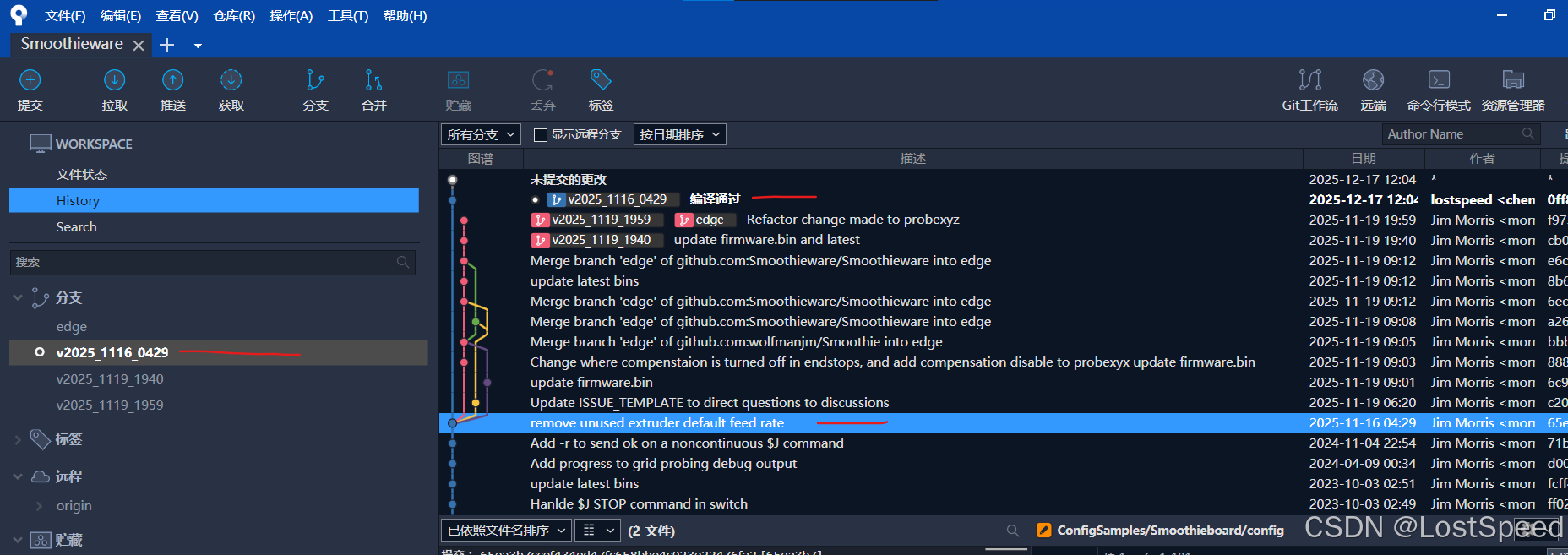
代码分支起点
看自己,挑一个带win_install.cmd的后期版本提交点,做个分支开始实验。
chenx@ls3561 MINGW64 /D/3rd/openpnp_prj/Smoothieware/Smoothieware
$ git remote -v
origin  https://github.com/Smoothieware/Smoothieware.git (fetch)
origin  https://github.com/Smoothieware/Smoothieware.git (push)
MSYS2 MINGW64 快捷方式对应的实际程序
C:\msys64\mingw64.exe
// 如果嫌弃找快捷方式麻烦,可以自己做个.bat, 直接启动mingw64.exe
msys2-mingw64安装缺失组件
安装git
make clean 时,显示缺少git
chenx@ls3561 MINGW64 /d/3rd/openpnp_prj/Smoothieware/Smoothieware
$ pacman -Ss git | grep mingw-w64-x86_64-git
mingw64/mingw-w64-x86_64-git-lfs 3.7.1-1
mingw64/mingw-w64-x86_64-git-repo 0.4.20-2
mingw64/mingw-w64-x86_64-gitg 44-7
mingw64/mingw-w64-x86_64-github-cli 2.83.1-1
mingw64/mingw-w64-x86_64-gitui 0.27.0-1
// 查看具体的软件信息,看到下列软件是git相关的
pacman -Si mingw-w64-x86_64-git-repo
pacman -Si mingw-w64-x86_64-git-lfs
// 安装git软件
pacman -S mingw-w64-x86_64-git-repo  // 装了这个软件, 并没有git
pacman -S mingw-w64-x86_64-git-lfs // 这个软件包中有git
// 测试一下,是否有git命令可用?
$ where git
C:\msys64\usr\bin\git.exe

$ git --version
git version 2.51.2 // 和win10中装的git版本一样
现在make clean 执行成功了
处理make时缺copy命令
先尝试将msys2-mingw64中的cp.exe命令拷贝为copy.exe, 看make时行不行?
chenx@ls3561 MINGW64 /D/3rd/openpnp_prj/Smoothieware/Smoothieware
$ where copy
信息: 用提供的模式无法找到文件。

chenx@ls3561 MINGW64 /D/3rd/openpnp_prj/Smoothieware/Smoothieware
$ where cp
C:\msys64\usr\bin\cp.exe

chenx@ls3561 MINGW64 /D/3rd/openpnp_prj/Smoothieware/Smoothieware
$ cp /usr/bin/cp.exe /usr/bin/copy.exe

chenx@ls3561 MINGW64 /D/3rd/openpnp_prj/Smoothieware/Smoothieware
$ where copy
C:\msys64\usr\bin\copy.exe
make all 时,copy语法不对。删掉 C:\msys64\usr\bin\copy.exe
将win10的copy命令是内部命令,无法拷贝到msys2
只能去改makefile, 将copy命令改为cp
修改 arm-common.mk 如下:
# Command line tools that are different between *nix and Windows.
# ifeq "$(OS)" "Windows_NT"

ifeq "0" "1"
SHELL      =cmd.exe
REMOVE     =del /q
REMOVE_DIR =rd /s /q
COPY       =copy
CAT        =type
MKDIR      =mkdir
QUIET      =>nul 2>nul & exit 0
NOSTDOUT   =>nul
else
REMOVE     =rm
REMOVE_DIR =rm -r -f
COPY       =cp
CAT        =cat
MKDIR      =mkdir -p
QUIET      => /dev/null 2>&1 ; exit 0
NOSTDOUT   => /dev/null
endif

# Macro which will convert / to \ on Windows.
# ifeq "$(OS)" "Windows_NT"

ifeq "0" "1"
define convert-slash
$(subst /,\,$1)
endef
else
define convert-slash
$1
endef
endif
修改 D:\3rd\openpnp_prj\Smoothieware\Smoothieware\mbed\src\Makefile如下
# Command line tools that are different between *nix and Windows.
# ifeq "$(OS)" "Windows_NT"
ifeq "0" "1"
REMOVE     =del /q
REMOVE_DIR =rd /s /q
COPY       =copy
CAT        =type
MKDIR      =mkdir
QUIET      =>nul 2>nul & exit 0
NOSTDOUT   =>nul
else
REMOVE     =rm
REMOVE_DIR =rm -r -f
COPY       =cp
CAT        =cat
MKDIR      =mkdir -p
QUIET      => /dev/null 2>&1 ; exit 0
NOSTDOUT   => /dev/null
endif


# Macro which will convert / to \ on Windows.
# ifeq "$(OS)" "Windows_NT"
ifeq "0" "1"
define convert-slash
$(subst /,\,$1)
endef
else
define convert-slash
$1
endef
endif
修改 D:\3rd\openpnp_prj\Smoothieware\Smoothieware\src\makefile
# generate a git version string
# ifneq "$(OS)" "Windows_NT"
ifneq "0" "1"
DEFINES += -D__GITVERSIONSTRING__=\"$(shell ./generate-version.sh)\"
else
DEFINES += -D__GITVERSIONSTRING__=\"$(shell generate-version.bat)\"
endif

## ifneq "$(OS)" "Windows_NT"
ifneq "0" "1"
COPY=cp
else
COPY=copy
endif
make all 时,可以进行下去了,还有些别的错,应该是要特定版本编译器才能正常编译过,否则就要改代码。
作者推荐的方式是用win_install.cmd下载作者确认过版本的gcc, 然后生成另外一个bat, 指向下载解压后的bin目录,进行编译。
我后续将makefile工程引入eclipse-cpp, 最好是能用msys2-mingw64的命令行编译过,那样在eclipse-cpp中编译工程时,就可以和msys2-mingw64编译的过程和效果相同。
其实就是arm-gcc版本的不同,只要作者代码写的没问题,arm-gcc版本差一点,问题不大。
用作者指定的arm-gcc环境编译,警告也是一堆,好不到哪里去。
如果用作者指定版本的arm-gcc编译器,能0警告,0错误,那我就在eclipse-cpp中指定作者版本的arm-gcc进行编译。可惜不是。
改代码吧。
将编译日志拷贝下来,看到generate-version.sh执行失败,估计是权限问题,将权限加上(不能只加执行权限,因为还要产生文件version.cpp)。
cd /D/3rd/openpnp_prj/Smoothieware/Smoothieware/src
chmod 777 ./generate-version.sh
还不行
修改 D:\3rd\openpnp_prj\Smoothieware\Smoothieware\src\Makefile
让 sh 执行.sh, 而不是直接用shell 执行
# generate a git version string
# ifneq "$(OS)" "Windows_NT"
ifneq "0" "1"
DEFINES += -D__GITVERSIONSTRING__=\"$(shell sh ./generate-version.sh)\"
else
DEFINES += -D__GITVERSIONSTRING__=\"$(shell generate-version.bat)\"
endif
现在工程总的make clean 执行成功了。
修正make all时的错误
make all 有些错误,准备修正。
修改时,需要最小化修改,哪里缺头文件,就加在哪,不乱加头文件。
根据编译信息找报错文件时,用vscode打开源码目录的方式包含整个Makeile工程所在目录方便一些(也可以在源码目录下,右击,选择菜单any code)
执行下面这行命令,有报错的话,将全部日志拷贝出来,找出报错点,进行修正,然后再执行下面这行组合命令,直到编译通过。
make clean && clear && make all

为了节省时间,第一次运行上面的命令,剩下时间只运行 clear && make all

如果报错时,是由于旧代码没完全编译引起的,运行完整命令
等都修正完了,再运行一次完整的命令确认一下。
D:\3rd\openpnp_prj\Smoothieware\Smoothieware\src\libs\Kernel.h

#ifndef KERNEL_H
#define KERNEL_H

#define THEKERNEL Kernel::instance
#define THECONVEYOR THEKERNEL->conveyor
#define THEROBOT THEKERNEL->robot

#include "Module.h"
#include <array>
#include <vector>
#include <string>
#include <cstdint> // add by me
D:\3rd\openpnp_prj\Smoothieware\Smoothieware\src\libs\ConfigValue.h

#ifndef CONFIGVALUE_H
#define CONFIGVALUE_H

#include <string>
#include <cstdint> // add by me
using std::string;
D:\3rd\openpnp_prj\Smoothieware\Smoothieware\src\modules\communication\GcodeDispatch.h
#pragma once

#include "libs/Module.h"

#include <stdio.h>
#include <string>
#include <cstdint> // add by me
D:\3rd\openpnp_prj\Smoothieware\Smoothieware\src\modules\robot\Block.h
#pragma once

#include <bitset>
#include "ActuatorCoordinates.h"
#include <cstdint> // add by me
D:\3rd\openpnp_prj\Smoothieware\Smoothieware\src\modules\communication\utils\Gcode.h
#ifndef GCODE_H
#define GCODE_H
#include <string>
#include <map>
#include <cstdint> // add by me
D:\3rd\openpnp_prj\Smoothieware\Smoothieware\src\modules\robot\ActuatorCoordinates.h
#pragma once

#include <array>
#include <cstddef> // add to fix build err
D:\3rd\openpnp_prj\Smoothieware\Smoothieware\src\modules\tools\temperatureswitch\TemperatureSwitch.h
#ifndef TEMPERATURESWITCH_MODULE_H
#define TEMPERATURESWITCH_MODULE_H

using namespace std;

#include "libs/Module.h"
#include <string>
#include <vector>
#include <cstdint> // add to fix err
D:\3rd\openpnp_prj\Smoothieware\Smoothieware\src\modules\tools\zprobe\CartGridStrategy.h
#pragma once

#include "LevelingStrategy.h"

#include <string.h>
#include <tuple>
#include <string> // add to fix err
#include <cstdint> // add to fix err
D:\3rd\openpnp_prj\Smoothieware\Smoothieware\src\modules\tools\zprobe\DeltaGridStrategy.h
#pragma once

#include "LevelingStrategy.h"

#include <string.h>
#include <tuple>
#include <cstdint> // add to fix err
D:\3rd\openpnp_prj\Smoothieware\Smoothieware\src\modules\utils\player\Player.h
#pragma once

#include "Module.h"

#include <stdio.h>
#include <string>
#include <map>
#include <vector>
#include <cstdint> // add to fix err
using std::string;
D:\3rd\openpnp_prj\Smoothieware\Smoothieware\src\modules\utils\panel\PanelScreen.h
#ifndef PANELSCREEN_H
#define PANELSCREEN_H

#include <string>
#include <deque>
#include <cstdint> // add to fix err
D:\3rd\openpnp_prj\Smoothieware\Smoothieware\src\modules\utils\panel\screens\CustomScreen.h
#ifndef CUSTOMSCREEN_H
#define CUSTOMSCREEN_H

#include "PanelScreen.h"

#include <vector>
#include <tuple>
#include <cstdint> // add to fix err
D:\3rd\openpnp_prj\Smoothieware\Smoothieware\src\modules\utils\motordrivercontrol\drivers\DRV8711\drv8711.h
#pragma once

#include <functional>
#include <bitset>
#include <cstdint> // add to fix err
D:\3rd\openpnp_prj\Smoothieware\Smoothieware\src\modules\utils\motordrivercontrol\drivers\TMC26X\TMC26X.h
#pragma once

#include <functional>
#include <map>
#include <bitset>
#include <cstdint> // add to fix err
增加 version.cpp, 值根据 generate-version.sh 显示的值来
将 generate-version.sh和generate-version.bat中touch version.cpp 的代码行注释掉,防止覆盖自己改的version.cpp
// @file src/version.cpp

#include "version.h"

/*
$ ./src/generate-version.sh
v2025_1116_0429-65ea3b7
*/

const char* Version::get_build(void) const
{
	return "v2025_1116_0429-65ea3b7";
}

const char* Version::get_build_date(void) const
{
	return "2025_1116_0429";
}
编译过了
运行完整命令 make clean && clear && make all 确认,确实编译过了。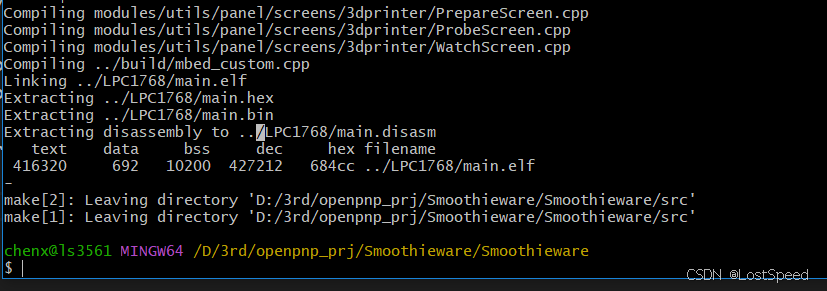
将编译优化选项改为-Og
D:\3rd\openpnp_prj\Smoothieware\Smoothieware\build\common.mk
编译选项都在common.mk中,将OPTIMIZATION的值都改为g
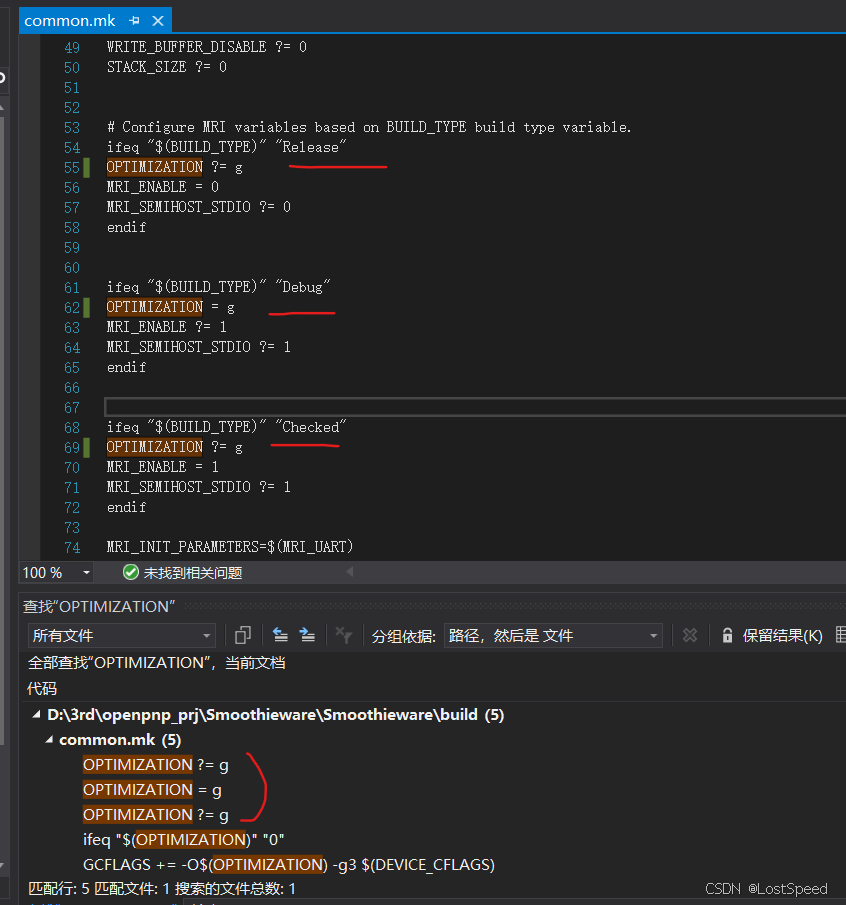
按照-Og编译出来的elf, 不影响单步调试。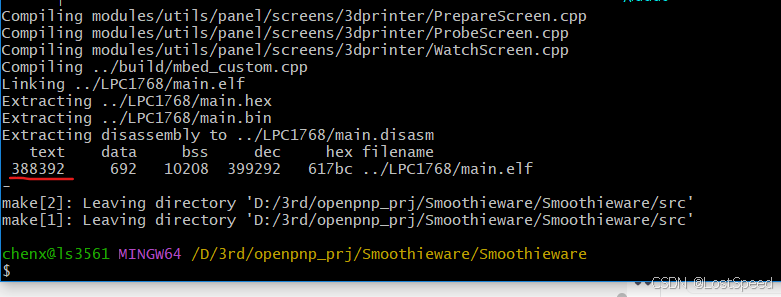
比原版编译的elf输出还小 😛
指定c++标准
msys2-mingw64中编译工程,.cpp默认是用的c++17
作者编译时,用的应该不是c++17标准。
现在编译完有c++17不支持的关键字警告
./vendor/NXP/cmsis/LPC1768/core_cmFunc.h: In function 'uint32_t __get_PSP()':
./vendor/NXP/cmsis/LPC1768/core_cmFunc.h:412:21: warning: ISO C++17 does not allow 'register' storag
e class specifier [-Wregister]
  412 |   register uint32_t result;
      |                     ^~~~~~
查了资料,register 关键字在 C++11、C++98 等早期标准中有效,用于提示编译器将变量存储在寄存器中以提高访问效率(例如循环计数器). 从 C++17 标准开始,register 被废弃(deprecated)并完全移除。编译器会发出 -Wregister 警告,提示该关键字不再合法.
C++14/C++11都支持register关键字。
在makefile中显势指定使用C++14
makefile中, 作者就是用的gnu++11标准。
GPFLAGS += $(GCFLAGS) -fno-rtti -std=gnu++11
C_FLAGS +=-std=c99
CPPFLAGS = CFLAGS + ' -fno-rtti -std=gnu++11 -fno-exceptions'
CXXFLAGS = CFLAGS + ' -fno-rtti -std=gnu++11 -fexceptions' # used for a .cxx file that needs to be compiled with exceptions

在msys2-mingw64中,查看arm-none-eabi-g++支持的c++标准,也支持gnu++11
arm-none-eabi-g++ --help -v | grep "std="
-std=gnu++11                Conform to the ISO 2011 C++ standard with GNU

那这个问题就不管了。
且这个警告是CMSIS库中的警告,不管了。
如果register关键字在c++17中无效,那么编译出的输出就和没有register关键字相同,运行效率稍慢,不影响正确性。
END

有“AI”的1024 = 2048,欢迎大家加入2048 AI社区
更多推荐


 21
21 0
0- 0


 已为社区贡献70条内容

所有评论(0)