备赛2--
媒体查询(Media Queries)
媒体查询是 CSS 实现自适应的核心工具,能根据设备特性(如屏幕宽度、方向、分辨率)为不同场景应用差异化样式。
1. 基本语法
css
/* 语法结构 */
@media [媒体类型] [and/or/not 媒体特性] {
/* 满足条件时生效的样式 */
}
- 媒体类型:可选值有 screen (屏幕设备)、 print (打印设备)、 all (所有设备,默认值)。
- 媒体特性:常用 width / max-width / min-width (宽度相关)、 orientation (屏幕方向: portrait 竖屏/ landscape 横屏)。
2. 常用写法
- 按宽度断点适配(最常用)
css
/* 大屏幕(桌面端):宽度 ≥ 1200px */
@media (min-width: 1200px) {
.box { width: 25%; }
}
/* 平板:宽度 768px ~ 1199px */
@media (min-width: 768px) and (max-width: 1199px) {
.box { width: 50%; }
}
/* 手机:宽度 ≤ 767px */
@media (max-width: 767px) {
.box { width: 100%; }
}
- 按屏幕方向适配
css
/* 横屏时生效 */
@media (orientation: landscape) {
body { background: #f5f5f5; }
}
3. 两种适配思路
思路 写法特点 适用场景
移动端优先 先写移动端样式,再用 min-width 向上适配大屏 移动端用户占比高的项目
桌面端优先 先写桌面端样式,再用 max-width 向下适配小屏 传统网页改造自适应
4. 注意事项
- 断点(如 768px 1200px )无绝对标准,可根据目标设备自定义。
- 媒体查询的样式会覆盖默认样式,需注意 CSS 代码的加载顺序(后写的样式优先级更高)。
5.includes
includes() 是用于判断数组或字符串中是否包含指定元素/子串的方法,返回布尔值( true / false ),常用来做存在性校验,比如之前筛选不重复随机数时就用到了数组的 includes() 。
一、数组的 includes()
array.includes(searchElement[, fromIndex])
- searchElement :要查找的元素。
- fromIndex (可选):从数组的该索引位置开始查找,默认值为 0 。
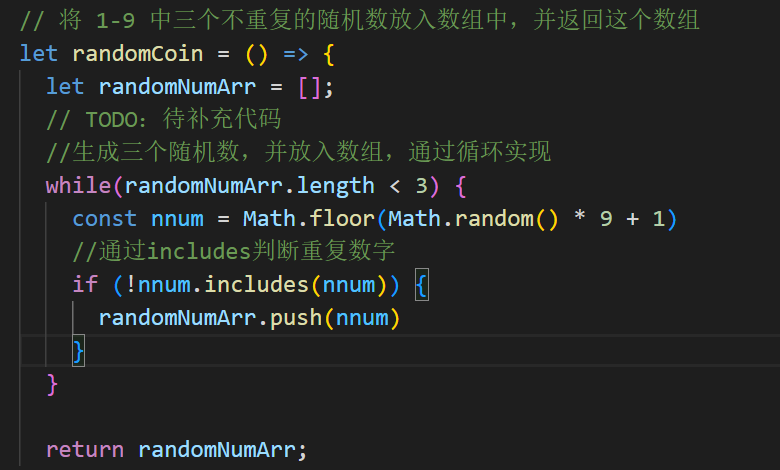
(上文!后不是nnum,是randomNumArr)
关键特点 - 严格匹配( === ),比如 arr.includes('3') 对上面的数组会返回 false 。
- 能识别 NaN ,而 indexOf() 无法识别 NaN : javascript const arr = [NaN]; console.log(arr.includes(NaN)); // true
console.log(arr.indexOf(NaN)); // -1
二、字符串的 includes() 语法
str.includes(searchString[, position])
- searchString :要查找的子串。
- position (可选):从字符串的该索引位置开始查找,默认值为 0 。
示例
javascript const str = "hello world"; console.log(str.includes("world")); // true console.log(str.includes("World")); // false(区分大小写)
console.log(str.includes("llo", 2)); // true(从索引2开始找,能找到"llo")
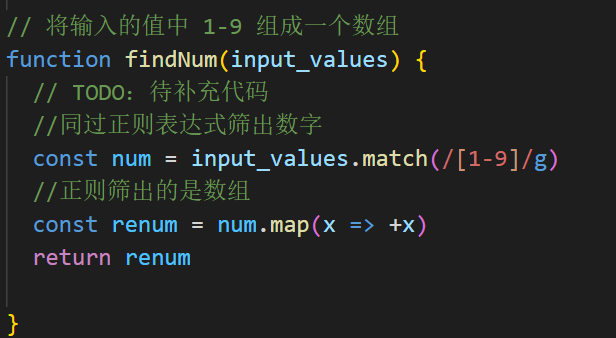
6.正则筛选
一、 fetch 基本语法
javascript
fetch(url[, options])
.then(response => {
// 处理响应
})
.catch(error => {
// 捕获错误
});
- url :请求的接口地址(必填)。
- options (可选):配置对象,包含请求方法、请求头、请求体等。
二、常见请求示例
1. GET 请求(默认方式)
javascript
// 发起GET请求获取数据
fetch('https://jsonplaceholder.typicode.com/todos/1')
.then(response => {
// 检查响应状态是否成功(status在200-299之间)
if (!response.ok) {
throw new Error(`请求失败:${response.status}`);
}
// 将响应解析为JSON格式
return response.json();
})
.then(data => {
console.log('获取的数据:', data);
})
.catch(error => {
console.error('请求出错:', error);
});
2. POST 请求(提交数据)
javascript
// 要提交的参数
const postData = {
title: 'foo',
body: 'bar',
userId: 1
};
fetch('https://jsonplaceholder.typicode.com/posts', {
method: 'POST', // 设置请求方法为POST
headers: {
'Content-Type': 'application/json' // 声明请求体为JSON格式
},
body: JSON.stringify(postData) // 将对象转为JSON字符串
})
.then(response => response.json())
.then(data => {
console.log('提交后返回的数据:', data);
})
.catch(error => {
console.error('POST请求出错:', error);
});
三、关键注意点
1. 响应处理: fetch 只会捕获网络错误(如断网),不会因 HTTP 状态码错误(如404、500)触发 catch ,需要手动通过 response.ok 或 response.status 判断。
2. 数据解析:根据响应类型选择解析方法:
- response.json() :解析为JSON对象(最常用)。
- response.text() :解析为纯文本。
- response.blob() :解析为二进制文件(如图片)。
3. 跨域问题:请求不同域名的接口时,需要后端配置 CORS(跨域资源共享),否则会报错。
四、 async/await 简化写法
结合 ES6 的 async/await 可以让异步代码更像同步代码,可读性更高:
javascript
async function fetchData() {
try {
const response = await fetch('https://jsonplaceholder.typicode.com/todos/1');
if (!response.ok) {
throw new Error(`请求失败:${response.status}`);
}
const data = await response.json();
console.log('获取的数据:', data);
} catch (error) {
console.error('请求出错:', error);
}
}
// 调用函数
fetchData();

有“AI”的1024 = 2048,欢迎大家加入2048 AI社区
更多推荐

 3
3 0
0- 0


 已为社区贡献1条内容

所有评论(0)