[python]收纳一些常见问题——更新于20260106
python经验
1.python 五种下划线的含义
https://zhuanlan.zhihu.com/p/36173202
2.正则表达式匹配中文最简单的方法\u4e00和\u9fa5是unicode编码,并且正好是中文编码的开始和结束的两个值,所以这个正则表达式可以用来判断字符串中是否包含中文,如下:
>>>import re
>>>word = '浙江之潮1,天下之伟观也。自既望以至十八日为最盛2。方其远出海门3,仅如银线4;既而渐近,则玉城雪岭际天而来5,大声如雷霆,震撼激射,吞天沃日6,势极雄豪。杨诚斋诗云“海涌银为郭,江横玉系腰”者是也7'
>>>re.findall(r'[\u4e00-\u9fa5]', word)
# Result: ['浙', '江', '之', '潮', '天', '下', '之', '伟', '观', '也', '自', '既', '望', '以', '至', '十', '八', '日', '为', '最', '盛', '方', '其', '远', '出', '海', '门', '仅', '如', '银', '线', '既', '而', '渐', '近', '则', '玉', '城', '雪', '岭', '际', '天', '而', '来', '大', '声', '如', '雷', '霆', '震', '撼', '激', '射', '吞', '天', '沃', '日', '势', '极', '雄', '豪', '杨', '诚', '斋', '诗', '云', '海', '涌', '银', '为', '郭', '江', '横', '玉', '系', '腰', '者', '是', '也']
>>>''.join(re.findall(r'[\u4e00-\u9fa5]', word))
# Result: '浙江之潮天下之伟观也自既望以至十八日为最盛方其远出海门仅如银线既而渐近则玉城雪岭际天而来大声如雷霆震撼激射吞天沃日势极雄豪杨诚斋诗云海涌银为郭江横玉系腰者是也'
3.python 字典(dict)按键和值排序
>>>data = {'a': 4, 'c': 2, 'b': 1, 'd': 3}

>>>sorted(data.items(), key=lambda d: d[1], reverse=True)	# 按值由大到小排序
[('a', 4), ('d', 3), ('c', 2), ('b', 1)]

>>>sorted(data.items(), key=lambda d: d[0])		# 按键字母顺序排序
[('a', 4), ('b', 1), ('c', 2), ('d', 3)]
4.更安全的eval()
什么是eval()
使用普通eval()在真实的后端项目中时,会有被代码注入的风险
以下方法可以让eval的安全性更高,风险相对较小
import ast
ast.literal_eval()      # 更安全的eval
5.Python中给数字添加千位分隔符
每日演练:Python中数字的千位分隔符
6.python jsonp转json
Python_优雅的解析jsonp格式为json
相关文章:
Python JSON/JSONP数据解析
关于Python中正则表达式re.S的作用
8.关于ModuleNotFoundError: No module named ‘crypto‘解决
9.没有斜杠的unicode字符转中文
s = "u8bb8u5149u6c49"
bytes(s.replace("u", "\\u").encode()).decode("unicode_escape")
10.同一个请求体在windows系统可以拿到json数据,但在linux上却是乱码
原因是Accept-Encoding影响了响应编码
请求头包含"Accept-Encoding": “br,gzip”,这意味着服务器可能返回Brotli(br)或gzip压缩的响应。
Windows环境:可能默认支持Brotli/gzip解压(或send_get_request函数在Windows上已正确处理压缩),因此能正常解析JSON。
Linux环境:若send_get_request未集成Brotli解压逻辑(如未使用brotli库),或压缩库版本不兼容,会导致读取到压缩后的原始二进制数据,显示为乱码。
Pyinstaller
1.提示找不到dll
Failed to load Python DLL
'C:\Users\username\Desktop\_internal\python38.dll'.
LoadLibrany: 找不到指定的模块
这是因为打包时没有将dll打包到exe中,可能没有使用pyinstaller -F 进行打包所致,重新打包即可
pyinstaller -F test.py
注意:如果使用.spec文件进行打包,则无法设置-F参数,会出现以下报错:
ERROR: option(s) not allowed:
  --onedir/--onefile
makespec options not valid when a .spec file is given
错误提示明确指出:当使用 .spec 文件时,不允许再使用 -F/–onefile 或 -D/–onedir 选项。应该首先修改spec中的参数:
     # 删除 coll = COLLECT(...) 整个代码块
     exe = EXE(
         pyz,
         a.scripts,
         a.binaries,  # 添加此行
         a.datas,     # 添加此行
         name='test',
         debug=False,
         bootloader_ignore_signals=False,
         strip=False,
         upx=True,
         console=False,
         disable_windowed_traceback=False,
         argv_emulation=False,
         target_arch=None,
         codesign_identity=None,
         entitlements_file=None,
     )
然后直接使用spec打包:
pyinstaller test.spec
2.打包后运行出现ModuleNotFoundError
打包环境依赖中没有安装这个包
可以在当前环境中安装好再打包,或者找到有该包的环境依赖的Script文件夹,然后:
E:\all_venv\test_env\Scripts\pyinstaller -F test.py
3.Pyinstaller 打包后jieba缺少dict.txt
可以自己写个hook放到pyinstaller的hooks文件夹里
hook文件的命名规范为: hook-【库名】.py,以结巴分词为例,即为hook-jieba.py,然后简单敲入以下两行:
from PyInstaller.utils.hooks import collect_data_files

datas = collect_data_files("jieba")
pyinstaller 打包出现第三方库FileNotFoundError的一般解决方法
4. 在Win10上用pyinstaller打包后,无法在Win7中打开
两种解决方法:
- 简单粗暴 – 在win7上用pyinstaller打包
- 下载VC++ redis 2015安装在Win10和Win7上,再用pyinstaller打包一次,即可在Win7中运行
参考文章:
Pyinstaller 打包发布经验总结
https://blog.csdn.net/Neil_001/article/details/121132604
Selenium
1>python+selenium拖动滑块
https://www.jianshu.com/p/f1fef22a14f4
2>selenium.common.exceptions.JavascriptException: Message: javascript error: Invalid or unexpected token
检查一下你的JS语法,看是否有多余的标点符号
3>Python+selenium 自动化-启用带插件的chrome浏览器
https://www.cnblogs.com/lizm166/p/13207036.html
4>selenium–更改标签的属性值
selenium+JS实现对标签属性的增删改查
https://www.cnblogs.com/zouzou-busy/p/11285732.html
5>元素定位出现错误selenium.common.exceptions.StaleElementReferenceException: Message: stale element reference: element is not attached to the page document (Session info: chrome=80.0.3987.163)
使用find_element_by_xpath之类的选取元素后,页面刷新或动态更新后,之前的元素就失效了,当你使用失效的元素时就会出现这个错误
解决方法是再刷新后在测选取该元素
6>selenium webdriver使用过程中出现Element is not currently visible and so may not be interacted with的处理方法
参考文档: https://www.cnblogs.com/techfans/p/4329398.html
网站在元素的style属性中 或者是在css中将该元素设置为了display: none, 解决办法就是给元素加一个styl="display: block;"即可,selenium中使用以下代码
driver.execute_script(f"""document.querySelector("#{target.get_attribute("id")}").setAttribute('style', "display: block;")""")
数据获取
1>一个标签中有多行数据, 如何分行获取
我遇到的情况是这样的: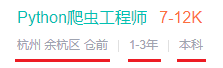
源码是:
<p>
	杭州 余杭区 仓前
	<em class="vline"></em>
	1-3年
	<em class="vline"></em>
	本科
</p>
解决方法
# selenium获取这个p标签的源码,然后split成list
info_ls = chrome.find_element_by_xpath('//div[@class="job-banner"]//p').get_attribute('innerHTML').split('<em class="vline"></em>')
item['City'] = info_ls[0]	# 城市
item['eduLevel'] = info_ls[1]	# 学历
item['workingExp'] = info_ls[2]		# 工作经验
2>Requests请求网页中文乱码
返回的响应为html报文时,使用如下代码可以解决中文乱码问题
r.text.encode(r.encoding).decode(r.apparent_encoding)
若返回的响应是json,则需要在请求头中增加一条参数,例如
# 这是一条示例,可以直接copy网站控制台中的Accept参数来定义headers
headers = {"Accept": "application/json, text/javascript, */*; q=0.01"}
Pyspider
1>安装pyspider过程出错:ERROR: Command errored out with exit status 10: python setup.py egg_info Check…
https://blog.csdn.net/weixin_43810415/article/details/99694315
2>pyspider all运行出错:①SyntaxError: invalid syntax,② - Deprecated option ‘domaincontroller’: use 'http_au
https://blog.csdn.net/u012424313/article/details/89511520
3>运行时出现: ValueError: Invalid configuration
解决方法: pip install wsgidav==2.4.1
4>运行时卡在result_worker starting…
错误如下:
(venv1) D:\Fire\PycharmProject\pyspider\test1>pyspider
c:\users\xxx\pycharmprojects\untitled1\venv1\lib\site-packages\pyspider\libs\utils.py:196: FutureWarning: timeout is not supported on you
r platform.
  warnings.warn("timeout is not supported on your platform.", FutureWarning)
[W 191028 21:30:05 run:413] phantomjs not found, continue running without it.
[I 191028 21:30:07 result_worker:49] result_worker starting...
解决方法:
下载phantomjs, 然后将phantomjs.exe拖到python根目录, 重新运行即可
如果还是不行,请参考:https://blog.csdn.net/qq_35167821/article/details/89162394
5. 在实际的调试中发现pyspider的Web预览界面只有一点非常小
这篇文章中的第3个:
https://www.jianshu.com/p/7bff6fd4dc1b
数据储存
1>MongoDB让数据具有过期时间
主要使用pymongo库中的createIndex()方法, 其中有个expireAfterSeconds的参数, 作用是指定一个以秒为单位的数值,可以用来创建一个具有过期时间的索引, 这样之后写入的集合就可以拥有过期时间
详情参考: https://www.runoob.com/mongodb/mongodb-indexing.html
注:指定的索引写入时必须为datetime格式, 否则不会自动删除
2>sql查询时设置超时时间
在字段前加上/*+ max_execution_time(10000)*/即可(10000ms == 10s)
SELECT /*+ max_execution_time(10000)*/ `title` FROM `mondata` WHERE `title` LIKE '%灭霸%' LIMIT 0,10
https://blog.csdn.net/pmdream/article/details/118414330
其他问题
1>解决windows下 cd 无法切换盘符目录
https://blog.csdn.net/kakuma_chen/article/details/71173243
2>关于解决’\u’开头的字符串转中文的方法
https://www.cnblogs.com/hahaxzy9500/p/7685955.html
3>修改jupyter notebook启动的虚拟环境
合并查看一下两篇文章:
https://blog.csdn.net/hao5335156/article/details/81165727
https://blog.csdn.net/weixin_41813895/article/details/84750990
4.python爬虫 随机UA库
https://blog.csdn.net/qq_18525247/article/details/81355397
5. 如何获取页面上单选按钮的值
jq方法:$('input:radio:checked').val();
原文链接:https://blog.csdn.net/z132411/article/details/105090806
6. 使用selenium时,如何用xpath取到iframe里的元素
selenium获取page_source时不包括内嵌iframe的源码,因此想要取到内嵌iframe的源码需要先切换iframe,再重新获取一次page_source
灵感来源:https://blog.csdn.net/qq_35768238/article/details/103913249
7. xpath高级用法
| 表达式 | 解释 |
|---|---|
//*[contains(@class, 'text')] |
选取元素,其属性包含某些字段 |
//div[contains(string(), '测试字段')] |
选取某个内容包含文本测试字段的div标签 |
//input[@value='1']/following-sibling::input[@value='0'] |
选取当前节点之后的所有同级节点 这里是选取 value=0的input的兄弟标签,其value=1 |
参考文章:
- XPath定位中and、or、not、contains、starts-with和string(.)用法
- 定位元素的父(parent::)、兄弟(following-sibling::、preceding-sibling::)节点
8. sklearn——CountVectorizer详解
https://blog.csdn.net/weixin_38278334/article/details/82320307
9. 如何用Python从海量文本抽取主题?
https://zhuanlan.zhihu.com/p/28992175
10. PIL将Image格式转为bytes字节流格式
https://blog.csdn.net/sxf1061700625/article/details/104144286
11.opencv读取图片的字节流
https://www.cnblogs.com/hercules-chung/p/12250883.html
12.Microsoft Visual C++ 14.0 is required. Get it with “Microsoft Visual C++ Build Tools”
error: Microsoft Visual C++ 14.0 is required. Get it with “Microsoft Visual C++ Build Tools,亲测100%安装
13.Fiddler 如何将请求的HTTPS改为HTTP?
Fiddler成长之路 - 如何将https修改为http协议
14.请求头中的Accept-Encoding可能会导致linux os跟windows os请求到的数据包不一致
15.释放Docker占用C盘的空间
https://www.cnblogs.com/cyxg/p/18800234
https://blog.csdn.net/Aquester/article/details/138867222

有“AI”的1024 = 2048,欢迎大家加入2048 AI社区
更多推荐
 1
1 0
0- 0


 已为社区贡献4条内容

所有评论(0)