iOS底层系列32 -- performSelector方法的探索
performSelector方法
- performSelector在运行时,调用方去找目标方法selector,在编译时不做校验;
延迟执行 -- 与RunLoop有关
- 调用performSelector:withObject:afterDelay方法实现延迟执行,底层的本质是会创建NSTimer定时器去执行目标方法selector;
- (void)viewDidLoad {
    [super viewDidLoad];
    [self performSelector:@selector(test) withObject:nil afterDelay:3];
}

- (void)test {
    NSLog(@"%s",__func__);
    NSLog(@"%@",[NSThread currentThread]);
}
@end
- 在主线程中,延迟3秒后执行test方法,可以执行成功;
- 若将performSelector:withObject:afterDelay方法 放在子线程中调用,如下
@implementation ViewController

- (void)viewDidLoad {
    [super viewDidLoad];

    dispatch_async(dispatch_get_global_queue(0, 0), ^{
        [self performSelector:@selector(test) withObject:nil afterDelay:3];
    });
}

- (void)test {
    NSLog(@"%s",__func__);
    NSLog(@"%@",[NSThread currentThread]);
}
@end
在子线程中调用performSelector:withObject:afterDelay方法 是不会执行test方法的,因为NSTimer定时器依赖于RunLoop才能执行,必须开启子线程的RunLoop,做如下修改:
@implementation ViewController

- (void)viewDidLoad {
    [super viewDidLoad];

    dispatch_async(dispatch_get_global_queue(0, 0), ^{
        [self performSelector:@selector(test) withObject:nil afterDelay:3];
        [[NSRunLoop currentRunLoop] run];
    });
}

- (void)test {
    NSLog(@"%s",__func__);
    NSLog(@"%@",[NSThread currentThread]);
}
@end
开启子线程执行任务 -- 与多线程有关
- performSelector: onThread:withObject: waitUntilDone: 可指定线程执行目标方法任务;
@implementation ViewController

- (void)viewDidLoad {
    [super viewDidLoad];
    dispatch_async(dispatch_get_global_queue(0, 0), ^{
        NSLog(@"%@",[NSThread currentThread]);
        NSLog(@"11111");
        [self performSelector:@selector(test) onThread:[NSThread currentThread] withObject:nil waitUntilDone:YES];
        NSLog(@"22222");
    });
}

- (void)test {
    NSLog(@"%s",__func__);
    NSLog(@"%@",[NSThread currentThread]);
}
@end
控制台的调试结果如下:
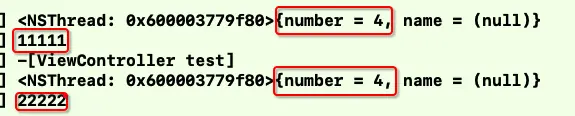
image.png
- performSelector发送消息与消息的执行是处于
同一个线程的; - waitUntilDone参数为Yes,表示test方法必须执行完成,才会执行之后的打印2222,即会阻塞当前线程的继续执行;
performSelector:方法传递多参数的实现方案
- 第一种方案:将所有参数放到字典或者数组中,再传递集合即可;
@implementation ViewController

- (void)viewDidLoad {
    [super viewDidLoad];

    NSDictionary *params = @{
        @"name":@"yanzi",
        @"age":@"30"
    };
    [self performSelector:@selector(test:) withObject:params];

}

- (void)test:(NSDictionary *)params {
    NSLog(@"%@--%@",params[@"name"],params[@"age"]);
}
@end
第二种方案:利用objc_msgSend()进行传递,其可以传递多个参数;
#import "ViewController.h"
#import <objc/message.h>

@interface ViewController ()

@end

@implementation ViewController

- (void)viewDidLoad {
    [super viewDidLoad];

    ((void (*)(id,SEL,NSString *, NSString *, NSString *))objc_msgSend)(self, @selector(testWithParam:param2:param3:),@"111",@"222",@"333");
}

//有三个参数的方法
- (void)testWithParam:(NSString *)param1 param2:(NSString *)param2 param3:(NSString *)param3 {
    NSLog(@"param1:%@, param2:%@, param3:%@",param1, param2, param3);
}
@end
第三种方案:利用NSInvocation进行传递
@implementation ViewController

- (void)viewDidLoad {
    [super viewDidLoad];
    //调用方法
    NSArray *paramArray = @[@"112",@[@2,@13],@12];
    [self performSelector:@selector(testFunctionWithParam:param2:param3:) withObjects:paramArray];
}

//可以传多个参数的方法
- (id)performSelector:(SEL)selector withObjects:(NSArray *)objects{
    // 方法签名(方法的描述)
    NSMethodSignature *signature = [[self class] instanceMethodSignatureForSelector:selector];
    if (signature == nil) {
        //可以抛出异常也可以不操作。
    }

    //NSInvocation: 利用一个NSInvocation对象包装一次方法调用(方法调用者、方法名、方法参数、方法返回值)
    NSInvocation *invocation = [NSInvocation invocationWithMethodSignature:signature];
    invocation.target = self;
    invocation.selector = selector;

    //设置参数
    NSInteger paramsCount = signature.numberOfArguments - 2; // 除self、_cmd以外的参数个数
    paramsCount = MIN(paramsCount, objects.count);
    for (NSInteger i = 0; i < paramsCount; i++) {
        id object = objects[i];
        if ([object isKindOfClass:[NSNull class]]) continue;
        [invocation setArgument:&object atIndex:i + 2];
    }

    //调用方法
    [invocation invoke];

    //获取返回值
    id returnValue = nil;
    if (signature.methodReturnLength) { // 有返回值类型,才去获得返回值
        [invocation getReturnValue:&returnValue];
    }
    return returnValue;
}

//要调用的方法
- (void)testFunctionWithParam:(NSString *)param1 param2:(NSArray *)param2 param3:(NSInteger)param3 {
    NSLog(@"param1:%@, param2:%@, param3:%ld",param1, param2, param3);
}
@end
AI大模型学习福利
作为一名热心肠的互联网老兵,我决定把宝贵的AI知识分享给大家。 至于能学习到多少就看你的学习毅力和能力了 。我已将重要的AI大模型资料包括AI大模型入门学习思维导图、精品AI大模型学习书籍手册、视频教程、实战学习等录播视频免费分享出来。
一、全套AGI大模型学习路线
AI大模型时代的学习之旅:从基础到前沿,掌握人工智能的核心技能!
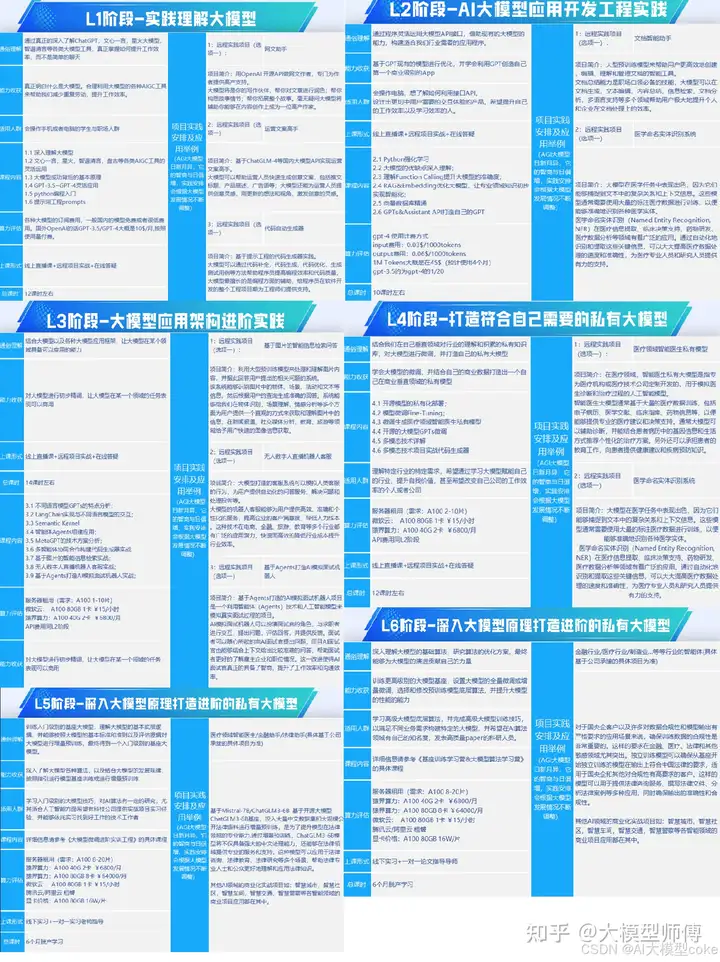
因篇幅有限,仅展示部分资料,需要点击文章最下方名片即可前往获取
二、640套AI大模型报告合集
这套包含640份报告的合集,涵盖了AI大模型的理论研究、技术实现、行业应用等多个方面。无论您是科研人员、工程师,还是对AI大模型感兴趣的爱好者,这套报告合集都将为您提供宝贵的信息和启示。
因篇幅有限,仅展示部分资料,需要点击文章最下方名片即可前往获
三、AI大模型经典PDF籍
随着人工智能技术的飞速发展,AI大模型已经成为了当今科技领域的一大热点。这些大型预训练模型,如GPT-3、BERT、XLNet等,以其强大的语言理解和生成能力,正在改变我们对人工智能的认识。 那以下这些PDF籍就是非常不错的学习资源。
因篇幅有限,仅展示部分资料,需要点击文章最下方名片即可前往获
四、AI大模型商业化落地方案

因篇幅有限,仅展示部分资料,需要点击文章最下方名片即可前往获
作为普通人,入局大模型时代需要持续学习和实践,不断提高自己的技能和认知水平,同时也需要有责任感和伦理意识,为人工智能的健康发展贡献力量

有“AI”的1024 = 2048,欢迎大家加入2048 AI社区
更多推荐

 9
9 0
0- 0


 已为社区贡献301条内容

所有评论(0)