Qwen3-VL-8B-Instruct模型部署和峰值显存占用实测
本文详细介绍了Qwen3-VL-8B-Instruct多模态大模型的部署方法和显存占用测试。主要内容包括:1)通过GitHub下载代码库,使用Modelscope获取模型权重;2)配置conda虚拟环境并安装必要的Python库;3)改造推理代码以测量峰值显存占用。测试结果显示,在单张图片推理任务中,模型能准确描述图像内容(如沙滩上女子与狗的温馨场景),单卡显存占用约17GB,多卡可降低单卡负载。
Qwen3-VL-8B-Instruct模型部署和显存占用实测
一、模型部署
1、Github仓库代码下载
使用git clone --recursive下载完整代码:
git clone --recursive https://github.com/QwenLM/Qwen3-VL.git
2、Modelscope模型权重文件下载
Modelscope模型权重:https://modelscope.cn/models/Qwen/Qwen3-VL-8B-Instruct
使用 Modelscope 下载 Qwen3-VL-8B-Instruct 完整模型权重文件, --local_dir用于指定模型保存路径。这里也可以使用HuffingFace下载,但国内需要代理或者使用镜像网站。
modelscope download --model Qwen/Qwen3-VL-8B-Instruct README.md --local_dir ./dir
3、conda配置环境
首先使用conda创建虚拟环境vlm_env:
conda create -n vlm_env python==3.10
创建后激活虚拟环境vlm_env:
conda activate vlm_env
安装transformers库(如果只进行推理的话这一个库就够了):
pip install "transformers>=4.57.0"
对于峰值显存占用测试,还要用到torch自带的统计工具,需要安装torch:
pip install torch==2.5.0 torchvision==0.20.0 torchaudio==2.5.0
二、推理测试和显存占用
这部分首先进行峰值显存占用测试代码改造,接着结合官方代码仓库给的测试案例对不同案例demo进行测试。
1、峰值内存占用改造
在实际运行的代码前后插入以下代码即可:
import torch
# 在推理/训练开始前重置统计
torch.cuda.reset_peak_memory_stats()

# === 这里运行具体模型代码 (Model Inference/Training) ===
# output = model.generate(...)
# ===================================================

# 运行结束后打印峰值
max_memory = torch.cuda.max_memory_allocated() / (1024 ** 3) # 换算成 GB
print(f"🔥 GPU 理论显存峰值占用: {max_memory:.2f} GB")
max_memory = torch.cuda.max_memory_reserved() / (1024 ** 3) # 换算成 GB
print(f"🚀 GPU 实际显存峰值占用: {max_memory:.2f} GB")
2、demo1:单张图片推理(Single Image)
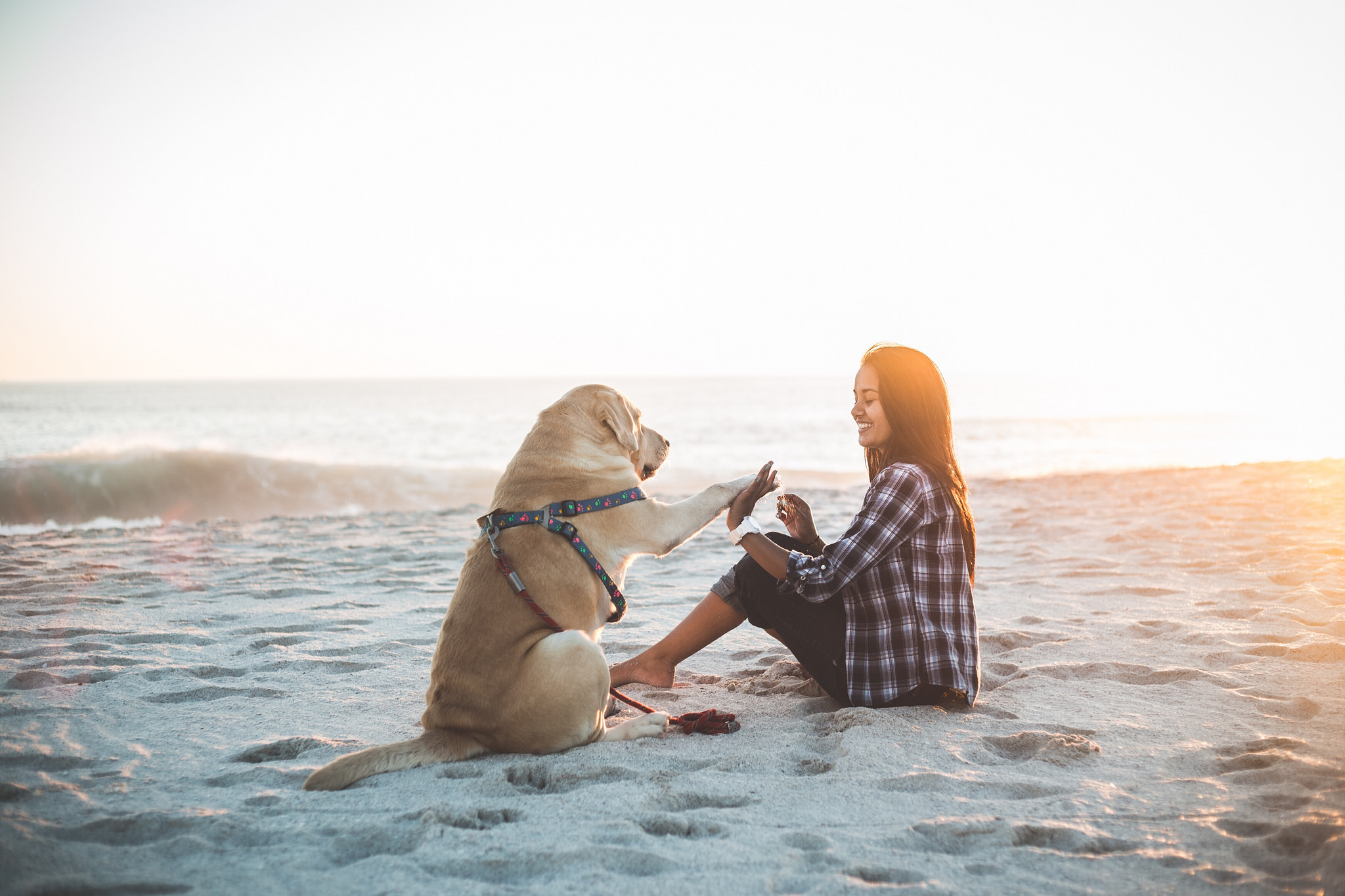
官方给的案例图片如下,对应的文本指令是:"Describe this image."。
Qwen3-VL-8B-Instruct模型给出的回答是:
[‘This is a heartwarming and serene photograph capturing a moment between a young woman and her dog on a beach at sunset or sunrise.\n\nMain Subjects:\n- A light-colored Labrador Retriever, likely yellow, is sitting upright on the sand. It is wearing a colorful harness with a floral or paw-print pattern and is reaching its front paw out towards the woman, as if to high-five or beg for a treat.\n- A young woman with long, dark hair is sitting cross-legged in the sand, smiling warmly at the dog. She is wearing a plaid shirt (black and white or dark blue and white) and dark’]
对应的中文翻译如下:
这是一张温馨而宁静的照片,捕捉到了日落或日出时分,一位年轻女子和她的爱犬在沙滩上的动人瞬间。
主要主体:
一只浅色的拉布拉多犬(很可能是黄色拉布拉多)正端坐在沙滩上。它身上穿着一件带有花朵或爪印图案的彩色胸背带,并且正向女子伸出一只前爪,看起来像是在求击掌或者讨要零食。
一位留着深色长发的年轻女子盘腿坐在沙地上,正对着狗狗温暖地微笑。她身穿一件格子衬衫(黑白相间或深蓝白相间)搭配深色……
对应的峰值内存占用如下。单卡17GB左右显存占用、双卡每张卡各8GB左右显存占用,4卡每张卡各4GB左右显存占用。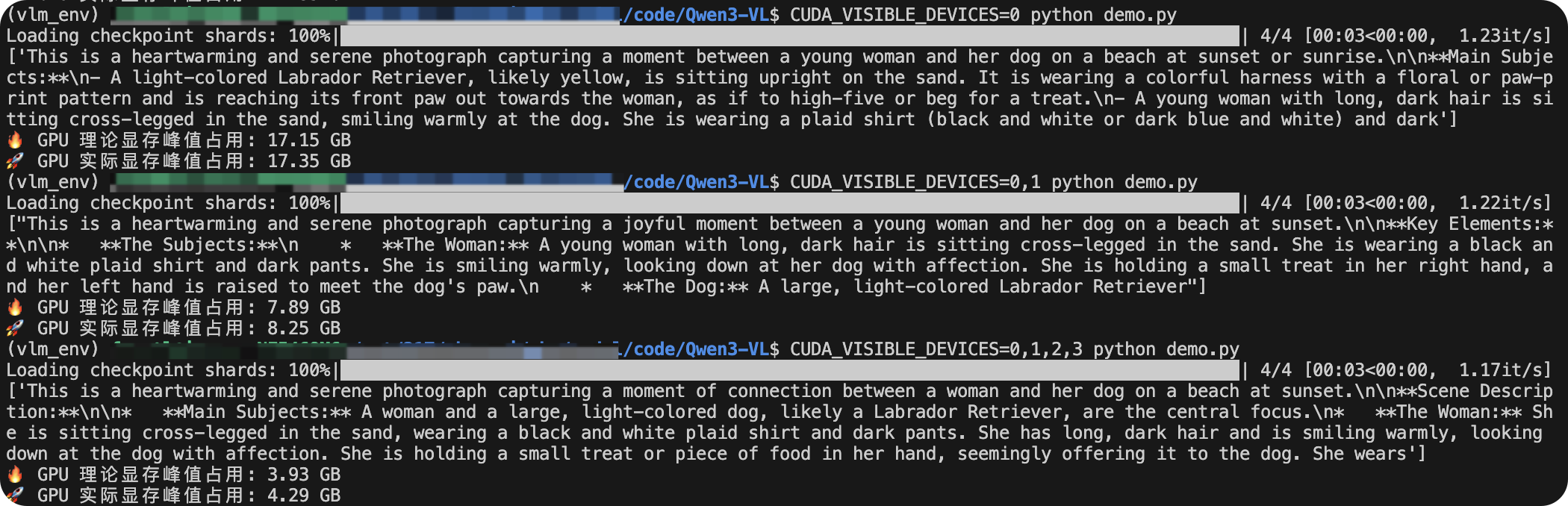
该demo示例改造后的完整代码如下:
from transformers import AutoModelForImageTextToText, AutoProcessor

import torch

# 在推理/训练开始前重置统计
torch.cuda.reset_peak_memory_stats()

# 统一模型路径
qwen_vl_8b_instruct_model_path = "/path/to/pretrained_weight/Qwen3-VL-8B-Instruct"

# CUDA_VISIBLE_DEVICES=0,1,2,3 python demo.py

# default: Load the model on the available device(s)
model = AutoModelForImageTextToText.from_pretrained(
    qwen_vl_8b_instruct_model_path, dtype="auto", device_map="auto"
)

# We recommend enabling flash_attention_2 for better acceleration and memory saving, especially in multi-image and video scenarios.
# model = AutoModelForImageTextToText.from_pretrained(
#     "Qwen/Qwen3-VL-235B-A22B-Instruct",
#     dtype=torch.bfloat16,
#     attn_implementation="flash_attention_2",
#     device_map="auto",
# )

processor = AutoProcessor.from_pretrained(qwen_vl_8b_instruct_model_path)

messages = [
    {
        "role": "user",
        "content": [
            {
                "type": "image",
                "image": "https://qianwen-res.oss-cn-beijing.aliyuncs.com/Qwen-VL/assets/demo.jpeg",
            },
            {"type": "text", "text": "Describe this image."},
        ],
    }
]

# Preparation for inference
inputs = processor.apply_chat_template(
    messages,
    tokenize=True,
    add_generation_prompt=True,
    return_dict=True,
    return_tensors="pt"
)
inputs = inputs.to(model.device)

# Inference: Generation of the output
generated_ids = model.generate(**inputs, max_new_tokens=128)
generated_ids_trimmed = [
    out_ids[len(in_ids) :] for in_ids, out_ids in zip(inputs.input_ids, generated_ids)
]
output_text = processor.batch_decode(
    generated_ids_trimmed, skip_special_tokens=True, clean_up_tokenization_spaces=False
)
print(output_text)

# 运行结束后打印峰值
max_memory = torch.cuda.max_memory_allocated() / (1024 ** 3) # 换算成 GB
print(f"🔥 GPU 理论显存峰值占用: {max_memory:.2f} GB")
max_memory = torch.cuda.max_memory_reserved() / (1024 ** 3) # 换算成 GB
print(f"🚀 GPU 实际显存峰值占用: {max_memory:.2f} GB")
3、demo2:多张图片推理(Multi image inference)
这里我按照测试案例的文本指令:Identify the similarities between these images.。并采用了以下两张图片作为输入:

Qwen3-VL-8B-Instruct模型给出的回答是:
[‘Based on a visual analysis, the two images share several key similarities, despite their different designs and institutions:\n\n1. Overall Structure: Both images are circular seals or logos. They feature a central design enclosed within a circular border.\n2. Central Element: Each seal has a prominent central graphic. In the first image, this is a stylized shield-like shape containing Chinese characters. In the second image, it is a shield-like shape containing a complex, abstract design.\n3. Text Placement: Text is placed along the outer edge of the circle in both logos. The first logo has the text "NANKAI’]
对应的中文翻译如下:
基于视觉分析,尽管这两个图像的设计和所属机构不同,但它们共有几个关键的相似之处:
- 整体结构:两个图像均为圆形的印章或徽标。其特征都在于圆形边框内包含一个中心设计。
- 中心元素:每个印章都有一个突出的中心图形。在第一张图中,这是一个包含汉字的风格化盾形图案;在第二张图中,则是一个包含复杂抽象设计的盾形图案。
- 文字布局:两个徽标中的文字均沿着圆环外沿排列。第一个徽标印有“NANKAI”字样……
对应的峰值内存占用如下。单卡17GB左右显存占用。

该demo示例改造后的完整代码如下:
from transformers import AutoModelForImageTextToText, AutoProcessor

import torch

# 在推理/训练开始前重置统计
torch.cuda.reset_peak_memory_stats()

# CUDA_VISIBLE_DEVICES=7 python demo.py

# 统一模型路径
qwen_vl_8b_instruct_model_path = "/path/to/pretrained_weight/Qwen3-VL-8B-Instruct"

# default: Load the model on the available device(s)
model = AutoModelForImageTextToText.from_pretrained(
    qwen_vl_8b_instruct_model_path, dtype="auto", device_map="auto"
)

# We recommend enabling flash_attention_2 for better acceleration and memory saving, especially in multi-image and video scenarios.
# model = AutoModelForImageTextToText.from_pretrained(
#     "Qwen/Qwen3-VL-235B-A22B-Instruct",
#     dtype=torch.bfloat16,
#     attn_implementation="flash_attention_2",
#     device_map="auto",
# )

processor = AutoProcessor.from_pretrained(qwen_vl_8b_instruct_model_path)

# Messages containing multiple images and a text query
messages = [
    {
        "role": "user",
        "content": [
            {"type": "image", "image": "./images/nankai.jpg"},
            {"type": "image", "image": "./images/tju_badge_white.png"},
            {"type": "text", "text": "Identify the similarities between these images."},
        ],
    }
]

# Preparation for inference
inputs = processor.apply_chat_template(
    messages,
    tokenize=True,
    add_generation_prompt=True,
    return_dict=True,
    return_tensors="pt"
)
inputs = inputs.to(model.device)

# Inference: Generation of the output
generated_ids = model.generate(**inputs, max_new_tokens=128)
generated_ids_trimmed = [
    out_ids[len(in_ids) :] for in_ids, out_ids in zip(inputs.input_ids, generated_ids)
]
output_text = processor.batch_decode(
    generated_ids_trimmed, skip_special_tokens=True, clean_up_tokenization_spaces=False
)
print(output_text)

# 运行结束后打印峰值
max_memory = torch.cuda.max_memory_allocated() / (1024 ** 3) # 换算成 GB
print(f"🔥 GPU 理论显存峰值占用: {max_memory:.2f} GB")
max_memory = torch.cuda.max_memory_reserved() / (1024 ** 3) # 换算成 GB
print(f"🚀 GPU 实际显存峰值占用: {max_memory:.2f} GB")
4、demo3:视频推理(Video inference)
这部分需要安装新的包av:
pip install av
由于服务器ffmpeg相关支持版本太老,所以安装报错。用下面命令可以解决这一问题。该命令强制pip只寻找预编译好的 Wheel 包(需要网络环境允许且源里有对应的包)。
pip install av --only-binary=:all:
这里我按照测试案例的文本指令:Describe this video.。并采用了官方给的示例链接视频作为输入:
https://qianwen-res.oss-cn-beijing.aliyuncs.com/Qwen2-VL/space_woaudio.mp4
Qwen3-VL-8B-Instruct模型给出的回答是:
[‘The video begins with a man standing in front of a large screen displaying a map of the world with various lines and data points. He appears to be speaking or presenting, possibly discussing global events or data. The scene then transitions to a graphic of the International Space Station (ISS) surrounded by various national flags, indicating international cooperation. Text appears on the screen reading “Inside the ISS,” suggesting the video will explore life and activities aboard the ISS.\n\nThe video then cuts to a scene inside the ISS, where two astronauts are seen standing and talking to the camera. One astronaut is holding a microphone, indicating they might be conducting an interview or giving’]
对应的中文翻译如下:
视频开头,一位男士站在显示世界地图的大屏幕前,屏幕上布满了各种线条和数据点。他似乎正在发言或进行演示,可能是在探讨全球性事件或相关数据。随后画面过渡到一幅国际空间站(ISS)的图像,其周围环绕着各国的国旗,象征着国际合作。屏幕上出现了文字“Inside the ISS”(走进国际空间站),预示着视频将展示空间站内的生活与工作场景。接着镜头切换到国际空间站内部,可以看到两名宇航员站立着面对镜头交谈。其中一名宇航员手持麦克风,表明他们可能正在进行采访或发表……
对应的峰值内存占用如下,单卡显存占用约21GB。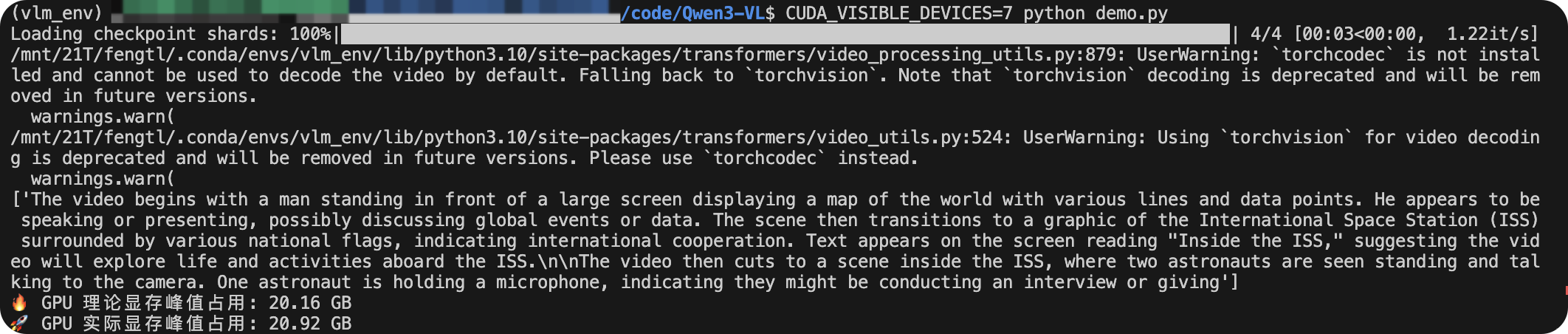

有“AI”的1024 = 2048,欢迎大家加入2048 AI社区
更多推荐
 45
45 0
0- 0


 已为社区贡献6条内容

所有评论(0)