chen-er 专为Chen式ER图打造的npm包
🕒 阅读时间:11 min read👀 阅读量:36
前言
现代 Web 的各种图形库基本上都默认存在 ER 图 渲染,尤其是 Mermaid 这种“文本到图形”更是不例外,但遗憾的是,这些图形库完全都是按照 Crow’s Foot 方法
Crow’s Foot 方法(也称 “乌鸦脚表示法”)是一种用于数据库设计的实体 - 关系 (ER) 图可视化表示方法,以其表示 “多” 关系的独特三分支符号(类似鸟爪)得名。它是数据库设计中最流行的 ER 表示法之一,广泛应用于软件工程、信息工程和数据库建模领域。
来写的,但学校是按照 Chen’s Notation,也就是经典的 菱形关系、椭圆属性、矩形实体
Chen 表示法(也称 “陈式 ER 表示法”)是由华裔计算机科学家陈品山(Peter Pin-Shan Chen) 于 1976 年在《ACM Transactions on Database Systems》发表的《The Entity-Relationship Model—Toward a Unified View of Data》中首次提出的实体 - 关系(ER)模型可视化规范,是原始 ER 模型的官方表示法,也是数据库建模、软件工程教学中最经典的 ER 可视化范式。
个人来讲,ER 图 表示法是我在学校的数据库课中学来的。为了方便自己快速从文本绘制 ER 图(就像 Mermaid 那样)而不是通过第三方工具手动拖拽拼凑那样繁琐麻烦
那么作为计算机学生,发现网上缺少这样的实现,不免心痒,于是就诞生了下面的 npm 包
chen-er
github/chen-er: https://github.com/xingwangzhe/chen-er/
npm/chen-er: https://www.npmjs.com/package/chen-er
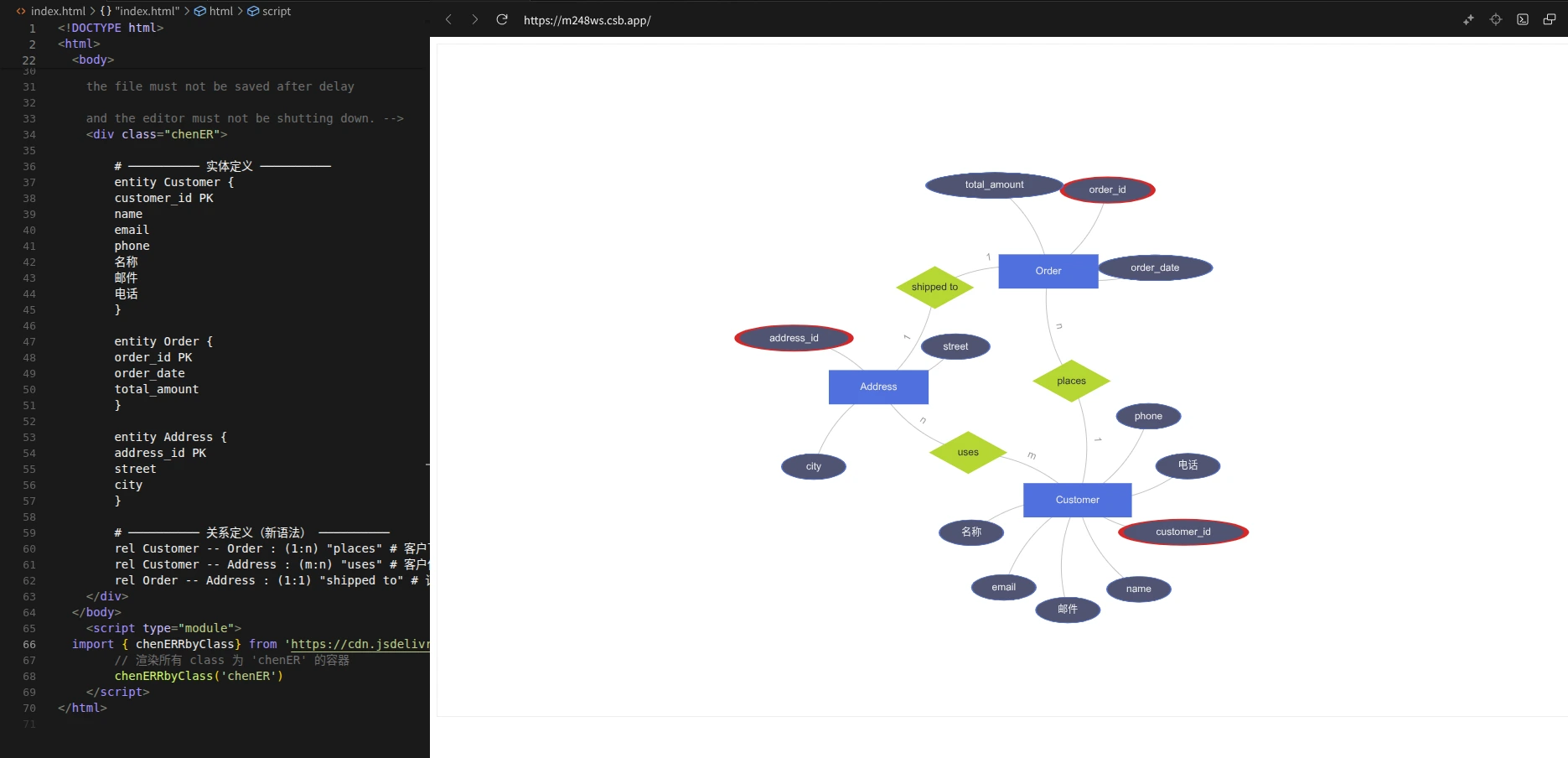
在线体验!!!: https://codesandbox.io/p/sandbox/m248ws
chen-er 是基于 Peggy 和 ECharts 开发的、从文本转到 ER 图 的 npm 包,其中,Peggy 用来将文本进行解析/序列化,ECharts 用来实现图形渲染与自动布局
技术细节
为什么选择 Peggy
这点要感谢 AI 的推荐,这个库看起来没什么人用,但我敢说这绝对是宝藏:它对语法的解析绝对比自己手撸正则要好很多!!!
我们可以自定义**“宏”**,来方便复用一些常用的方法
common.peggy
// Peggy 语法通用规则库

_  // 可选空白 + 注释
  = (comment / [ \t\n\r])*

__ // 至少一个空白字符
  = [ \t\n\r]+

// 行内空白(不含换行)
hws = [ \t]*

// 跨平台换行符
newline
  = "\r\n" / "\n" / "\r"

// 标识符(支持 Unicode 字母和数字)
Identifier
  = id:$[^ \t\n\r{}():\"#\-]+ &{ return /^[\p{L}_][\p{L}\p{N}_]*$/u.test(id); } { return id; }

// 行注释(不吞掉换行)
comment
  = "#" [^\n\r]* { return null; }
接下来就开始定义了,当你看到下面的 Peggy 代码,你会发现,这个定义非常符合编程直觉;即使你从未学过编译原理或者正则表达, 也能看懂很多!这正是 Peggy 的魅力所在!!!
entities.peggy
entity Customer {
  customer_id  PK    # 主键下划线用PK标记
  name
  email
  phone
}
类似的对于关系,我们可以这么定义
rel Customer -- Order (1:n) "places" # 客户下订单

rel Customer -- Address (m:n) "uses" # 客户使用地址

rel Order -- Address (1:1) "shipped to" # 订单发货地址
相应的代码实现
sample.peggy
// 引用公共规则

import { Identifier, hws, newline, _ , __, comment } from "./common.peggy"

// start // 解析入口

// = _ rels:rel+ _ { return rels; }

// 关系定义:rel <实体1> -- <实体2> : (基数) "<关系名>"

rel

= _ "rel" __ left:Identifier __ "--" __ right:Identifier _ ":" _ "(" card:Cardinality ")" _ name:QuotedString _ comment? newline? {

return { type: "relation", left, right, cardinality: card, name };

}

// 基数:如 1:n, m:n, 1:1

Cardinality

= chars:[^)]* { return chars.join("").trim(); }

// 双引号字符串

QuotedString

= '"' chars:[^"]* '"' { return chars.join(""); }
这两个重点写好了,那么汇总一下
all.peggy
// 引用公共规则

import { Identifier, hws, newline, _ , __, comment } from "./common.peggy"

// start // 解析入口

// = _ rels:rel+ _ { return rels; }

// 关系定义:rel <实体1> -- <实体2> : (基数) "<关系名>"

rel

= _ "rel" __ left:Identifier __ "--" __ right:Identifier _ ":" _ "(" card:Cardinality ")" _ name:QuotedString _ comment? newline? {

return { type: "relation", left, right, cardinality: card, name };

}

// 基数:如 1:n, m:n, 1:1

Cardinality

= chars:[^)]* { return chars.join("").trim(); }

// 双引号字符串

QuotedString

= '"' chars:[^"]* '"' { return chars.join(""); }
至此,语法解析的部分基本结束。同时,这些 Peggy 编译后输出的 JS 代码会自动输出序列化的数据,接下来将在 ECharts 中使用。
ECharts 渲染
首先简单定义一下类型
type.ts
/**

* 字段定义

*/

export interface ERField {

type: "field";

name: string;

pk: boolean;

}

/**

* 实体定义

*/

export interface EREntity {

type: "entity";

name: string;

fields: ERField[];

}

/**

* 关系定义

*/

export interface ERRelation {

type: "relation";

left: string;

right: string;

cardinality: string;

name: string;

}

/**

* ER 图 JSON 节点类型

*/

export type ERJson = EREntity | ERRelation;
“桥接”点,方便引入 Peggy 编译产生的 JS 解析器和序列化功能
main.ts
// @ts-ignore 使用 peggy 生成的解析器(ESM,命名导出 parse)

// 生成脚本见 package.json -> scripts.pg

import { parse as peggyParse } from "../grammar/peggy/all-parser.js";

import type { ERJson } from "./type";

/**

* 解析 ER 图文本为 AST

* @param input 多行 ER 图定义文本

* @returns 解析后的 AST 数组

*/

export function parseERSchema(input: string): ERJson[] {

try {

return peggyParse(input) as ERJson[];

} catch (e: any) {

console.error("解析失败:", e?.message, "\n位置:", e?.location);

throw e;

}

}

/**

* 解析 ER 图文本并输出 JSON

* @param input 多行 ER 图定义文本

* @returns JSON 字符串

*/

export function parseERSchemaToJSON(input: string): string {

return JSON.stringify(parseERSchema(input), null, 2);

}为了方便叙述,下面代码改成高度概括的版本
仅保留三个关键步骤——解析(parseERSchema)→ 映射(实体/属性/关系三类节点与连边)→ 渲染(ECharts Graph + 力导向布局)。形状遵循 Chen 表示法:实体=矩形,属性=椭圆(主键红色描边),关系=菱形;基数标注到边标签上。通过 chenERRbyClass/chenERRbyId 即可把容器内的 ER 文本 直接渲染为可交互图。
graph.ts
import * as echarts from "echarts/core";

import { GraphChart } from "echarts/charts";

import { TooltipComponent } from "echarts/components";

import { CanvasRenderer } from "echarts/renderers";

import type { ComposeOption } from "echarts/core";

import type { GraphSeriesOption } from "echarts/charts";

import { parseERSchema } from "./main";

// 仅注册必需组件(图 + 提示 + 渲染器)

echarts.use([GraphChart, TooltipComponent, CanvasRenderer]);

type ECOption = ComposeOption<GraphSeriesOption>;

// 椭圆属性节点(Chen)

const ELLIPSE = "path://M50 0 A50 50 0 1 1 49.999 0 Z";

// AST -> Graph(节点、连边)

function astToGraph(ast: any[]) {

const nodes: any[] = [];

const edges: any[] = [];

for (const it of ast) {

if (it.type === "entity") {

const id = it.name;

nodes.push({

id,

name: id,

symbol: "rect",

category: "entity",

symbolSize: [Math.max(140, id.length * 14 + 40), 48],

label: { show: true },

attrs: (it.fields || []).map((f: any) => ({ name: f.name, pk: !!f.pk })),

});

for (const f of it.fields || []) {

const aid = `${id}.${f.name}`;

nodes.push({

id: aid,

name: f.name,

symbol: ELLIPSE,

symbolKeepAspect: false,

symbolSize: [Math.max(90, f.name.length * 16), 36],

category: "attribute",

label: { show: true },

itemStyle: {

borderColor: f.pk ? "#d62728" : "#5470c6",

borderWidth: f.pk ? 3 : 1,

},

});

edges.push({ source: aid, target: id });

}

} else if (it.type === "relation") {

const rid = `rel:${it.name}-${it.left}-${it.right}`;

const [l = "", r = ""] = (it.cardinality || "").split(":");

nodes.push({

id: rid,

name: it.name,

symbol: "diamond",

symbolSize: [110, 60],

category: "relation",

label: { show: true },

});

edges.push({ source: rid, target: it.left, name: l });

edges.push({ source: rid, target: it.right, name: r });

}

}

return { nodes, edges };

}

// 批量渲染指定类名容器

export function renderChenER(cls = "chenER") {

const list = document.getElementsByClassName(cls) as HTMLCollectionOf<HTMLElement>;

for (let i = 0; i < list.length; i++) {

const el = list[i];

const { nodes, edges } = astToGraph(parseERSchema(el.textContent || ""));

el.innerHTML = "";

const chart = echarts.init(el);

const option: ECOption = {

series: [

{

type: "graph",

layout: "force",

roam: true,

data: nodes,

links: edges,

categories: [

{ name: "entity" },

{ name: "relation" },

{ name: "attribute" },

],

label: { show: true, position: "inside" },

edgeLabel: { show: true, formatter: (p: any) => p?.data?.name ?? "" },

edgeSymbol: ["none", "none"],

lineStyle: { color: "#888", curveness: 0.2 },

force: { repulsion: 600, edgeLength: 140, friction: 0.2 },

tooltip: {

show: true,

formatter: (p: any) => {

if (p.dataType === "node" && p?.data?.category === "relation") {

return p.data.name || "";

}

if (p.dataType === "node" && p?.data?.category === "entity") {

const d = p.data as any;

const attrs = (d.attrs || []).map((a: any) => (a.pk ? `*${a.name}` : a.name));

return [d.name, ...attrs].join("<br/>");

}

return p.name || "";

},

},

},

],

};

chart.setOption(option);

addEventListener("resize", () => chart.resize());

}

}

export const chenERRbyClass = renderChenER;

export function chenERRbyId(id: string) {

const el = document.getElementById(id) as HTMLElement | null;

if (!el) throw new Error(`Container #${id} not found`);

el.classList.add("chenER");

renderChenER("chenER");

}
还等什么,现在就去试试吧!
https://codesandbox.io/p/sandbox/m248ws
chen-er 专为Chen式ER图打造的npm包
作者: xingwangzhe
本文链接: https://xingwangzhe.fun/posts/b8eb3b61
本文采用 知识共享署名-非商业性使用-相同方式共享 4.0 国际许可协议 进行许可。

有“AI”的1024 = 2048,欢迎大家加入2048 AI社区
更多推荐

 27
27 0
0- 0


 已为社区贡献2条内容

所有评论(0)