如何用Python调用Google机器翻译的API进行翻译
Google的神经机器翻译质量一直是译界比较认可的,可以说与DeepL不相上下。就调用的难易程度来说Google更简单一些,虽然它已经退出国内,而且它的API访问网址也不可用,但是可以通过reverse proxy的方法来解决这个问题。
一、购买VPS并安装1panel
大家可以买一个国外的VPS服务器,最好是美国的,并且最好是国内优化线路,访问速度快的,然后安装1panel面板,具体安装方法可以参考以前的文章:
https://pythonfun.blog.csdn.net/article/details/142425343
二、购买域名并更改DNS
可以从namesilo上买一个域名,一二刀就可以,然后把DNS改成cloudflare的DNS,在cloudflare上给网站设置一个A记录:mt,然后填入你购买的服务器的ip,这样可以把这个http://mt.yourdomain.com解析到你新买的服务器上面。
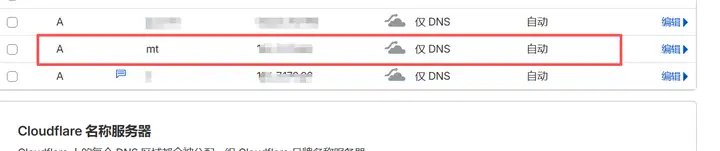
解析服务器
三、设置一个reverse proxy
在1panel上面,选择网站-网站-反向代理,然后创建一个反向代理。
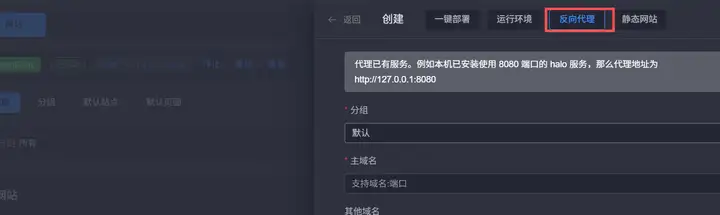
添加反向代理
主域名设置为http://mt.yourdomain.com,前端请求路径为/,后端代理地址是https://translation.googleapis.com。
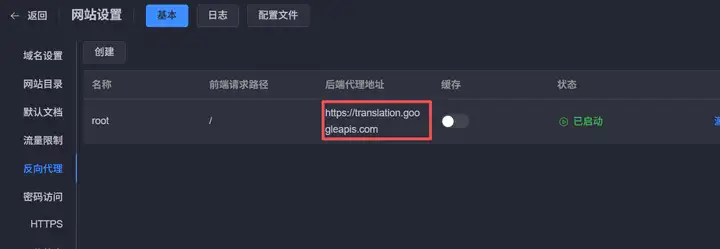
配置代理地址
四、配置代理信息
接着给http://mt.yourdomain.com申请一个https免费证书,把http://mt.yourdomain.com强制开启https,这样默认访问的就是443端口。
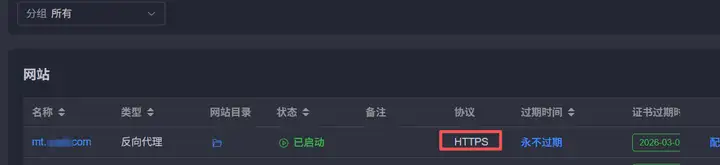
接下来,在这个reverse proxy的配置文件中修改监听端口为443,配置信息如下所示,仅供参考:
server {
    listen 443 ssl ;
    server_name mt.yourdomain.com;
    index index.php index.html index.htm default.php default.htm default.html;
    proxy_set_header Host https://translation.googleapis.com/language/translate/v2;
    proxy_set_header X-Forwarded-For $proxy_add_x_forwarded_for;
    proxy_set_header X-Forwarded-Host $server_name;
    proxy_set_header X-Real-IP $remote_addr;
    # 解决可能出现的 HTTPS/SSL 转发问题
    proxy_ssl_server_name on;
    proxy_ssl_protocols TLSv1 TLSv1.1 TLSv1.2 TLSv1.3;
    proxy_http_version 1.1;
    proxy_set_header Upgrade $http_upgrade;
    proxy_set_header Connection $http_connection;
    access_log /www/sites/mt.yourdomain.com/log/access.log main;
    error_log /www/sites/mt.yourdomain.com/log/error.log;
    location ^~ /.well-known/acme-challenge {
        allow all;
        root /usr/share/nginx/html;
    }
    include /www/sites/mt.yourdomain.com/proxy/*.conf;
五、代码测试
保存成功后,就可以用DeepSeek修改的python代码测试了,测试代码中增加了打印状态码和响应内容。这里把官方的代码进行了修改,用requests发起请求,这样不需要安装不必要的模块了,而且速度上也有了大幅度的提升。
import requests
import json

def google_api(content):
    # 你的反向代理地址
    url = "https://mt.yourdomain.com:443/language/translate/v2"

    # Google Cloud Translation API的正确参数格式
    params = {
        'key': "Your Google API",
        'q': content,
        'source': 'en',  # 或 'zh',看哪种有效
        'target': 'zh-CN',
        'format': 'text'
    }

    # 注意:Google Translation API使用GET请求,但参数放在查询字符串中
    # 如果你需要POST,数据格式也不同
    try:
        response = requests.get(url, params=params)
        print(f"状态码: {response.status_code}")
        print(f"响应内容: {response.text}")

        if response.status_code == 200:
            res = response.json()
            # Google Cloud Translation API的标准响应格式
            if 'data' in res and 'translations' in res['data']:
                text = res["data"]["translations"][0]["translatedText"]
                return text
            else:
                return f"响应格式错误: {res}"
        else:
            return f"请求失败: {response.status_code}, {response.text}"

    except Exception as e:
        return f"发生异常: {str(e)}"

# 测试
print("谷歌翻译:" + google_api("To be or not to be, that is a question."))
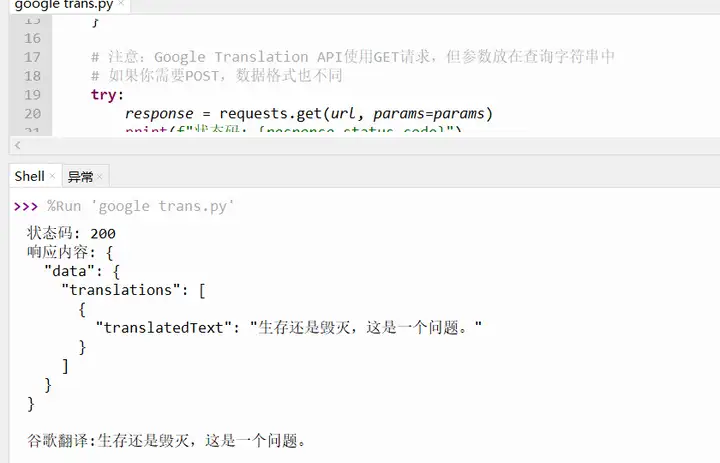
最终测试结果如下所示:
六、学后反思
- 谷歌翻译问题一直困扰了我好久,今天终于在DeepSeek的帮助下,完美解决。在解决过程中运用到了服务器技术、域名解析、面板安装、代理配置、代码测试等方面的知识。虽然看似问题不大,但是综合了多项技术。
- AI的功能现在已经非常强了,从问题的分析,到问题的解决,再到细节的指导,它都能如影随形,给你建设性的意见。让你在短时间内迅速解决问题。当然前期,还是需要储备一些服务器和编程方面的基础知识,这样才能更好、更快地化解难题。

有“AI”的1024 = 2048,欢迎大家加入2048 AI社区
更多推荐

 6
6 0
0- 0


 已为社区贡献25条内容

所有评论(0)