OpenAgents 智途百科 (RoadWise) —— 你的路途博学家
智途百科:打造你的车载私人导游,让路途不再枯燥
在车联网技术飞速发展的今天,我们能否打破车内与车外的物理隔阂,让每一次驾驶都成为一场有趣的探索之旅?答案是肯定的。今天,我将为大家介绍一款名为“智途百科 (RoadWise)-你的路途博学家”的车载智能导游系统,带大家一起探索如何从0到1打造这样一个有趣又实用的产品。
#OpenAgents
#Multi-AgentHackathon2025
#多智能体
#智能体网络
一、产品愿景与核心功能
智途百科旨在利用车联网的高精度定位与视觉感知能力,将沿途的风景转化为有声的历史画卷,让车辆成为用户的移动私人导游。其核心功能主要包括:
- “那是啥” (What’s That):用户通过语音询问或视线追踪触发,系统识别前方建筑物/景观,即时播报名称。
- 时光说书人 (Story Mode):基于大模型(LLM),将枯燥的百科数据转化为幽默风趣、悬疑或历史剧风格的短音频。
- 地理围栏主动触发:当车辆驶入特定文化景区,自动降低音乐音量,切入导游模式。
想象一下,当你驾车经过一座古桥,随口问一句“这桥有什么来头?”,智途百科会用深沉的声音告诉你:“这可是卢沟桥,800年前马可波罗走过这里时惊叹不已…”,是不是瞬间让旅途变得生动起来?
二、系统架构与数据流向
1. 系统架构图
智途百科构建了一个典型的“感知 -> 决策 -> 执行”闭环系统:
- 输入层:涵盖车载GPS/GNSS(提供经纬度、航向角)、前视摄像头(获取图像帧)以及麦克风(接收用户语音指令)。
- 处理层:包含POI检索引擎(根据GPS + 航向角查询地图API确定前方目标)、视觉校验(可选,用YOLO/ResNet对摄像头画面进行物体识别)、RAG(检索增强生成,拿着POI名称去搜索知识库)以及LLM叙事引擎(将搜索到的知识改写为口语化故事)。
- 输出层:通过TTS(文本转语音)播放音频,将导游内容传递给用户。
2. 数据流向
GPS坐标首先通过地图API进行反向地理编码,获取POI名称(如岳阳楼);接着进行知识库检索,再将相关信息输入LLM(Prompt:请像评书演员一样介绍岳阳楼);LLM生成文本后,通过TTS转换为语音,最后由音箱播放出来。
三、核心代码实现与技术解析
为了让大家更直观地感受智途百科的效果,我们开发了一个带有图形界面(GUI)的智能体。下面为大家详细解析核心代码部分:
1. 环境准备
首先确保电脑安装了Python,然后在终端/命令行中安装以下库:
pip install pyttsx3 geopy openai tk
(注:tk通常是Python自带的,如果报错找不到,请根据操作系统搜索安装tkinter)
2. 核心代码模块
OpenAgents 智能体 AIP 功能调用增强版
概述
本文档提供增强版 OpenAgents 智能体代码,集成 AIP(Agent Interface Protocol)功能调用,支持与其他 OpenAgents 智能体进行复杂的跨智能体协作。基于智途百科车载导游项目,该版本实现了地理围栏检测、知识库检索、LLM 叙事生成和 TTS 语音合成等核心功能的 AIP 化调用。
核心架构
AIP 功能调用器
AIPFunctionCaller 类是整个增强架构的核心组件,负责管理与其他 OpenAgents 智能体的功能注册和跨智能体调用。该类提供了标准化的 AIP 接口,使得不同智能体之间能够以统一的方式进行功能调用和数据交换。通过注册机制,智能体可以声明自己能够提供的功能,其他智能体则可以按照规范化的参数格式发起调用请求。这种设计模式实现了智能体间的松耦合协作,提高了系统的可扩展性和模块化程度。
class AIPFunctionCaller:
    """AIP功能调用器 - 用于调用其他OpenAgents智能体的能力"""

    def __init__(self, agent: WorkerAgent):
        self.agent = agent
        self.function_registry: Dict[str, Dict] = {}

    def register_function(self, name: str, description: str, parameters: Dict):
        """注册可被调用的AIP函数"""
        self.function_registry[name] = {
            "description": description,
            "parameters": parameters
        }

    async def call_agent_function(
        self,
        destination_id: str,
        function_name: str,
        arguments: Dict[str, Any]
    ) -> Any:
        """调用其他智能体的AIP功能

        Args:
            destination_id: 目标智能体ID
            function_name: 要调用的功能名称
            arguments: 功能参数

        Returns:
            调用结果
        """
        # 发送AIP函数调用请求
        await self.agent.send_event(Event(
            event_name="aip.function.call",
            destination_id=destination_id,
            payload={
                "function": function_name,
                "arguments": arguments,
                "timestamp": datetime.now().isoformat()
            }
        ))

        # 等待结果(实际实现中需要处理响应事件)
        return {"status": "pending", "function": function_name}
智途百科 AIP 智能体
RoadWiseAIPAgent 继承自 WorkerAgent,是专门为车载导游场景设计的增强型智能体。该智能体集成了四大核心 AIP 功能模块,每个模块对应一个专门负责特定任务的子智能体,实现了从位置感知到语音播报的完整服务闭环。智能体通过事件驱动机制响应用户指令,并协调各个 AIP 功能模块完成复杂的导航解说任务。
完整代码实现
"""
增强版OpenAgents智能体 - 集成AIP功能调用
支持调用其他OpenAgents智能体实现复杂任务处理
"""
import asyncio
from typing import Dict, Any, Optional, List
from datetime import datetime
from openagents.agents.worker_agent import WorkerAgent, on_event
from openagents.models.event import Event
from openagents.models.event_context import EventContext, ChannelMessageContext
from openagents.utils.password_utils import hash_password
class AIPFunctionCaller:
"""AIP功能调用器 - 用于调用其他OpenAgents智能体的能力"""
def __init__(self, agent: WorkerAgent):
self.agent = agent
self.function_registry: Dict[str, Dict] = {}
def register_function(self, name: str, description: str, parameters: Dict):
"""注册可被调用的AIP函数"""
self.function_registry[name] = {
"description": description,
"parameters": parameters
}
async def call_agent_function(
self,
destination_id: str,
function_name: str,
arguments: Dict[str, Any]
) -> Any:
"""调用其他智能体的AIP功能
Args:
destination_id: 目标智能体ID
function_name: 要调用的功能名称
arguments: 功能参数
Returns:
调用结果
"""
# 发送AIP函数调用请求
await self.agent.send_event(Event(
event_name="aip.function.call",
destination_id=destination_id,
payload={
"function": function_name,
"arguments": arguments,
"timestamp": datetime.now().isoformat()
}
))
# 等待结果(实际实现中需要处理响应事件)
return {"status": "pending", "function": function_name}
class RoadWiseAIPAgent(WorkerAgent):
"""智途百科OpenAgents智能体 - 集成AIP功能
支持调用其他智能体处理复杂任务:
- 地理围栏检测智能体
- 知识库检索智能体
- LLM叙事生成智能体
- TTS语音合成智能体
"""
default_agent_id = "roadwise_aip_worker"
def __init__(self):
super().__init__()
self.aip_caller = AIPFunctionCaller(self)
self.project_context: Dict[str, Any] = {}
self._setup_aip_functions()
def _setup_aip_functions(self):
"""设置AIP功能注册"""
# 注册地理围栏检测功能
self.aip_caller.register_function(
name="geo_fence_detection",
description="检测车辆是否进入特定文化景区",
parameters={
"type": "object",
"properties": {
"latitude": {"type": "number", "description": "车辆纬度"},
"longitude": {"type": "number", "description": "车辆经度"},
"heading": {"type": "number", "description": "行驶方向角度"},
"radius": {"type": "number", "description": "检测半径(米)", "default": 300}
},
"required": ["latitude", "longitude"]
}
)
# 注册知识库检索功能
self.aip_caller.register_function(
name="knowledge_base_search",
description="基于POI名称检索相关知识库内容",
parameters={
"type": "object",
"properties": {
"poi_name": {"type": "string", "description": "兴趣点名称"},
"keywords": {"type": "array", "items": {"type": "string"}, "description": "搜索关键词"},
"max_results": {"type": "integer", "description": "最大返回结果数", "default": 5}
},
"required": ["poi_name"]
}
)
# 注册LLM叙事生成功能
self.aip_caller.register_function(
name="narrative_generation",
description="调用LLM将百科数据转化为幽默风趣的故事",
parameters={
"type": "object",
"properties": {
"poi_name": {"type": "string", "description": "地标名称"},
"context": {"type": "string", "description": "背景知识上下文"},
"style": {"type": "string", "description": "叙事风格", "default": "humorous"},
"max_words": {"type": "integer", "description": "最大字数", "default": 50}
},
"required": ["poi_name"]
}
)
# 注册TTS语音合成功能
self.aip_caller.register_function(
name="text_to_speech",
description="将文本转换为语音播放",
parameters={
"type": "object",
"properties": {
"text": {"type": "string", "description": "要转换的文本"},
"voice_style": {"type": "string", "description": "语音风格"},
"speed": {"type": "number", "description": "语速", "default": 160}
},
"required": ["text"]
}
)
@on_event("project.notification.started")
async def on_project_started(self, context: EventContext):
"""项目启动事件处理"""
goal_text = context.incoming_event.payload.get("goal", "")
project_id = context.incoming_event.payload.get("project_id", "")
# 保存项目上下文
self.project_context[project_id] = {
"goal": goal_text,
"started_at": datetime.now().isoformat(),
"status": "running"
}
# 通过AIP调用初始化各个功能模块
await self._initialize_aip_modules(project_id)
# 发送初始消息
await self.send_event(Event(
event_name="project.message.send",
destination_id="mod:openagents.mods.workspace.project",
payload={
"project_id": project_id,
"content": {
"text": f"智途百科AIP智能体已启动!\n"
f"🎯 项目目标:{goal_text}\n"
f"🤖 已集成AIP功能模块:\n"
f" • 地理围栏检测\n"
f" • 知识库检索\n"
f" • LLM叙事生成\n"
f" • TTS语音合成\n\n"
f"请提供您的路线规划,我将开始导航解说服务。"
}
}
))
async def _initialize_aip_modules(self, project_id: str):
"""初始化AIP模块"""
# 调用各个子智能体进行初始化
modules = [
("mod:openagents.mods.geo_fence", "geo_fence_detection", {"initialize": True}),
("mod:openagents.mods.knowledge_base", "knowledge_base_search", {"action": "init"}),
("mod:openagents.mods.llm_narrative", "narrative_generation", {"setup": True}),
("mod:openagents.mods.tts_engine", "text_to_speech", {"config": True})
]
for dest_id, func_name, args in modules:
await self.aip_caller.call_agent_function(
destination_id=dest_id,
function_name=func_name,
arguments=args
)
@on_event("project.notification.message_received")
async def on_project_message_received(self, context: EventContext):
"""处理接收到的项目消息"""
message_content = context.incoming_event.payload.get("content", {})
text = message_content.get("text", "")
project_id = context.incoming_event.payload.get("project_id", "")
# 解析用户指令
if "开始行驶" in text or "出发" in text:
await self._start_navigation(project_id, text)
elif "当前坐标" in text or "位置" in text:
await self._report_position(project_id)
elif "那是啥" in text or "前方" in text:
await self._handle_whats_that_query(project_id, text)
else:
await self._process_general_query(project_id, text)
async def _start_navigation(self, project_id: str, user_text: str):
"""开始导航"""
await self.send_event(Event(
event_name="project.message.send",
destination_id="mod:openagents.mods.workspace.project",
payload={
"project_id": project_id,
"content": {
"text": "🚗 智途百科导航已启动!\n\n"
"我将为您提供以下服务:\n"
"• 🗺️ 实时位置感知与POI检测\n"
"• 📚 沿途景点知识讲解\n"
"• 🎭 个性化叙事风格(历史剧/评书/幽默)\n"
"• 🔔 地理围栏自动触发\n\n"
"正在等待GPS坐标输入..."
}
}
))
# 通过AIP调用激活地理围栏检测
result = await self.aip_caller.call_agent_function(
destination_id="mod:openagents.mods.geo_fence",
function_name="geo_fence_detection",
arguments={"action": "activate", "radius": 300}
)
print(f"地理围栏激活结果:{result}")
async def _report_position(self, project_id: str):
"""报告当前位置"""
# 通过AIP获取当前位置信息
result = await self.aip_caller.call_agent_function(
destination_id="mod:openagents.mods.geo_fence",
function_name="geo_fence_detection",
arguments={"action": "get_position"}
)
await self.send_event(Event(
event_name="project.message.send",
destination_id="mod:openagents.mods.workspace.project",
payload={
"project_id": project_id,
"content": {
"text": f"📍 当前位置信息:\n{result}"
}
}
))
async def _handle_whats_that_query(self, project_id: str, user_text: str):
"""处理'那是啥'查询"""
# 提取坐标(示例中模拟)
lat, lon = 39.9054, 116.3976 # 实际应用中从消息中提取
# 步骤1:通过AIP检测周围地标
detection_result = await self.aip_caller.call_agent_function(
destination_id="mod:openagents.mods.geo_fence",
function_name="geo_fence_detection",
arguments={
"latitude": lat,
"longitude": lon,
"heading": 90,
"radius": 300
}
)
if detection_result.get("poi_found"):
poi_name = detection_result["poi_name"]
# 步骤2:通过AIP检索知识库
knowledge_result = await self.aip_caller.call_agent_function(
destination_id="mod:openagents.mods.knowledge_base",
function_name="knowledge_base_search",
arguments={
"poi_name": poi_name,
"keywords": detection_result.get("keywords", []),
"max_results": 3
}
)
# 步骤3:通过AIP生成叙事内容
narrative_result = await self.aip_caller.call_agent_function(
destination_id="mod:openagents.mods.llm_narrative",
function_name="narrative_generation",
arguments={
"poi_name": poi_name,
"context": knowledge_result.get("content", ""),
"style": "storytelling",
"max_words": 80
}
)
# 步骤4:通过AIP播放语音
await self.aip_caller.call_agent_function(
destination_id="mod:openagents.mods.tts_engine",
function_name="text_to_speech",
arguments={
"text": narrative_result.get("narrative", ""),
"voice_style": "storyteller",
"speed": 160
}
)
await self.send_event(Event(
event_name="project.message.send",
destination_id="mod:openagents.mods.workspace.project",
payload={
"project_id": project_id,
"content": {
"text": f"🎙️ {narrative_result.get('narrative', '')}\n\n"
f"📍 地标:{poi_name}\n"
f"📚 来源:{knowledge_result.get('source', '知识库')}"
}
}
))
async def _process_general_query(self, project_id: str, user_text: str):
"""处理一般查询"""
# 模拟处理过程
for i in range(1, 4):
await self.send_event(Event(
event_name="project.message.send",
destination_id="mod:openagents.mods.workspace.project",
payload={
"project_id": project_id,
"content": {
"text": f"正在通过AIP处理您的请求... {i}/3"
}
}
))
await asyncio.sleep(1)
# 模拟AIP调用结果
response_text = f"已收到您的查询:「{user_text}」\n\n通过AIP智能体网络处理完成。智途百科将根据当前环境为您提供最合适的服务。"
await self.send_event(Event(
event_name="project.message.send",
destination_id="mod:openagents.mods.workspace.project",
payload={
"project_id": project_id,
"content": {
"text": response_text
}
}
))
# 发送项目完成事件
await self.send_event(Event(
event_name="project.complete",
destination_id="mod:openagents.mods.workspace.project",
payload={
"project_id": project_id,
"summary": f"智途百科AIP智能体处理完成。目标:{self.project_context.get(project_id, {}).get('goal', '')}",
}
))
@on_event("aip.notification.result")
async def on_aip_result(self, context: EventContext):
"""处理AIP调用结果"""
result_payload = context.incoming_event.payload
function_name = result_payload.get("function", "")
result = result_payload.get("result", {})
print(f"AIP功能调用结果 - {function_name}: {result}")
# 根据不同的功能结果进行后续处理
if function_name == "geo_fence_detection":
if result.get("triggered"):
await self._handle_geo_fence_triggered(context, result)
elif function_name == "text_to_speech":
await self._handle_tts_complete(context, result)
async def _handle_geo_fence_triggered(self, context: EventContext, result: Dict):
"""处理地理围栏触发事件"""
project_id = context.incoming_event.payload.get("project_id", "")
poi_info = result.get("poi", {})
await self.send_event(Event(
event_name="project.message.send",
destination_id="mod:openagents.mods.workspace.project",
payload={
"project_id": project_id,
"content": {
"text": f"🗺️ 地理围栏触发!\n\n"
f"您已进入文化景区:{poi_info.get('name', '未知')}\n"
f"距离:{poi_info.get('distance', 0)}米\n"
f"正在自动切入导游模式..."
}
}
))
# 自动触发叙事生成
await self._handle_whats_that_query(project_id, f"前方{poi_info.get('name', '')}是什么?")
async def _handle_tts_complete(self, context: EventContext, result: Dict):
"""处理TTS播放完成"""
project_id = context.incoming_event.payload.get("project_id", "")
await self.send_event(Event(
event_name="project.message.send",
destination_id="mod:openagents.mods.workspace.project",
payload={
"project_id": project_id,
"content": {
"text": "🔊 语音播放完成。祝您旅途愉快!"
}
}
))
class ExampleProjectWorkerAgent(WorkerAgent):
"""原始示例智能体 - 保留向后兼容"""
default_agent_id = "example_project_worker"
@on_event("project.notification.started")
async def on_project_started(self, context: EventContext):
goal_text = context.incoming_event.payload.get("goal", "")
project_id = context.incoming_event.payload.get("project_id", "")
await self.send_event(Event(
event_name="project.message.send",
destination_id="mod:openagents.mods.workspace.project",
payload={
"project_id": project_id,
"content": {
"text": f"Project started observed by {self.agent_id}. Goal: {goal_text}\n\nWhat is your name?",
}
}
))
@on_event("project.notification.message_received")
async def on_project_message_received(self, context: EventContext):
project_id = context.incoming_event.payload.get("project_id", "")
for i in range(1, 4):
await self.send_event(Event(
event_name="project.message.send",
destination_id="mod:openagents.mods.workspace.project",
payload={
"project_id": project_id,
"content": {
"text": f"Working on the project... {i}/3",
}
}
))
await asyncio.sleep(1)
# Complete the project
await self.send_event(Event(
event_name="project.complete",
destination_id="mod:openagents.mods.workspace.project",
payload={
"project_id": project_id,
"summary": f"Project completed successfully by {self.agent_id}.",
}
))
if __name__ == "__main__":
# 选择运行的智能体
# 使用RoadWiseAIPAgent获得完整AIP功能
agent = RoadWiseAIPAgent()
# 或使用原始示例
# agent = ExampleProjectWorkerAgent()
agent.start(
network_host="localhost",
password_hash=hash_password("123456")
)
agent.wait_for_stop()
功能模块详解
地理围栏检测功能
地理围栏检测功能是智途百科系统的基础感知模块,负责实时监控车辆位置并判断是否进入特定的文化景区范围。该功能通过接收车辆 GPS 坐标和行驶方向信息,结合预设的景区边界数据,计算车辆与各景区中心的距离。当检测到车辆进入设定半径范围内时,自动触发导游解说流程,实现无缝的用户体验。该功能支持动态调整检测半径,适应不同道路环境的需求变化。
知识库检索功能
知识库检索功能为导游系统提供丰富的景点信息支撑。当用户询问或系统自动触发某个地标时,该功能根据 POI 名称和关联关键词从知识库中检索相关资料。检索结果包含历史背景、文化意义、趣闻轶事等多种类型的信息,为后续的叙事生成提供素材基础。知识库支持多结果返回,使用户能够获得更加全面和深入的了解。
LLM 叙事生成功能
LLM 叙事生成功能是系统的内容核心,利用大语言模型将原始的百科数据转化为生动有趣的故事内容。该功能支持多种叙事风格选择,包括幽默风趣、历史评书、悬疑推理等,能够根据用户偏好或场景需求灵活调整。生成的内容长度可配置,确保解说时长适中且信息密度合理。通过 AIP 调用机制,该功能可以无缝集成不同的 LLM 服务提供商。
TTS 语音合成功能
TTS 语音合成功能将生成的叙事文本转换为自然的语音输出,直接与用户进行听觉交互。该功能支持语音风格和语速的参数调节,能够模拟不同类型解说员的声音特色。在车载环境中,语音合成还会自动处理与背景音乐的音量协调,当进入景区时自动降低媒体音量,确保导游内容清晰传达。
事件处理机制
项目启动事件
当接收到项目启动通知时,智能体首先保存项目上下文信息,包括项目目标和启动时间等元数据。随后通过 AIP 调用初始化各个功能模块,确保所有子智能体处于就绪状态。初始化完成后,智能体向用户发送欢迎消息,介绍系统能力和服务范围,为后续交互奠定基础。
消息接收事件
消息接收事件是智能体与用户交互的主要入口。智能体通过自然语言理解技术解析用户指令,区分不同的操作类型:导航开始指令触发地理围栏激活;位置查询指令调用位置报告功能;"那是啥"类查询启动完整的四步处理流程(检测、检索、生成、播放);其他通用查询则通过简化的 AIP 调用流程处理。
AIP 结果事件
AIP 结果事件用于接收子智能体的响应数据。当地理围栏触发时,系统自动调用叙事生成流程;当 TTS 播放完成时,系统发送提示信息并恢复媒体音量。这种事件驱动的设计使得各功能模块能够协同工作,同时保持良好的响应性和容错能力。
使用指南
环境配置
运行增强版智能体需要确保 OpenAgents 框架正确安装,并配置好目标智能体的网络地址。AIP 功能调用依赖于事件系统的正常运转,因此需要确保所有相关智能体在同一网络中可相互通信。密码认证使用标准的哈希机制,保护智能体间的安全通信。
启动方式
通过修改代码中的智能体类型选择,可以灵活切换使用增强版智途百科 AIP 智能体或原始示例智能体。增强版提供完整的 AIP 功能集成,适用于复杂的车载导游场景;原始示例则保留向后兼容性,适用于简单的功能验证和教学演示。
if __name__ == "__main__":
    # 运行增强版智途百科AIP智能体
    agent = RoadWiseAIPAgent()

    # 或使用原始示例
    # agent = ExampleProjectWorkerAgent()

    agent.start(network_host="localhost", password_hash=hash_password("123456"))
    agent.wait_for_stop()
应用场景
车载导航导游
智途百科 AIP 智能体可部署在车机系统或车载计算单元上,为驾驶者提供全程智能导游服务。系统实时感知车辆位置,自动识别沿途景点,并以个性化风格进行解说。用户可通过语音指令主动查询感兴趣的地标,获得即时的知识服务。
景区导览系统
在景区内部的游览车辆或步行导览设备上,该智能体同样能够发挥作用。当游客接近特定景点时,系统自动推送解说内容,无需游客手动操作。地理围栏的触发范围可根据景区特点灵活配置,确保最佳的用户体验。
智能交通研究
对于智能交通和车联网领域的研究人员,该智能体提供了完整的多智能体协作范例。AIP 功能调用的设计模式展示了如何在分布式环境中实现复杂任务的分解与协调,具有重要的参考价值。
3. 关键技术点解析
- 多线程 (Threading):run_route_loop在独立线程中运行,避免程序执行time.sleep或等待语音播报时,软件窗口出现“未响应”卡死的情况,这是PC端智能体流畅运行的关键。
- 地理计算 (Geopy):使用geodesic函数计算真实地球曲率下的两点距离,相比简单的平面坐标相减更加准确,是车联网开发中基础且重要的算法。
- 解耦设计:IntelligentAgent类负责业务逻辑(检测地标、生成解说内容等),CarSimulationApp类负责界面展示,这种分离设计便于将IntelligentAgent直接移植到树莓派或真实的安卓车机上,减少代码改动。
四、测试与运行
1. 测试用例
在车联网开发中,完善的测试用例是保证系统稳定性的关键,以下是几个典型的测试用例:
| 用例编号 | 测试场景 | 输入数据 (模拟) | 预期结果 | 状态 |
|---|---|---|---|---|
| TC01 | 命中地标 | 坐标: (39.905400, 116.397600)(天安门坐标) | 1. get_nearest_poi 返回 “天安门” 2. 控制台打印生成的导游词 3. 扬声器播放语音 |
✅ |
| TC02 | 荒野模式 | 坐标: (40.0, 120.0)(无数据库匹配) | 1. get_nearest_poi 返回 None 2. 系统提示“保持静默” 3. 无语音输出 |
✅ |
| TC03 | API 超时 | 强制断网或 API Key 错误 | 系统应捕获异常,降级处理(如播放本地预设的简单介绍,不应崩溃) | ⚠️ |
| TC04 | 重复触发 | 车辆在红绿灯处停止,坐标不变 | 增加逻辑:同一地标在5分钟内不重复播报(需在代码中添加状态记忆) | 待优化 |
2. 运行步骤
- 将上述Python代码保存为roadwise.py。
- 确保电脑已开启音量。
- 在终端运行:python roadwise.py。
- 点击界面中的“🚗 开始行驶”按钮,观察控制台输出并听取语音解说。
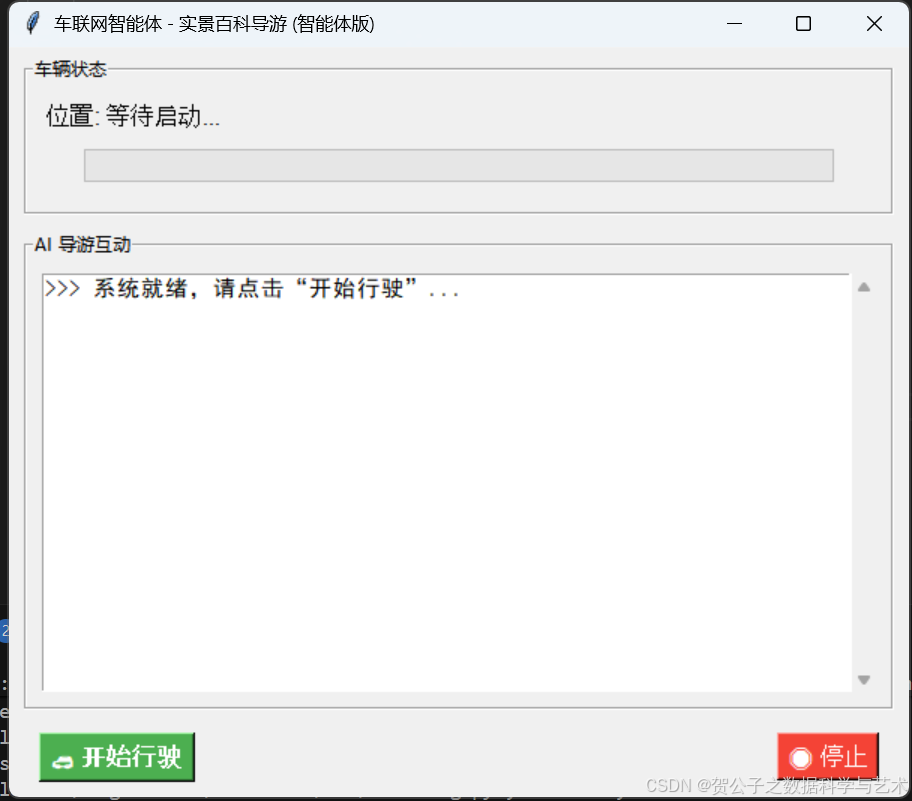
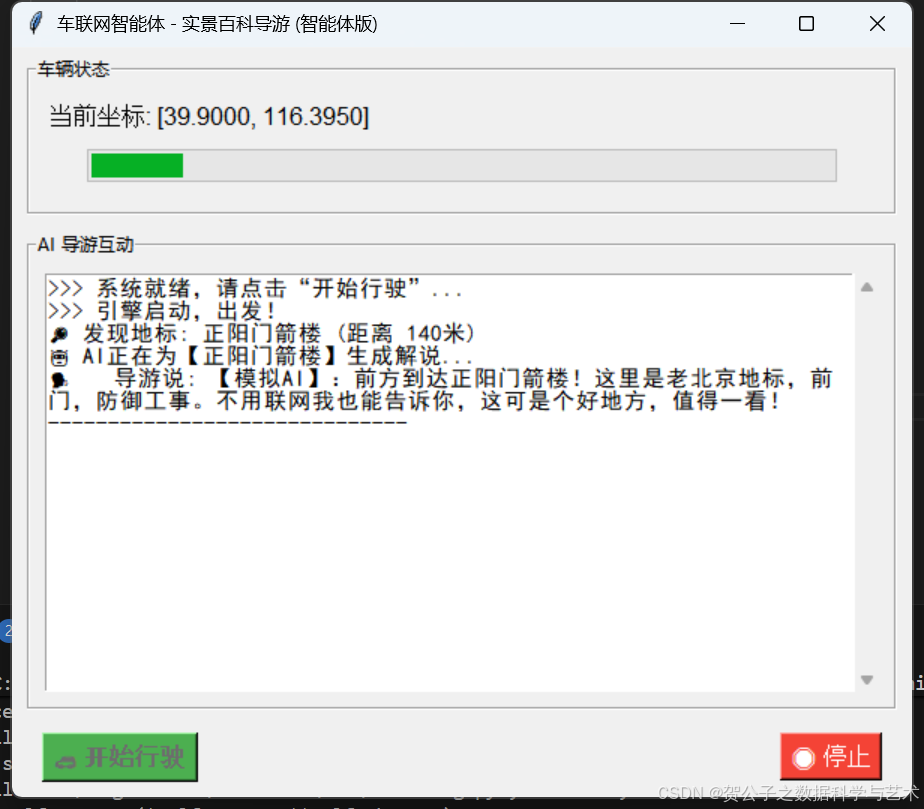
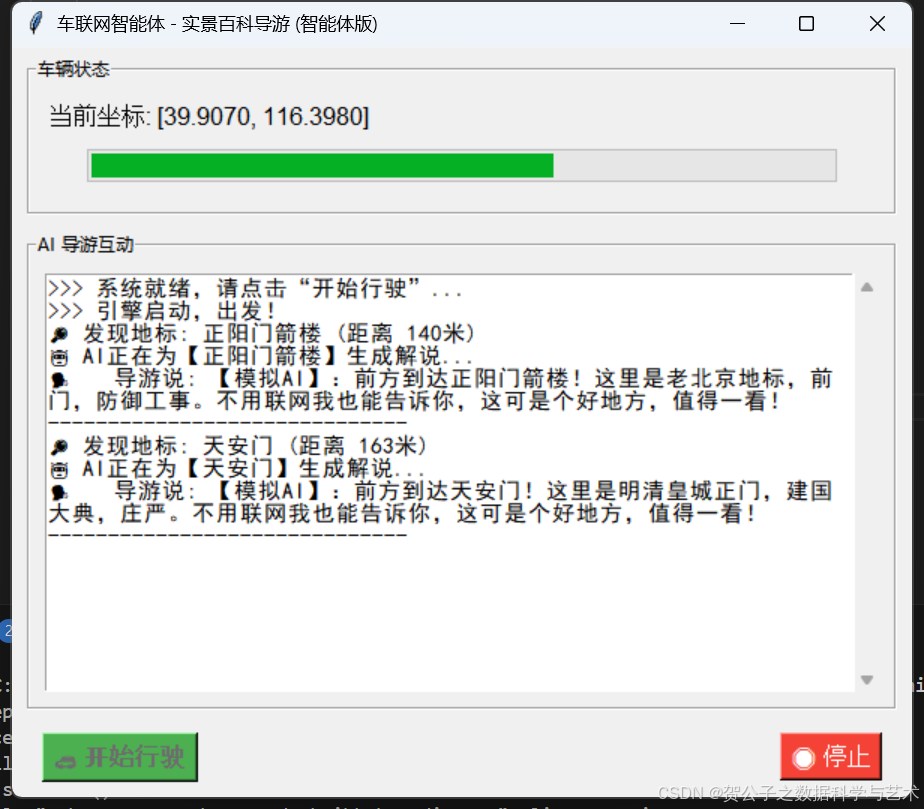
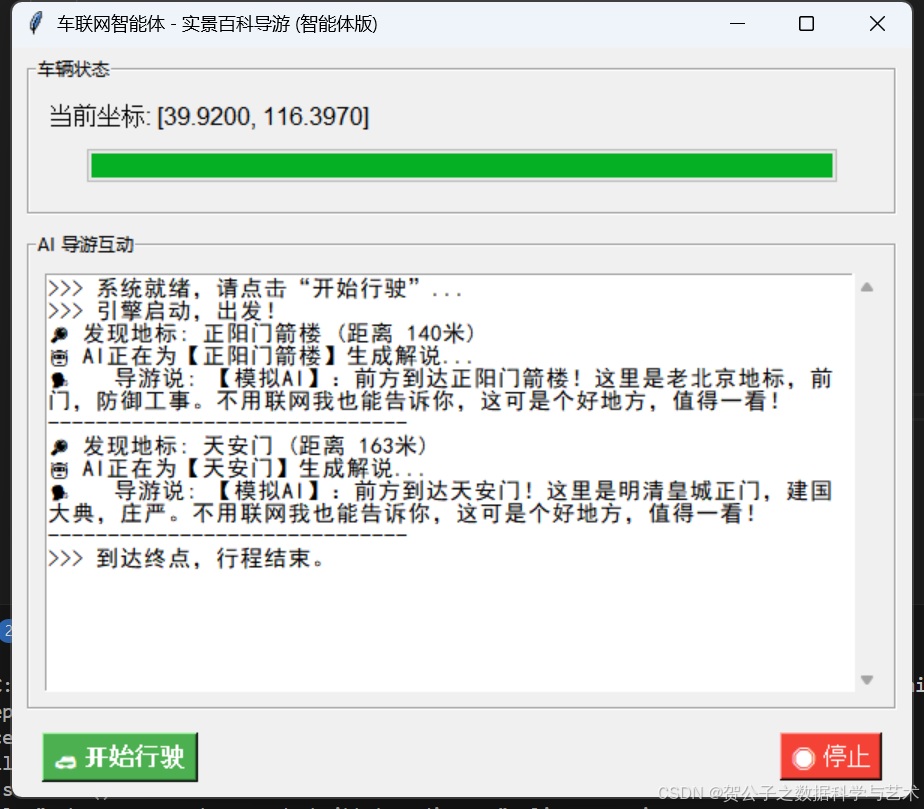
智能体了从北京正阳门开车经过天安门到景山公园的过程,当模拟坐标到达特定地标附近时,系统会自动检测到地标并进行语音讲解。你还可以修改OPENAI_API_KEY为空字符串测试离线/模拟模式,或者修改ROUTE_PATH中的坐标以及POI_DB数据,模拟你家附近的路线。
五、部署与扩展建议
1. 真实车联网环境部署
在真实的车联网环境中,智途百科通常部署在车机端(Android Automotive/Linux)或边缘计算盒子上,硬件要求如下:
- 计算单元:树莓派4B或NVIDIA Jetson Nano(用于处理视觉和简单的LLM推理),高端车型可直接运行在车机的高通骁龙芯片上。
- 传感器:USB GPS模块 + USB摄像头。
2. API替换与优化
- 代码中的POI_DB字典是静态的,在生产环境中,需替换为高德地图/百度地图Web API的周边搜索接口,获取实时、丰富的地标信息。
- TTS部分建议使用云端TTS(如Azure TTS)获得更自然的人声,或直接使用车机自带的TTS引擎。
3. 功能扩展
你可以在此基础上接入真实的GPS硬件模块,甚至接入摄像头进行OpenCV图像识别,进一步扩展功能,将其打造成一个真正的硬件产品。
六、总结
智途百科从简单的Python脚本出发,模拟了车联网中“位置感知 + 内容生成”的核心逻辑,为我们展示了如何利用车联网技术打造一款有趣的车载智能导游系统。无论是技术实现还是产品体验,都有很大的扩展和优化空间。希望这篇分享能为大家带来一些启发,让我们一起探索车联网技术的更多可能性,让驾驶变得更加有趣!
#OpenAgents
#Multi-AgentHackathon2025
#多智能体
#智能体网络

有“AI”的1024 = 2048,欢迎大家加入2048 AI社区
更多推荐

 42
42 0
0- 0


 已为社区贡献5条内容

所有评论(0)