Samba domain controller on Ubuntu Server 22.04 LTS
【代码】Samba domain controller on Ubuntu Server 22.04 LTS。
Install cockpit for easy interface configuration
<span style="color:#24292e"><span style="background-color:#ffffff"><span style="background-color:#f8f8f8"><span style="background-color:#f6f8fa"><code>sudo apt install -y cockpit
</code></span></span></span></span>
Install NetworkManager on Ubuntu:
<span style="color:#24292e"><span style="background-color:#ffffff"><span style="background-color:#f8f8f8"><span style="background-color:#f6f8fa"><code><span style="color:#0086b3">sudo </span>apt-get <span style="color:#0086b3">install </span>network-manager
</code></span></span></span></span>
Open the .yaml config file inside the /etc/netplan directory and replace the existing configuration with following:
<span style="color:#24292e"><span style="background-color:#ffffff"><span style="background-color:#f8f8f8"><span style="background-color:#f6f8fa"><code><span style="color:#008080">network</span>:
  <span style="color:#008080">version</span>: <span style="color:#009999">2</span>
  <span style="color:#008080">renderer</span>: <span style="color:#dd1144">NetworkManager</span>
</code></span></span></span></span>
Generate backend specific configuration files for NetworkManager with netplan command:
<span style="color:#24292e"><span style="background-color:#ffffff"><span style="background-color:#f8f8f8"><span style="background-color:#f6f8fa"><code><span style="color:#0086b3">sudo </span>netplan generate
</code></span></span></span></span>
Start the NetworkManager Service:
<span style="color:#24292e"><span style="background-color:#ffffff"><span style="background-color:#f8f8f8"><span style="background-color:#f6f8fa"><code><span style="color:#0086b3">sudo </span>systemctl unmask NetworkManager
<span style="color:#0086b3">sudo </span>systemctl <span style="color:#0086b3">enable </span>NetworkManager
<span style="color:#0086b3">sudo </span>systemctl start NetworkManager
</code></span></span></span></span>
Now the NetworkManager is enabled, interface configurations can be done via the GUI or from the command line, using the nmcli command.
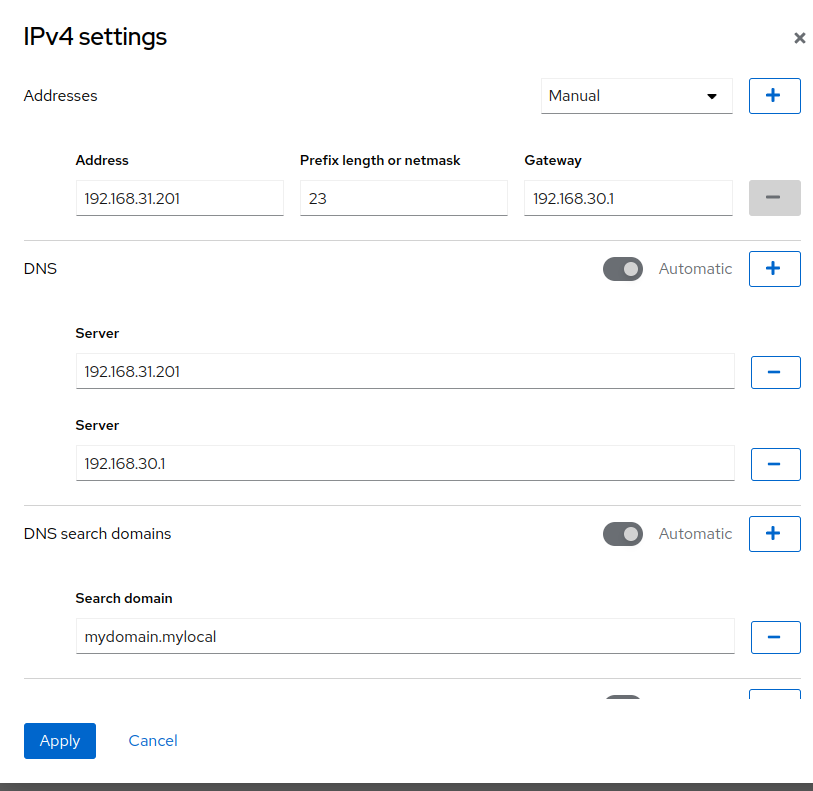
Open cockpit in web browser (https://${server_ip}:9090) and set up static ip:
- set the server’s static ip as primary dns
- make sure to make all the proper infra configurations for your environment (eg static mappings in
pfsense) - set your preferred dns server as secondary
- ex:
Install Dependecies
<span style="color:#24292e"><span style="background-color:#ffffff"><span style="background-color:#f8f8f8"><span style="background-color:#f6f8fa"><code><span style="color:#0086b3">sudo </span>apt <span style="color:#0086b3">install</span> <span style="color:#000080">-y</span> samba winbind krb5-config smbclient dnsutils net-tools
</code></span></span></span></span>
When prompted for Default Kerberos version 5 realm:
enter in ALL CAPS the domain that will be your active directory domain, eg
HOME.ARPA
When prompted for the Kerberos servers for your realm:
enter in all lowercase the fqdn of your samba/ad instance, eg
dc1.home.arpa
When prompted for the Administrative server for your Kerberos realm:
enter in all lowercase the fqdn of your samba/ad instance, eg
dc1.home.arpa
Configure services
Backup /etc/smb.conf
<span style="color:#24292e"><span style="background-color:#ffffff"><span style="background-color:#f8f8f8"><span style="background-color:#f6f8fa"><code><span style="color:#0086b3">sudo  mv</span> /etc/samba/smb.conf /etc/samba/smb.conf.bak
</code></span></span></span></span>
Run samba-tool domain provision --use-rfc2307 --interactive
<span style="color:#24292e"><span style="background-color:#ffffff"><span style="background-color:#f8f8f8"><span style="background-color:#f6f8fa"><code><span style="color:#0086b3">sudo </span>samba-tool domain provision <span style="color:#000080">--use-rfc2307</span> <span style="color:#000080">--interactive</span>
</code></span></span></span></span>
When prompted for Realm:
enter in ALL CAPS the domain that will be your active directory domain, eg
HOME.ARPA
When prompted for domain:
Enter in ALL CAPS your domain name, without tld, eg
HOME
When prompted for server role
enter
dc
When prompted for DNS backend:
enter
SAMBA_INTERNAL
When prompted for DNS forwarder IP address:
enter your preferred or upstream dns server, e.g. the ip for a google or cloudflare dns server, or isp dns server, or the ip address for pfsense (if running unbound)
Next copy kerbeos config into /etc directory:
<span style="color:#24292e"><span style="background-color:#ffffff"><span style="background-color:#f8f8f8"><span style="background-color:#f6f8fa"><code><span style="color:#0086b3">sudo cp</span> /var/lib/samba/private/krb5.conf /etc
</code></span></span></span></span>
Disable services that will now be handled by samba active directory domain controller:
<span style="color:#24292e"><span style="background-color:#ffffff"><span style="background-color:#f8f8f8"><span style="background-color:#f6f8fa"><code>sudo systemctl disable --now smbd nmbd winbind systemd-resolved.service
</code></span></span></span></span>
Unmask the active directory service:
<span style="color:#24292e"><span style="background-color:#ffffff"><span style="background-color:#f8f8f8"><span style="background-color:#f6f8fa"><code><span style="color:#0086b3">sudo </span>systemctl unmask samba-ad-dc.service
</code></span></span></span></span>
Start and enable the active directory service:
<span style="color:#24292e"><span style="background-color:#ffffff"><span style="background-color:#f8f8f8"><span style="background-color:#f6f8fa"><code><span style="color:#0086b3">sudo </span>systemctl <span style="color:#0086b3">enable</span> <span style="color:#000080">--now</span> samba-ad-dc.service
</code></span></span></span></span>
Verify services are running:
<span style="color:#24292e"><span style="background-color:#ffffff"><span style="background-color:#f8f8f8"><span style="background-color:#f6f8fa"><code><span style="color:#0086b3">sudo </span>netstat <span style="color:#000080">-antp</span> | egrep <span style="color:#dd1144">'smbd|samba'</span>
</code></span></span></span></span>
expected output:
tcp        0      0 0.0.0.0:445             0.0.0.0:*               LISTEN      3387/smbd
tcp        0      0 0.0.0.0:389             0.0.0.0:*               LISTEN      3395/samba: task[ld
tcp        0      0 0.0.0.0:464             0.0.0.0:*               LISTEN      3405/samba: task[kd
tcp        0      0 0.0.0.0:135             0.0.0.0:*               LISTEN      3392/samba: task[rp
tcp        0      0 0.0.0.0:139             0.0.0.0:*               LISTEN      3387/smbd
tcp        0      0 0.0.0.0:3269            0.0.0.0:*               LISTEN      3395/samba: task[ld
tcp        0      0 0.0.0.0:3268            0.0.0.0:*               LISTEN      3395/samba: task[ld
tcp        0      0 0.0.0.0:53              0.0.0.0:*               LISTEN      3428/samba: task[dn
tcp        0      0 0.0.0.0:49154           0.0.0.0:*               LISTEN      3392/samba: task[rp
tcp        0      0 0.0.0.0:49153           0.0.0.0:*               LISTEN      3392/samba: task[rp
tcp        0      0 0.0.0.0:49152           0.0.0.0:*               LISTEN      3386/samba: task[rp
tcp        0      0 0.0.0.0:88              0.0.0.0:*               LISTEN      3405/samba: task[kd
tcp        0      0 0.0.0.0:636             0.0.0.0:*               LISTEN      3395/samba: task[ld
tcp6       0      0 :::445                  :::*                    LISTEN      3387/smbd
tcp6       0      0 :::389                  :::*                    LISTEN      3395/samba: task[ld
tcp6       0      0 :::464                  :::*                    LISTEN      3405/samba: task[kd
tcp6       0      0 :::135                  :::*                    LISTEN      3392/samba: task[rp
tcp6       0      0 :::139                  :::*                    LISTEN      3387/smbd
tcp6       0      0 :::3269                 :::*                    LISTEN      3395/samba: task[ld
tcp6       0      0 :::3268                 :::*                    LISTEN      3395/samba: task[ld
tcp6       0      0 :::53                   :::*                    LISTEN      3428/samba: task[dn
tcp6       0      0 :::49154                :::*                    LISTEN      3392/samba: task[rp
tcp6       0      0 :::49153                :::*                    LISTEN      3392/samba: task[rp
tcp6       0      0 :::49152                :::*                    LISTEN      3386/samba: task[rp
tcp6       0      0 :::88                   :::*                    LISTEN      3405/samba: task[kd
tcp6       0      0 :::636                  :::*                    LISTEN      3395/samba: task[ld
有“AI”的1024 = 2048,欢迎大家加入2048 AI社区
更多推荐

 27
27 0
0- 0


 已为社区贡献166条内容

所有评论(0)