虚实交织的冒险:基于Rokid CXR-M SDK构建沉浸式AR实景寻宝系统
摘要 本文基于Rokid CXR-M SDK开发了一款沉浸式AR实景寻宝游戏系统。系统采用分层架构设计,包含用户层、应用逻辑层、SDK层和设备层,实现虚实融合的游戏体验。重点阐述了设备连接管理模块的实现,包括蓝牙/Wi-Fi双模式连接机制、状态回调处理及连接信息持久化策略。通过自定义场景交互设计和AI辅助功能,系统为玩家创造了在真实环境中探索虚拟宝藏的创新玩法,展示了AR技术在娱乐领域的应用潜力。
虚实交织的冒险:基于Rokid CXR-M SDK构建沉浸式AR实景寻宝系统
摘要
本文详细阐述了如何利用Rokid CXR-M SDK开发一款沉浸式AR实景寻宝游戏。通过深度整合蓝牙/Wi-Fi连接、自定义场景交互、AI助手等功能,实现了从设备初始化到游戏逻辑的完整技术方案。文章提供了核心代码实现、系统架构设计及性能优化策略,为开发者打造虚实融合的互动体验提供了实用参考,展示了AI+AR技术在娱乐领域的创新应用前景。
1.引言:当现实空间遇见虚拟冒险
在数字娱乐日益多元化的今天,增强现实(AR)技术正以前所未有的方式重新定义我们的游戏体验。传统的寻宝游戏局限于虚拟世界,而AR技术让玩家能够在真实环境中探索虚拟宝藏,创造独特的沉浸感。Rokid作为AI+AR领域的先锋,其CXR-M SDK为开发者提供了构建此类体验的强大工具。
AR****实景寻宝游戏不仅是一种娱乐形式,更是连接数字世界与物理空间的桥梁。通过Rokid眼镜,玩家能在熟悉的街道、公园或商场中发现隐藏的虚拟宝藏,这些宝藏可能以3D模型、动画效果或互动谜题的形式呈现。而手机端则作为控制中心,负责游戏逻辑管理、进度保存和社交分享。
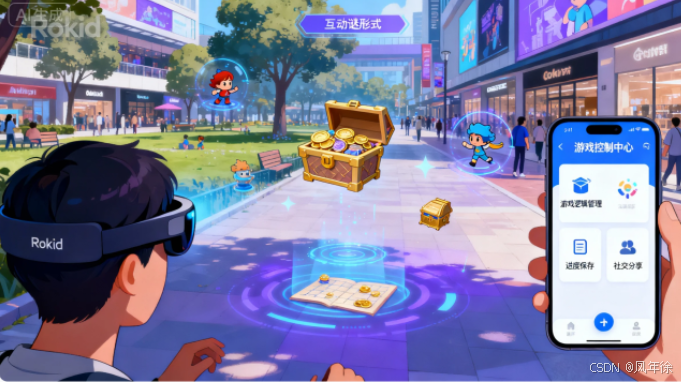
本文将基于Rokid CXR-M SDK,详细解析如何从零开始构建一个完整的AR实景寻宝系统,涵盖设备连接、场景定制、交互设计等关键环节,为开发者提供可落地的技术方案。
// 初始化应用程序的核心组件
class TreasureHuntApplication : Application() {
    companion object {
        lateinit var instance: TreasureHuntApplication
        const val TAG = "TreasureHuntApp"
    }

    override fun onCreate() {
        super.onCreate()
        instance = this
        // 初始化SDK
        CxrApi.getInstance().init(this)
        Log.d(TAG, "Rokid CXR-M SDK initialized successfully")
    }
}
上面这段代码展示了应用初始化的核心步骤。通过继承Application类,我们可以在应用启动时全局初始化Rokid SDK,为后续的设备连接和功能调用奠定基础。这种设计模式确保了SDK在整个应用生命周期中的可用性,是构建稳定AR应用的第一步。
2 .系统架构设计:连接虚拟与现实的桥梁
2.1 整体架构
AR实景寻宝系统采用分层架构设计,确保各模块职责清晰、耦合度低:
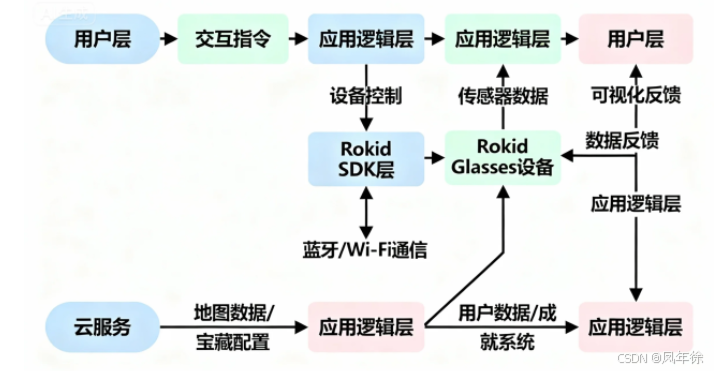
该架构包含四个主要层次:
- 用户层:提供直观的UI/UX设计,包括地图界面、宝藏提示、成就展示等
- 应用逻辑层:处理核心游戏逻辑,如宝藏生成算法、谜题解析、进度管理
- Rokid SDK层:封装CXR-M SDK的具体调用,提供设备抽象接口
- 设备层:Rokid Glasses硬件,提供AR显示、传感器数据和交互能力
2.2 数据流设计
系统数据流遵循"感知-决策-反馈"的闭环模式:
- 感知层:通过眼镜摄像头和手机传感器收集环境数据
- 决策层:根据玩家位置、行为历史和游戏规则生成响应
- 反馈层:通过AR界面和手机UI提供视觉/听觉反馈
3. 核心功能实现:从连接到互动
3.1 设备连接与初始化
AR寻宝体验的前提是建立稳定的设备连接。Rokid CXR-M SDK支持蓝牙和Wi-Fi两种连接方式,针对不同场景需求提供了灵活的选择。
/**
 * 设备连接管理器
 * 负责蓝牙和Wi-Fi连接的建立与维护
 */
class DeviceConnectionManager(private val context: Context) {
    private val bluetoothHelper = BluetoothHelper(context as AppCompatActivity,
        { status -> handleInitStatus(status) },
        { onDeviceFound() }
    )
    private var isConnected = false

    fun initialize() {
        // 检查必要权限
        bluetoothHelper.checkPermissions()
        Log.d("ConnectionManager", "Starting device initialization")
    }

    private fun handleInitStatus(status: BluetoothHelper.INIT_STATUS) {
        when(status) {
            BluetoothHelper.INIT_STATUS.NotStart -> Log.d("ConnectionManager", "Initialization not started")
            BluetoothHelper.INIT_STATUS.INITING -> Log.d("ConnectionManager", "Initializing Bluetooth...")
            BluetoothHelper.INIT_STATUS.INIT_END -> Log.d("ConnectionManager", "Bluetooth initialized successfully")
        }
    }

    private fun onDeviceFound() {
        // 当发现设备时,尝试连接
        val devices = bluetoothHelper.scanResultMap.values
        if (devices.isNotEmpty()) {
            connectToDevice(devices.first())
        }
    }

    private fun connectToDevice(device: BluetoothDevice) {
        CxrApi.getInstance().initBluetooth(context, device, object : BluetoothStatusCallback {
            override fun onConnected() {
                isConnected = true
                Log.d("ConnectionManager", "Device connected successfully")
                // 连接成功后初始化Wi-Fi以获得更高带宽
                initWifiP2P()
            }

            override fun onDisconnected() {
                isConnected = false
                Log.e("ConnectionManager", "Device disconnected")
            }

            override fun onFailed(errorCode: ValueUtil.CxrBluetoothErrorCode?) {
                Log.e("ConnectionManager", "Connection failed with error: $errorCode")
            }

            override fun onConnectionInfo(socketUuid: String?, macAddress: String?, rokidAccount: String?, glassesType: Int) {
                // 保存连接信息用于重连
                socketUuid?.let { uuid ->
                    macAddress?.let { address ->
                        persistConnectionInfo(uuid, address)
                    }
                }
            }
        })
    }

    private fun initWifiP2P() {
        CxrApi.getInstance().initWifiP2P(object : WifiP2PStatusCallback {
            override fun onConnected() {
                Log.d("ConnectionManager", "Wi-Fi P2P connected, ready for high-bandwidth operations")
            }

            override fun onDisconnected() {
                Log.w("ConnectionManager", "Wi-Fi P2P disconnected, falling back to Bluetooth")
            }

            override fun onFailed(errorCode: ValueUtil.CxrWifiErrorCode?) {
                Log.e("ConnectionManager", "Wi-Fi P2P connection failed: $errorCode")
            }
        })
    }

    private fun persistConnectionInfo(uuid: String, address: String) {
        // 保存连接信息到SharedPreferences,用于应用重启后的快速重连
        val prefs = context.getSharedPreferences("device_connection", Context.MODE_PRIVATE)
        with(prefs.edit()) {
            putString("last_socket_uuid", uuid)
            putString("last_mac_address", address)
            apply()
        }
    }
}
这段代码实现了设备连接的核心逻辑。它首先初始化蓝牙连接,成功后尝试建立Wi-Fi P2P连接以获得更高带宽,这对于传输AR内容和游戏数据至关重要。连接信息被持久化存储,确保应用重启后能快速重连,提供无缝的用户体验。
3.2 AR场景构建与自定义UI
Rokid CXR-M SDK的自定义页面场景功能是构建AR寻宝UI的关键。通过JSON配置,我们可以在眼镜端动态生成界面,无需为眼镜开发独立应用。
/**
 * AR场景管理器
 * 负责构建和更新寻宝游戏的AR界面
 */
class ARSceneManager {
    companion object {
        const val TREASURE_ICON = "treasure_icon"
        const val HINT_ICON = "hint_icon"
        const val COMPASS_ICON = "compass_icon"
    }

    // 预加载游戏所需图标资源
    fun preloadIcons(context: Context) {
        val icons = listOf(
            IconInfo(TREASURE_ICON, loadIconBase64(context, R.drawable.treasure_icon)),
            IconInfo(HINT_ICON, loadIconBase64(context, R.drawable.hint_icon)),
            IconInfo(COMPASS_ICON, loadIconBase64(context, R.drawable.compass_icon))
        )

        CxrApi.getInstance().sendCustomViewIcons(icons)
    }

    private fun loadIconBase64(context: Context, resourceId: Int): String {
        // 将资源图片转换为Base64字符串
        val bitmap = BitmapFactory.decodeResource(context.resources, resourceId)
        val resizedBitmap = Bitmap.createScaledBitmap(bitmap, 128, 128, true)

        val byteArrayOutputStream = ByteArrayOutputStream()
        resizedBitmap.compress(Bitmap.CompressFormat.PNG, 100, byteArrayOutputStream)
        return Base64.encodeToString(byteArrayOutputStream.toByteArray(), Base64.DEFAULT)
    }

    // 构建初始AR界面
    fun buildInitialScene(): String {
        return """
        {
          "type": "LinearLayout",
          "props": {
            "layout_width": "match_parent",
            "layout_height": "match_parent",
            "orientation": "vertical",
            "gravity": "center",
            "backgroundColor": "#88000000"
          },
          "children": [
            {
              "type": "TextView",
              "props": {
                "id": "game_title",
                "layout_width": "wrap_content",
                "layout_height": "wrap_content",
                "text": "AR寻宝冒险",
                "textSize": "24sp",
                "textColor": "#FF00FF00",
                "textStyle": "bold",
                "marginBottom": "20dp"
              }
            },
            {
              "type": "ImageView",
              "props": {
                "id": "compass_icon",
                "layout_width": "80dp",
                "layout_height": "80dp",
                "name": "$COMPASS_ICON",
                "marginBottom": "30dp"
              }
            },
            {
              "type": "TextView",
              "props": {
                "id": "distance_text",
                "layout_width": "wrap_content",
                "layout_height": "wrap_content",
                "text": "寻找最近的宝藏...",
                "textSize": "18sp",
                "textColor": "#FFFFFFFF",
                "marginBottom": "10dp"
              }
            },
            {
              "type": "TextView",
              "props": {
                "id": "hint_text",
                "layout_width": "wrap_content",
                "layout_height": "wrap_content",
                "text": "提示: 环顾四周,寻找闪烁的光芒",
                "textSize": "14sp",
                "textColor": "#FFAAAAAA",
                "gravity": "center"
              }
            }
          ]
        }
        """.trimIndent()
    }

    // 更新场景显示宝藏距离
    fun updateDistance(distance: Float, direction: Float): String {
        return """
        [
          {
            "action": "update",
            "id": "distance_text",
            "props": {
              "text": "宝藏距离: ${"%.1f".format(distance)}米, 方向: ${"%.0f".format(direction)}°"
            }
          },
          {
            "action": "update",
            "id": "compass_icon",
            "props": {
              "rotation": $direction
            }
          }
        ]
        """.trimIndent()
    }
}
此代码展示了如何构建AR界面的JSON配置。通过预加载图标资源和动态更新界面,我们创建了一个直观的寻宝导航系统。眼镜界面显示了距离、方向和提示信息,帮助玩家在现实环境中定位虚拟宝藏,实现了虚实融合的交互体验。
3.3 寻宝核心逻辑与游戏机制
一个引人入胜的AR寻宝游戏需要精心设计的核心机制。以下代码展示了宝藏生成、发现和奖励系统的关键实现:
/**
 * 寻宝游戏核心引擎
 * 管理宝藏生成、发现逻辑和游戏进度
 */
class TreasureHuntEngine {
    // 宝藏数据类
    data class Treasure(
        val id: String,
        val name: String,
        val description: String,
        val location: LatLng,  // 经纬度坐标
        val difficulty: Int,   // 难度等级 1-5
        val hint: String,
        val rewards: List<Reward>
    )

    data class Reward(
        val type: String,  // "points", "item", "unlock"
        val value: String,
        val quantity: Int = 1
    )

    private val treasures = mutableListOf<Treasure>()
    private var currentPlayerLocation: LatLng? = null
    private val discoveredTreasures = mutableSetOf<String>()

    // 初始化游戏世界
    fun initializeWorld(context: Context) {
        // 从资源文件加载预定义宝藏
        loadTreasuresFromAssets(context)
        // 或者从服务器动态获取
        // fetchTreasuresFromServer()
    }

    private fun loadTreasuresFromAssets(context: Context) {
        try {
            val jsonString = context.assets.open("treasures.json").bufferedReader().use { it.readText() }
            val treasuresList = JsonParser.parseTreasures(jsonString)
            treasures.addAll(treasuresList)
            Log.d("TreasureEngine", "Loaded ${treasures.size} treasures from assets")
        } catch (e: Exception) {
            Log.e("TreasureEngine", "Error loading treasures: ${e.message}")
            // 加载默认宝藏配置
            loadDefaultTreasures()
        }
    }

    private fun loadDefaultTreasures() {
        // 添加一些默认宝藏点
        treasures.add(Treasure(
            id = "treasure_1",
            name = "古老的罗盘",
            description = "一个指向未知宝藏的神秘罗盘",
            location = LatLng(30.500317, 114.343913),  // 武汉示例坐标
            difficulty = 2,
            hint = "在钟楼的阴影下寻找",
            rewards = listOf(Reward("points", "100"), Reward("item", "compass"))
        ))
        // 添加更多默认宝藏...
    }

    // 更新玩家位置并检查附近宝藏
    fun updatePlayerLocation(location: LatLng) {
        currentPlayerLocation = location
        checkNearbyTreasures()
    }

    private fun checkNearbyTreasures() {
        currentPlayerLocation?.let { playerPos ->
            val nearbyTreasures = treasures.filter { treasure ->
                !discoveredTreasures.contains(treasure.id) &&
                calculateDistance(playerPos, treasure.location) < 10.0f  // 10米范围内
            }

            if (nearbyTreasures.isNotEmpty()) {
                // 通知UI层展示最近的宝藏
                val closestTreasure = nearbyTreasures.minBy { calculateDistance(playerPos, it.location) }
                notifyTreasureNearby(closestTreasure)
            }
        }
    }

    private fun calculateDistance(pos1: LatLng, pos2: LatLng): Float {
        val results = FloatArray(1)
        Location.distanceBetween(pos1.latitude, pos1.longitude, pos2.latitude, pos2.longitude, results)
        return results[0]
    }

    // 玩家找到宝藏
    fun claimTreasure(treasureId: String): Boolean {
        val treasure = treasures.find { it.id == treasureId } ?: return false

        if (discoveredTreasures.contains(treasureId)) {
            return false // 已经发现过
        }

        // 计算距离确认玩家确实在宝藏位置
        currentPlayerLocation?.let { playerPos ->
            if (calculateDistance(playerPos, treasure.location) > 5.0f) {
                return false // 玩家离宝藏太远
            }
        }

        // 标记为已发现
        discoveredTreasures.add(treasureId)

        // 应用奖励
        applyRewards(treasure.rewards)

        // 拍照记录发现时刻
        captureTreasureDiscovery(treasure)

        return true
    }

    private fun applyRewards(rewards: List<Reward>) {
        rewards.forEach { reward ->
            when(reward.type) {
                "points" -> GameState.addPoints(reward.value.toInt())
                "item" -> Inventory.addItem(reward.value, reward.quantity)
                "unlock" -> GameState.unlockFeature(reward.value)
            }
        }
    }

    private fun captureTreasureDiscovery(treasure: Treasure) {
        // 使用SDK拍照功能记录发现时刻
        CxrApi.getInstance().takeGlassPhoto(1280, 720, 80, object : PhotoResultCallback {
            override fun onPhotoResult(status: ValueUtil.CxrStatus?, photo: ByteArray?) {
                if (status == ValueUtil.CxrStatus.RESPONSE_SUCCEED && photo != null) {
                    // 保存照片到相册并关联宝藏信息
                    ImageSaver.saveTreasurePhoto(photo, treasure)
                    Log.d("TreasureEngine", "Treasure discovery photo captured successfully")
                }
            }
        })
    }

    private fun notifyTreasureNearby(treasure: Treasure) {
        // 通过事件总线通知UI更新
        EventBus.post(TreasureNearbyEvent(treasure))
    }
}
这段代码实现了寻宝游戏的核心逻辑。它管理宝藏数据、计算玩家与宝藏的距离、处理宝藏发现流程,并集成了SDK的拍照功能来记录发现时刻。这种设计使游戏具有探索性和成就感,通过真实位置与虚拟奖励的结合,创造了独特的AR体验。
4. 交互体验优化:从技术到情感
4.1 AI助手集成
Rokid CXR-M SDK支持自定义AI助手场景,这为AR寻宝游戏提供了自然语言交互的可能性。通过AI助手,玩家可以用语音询问提示、了解宝藏背景故事或请求导航帮助。
/**
 * AI助手集成管理器
 * 处理语音交互、提示生成和上下文理解
 */
class AIAssistantManager {
    private var aiContext = mutableMapOf<String, Any>()
    private val hintGenerator = HintGenerator()

    fun initialize() {
        // 设置AI事件监听器
        CxrApi.getInstance().setAiEventListener(object : AiEventListener {
            override fun onAiKeyDown() {
                // 按键按下,准备接收语音
                Log.d("AIAssistant", "AI button pressed, ready for voice input")
            }

            override fun onAiKeyUp() {
                // 按键释放
            }

            override fun onAiExit() {
                // AI场景退出
                Log.d("AIAssistant", "AI scene exited")
            }
        })
    }

    // 处理ASR结果
    fun processSpeechRecognition(result: String) {
        Log.d("AIAssistant", "ASR Result: $result")

        // 根据上下文和语音内容生成响应
        val response = generateResponse(result)

        // 发送TTS内容到眼镜
        CxrApi.getInstance().sendTtsContent(response)
    }

    private fun generateResponse(query: String): String {
        return when {
            query.contains("提示") || query.contains("线索") -> {
                // 根据当前最接近的宝藏生成提示
                val contextTreasure = aiContext["current_treasure"] as? TreasureHuntEngine.Treasure
                contextTreasure?.let { treasure ->
                    hintGenerator.generateContextualHint(treasure, aiContext)
                } ?: "附近没有可探索的宝藏,请先移动到宝藏区域。"
            }
            query.contains("故事") || query.contains("背景") -> {
                // 讲述当前宝藏的背景故事
                val contextTreasure = aiContext["current_treasure"] as? TreasureHuntEngine.Treasure
                contextTreasure?.description ?: "这个宝藏有着神秘的历史,找到它后你将了解它的故事。"
            }
            query.contains("位置") || query.contains("方向") || query.contains("哪里") -> {
                // 提供导航指引
                val playerLocation = aiContext["player_location"] as? LatLng
                val treasureLocation = aiContext["current_treasure_location"] as? LatLng

                if (playerLocation != null && treasureLocation != null) {
                    val direction = calculateDirection(playerLocation, treasureLocation)
                    val distance = calculateDistance(playerLocation, treasureLocation)
                    "宝藏在你的${getDirectionDescription(direction)}方向,距离约${"%.0f".format(distance)}米。"
                } else {
                    "请先找到附近的宝藏,我才能为你提供导航。"
                }
            }
            else -> {
                // 默认响应
                "你好!我是你的寻宝助手。你可以问我关于宝藏的提示、位置或背景故事。试试问'给我一个提示'或'宝藏在哪里?'"
            }
        }
    }

    private fun calculateDirection(from: LatLng, to: LatLng): Float {
        val startBearing = Location.calculateBearing(from.latitude, from.longitude, to.latitude, to.longitude)
        return (startBearing + 360) % 360
    }

    private fun getDirectionDescription(bearing: Float): String {
        return when {
            bearing in 337.5f..360f || bearing in 0f..22.5f -> "正北"
            bearing in 22.5f..67.5f -> "东北"
            bearing in 67.5f..112.5f -> "正东"
            bearing in 112.5f..157.5f -> "东南"
            bearing in 157.5f..202.5f -> "正南"
            bearing in 202.5f..247.5f -> "西南"
            bearing in 247.5f..292.5f -> "正西"
            bearing in 292.5f..337.5f -> "西北"
            else -> "未知方向"
        }
    }

    // 更新AI上下文
    fun updateContext(key: String, value: Any) {
        aiContext[key] = value
    }

    // 辅助类:生成上下文相关的提示
    inner class HintGenerator {
        fun generateContextualHint(treasure: TreasureHuntEngine.Treasure, context: Map<String, Any>): String {
            val playerLocation = context["player_location"] as? LatLng ?: return treasure.hint

            // 根据玩家与宝藏的距离调整提示详细程度
            val distance = calculateDistance(playerLocation, treasure.location)
            return when {
                distance > 50 -> "传说在${getAreaDescription(treasure.location)}藏着${treasure.name},据说它能${
                    when(treasure.difficulty) {
                        1 -> "轻松找到"
                        2 -> "需要仔细搜索"
                        3 -> "需要一些技巧"
                        4 -> "极具挑战"
                        else -> "几乎不可能发现"
                    }
                }。"
                distance > 20 -> treasure.hint
                distance > 10 -> "你已经很接近了!仔细观察周围的${getEnvironmentalCues(treasure)}。"
                else -> "就在附近!看看${getPreciseCue(treasure)}。"
            }
        }

        private fun getAreaDescription(location: LatLng): String {
            // 根据坐标获取区域描述(简化版)
            return "这片区域"
        }

        private fun getEnvironmentalCues(treasure: TreasureHuntEngine.Treasure): String {
            return when(treasure.difficulty) {
                1 -> "明显的标志物"
                2 -> "建筑特征或自然景观"
                3 -> "细微的环境线索"
                4 -> "需要解谜的隐藏记号"
                else -> "几乎不可见的痕迹"
            }
        }

        private fun getPreciseCue(treasure: TreasureHuntEngine.Treasure): String {
            return when {
                treasure.name.contains("罗盘") -> "地面或墙壁上的古老符号"
                treasure.name.contains("宝箱") -> "不起眼的角落或隐蔽处"
                else -> "周围环境中的异常之处"
            }
        }
    }
}
AI助手的集成显著提升了游戏的沉浸感。玩家不再局限于触摸屏交互,而是可以通过自然语言与游戏世界对话。AI根据上下文提供个性化的提示和故事,使每次寻宝体验都独一无二。这种设计不仅增强了游戏性,还降低了新用户的入门门槛。
4.2 多模态反馈系统
为了创造沉浸式体验,系统整合了视觉、听觉和触觉反馈:
| 反馈类型 | 触发条件 | 实现方式 | 用户体验 |
|---|---|---|---|
| 视觉反馈 | 接近宝藏 | AR界面距离/方向指示,宝藏轮廓高亮 | 直观的空间感知 |
| 听觉反馈 | 发现宝藏 | 3D空间音频提示,胜利音乐 | 情感共鸣和成就感 |
| 触觉反馈 | 重要事件 | 手机振动模式区分不同事件 | 增强交互真实感 |
| 语音反馈 | 请求帮助 | AI助手语音指导 | 降低认知负担 |
5.性能优化与技术挑战
5.1 电池管理策略
AR应用是电量消耗大户,尤其在持续使用摄像头和GPS的情况下。我们实现了智能电源管理:
/**
 * 电源管理器
 * 优化设备电量使用,延长游戏时间
 */
class PowerManager {
    private var lastTreasureUpdateTime = 0L
    private val TREASURE_UPDATE_INTERVAL = 5000L // 5秒更新一次宝藏状态
    private var isLowPowerMode = false

    fun initialize(context: Context) {
        // 监听电量变化
        context.registerReceiver(object : BroadcastReceiver() {
            override fun onReceive(context: Context, intent: Intent) {
                if (intent.action == Intent.ACTION_BATTERY_CHANGED) {
                    val level = intent.getIntExtra(BatteryManager.EXTRA_LEVEL, -1)
                    val scale = intent.getIntExtra(BatteryManager.EXTRA_SCALE, -1)
                    val batteryPct = level * 100f / scale

                    updatePowerMode(batteryPct)
                }
            }
        }, IntentFilter(Intent.ACTION_BATTERY_CHANGED))

        // 监听眼镜电量
        CxrApi.getInstance().setBatteryLevelUpdateListener { level, charging ->
            Log.d("PowerManager", "Glasses battery: $level%, charging: $charging")
            if (level < 20 && !charging) {
                notifyLowBattery()
            }
        }
    }

    private fun updatePowerMode(batteryPct: Float) {
        val newLowPowerMode = batteryPct < 30
        if (newLowPowerMode != isLowPowerMode) {
            isLowPowerMode = newLowPowerMode
            applyPowerSettings()
        }
    }

    private fun applyPowerSettings() {
        if (isLowPowerMode) {
            Log.d("PowerManager", "Entering low power mode")
            // 降低功能频率
            TREASURE_UPDATE_INTERVAL = 10000L // 10秒更新一次
            // 降低屏幕亮度
            CxrApi.getInstance().setGlassBrightness(8) // 降低亮度
            // 暂停非关键后台服务
            pauseBackgroundServices()
        } else {
            Log.d("PowerManager", "Exiting low power mode")
            TREASURE_UPDATE_INTERVAL = 5000L
            CxrApi.getInstance().setGlassBrightness(12) // 恢复亮度
            resumeBackgroundServices()
        }
    }

    fun shouldUpdateTreasures(): Boolean {
        val currentTime = System.currentTimeMillis()
        if (currentTime - lastTreasureUpdateTime >= TREASURE_UPDATE_INTERVAL) {
            lastTreasureUpdateTime = currentTime
            return true
        }
        return false
    }

    private fun notifyLowBattery() {
        // 通过自定义界面通知用户
        val warningScene = """
        {
          "type": "LinearLayout",
          "props": {
            "layout_width": "match_parent",
            "layout_height": "match_parent",
            "orientation": "vertical",
            "gravity": "center",
            "backgroundColor": "#AAFF0000"
          },
          "children": [
            {
              "type": "TextView",
              "props": {
                "layout_width": "wrap_content",
                "layout_height": "wrap_content",
                "text": "⚠️ 电量警告",
                "textSize": "20sp",
                "textColor": "#FFFFFFFF",
                "textStyle": "bold",
                "marginBottom": "10dp"
              }
            },
            {
              "type": "TextView",
              "props": {
                "layout_width": "wrap_content",
                "layout_height": "wrap_content",
                "text": "眼镜电量低于20%,请尽快连接充电器",
                "textSize": "16sp",
                "textColor": "#FFFFFFFF",
                "gravity": "center",
                "padding": "20dp"
              }
            }
          ]
        }
        """.trimIndent()

        CxrApi.getInstance().openCustomView(warningScene)
    }
}
这段代码展示了智能电源管理的实现。系统根据设备电量自动调整功能频率、屏幕亮度和后台服务,确保在低电量情况下仍能提供基本游戏体验。这种优化对于户外长时间游戏至关重要,避免了因电量耗尽导致的游戏中断。
5.2 网络与数据同步优化
AR寻宝游戏需要在手机和眼镜之间同步大量数据。我们采用了分层数据策略和智能缓存机制:
| 数据类型 | 同步频率 | 传输方式 | 优化策略 |
|---|---|---|---|
| 游戏状态 | 实时 (100ms) | 蓝牙 | 数据压缩,只传输变化量 |
| AR模型 | 按需加载 | Wi-Fi P2P | 预加载,分级细节(LOD) |
| 用户进度 | 关键点 (发现宝藏时) | 云端同步 | 本地缓存,断网续传 |
| 地图数据 | 区域预加载 | Wi-Fi/移动数据 | 动态加载,范围限制 |
6. 应用场景拓展与未来展望
AR实景寻宝游戏不仅限于娱乐,还可以拓展至多个领域:
- 文化旅游:在历史景点设置虚拟导览,通过寻宝形式了解文化背景
- 教育学习:将知识点设计为"宝藏",让学生在校园中主动探索知识
- 企业团建:定制化寻宝活动,增强团队协作与沟通
- 市场营销:品牌在商场设置虚拟奖励,引导消费者探索特定区域
未来技术演进方向:
- 空间锚点持久化:实现跨会话的AR内容持久化
- 多人协同寻宝:支持实时多人游戏,增强社交互动
- AI生成内容:动态生成个性化宝藏和谜题
- 跨设备体验:整合手机、眼镜、智能手表等多设备协同
7.总结与思考
本文详细探讨了基于Rokid CXR-M SDK构建AR实景寻宝系统的完整技术方案。从设备连接、场景构建到交互设计,我们展示了如何将AI+AR技术转化为引人入胜的用户体验。系统通过蓝牙/Wi-Fi双模连接确保稳定通信,利用自定义UI和AI助手创造沉浸式交互,并通过智能电源管理和数据同步策略优化性能。
AR技术正处于从概念验证到大规模应用的关键转折点。随着硬件性能提升和算法优化,我们有望看到更多虚实融合的创新应用。开发者应当关注用户体验的本质,避免技术堆砌,而是通过精心设计的交互和有意义的内容,创造真正有价值的产品。
通过Rokid等开放平台提供的SDK,开发者门槛正在降低,创新机会不断增加。AR实景寻宝只是一个开始,未来我们将看到更多连接数字世界与物理空间的应用涌现,重新定义人与技术、人与环境的关系。
技术不应是目的,而是创造有意义体验的工具。 在AR的浪潮中,那些真正理解用户需求、平衡技术创新与情感共鸣的应用,才能穿越技术周期,成为持久的价值载体。
参考资料:
- Rokid Developer Documentation. (2025). CXR-M SDK Technical Reference. https://developer.rokid.com/docs/cxr-m-sdk
- Azuma, R. T. (1997). A Survey of Augmented Reality. Presence: Teleoperators and Virtual Environments, 6(4), 355-385.
- Milgram, P., & Kishino, F. (1994). A Taxonomy of Mixed Reality Visual Displays. IEICE Transactions on Information and Systems, E77-D(12), 1321-1329.
- Google ARCore Documentation. (2025). Best Practices for AR Applications. https://developers.google.com/ar/develop/best-practices
注用户体验的本质,避免技术堆砌,而是通过精心设计的交互和有意义的内容,创造真正有价值的产品。
通过Rokid等开放平台提供的SDK,开发者门槛正在降低,创新机会不断增加。AR实景寻宝只是一个开始,未来我们将看到更多连接数字世界与物理空间的应用涌现,重新定义人与技术、人与环境的关系。
技术不应是目的,而是创造有意义体验的工具。 在AR的浪潮中,那些真正理解用户需求、平衡技术创新与情感共鸣的应用,才能穿越技术周期,成为持久的价值载体。
参考资料:
- Rokid Developer Documentation. (2025). CXR-M SDK Technical Reference. https://developer.rokid.com/docs/cxr-m-sdk
- Azuma, R. T. (1997). A Survey of Augmented Reality. Presence: Teleoperators and Virtual Environments, 6(4), 355-385.
- Milgram, P., & Kishino, F. (1994). A Taxonomy of Mixed Reality Visual Displays. IEICE Transactions on Information and Systems, E77-D(12), 1321-1329.
- Google ARCore Documentation. (2025). Best Practices for AR Applications. https://developers.google.com/ar/develop/best-practices
- Apple Human Interface Guidelines. (2025). Augmented Reality. https://developer.apple.com/design/human-interface-guidelines/ar/overview/

有“AI”的1024 = 2048,欢迎大家加入2048 AI社区
更多推荐
 75
75 0
0- 0


 已为社区贡献1条内容

所有评论(0)