react16 run android 报错 Task :app:processXiaozhiDebugManifest FAILED
·
前言:
刚开始报的是
> Task :react-native-amap-geolocation:compileDebugJavaWithJavac FAILED
Deprecated Gradle features were used in this build, making it incompatible with Gradle 7.0.
Use '--warning-mode all' to show the individual deprecation warnings.
See https://docs.gradle.org/6.1.1/userguide/command_line_interface.html#sec:command_line_warnings
259 actionable tasks: 259 executed
F:\Projects\zhizhu_xiaozhi_client\XiaoZhiKanFang\node_modules\react-native-amap-geolocation\lib\android\src\main\java\cn\qiuxiang\react\geolocation\AMapGeolocationPackage.java:22: ����: �����ݵ�����: List<AMapGeolocationModule>��ת��ΪList<NativeModule>
return Collections.singletonList(new AMapGeolocationModule(reactContext));
通过 卸载了 react-native-amap-geolocation 安装了@tuya-oh/react-native-amap-geolocation 改好了。
然后还安装了python 3.13.7
-------------------------------------------------------------------------------------------------------------------------
npm run android报错:
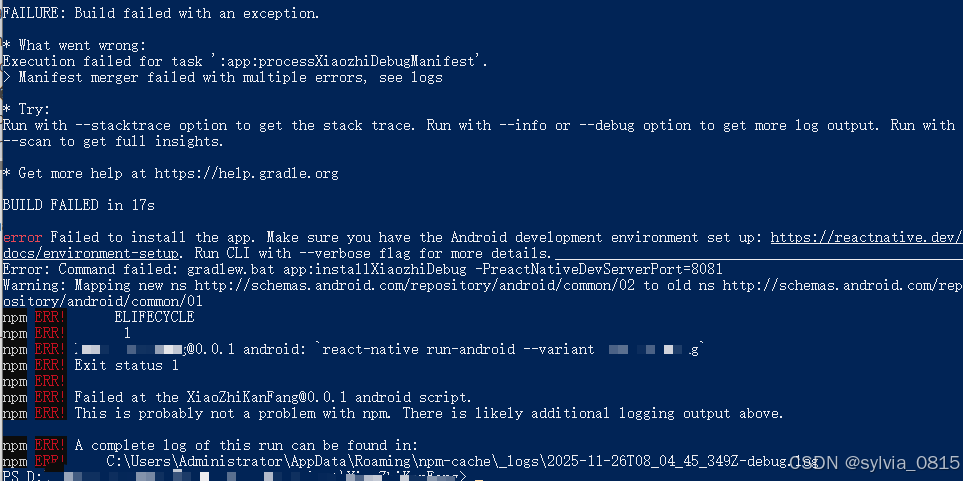
整体在这里:
> Task :app:processXiaozhiDebugManifest FAILED
F:\Projects\zhizhu_xiaozhi_client\XiaoZhiKanFang\android\app\src\main\AndroidManifest.xml:129:5-65 Warning:
        Element uses-permission#android.permission.CAMERA at AndroidManifest.xml:129:5-65 duplicated with element declared at AndroidManifest.xml:124:5-65
F:\Projects\zhizhu_xiaozhi_client\XiaoZhiKanFang\android\app\src\main\AndroidManifest.xml:137:5-81 Warning:
        Element uses-permission#android.permission.WRITE_EXTERNAL_STORAGE at AndroidManifest.xml:137:5-81 duplicated with element declared at AndroidManifest.xml:126:5-81
F:\Projects\zhizhu_xiaozhi_client\XiaoZhiKanFang\android\app\src\main\AndroidManifest.xml:138:5-80 Warning:
        Element uses-permission#android.permission.READ_EXTERNAL_STORAGE at AndroidManifest.xml:138:5-80 duplicated with element declared at AndroidManifest.xml:125:5-80
F:\Projects\zhizhu_xiaozhi_client\XiaoZhiKanFang\android\app\src\main\AndroidManifest.xml:139:5-79 Warning:
        Element uses-permission#android.permission.RECEIVE_USER_PRESENT at AndroidManifest.xml:139:5-79 duplicated with element declared at AndroidManifest.xml:134:5-79

See http://g.co/androidstudio/manifest-merger for more information about the manifest merger.
Deprecated Gradle features were used in this build, making it incompatible with Gradle 7.0.
Use '--warning-mode all' to show the individual deprecation warnings.
See https://docs.gradle.org/6.1.1/userguide/command_line_interface.html#sec:command_line_warnings
146 actionable tasks: 140 executed, 6 up-to-date
F:\Projects\zhizhu_xiaozhi_client\XiaoZhiKanFang\android\app\src\debug\AndroidManifest.xml:5:5-7:51 Error:
        uses-sdk:minSdkVersion 19 cannot be smaller than version 21 declared in library [com.alipay.sdk:alipaysdk-android:15.8.40] F:\gradle\gradle_global\caches\transforms-2\files-2.1\4b9c5941da8e86a4793d542ba0d7e61e\jetified-alipaysdk-android-15.8.40\AndroidManifest.xml as the library might be using APIs not available in 19
        Suggestion: use a compatible library with a minSdk of at most 19,
                or increase this project's minSdk version to at least 21,
                or use tools:overrideLibrary="com.alipay.sdk" to force usage (may lead to runtime failures)

FAILURE: Build failed with an exception.

* What went wrong:
Execution failed for task ':app:processXiaozhiDebugManifest'.
> Manifest merger failed with multiple errors, see logs

* Try:
Run with --stacktrace option to get the stack trace. Run with --info or --debug option to get more log output. Run with --scan to get full insights.

* Get more help at https://help.gradle.org

BUILD FAILED in 25s

error Failed to install the app. Make sure you have the Android development environment set up: https://reactnative.dev/docs/environment-setup. Run CLI with --verbose flag for more details.
Error: Command failed: gradlew.bat app:installXiaozhiDebug -PreactNativeDevServerPort=8081
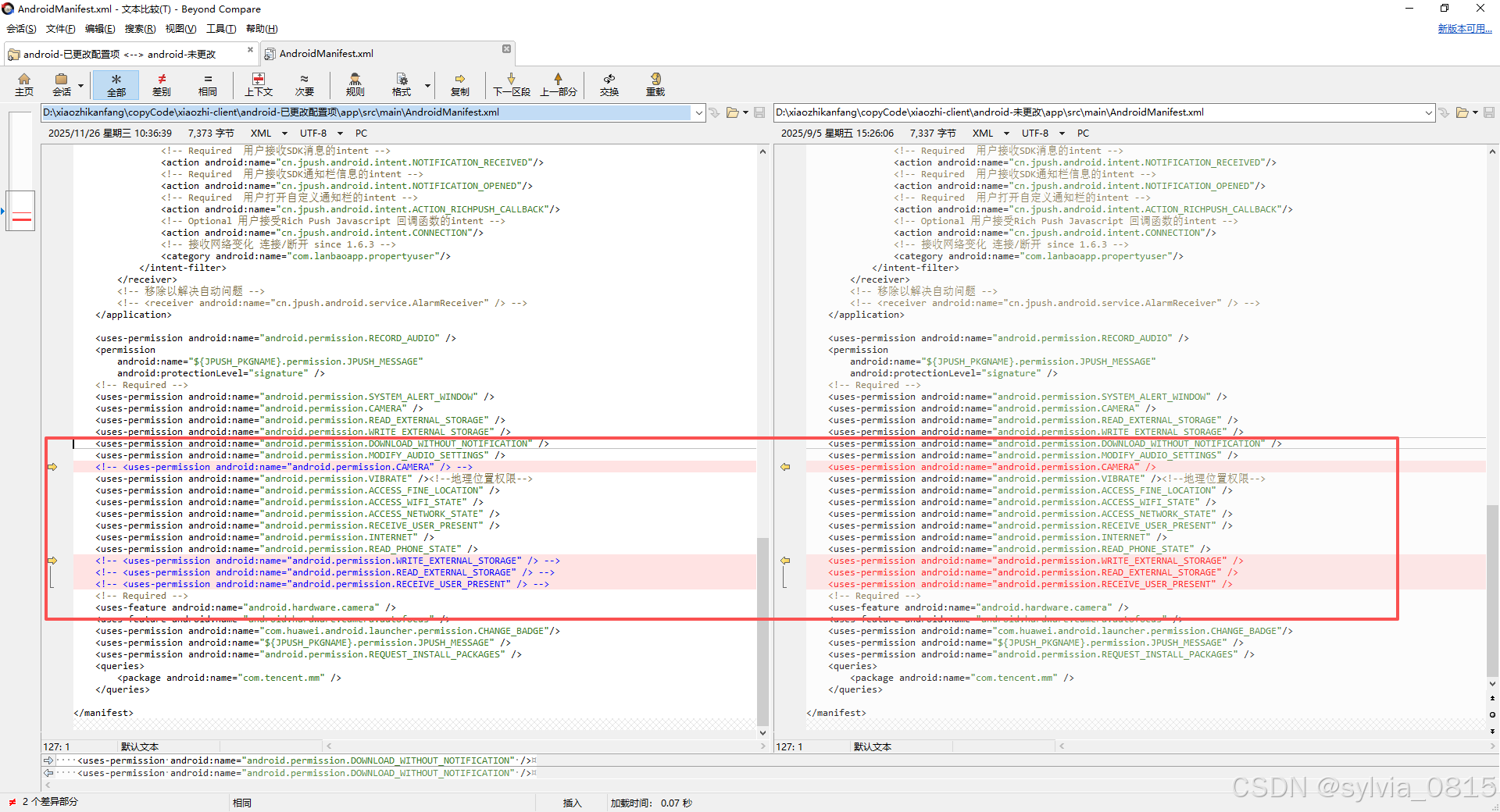
由上面(deepseek)可知:问题主要出现在两个方面:权限重复声明和minSdkVersion版本冲突。
1. 权限重复声明问题
在您的 AndroidManifest.xml 文件中,以下权限被重复声明了:
CAMERA (第124和129行)
WRITE_EXTERNAL_STORAGE (第126和137行)
READ_EXTERNAL_STORAGE (第125和138行)
RECEIVE_USER_PRESENT (第134和139行)
解决方案:
打开 android/app/src/main/AndroidManifest.xml 文件,删除重复的权限声明,保留一份即可。
2. minSdkVersion版本冲突
错误显示您的项目设置 minSdkVersion 为19,但 com.alipay.sdk:alipaysdk-android:15.8.40 库要求至少21。
所以:
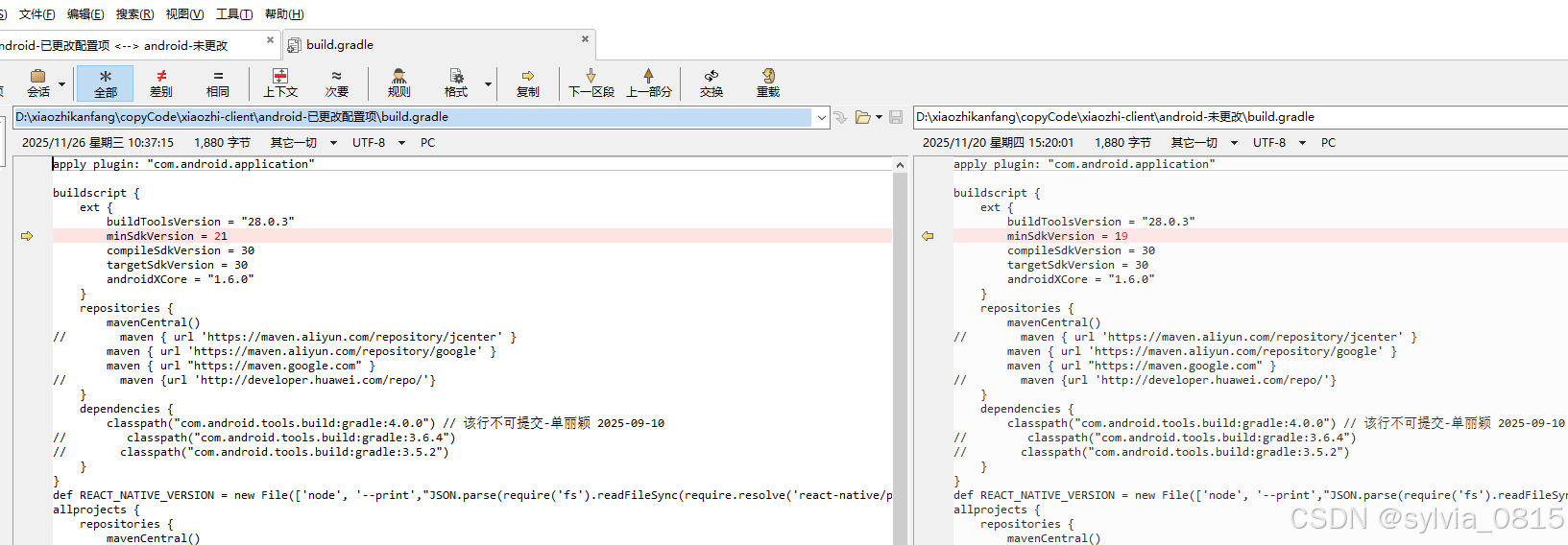
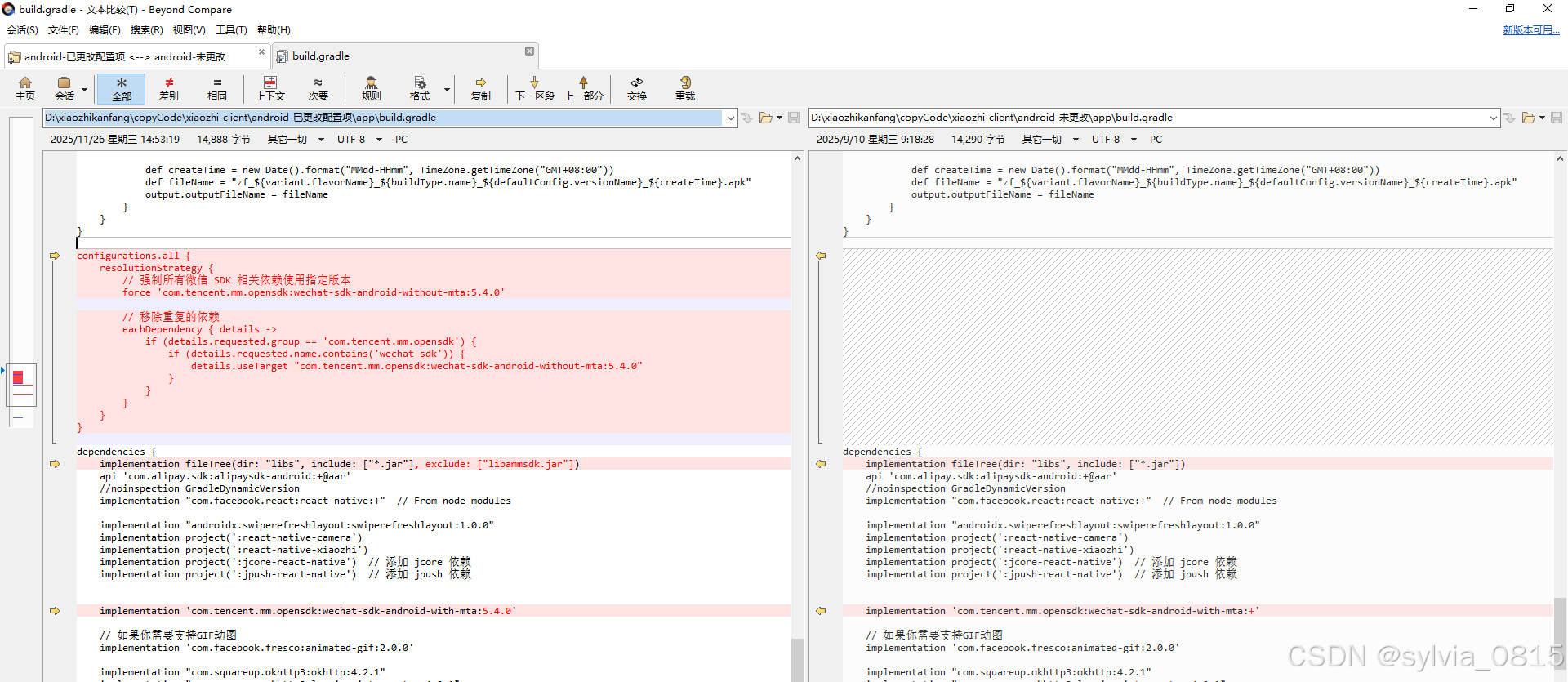
configurations.all {
    resolutionStrategy {
        // 强制所有微信 SDK 相关依赖使用指定版本
        force 'com.tencent.mm.opensdk:wechat-sdk-android-without-mta:5.4.0'

        // 移除重复的依赖
        eachDependency { details ->
            if (details.requested.group == 'com.tencent.mm.opensdk') {
                if (details.requested.name.contains('wechat-sdk')) {
                    details.useTarget "com.tencent.mm.opensdk:wechat-sdk-android-without-mta:5.4.0"
                }
            }
        }
    }
}

dependencies {
    implementation fileTree(dir: "libs", include: ["*.jar"], exclude: ["libammsdk.jar"])
    api 'com.alipay.sdk:alipaysdk-android:+@aar'
    //noinspection GradleDynamicVersion
    implementation "com.facebook.react:react-native:+"  // From node_modules

    implementation "androidx.swiperefreshlayout:swiperefreshlayout:1.0.0"
    implementation project(':react-native-camera')
    implementation project(':react-native-xiaozhi')
    implementation project(':jcore-react-native')  // 添加 jcore 依赖
    implementation project(':jpush-react-native')  // 添加 jpush 依赖


    implementation 'com.tencent.mm.opensdk:wechat-sdk-android-with-mta:5.4.0'

    // 如果你需要支持GIF动图
    implementation 'com.facebook.fresco:animated-gif:2.0.0'

    implementation "com.squareup.okhttp3:okhttp:4.2.1"
    implementation "com.squareup.okhttp3:logging-interceptor:4.2.1"
    implementation "com.squareup.okhttp3:okhttp-urlconnection:4.2.1"

    debugImplementation("com.facebook.flipper:flipper:${FLIPPER_VERSION}") {
        exclude group:'com.facebook.fbjni'
    }

    debugImplementation("com.facebook.flipper:flipper-network-plugin:${FLIPPER_VERSION}") {
        exclude group:'com.facebook.flipper'
    }

    debugImplementation("com.facebook.flipper:flipper-fresco-plugin:${FLIPPER_VERSION}") {
        exclude group:'com.facebook.flipper'
    }

    if (enableHermes) {
        def hermesPath = "../../node_modules/hermes-engine/android/";
        debugImplementation files(hermesPath + "hermes-debug.aar")
        releaseImplementation files(hermesPath + "hermes-release.aar")
    } else {
        implementation jscFlavor
    }

}
期间记得npm run android 之前都要进行
cd android
./gradlew clean
./gradlew cleanBuildCache
cd ..
对缓存进行重置

有“AI”的1024 = 2048,欢迎大家加入2048 AI社区
更多推荐

 19
19 0
0- 0


 已为社区贡献1条内容

所有评论(0)