Python LangChain学习
·
LangChain学习
随着人工智能技术的飞速发展,大语言模型(LLM)已经成为了许多应用的核心组件。然而,要充分发挥LLM的能力,我们需要一个强大的框架来管理模型交互、工具调用以及复杂的推理链。这就是LangChain发挥作用的地方。
什么是LangChain?
LangChain是一个专为开发由大型语言模型驱动的应用而设计的框架。它提供了丰富的工具和抽象层,使开发者能够轻松地构建复杂的AI应用,包括聊天机器人、文档分析系统、自动化代理等。
在本文中,将通过一个具体的例子——网页内容抓取与分析系统,来深入了解LangChain的基本概念和使用方法。
实战案例:网页内容分析
项目包含两个核心部分:
- MCP服务器:负责网页内容的抓取和处理
- LangChain客户端: 作为智能代理协调整个过程
MCP服务器架构
MCP(Model Context Protocol)服务器是这个系统的底层服务,负责执行具体的网页处理任务。在我们的示例中,它包含了三个核心功能:
- fetch_html:获取网页的原始HTML内容
- extract_text:从HTML转给你提取纯文本内容
- clean_html:清理HTML并提取主要内容
这些功能被包装成工具,供LangChain代理调用。
@mcp.tool()
async def fetch_html(url: str, timeout: int = 10) -> str:
    """
    获取网页原始HTML内容
    :param url: 网页URL
    :param timeout: 请求超时
    :return: 网页HTML内容
    """
    ...
LangChain代理配置
在LangChain客户端中,我们首先需要配置大语言模型。在这个例子中,我们使用了来自硅基流动的Qwen/Qwen3-8B模型:
siliconflow_llm = ChatOpenAI(
    model="Qwen/Qwen3-8B",
    api_key="your-api-key",
    base_url="https://api.siliconflow.cn/v1",
    temperature=0.1,
    max_tokens=2000,
)
接下来,连接到MCP服务器,并获取其暴露的工具:
client = MultiServerMCPClient(
    {
        "web_parser": {
            "command": "python",
            "args": ["./mcp_server.py"],
            "transport": "stdio",
        }
    }
)
tools = await client.get_tools()
构建智能代理
有了LLM和工具之后,我们可以创建一个智能代理来协调它们的工作。这里我们使用了LangChain的create_tool_calling_agent函数:
prompt = ChatPromptTemplate.from_messages([
    ("system", """你是一个精准的网页数据提取助手。
                 请按照以下格式返回数据:
                 {format_instructions}
                 严格按格式返回JSON
                 重要:只返回JSON,不要任何解释文字。"""),
    ("human", "任务:提取网页内容\n目标URL:{url}"),
    ("placeholder", "{agent_scratchpad}"),
])

agent = create_tool_calling_agent(llm=siliconflow_llm, tools=tools, prompt=prompt)
定义了一个结构化的数据模型来规范输出格式:
class News(BaseModel):
    title: str = Field(default="", description="标题")
    content_type: str = Field(default="", description="标签")
    article_type: str = Field(default="其他", description="内容类型, 转载、原贴、评论、其他")
    content: str = Field(default="", description="页面文本")
    # ... 其他字段
最后,创建AgentExecutor来执行代理任务:
agent_executor = AgentExecutor(
    agent=agent,
    tools=tools,
    verbose=True,
    max_iterations=3,
    handle_parsing_errors=True,
    return_intermediate_steps=True,
)
执行流程
当代理执行任务时,经历一下步骤:
- 接收用户的指令(例如抓取特定URL的内容)
- 分析任务需求并决定需要调用哪些工具
- 调用相应的工具
- 处理工具返回的结果
- 根据需要进一步调用其他工具
- 最终将结构化数据返回给用户
关键概念总结
- LLM集成:LangChain支持多种大语言模型,包括OpenAI、Anthropic以及其他兼容API的模型。
- 工具(Tools):外部函数或服务,可以被代理调用来执行特定任务。在我们的例子中,MCP服务器提供的网页处理功能就是工具。
- 提示模板(Prompt Templates):用于构造发送给LLM的提示,确保一致性和可维护性。
- 代理(Agents):决策层,决定采取什么行动,调用什么工具,以及如何响应用户。
- 执行器(Executors):负责实际执行代理的决策,调用工具并处理结果。
小结
这篇文章介绍了LangChain的基本概念,并通过一个网页内容分析的实际例子展示了如何使用LangChain构建智能应用。如何配置LLM、连接外部工具、构建代理并执行复杂任务。
完整代码
安装依赖
pip install fastmcp beautifulsoup4 langchain-mcp-adapters langchain-openai langchain langchain-community html2text
pip install readability-lxml>=0.8.4.1
# mcp_server.py
import asyncio
from typing import Optional

import aiohttp
from mcp.server.fastmcp import FastMCP
from bs4 import BeautifulSoup
import html2text
from readability import Document

mcp = FastMCP("WebParser")

class SessionManager:
    def __init__(self):
        self.session: Optional[aiohttp.ClientSession] = None

    async def get_session(self) -> aiohttp.ClientSession:
        if self.session is None or self.session.closed:
            timeout = aiohttp.ClientTimeout(total=30)
            self.session = aiohttp.ClientSession(
                timeout=timeout,
                headers={"User-Agent": "Mozilla/5.0 (compatible; LangChainBot/1.0)"},
            )
        return self.session

    async def close(self):
        if self.session and not self.session.closed:
            await self.session.close()

session_mgr = SessionManager()

@mcp.tool()
async def fetch_html(url: str, timeout: int = 10) -> str:
    """
    获取网页原始HTML内容
    :param url: 网页URL
    :param timeout: 请求超时
    :return: 网页HTML内容
    """
    session = await session_mgr.get_session()
    try:
        async with session.get(url, timeout=timeout) as resp:
            resp.raise_for_status()
            # 先获取bytes内容
            content_bytes = await resp.read()
            # 检测编码
            import chardet

            encoding_detected = chardet.detect(content_bytes)["encoding"]
            try:
                if encoding_detected:
                    html_content = content_bytes.decode(
                        encoding_detected, errors="replace"
                    )
                else:
                    html_content = content_bytes.decode("utf-8", errors="replace")
            except (UnicodeDecodeError, LookupError):
                # 如果检测的编码失败,尝试常见编码
                for encoding in ["utf-8", "gbk", "gb2312", "latin-1"]:
                    try:
                        html_content = content_bytes.decode(encoding, errors="replace")
                        break
                    except UnicodeDecodeError:
                        continue
                else:
                    # 所有编码都失败,使用replace模式
                    html_content = content_bytes.decode("utf-8", errors="replace")
            return html_content
    except aiohttp.ClientError as e:
        print(f"获取网页HTML失败: {e}")
        return ""


def _extract_text_sync(html: str, selector: Optional[str]) -> str:
    """同步提取函数"""
    soup = BeautifulSoup(html, "html.parser")
    if selector:
        elements = soup.select(selector)
        return "\n".join(e.get_text(strip=True) for e in elements)
    return soup.body.get_text(strip=True) if soup.body else ""

@mcp.tool()
async def extract_text(html: str, selector: Optional[str] = None) -> str:
    """
    使用css选择器提取纯文本,无selector则提取body全部文本
    :param html: 网页源码
    :param selector: css选择器
    :return: 纯文本
    """
    loop = asyncio.get_event_loop()
    return await loop.run_in_executor(None, _extract_text_sync, html, selector)


def _clean_html_sync(html_content: str) -> str:
    """
    结合readability-lxml、BeautifulSoup和html2text来提取和清理HTML内容
    步骤:readability提取正文 -> BeautifulSoup清理 -> html2text转换
    :param html_content: 输入HTML
    :return: 清理后的HTML
    """
    if not html_content:
        return ""

    # 第一步:readability提取正文
    try:
        doc = Document(html_content)
        main_content = doc.summary()
    except Exception as e:
        print(f"Readability提取失败,使用原始HTML结果: {e}")
        main_content = html_content

    # 第二步:BeautifulSoup清理无关元素
    try:
        soup = BeautifulSoup(main_content, "html.parser")
        for tag in soup(
            [
                "script",
                "style",
                "nav",
                "header",
                "footer",
                "aside",
                "advertisement",
                "sidebar",
                "comment",
            ]
        ):
            tag.decompose()
        for tag in soup.find_all():
            if not tag.get_text(strip=True):
                tag.decompose()

        cleaned_html = str(soup)
    except Exception as e:
        print(f"BeautifulSoup清理失败,使用readability结果: {e}")
        cleaned_html = main_content

    # 第三步:使用html2md转换为精简的Markdown
    try:
        h = html2text.HTML2Text()
        h.ignore_links = True
        h.ignore_images = True
        h.ignore_tables = True
        h.ignore_emphasis = True
        h.body_width = 0
        h.single_line_break = True
        h.ul_item_mark = "-"

        markdown_content = h.handle(cleaned_html)
        lines = [line.strip() for line in markdown_content.splitlines() if line.strip()]
        final_content = "\n".join(lines)

        return final_content
    except Exception as e:
        print(f"HTML转markdown失败,返回清理后的html: {e}")
        return cleaned_html


@mcp.tool()
async def clean_html(html_content: str) -> str:
    """异步清洗HTML"""
    loop = asyncio.get_event_loop()
    return await loop.run_in_executor(None, _clean_html_sync, html_content)


async def shutdown():
    """MCP服务器关闭时清理资源"""
    await session_mgr.close()


async def main():
    """主函数"""
    await mcp.run_stdio_async()
# scraper_agent.py
import asyncio
from datetime import datetime
from typing import Optional

from langchain_core.output_parsers import PydanticOutputParser
from langchain_core.prompts import ChatPromptTemplate
from pydantic import BaseModel, Field
from langchain_classic.agents import (
    AgentExecutor,
    create_tool_calling_agent,
)
from langchain_mcp_adapters.client import MultiServerMCPClient
from langchain_openai import ChatOpenAI


class News(BaseModel):
    title: str = Field(default="", description="标题")
    content_type: str = Field(default="", description="标签")
    article_type: str = Field(
        default="其他", description="内容类型, 转载、原贴、评论、其他"
    )
    content: str = Field(default="", description="页面文本")
    ...

parser = PydanticOutputParser(pydantic_object=News)

async def main():
    # 1. 配置大模型
    siliconflow_llm = ChatOpenAI(
        model="Qwen/Qwen3-8B",  # 模型名称从模型广场获取
        api_key="your_api_key",  # 硅基流动 API Key
        base_url="https://api.siliconflow.cn/v1",
        temperature=0.1,
        max_tokens=2000,
    )
    # 2. 连接MCP服务器(本地stdio模式)
    client = MultiServerMCPClient(
        {
            "web_parser": {
                "command": "python",
                "args": ["./mcp_server.py"],
                "transport": "stdio",
            }
        }
    )
    # 3. 获取MCP工具并创建Agent
    tools = await client.get_tools()
    prompt = ChatPromptTemplate.from_messages(
        [
            (
                "system",
                """你是一个精准的网页数据提取助手。
                    请按照以下格式返回数据:
                    {format_instructions}
                    严格按格式返回JSON
                    重要:只返回JSON,不要任何解释文字。
                """,
            ),
            ("human", "任务:提取网页内容\n目标URL:{url}"),
            ("placeholder", "{agent_scratchpad}"),
        ]
    )
    print("可用工具:", [tool.name for tool in tools])
    # 4. 构建带结构化输出的Agent
    agent = create_tool_calling_agent(llm=siliconflow_llm, tools=tools, prompt=prompt)
    # 5. 定义爬取任务
    target_url = "目标URL"
    # 6. 创建AgentExecutor并执行
    agent_executor = AgentExecutor(
        agent=agent,
        tools=tools,
        verbose=True,
        max_iterations=3,  # 减少迭代次数避免无限循环
        handle_parsing_errors=True,  # 添加错误处理
        return_intermediate_steps=True,  # 返回中间步骤用于调试
    )
    response = await agent_executor.ainvoke(
        {
            "url": target_url,
            "format_instructions": parser.get_format_instructions(),
            "agent_scratchpad": [],
        }
    )
    # 7. 提取最终结果
    final_output = response.get("output", "")
    if final_output:
        try:
            news = parser.parse(final_output)
            print("解析成功")
            print(f"{news.title}")
        except Exception as e:
            print(f"解析失败:{e}")
            print(f"原始输出:{final_output}")
    else:
        print("无有效输出")


if __name__ == "__main__":
    asyncio.run(main())
运行结果: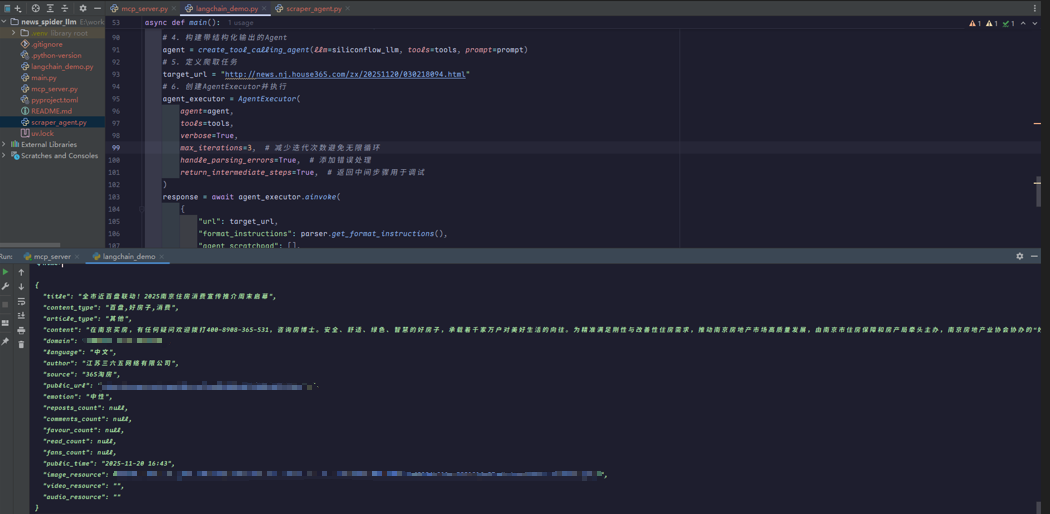

有“AI”的1024 = 2048,欢迎大家加入2048 AI社区
更多推荐

 9
9 0
0- 0


 已为社区贡献1条内容

所有评论(0)