【Sourcetree 】Sourcetree 拉取 Bitbucket 代码突然失败?一次完整的定位与解决全过程(2025 年版)
摘要:Sourcetree用户拉取代码时出现"Authentication failed"错误。问题根源在于Sourcetree内置Git仍使用旧凭据,而终端Git Bash因支持OAuth可正常操作。解决方案是在Sourcetree中切换至System Git(工具→选项→Git),利用Git Credential Manager Core实现OAuth认证。最终建议始终使用System Git
Sourcetree 拉取 Bitbucket 代码突然失败?一次完整的定位与解决全过程(2025 年版)
2025 年之后,Bitbucket 逐步禁用了旧的账号密码登录方式(Basic Auth),并替换为 API Token 和 OAuth。很多使用 Sourcetree + HTTPS 拉代码的用户,会突然遇到一模一样的报错:
fatal: Authentication failed for 'https://bitbucket.org/...'
remote: You may not have access to this repository or it no longer exists...
表面是“没有权限”,实质是认证体系升级导致旧凭据全部失效。
本文记录一次完整的排查过程,并总结 2025 年之后 Sourcetree 与 Bitbucket 的正确使用方式。
一、问题现象
使用 Sourcetree 点击 Pull 时:
- 拉取失败
- 控制台重复出现:
fatal: Authentication failed for 'https://bitbucket.org/...'
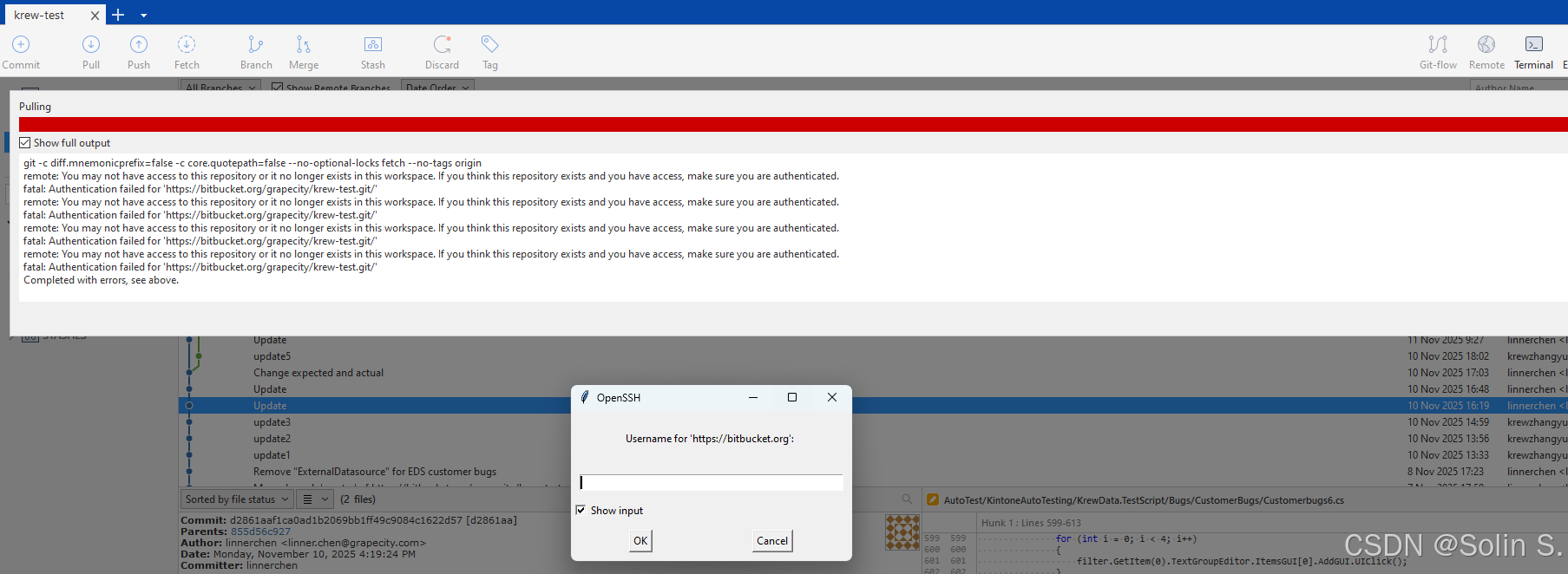
更奇怪的是:
- 最初 Sourcetree 不会弹出密码输入框
- 即使手动输入账号密码,也始终失败
- 但终端执行:
git ls-remote https://bitbucket.org/<team>/<repo>.git
却能返回正常分支列表
结论:Sourcetree 无法拉取代码,但 Git Bash 一切正常。
二、初步排查路径
1. 检查远端可达
终端执行:
git ls-remote https://bitbucket.org/<team>/<repo>.git
若能返回分支列表,说明:
- 远程仓库存在
- 网络没有问题
- 权限正常
本例中终端显示正常,因此排除“权限不足”。
2. 检查 Sourcetree 的远端分支列表
打开 Pull 窗口,发现:
- Remote branch 列表为空
- 尝试 Refresh 无效
这意味着 Sourcetree 本地没有正确的“远端跟踪分支”,通常由 fetch 失败导致。
3. 手动 fetch
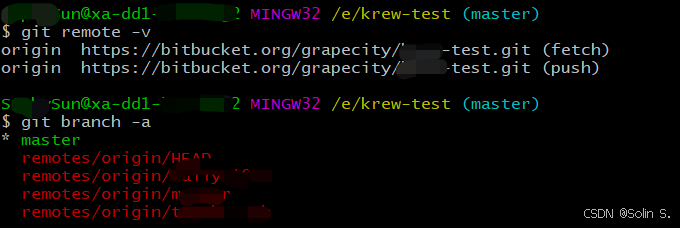
终端执行:
git fetch origin
git branch -a
分支出现,例如:
remotes/origin/master
remotes/origin/daily-test
说明本地 Git 正常工作,问题只发生在 Sourcetree 内。
三、根因确认:Bitbucket 废弃 Basic Auth,旧凭据失效
关键点:
1)你从未配置过 App Password,为什么突然失效?
因为你一直在用:
Windows Credential Manager 中保存的旧账号密码
这些密码是你第一次 clone/拉代码时保存的,但 2025 年起 Bitbucket 禁用了 Basic Auth(账号密码拉代码)。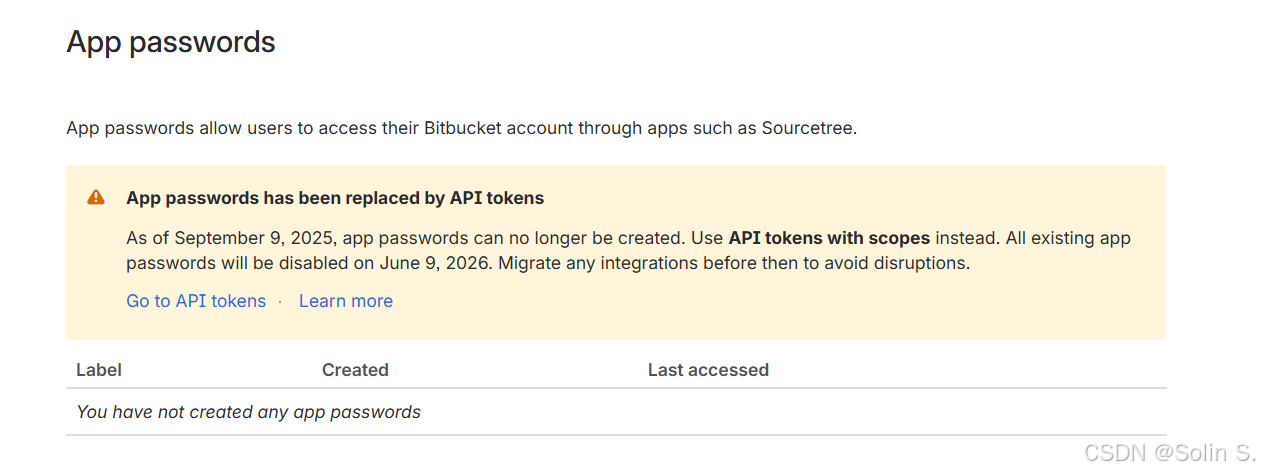
导致:
- Sourcetree 仍旧尝试使用旧密码
- Bitbucket 直接拒绝
- Sourcetree 判断“已有凭据”,但不会弹输入框
- 导致无法更换新凭据
最终出现:不能拉取,不能输入新密码,陷入死循环
2)为什么 Git Bash 正常?
因为 Git Bash 使用的是:
System Git + Git Credential Manager (GCM Core)
GCM Core 在 Bitbucket 上支持 OAuth:
- 自动弹出网页登录
- 自动刷新 token
- 自动管理凭据
因此终端可以正常认证。
而 Sourcetree 默认使用 embedded Git(老版本 Git + 弱认证),无法走 OAuth,所以失败。
四、最终解决方法:切换到 System Git
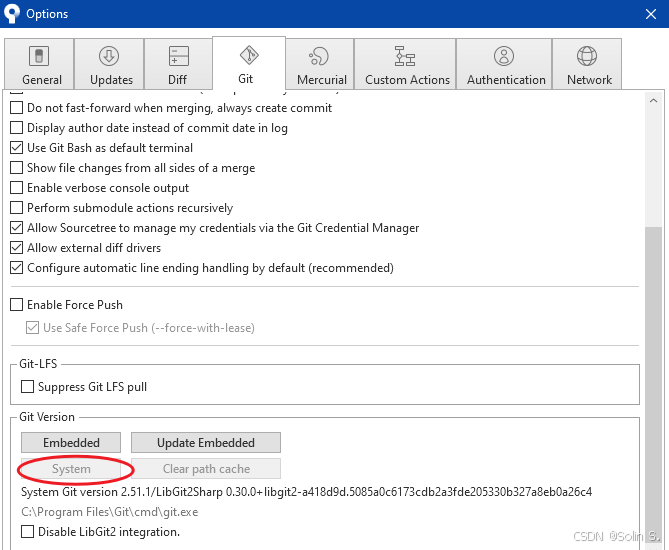
路径:
- Sourcetree → Tools → Options → Git
- 勾选:Use System Git
- 点击 Apply → 重启 Sourcetree
再次执行 pull,会弹出:
“需要使用 Atlassian 授权”
这是 Bitbucket 的 OAuth:
- 你在浏览器里登录 Atlassian 账号
- 授权 Sourcetree 访问 Bitbucket
- Git Credential Manager 会自动保存 token
授权完成后,再次拉取代码即可成功。
五、为什么“使用 System Git”就能解决?
因为 System Git 内置 Git Credential Manager Core (GCM Core),具备现代化认证支持:
- 支持 Bitbucket OAuth
- 支持 token 自动刷新
- 不需要手动输入密码
- 不依赖 App password 或 Basic Auth
相比之下,Sourcetree 的 embedded Git:
- 不支持 OAuth
- 会反复使用失效的旧凭据
- 无法自动更新
- 也不弹出新的登录窗口
切换 System Git 等于让 Sourcetree 复用终端的现代认证链路。
六、总结
问题根因
- Bitbucket 禁用了 Basic Auth
- Windows 凭据管理器仍保存旧密码
- Sourcetree embedded Git 不支持 OAuth
- 认证失败且不弹出输入框
- 导致 Sourcetree 不能拉代码,但 Git Bash 正常
最终解决
切换 Sourcetree 到 System Git → 自动触发 Atlassian OAuth → 认证恢复正常。
七、2025 之后使用 Bitbucket + Sourcetree 的建议
- 在 Sourcetree 中始终使用 System Git
- 不要再使用账号密码进行 Git 操作
- 推荐 HTTPS + OAuth(由 GCM 自动管理)
- 若必须使用令牌,使用 Bitbucket 的 API Token(替代 App password)
如果你也突然遇到 Sourcetree 无法拉取 Bitbucket 代码的情况,不妨按本文的排查路径走一遍,大多数问题都能通过“切换 System Git + OAuth 授权”解决。

有“AI”的1024 = 2048,欢迎大家加入2048 AI社区
更多推荐
 24
24 0
0- 0



 已为社区贡献1条内容

所有评论(0)