GTE-multilingual-base 本地向量服务部署与 Spring AI 集成方案
文章摘要 本文介绍了一个本地化部署的GTE-multilingual-base向量服务方案,适用于内网环境和数据安全要求高的场景。方案采用Docker容器化部署,具备以下特点: 无GPU要求,纯CPU环境下运行 支持单文本和批量文本向量化处理 通过FastAPI提供统一接口 包含Spring AI集成方案 采用Docker Compose实现一键部署 系统架构包含向量模型服务层和Spring应用层
GTE-multilingual-base 本地向量服务部署与 Spring AI 集成方案
前言
在构建 RAG(检索增强生成)系统时,文本向量化是核心环节之一。虽然云服务提供了便捷的 Embedding API,但在内网环境、数据安全要求高或需要控制成本的场景下,本地部署向量服务是更好的选择。
本文档详细介绍了如何在 无 GPU 的服务器 上部署 gte-multilingual-base 向量模型,并通过 FastAPI 提供统一的向量化服务接口。同时,我们将展示如何将其无缝集成到 Spring AI 项目中,实现完整的 RAG 系统。
本文执行方案基于claude4.5生成,已经验证可行
方案特点
- Docker 一键部署:简化部署流程,降低运维成本
- 批量处理支持:支持单文本和批量文本向量化
- CPU 优化:针对 CPU 环境进行性能优化
- 模型缓存复用:挂载 HuggingFace 缓存目录,避免重复下载
- Spring AI 集成:提供完整的 Spring Boot 集成示例
一、系统架构
1.1 整体架构 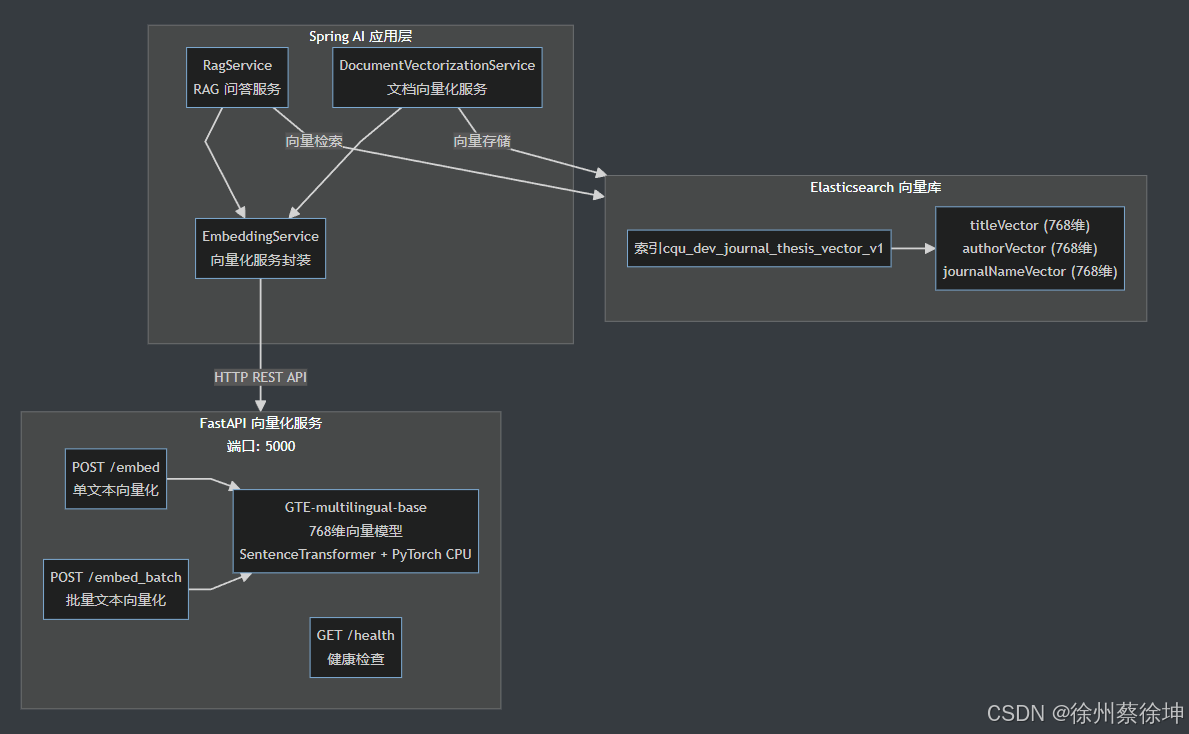
1.2 技术栈
- 向量模型:
Alibaba-NLP/gte-multilingual-base(768 维向量) - 运行环境:CPU(无 GPU 要求)
- 服务框架:FastAPI + Uvicorn
- 容器化:Docker + Docker Compose
- 集成框架:Spring Boot + Spring AI
二、项目结构
embedding-service/
├── app.py              # FastAPI 主服务代码
├── requirements.txt    # Python 依赖
├── Dockerfile          # 镜像构建
└── docker-compose.yml  # 一键部署
三、核心文件内容
1. app.py
"""
GTE-multilingual-base FastAPI 推理服务
提供文本向量化 API,支持单文本和批量处理
"""
from fastapi import FastAPI, HTTPException
from fastapi.responses import JSONResponse
from pydantic import BaseModel
from typing import List
import torch
from sentence_transformers import SentenceTransformer
import logging
import time

# 配置日志
logging.basicConfig(
    level=logging.INFO,
    format='%(asctime)s - %(name)s - %(levelname)s - %(message)s'
)
logger = logging.getLogger(__name__)

# 创建 FastAPI 应用
app = FastAPI(
    title="GTE Embedding Service",
    description="Alibaba-NLP/gte-multilingual-base 文本向量化服务",
    version="1.0.0"
)

# 全局变量
model = None
MODEL_NAME = "Alibaba-NLP/gte-multilingual-base"
DIMENSION = 768


class EmbedRequest(BaseModel):
    """单文本向量化请求"""
    text: str


class EmbedBatchRequest(BaseModel):
    """批量文本向量化请求"""
    texts: List[str]


class EmbedResponse(BaseModel):
    """向量化响应"""
    embedding: List[float]
    dimension: int


class EmbedBatchResponse(BaseModel):
    """批量向量化响应"""
    embeddings: List[List[float]]
    dimension: int
    count: int


class HealthResponse(BaseModel):
    """健康检查响应"""
    status: str
    model: str
    dimension: int
    device: str


@app.on_event("startup")
async def load_model():
    """启动时加载模型"""
    global model
    try:
        logger.info(f"开始加载模型: {MODEL_NAME}")
        start_time = time.time()

        # 加载模型(自动下载到 ~/.cache/huggingface/)
        # trust_remote_code=True: GTE 模型使用自定义配置代码
        model = SentenceTransformer(MODEL_NAME, trust_remote_code=True)

        # CPU 优化设置
        if torch.cuda.is_available():
            logger.info("检测到 GPU,使用 CUDA")
            model = model.cuda()
        else:
            logger.info("使用 CPU 推理")
            # CPU 优化
            torch.set_num_threads(4)  # 根据 CPU 核心数调整

        load_time = time.time() - start_time
        logger.info(f"模型加载成功!耗时: {load_time:.2f}秒")
        logger.info(f"向量维度: {DIMENSION}")

    except Exception as e:
        logger.error(f"模型加载失败: {e}")
        raise


@app.get("/", response_model=dict)
async def root():
    """根路径"""
    return {
        "service": "GTE Embedding Service",
        "model": MODEL_NAME,
        "dimension": DIMENSION,
        "endpoints": {
            "health": "/health",
            "embed": "/embed (POST)",
            "embed_batch": "/embed_batch (POST)"
        }
    }


@app.get("/health", response_model=HealthResponse)
async def health_check():
    """健康检查接口"""
    if model is None:
        raise HTTPException(status_code=503, detail="模型未加载")

    device = "cuda" if torch.cuda.is_available() else "cpu"

    return HealthResponse(
        status="healthy",
        model=MODEL_NAME,
        dimension=DIMENSION,
        device=device
    )


@app.post("/embed", response_model=EmbedResponse)
async def embed_text(request: EmbedRequest):
    """
    单文本向量化

    请求示例:
    {
        "text": "这是一段测试文本"
    }
    """
    if model is None:
        raise HTTPException(status_code=503, detail="模型未加载")

    if not request.text or not request.text.strip():
        raise HTTPException(status_code=400, detail="文本不能为空")

    try:
        start_time = time.time()

        # 生成向量
        embedding = model.encode(request.text, convert_to_numpy=True)

        # 转换为列表
        embedding_list = embedding.tolist()

        inference_time = time.time() - start_time
        logger.info(f"向量生成成功,耗时: {inference_time*1000:.2f}ms")

        return EmbedResponse(
            embedding=embedding_list,
            dimension=len(embedding_list)
        )

    except Exception as e:
        logger.error(f"向量生成失败: {e}")
        raise HTTPException(status_code=500, detail=f"向量生成失败: {str(e)}")


@app.post("/embed_batch", response_model=EmbedBatchResponse)
async def embed_texts(request: EmbedBatchRequest):
    """
    批量文本向量化

    请求示例:
    {
        "texts": ["文本1", "文本2", "文本3"]
    }
    """
    if model is None:
        raise HTTPException(status_code=503, detail="模型未加载")

    if not request.texts or len(request.texts) == 0:
        raise HTTPException(status_code=400, detail="文本列表不能为空")

    # 过滤空文本
    valid_texts = [text for text in request.texts if text and text.strip()]
    if not valid_texts:
        raise HTTPException(status_code=400, detail="没有有效的文本")

    try:
        start_time = time.time()

        # 批量生成向量
        embeddings = model.encode(valid_texts, convert_to_numpy=True, batch_size=32)

        # 转换为列表
        embeddings_list = embeddings.tolist()

        inference_time = time.time() - start_time
        logger.info(f"批量向量生成成功,数量: {len(embeddings_list)}, 耗时: {inference_time:.2f}s")

        return EmbedBatchResponse(
            embeddings=embeddings_list,
            dimension=DIMENSION,
            count=len(embeddings_list)
        )

    except Exception as e:
        logger.error(f"批量向量生成失败: {e}")
        raise HTTPException(status_code=500, detail=f"批量向量生成失败: {str(e)}")


@app.exception_handler(Exception)
async def global_exception_handler(request, exc):
    """全局异常处理"""
    logger.error(f"未处理的异常: {exc}")
    return JSONResponse(
        status_code=500,
        content={"detail": "服务器内部错误"}
    )


if __name__ == "__main__":
    import uvicorn
    uvicorn.run(app, host="0.0.0.0", port=5000)
2. requirements.txt
# Web 框架
fastapi==0.104.1
uvicorn[standard]==0.24.0
pydantic==2.5.0

# 深度学习框架
torch==2.1.2
transformers==4.36.0
sentence-transformers==2.3.1

# 基础库
numpy==1.24.3
tokenizers==0.15.0
3. Dockerfile
# 使用官方 Python 镜像
FROM python:3.10-slim

# 设置工作目录
WORKDIR /app

# 设置环境变量
ENV PYTHONUNBUFFERED=1 \
    PYTHONDONTWRITEBYTECODE=1 \
    PIP_NO_CACHE_DIR=1 \
    PIP_DISABLE_PIP_VERSION_CHECK=1

# 更换为阿里云镜像源并安装系统依赖
RUN sed -i 's/deb.debian.org/mirrors.aliyun.com/g' /etc/apt/sources.list.d/debian.sources && \
    apt-get update && apt-get install -y --no-install-recommends \
    build-essential \
    curl \
    && rm -rf /var/lib/apt/lists/*

# 复制依赖文件
COPY requirements.txt .

# 安装 Python 依赖(使用阿里云镜像源)
RUN pip install --no-cache-dir -i https://mirrors.aliyun.com/pypi/simple/ -r requirements.txt

# 复制应用代码
COPY app.py .

# 暴露端口
EXPOSE 5000

# 健康检查
HEALTHCHECK --interval=30s --timeout=10s --start-period=60s --retries=3 \
    CMD curl -f http://localhost:5000/health || exit 1

# 启动命令
CMD ["uvicorn", "app:app", "--host", "0.0.0.0", "--port", "5000", "--workers", "1"]
4. docker-compose.yml
version: '3.8'

services:
  embedding-service:
    build:
      context: .
      dockerfile: Dockerfile
    container_name: gte-embedding-service
    ports:
      - "5000:5000"
    environment:
      # CPU 优化设置
      - OMP_NUM_THREADS=4
      - MKL_NUM_THREADS=4
      # 使用 HuggingFace 镜像站(国内访问)
      - HF_ENDPOINT=https://hf-mirror.com
    volumes:
      # 挂载模型缓存目录,避免重复下载
      - ~/.cache/huggingface:/root/.cache/huggingface
    restart: unless-stopped
    healthcheck:
      test: ["CMD", "curl", "-f", "http://localhost:5000/health"]
      interval: 30s
      timeout: 10s
      retries: 3
      start_period: 60s
    # CPU 资源限制(根据实际情况调整)
    deploy:
      resources:
        limits:
          cpus: '8'
          memory: 8G
        reservations:
          cpus: '4'
          memory: 4G
四、部署步骤
Docker 部署
上传embedding-service文件夹到服务器
cd embedding-service
docker-compose up -d
执行输出:
[root@manager168 embedding-service]# docker compose up -d --build
[+] Building 531.9s (11/11) FINISHED docker:default
=> [embedding-service internal] load build definition from Dockerfile 0.0s
=> => transferring dockerfile: 1.09kB 0.0s
=> [embedding-service internal] load metadata for docker.io/library/python:3.10-slim 0.5s
=> [embedding-service internal] load .dockerignore 0.0s
=> => transferring context: 2B 0.0s
=> [embedding-service 1/6] FROM docker.io/library/python:3.10-slim@sha256:975a1e200a16719060d391eea4ac66ee067d709cc22a32f4ca4737731eae36c0 0.0s
=> [embedding-service internal] load build context 0.0s
=> => transferring context: 63B 0.0s
=> CACHED [embedding-service 2/6] WORKDIR /app 0.0s
=> CACHED [embedding-service 3/6] RUN sed -i ‘s/deb.debian.org/mirrors.aliyun.com/g’ /etc/apt/sources.list.d/debian.sources && apt-get updat 0.0s
=> CACHED [embedding-service 4/6] COPY requirements.txt . 0.0s
=> [embedding-service 5/6] RUN pip install --no-cache-dir -i https://mirrors.aliyun.com/pypi/simple/ -r requirements.txt 480.2s
=> [embedding-service 6/6] COPY app.py . 0.1s
=> [embedding-service] exporting to image 51.1s
=> => exporting layers 51.1s
=> => writing image sha256:6f215be4bd4923ef16cc87f77fc3cbfb0f0288395eb2145a6be1d86dd0ffde4b 0.0s
=> => naming to docker.io/library/embedding-service-embedding-service 0.0s
[+] Running 2/2
✔ Network embedding-service_default Created 0.1s
✔ Container gte-embedding-service Started 0.6s
查看运行情况
docker compose logs -f
[root@manager168 embedding-service]# docker compose logs -f
WARN[0000] /mnt/sdb3/embedding-service/docker-compose.yml: version is obsolete
gte-embedding-service | INFO: Started server process [1]
gte-embedding-service | INFO: Waiting for application startup.
gte-embedding-service | 2025-11-14 08:07:56,706 - app - INFO - 开始加载模型: Alibaba-NLP/gte-multilingual-base
gte-embedding-service | 2025-11-14 08:07:56,706 - sentence_transformers.SentenceTransformer - INFO - Load pretrained SentenceTransformer: Alibaba-NLP/gte-multilingual-base
gte-embedding-service | /usr/local/lib/python3.10/site-packages/huggingface_hub/file_download.py:942: FutureWarning: resume_download is deprecated and will be removed in version 1.0.0. Downloads always resume when possible. If you want to force a new download, use force_download=True.
gte-embedding-service | warnings.warn(
gte-embedding-service | A new version of the following files was downloaded from https://huggingface.co/Alibaba-NLP/new-impl:
gte-embedding-service | - configuration.py
gte-embedding-service | . Make sure to double-check they do not contain any added malicious code. To avoid downloading new versions of the code file, you can pin a revision.
gte-embedding-service | A new version of the following files was downloaded from https://huggingface.co/Alibaba-NLP/new-impl:
gte-embedding-service | - modeling.py
gte-embedding-service | . Make sure to double-check they do not contain any added malicious code. To avoid downloading new versions of the code file, you can pin a revision.
gte-embedding-service | Some weights of the model checkpoint at Alibaba-NLP/gte-multilingual-base were not used when initializing NewModel: [‘classifier.bias’, ‘classifier.weight’]
gte-embedding-service | - This IS expected if you are initializing NewModel from the checkpoint of a model trained on another task or with another architecture (e.g. initializing a BertForSequenceClassification model from a BertForPreTraining model).
gte-embedding-service | - This IS NOT expected if you are initializing NewModel from the checkpoint of a model that you expect to be exactly identical (initializing a BertForSequenceClassification model from a BertForSequenceClassification model).
gte-embedding-service | 2025-11-14 08:10:34,530 - sentence_transformers.SentenceTransformer - INFO - Use pytorch device_name: cpu
gte-embedding-service | 2025-11-14 08:10:34,534 - app - INFO - 使用 CPU 推理
gte-embedding-service | 2025-11-14 08:10:34,550 - app - INFO - 模型加载成功!耗时: 157.84秒
gte-embedding-service | 2025-11-14 08:10:34,550 - app - INFO - 向量维度: 768
gte-embedding-service | INFO: Application startup complete.
gte-embedding-service | INFO: Uvicorn running on http://0.0.0.0:5000 (Press CTRL+C to quit)
gte-embedding-service | INFO: 127.0.0.1:35030 - “GET /health HTTP/1.1” 200 OK
gte-embedding-service | INFO: 127.0.0.1:35582 - “GET /health HTTP/1.1” 200 OK
gte-embedding-service | INFO: 127.0.0.1:36112 - “GET /health HTTP/1.1” 200 OK
gte-embedding-service | INFO: 127.0.0.1:36624 - “GET /health HTTP/1.1” 200 OK
gte-embedding-service | INFO: 127.0.0.1:36638 - “GET /health HTTP/1.1” 200 OK
gte-embedding-service | INFO: 127.0.0.1:36646 - “GET /health HTTP/1.1” 200 OK
gte-embedding-service | INFO: 127.0.0.1:36656 - “GET /health HTTP/1.1” 200 OK
gte-embedding-service | INFO: 127.0.0.1:36664 - “GET /health HTTP/1.1” 200 OK
gte-embedding-service | INFO: 127.0.0.1:36676 - “GET /health HTTP/1.1” 200 OK
gte-embedding-service | INFO: 127.0.0.1:36688 - “GET /health HTTP/1.1” 200 OK
gte-embedding-service | INFO: 127.0.0.1:36700 - “GET /health HTTP/1.1” 200 OK
gte-embedding-service | INFO: 127.0.0.1:36708 - “GET /health HTTP/1.1” 200 OK
gte-embedding-service | INFO: 127.0.0.1:36718 - “GET /health HTTP/1.1” 200 OK
gte-embedding-service | INFO: 127.0.0.1:36728 - “GET /health HTTP/1.1” 200 O
五、API 使用示例
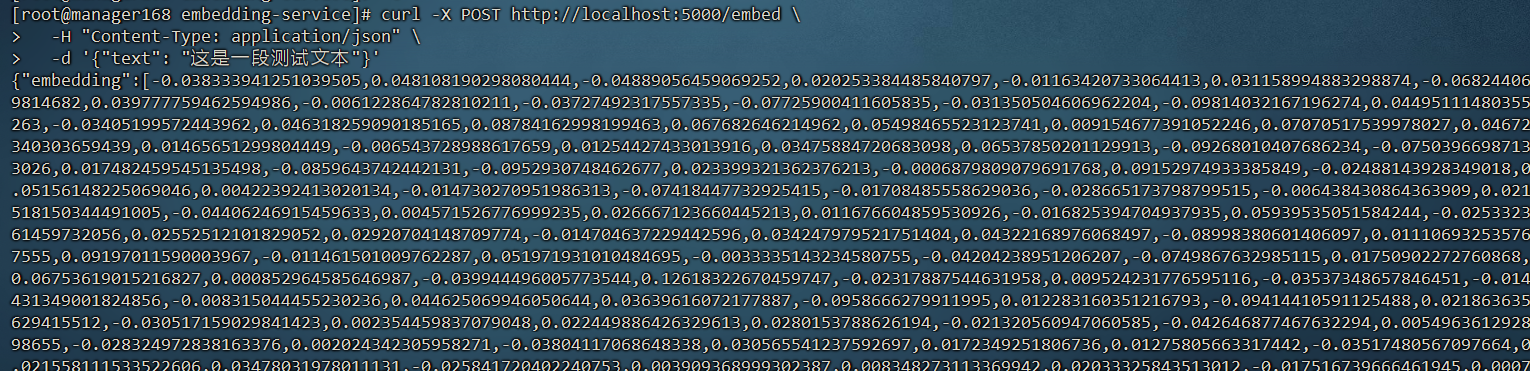
1. 单文本向量化
curl -X POST http://localhost:5000/embed \
  -H "Content-Type: application/json" \
  -d '{"text": "这是一段测试文本"}'
返回:
{
  "embedding": [...],
  "dimension": 768
}
2. 批量向量化
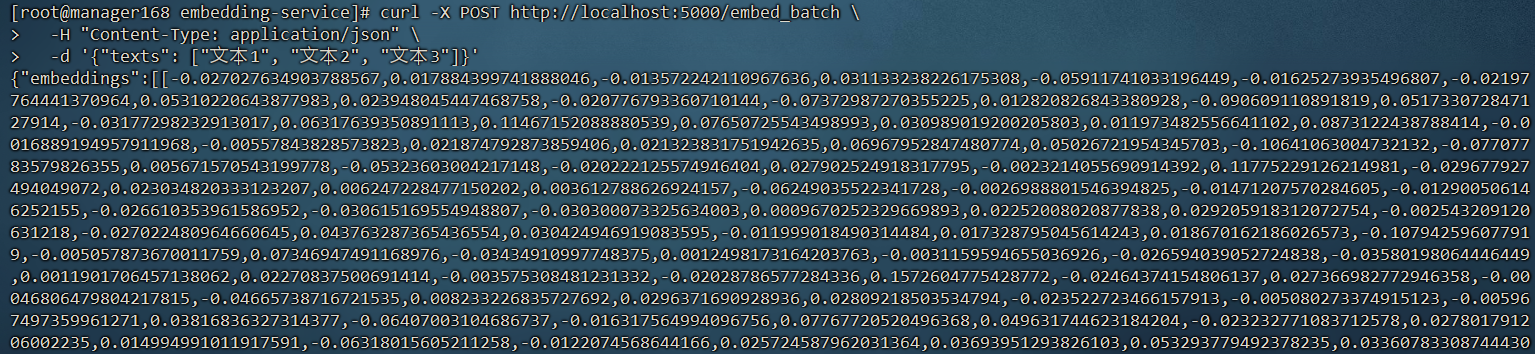
curl -X POST http://localhost:5000/embed_batch \
  -H "Content-Type: application/json" \
  -d '{"texts": ["文本1", "文本2", "文本3"]}'
返回:
{
  "embeddings": [...],
  "dimension": 768,
  "count": 3
}
六、Spring AI 项目集成
6.1 项目配置
在 Spring Boot 项目的 application.yml 中添加向量服务配置:
# 自定义配置
app:
  elasticsearch:
    # 向量维度(gte-multilingual-base 模型)
    vector-dimension: 768
    # 批量处理大小
    batch-size: 100
    # 本地 Embedding 服务 URL
    embedding-service-url: http://192.168.0.168:5000
6.2 配置类实现
创建配置类 AppConfig.java 用于读取配置和初始化 RestTemplate:
package com.zhouquan.ai.config;

import lombok.Data;
import org.springframework.boot.context.properties.ConfigurationProperties;
import org.springframework.boot.web.client.RestTemplateBuilder;
import org.springframework.context.annotation.Bean;
import org.springframework.context.annotation.Configuration;
import org.springframework.http.client.BufferingClientHttpRequestFactory;
import org.springframework.http.client.SimpleClientHttpRequestFactory;
import org.springframework.web.client.RestTemplate;

/**
 * 应用自定义配置
 */
@Data
@Configuration
@ConfigurationProperties(prefix = "app.elasticsearch")
public class AppConfig {

    /**
     * 向量维度
     */
    private Integer vectorDimension;

    /**
     * 批量处理大小
     */
    private Integer batchSize;

    /**
     * Embedding 服务 URL
     */
    private String embeddingServiceUrl;

    @Bean
    public RestTemplate restTemplate(RestTemplateBuilder builder) {
        // 配置请求工厂
        SimpleClientHttpRequestFactory requestFactory = new SimpleClientHttpRequestFactory();
        // 设置连接超时时间(30秒)
        requestFactory.setConnectTimeout(30000);
        // 设置读取超时时间(5分钟,因为向量化可能需要较长时间)
        requestFactory.setReadTimeout(300000);

        // 使用 BufferingClientHttpRequestFactory 来支持请求体的多次读取
        BufferingClientHttpRequestFactory bufferingFactory =
                new BufferingClientHttpRequestFactory(requestFactory);

        return builder
                .requestFactory(() -> bufferingFactory)
                .build();
    }
}
6.3 EmbeddingService 实现
创建 EmbeddingService.java 封装向量化服务调用:
package com.zhouquan.ai.service;

import com.zhouquan.ai.config.AppConfig;
import lombok.RequiredArgsConstructor;
import lombok.extern.slf4j.Slf4j;
import org.springframework.http.HttpEntity;
import org.springframework.http.HttpHeaders;
import org.springframework.http.MediaType;
import org.springframework.http.ResponseEntity;
import org.springframework.stereotype.Service;
import org.springframework.web.client.RestTemplate;

import java.util.ArrayList;
import java.util.HashMap;
import java.util.List;
import java.util.Map;

/**
 * Embedding 向量化服务
 * 使用本地部署的 gte-multilingual-base 模型生成文本向量
 */
@Slf4j
@Service
@RequiredArgsConstructor
public class EmbeddingService {

    private final RestTemplate restTemplate;
    private final AppConfig appConfig;

    /**
     * 将单个文本转换为向量
     */
    public float[] embedText(String text) {
        if (text == null || text.trim().isEmpty()) {
            log.warn("文本为空,返回空向量");
            return new float[0];
        }

        try {
            List<float[]> vectors = embedTexts(List.of(text));
            if (vectors.isEmpty()) {
                log.warn("向量化结果为空");
                return new float[0];
            }
            return vectors.get(0);
        } catch (Exception e) {
            log.error("文本向量化失败: {}", text.substring(0, Math.min(100, text.length())), e);
            throw new RuntimeException("文本向量化失败", e);
        }
    }

    /**
     * 批量将文本转换为向量
     * 支持自动重试机制,提高服务稳定性
     */
    public List<float[]> embedTexts(List<String> texts) {
        if (texts == null || texts.isEmpty()) {
            return new ArrayList<>();
        }

        int maxRetries = 3;
        int retryDelay = 1000; // 1秒

        for (int attempt = 1; attempt <= maxRetries; attempt++) {
            try {
                String url = appConfig.getEmbeddingServiceUrl() + "/embed_batch";
                log.info("调用本地 embedding 服务: {}, 文本数量: {}, 尝试次数: {}/{}",
                        url, texts.size(), attempt, maxRetries);

                // 计算请求大小
                long totalChars = texts.stream().mapToLong(String::length).sum();
                log.info("请求文本总字符数: {}", totalChars);

                // 构建请求体
                Map<String, Object> requestBody = new HashMap<>();
                requestBody.put("texts", texts);

                // 设置请求头
                HttpHeaders headers = new HttpHeaders();
                headers.setContentType(MediaType.APPLICATION_JSON);
                headers.set("Connection", "keep-alive");
                HttpEntity<Map<String, Object>> request = new HttpEntity<>(requestBody, headers);

                // 发送 POST 请求
                ResponseEntity<EmbedBatchResponse> response = restTemplate.postForEntity(
                        url,
                        request,
                        EmbedBatchResponse.class
                );

                EmbedBatchResponse body = response.getBody();
                if (body == null || body.getEmbeddings() == null || body.getEmbeddings().isEmpty()) {
                    log.error("向量化服务返回结果为空");
                    throw new RuntimeException("向量化服务返回结果为空");
                }

                log.info("向量化成功,返回 {} 个向量,维度: {}", body.getCount(), body.getDimension());

                // 将 List<List<Double>> 转换为 List<float[]>
                List<float[]> result = new ArrayList<>();
                for (List<Double> embedding : body.getEmbeddings()) {
                    float[] floatArray = new float[embedding.size()];
                    for (int i = 0; i < embedding.size(); i++) {
                        floatArray[i] = embedding.get(i).floatValue();
                    }
                    result.add(floatArray);
                }

                return result;

            } catch (org.springframework.web.client.ResourceAccessException e) {
                if (attempt == maxRetries) {
                    log.error("批量文本向量化失败,已达最大重试次数 {}", maxRetries, e);
                    throw new RuntimeException("批量文本向量化失败(连接错误): " + e.getMessage() +
                            "。请检查向量化服务是否正常运行: " + appConfig.getEmbeddingServiceUrl(), e);
                }

                log.warn("第 {} 次尝试失败(连接错误),{}ms 后重试: {}",
                        attempt, retryDelay, e.getMessage());

                try {
                    Thread.sleep(retryDelay);
                    retryDelay *= 2; // 指数退避
                } catch (InterruptedException ie) {
                    Thread.currentThread().interrupt();
                    throw new RuntimeException("重试被中断", ie);
                }

            } catch (Exception e) {
                log.error("批量文本向量化失败,文本数量: {}", texts.size(), e);
                throw new RuntimeException("批量文本向量化失败: " + e.getMessage(), e);
            }
        }

        throw new RuntimeException("批量文本向量化失败:未知错误");
    }

    /**
     * 计算向量维度
     */
    public int getVectorDimension(String sampleText) {
        float[] vector = embedText(sampleText);
        return vector.length;
    }

    /**
     * 批量响应数据结构
     */
    @lombok.Data
    private static class EmbedBatchResponse {
        private List<List<Double>> embeddings;
        private Integer dimension;
        private Integer count;
    }
}
6.4 在 RAG 服务中使用
在 RagService.java 中使用 EmbeddingService:
@Service
@RequiredArgsConstructor
public class RagService {

    private final EmbeddingService embeddingService;
    // ... 其他依赖

    public RagResponse ask(String question, List<QaHistory> historyContext) {
        // 1. 将问题向量化
        float[] questionVector = embeddingService.embedText(question);

        // 2. 从向量库检索相似文档
        List<RetrievedDocument> retrievedDocs = searchSimilarDocuments(questionVector);

        // 3. 构建增强提示词并生成答案
        // ...
    }
}
6.5 批量向量化示例
在 DocumentVectorizationService.java 中批量处理文档:
@Service
@RequiredArgsConstructor
public class DocumentVectorizationService {

    private final EmbeddingService embeddingService;

    public void vectorizeDocuments(int startIndex, int size) {
        // 1. 从数据源读取文档
        List<Document> documents = loadDocuments(startIndex, size);

        // 2. 提取文本内容
        List<String> texts = documents.stream()
            .map(Document::getContent)
            .collect(Collectors.toList());

        // 3. 批量向量化(利用批量接口提高效率)
        List<float[]> vectors = embeddingService.embedTexts(texts);

        // 4. 存储向量到 Elasticsearch
        saveVectorsToElasticsearch(documents, vectors);
    }
}
八、总结
本文档详细介绍了 GTE-multilingual-base 向量模型的本地部署方案,以及如何将其集成到 Spring AI 项目中。通过 Docker 容器化部署,我们实现了:
- 一键部署,降低运维成本
- 稳定可靠的向量化服务
- 与 Spring AI 无缝集成
- 支持大规模批量处理
- 完善的错误处理和重试机制
相关资源

有“AI”的1024 = 2048,欢迎大家加入2048 AI社区
更多推荐

 27
27 0
0- 0


 已为社区贡献8条内容

所有评论(0)