Join a Debian GNU/Linux Server to an Active Directory Domain Using Winbind
·
This guide explains how to configure a Samba file server with Winbind on GNU/Linux to integrate it into an Active Directory environment. The goal is to allow domain users to authenticate and access shared resources seamlessly using their existing credentials.
- Key benefits of using Winbind include:
- Enables GNU/Linux systems to authenticate and access resources on Windows servers
- Maps Windows users and groups to manage ACLs on Samba shares
- Centralizes account and authentication management via Active Directory
This tutorial is based on a Debian 12 server setup.
Network Architecture
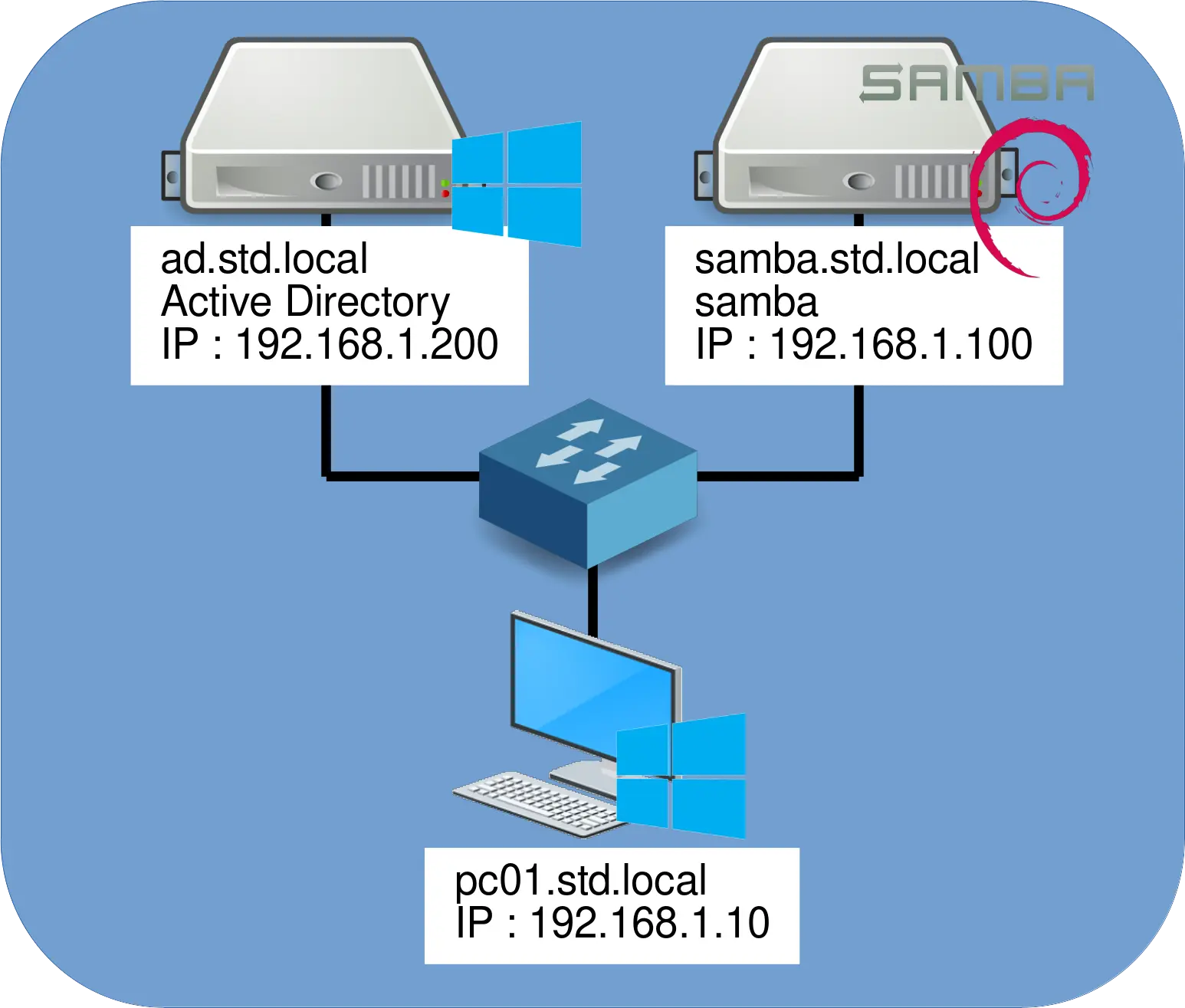
Winbind Architecture.
Installation and Configuration
⚠️Prerequisites: Make sure the system clocks on both the Windows domain controller and the Debian server are synchronized. Time discrepancies can cause authentication failures. ⚠️
- Set the server hostname:
root@SAMBA:~# echo "SAMBA" > /etc/hostname
root@SAMBA:~# hostname SAMBA
- Edit the
/etc/hostsfile to map the hostname to its local IP:
127.0.0.1       localhost
127.0.1.1       samba.std.local  samba
- Edit the
/etc/resolv.conffile to configure DNS resolution:
domain std.local
search std.local
nameserver 192.168.1.200
- Install the required packages for Samba, Winbind, and Kerberos support:
root@SAMBA:~# apt update && apt install samba winbind libnss-winbind libpam-winbind krb5-user
- Configure Kerberos by editing the
/etc/krb5.conffile:
[libdefaults]
    default_realm = STD.LOCAL
    ticket_lifetime = 1d
    renew_lifetime = 7d
    dns_lookup_realm = false
    dns_lookup_kdc = true

[realms]
     STD.LOCAL = {
        kdc = 192.168.1.200
        admin_server = 192.168.1.200
     }
- Create the shared folder that will be accessible over the network:
root@SAMBA:~# mkdir /data
- Edit the
/etc/samba/smb.conffile to configure the Samba server and define the share:
[global]
 workgroup = std
 security = ads
 realm = std.local
 idmap config *:backend = tdb
 idmap config *:range = 700001-800000
 idmap config STD:backend = rid
 idmap config STD:range = 10000-700000
 winbind use default domain = yes
 template homedir = /home/%U
 map acl inherit = yes
 template shell = /bin/bash
 winbind enum users = yes
 winbind enum groups = yes
 vfs objects = acl_xattr
 ; improve security :
 ntlm auth = no
 ; improve security, Windows > 8 only :
 server min protocol = SMB3_00

[share]
 path = /data
 writable = yes
 guest ok = no
 create mask = 660
 directory mask = 770
- Validate the Samba configuration file to ensure there are no syntax errors:
root@SAMBA:~# testparm
- Edit the
/etc/nsswitch.conffile to include Winbind in user and group resolution:
# /etc/nsswitch.conf
#
# Example configuration of GNU Name Service Switch functionality.
# If you have the `glibc-doc-reference' and `info' packages installed, try:
# `info libc "Name Service Switch"' for information about this file.

passwd:         files systemd winbind
group:          files systemd winbind
shadow:         files systemd
gshadow:        files systemd

hosts:          files dns
networks:       files

protocols:      db files
services:       db files
ethers:         db files
rpc:            db files

netgroup:       nis
- Join the Debian server to the Active Directory domain:
root@SAMBA:~# net ads join -U administrator@std.local
- Restart the necessary services to apply the configuration:
root@SAMBA:~# systemctl restart smbd.service nmbd.service winbind.service
- Verify connectivity with the Active Directory domain using
wbinfo:
root@SAMBA:~# wbinfo --ping-dc
checking the NETLOGON for domain[STD] dc connection to "ad.std.local" succeeded
- List domain users and groups using the
wbinfotool to confirm proper integration:
root@SAMBA:~# wbinfo -u
administrator
guest
krbtgt
e.cartman
s.marsh
[…]
root@SAMBA:~# wbinfo -g
domain computers
domain controllers
schema admins
enterprise admins
domain users
domain guests
[…]
- Use the
getenttool to verify that domain users and groups are correctly integrated into the local system database:
root@SAMBA:~# getent passwd
[…]
administrator:*:10500:10513::/home/administrator:/bin/bash
s.marsh:*:11115:10513::/home/s.marsh:/bin/bash
k.brofloski:*:11116:10513::/home/k.brofloski:/bin/bash
b.stotch:*:11117:10513::/home/b.stotch:/bin/bash
[…]
root@SAMBA:~# getent group
[…]
domain admins:x:10512:
domain users:x:10513:
[…]
- Set ownership of the shared directory to the appropriate domain user and group:
root@SAMBA:~# chown -R "administrator:domain users" /data/
- Alternatively, use the corresponding UID and GID values:
root@SAMBA:~# chown -R "10500:10513" /data/
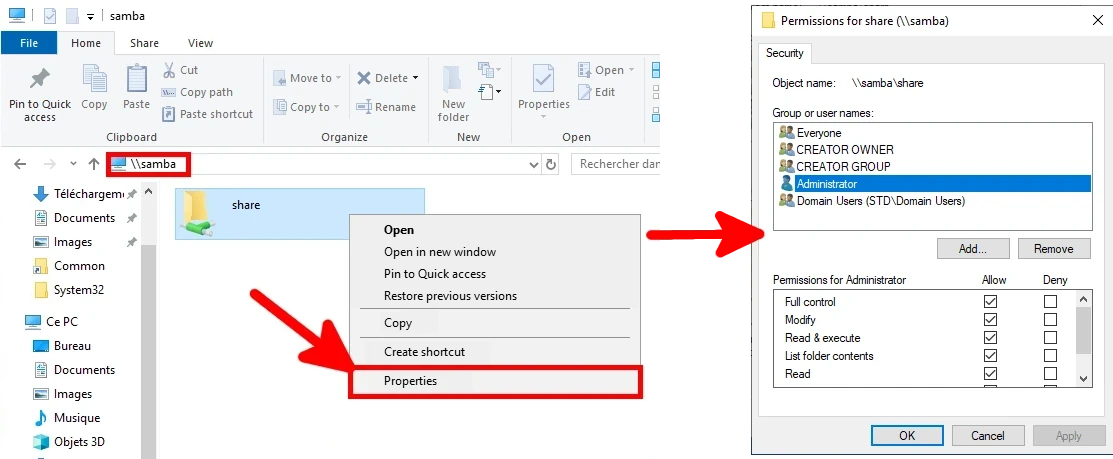
- Set permissions from the Active Directory server via the Windows GUI:

有“AI”的1024 = 2048,欢迎大家加入2048 AI社区
更多推荐


 7
7 0
0- 0


 已为社区贡献226条内容

所有评论(0)