Vue3 实现 12306 原版火车票组件:从像素级还原到自适应适配【源码】
·
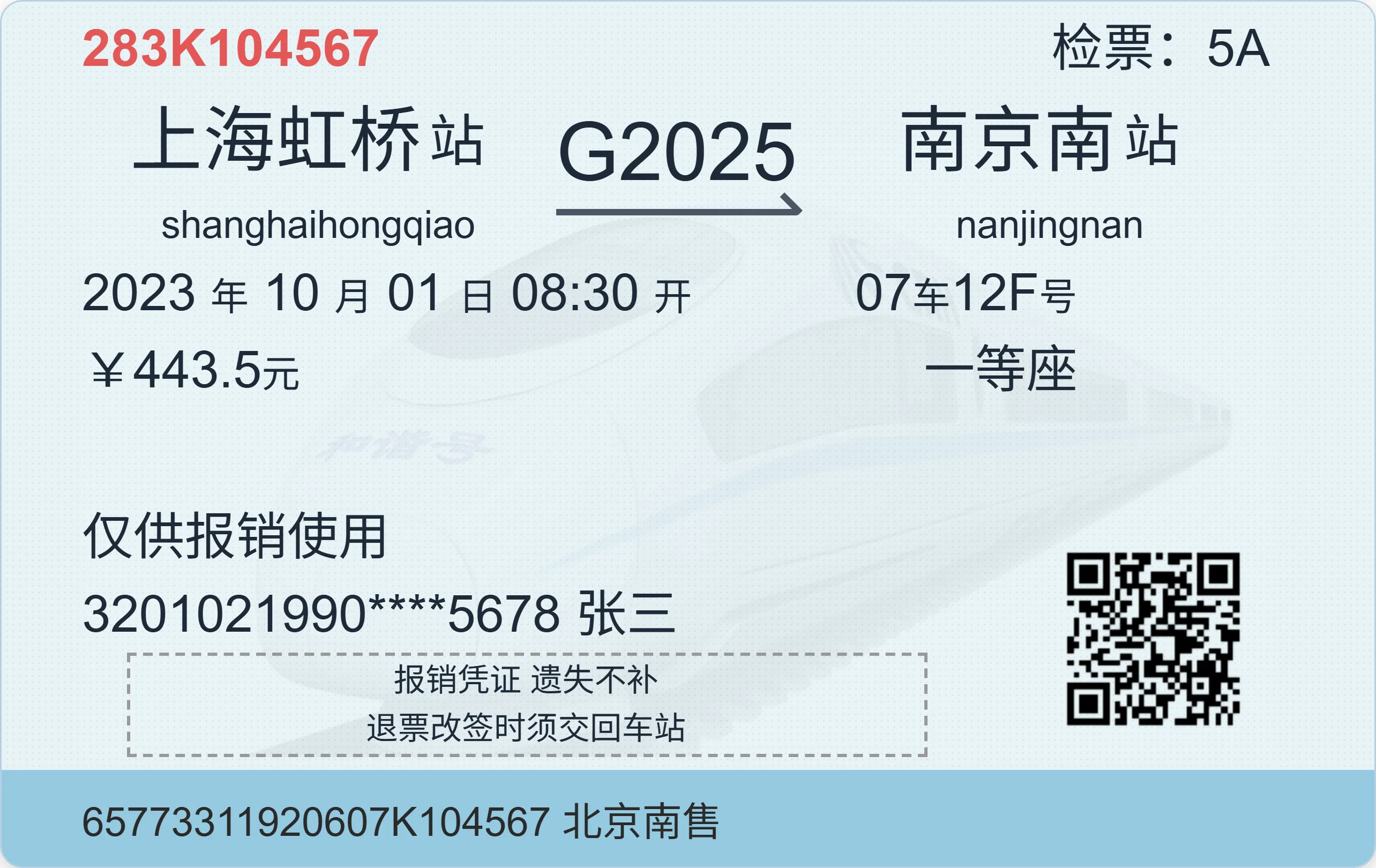
在票务系统、差旅报销平台或出行类应用中,还原12306官方火车票样式的展示组件是常见需求。本文将详细介绍如何基于 Vue3 Composition API 开发一款高度还原原版、支持自适应布局、动态数据驱动的火车票组件,拆解实现过程中的核心技术亮点与设计思路。
开源地址在文末!!!
一、组件核心功能亮点
这款火车票组件完全对标12306官方报销凭证样式,具备以下核心特性:
- 像素级还原:从尺寸比例、颜色搭配、字体大小到布局间距,精准复刻原版火车票视觉效果
- 自适应布局:自动适配不同容器宽度,保持原始宽高比,支持窗口resize响应
- 动态数据驱动:通过Props灵活传入车次、站点、时间、乘客等信息,支持多场景复用
- 多优惠标识支持:支持学生票、儿童票、军残票等多种优惠类型,可传入单个或多个优惠标识
- 导出适配:支持切换导出模式(取消缩放),满足打印、截图等场景需求
- Vue3 原生特性:基于 Composition API 开发,语法简洁、性能优异,支持按需暴露内部API
二、技术实现深度解析
1. 技术栈基础
- 框架:Vue3(Composition API +
<script setup>语法糖) - 样式:Tailwind CSS(快速实现布局与样式)+ 原生CSS(精准还原细节)
- 核心能力:响应式编程、DOM操作、窗口事件监听、动态样式计算
完整代码
<template>
  <div ref="wrapper" class="export-target">
  <!-- 外层自动适配比例的容器 -->
  <div class="ticket-wrapper">
    <!-- 根容器:保持原始尺寸,通过内部scale计算自动缩放 -->
    <div
      class="ticket-container"
      :style="{
        transform: exporting ? 'none' : `scale(${scale})`,
        transformOrigin: 'top left',
        width: BASE_WIDTH + 'px',
        height: BASE_HEIGHT + 'px'
      }"
    >
      <div
        class="ticket relative text-[32px] text-gray-800 w-full h-full rounded-[14px] shadow-[0_6px_24px_rgba(0,0,0,.12),0_2px_6px_rgba(0,0,0,.08)] border border-[#b8cfe0] overflow-hidden p-[5px_65px_0_50px]"
        role="img"
        aria-label="火车票">

        <!-- 顶部:票号/检票口 -->
        <div class="topbar flex items-center justify-between tracking-[0.3px]">
          <div class="serial text-[#e35757] font-semibold">{{ serial }}</div>
          <div class="gate">检票:{{ gate }}</div>
        </div>

        <div class="bgmain">
          <div
            class="absolute inset-0 z-[-2] opacity-5 bg-bottom bg-no-repeat bg-contain"
            :style="{ backgroundImage: 'url(/CRH-Dr3OhT7q.jpg)' }"
          ></div>
          <div class="h-[250px]">
            <!-- 主信息:出发站 / 车次 / 到达站 -->
            <div class="main grid grid-cols-[1fr_auto_1fr] gap-[10px] px-[0px_40px_0_20px] items-center">
              <div class="station flex flex-col from items-center">
                <div class="flex items-center flex-grow-0">
                  <div
                    class="name text-[45px] tracking-[0.5px] max-w-[240px]"
                    :class="{'two-char': fromStation.length === 2}"
                  >
                    {{ fromStation }}
                  </div>
                  <div class="big-fix px-[4px] py-[0px] text-[35px]">站</div>
                </div>
                <div class="pinyin ml-[10px] text-[24px]">{{ fromPinyin }}</div>
              </div>
              <!-- 中间列:车次 + 箭头 -->
            <div class="train-center flex flex-col items-center justify-center">
              <div class="train-code text-center text-[50px] leading-none pb-1">
                {{ trainCode }}
              </div>
              <!-- 箭头 -->
              <!-- CSS 箭头 -->
              <div class="arrow mt-[6px] relative h-3 w-full">
                <div class="line h-[4px] bg-gray-600 w-full"></div>
                <div class="arrow-head absolute right-0 top-[-7px] h-4 w-4 border-t-[4px] border-gray-600 rotate-45"></div>
              </div>
            </div>
              <div class="station to flex flex-col items-center">
                <div class="flex items-center flex-grow-0">
                  <div
                    class="name text-[45px] tracking-[0.5px] max-w-[240px]"
                    :class="{'two-char': toStation.length === 2}"
                  >
                    {{ toStation }}
                  </div>
                  <div class="big-fix px-[4px] py-[0px] text-[35px]">站</div>
                </div>
                <div class="pinyin ml-[10px] text-[24px]">{{ toPinyin }}</div>
              </div>
            </div>

            <!-- 第二行:时间 / 车厢座位 / 价格 / 座位类型 -->
            <div class="second-row flex justify-between pr-[100px]">
              <div class="datetime">
                {{ dateTime.year }}
                <span class="small-fix text-[24px]">年</span>
                {{ dateTime.month }}
                <span class="small-fix text-[24px]">月</span>
                {{ dateTime.day }}
                <span class="small-fix text-[24px]">日</span>
                {{ dateTime.time }}
                <span class="small-fix text-[24px]">开</span>
              </div>
              <div class="seat">{{ carriage }}<span class="small-fix text-[24px]">车</span>{{ seatNumber }}<span class="small-fix text-[24px]">号</span><span v-if="berthType">{{ berthType }}</span><span v-if="berthType" class="small-fix text-[24px]">铺</span></div>
            </div>
            <!-- 价格和座位类型行:添加优惠标识 -->
            <div class="second-row flex justify-between pr-[100px] items-center">
              <div class="datetime flex items-center gap-[12px]">
                ¥{{ price }}<span class="small-fix text-[24px]">元</span>
              </div>
              <div>
                <!-- 优惠标识 -->
                <span v-for="(text, index) in discountTexts" :key="index" class="discount-badge">{{ text }}</span>
              </div>
              <div class="seat flex items-center gap-[12px]">
                {{ seatType }}
              </div>
            </div>
          </div>

          <!-- 详情与二维码 -->
          <div class="detail-area relative grid grid-cols-[1fr_170px] gap-[16px]">
            <div>
              <p class="muted mt-[6px]">仅供报销使用</p>
              <div class="code">{{ idNumber }} {{ passengerName }}</div>
              <!-- 虚线框 -->
              <div class="details text-[20px] text-center leading-[1.5] border-dashed border-[3px] border-[#999] mx-[28px]">
                <p>报销凭证 遗失不补</p>
                <p>退票改签时须交回车站</p>
              </div>
            </div>

            <!-- 二维码 -->
            <div class="qr self-end justify-self-end w-[148px] h-[148px] border-black  p-[6px] " aria-hidden="true">
              <!-- 简化二维码 -->
              <img src="@/assets/qrcode.png" alt="二维码" class="w-full h-full object-cover" />
            </div>
          </div>
        </div>

        <!-- 底部出票信息 -->
        <div class="footer absolute w-[856px] left-[-50px] bottom-[-8px] h-[65px] flex justify-between items-center bg-[#94CAE0] text-[25px] text-[#2a2a2a]">
          <div class="from px-[50px]">{{ footerInfo }}</div>
        </div>
      </div>
    </div>
  </div>
  </div>
</template>

<script setup>

import { ref, computed, onMounted, onUnmounted } from 'vue'

// 基础尺寸
const BASE_WIDTH = 856
const BASE_HEIGHT = 540

const wrapper = ref(null)
const scale = ref(1)
const exporting = ref(false)

// 自适应缩放
function updateScale() {
  if (wrapper.value) {
    const width = wrapper.value.clientWidth
    scale.value = width / BASE_WIDTH
    console.log('Updated scale:', scale.value)
    console.log('Wrapper width:', width)
  }
}
onMounted(() => {
  updateScale()
  window.addEventListener('resize', updateScale)
})
onUnmounted(() => {
  window.removeEventListener('resize', updateScale)
})

// 定义属性
const props = defineProps({
  serial: { type: String, default: '192J093984' },
  gate: { type: String, default: '8B' },
  fromStation: { type: String, default: '上海虹桥' },
  fromPinyin: { type: String, default: 'Shanghaihongqiao' },
  toStation: { type: String, default: '西安北' },
  toPinyin: { type: String, default: "Xi'anbei" },
  trainCode: { type: String, default: 'G1925' },
  dateTime: { type: String, default: '2017-06-06 16:46' },
  carriage: { type: String, default: '03' },
  seatNumber: { type: String, default: '04D' },
  berthType: { type: String, default: '' },
  berthNumber: { type: String, default: '' },
  price: { type: String, default: '239.0' },
  seatType: { type: String, default: '二等座' },
  idNumber: { type: String, default: '14041111985****0854' },
  passengerName: { type: String, default: '李小二' },
  footerInfo: { type: String, default: '65773311920607J093984 郑州东售' },
  // 修改:支持传入数组(多个优惠类型)或字符串(单个优惠类型)
  discountType: {
    type: [String, Array],
    default: '',
    validator: (value) => {
      // 允许的优惠类型(支持单个或数组)
      const validTypes = ['student', 'discount', 'child', 'elder', 'military', 'disabled', 'group', 'worker-group', 'student-group', '']
      if (Array.isArray(value)) {
        return value.every(item => validTypes.includes(item))
      }
      return validTypes.includes(value)
    }
  }
})

// 拆分时间
const dateTime = computed(() => {
  return {
    year: props.dateTime.slice(0, 4),
    month: props.dateTime.slice(5, 7),
    day: props.dateTime.slice(8, 10),
    time: props.dateTime.slice(11)
  }
})

// 修改:计算优惠显示文字(支持多个)
const discountTexts = computed(() => {
  const texts = []
  const types = Array.isArray(props.discountType) ? props.discountType : props.discountType ? [props.discountType] : []

  types.forEach(type => {
    switch(type) {
      case 'student':
        texts.push('学', '惠') // 学生票同时添加"学"和"惠"
        break
      case 'discount':
        texts.push('惠')
        break
      case 'child':
        texts.push('儿')
        break
      case 'elder':
        texts.push('老')
        break
      case 'military':
        texts.push('军')
        break
      case 'disabled':
        texts.push('残')
        break
      case 'group':
        texts.push('团')
        break
      case 'worker-group':
        texts.push('工')
        break
      case 'student-group':
        texts.push('学', '团')
        break
      default:
        // 支持直接传入文字(如['优', '惠'])
        if (type && !validTypes.includes(type)) {
          texts.push(type)
        }
    }
  })
  return texts
})

defineExpose({ wrapper, exporting  }) // ✅ 暴露内部DOM给父组件访问
</script>

<style scoped>
.export-target {
  transform: scale(1); /* 确保导出是原始比例 */
}
.ticket-wrapper {
  width: 100%;
  position: relative;
  overflow: hidden;
  aspect-ratio: 856 / 540; /* 保持原始宽高比 */
}

.ticket-container {
  transform-origin: top left;
  transition: transform 0.2s ease;
}

/* 票样式 */
.ticket > * {
  position: relative;
  z-index: 1;
}
.ticket {
  font-smoothing: antialiased;
  -webkit-font-smoothing: antialiased;
  position: relative;
}

/* 背景条纹 */
.ticket::before {
  content: "";
  position: absolute;
  inset: 0;
  z-index: -1;
  background-color: #e8f3f7;
  background-image: linear-gradient(
    -45deg,
    rgba(180, 200, 220, 0.3) 1px,
    transparent 1px,
    transparent 4px
  );
  background-size: 4px 4px;
}

/* 背景图 */
/* .bgmain::before {
  content: "";
  position: absolute;
  inset: 0;
  z-index: -2;
  opacity: 0.05;
  background-image: url('/CRH-Dr3OhT7q.jpg');
  background-size: contain;
  background-repeat: no-repeat;
  background-position: bottom;
} */

/* 两字站名样式 */
.two-char {
  min-width: 145px;
  text-align: justify;
  text-align-last: justify;
}
.train-arrow {
  width: 100%; /* 与“G2025”文字宽度完全一致 */
  height: 0;
  border-left: 8px solid transparent; /* 左透明边框(数值越小箭头越细) */
  border-right: 8px solid transparent; /* 右透明边框(与左边数值一致) */
  border-top: 8px solid #3a5874; /* 箭头颜色(与拼音同色) */
  margin-top: 6px; /* 箭头与文字的间距(可按需调整) */
}
/* 新增:优惠标识圆圈样式 */
.discount-badge {
  display: inline-flex;
  align-items: center;
  justify-content: center;
  width: 36px;
  height: 36px;
  border: 3px solid #1f1d1d;
  border-radius: 50%;
  font-size: 24px;
  /* font-weight: 600; */
  line-height: 1;
  text-align: center;
  /* background-color: rgba(227, 87, 87, 0.08); */
}
</style>
2. 自适应缩放机制:保持比例的关键
原版火车票的宽高比为 856:540(基于真实报销凭证尺寸),组件需在不同容器宽度下保持该比例,同时实现自适应缩放。核心实现思路如下:
(1)基础尺寸定义
首先定义火车票原始宽高常量,作为缩放计算的基准:
// 基础尺寸(复刻12306原版火车票实际尺寸)
const BASE_WIDTH = 856
const BASE_HEIGHT = 540
(2)容器宽高比约束
通过 aspect-ratio 确保外层容器始终保持原始宽高比,避免拉伸变形:
.ticket-wrapper {
  width: 100%;
  position: relative;
  overflow: hidden;
  aspect-ratio: 856 / 540; /* 固定宽高比,适配任何宽度容器 */
}
(3)动态缩放计算
监听窗口 resize 事件和组件挂载事件,通过容器宽度与基准宽度的比值计算缩放比例,再通过 transform: scale() 实现自适应:
const wrapper = ref(null)
const scale = ref(1)

// 计算缩放比例
function updateScale() {
  if (wrapper.value) {
    const width = wrapper.value.clientWidth
    scale.value = width / BASE_WIDTH // 容器宽度 / 基准宽度 = 缩放比例
  }
}

// 组件挂载时初始化,窗口变化时更新
onMounted(() => {
  updateScale()
  window.addEventListener('resize', updateScale)
})

// 组件卸载时解绑事件,避免内存泄漏
onUnmounted(() => {
  window.removeEventListener('resize', updateScale)
})
(4)缩放原点控制
通过 transformOrigin: 'top left' 确保缩放以左上角为原点,避免布局偏移:
<div
  class="ticket-container"
  :style="{
    transform: exporting ? 'none' : `scale(${scale})`, // 导出时取消缩放
    transformOrigin: 'top left', // 缩放原点:左上角
    width: BASE_WIDTH + 'px',
    height: BASE_HEIGHT + 'px'
  }"
>
3. Props 设计:灵活且可靠的数据传入
组件通过 defineProps 定义输入数据,兼顾灵活性与数据合法性,核心设计如下:
(1)支持多类型数据的 Props 定义
针对「优惠类型」这类可能单个或多个的场景,支持 String 和 Array 两种类型,并通过 validator 验证合法性:
const props = defineProps({
  // 其他Props...
  discountType: {
    type: [String, Array],
    default: '',
    validator: (value) => {
      const validTypes = ['student', 'discount', 'child', 'elder', 'military', 'disabled', 'group', 'worker-group', 'student-group', '']
      if (Array.isArray(value)) {
        return value.every(item => validTypes.includes(item)) // 数组元素均需合法
      }
      return validTypes.includes(value) // 单个值需合法
    }
  }
})
(2)动态数据处理
通过 computed 对传入数据进行二次处理,适配组件展示需求:
- 时间格式拆分:将
YYYY-MM-DD HH:mm格式拆分为年、月、日、时单独展示 - 优惠文本映射:将
discountType映射为直观的文字标识(如student→ 「学」「惠」)
// 拆分时间格式
const dateTime = computed(() => {
  return {
    year: props.dateTime.slice(0, 4),
    month: props.dateTime.slice(5, 7),
    day: props.dateTime.slice(8, 10),
    time: props.dateTime.slice(11)
  }
})

// 映射优惠标识文本
const discountTexts = computed(() => {
  const texts = []
  const types = Array.isArray(props.discountType) ? props.discountType : props.discountType ? [props.discountType] : []

  types.forEach(type => {
    switch(type) {
      case 'student': texts.push('学', '惠'); break // 学生票显示「学」「惠」双标识
      case 'child': texts.push('儿'); break
      case 'elder': texts.push('老'); break
      case 'military': texts.push('军'); break
      // 其他优惠类型映射...
    }
  })
  return texts
})
4. 像素级样式还原:复刻原版视觉效果
(1)背景效果实现
原版火车票的背景包含「条纹底纹」和「淡化列车图案」,通过多层背景叠加实现:
/* 条纹底纹:使用linear-gradient实现重复纹理 */
.ticket::before {
  content: "";
  position: absolute;
  inset: 0;
  z-index: -1;
  background-color: #e8f3f7;
  background-image: linear-gradient(
    -45deg,
    rgba(180, 200, 220, 0.3) 1px,
    transparent 1px,
    transparent 4px
  );
  background-size: 4px 4px;
}

/* 淡化列车背景图:底部居中显示,低透明度 */
.bgmain .absolute.inset-0.z-\[-2\] {
  background-image: url(/CRH-Dr3OhT7q.jpg);
  background-position: bottom;
  background-repeat: no-repeat;
  background-size: contain;
  opacity: 0.05;
}
(2)细节样式还原
- 两字站名对齐:通过
text-align: justify实现两字站名均匀分布 - CSS 箭头:无需图片,通过边框组合实现列车方向箭头
- 优惠标识:圆形边框+居中文字,还原原版优惠徽章样式
/* 两字站名对齐 */
.two-char {
  min-width: 145px;
  text-align: justify;
  text-align-last: justify;
}

/* CSS箭头实现 */
.arrow .line {
  height: 4px;
  background-color: #3a5874;
  width: 100%;
}
.arrow .arrow-head {
  position: absolute;
  right: 0;
  top: -7px;
  width: 4px;
  height: 4px;
  border-top: 4px solid #3a5874;
  border-right: 4px solid #3a5874;
  transform: rotate(45deg);
}

/* 优惠标识圆圈 */
.discount-badge {
  display: inline-flex;
  align-items: center;
  justify-content: center;
  width: 36px;
  height: 36px;
  border: 3px solid #1f1d1d;
  border-radius: 50%;
  font-size: 24px;
  line-height: 1;
}
5. 导出适配:支持打印/截图场景
组件通过 exporting 状态控制是否取消缩放,确保导出时为原始尺寸:
const exporting = ref(false)
defineExpose({ wrapper, exporting }) // 暴露给父组件控制
父组件可通过暴露的 API 切换导出模式:
// 父组件中控制导出
const ticketRef = ref(null)
const handleExport = () => {
  ticketRef.value.exporting = true // 取消缩放,使用原始尺寸
  // 执行打印/截图逻辑...
  setTimeout(() => {
    ticketRef.value.exporting = false // 恢复缩放
  }, 100)
}
三、组件使用指南
1. 基础引入
<template>
  <TrainTicket
    :fromStation="fromStation"
    :toStation="toStation"
    :trainCode="trainCode"
    :dateTime="dateTime"
    :discountType="['student', 'discount']"
    <!-- 其他Props... -->
  />
</template>

<script setup>
import TrainTicket from './components/TrainTicket.vue'

// 配置数据
const fromStation = '北京西'
const toStation = '深圳北'
const trainCode = 'G71'
const dateTime = '2025-11-15 08:00'
// ...其他配置
</script>
2. 自定义优惠类型
支持传入单个字符串或数组形式的优惠类型:
<!-- 单个优惠类型 -->
<TrainTicket discountType="child" />

<!-- 多个优惠类型 -->
<TrainTicket discountType="['student', 'group']" />
四、扩展与优化建议
1. 功能扩展
- 支持更多优惠类型:在
discountTexts中添加新的类型映射即可 - 二维码动态生成:集成
qrcode.vue等库,根据票据信息动态生成二维码 - 打印功能增强:添加
@media print样式,优化打印效果,隐藏无关元素
2. 性能优化
- 图片懒加载:对列车背景图、二维码图片使用懒加载,减少初始加载压力
- 事件防抖:对
resize事件添加防抖处理,避免频繁触发缩放计算
import { debounce } from 'lodash'
// 防抖处理:50ms内只触发一次
onMounted(() => {
  updateScale()
  window.addEventListener('resize', debounce(updateScale, 50))
})
3. 兼容性优化
- 对不支持
aspect-ratio的浏览器,添加降级方案:通过padding-bottom计算高度
@supports not (aspect-ratio: 856/540) {
  .ticket-wrapper {
    padding-bottom: calc(540 / 856 * 100%); /* 高度 = 宽度 * 540/856 */
  }
}
五、开源地址

有“AI”的1024 = 2048,欢迎大家加入2048 AI社区
更多推荐

 26
26 0
0- 0


 已为社区贡献2条内容

所有评论(0)