别再手动解析网页了!让AI替你写爬虫
本文比较了两种网页爬取方法:传统Scrapy框架与基于大语言模型(LLM)的Crawl4AI。在Scrapy部分,详细介绍了创建项目、配置Item、XPath解析网页内容以及数据存储等流程。Crawl4AI部分展示了如何通过提示词提取结构化信息、自动生成Markdown、以及外部/内部调用LLM进行智能内容提取。对比发现,传统方法需要精细的HTML解析,而LLM方法通过语义理解简化了提取流程。两种
目录
4.配置pipelines文件以及settings文件,对爬虫抓取到的数据进行后续处理以及优化配置
1.小试牛刀,通过简单提示词+神州数码官网提取想要的产品服务信息
2.默认条件下,crawl4ai会自动从每个抓取的页面生成markdown。
4.关于内部调用LLMExtractionStrategy类
一、传统主题爬虫框架scrapy
1. 如何创建scrapy?
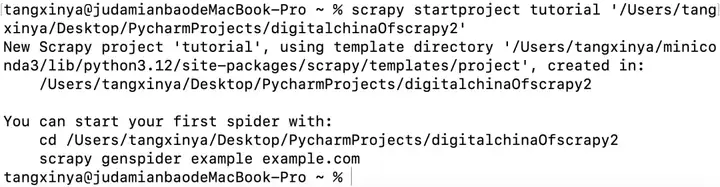
在终端命令行输入scrapy startproject tutorial '路径地址/爬虫文件名称',回车后出现下图信息即创建成功:
使用IDE打开创建的文件可以观察到scrapy自动分好了模块。
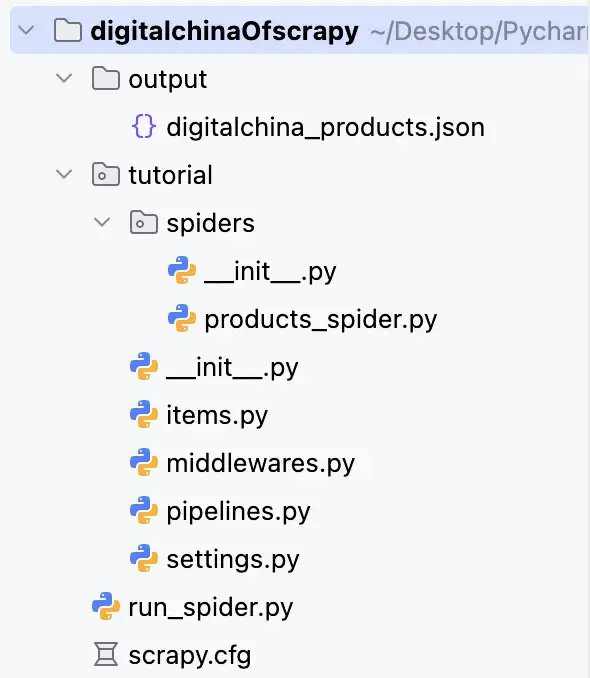
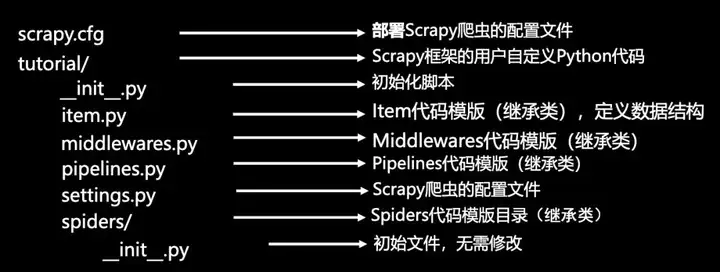
在终端输入scrapy genspider 爬虫名 域名,则创建出


import scrapy

class DigitalchinaItem(scrapy.Item):
    category_path = scrapy.Field() #示例:“产品及服务>AI>产品及解决方案”
    name = scrapy.Field() #产品名称
    url = scrapy.Field() #产品URL
parse()用于处理响应,解析内容形成字典,发现新的URL爬取请求。通过self,可以在parse方法中访问该spider的属性(包括:name,allowed_domains)以及其他方法,而response对象包含了从目标网页获取的响应数据。
2. 配置item文件,保存爬取数据的同时定义格式
查看神州数码官网 信息,很容易发现网页对于产品及服务的排布框架:
import scrapy

class DigitalchinaItem(scrapy.Item):
    category_path = scrapy.Field() #示例:“产品及服务>AI>产品及解决方案”
    name = scrapy.Field() #产品名称
    url = scrapy.Field() #产品URL
3. 网页解析
Scrapy提供的数据提取方式是Selector选择器,Selector基于lxml构建,支持Xpath选择器、CSS选择器以及正则表达式,功能全面,解析速度和准确度非常高,在这里我们以Xpath为例进行网页解析。
Xpath常用规则如下,具体用法可见 Xpath语法教程 (https://www.w3cschool.cn/xpath/xpath-syntax.html)

简单来说就是通过解析网页 HTML 的层级结构,用路径表达式定位到需要提取的数据位置,直接从网页源码中抓取特定内容,下面是解析内容的主要代码:
import scrapy
from urllib.parse import urljoin
from tutorial.items import DigitalchinaItem


class ProductsSpider(scrapy.Spider):
    name = 'products'
    allowed_domains = ['digitalchina.com', 'yunke-china.com']
    start_urls = ['https://www.digitalchina.com/']

    custom_settings = {
        'request_headers': {
            'User-Agent': 'Mozilla/5.0 (Macintosh; Intel Mac OS X 10_15_7) AppleWebKit/537.36 (KHTML, like Gecko) Chrome/138.0.0.0 Safari/537.36 Edg/138.0.0.0',
            'Accept': 'text/html,application/xhtml+xml,application/xml;q=0.9,*/*;q=0.8',
        },
        'output_file': {
            'digitalchina_products.json': {
                'format': 'json',
                'encoding': 'utf8',
                'overwrite': True,
                'indent': 2
            }
        },
        'robotstxt': False,
        'download_delay': 1,
    }

    def parse(self, response):
        #第一步:定位“产品及服务”的核心容器(根据源代码,使用data-menu="cpyfw"标识)
        #对应源代码中的<div class="one-nav-side cpyfw clearfix" data-menu="cpyfw">
        product_service_container = response.xpath(
            '//div[@data-menu="cpyfw" and contains(@class, "one-nav-side")]'
        )

        ifnot product_service_container:
            return

        #第二步:提取一级分类(如AI、数据、云等,对应左侧导航的<li>标签)
        #对应源代码中的<div class="subnav-left-box">下的<ul>中的<li>
        first_level_categories = product_service_container.xpath(
            './/div[@class="subnav-left-box"]/ul/li/a'
        )

        ifnot first_level_categories:
            return

        #第三步:提取右侧产品内容区(对应每个一级分类的产品列表)
        #对应源代码中的<div class="subnav-right-scroll">下的多个<div class="two-nav-side-box">
        product_content_boxes = product_service_container.xpath(
            './/div[@class="subnav-right-scroll"]/div[@class="two-nav-side-box"]'
        )

        #一级分类与右侧内容区是一一对应的,通过索引关联
        for idx, first_level in enumerate(first_level_categories):
            #一级分类名称(如“AI”“数据”)
            first_level_name = first_level.xpath('text()').get().strip()

            #对应索引的右侧产品内容区
            if idx >= len(product_content_boxes):
                continue
            current_content_box = product_content_boxes[idx]

            #第四步:提取二级分类(如“产品及解决方案”“服务”,对应<div class="t-title">)
            #对应源代码中的<div class="two-nav-side">下的<li>中的<div class="t-title">
            second_level_categories = current_content_box.xpath(
                './/div[@class="two-nav-side"]//li/div[@class="t-title"]'
            )

            #第五步:提取每个二级分类下的产品列表(对应<dl>中的<dd>标签)
            product_lists = current_content_box.xpath(
                './/div[@class="three-nav-side"]/dl'
            )

            #二级分类与产品列表同样是对应的,建立索引关联
            for sec_idx, second_level in enumerate(second_level_categories):
                #二级分类名称(如“产品及解决方案”“服务”)
                second_level_name = second_level.xpath('text()').get() or second_level.xpath('a/text()').get().strip()
                category_path = f"产品及服务>{first_level_name}>{second_level_name}"

                #对应索引的产品列表
                if sec_idx >= len(product_lists):
                    continue
                current_product_list = product_lists[sec_idx]

                #第六步:提取产品名称和URL(对应<dd>中的<a>标签)
                products = current_product_list.xpath('dd/a')
                for product in products:
                    #产品名称,去除前缀“>”
                    product_name = product.xpath('span/text()').get() or product.xpath('text()').get()
                    ifnot product_name:
                        continue
                    product_name = product_name.strip().lstrip('>').strip()

                    #产品URL,主要是处理相对路径
                    product_url = product.xpath('@href').get()
                    ifnot product_url:
                        continue
                    product_url = urljoin(response.url, product_url)

                    #最后按格式输出一下
                    item = DigitalchinaItem()
                    item['category_path'] = category_path
                    item['name'] = product_name
                    item['url'] = product_url
yield item附:HTML标签含义合集:HTML元素(https://developer.mozilla.org/en-US/docs/Web/HTML)
4.配置pipelines文件以及settings文件,对爬虫抓取到的数据进行后续处理以及优化配置
import json
import os
from itemadapter import ItemAdapter


class TutorialPipeline:
    def process_item(self, item, spider):
        return item


class JsonFilePipeline:
    """将爬取的数据保存到JSON文件的管道"""

    def __init__(self):
        self.file = None
        self.items = []

    def open_spider(self, spider):
        """爬虫开始时打开文件"""
        output_dir = 'output'
        ifnot os.path.exists(output_dir):
            os.makedirs(output_dir)

        filename = os.path.join(output_dir, 'digitalchina_products.json')
        self.file = open(filename, 'w', encoding='utf-8')
        self.file.write('[\n')
        self.first_item = True

    def close_spider(self, spider):
        """爬虫结束时关闭文件"""
        if self.file:
            self.file.write('\n]')
            self.file.close()
            print(f"数据已保存到: {os.path.abspath('output/digitalchina_products.json')}")

    def process_item(self, item, spider):
        """处理每个爬取的项目"""
        ifnot self.first_item:
            self.file.write(',\n')

        item_dict = dict(item)
        json.dump(item_dict, self.file, ensure_ascii=False, indent=2)

        self.first_item = False
        return item
#查找爬虫路径
SPIDER_MODULES = ['tutorial.spiders']
#创建爬虫默认位置
NEWSPIDER_MODULE = 'tutorial.spiders'
#启用pipelines,将数据保存到JSON文件
ITEM_PIPELINES = {
'tutorial.pipelines.JsonFilePipeline': 300,
}最后对整个爬虫执行一个run文件,得到对应的json格式的输出文件:
import os
from scrapy.crawler import CrawlerProcess

from scrapy.utils.project import get_project_settings
from tutorial.spiders.products_spider import ProductsSpider

if __name__ == "__main__":
    os.environ.setdefault('SCRAPY_SETTINGS_MODULE', 'tutorial.settings')
    settings = get_project_settings()

    process = CrawlerProcess(settings)
    process.crawl(ProductsSpider)
    process.start()
    print("爬虫已完成!")
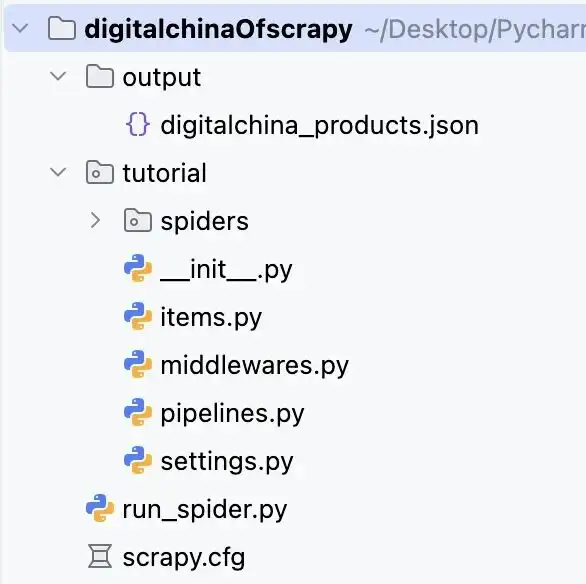
最后结果如下所示。
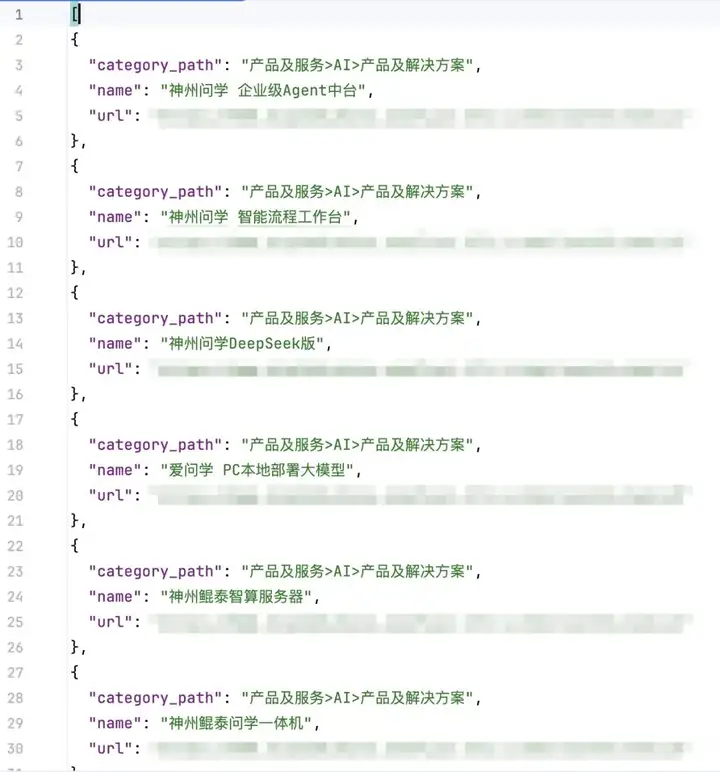
二、基于LLM的AI爬虫Crawl4AI
1.小试牛刀,通过简单提示词+神州数码官网提取想要的产品服务信息
AsyncWebCrawler是 Crawl4AI 的核心类,用于异步网页抓取。arun方法用于执行抓取任务,而verbose的布尔值决定了是否展开详细日志输出。
from crawl4ai import AsyncWebCrawler
import asyncio

async def main():
    async with AsyncWebCrawler(verbose=True) as crawler:
        result = await crawler.arun(url="https://www.digitalchina.com")
        print(result.markdown)

if __name__ == '__main__':
    asyncio.run(main())
部分爬取结果如下:
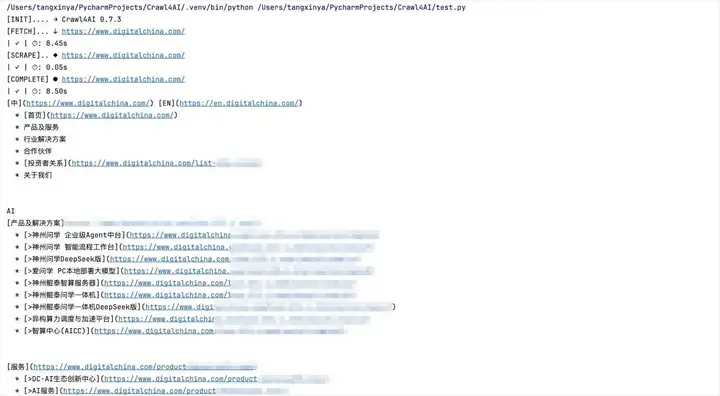
可以看到,AsyncWebCrawler启动了无头浏览器,通过指令crawl4ai可以提取到结构化的标题+链接信息并且自动转化为markdown格式,提取到了整个页面的所有子信息。但是我们只需要产品及服务对应的爬虫内容,这一点需要进一步完善。
2.默认条件下,crawl4ai会自动从每个抓取的页面生成markdown。
而确切的输出则取决于指定markdown生成器还是内容内容筛选器。
所需要的常用类有:
import asyncio from crawl4ai import (
    AsyncWebCrawler, #异步网页抓取,支持动态内容处理和结构化数据提取
    BrowserConfig, #浏览器配置
    CrawlerRunConfig, #爬虫运行配置
    CacheMode #缓存模式枚举
    )

import crawl4ai.extraction_strategy import JsonCssExtractionStrategy,LLMExtractionStrategy
#针对基于CSS选择器等传统提取策略和基于大语言模型提取策略
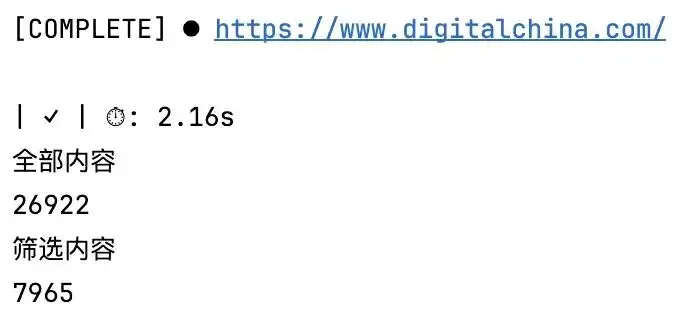
利用crawl4ai的筛选功能可以实现输出结果聚焦在核心板块【“AI”“数据”“云”“物联网” 等的产品及服务】信息,过滤了大量重复的辅助内容如多次出现的合作伙伴 logo、冗余的新闻重复条目,但同时并未做到完全消除需求外的内容,并且由于简化结构,去除了部分嵌套过深的次要信息如多级跳转的冗余链接。
分别打印全部内容与筛选内容的长度可见:
import asyncio
from crawl4ai import AsyncWebCrawler,CrawlerRunConfig,CacheMode,BrowserConfig
from crawl4ai.content_filter_strategy import PruningContentFilter
from crawl4ai.markdown_generation_strategy import DefaultMarkdownGenerator

our_generator = DefaultMarkdownGenerator(content_filter=PruningContentFilter(threshold=0.4,threshold_type='fixed'))

config = CrawlerRunConfig(cache_mode = CacheMode.BYPASS,
                          markdown_generator=our_generator)
asyncdef main():
    asyncwith AsyncWebCrawler() as crawler:
        result = await crawler.arun("https://www.digitalchina.com/",
                                    config=config,
                                    prompt = "提取导航栏'产品及服务'对应产品或服务的名称及网址链接,并根据不同分类进行统一整理")
        print("全部内容")
        print(result.markdown.raw_markdown)
        print("筛选内容")
        print(result.markdown.fit_markdown)

if __name__ == '__main__':
    asyncio.run(main())
3.外部调用LLM
import json
import asyncio
from urllib.parse import urlsplit
from openai import OpenAI
from crawl4ai import AsyncWebCrawler, BrowserConfig, CrawlerRunConfig, CacheMode
from crawl4ai.markdown_generation_strategy import DefaultMarkdownGenerator
from crawl4ai.content_filter_strategy import PruningContentFilter


def evaluate_content_quality(content):
    ifnot content:
        return0

    #通过关键词的关联度来建立评分,之后用于进一步数据清洗
    keywords = {
        '导航词': ['产品', '服务', '解决方案', '技术', '平台', '业务'],
        '结构词': ['导航', '菜单', '分类', '目录', '产品中心'],
        '内容词': ['介绍', '描述', '特点', '优势', '功能', '应用']
    }
    return sum(sum(1for w in group if w in content) / len(group) for group in keywords.values()) / 3


asyncdef crawl_website(url, max_attempts=3):
    browser_config = BrowserConfig(
        headless=True,
        viewport_width=1920,
        viewport_height=1080,
        user_agent="Mozilla/5.0 (Macintosh; Intel Mac OS X 10_15_7) AppleWebKit/537.36 (KHTML, like Gecko) Chrome/138.0.0.0 Safari/537.36 Edg/138.0.0.0",
        text_mode=False
    )
    #对评分值过滤由紧到松过滤三次
    configs = [
        (0.1, 60000), (0.05, 90000), (0.02, 120000)
    ]
    best_content, best_score = None, 0

    asyncwith AsyncWebCrawler(config=browser_config) as crawler:
        for threshold, timeout in configs[:max_attempts]:
            run_config = CrawlerRunConfig(
                cache_mode=CacheMode.DISABLED,
                wait_for='body',
                page_timeout=timeout,
                markdown_generator=DefaultMarkdownGenerator(
                    content_filter=PruningContentFilter(threshold=threshold, threshold_type="static"),
                    options={"ignore_links": False, "ignore_images": True, "include_metadata": True}
                )
            )
            result = await crawler.arun(url=url, config=run_config, render_js=True)
            if result.success and hasattr(result.markdown, "fit_markdown"):
                content = result.markdown.fit_markdown
                score = evaluate_content_quality(content)
                if score > best_score:
                    best_score, best_content = score, content

    return best_content


def extract_with_llm(page_content):
    client = OpenAI(
        api_key="sk-d9eed3214a3e408d9cb3509e2a785bf0",
        base_url="https://dashscope.aliyuncs.com/compatible-mode/v1"
    )
    resp = client.chat.completions.create(
        model="qwen-plus",
        messages=[
            {"role": "system", "content": "只提取企业官网的产品和服务信息,返回JSON数组,不要其他内容"},
            {"role": "user", "content": f"从下面内容里找产品/服务,每个包含category_path、name、url。内容:{page_content}"}
        ],
        temperature=0.0,
        extra_body={"enable_thinking": False}
    )
    return resp.choices[0].message.content.strip()


def get_user_input():
    whileTrue:
        url = input("请输入官网URL: ").strip()
        return url if url.startswith(('http://', 'https://')) elsef'https://{url}'


asyncdef main(url):
    print(f"开始爬取: {url}")
    content = await crawl_website(url)

    #根据url生成输出的文件名
    domain = urlsplit(url).netloc.replace('www.', '')
    with open(f"{domain}_raw.txt", "w", encoding="utf-8") as f:
        f.write(content)

    llm_result = extract_with_llm(content)
    llm_result = llm_result.strip('`').replace('json', '', 1).strip()
    products = json.loads(llm_result)

    #在实际爬取过程中部分子链接会有重复,进行去重
    unique_products, seen = [], set()
    for p in products:
        if (name := p.get('name')) and name notin seen:
            unique_products.append(p)
            seen.add(name)

    with open(f"{domain}_products.json", "w", encoding="utf-8") as f:
        json.dump(unique_products, f, ensure_ascii=False, indent=2)

    print(f"完成!共{len(products)}个,去重后{len(unique_products)}个")
    print(f"结果文件: {domain}_products.json")


if __name__ == "__main__":
    asyncio.run(main(get_user_input()))
4.关于内部调用LLMExtractionStrategy类
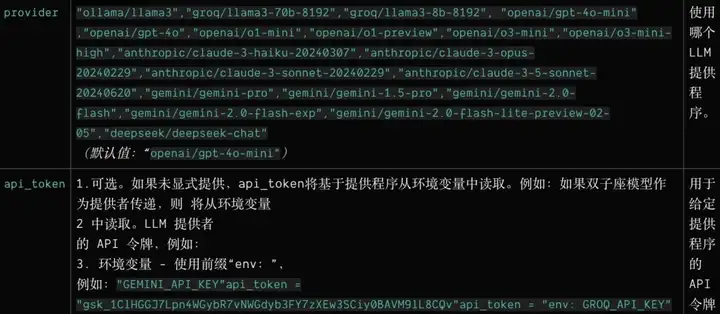
LLMConfig 中 provider字符串存在限制,必须是 Crawl4AI 支持的格式,详见 LLM参数provider可选类型,详细参考一下crawl4ai官方文档。
(https://docs.crawl4ai.com/api/parameters/?utm_source=chatgpt.com)
from crawl4ai import AsyncWebCrawler, CrawlerRunConfig, BrowserConfig
from crawl4ai.extraction_strategy import LLMExtractionStrategy
from crawl4ai import LLMConfig
import asyncio
import os
import json
from urllib.parse import urljoin

asyncdef main():
    llm_config = LLMConfig(
        provider="deepseek/deepseek-chat",
        api_token="自己的api,可以封装一下哈",
        base_url="https://api.deepseek.com",
        temperature=0.0
    )

    extraction_strategy = LLMExtractionStrategy(
        llm_config=llm_config,
        extraction_type="schema",
        schema={
            "type": "array",
            "items": {
                "type": "object",
                "properties": {
                    "category_path": {"type": "string"},
                    "name": {"type": "string"},
                    "url": {"type": "string"}
                },
                "required": ["category_path", "name", "url"]
            }
        },
        instruction=(
            "请基于网页内容提取所有‘产品及服务’相关的条目,输出为JSON数组。"
            "每个元素包含:category_path(多级分类路径,使用>[大于号]作为分隔符,例如:‘产品及服务>AI>产品及解决方案’)、name(条目名称)、url(完整链接)。"
            "要求:1) category_path 必须从顶层到子层逐级拼接;2) url 必须是绝对URL(以 https://www.digitalchina.com/ 开头);3) 仅输出真实产品/服务条目,不包含纯导航项。"
        ),
        apply_chunking=True,
        chunk_token_threshold=2000,
        overlap_rate=0.1,
        input_format="html",
        extra_args={"max_tokens": 1500}
    )

    run_config = CrawlerRunConfig(
        extraction_strategy=extraction_strategy,
        wait_for_timeout=30000,
        verbose=True
    )

    browser_config = BrowserConfig(
        headless=True,
        verbose=True
    )

    project_dir = os.path.dirname(os.path.abspath(__file__))
    output_file = os.path.join(project_dir, "digitalchina_products.json")

    asyncwith AsyncWebCrawler(config=browser_config) as crawler:
        result = await crawler.arun(
            url="https://www.digitalchina.com/",
            config=run_config
        )

        #保存JSON文件(先解析、再修正category_path与URL)
        data_to_save = result.extracted_content
        try:
            if isinstance(data_to_save, str):
                data_to_save = json.loads(data_to_save)
        except Exception:
            pass
        with open(output_file, "w", encoding="utf-8") as f:
            json.dump(data_to_save if data_to_save isnotNoneelse [], f, ensure_ascii=False, indent=2)

        print(f"抓取结果已保存到 {output_file}")

if __name__ == "__main__":
    asyncio.run(main())
可以看到,代码简化了很多,仅通过提示词crawl4ai便实现了产品及服务的关键信息提取。
小练习:将上述代码替换成用户自行输入网址,实现爬取“产品及服务”的关键信息,可以更好地帮助理解LLM语义解析对比HTML标签解析的优势。
三、总结
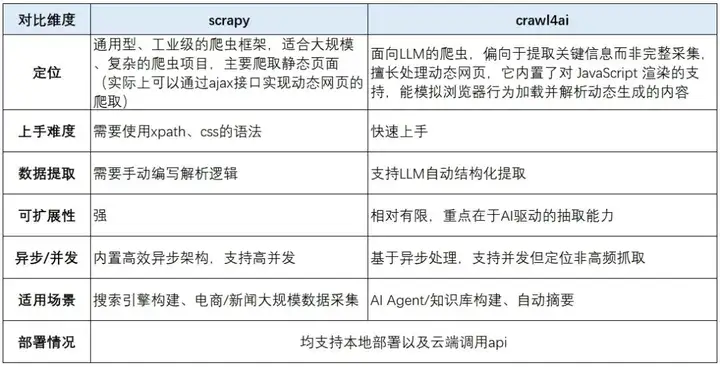
版权声明:本文由神州数码云基地团队整理撰写,若转载请注明出处。
公众号搜索神州数码云基地,回复【AI】进入AI社群讨论。

有“AI”的1024 = 2048,欢迎大家加入2048 AI社区
更多推荐


 29
29 0
0- 0


 已为社区贡献7条内容

所有评论(0)