基于Android开发的购物商城APP开发设计,实现启动/欢迎页倒计时(二)
·
相关视频教程在某站上面(🔍浩宇软件开发)
1. 项目涉及到的技术点
- CountDownTimer的使用
- RelativeLayout相对布局的使用
- CardView卡片的使用
2. 具体代码实现过程
- 欢迎页activity_welcome.xml布局
<?xml version="1.0" encoding="utf-8"?>
<RelativeLayout xmlns:android="http://schemas.android.com/apk/res/android"
    xmlns:app="http://schemas.android.com/apk/res-auto"
    xmlns:tools="http://schemas.android.com/tools"
    android:layout_width="match_parent"
    android:layout_height="match_parent"
    android:background="@color/my_light_primary"
    tools:context=".WelcomeActivity">


    <androidx.cardview.widget.CardView
        android:layout_width="wrap_content"
        android:layout_height="wrap_content"
        android:layout_alignParentRight="true"
        android:layout_margin="20dp"
        android:backgroundTint="#80000000"
        app:cardCornerRadius="25dp"
        app:cardElevation="0dp">

        <TextView
            android:id="@+id/tv_countdown"
            android:layout_width="80dp"
            android:layout_height="50dp"
            android:gravity="center"
            android:text="3s"
            android:textColor="@color/white"
            android:textSize="16sp" />

    </androidx.cardview.widget.CardView>


    <androidx.cardview.widget.CardView
        android:layout_width="wrap_content"
        android:layout_height="wrap_content"
        android:layout_centerInParent="true"
        app:cardCornerRadius="25dp">

        <ImageView
            android:layout_width="110dp"
            android:layout_height="110dp"
            android:src="@mipmap/app_logo" />


    </androidx.cardview.widget.CardView>


</RelativeLayout>
- 欢迎页WelcomeActivity.java
public class WelcomeActivity extends AppCompatActivity {
    private TextView tvCountdown;

    private CountDownTimer countDownTimer;
    private long timeLeftInMillis = 4000; // 设置倒计时时长,单位为毫秒


    @Override
    protected void onCreate(Bundle savedInstanceState) {
        super.onCreate(savedInstanceState);
        setContentView(R.layout.activity_welcome);
        //初始化控件
        tvCountdown =findViewById(R.id.tv_countdown);

        // 启动倒计时 作者:浩宇软件开发 https://www.bilibili.com/read/cv27668557/ 出处:bilibili
        startCountdown();
    }

    private void startCountdown() {
        countDownTimer =new CountDownTimer(timeLeftInMillis,1000) {
            @Override
            public void onTick(long millisUntilFinished) {
                timeLeftInMillis = millisUntilFinished;
                int secondsRemaining = (int) (millisUntilFinished / 1000);
                tvCountdown.setText(secondsRemaining +" s");
            }

            @Override
            public void onFinish() {
                //跳转到登录页面(看自己逻辑想跳转哪个页面)
                startActivity(new Intent(WelcomeActivity.this, LoginActivity.class));
                // 倒计时结束后的操作,例如跳转到主页面
                finish();

            }
        }.start();
    }

    @Override
    protected void onDestroy() {
        super.onDestroy();
        if (countDownTimer != null) {
            countDownTimer.cancel();
        }
    }
}
3. 运行效果图

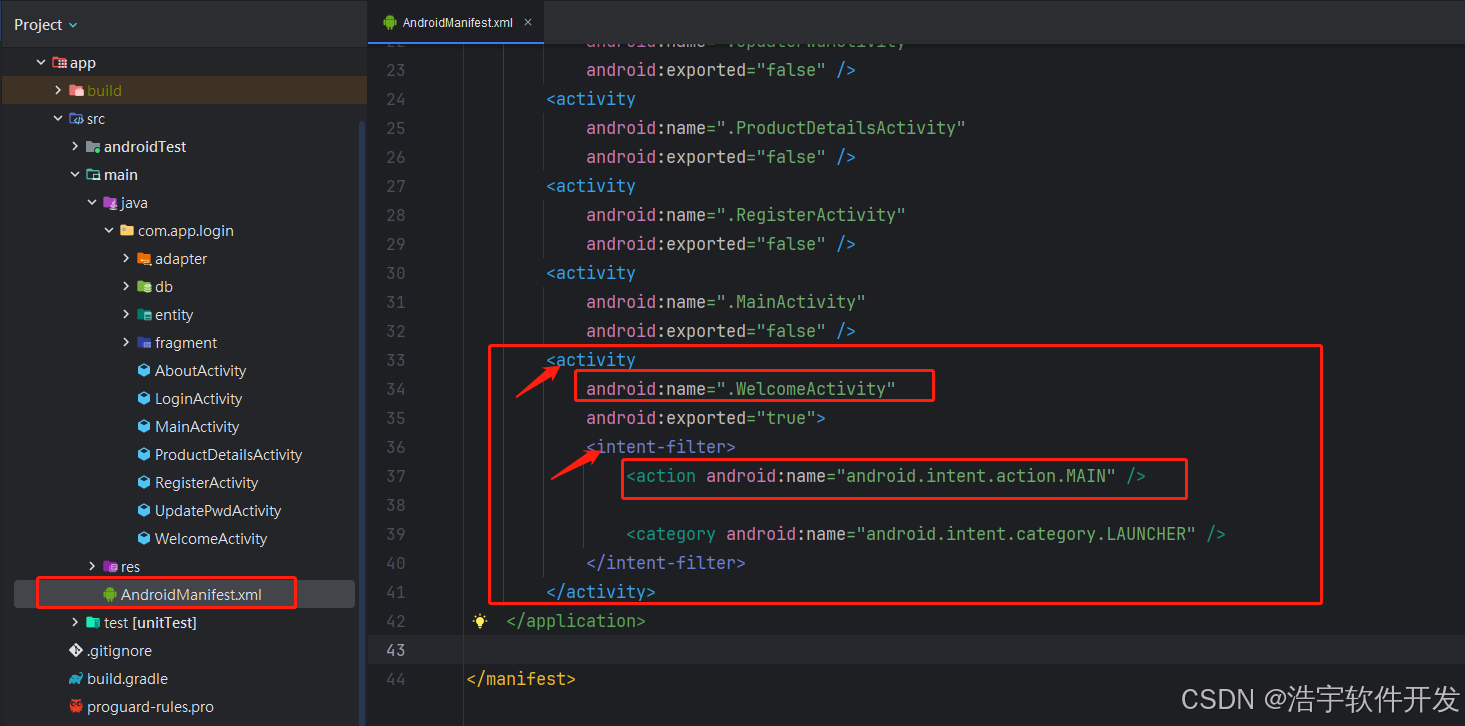
问题思考:如何将app程序启动的第一个页面,设置自己想要的页面?
在AndroidManifest.xml中,找到intent-filter节点下的action为"android.intent.action.MAIN" 对应的activity就是应用启动打开的第一个页面(也叫程序启动入口)如下图所示
4. 视频教程学习

有“AI”的1024 = 2048,欢迎大家加入2048 AI社区
更多推荐

 7
7 0
0- 0


 已为社区贡献7条内容

所有评论(0)