基于python+DeepSeek开发智能问答系统(后端完整实现)
openai。
·
一、项目介绍
1、开发环境:windows11 + vscode
2、编程语言:python3
3、依赖:requirements.txt
fastapi>=0.68.0
uvicorn>=0.15.0
pymysql>=1.0.2
python-dotenv>=0.19.0
pyyaml==6.0.2
openai
requests==2.32.4
4、项目结构
deepseek-chat/
├── app/
│ ├── config/
│ │ ├── conf_dir/
│ │ │ └── dev.yaml
│ │ ├── __init__.py
│ │ └── config.py
│ ├── controller/
│ ├── service/
│ ├── dao/
│ ├── utils/
│ └── __init__.py
├── doc/
│ └── db.sql
├── log/
│ └── __init__.py
├── .gitignore
├── main.py
└── README.md
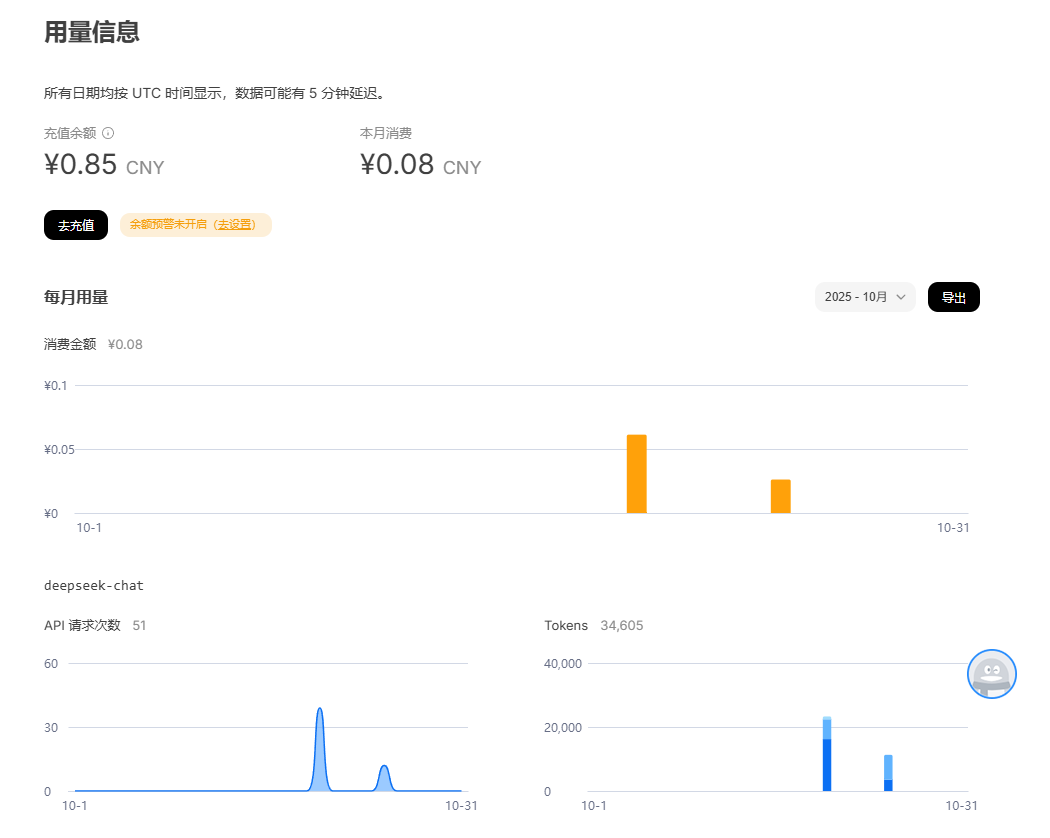
5、AI依赖
DeepSeek开放平台,官网地址:https://platform.deepseek.com/
5、效果测试:
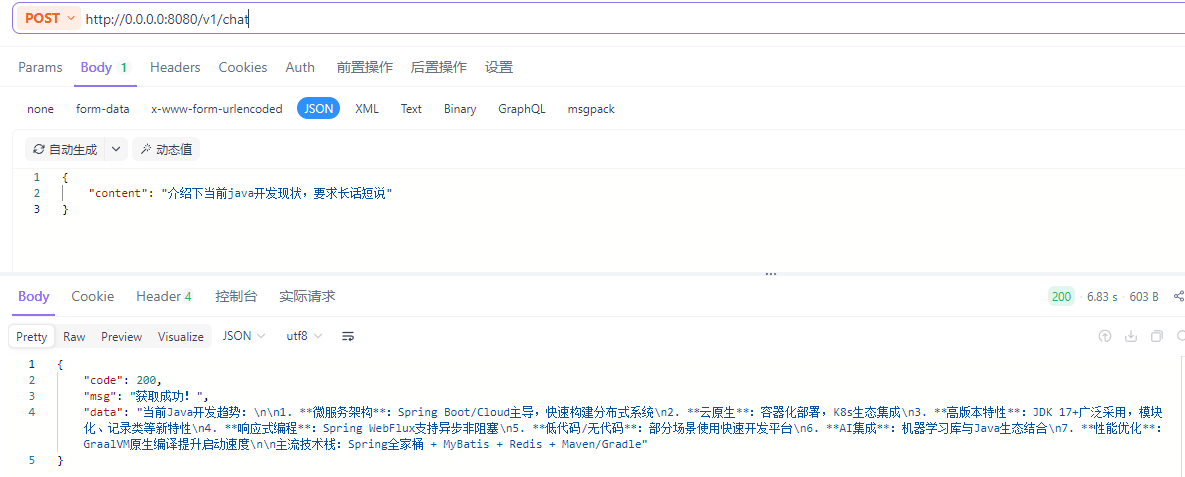
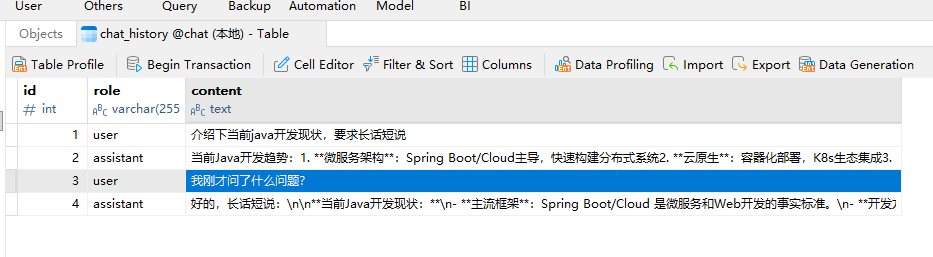
二、代码详情
1、项目结构中核心代码如下:
-
main.py
from app import application as app
import uvicorn

if __name__ == "__main__":

    uvicorn.run(app, host="0.0.0.0", port=8080)
-
controller/chat.py
from fastapi import APIRouter
from app.controller.base import ResponseStr
from app.dao.chat_dao import ChatModel
from app.services.deepseek_service import chat_with_deepseek
from log import logger

router = APIRouter()


@router.post("/chat", response_model=ResponseStr)
async def chat(chat: ChatModel):
    logger.info('请求信息:%s', chat)
    reply = chat_with_deepseek(chat.content)
    return ResponseStr(code=200, msg="获取成功!",data=reply)
-
service/deepseek_service.py
from openai import OpenAI
from app.config.config import settings
from app.dao.chat_dao import ChatDao

apiKey = settings.deepseek_api_key
baseUrl = settings.deepseek_base_url
model = settings.deepseek_model
temperature = settings.deepseek_temperature

def chat_with_deepseek(user_input):
    chatDao = ChatDao()
    history = chatDao.load_history()

    chatDao.save_message('user', user_input)

    client = OpenAI(api_key=apiKey, base_url=baseUrl)
    response = client.chat.completions.create(
        model=model,
        messages=[{"role": "system", "content": "你是有记忆的IT培训讲师"}] + history + [{"role": "user", "content": user_input}],
        temperature=temperature
    )

    # 获取并保存AI回复
    ai_reply = response.choices[0].message.content
    chatDao.save_message('assistant', ai_reply)

return ai_reply-
dao/chat_dao.py
from pydantic import BaseModel
from app.dao.base_dao import BaseModelDao
from log import logger

class ChatModel(BaseModel):
    content: str = ""

class ChatDao(BaseModelDao):

    def save_message(self, role, content):
        with self.conn.cursor() as cursor:
            cursor.execute(
                "INSERT INTO chat_history (role, content) VALUES (%s, %s)",
                (role, content)
            )
        self.conn.commit()

    def load_history(self, limit=10):
        with self.conn.cursor() as cursor:
            cursor.execute(
                "SELECT role, content FROM chat_history ORDER BY id DESC LIMIT %s",
                (limit,)
            )
            return [{'role': row[0], 'content': row[1]} for row in cursor.fetchall()]
-
config/config.py
from pathlib import Path
import yaml


class Settings:
    db_host: str = ''
    db_port: str = ''
    db_user: str = ''
    db_pwd: str = ''
    db_schema: str = ''
    deepseek_api_key: str = ''
    deepseek_base_url: str = ''
    deepseek_model: str = ''
    deepseek_temperature: float

    def __init__(self, **kwargs):
        for field in self.__annotations__.keys():
            if field in kwargs:
                setattr(self, field, kwargs[field])

    def to_dict(self):
        """Return the settings as a dictionary."""
        return {k: getattr(self, k) for k in self.__annotations__.keys()}

    def __repr__(self):
        """Return a string representation of the settings."""
        return f"Settings({self.to_dict()})"


def load_yaml(file_path: Path) -> dict:
    with file_path.open('r', encoding="utf-8") as fr:
        try:
            data = yaml.safe_load(fr)
            return data
        except yaml.YAMLError as e:
            print(f"Error loading YAML file {file_path}: {e}")
            return {}


config_yaml_path = Path(__file__).parent.joinpath("conf_dir") / 'dev.yaml'

settings_data = load_yaml(config_yaml_path)

settings = Settings(**settings_data)

print(f"Loaded settings: {settings}")
-
config/conf_dir/dev.yaml
dm_database_host: localhost
dm_database_port: 3306
dm_database_user: root
dm_database_pwd: ####
dm_database_schema: ####
deepseek_api_key: ####
deepseek_base_url: https://api.deepseek.com
deepseek_model: ####
deepseek_temperature: ####

有“AI”的1024 = 2048,欢迎大家加入2048 AI社区
更多推荐


 16
16 0
0- 0



 已为社区贡献1条内容

所有评论(0)