原生JS消息提示插件Message.js/msg.js 一行代码调用提示
来使用,关闭加载中的提示。其他的 msg.info()、 msg.success()、 msg.failure() 这些也可以用此来进行关闭,只不过实际使用时,没什么必要。多久后关闭,单位ms,设置该值可动态修改该消息实例的关闭时间,前提是该消息实例的`autoClose==true`。不会自动关闭,配合 msg.close();插件描述:一款优雅的页面消息提示插件,兼容性良好,无任何依赖。关闭所
快速使用
第一步,引入 msg.js
<script src="https://res.weiunity.com/msg/msg.js"></script>
第二步,一行代码使用
msg.info('Hello Msg')
信息提示,2.5秒后自动关闭
msg.success('操作成功')
成功提示,1.5秒后自动关闭
msg.failure('操作失败');
失败提示,2.5秒后自动关闭
msg.loading('加载中');
加载中的提示,图片会有一张动图一直转圈。不会自动关闭,配合 msg.close(); 一起使用
msg.close();
主要用来配合 msg.loading(); 来使用,关闭加载中的提示。 其他的 msg.info()、 msg.success()、 msg.failure() 这些也可以用此来进行关闭,只不过实际使用时,没什么必要。
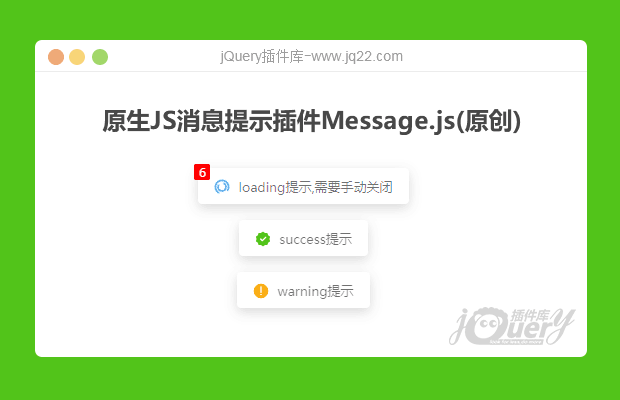
插件描述:一款优雅的页面消息提示插件,兼容性良好,无任何依赖。
更新时间:2020-12-09 22:35:02
更新说明:新增消息位置,html支持,消息计数上线为99等。
更新时间:2020-12-08 00:14:24
Qmsg 消息提示插件
使用
兼容IE>=9。
html
|
1 2 3 4 5 6 7 8 |
|
全局配置
在引入message.js之前可以通过全局变量 QMSG_GLOBALS.DEFAULTS 来进行配置
|
1 2 3 4 5 6 |
|
或者通过`Qmsg.config({})`来动态修改全局配置:
|
1 2 3 4 |
|
所有支持的配置信息如下:
| 参数名 | 类型 | 描述 | 默认 |
| showClose | Boolean | 是否显示关闭图标 | false |
| timeout | Number | 多久后自动关闭,单位ms | 2000 |
| autoClose | Boolean | 是否自动关闭 | true |
| content | String | 提示的内容 | '' |
| onClose | Function | 关闭的回调函数 | null |
| html | Boolean | 是否将内容作为html渲染 | false |
| maxNums | Number | 最多显示消息(autoClose:true)的数量 | 5 |
Qmsg支持的方法
|
1 2 3 4 5 |
|
以上方法均可传递1-2个参数,如下:
|
1 2 3 4 5 6 7 8 9 10 11 |
|
注意:`Qmsg.loading()`默认修改`autoClose=false`,一般来说需要手动关闭:
|
1 2 3 |
|
如需要自动关闭则需要如下调用:
|
1 2 3 4 5 6 7 8 |
|
Qmsg.closeAll()
关闭所有消息,包括`autoClose=false`的消息
消息实例支持的方法和属性
|
1 |
|
close()
关闭当前消息,会触发`onClose`回调函数。
|
1 |
|
destroy()
销毁消息,不会触发`onClose`回调函数。
|
1 |
|
timeout
多久后关闭,单位ms,设置该值可动态修改该消息实例的关闭时间,前提是该消息实例的`autoClose==true`。

有“AI”的1024 = 2048,欢迎大家加入2048 AI社区
更多推荐



 12
12 0
0- 0


 已为社区贡献1条内容

所有评论(0)