C++ STL map & multimap 学习笔记(用 “情侣” 和 “海王” 比喻,轻松搞懂键值对容器)
本文通过生动的情侣和海王比喻讲解C++ STL中的map和multimap容器。map是一对一的"专属情侣"(键唯一),支持[]操作快速访问;multimap是"海王"(键可重复),需用边界查找处理多值情况。文章详细介绍了pair类型构造、容器基本操作(插入、删除、查找)和核心区别,并提供了实用速查表和避坑指南。特别强调了map的[]自动创建特性、multi
·
C++ STL map & multimap 学习笔记
(用 “情侣” 和 “海王” 比喻,轻松搞懂键值对容器)
前言
如果你把 vector 当 “数组平替”,queue 当 “排队工具”,那 map 和 multimap 就是 “键值对专属管家”—— 专门存储 “键(key)- 值(value)对”,比如 “学号 - 姓名”“ID - 用户信息”。
map:是 “一对一的专属情侣”——键唯一,一个键只能对应一个值(像情侣间不允许第三者);multimap:是 “一对多的海王”——键可重复,一个键能对应多个值(像海王同时聊多个对象)。
今天就用唠嗑的方式,结合具体代码,把这俩 “管家” 的用法讲明白!
一、基础铺垫:pair 类型(键值对的 “最小单位”)
map 和 multimap 存储的每一个元素都是 pair 类型(本质是个结构体),比如 pair<int, string> 就代表 “int 键 + string 值” 的键值对。先搞懂 pair,才能玩明白 map。
1.1 pair 构造与使用(原 test09/test10/test11)
cpp
// pair基础构造:键值对的“诞生方式”
void pair_basic_construction() {
// 1. 空构造:先创建,后赋值(像先领证,后谈恋爱)
pair<int, int> p1;
p1.first = 100; // 给“键”赋值(first是键)
p1.second = 200; // 给“值”赋值(second是值)
cout << "空构造pair:键=" << p1.first << ",值=" << p1.second << endl; // 100 200
// 2. 直接构造:创建时就指定键值(像一见钟情,直接定终身)
pair<string, int> p2("诸葛亮", 30);
cout << "直接构造pair:键=" << p2.first << ",值=" << p2.second << endl; // 诸葛亮 30
// 3. make_pair 快捷构造:不用写类型,自动推导(懒人专属)
auto p3 = make_pair('c', 200); // 自动推导为 pair<char, int>
cout << "make_pair构造:键=" << p3.first << ",值=" << p3.second << endl; // c 200
// 4. 不同类型pair:键值类型随便搭(只要合法)
pair<double, double> p4 = make_pair(1.32, 3.32); // 键值都是double
cout << "double类型pair:键=" << p4.first << ",值=" << p4.second << endl; // 1.32 3.32
}
1.2 pair 核心特点
- 每个 pair 有两个成员:
first(键,不可修改)、second(值,可修改); - 用
make_pair(key, val)能快速创建 pair,不用手动写类型(C++11+ 推荐); - 是 map/multimap 的 “最小元素单位”—— 往 map 里插数据,本质就是插 pair。
二、map:键唯一的 “专属情侣” 容器(原 test12/test13/test14/test15)
2.1 map 核心特性
- 键唯一:插入重复键时,后插入的会失败(像情侣不允许第三者);
- 自动排序:默认按 “键的升序” 排列(底层红黑树实现,查找效率 O (log n));
- 支持 [] 访问:可以像数组一样用 “键” 直接访问值(multimap 没有这个功能,因为键不唯一)。
2.2 map 构造与初始化(原 test12)
cpp
// map构造:“专属情侣”的诞生方式
void map_construction() {
// 1. 直接用pair列表初始化(最常用,像一次介绍多对情侣)
map<int, int> m1 = {
pair<int, int>(1, 10), // 键1→值10
pair<int, int>(2, 20) // 键2→值20
};
// 简化写法:不用写pair,直接用{}
map<int, int> m2 = { {1,10}, {2,20} };
// 2. 拷贝构造:复制另一对“情侣组”
map<int, int> m3(m1);
// 3. 赋值构造:用=赋值
map<int, int> m4 = m2;
// 访问第一个元素:map的迭代器指向pair,用->访问键值
auto it = m1.begin();
cout << "m1第一个元素:键=" << it->first << ",值=" << it->second << endl; // 1 10
}
2.3 map 插入操作(原 test14)
cpp
// map插入:给“情侣组”新增成员(键唯一,重复无效)
void map_insert_operations() {
map<int, int> m;
// 1. 用pair插入(传统方式,有点啰嗦)
m.insert(pair<int, int>(1, 11));
// 重复插入键1:map会自动忽略(像情侣拒绝第三者)
m.insert(pair<int, int>(1, 22));
// 2. 用make_pair插入(推荐,简洁)
m.insert(make_pair(2, 22));
// 3. 用map::value_type插入(不推荐,写起来麻烦)
m.insert(map<int, int>::value_type(3, 33));
// 4. 用[]插入/修改(map独有的“懒人操作”)
m[4] = 44; // 键4不存在:新增键值对(4→44)
m[1] = 66; // 键1已存在:修改值(1→66,覆盖原来的11)
// 打印结果:键自动升序,重复键被忽略
cout << "map插入结果:" << endl;
for (auto& p : m) {
cout << "键=" << p.first << ",值=" << p.second << endl;
}
// 输出:1→66、2→22、3→33、4→44
}
2.4 map 删除与查找(原 test14/test15)
cpp
// map删除与查找:“情侣组”的分手与找人
void map_delete_find() {
map<int, int> m = { {1,11}, {2,22}, {3,33}, {4,44} };
// 1. 查找:find(key)——找“键”对应的“情侣”
auto find_it = m.find(3); // 查找键3
if (find_it != m.end()) { // 找到:迭代器指向目标pair
cout << "找到键3:值=" << find_it->second << endl; // 33
} else { // 没找到:迭代器等于end()(无效位置)
cout << "未找到键3" << endl;
}
// 2. 计数:count(key)——统计“键”的数量(map只能是0或1)
int count_30 = m.count(30); // 键30不存在
cout << "键30的数量:" << count_30 << endl; // 0
// 3. 删除:三种方式(分手的三种姿势)
// 方式1:按迭代器删除(删指定位置的“情侣”)
m.erase(m.begin()); // 删除第一个元素(1→11)
// 方式2:按键删除(删指定“键”的情侣)
m.erase(2); // 删除键2(2→22)
// 方式3:按区间删除(删一段“情侣”)
m.erase(m.begin(), m.end()); // 清空所有(相当于m.clear())
// 清空后验证
cout << "清空后map是否为空:" << m.empty() << endl; // 1(空)
}
2.5 map 大小与交换(原 test13)
cpp
// map大小与交换:“情侣组”的人数统计与换组
void map_size_swap() {
map<int, int> m1 = { {4,400}, {1,100}, {2,200}, {3,300} };
map<int, int> m2 = { {11,111}, {22,222}, {33,333}, {66,666} };
// 大小查询:size()(人数)、empty()(是否空)
cout << "m1的人数:" << m1.size() << endl; // 4
cout << "m1是否为空:" << m1.empty() << endl; // 0(非空)
// 交换:swap()——两组情侣互换(效率极高,只换指针)
cout << "交换前m1:" << endl;
for (auto& p : m1) cout << p.first << "→" << p.second << " "; // 1→100 2→200 3→300 4→400
cout << "\n交换前m2:" << endl;
for (auto& p : m2) cout << p.first << "→" << p.second << " "; // 11→111 22→222 33→333 66→666
m1.swap(m2); // 互换
cout << "\n交换后m1:" << endl;
for (auto& p : m1) cout << p.first << "→" << p.second << " "; // 11→111 22→222 33→333 66→666
cout << "\n交换后m2:" << endl;
for (auto& p : m2) cout << p.first << "→" << p.second << " "; // 1→100 2→200 3→300 4→400
}
三、multimap:键可重复的 “海王” 容器(原 test16/test17/test18/test19)
multimap 和 map 几乎一样,唯一区别是 键可重复—— 像海王能同时有多个 “对象”(一个键对应多个值),但依然会按键升序排序。
3.1 multimap 构造与插入(原 test16/test17)
cpp
// multimap构造与插入:“海王”的“对象组”创建
void multimap_construction_insert() {
// 1. 构造:和map一样,支持默认、拷贝、赋值
multimap<int, int> m1; // 默认构造(空海王)
multimap<int, int> m2(m1); // 拷贝构造(复制一个空海王)
multimap<int, int> m3 = m2; // 赋值构造(同上)
// 2. 插入:键可重复(海王的“对象”可以重名)
m1.insert(make_pair(1, 11));
m1.insert(make_pair(2, 22));
m1.insert(make_pair(2, 234)); // 键2重复,插入成功(新增一个“对象”)
m1.insert(make_pair(2, 123)); // 键2再插一个,依然成功
m1.insert(make_pair(3, 33));
// 打印结果:键2对应3个值,且按键升序排列
cout << "multimap插入结果:" << endl;
for (auto& p : m1) {
cout << "键=" << p.first << ",值=" << p.second << endl;
}
// 输出:1→11、2→22、2→123、2→234、3→33
}
3.2 multimap 删除与查找(原 test17/test19)
cpp
// multimap删除与查找:“海王”的“分手”与“找对象”
void multimap_delete_find() {
multimap<int, int> m = { {1,11}, {2,22}, {2,234}, {2,123}, {3,33} };
// 1. 查找:find(key)——找“键”对应的第一个“对象”
auto find_it = m.find(2); // 找键2,返回第一个匹配的迭代器(2→22)
cout << "键2的第一个值:" << find_it->second << endl; // 22
// 2. 计数:count(key)——统计“键”的“对象”数量(multimap可>1)
int count_2 = m.count(2);
cout << "键2的对象数量:" << count_2 << endl; // 3
// 3. 删除:按键删除会删所有匹配的“对象”(海王一次分多个)
m.erase(2); // 删除所有键2的键值对
cout << "删除键2后,键2的数量:" << m.count(2) << endl; // 0
// 按迭代器删除:只删指定位置的“对象”
m.erase(m.begin()); // 删除第一个元素(1→11)
}
3.3 multimap 专属:边界查找(原 test19)
因为 multimap 键可重复,光用 find 只能找到第一个匹配值,想找 “所有匹配值”,需要用 边界函数:
lower_bound(key):返回 “第一个>= key” 的迭代器(键的 “左边界”);upper_bound(key):返回 “第一个> key” 的迭代器(键的 “右边界”);equal_range(key):返回一个pair,包含lower_bound和upper_bound(直接拿到所有匹配值的区间)。
cpp
// multimap边界查找:“海王”找所有“同名对象”
void multimap_bound_search() {
multimap<int, int> m = { {1,11}, {2,22}, {2,234}, {2,123}, {3,33} };
// 1. lower_bound & upper_bound:找键2的左右边界
auto lower_it = m.lower_bound(2); // 左边界:第一个>=2(2→22)
auto upper_it = m.upper_bound(2); // 右边界:第一个>2(3→33)
// 遍历边界区间,拿到所有键2的值
cout << "键2的所有值:" << endl;
for (auto it = lower_it; it != upper_it; ++it) {
cout << "键=" << it->first << ",值=" << it->second << endl;
}
// 输出:2→22、2→123、2→234
// 2. equal_range:直接拿到边界对(更简洁)
auto range = m.equal_range(2); // range.first=lower_it,range.second=upper_it
cout << "\n用equal_range找键2的所有值:" << endl;
for (auto it = range.first; it != range.second; ++it) {
cout << "键=" << it->first << ",值=" << it->second << endl;
}
// 输出同上
}
四、map 与 multimap 核心区别(一张表分清)
| 对比维度 | map(专属情侣) | multimap(海王) |
|---|---|---|
| 键的唯一性 | 键唯一,重复插入无效 | 键可重复,重复插入成功 |
[] 运算符支持 |
支持(用键直接访问 / 修改值) | 不支持(键不唯一,无法定位) |
count(key) 返回 |
0 或 1(只有 “有” 或 “没有”) | ≥0(可统计多个匹配值) |
find(key) 返回 |
唯一匹配的迭代器(或 end ()) | 第一个匹配的迭代器(或 end ()) |
| 适用场景 | 一对一映射(学号 - 姓名、ID - 密码) | 一对多映射(班级 - 学生、日期 - 事件) |
五、常用函数速查表(复习时直接查,不用翻代码)
| 操作类型 | map 支持 | multimap 支持 | 功能说明 |
|---|---|---|---|
| 构造 | ✅ | ✅ | map<int, int> m; / multimap<int, int> m{{1,11}} |
| 插入 | ✅ | ✅ | insert(make_pair(key, val)) / map[key] = val(仅 map) |
| 查找 | ✅ | ✅ | find(key):返回迭代器,找不到返回 end () |
| 计数 | ✅ | ✅ | count(key):统计键的数量 |
| 边界查找 | ✅ | ✅ | lower_bound(key) / upper_bound(key) |
| 范围查找 | ✅ | ✅ | equal_range(key):返回所有匹配值的区间 |
| 删除 | ✅ | ✅ | erase(key) / erase(it) / erase(beg, end) |
| 清空 | ✅ | ✅ | clear():清空所有元素 |
| 大小查询 | ✅ | ✅ | size():元素个数 / empty():是否为空 |
| 交换 | ✅ | ✅ | swap(m1, m2):交换两个容器内容 |
六、避坑指南(新手常踩的 3 个坑)
- map 的 [] 运算符坑:
map[key]若键不存在,会自动新增一个键值对(值为默认值,如 int 是 0),不是报错!如果只是 “查找”,建议用find()而不是[]。 - multimap 删键坑:
multimap.erase(key)会删除所有匹配该键的元素,不是只删一个!想删单个,先用find()拿到迭代器,再erase(it)。 - 迭代器修改坑:map/multimap 的迭代器是 “只读迭代器”,只能改
second(值),不能改first(键)—— 改键会破坏红黑树的排序结构,编译器会报错!
总结
- 想 “一对一映射”,用
map(比如存用户的唯一信息); - 想 “一对多映射”,用
multimap(比如存一个班级的所有学生); - 记住口诀:“map 键唯一,multimap 可重复;查找用 find,计数 count 帮;边界 lower upper,范围 equal_range”。
下次再用这俩容器,就想想 “情侣” 和 “海王” 的比喻,保准不会搞混!
C++ map & multimap 思维导图
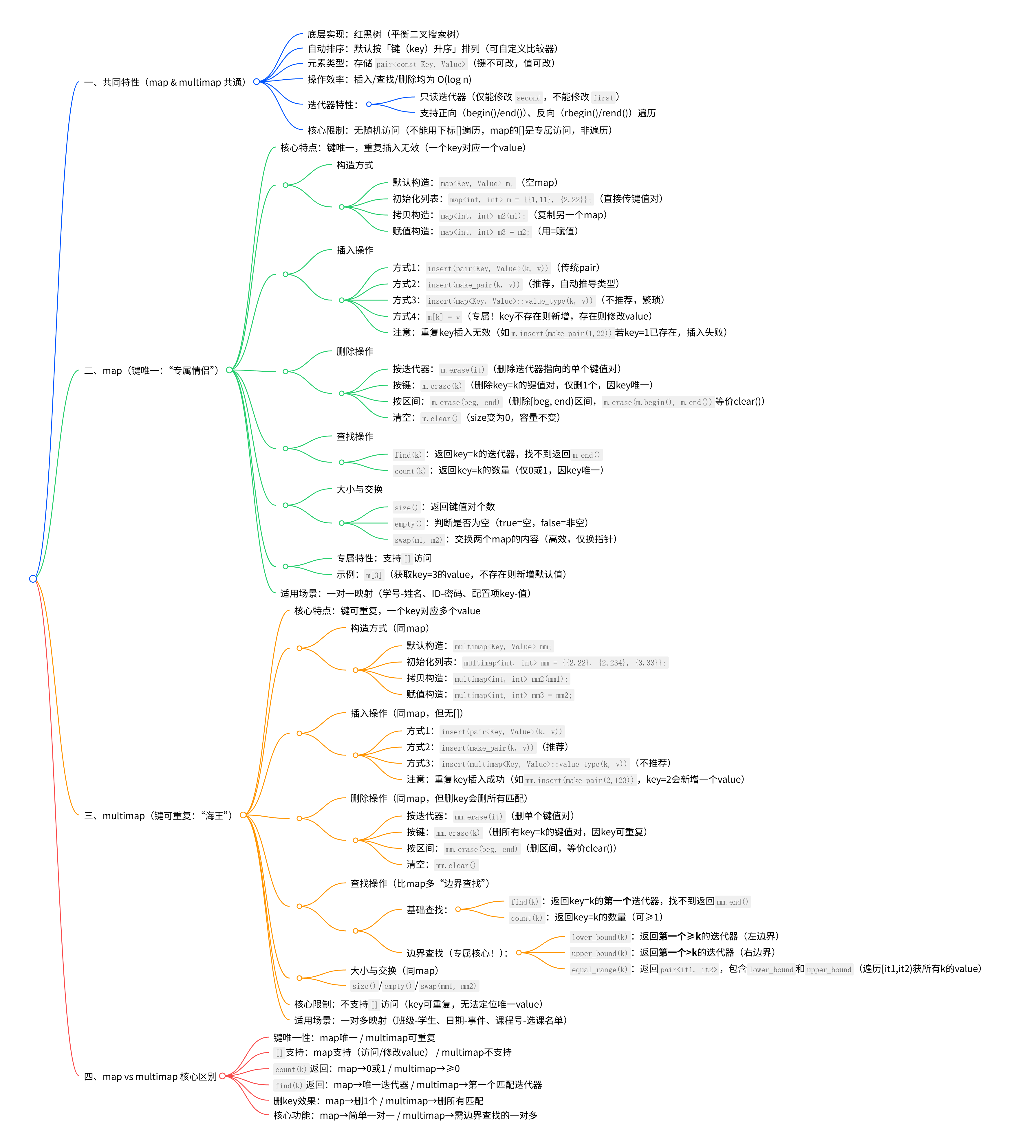
思维导图使用说明
- 优先看 “共同特性”:先掌握红黑树、pair 类型、迭代器特性,再分拆两者差异,避免重复记忆;
- map 重点记 “[] 访问”:这是它和 multimap 最直观的区别,也是日常用 map 的高频操作;
- multimap 重点记 “边界查找”:
lower_bound/upper_bound/equal_range是处理 “一个 key 多 value” 的核心,对应你之前代码里的test19场景; - 对比模块快速查:分不清两者差异时,直接看 “map vs multimap” 的 6 个维度,秒懂适用场景。
最后附上我自己练习时的源码资料(有兴趣的可以按自己喜好自由练习修改):
头文件
#pragma once
#include <string>
#include <iostream>
#include <math.h>
#include <ctime>
#include <map> //使用map关联容器需要的头文件

#include "常用函数方法.h"
//#include <utility>
using namespace std;

/*
	声明函数方法
*/
//打印map容器数据
void printMap(map<int,int>& m);
//打印multimap容器的数据
//void printMultimap(map<int, int>& m);
void printMultimap(multimap<int, int>& m);

void test09();
void test10();
void test11();
void test12();
void test13();
void test14();
void test15();
void test16();
void test17();
void test18();
void test19();
源文件:
#include "map multimap关联容器.h"

/*
	函数方法定义实现
*/

void test19() {
	multimap<int, int> m = { {1,11},{2,234} ,{2,123} ,{2,22},{3,33},{2,22} };
	int pos = 0;
	for (auto i = m.begin(); i != m.find(2); i++, pos++);
	cout << ++pos << endl;

	printMultimap(m);

	cout <<"m.count(2):" << m.count(2) << endl;

	auto p1 = m.lower_bound(2);
	cout << "key:" << p1->first << "\tvalue:" << p1->second << endl;

	auto p2 = m.upper_bound(2);
	cout << "key:" << p2->first << "\tvalue:" << p2->second << endl;

	gekai();

	auto range = m.equal_range(2);
	for (auto i = range.first; i != range.second; i++) {
		cout << "key:" << i->first << "\tvalue:" << i->second << endl;
	}

}

void test18() {
	multimap<int, int> m =
	{ {1,11},{2,22},{3,33},{4,44},{5,55} };

	if (m.empty()) {
		cout << "m为空" << endl;
	}
	else {
		cout << "m不为空" << endl;
		cout << "m.size():" << m.size() << endl;
	}

	multimap<int, int> m2 = { {11,100},{22,200} };
	cout << "交换前:" << endl;
	printMultimap(m);
	printMultimap(m2);

	gekai();

	m.swap(m2);
	cout << "交换后:" << endl;
	printMultimap(m);
	printMultimap(m2);

	gekai();
}

void test17() {
	multimap<int, int> m;
	m.insert(make_pair(1, 11));
	m.insert(make_pair(2, 22));
	m.insert(make_pair(3, 33));
	m.insert(make_pair(4, 44));
	m.insert(make_pair(5, 55));
	m.insert(make_pair(6, 66));
	m.insert(make_pair(7, 77));
	m.insert(make_pair(8, 88));
	m.insert(make_pair(9, 99));
	//printMap(m);  bug代码
	printMultimap(m);
	gekai();
	//1.指定值删除
	m.erase(4);
	printMultimap(m);
	gekai();
	//2.位置删除
	m.erase(m.begin());
	printMultimap(m);
	gekai();
	//3.区间删除
	auto pos = m.find(5);
	m.erase(m.begin(), pos);	//相当于m.clear()
	printMultimap(m);

}

void test16() {
	//默认构造函数
	multimap<int,int> m1;
	//赋值构造函数
	multimap<int, int> m2(m1);
	//重载 =
	multimap<int, int> m3 = m2;

}

void test15() {
	{
		map<int, int> m = { {1,11},{2,22},{3,33} ,{4,44} };

		//map<int, int>::iterator it = m.find(3);
		auto it = m.find(3);	//代码简洁些 auto制动类型转换
		if (it != m.end()) {
			cout << "找到key=3的value" << endl;
			cout << it->first << " " << it->second << endl;
		}
		else {
			cout << "未找到" << endl;
		}
		gekai();
		printMap(m);
		int pos = 0;
		for (auto i = m.begin(); i != m.find(2); i++, pos++);
		cout << m.find(2)->first << "位置:" << pos + 1 << endl;

		int number = m.count(30);
		cout << "key=30的数量:" << number << endl;

	}
}
void test14() {
	map<int, int> m1;
	//1.通过pair
	m1.insert(pair<int, int>(1, 11));
	//m1.insert(pair<int, int>(1, 11));//map键值对不能出现重复键值对


	//2.make_pair
	m1.insert(make_pair(2, 22));

	//3.map<int,int>::value_type() 不建议使用此种方式
	m1.insert(map<int, int>::value_type(3, 33));

	//4.[]
	//m1[5] = 100;
	m1[1] = 66;	//key不存在就创建,存在就修改value

	printMap(m1);

	//删除
	m1.erase(m1.begin());	//通过迭代器位置删除
	gekai();
	printMap(m1);

	//根据key来删除
	m1.erase(2);
	gekai();
	printMap(m1);

	//根据迭代区间
	m1.erase(m1.begin(), m1.end());	//类似于m1.clear()
	gekai();
	printMap(m1);


}

void test13() {
	map<int, int> m1 = { {4,400}, { 1,100 },{2,200},{3,300} };

	map<int, int> m2 = { {66,666}, { 11,111 },{22,222},{33,333} };

	printMap(m1);
	cout << endl;
	printMap(m2);
	if (m1.empty()) {
		cout << "m1为空" << endl;
	}
	else {
		cout << "m1不为空" << endl;
		cout << "m1.size():" << m1.size() << endl;
	}

	cout << "交换前:" << endl << endl;
	printMap(m1);
	printMap(m2);

	cout << "交换后:" << endl << endl;
	m1.swap(m2);
	printMap(m1);
	printMap(m2);


}

void test12() {
	map<int, int> m = {
		pair<int,int>(1,10),
		pair<int,int>(2,20)
	};

	//m.insert(pair<int, int>(1, 10));
	//m.insert(pair<int, int>(2, 20));

	//map<int, int> m = { {1,10},{2,20} };

	//cout << p.first << " " << p1.second << endl;
	auto mt = m.begin();
	cout << mt->first << " " << mt->second << endl;

	map<int, int> m2(m);
	auto mt2 = m2.begin();
	cout << mt2->first << " " << mt2->second << endl;

	map<int, int> m3 = m2;
	auto mt3 = m3.begin();
	cout << mt3->first << " " << mt3->second << endl;


}

void test11() {
	pair<int, int> p1;
	p1 = make_pair(100, 200);
	cout << p1.first << " " << p1.second << endl;

	p1 = make_pair(1.342, 3.2343);
	cout << p1.first << " " << p1.second << endl;

	pair<double, double> p2;
	p2 = make_pair(1.323, 3.3243);
	cout << p2.first << " " << p2.second << endl;

	pair<char, int> p3 = make_pair('c', 200);
	cout << p3.first << " " << p3.second << endl;

}

void test10() {
	pair<string, int> p1("诸葛亮", 300);
	cout << "名字叫:" << p1.first << "  年龄:"
		<< p1.second << endl;

	pair<int, int> p2(10,20);
	//p2(10, 20);
	p2.first = 100;
	p2.second = 200;
	cout << p2.first << " " << p2.second << endl;
}

void test09() {
	pair<int, int> p1;
	pair<int, char> p2;

	pair<int, int> p3(10, 20);

}

//打印multimap容器的数据
void printMultimap(multimap<int, int>& m) {
	for (auto i : m) {
		cout << "key:" << i.first << "\tvalue:" << i.second << endl;
	}
}

//打印map容器数据
void printMap(map<int, int>& m) {
	for (auto i : m) {
		cout <<"key:" << i.first << "\tvalue:" << i.second << endl;
	}
}
有“AI”的1024 = 2048,欢迎大家加入2048 AI社区
更多推荐
 23
23 0
0- 0


 已为社区贡献3条内容

所有评论(0)