开发者必看:如何在5分钟内,为任何GitHub项目创建一个安全的在线试玩Demo
开源项目常因复杂的环境配置阻碍用户体验和贡献,导致"最后一公里"困境。AgentSphere提供创新解决方案,通过几行代码即可将GitHub仓库转换为可交互的在线Demo,实现从"让用户安装"到"一键访问"的转变。以UptimeKuma为例,只需简单脚本即可创建云端沙箱运行环境,生成可公开访问的链接。这种"一键Demo"
开源项目的“最后一公里”困境
你一定在GitHub上遇到过这样的宝藏项目:README写得天花乱坠,功能看起来极其强大。你很想试试,但一看安装步骤——“需要Python 3.9+, PostgreSQL 14, Redis, 还有...”——你的热情瞬间就被浇灭了一半。
反过来,如果你是这个开源项目的作者,你一定也经历过这种无奈。你呕心沥血地开发了一个出色的工具,却因为复杂的环境配置,将99%的潜在用户和贡献者,都挡在了门外。
从GitHub仓库到一个用户能真实体验的Demo之间,隔着一道名为“环境配置”的鸿沟。 这就是无数优秀开源项目的“最后一公里”困境。
今天,我们将向你展示如何用AgentSphere,轻松地跨越这道鸿沟。
新范式:从“让用户安装”到“给用户链接”
我们认为,展示一个开源项目的最佳方式,不应该是一份冗长的安装文档,而应该是一个可以一键访问的、活生生的、可交互的在线Demo。
设想一下,在你的GitHub README里,除了安装指南,还有一个醒目的“Live Demo”徽章。用户只需点击它,就能立即进入一个真实的应用环境,亲自上手试玩。这会带来多大的吸引力?
AgentSphere让这一切变得异常简单。你可以通过几行代码,将任何一个公开的GitHub仓库,打包到一个临时的、安全的、可公开访问的云沙箱中。
实战:为热门开源项目创建一个在线Demo
让我们来挑战一个真实的项目。Uptime Kuma是一个非常受欢迎的、漂亮的自托管监控工具。它的安装过程虽然不算特别复杂,但依然需要用户自己准备Node.js环境和服务器。
现在,我们来为它创建一个“免安装”的在线试玩版。
1. 准备一个简单的启动脚本
你只需要一个简单的Node.js脚本,来告诉AgentSphere该做什么。
import { Sandbox } from 'agentsphere-js';
import 'dotenv/config';

// Extract client ID from sandboxId to ensure URL uniqueness in multi-client environments
async function getClientId(sandbox) {
  // Method 1: Check environment variable (optional, user manual setting)
  const envClientId = process.env.AGENTSPHERE_CLIENT_ID;
  if (envClientId) {
    console.log('🔍 Using client ID from environment variable:', envClientId);
    return envClientId;
  }

  // Method 2: Auto-extract client ID from sandboxId
  try {
    const info = await sandbox.getInfo();
    console.log('📋 Sandbox info:', JSON.stringify(info, null, 2));

    // sandboxId format: "random_part-client_id"
    const sandboxId = info.sandboxId;
    if (sandboxId && sandboxId.includes('-')) {
      const parts = sandboxId.split('-');
      if (parts.length >= 2) {
        const clientId = parts[parts.length - 1]; // Take the last part as client ID
        console.log('🔍 Extracted client ID from sandboxId:', clientId);
        return clientId;
      }
    }
  } catch (error) {
    console.log('⚠️  Could not retrieve sandbox info:', error.message);
  }

  // Method 3: If client ID cannot be obtained, return null and use basic URL
  console.log('⚠️  Client ID not found. Using basic URL format.');
  return null;
}

// Generate URL with automatic client ID handling
async function generateSecureUrl(host, port, sandboxId, sandbox) {
  const clientId = await getClientId(sandbox);

  // If no client ID, use basic URL
  if (!clientId) {
    console.log('📍 Using basic URL format (single-client mode)');
    return `https://${host}`;
  }

  // Check host format and build URL with client ID
  if (host.includes('-') && host.split('.')[0].split('-').length >= 2) {
    const [portPart, ...rest] = host.split('.');
    const domain = rest.join('.');
    const newHost = `${port}-${sandboxId}-${clientId}.${domain}`;

    console.log(`🔒 Enhanced URL with client ID for multi-client security`);
    console.log(`🔍 Client ID: ${clientId}`);
    return `https://${newHost}`;
  }

  // Fallback to original URL
  return `https://${host}`;
}

async function createUptimeKumaDemo() {
  console.log('Starting to create a live demo for Uptime Kuma...');

  const sandbox = await Sandbox.create({
    template: 'agentsphere-code-interpreter-v1',
    apiKey: process.env.AGENTSPHERE_API_KEY,
    timeoutMs: 10 * 60 * 1000,
  });

  console.log(`Sandbox created: ${sandbox.sandboxId}`);

  try {
    console.log('Cloning Uptime Kuma from GitHub...');
    await sandbox.commands.run('git clone https://github.com/louislam/uptime-kuma.git');
    console.log('Repository cloned.');

    console.log('Running official setup... (This may take a few minutes)');

    // Use the officially recommended setup command
    const setupResult = await sandbox.commands.run('cd uptime-kuma && npm run setup', {
      onStdout: (data) => console.log('Setup:', data),
      onStderr: (data) => console.log('Setup Error:', data)
    });

    console.log('Setup completed.');
    console.log('Starting the Uptime Kuma server...');

    // Start server in background
    const proc = await sandbox.commands.run(
      'cd uptime-kuma && node server/server.js',
      {
        background: true,
        onStdout: async (data) => {
          console.log('Server output:', data);

          // Dynamically detect port number
          const portMatch = data.match(/(?:Listening on port|HTTP Server on port)\s*(\d+)/i) ||
                           data.match(/port\s*(\d+)/i);

          if (portMatch) {
            const port = parseInt(portMatch[1]);
            const host = sandbox.getHost(port);
            console.log(`🔍 Debug - getHost(${port}) returned: ${host}`);

            // Build secure URL with client identifier
            const url = await generateSecureUrl(host, port, sandbox.sandboxId, sandbox);
            console.log('\n✅ Your Uptime Kuma Live Demo is Ready!');
            console.log(`🔗 Access it here: ${url}`);
            console.log(`🔢 Detected port: ${port}`);
            console.log('⏰ (This sandbox will self-destruct in 10 minutes)');
          } else if (data.includes('Server is ready') ||
                    data.includes('Server Type: HTTP') ||
                    data.includes('Creating express and socket.io instance')) {
            // If no specific port detected, try default port 3001
            const host = sandbox.getHost(3001);
            console.log(`🔍 Debug - getHost(3001) returned: ${host}`);

            const url = await generateSecureUrl(host, 3001, sandbox.sandboxId, sandbox);
            console.log('\n✅ Your Uptime Kuma Live Demo is Ready!');
            console.log(`🔗 Access it here: ${url}`);
            console.log('🔢 Using default port: 3001');
            console.log('⏰ (This sandbox will self-destruct in 10 minutes)');
          }
        },
        onStderr: (data) => {
          console.log('Server error:', data);
        }
      }
    );

    console.log('Server started in background. Waiting for full timeout...');

    // Keep running for the full 10 minutes
    await new Promise(resolve => setTimeout(resolve, 10 * 60 * 1000));

  } catch (error) {
    console.error('Error occurred:', error.message);
    console.error('Full error:', error);

    // Don't destroy sandbox immediately on error - give it time
    console.log('Keeping sandbox alive for 5 more minutes to debug...');
    await new Promise(resolve => setTimeout(resolve, 5 * 60 * 1000));

  } finally {
    try {
      await sandbox.kill();
      console.log('Demo sandbox has been destroyed.');
    } catch (killError) {
      console.log('Error destroying sandbox:', killError.message);
    }
  }
}

createUptimeKumaDemo().catch(console.error);
2. 运行脚本
# 首先,确保你已安装AgentSphere SDK
npm install agentsphere-js dotenv

# 然后,带上你的API Key运行脚本
AGENTSPHERE_API_KEY=your_api_key node uptime-kuma-demo.mjs
3. 见证奇迹
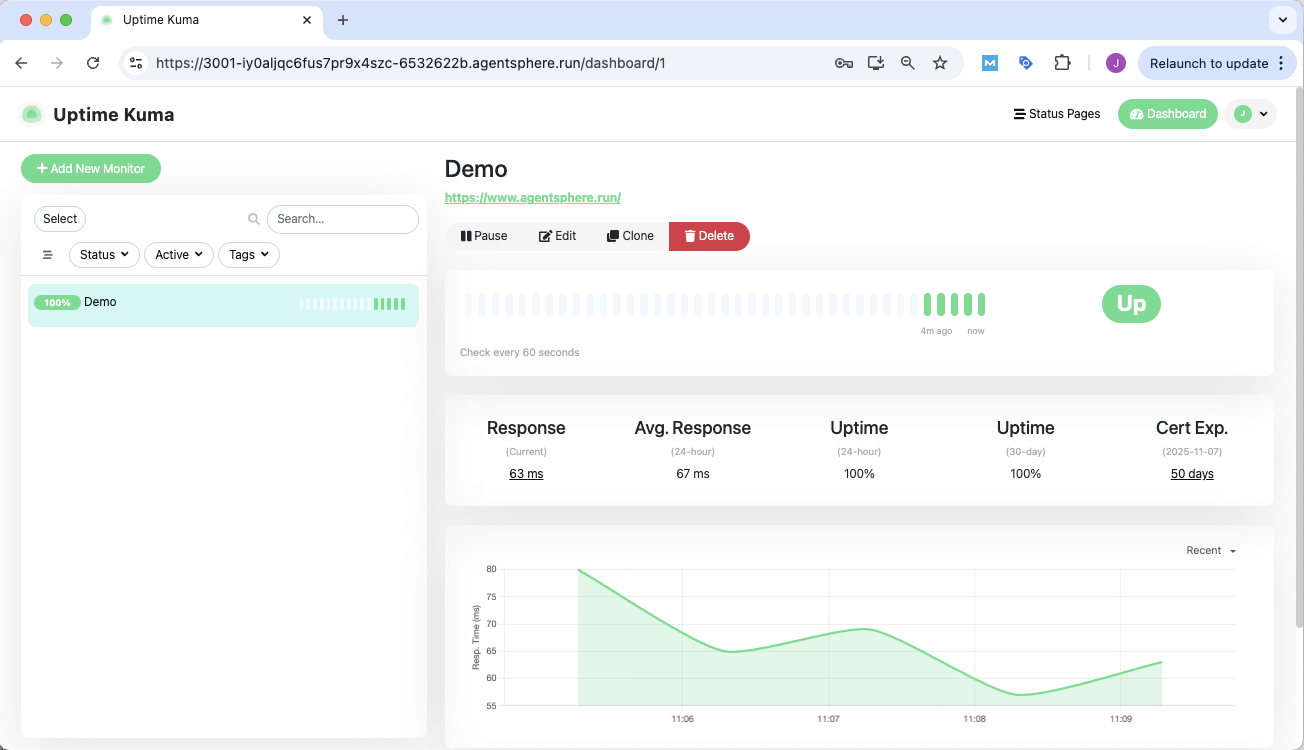
1分钟后,你的终端将打印出一个公开的URL。
任何人都可以通过这个链接,访问到一个功能完整的、正在云端沙箱中运行的 Uptime Kuma 实例!
这为开源世界带来了什么?
这种“一键Demo”的能力,对开源生态的价值是巨大的:
对于项目作者:
-
极大地提升项目吸引力: 一个活的Demo,胜过千言万语的README。
-
快速收集用户反馈: 让用户在决定“安装”之前,就能“试用”,更快地收集到有价值的反馈。
-
简化贡献者入门: 为潜在的贡献者提供一个即时的、标准化的开发环境。
对于项目用户:
-
零成本试用: 无需污染自己的本地环境,也无需付费购买服务器,就能安全地评估一个工具是否符合需求。
-
规避安全风险: 在一个隔离的沙箱中运行未知的开源代码,保护你的电脑和数据安全。
结论:成为你最爱项目的“推广大使”
AgentSphere不仅仅是一个开发工具,它更是一个连接器和放大器。
下一次,当你发现一个让你惊叹的开源项目,但又苦于无法向同事或朋友快速展示时,不妨试试用AgentSphere为它创建一个在线Demo。
你不仅能帮助这个项目获得更多关注,更能亲身体验到一种全新的、更流畅、更安全的软件交互方式。

有“AI”的1024 = 2048,欢迎大家加入2048 AI社区
更多推荐

 13
13 0
0- 0


 已为社区贡献7条内容

所有评论(0)