Java-多线程基础知识(一)
我们创建一个方法,让这个方法继承 Thread ,然后对 run 方法进行重写,重写的内容就是我们希望线程做的工作。因为线程的执行是随机的,例如上述代码有 main 线程 和 t 线程,此时执行之后会出现以下结果:注意:线程之间的运行可能会相互影响,而进程是独立的,不受其他进程影响。t.join 可以让 main 线程等待 t 线程结束之后再运行。
一:多线程的创建
1.继承 Thread 方法,并且重写 run 方法。
我们创建一个方法,让这个方法继承 Thread ,然后对 run 方法进行重写,重写的内容就是我们希望线程做的工作。
class MyThread extends Thread{
    @Override
    public void run() {
        while ( true) {
            System.out.println("Thread is running");
            try {
                Thread.sleep(1000);
            } catch (InterruptedException e) {
                throw new RuntimeException(e);
            }
        }
    }
}
完整测试代码:
class MyThread extends Thread{
    @Override
    public void run() {
        while ( true) {
            System.out.println("Thread is running");
            try {
                Thread.sleep(1000);
            } catch (InterruptedException e) {
                throw new RuntimeException(e);
            }
        }
    }
}
public class Demo{
    public static void main(String[] args) {

        MyThread t = new MyThread();
        t.start();
        while (true){
            System.out.println("Main thread is running");
            try {
                Thread.sleep(1000);
            } catch (InterruptedException e) {
                throw new RuntimeException(e);
            }
        }
    }
}
因为线程的执行是随机的,例如上述代码有 main 线程 和 t 线程,此时执行之后会出现以下结果:
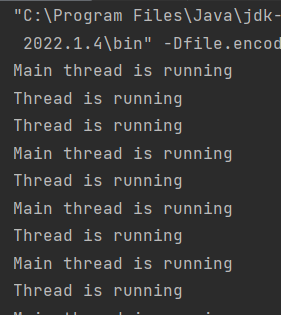
注意:线程之间的运行可能会相互影响,而进程是独立的,不受其他进程影响。
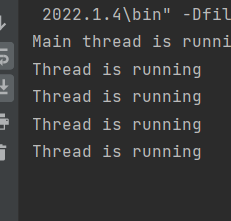
t.join 可以让 main 线程等待 t 线程结束之后再运行
public class Demo{
    public static void main(String[] args) {

        MyThread t = new MyThread();
        t.start();
        while (true){
            try {
                t.join();
                System.out.println("Main thread is running");
            } catch (InterruptedException e) {
                throw new RuntimeException(e);
            }
        }
    }
}
2.实现 Runnable ,重写run,搭配Thread
我们创建一个类 MyRunnable 类来接入 Runnable 接口,然后重写 Run 方法。
之后我们就需要让 MyRunnable 类来搭配Thread 使用,首先对 MyRunnable 创建实例,创建完成之后创建 Thread 的实例并且传入 MyRunnable 的实例对象当作参数,此时 Thread 就可以正常使用了,跟方法一没有区别。
这种方法的好处是解耦合。
class MyRunnable implements Runnable{
    @Override
    public void run() {
        while ( true){
            System.out.println("Thread is running");
            try {
                Thread.sleep(1000);
            } catch (InterruptedException e) {
                throw new RuntimeException(e);
            }
        }
    }
}
public class Demo2 {
    public static void main(String[] args) {
        MyRunnable t = new MyRunnable();
        Thread thread = new Thread(t);
        thread.start();
        while (true){
            System.out.println("Main thread is running");
            try {
                Thread.sleep(1000);
            } catch (InterruptedException e) {
                throw new RuntimeException(e);
            }
        }
    }
}
3.使用匿名内部类继承 Thread
这种方式我们在创建 Thread 对象的时候直接使用匿名内部类来继承 Thread
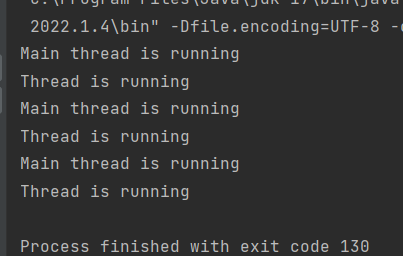
要注意:我们只有在 线程.start() 之后才算是真正创建了线程。
public class Demo3 {
    public static void main(String[] args) {
        Thread t = new Thread(){
            @Override
            public void run() {
                while (true){
                    System.out.println("Thread is running");
                    try {
                        Thread.sleep(1000);
                    } catch (InterruptedException e) {
                        throw new RuntimeException(e);
                    }
                }
            }
        };
        t.start();
        while ( true){
            System.out.println("Main thread is running");
            try {
                Thread.sleep(1000);
            } catch (InterruptedException e) {
                throw new RuntimeException(e);
            }
        }
    }
}
4.使用匿名内部类来实现 Runnable
这种方式也是通过匿名内部类来实现的:
public class Demo4 {
    public static void main(String[] args) {
        Thread t = new Thread(new Runnable(){

            @Override
            public void run() {
                while (true){
                    System.out.println("Thread is running");
                    try {
                        Thread.sleep(1000);
                    } catch (InterruptedException e) {
                        throw new RuntimeException(e);
                    }
                }
            }
        });
        t.start();
        while (true){
            System.out.println("Main thread is running");
            try {
                Thread.sleep(1000);
            } catch (InterruptedException e) {
                throw new RuntimeException(e);
            }
        }
    }
}
5.lambda(推荐)
public class Demo5 {
    public static void main(String[] args) {
        Thread t = new Thread(()->{
            while (true){
                System.out.println("Thread is running");
                try {
                    Thread.sleep(1000);
                } catch (InterruptedException e) {
                    throw new RuntimeException(e);
                }
            }
        });
        t.start();
        while ( true){
            System.out.println("Main thread is running");
            try {
                Thread.sleep(1000);
            } catch (InterruptedException e) {
                throw new RuntimeException(e);
            }
        }
    }
}
注意:
一个 Thread 对象对应着一个线程,不可以同时多次 strat ;
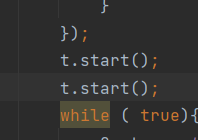
这样运行会报错,
我们可以通过多个线程来同时执行多个事务:
public class Demo6 {
    public static void main(String[] args) {
        Thread t = new Thread(()->{
            while (true){
                System.out.println("t is running");
                try {
                    Thread.sleep(1000);
                } catch (InterruptedException e) {
                    throw new RuntimeException(e);
                }
            }
        });
        Thread t2 = new Thread(()->{
            while (true){
                System.out.println("t2 is running");
                try {
                    Thread.sleep(1000);
                } catch (InterruptedException e) {
                    throw new RuntimeException(e);
                }
            }
        });
        Thread t3 = new Thread(()->{
            while (true){
                System.out.println("t3 is running");
                try {
                    Thread.sleep(1000);
                } catch (InterruptedException e) {
                    throw new RuntimeException(e);
                }
            }
        });
        t.start();
        t2.start();
        t3.start();
        while ( true){
            System.out.println("Main thread is running");
            try {
                Thread.sleep(1000);
            } catch (InterruptedException e) {
                throw new RuntimeException(e);
            }
        }
    }
}
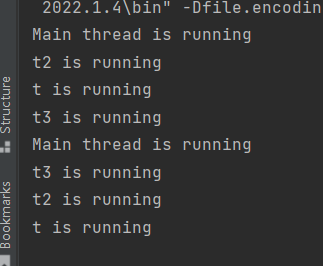
Thread 的属性 及其 方法
属性: 方法:
Id getId()
名称 getName()
状态 gerState()
优先级 getPriority()
是否后台线程 isDaemon()
是否存活 isAlive()
是否被中断 isInterrupted()
前台线程和后台线程:
当前台线程全部结束之后,当前的进程就会结束,当后台线程全部结束之后,进程并不会结束。
我们手动创建的线程及其 main 线程全部是前台线程。
想要结束线程,我们是不能直接打断线程运行的,例如我们写了一个方法来让线程中断,我们是不能知道这个线程运行到某个程度了,我们没有办法准确判断,所以想要让线程停止就只能让线程完成任务,
下面代码我们创建了一个Scanner实例,通过输入的方式来结束线程:
import java.util.Scanner;

public class Demo7 {
    static boolean flag = true;
    public static void main(String[] args) {

        Thread t = new Thread(()->{
            while (flag){
                System.out.println("Thread is running");
                try {
                    Thread.sleep(1000);
                } catch (InterruptedException e) {
                    throw new RuntimeException(e);
                }
            }
        });
        t.start();
        Scanner scanner = new Scanner(System.in);
        int n = scanner.nextInt();
        if (n == 0) flag = false;}
}
此时我们输入0之后线程就会结束运行,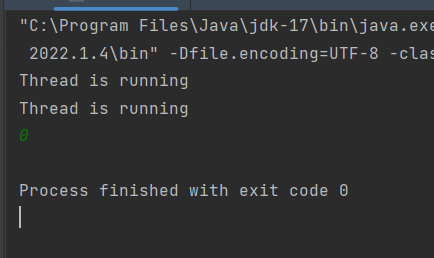
此时我们要注意 flag 是全局变量,flag 不能设置为局部变量。

有“AI”的1024 = 2048,欢迎大家加入2048 AI社区
更多推荐


 7
7 0
0- 0


 已为社区贡献2条内容

所有评论(0)