AI客服咨询系统
·
一.项目背景
电商咨询系统是一个基于人工智能技术的智能电商导购与咨询平台,它主动为用户提供购物建议,区别于传统被动式客服,扮演智能购物顾问的角色。电商平台商品海量,用户面临信息过载难题,难以高效找到心仪商品。传统筛选方式机械,用户需要更自然、对话式的交互来提升购物体验。
二.项目准备
1.前端vue3框架
(1)vue3项目的安装配置
安装:在当前文件夹的终端中运行这个命令,创建vue项目
npm create vue@latest
(2)目依赖包的安装
安装路由(前端url的映射):
npm install vue-router
安装pinia(项目中全局共享的资源):
npm install pinia
安装axios(向后端发送请求的库):
npm install axios
安装elements-plus组件库(可直接使用封装好的页面样式效果):
npm install element-plus --save
安装sass(规范css样式的写法):
npm install sass --save-dev
安装echart(画echat静动态图表):
npm install echarts
2.后端django5框架
(1)django5项目的安装配置
安装:在当前文件夹的终端中运行这个命令,创建django项目
py -m pip install Django==5.2.5
(2)项目依赖包的安装
安装django-rest-framework(django项目最常用的组件):
pip install djangorestframework
安装mysqlclient(连接数据库):
pip install mysqlclient
安装django-cors-headers(跨域配置,因为前端后端域名端口不同):
pip install django-cors-headers
安装django-environ(在settings中加载.env环境变量):
pip install django-environ
安装DrissionPage(数据自动化采集的包):
pip install DrissionPage
安装requests(请求扣子智能体接口的包):
pip install requests
安装cozepy(对接扣子的接口,实现ai对话接口的大脑):
pip install cozepy
3.扣子智能体
通过在扣子设计工作流,然后调用扣子工作流的接口,实现AI对话的大脑
4.mysql数据库
存储会话id和商品数据
5.DrissionPage
实现数据自动化采集
安装DrissionPage
pip install DrissionPage
三.项目详解
1.django后端
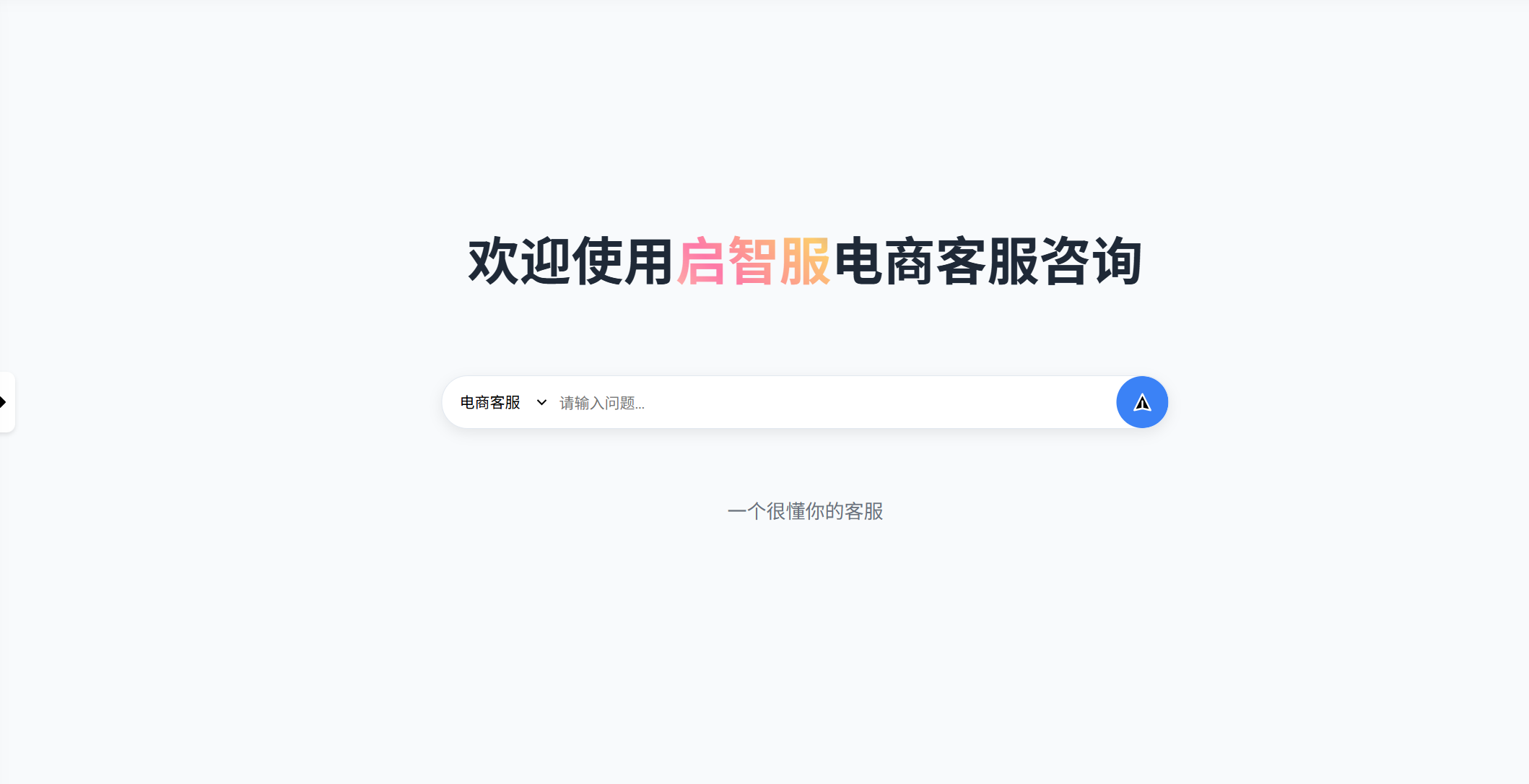
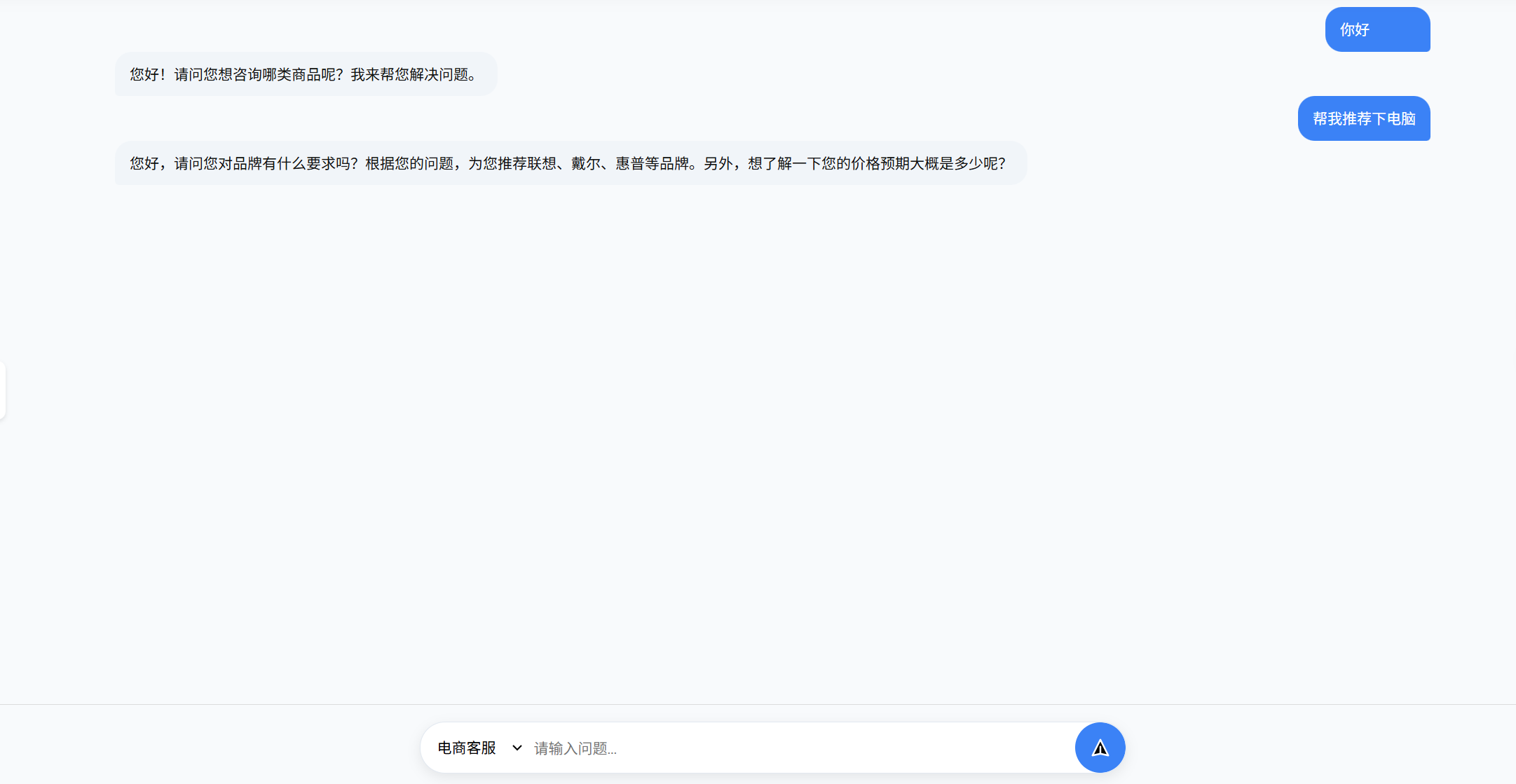
(1)AI咨询客服模块
ai对话
-
实现思路
通过调用自己设置好的扣子智能体,智能体根据模板提示词进行相关回复,然后实现对话流程。
-
部分代码
class ConversationView(APIView):
    def post(self, request):  # 新建会话
        coze = CozeConversation()  # 我封装的扣子接口
        user_id = request.data.get("user_id")  # 获取用户id
        question = request.data.get("question", '')  # 获取问题
        try:
            SysUser.objects.get(id=user_id)  # 用户是否存在
            if question == '':  # 如果问题为空,则返回请输入问题
                return JsonResponse({"message": "请输入问题"})
            conversation_info = coze.create_conversation(question)  # 新建会话并获取会话信息
            conversation_id = conversation_info.get("data").get("id")  # 获取会话id
            Conversation.objects.create(user_id=user_id, conversation_id=conversation_id, name=question)  # 将会话保存到数据库
            answer = coze.have_conversation(user_id, conversation_id, question)  # 我封装的扣子接口
                streaming_content=answer(),
                content_type="text/event-stream",
                status=200,
            )
            response['Cache-Control'] = 'no-cache'  # SSE / 流式响应里,如果不加这个头,浏览器可能会把上一次请求的内容缓存起来,导致用户看到的是“旧数据”,防止缓存,看到之前的数据
            response['X-Accel-Buffering'] = 'no'  # 关闭 Nginx 缓冲(如用 Nginx)
            return response
        except Exception as e:
return JsonResponse({"message": "消息发送失败", "error": str(e)})-
效果图
会话消息存储
-
实现思路
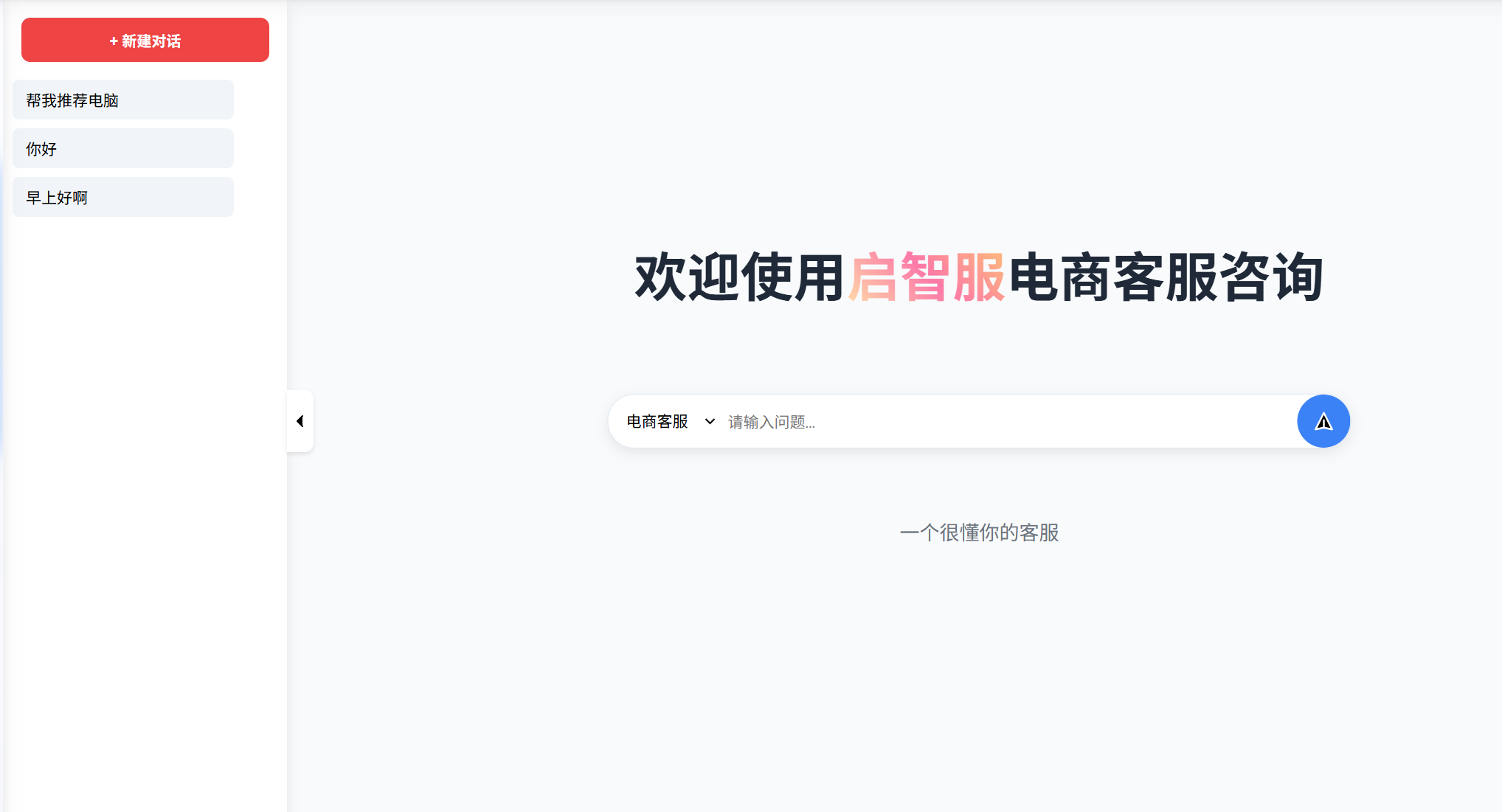
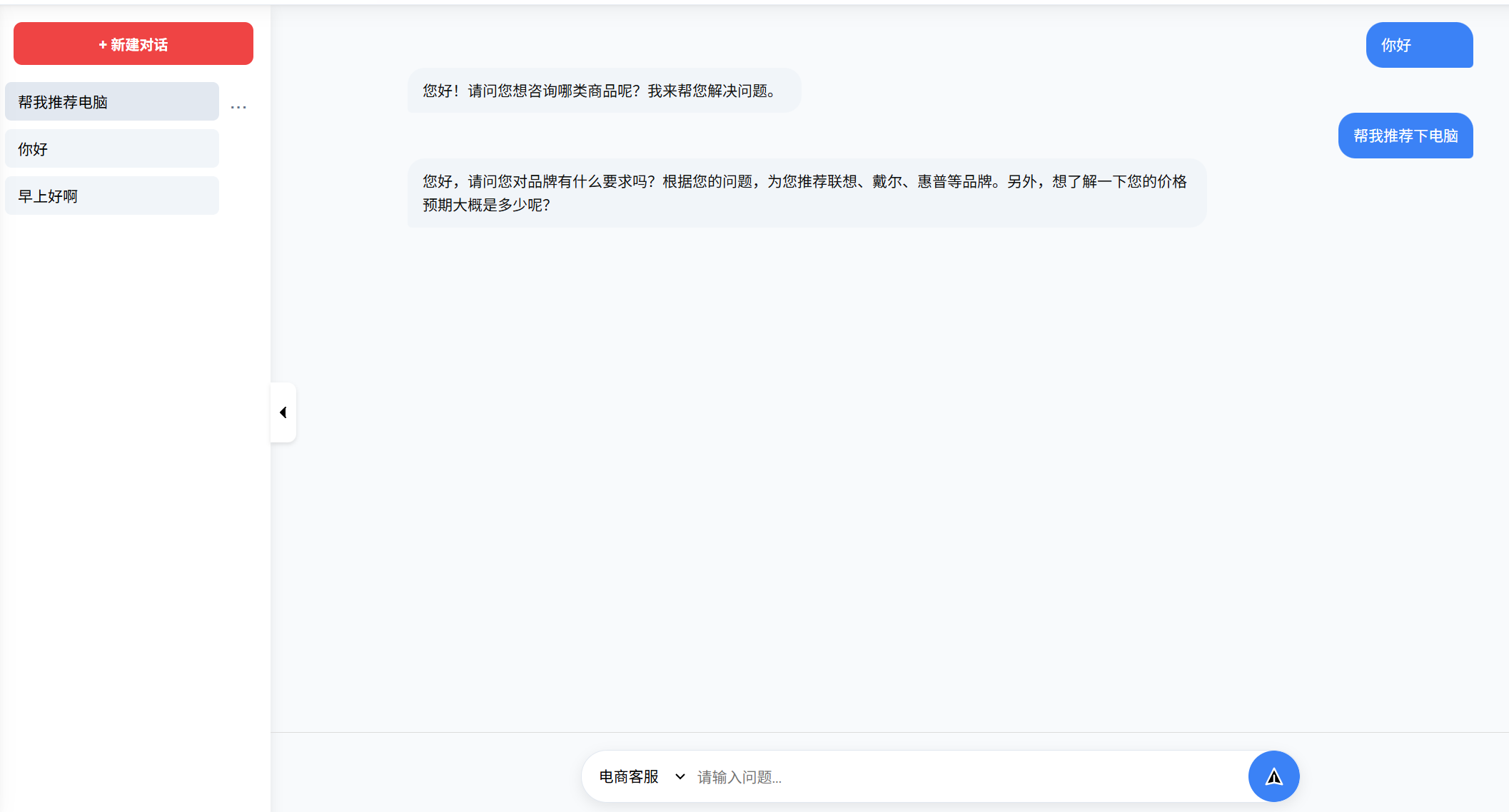
会话:在扣子中有会话存储接口,但是为了稳定,还需将获取的会话id存储到本地数据库中,然后根据用户id获取对应会话列表;消息:根据会话id请求扣子消息接口可以获取每个会话id对应的消息列表
-
部分代码
# 获取会话列表
class ConversationView(APIView):
    def get(self, request):  # 获取所有会话
        coze = CozeConversation()
        user_id = request.query_params.get("user_id")  # 获取用户id
        try:
            user = SysUser.objects.get(id=user_id)  # 用户是否存在
            conversations = coze.find_all_conversation()  # 获取所有会话
            all_conversation = list(
                user.conversations.all().values("user_id", "conversation_id", "name"))  # 在数据库中获取用户所有会话
            return JsonResponse({"data": all_conversation})  # 给前端返回所有会话
        except Exception as e:
            return JsonResponse({"message": "用户不存在"})

# 获取消息列表
class DialogueView(APIView):  # 对话
    def get(self, request):
        coze = CozeConversation()
        conversation_id = request.query_params.get("conversation_id")  # 获取会话id
        messages = coze.find_message_list(conversation_id)  # 获取会话消息列表
        dialogue = []  # 暂时存储对话列表
        question_answer = {}  # 存储一组问题答案字典
        # print(messages.get("data"))
        for message in messages.get("data"):
            if message.get("role") == "assistant":  # 获取答案
                question_answer["assistant"] = {"content": message.get("content"),
                                                "message_id": message.get("id")}  # 将答案和id暂时写入字典中
            elif message.get("role") == "user":  # 获取问题
                question_answer["user"] = {"content": message.get("content"),
                                           "message_id": message.get("id")}  # 将问题和id暂时写入字典中
                dialogue.append(question_answer)  # 将问题答案和id写入对话列表中
                question_answer = {}  # 清空字典
        # print(dialogue)
return JsonResponse({"data": dialogue})-
效果图
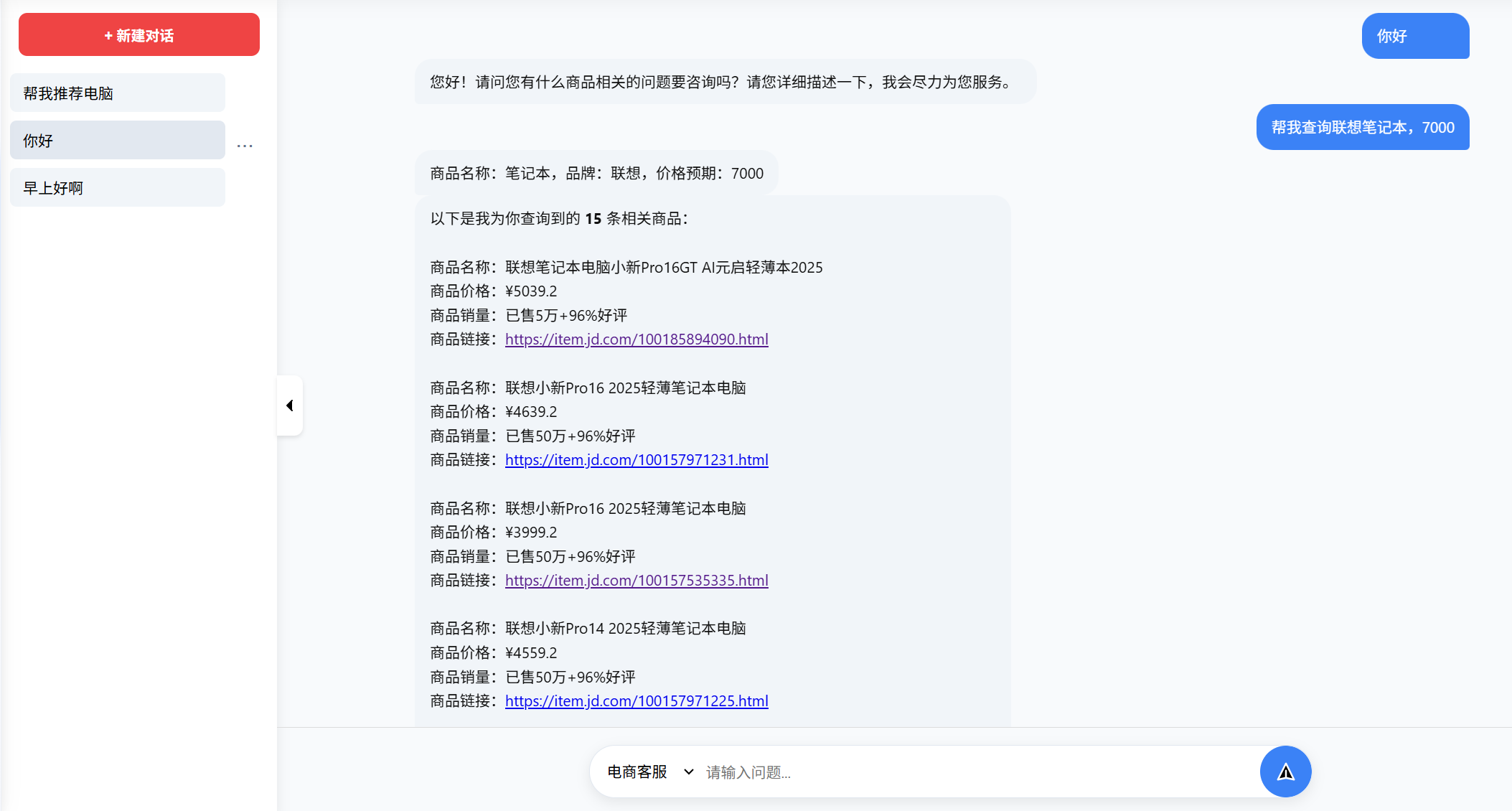
制定用户需求的个性化数据采集
-
实现思路
通过获取用户的需求,执行相应的数据采集程序
-
部分代码
class GetData(APIView):
    def post(self, request):  # user_id, conversation_id, product, price, brand
        coze = CozeConversation()
        user_id = request.data.get("user_id")  # 获取用户id
        conversation_id = request.data.get("conversation_id")  # 获取会话id
        product = request.data.get("product")
        min_price = request.data.get("min_price", '')
        max_price = request.data.get("max_price")
        brand = request.data.get("brand")
        # print(product, min_price, max_price, brand)
        if min_price:
            jd_product_info = jd_main(product=product, min_price=min_price, max_price=max_price, brand=brand)
            # tb_product_info = tb_main(product=product, min_price=int(min_price), max_price=int(max_price), brand=brand)
        else:
            jd_product_info = jd_main(product=product, max_price=max_price, brand=brand)
            # tb_product_info = tb_main(product=product, max_price=int(max_price), brand=brand)
        # all_product = {"jd_product": jd_product_info, "tb_product": tb_product_info}
        all_product = {"jd_product": jd_product_info}
        answer = coze.have_conversation(user_id, conversation_id, all_product, clear_the_message=True)
        response = StreamingHttpResponse(
            streaming_content=answer(),
            content_type="text/event-stream",
            status=200,
        )
        response['Cache-Control'] = 'no-cache'  # SSE / 流式响应里,如果不加这个头,浏览器可能会把上一次请求的内容缓存起来,导致用户看到的是“旧数据”,防止缓存,看到之前的数据
        response['X-Accel-Buffering'] = 'no'  # 关闭 Nginx 缓冲(如用 Nginx)
return response-
效果图
(2)数据采集模块
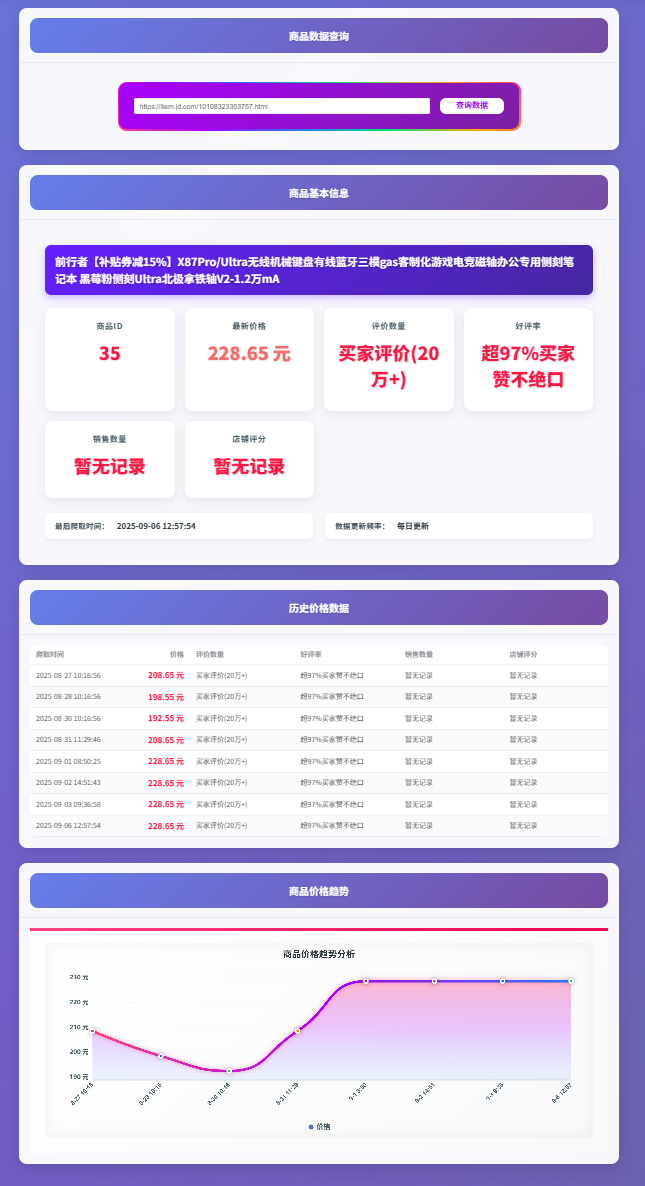
电商平台数据采集
-
实现思路
根据不同商品链接,查询数据库中商品历史,如果当日没有采集则先执行数据采集,再获取商品的历史数据
-
效果图
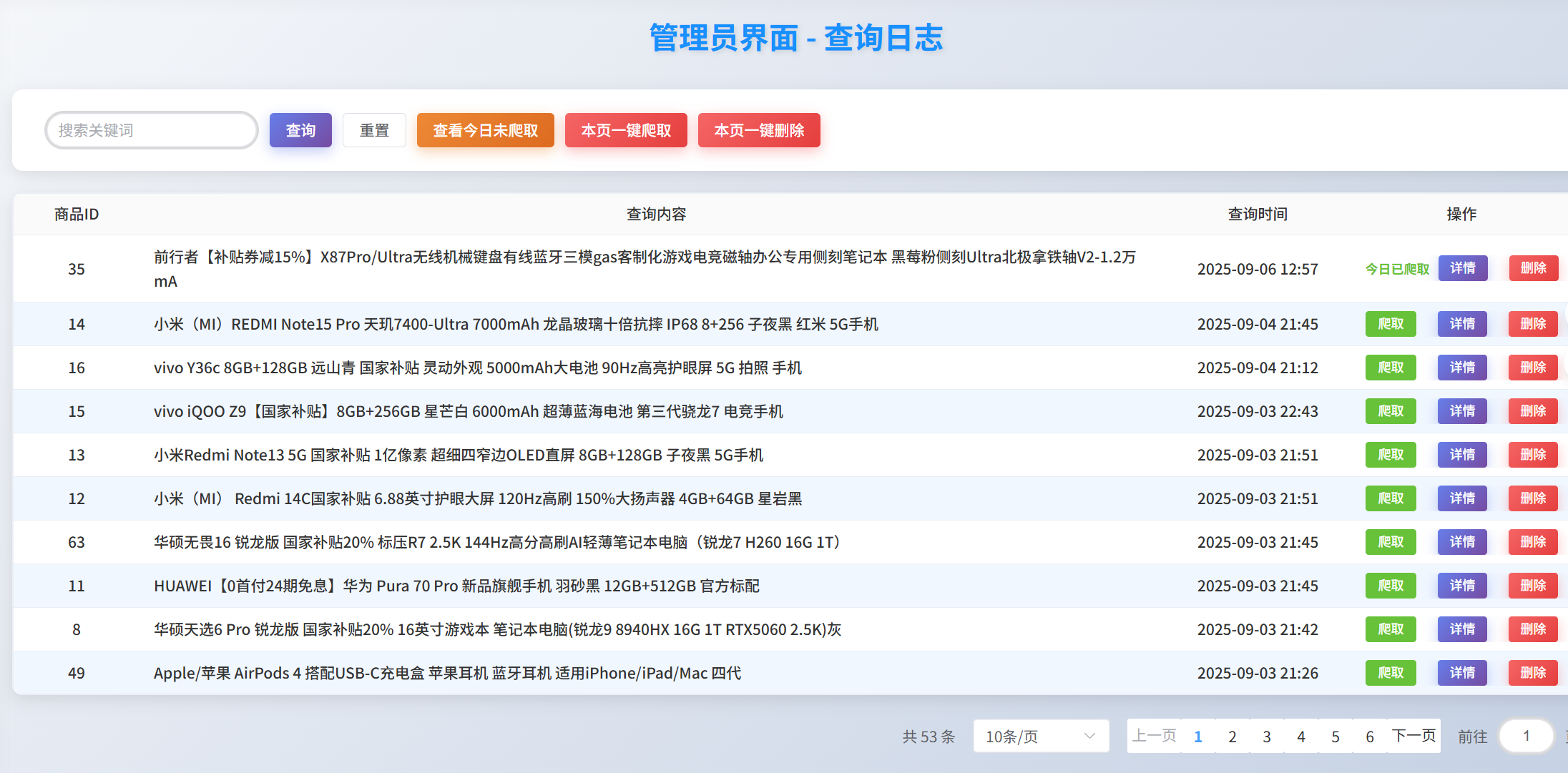
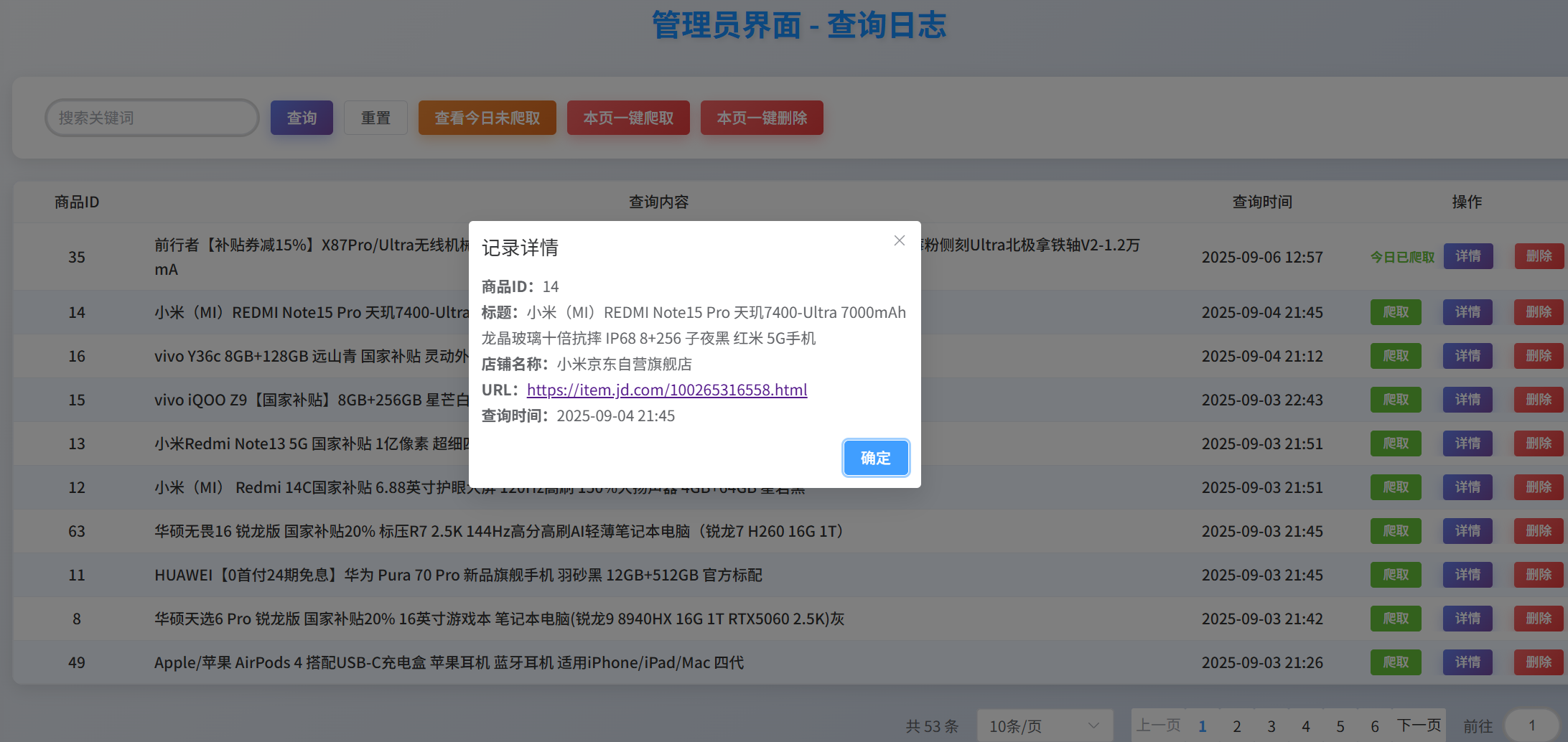
查询日志
-
实现思路
将用户的搜索历史存储在数据库,管理员可以查看并管理这些商品(自己选择执不执行该商品的数据采集)
-
部分代码
class QueryLogView(APIView):  # 管理员专用接口
    def get(self, request):  # 获取用户查询记录
        try:
            result = []  # 存储结果,最后返回给前端
            page = request.GET.get("page")  # 获取页码
            size = request.GET.get("page_size")  # 获取每页数量
            filter_uncrawled = request.GET.get("filter_uncrawled")
            keyword = request.GET.get("keyword")
            # 计算7天前的日期
            seven_days_ago = datetime.date.today() - datetime.timedelta(days=7)
            # 筛选7天内的记录
            query_logs = QueryLog.objects.filter(queried_at__gte=seven_days_ago)
            # 筛选未爬取的
            if filter_uncrawled:
                # 使用数据库查询筛选今天未爬取的数据
                query_logs = query_logs.exclude(
                    sku__last_crawled_at__date=datetime.date.today()
                )
            # 筛选关键词
            if keyword:
                query_logs = query_logs.filter(
                    Q(sku__title__icontains=keyword) |
                    Q(queried_at__date__icontains=keyword)
                )
            # 获取总条数
            length = query_logs.count()
            # 创建分页器
            paginator = Paginator(query_logs, size)
            # 获取当前页码数据
            paginators = paginator.get_page(page).object_list
            query_logs = list(paginators.values())
        except Exception as e:
            return JsonResponse({"message": "数据获取失败", "error": str(e)},
                                json_dumps_params={"ensure_ascii": False})
        # 遍历记录,判断当前记录今天是否已经抓取
        for log in query_logs:
            try:
                # 获取对应的商品
                sku = Sku.objects.get(id=log.get("sku_id"))
                log["url"] = sku.url
                log["title"] = sku.title
                log["shop_name"] = sku.shop_name
                if sku.last_crawled_at and sku.last_crawled_at.date() == datetime.date.today():
                    log["today_crawled"] = 1  # 1表示今天已经爬取
                else:
                    log["today_crawled"] = 0  # 0表示今天没有爬取
                result.append(log)
            except Sku.DoesNotExist:
                log["today_crawled"] = 0
                result.append(log)
        # print(result)
return JsonResponse({"data": result, "totalLength": length}, json_dumps_params={"ensure_ascii": False})-
效果图
2.扣子智能体
(1)创建智能体:我们需要自己创建一个符合该业务流程的专用智能体

(2)发布:在创建好后,还需要发布智能体点击勾选API,这样才可以使用python来调用该智能体(其中扣子封装了流式对话的接口)
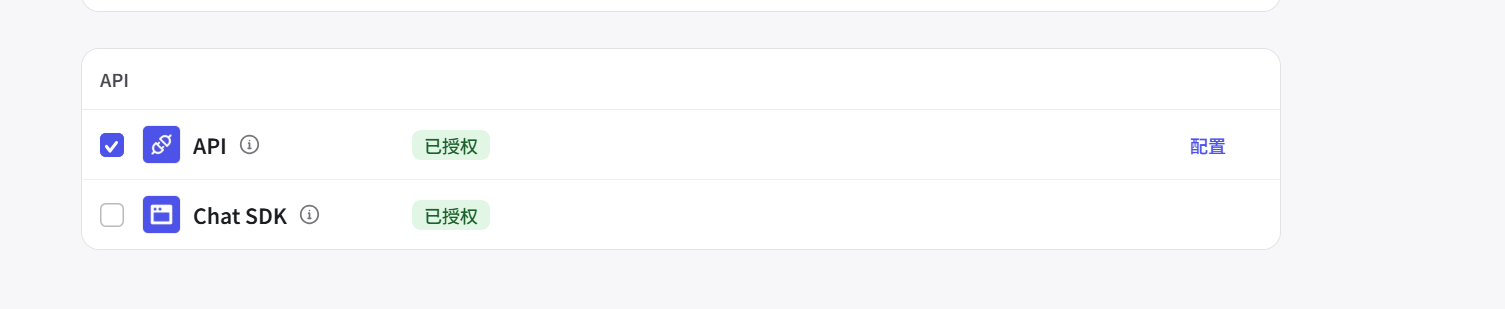
(3)调用该智能体:实现流式对话,以下是扣子封装好的代码,只需要更改---个人令牌,智能体id,用户id,用户输入内容。
"""
This example is about how to use the streaming interface to start a chat request
and handle chat events
"""

import os
# Our official coze sdk for Python [cozepy](https://github.com/coze-dev/coze-py)
from cozepy import COZE_CN_BASE_URL

# Get an access_token through personal access token or oauth.
coze_api_token = 个人令牌
# The default access is api.coze.com, but if you need to access api.coze.cn,
# please use base_url to configure the api endpoint to access
coze_api_base = COZE_CN_BASE_URL

from cozepy import Coze, TokenAuth, Message, ChatStatus, MessageContentType, ChatEventType  # noqa

# Init the Coze client through the access_token.
coze = Coze(auth=TokenAuth(token=coze_api_token), base_url=coze_api_base)

# Create a bot instance in Coze, copy the last number from the web link as the bot's ID.
bot_id = 智能体id
# The user id identifies the identity of a user. Developers can use a custom business ID
# or a random string.
user_id = 用户id

# Call the coze.chat.stream method to create a chat. The create method is a streaming
# chat and will return a Chat Iterator. Developers should iterate the iterator to get
# chat event and handle them.
for event in coze.chat.stream(
    bot_id=bot_id,
    user_id=user_id,
    additional_messages=[
        Message.build_user_question_text(用户输入内容),
    ],
):
    if event.event == ChatEventType.CONVERSATION_MESSAGE_DELTA:
        print(event.message.content, end="", flush=True)

    if event.event == ChatEventType.CONVERSATION_CHAT_COMPLETED:
        print()
        print("token usage:", event.chat.usage.token_count)
3.vue前端
只需做好后端响应的数据处理即可

有“AI”的1024 = 2048,欢迎大家加入2048 AI社区
更多推荐

 11
11 0
0- 0


 已为社区贡献1条内容

所有评论(0)