Linux--进程控制
进程是Linux系统中资源分配和调度的基本单位。深入理解进程的创建、终止、等待和程序替换是掌握Linux系统编程的关键。本文将对进程控制相关的系统调用进行详细解析。
一、进程创建:fork() 详解
fork()是Linux中最重要的进程创建函数,它的核心作用是从已存在进程中创建一个新进程。新进程称为子进程,原进程称为父进程。
1.1 基本用法和工作原理
#include <unistd.h>
pid_t fork(void);
执行流程:
-
内核为子进程分配新的内存块和内核数据结构
-
将父进程的数据结构内容拷贝至子进程
-
添加子进程到系统进程列表
-
返回两个值:父进程返回子进程PID,子进程返回0
关键特性:
-
代码共享:父子进程代码段相同,从fork之后开始分别执行
-
数据独立:数据段采用写时拷贝(Copy-On-Write)技术
-
执行顺序:fork之后,父子进程执行顺序由调度器决定
1.2 代码示例
#include <stdio.h>
#include <unistd.h>
#include <stdlib.h>

int main(void)
{
    pid_t pid;

    printf("Before fork: pid is %d\n", getpid());

    if ((pid = fork()) == -1) {
        perror("fork()");
        exit(1);
    }

    printf("After fork: pid is %d, fork return %d\n", getpid(), pid);
    sleep(1);

    return 0;
}
运行结果分析:
Before: pid is 43676
After:pid is 43676, fork return 43677  // 父进程
After:pid is 43677, fork return 0       // 子进程
1.3 写时拷贝(Copy-On-Write)机制
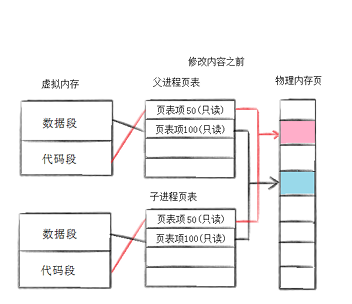
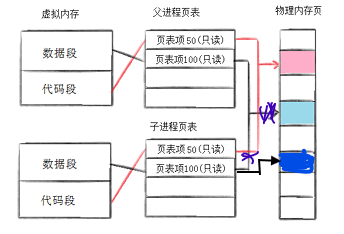
父子进程代码共享,若父子不再写入时,数据也是共享的,但是任意一方试图写入时,便会写时拷贝的方式各自一份副本,如下图所示变化:
工作原理:
-
初始化时,父子进程共享所有页框
-
当任一进程尝试修改某页时,内核为该页创建副本,这样可以节省内存,提高效率
#include <stdio.h>
#include <unistd.h>
#include <stdlib.h>

int global_var = 100;  // 全局变量

int main()
{
    int local_var = 200;  // 局部变量
    pid_t pid;

    pid = fork();
    if (pid < 0) {
        perror("fork");
        exit(1);
    } else if (pid == 0) {
        // 子进程修改变量
        global_var++;
        local_var++;
        printf("Child: global_var=%d, local_var=%d\n", global_var, local_var);
    } else {
        // 父进程保持变量不变
        sleep(1);  // 确保子进程先执行
        printf("Parent: global_var=%d, local_var=%d\n", global_var, local_var);
    }

    return 0;
}
二、进程终止详解
2.1 退出场景
-
代码执行完毕,结果正确。
-
代码执行完毕,结果错误。
-
代码异常终止(如信号中断)。
2.2 三种退出方法
2.2.1 _exit() - 直接终止
#include <unistd.h>
void _exit(int status);
特点:
-
立即进入内核终止进程
-
不刷新缓冲区
-
不执行清理函数
2.2.2 exit()
#include <stdlib.h>
void exit(int status);
执行步骤:
-
执行通过
atexit()或on_exit()注册的清理函数 -
刷新所有标准I/O缓冲区
-
调用
_exit()进入内核
2.2.3 return - main函数返回
return n; // 在main函数中等价于 exit(n)
三者的联系和区别:
只有在main函数中,return才可以退出进程,而exit和_exit可以在代码的任意地方起到退出进程的作用。
exit函数退出进程前,exit函数会执行用户定义的清理函数、冲刷缓冲,关闭流等操作,然后再终止进程,而_exit函数会直接终止进程,不会做任何收尾工作。
2.3 退出状态获取
-
使用
echo $?查看上一个进程的退出码。 -
status定义了进程的终止状态,父进程可以通过wait来获取,虽然status是int,但是只有低8位可以被父进程所用(0-255),所以
exit(-1)会被视为255。
三、进程等待详解
3.1 为什么需要等待?
-
避免僵尸进程(Zombie)导致内存泄漏。
-
获取子进程的退出状态(正常/异常、返回值等)。
3.2 wait()函数
pid_t wait(int *status);
功能特点:
-
阻塞等待:如果没有子进程退出,父进程会阻塞
-
任意子进程:等待任意一个子进程退出
-
状态获取:通过status参数获取子进程退出状态
3.3 waitpid()函数
pid_t waitpid(pid_t pid, int *status, int options);
参数说明:
-
pid = -1:等待任意子进程(等效于wait) -
pid > 0:等待指定PID的子进程 -
options = WNOHANG:非阻塞模式,立即返回
等待模式对比:
-
阻塞模式(options=0):父进程暂停执行,直到子进程退出
int main()
{
    pid_t pid = fork();
    if (pid == 0) {
        // 子进程执行任务
        sleep(3);
        exit(100);
    } else {
        int status;
        // 阻塞等待特定子进程
        pid_t ret = waitpid(pid, &status, 0);
        if (WIFEXITED(status)) {
            printf("Child exited with code: %d\n", WEXITSTATUS(status));
        }
    }
    return 0;
}
-
非阻塞模式(options=WNOHANG):立即返回,可周期性检查子进程状态
#include <stdio.h>
#include <unistd.h>
#include <stdlib.h>
#include <sys/wait.h>

int main()
{
    pid_t pid = fork();

    if (pid == 0) {
        // 子进程长时间运行
        printf("Child process starting...\n");
        sleep(10);
        exit(200);
    } else {
        int status;
        pid_t ret;

        do {
            // 非阻塞检查子进程状态
            ret = waitpid(pid, &status, WNOHANG);
            if (ret == 0) {
                printf("Child is still running, checking again in 1 second...\n");
                sleep(1);
            }
        } while (ret == 0);

        if (WIFEXITED(status)) {
            printf("Child completed with code: %d\n", WEXITSTATUS(status));
        }
    }

    return 0;
}
3.4 status
进程等待所使用的wait和waitpid,都有一个status参数,该参数是一个输出型参数,由操作系统进行填充。
如果对status参数传入NULL,表示不关心子进程的退出状态信息。否则,操作系统会通过该参数,将子进程的退出信息反馈给父进程。
status位图结构(16位):
┌───────────────┬───────────────┐
│ 15-8位 │ 7-0位 │
├───────────────┼───────────────┤
│ 退出状态码 │ 终止信号编号 │
└───────────────┴───────────────┘在status的低16比特位当中,高8位表示进程的退出状态,即退出码。进程若是被信号所杀,则低7位表示终止信号,而第8位比特位是core dump标志。
正常退出:信号编号=0,退出状态码=exit参数
信号终止:信号编号≠0,退出状态码无意义
解析宏函数:
WIFEXITED(status):检查是否正常退出
WEXITSTATUS(status):提取退出码
WIFSIGNALED(status):检查是否信号终止
WTERMSIG(status):提取信号编号
四、进程程序替换:exec函数族
4.1 替换原理核心理解
关键概念:
-
不创建新进程:exec只是替换当前进程的代码和数据
-
PID不变:进程标识符保持不变
-
全新开始:从新程序的main函数开始执行
-
无返回值:成功时不返回,失败返回-1
4.2 exec函数族分类
exec函数族包含6个函数,通过后缀区分功能:
#include <unistd.h>

 int execl(const char *path, const char *arg, ...);
 int execlp(const char *file, const char *arg, ...);
 int execle(const char *path, const char *arg, ...,char *const envp[]);
 int execv(const char *path, char *const argv[]);
 int execvp(const char *file, char *const argv[]);
 int execve(const char *path, char *const argv[], char *const envp[]);
命名规则:
-
l(list):参数以列表形式传递
-
v(vector):参数以数组形式传递
-
p(path):自动搜索PATH环境变量
-
e(env):自定义环境变量
只有execve是系统调用,其余皆是对它的封装
| 函数名 | 参数格式 | 路径搜索 | 环境变量 |
|---|---|---|---|
| execl | 列表 | 否 | 当前环境 |
| execlp | 列表 | 是 | 当前环境 |
| execle | 列表 | 否 | 自定义 |
| execv | 数组 | 否 | 当前环境 |
| execvp | 数组 | 是 | 当前环境 |
| execve | 数组 | 否 | 自定义 |
int main()
 {
    char *const argv[] = {"ps", "-ef", NULL};
    char *const envp[] = {"PATH=/bin:/usr/bin", "TERM=console", NULL};

    execl("/bin/ps", "ps", "-ef", NULL);

    // 带p的,可以使用环境变量PATH,无需写全路径
    execlp("ps", "ps", "-ef", NULL);

    // 带e的,需要自己组装环境变量
    execle("ps", "ps", "-ef", NULL, envp);

    execv("/bin/ps", argv);

    // 带p的,可以使用环境变量PATH,无需写全路径
    execvp("ps", argv);

    // 带e的,需要自己组装环境变量
    execve("/bin/ps", argv, envp);

    exit(0);
 }
五、Shell实现原理
5.1 Shell的工作机制
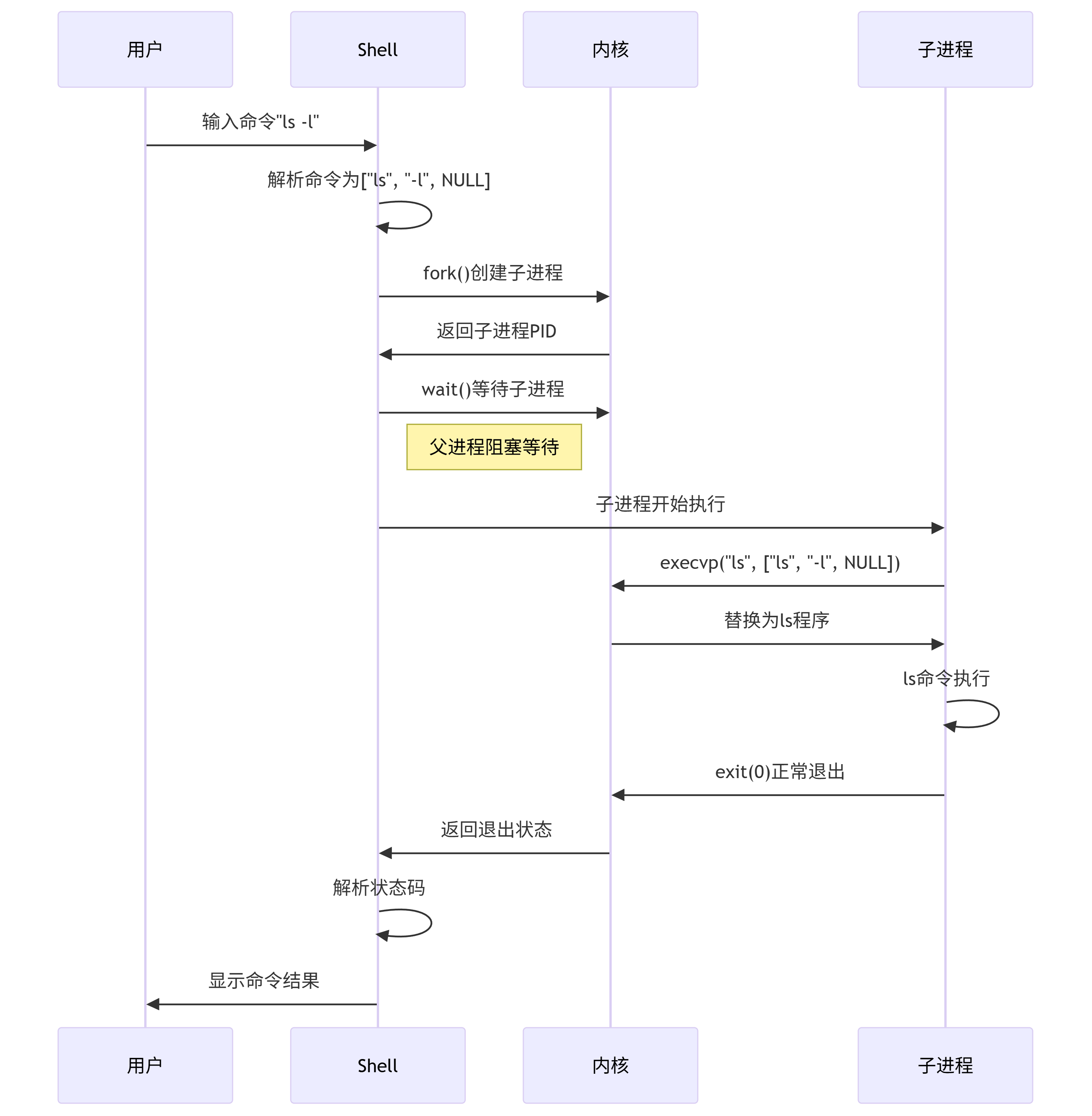
Shell的本质是一个循环执行的程序,其核心流程为:
-
读取输入:显示提示符,获取用户输入的命令行
-
解析命令:将命令行解析为命令和参数数组
-
创建进程:fork子进程执行命令
-
程序替换:在子进程中调用exec执行目标程序
-
等待完成:父进程wait等待子进程退出
5.2 shell的简易实现
#include <stdio.h>
#include <stdlib.h>
#include <unistd.h>
#include <string.h>
#include <fcntl.h>

#include <sys/wait.h>  // 用于waitpid()函数
#include <ctype.h>     // 用于isspace()函数

#define MAX_CMD 1024

char command[MAX_CMD];

 int do_face()
 {
    memset(command, 0x00, MAX_CMD);
    printf("minishell$ ");
    fflush(stdout);
    if (scanf("%[^\n]%*c", command) == 0) {
        getchar();
        return -1;
    }
    return 0;
 }

 char **do_parse(char *buff)
 {
    int argc = 0;
    static char *argv[32];
    char *ptr = buff;
    while(*ptr != '\0') {
        if (!isspace(*ptr)) {
            argv[argc++] = ptr;
            while((!isspace(*ptr)) && (*ptr) != '\0') {
                ptr++;
            }
        }else {
            while(isspace(*ptr)) {
                *ptr = '\0';
                ptr++;
            }
        }
    }
    argv[argc] = NULL;
    return argv;
 }

 int do_exec(char *buff)
 {
    char **argv = {NULL};
  int pid = fork();
    if (pid == 0) {
        argv = do_parse(buff);
        if (argv[0] == NULL) {
            exit(-1);
        }
        execvp(argv[0], argv);
    }else {
        waitpid(pid, NULL, 0);
    }
    return 0;
 }

 int main(int argc, char *argv[])
 {
    while(1) {
        if (do_face() < 0)
            continue;
        do_exec(command);
    }
    return 0;
 }
有一个有趣的类比,关于函数和进程之间的相似:
call/return ≈ fork/exit
Linux其实将程序内的函数调用模式扩展到了程序间的进程通信。

有“AI”的1024 = 2048,欢迎大家加入2048 AI社区
更多推荐

 27
27 0
0- 0


 已为社区贡献1条内容

所有评论(0)