SpringAi+Milvus构建简单的RAG 示例
注意这几个字段:这个spring-ai-milvus默认的id就是doc_id,且,他会插入数据,所以创建的时候不能用自增,后面的embeding是向量字段,跟你的embedding模型维度一致即可,content就是原为,metadata字段,这几个都是必须字段,缺一不可,缺少就报错。"text": "18. 通过SpringAIAlibaba的配置中心和注册中心实现动态扩展。"text": "
1.阿里官方文档报错
按照阿里官方示例https://github.com/alibaba/spring-ai-alibaba,插入数据发现会报错,io.milvus.exception.ParamException: The key name is not found 各种错误,且流程不规范
正规的RAG流程是
1.通过文档切割,把切割后的文档进行embedding之后,存入向量库
2.用户输入,再通过embeeding对用户的提问进行分析,去向量库检索相关文档
3.检索出来的文档再放入大模型,进行总结输出
官方文档只是插入了向量库,并没有对文档进行embedding相关操作,流程相当不规范,误导学者
pom文件
    <dependencies>
        <dependency>
            <groupId>com.alibaba.cloud.ai</groupId>
            <artifactId>spring-ai-alibaba-starter</artifactId>
            <version>${spring-ai-alibaba.version}</version>
        </dependency>

        <dependency>
            <groupId>org.springframework.boot</groupId>
            <artifactId>spring-boot-starter-web</artifactId>
        </dependency>

        <dependency>
            <groupId>org.springframework.ai</groupId>
            <artifactId>spring-ai-milvus-store-spring-boot-starter</artifactId>
        </dependency>
    </dependencies>
2.改造成一个简单rag
修改pom依赖
        <parent>
        <groupId>org.springframework.boot</groupId>
        <artifactId>spring-boot-starter-parent</artifactId>
        <version>3.4.4</version>
        <relativePath/> <!-- lookup parent from repository -->
    </parent>


<dependencies>
        <dependency>
            <groupId>org.springframework.ai</groupId>
            <artifactId>spring-ai-openai-spring-boot-starter</artifactId>
            <version>1.0.0-M6</version>
        </dependency>
        <dependency>
            <groupId>org.springframework.boot</groupId>
            <artifactId>spring-boot-starter-web</artifactId>
        </dependency>
        <dependency>
            <groupId>org.springframework.ai</groupId>
            <artifactId>spring-ai-milvus-store-spring-boot-starter</artifactId>
            <version>1.0.0-M6</version>
        </dependency>
    </dependencies>
3.向量库创建collection
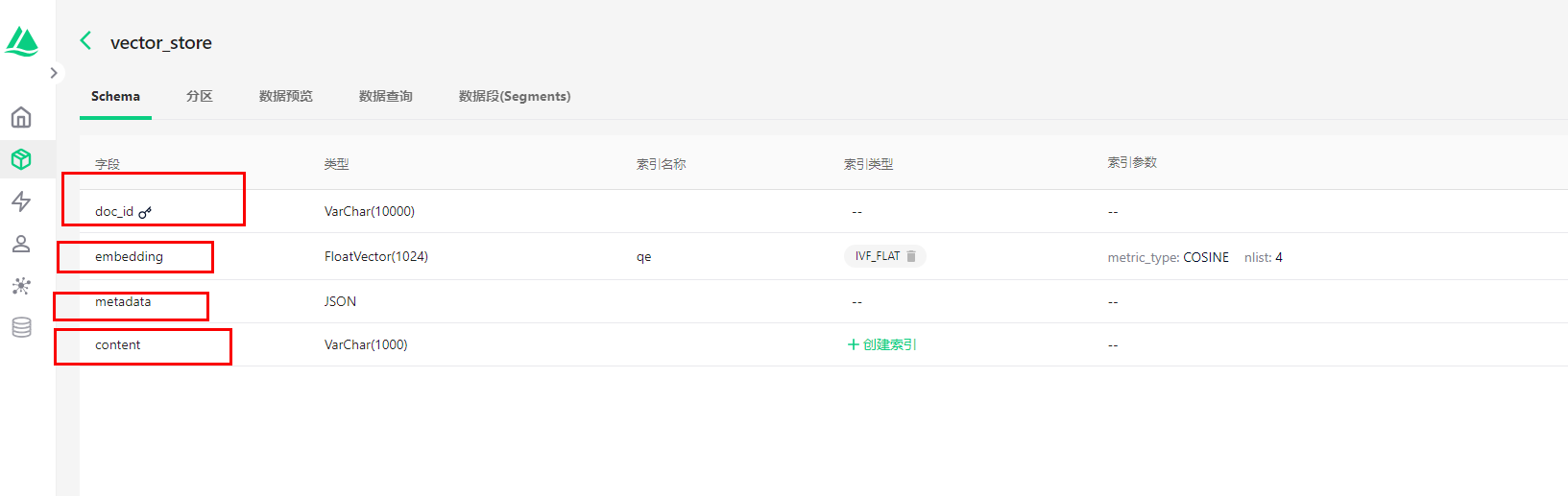
注意这几个字段:这个spring-ai-milvus默认的id就是doc_id,且,他会插入数据,所以创建的时候不能用自增,后面的embeding是向量字段,跟你的embedding模型维度一致即可,content就是原为,metadata字段,这几个都是必须字段,缺一不可,缺少就报错
4.代码阶段
application.yml
chat模型和embeding模型都是open ai格式的
spring:
  application:
    name: spring-ai-alibaba-rag-milvus-example

  ai:
    vectorstore:
      milvus:

        client:
          host: ${MILVUS_HOST:xxx} # default: localhost
          port: ${MILVUS_PORT:19530} # default: 19530
          username: ${MILVUS_USERNAME:root} # default: root
          password: ${MILVUS_PASSWORD:milvus} # default: milvus
        databaseName: n8n # default: default
        collectionName: fafaff # default: vector_store
        embeddingDimension: 1024 # default: 1536
        indexType: IVF_FLAT # default: IVF_FLAT
        metricType: COSINE # default: COSINE
        embedding-field-name: milvus
        id-field-name: id

    openai:
      chat:
        base-url: https://api.siliconflow.cn/
        api-key: xxxx
        options:
          model: Qwen/Qwen3-32B
      embedding:
        base-url: https://api.siliconflow.cn/
        options:
          model: BAAI/bge-m3
      api-key: xxxxxx
milvus配置 增加embedding模型支持
package org.moto.rag.config;


import io.milvus.client.MilvusServiceClient;
import org.springframework.ai.chat.client.ChatClient;
import org.springframework.ai.embedding.EmbeddingModel;
import org.springframework.ai.vectorstore.milvus.MilvusVectorStore;
import org.springframework.beans.factory.annotation.Autowired;
import org.springframework.context.annotation.Bean;
import org.springframework.context.annotation.Configuration;

@Configuration
public class MilvusConfig {
    @Autowired
    EmbeddingModel embeddingModel;

    @Autowired
    MilvusServiceClient milvusServiceClient;

    @Bean
    public MilvusVectorStore milvusEmbeddingStore(MilvusServiceClient milvusServiceClient, EmbeddingModel embeddingModel) {
        MilvusVectorStore.Builder builder = MilvusVectorStore.builder(milvusServiceClient, embeddingModel);
        return builder.build();
    }

    @Bean
    ChatClient chatClient(ChatClient.Builder builder) {
        return builder.defaultSystem("你将作为一名 Spring-AI-Alibaba 的专家,对于用户的使用需求作出解答").build();
    }
}
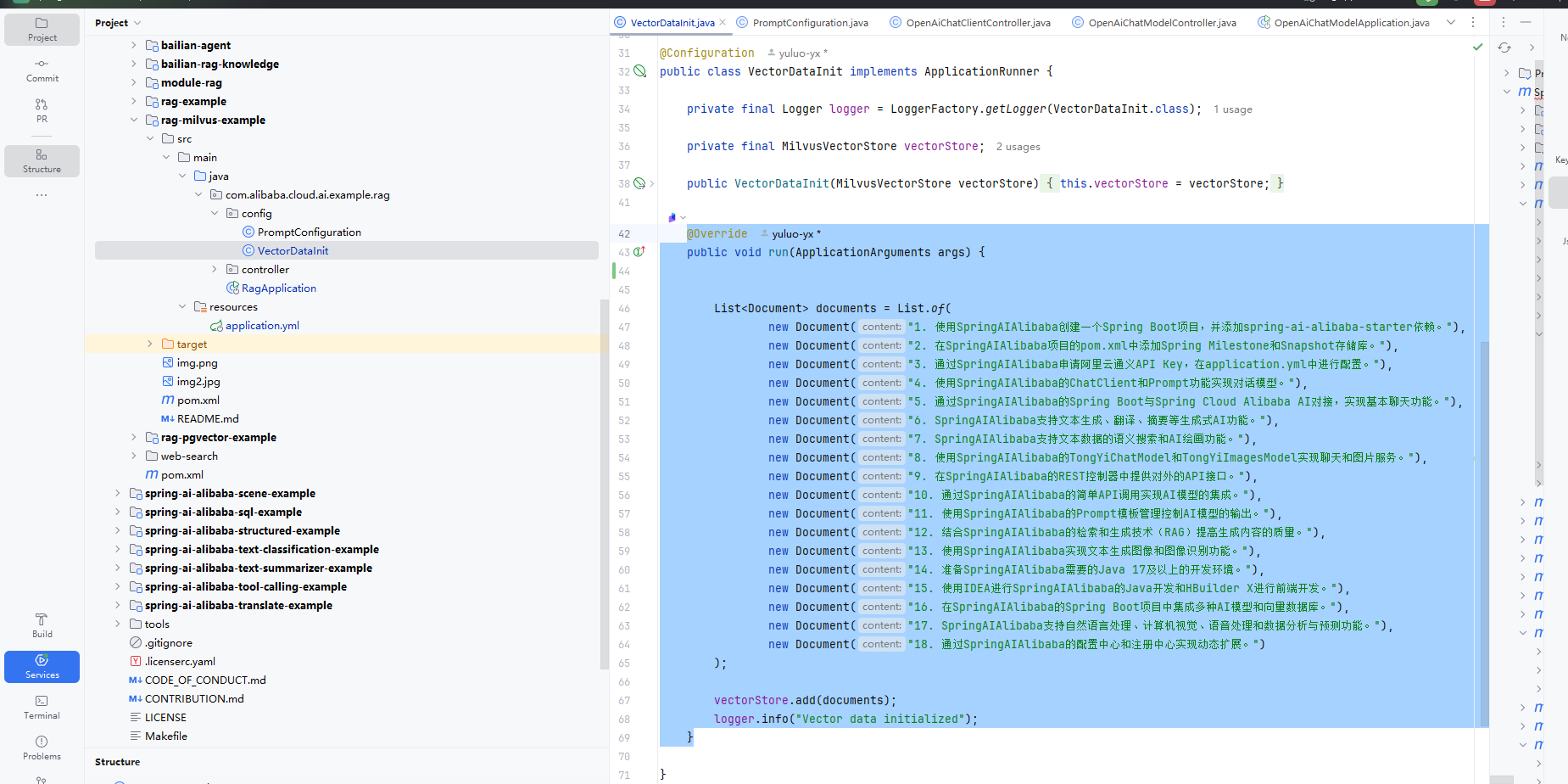
文档向量化(官网示例)
这里可以用其他工具,插入你想插入的数据,后面还可以增加metadata
/*
 * Copyright 2025 the original author or authors.
 *
 * Licensed under the Apache License, Version 2.0 (the "License");
 * you may not use this file except in compliance with the License.
 * You may obtain a copy of the License at
 *
 *      https://www.apache.org/licenses/LICENSE-2.0
 *
 * Unless required by applicable law or agreed to in writing, software
 * distributed under the License is distributed on an "AS IS" BASIS,
 * WITHOUT WARRANTIES OR CONDITIONS OF ANY KIND, either express or implied.
 * See the License for the specific language governing permissions and
 * limitations under the License.
 */

package org.moto.rag.config;


import org.slf4j.Logger;
import org.slf4j.LoggerFactory;
import org.springframework.ai.document.Document;
import org.springframework.ai.vectorstore.SearchRequest;
import org.springframework.ai.vectorstore.milvus.MilvusVectorStore;
import org.springframework.boot.ApplicationArguments;
import org.springframework.boot.ApplicationRunner;
import org.springframework.context.annotation.Configuration;

import java.util.List;

@Configuration
public class VectorDataInit implements ApplicationRunner {

	private final Logger logger = LoggerFactory.getLogger(VectorDataInit.class);

	private final MilvusVectorStore vectorStore;

	public VectorDataInit(MilvusVectorStore vectorStore) {
		this.vectorStore = vectorStore;
	}

	@Override
	public void run(ApplicationArguments args) {
		List<Document> documents = List.of(
				new Document("1. 使用SpringAIAlibaba创建一个Spring Boot项目,并添加spring-ai-alibaba-starter依赖。"),
				new Document("2. 在SpringAIAlibaba项目的pom.xml中添加Spring Milestone和Snapshot存储库。"),
				new Document("3. 通过SpringAIAlibaba申请阿里云通义API Key,在application.yml中进行配置。"),
				new Document("4. 使用SpringAIAlibaba的ChatClient和Prompt功能实现对话模型。"),
				new Document("5. 通过SpringAIAlibaba的Spring Boot与Spring Cloud Alibaba AI对接,实现基本聊天功能。"),
				new Document("6. SpringAIAlibaba支持文本生成、翻译、摘要等生成式AI功能。"),
				new Document("7. SpringAIAlibaba支持文本数据的语义搜索和AI绘画功能。"),
				new Document("8. 使用SpringAIAlibaba的TongYiChatModel和TongYiImagesModel实现聊天和图片服务。"),
				new Document("9. 在SpringAIAlibaba的REST控制器中提供对外的API接口。"),
				new Document("10. 通过SpringAIAlibaba的简单API调用实现AI模型的集成。"),
				new Document("11. 使用SpringAIAlibaba的Prompt模板管理控制AI模型的输出。"),
				new Document("12. 结合SpringAIAlibaba的检索和生成技术(RAG)提高生成内容的质量。"),
				new Document("13. 使用SpringAIAlibaba实现文本生成图像和图像识别功能。"),
				new Document("14. 准备SpringAIAlibaba需要的Java 17及以上的开发环境。"),
				new Document("15. 使用IDEA进行SpringAIAlibaba的Java开发和HBuilder X进行前端开发。"),
				new Document("16. 在SpringAIAlibaba的Spring Boot项目中集成多种AI模型和向量数据库。"),
				new Document("17. SpringAIAlibaba支持自然语言处理、计算机视觉、语音处理和数据分析与预测功能。"),
				new Document("18. 通过SpringAIAlibaba的配置中心和注册中心实现动态扩展。")
		);

		vectorStore.add(documents);
		logger.info("Vector data initialized");
	}

}
接口
/*
 * Copyright 2025 the original author or authors.
 *
 * Licensed under the Apache License, Version 2.0 (the "License");
 * you may not use this file except in compliance with the License.
 * You may obtain a copy of the License at
 *
 *      https://www.apache.org/licenses/LICENSE-2.0
 *
 * Unless required by applicable law or agreed to in writing, software
 * distributed under the License is distributed on an "AS IS" BASIS,
 * WITHOUT WARRANTIES OR CONDITIONS OF ANY KIND, either express or implied.
 * See the License for the specific language governing permissions and
 * limitations under the License.
 */

package org.moto.rag.controller;

import java.util.ArrayList;
import java.util.List;

import jakarta.servlet.http.HttpServletResponse;
import reactor.core.publisher.Flux;

import org.springframework.ai.chat.client.ChatClient;
import org.springframework.ai.chat.client.advisor.QuestionAnswerAdvisor;
import org.springframework.ai.chat.messages.Message;
import org.springframework.ai.chat.messages.UserMessage;
import org.springframework.ai.document.Document;
import org.springframework.ai.vectorstore.SearchRequest;
import org.springframework.ai.vectorstore.VectorStore;
import org.springframework.web.bind.annotation.GetMapping;
import org.springframework.web.bind.annotation.RequestMapping;
import org.springframework.web.bind.annotation.RequestParam;
import org.springframework.web.bind.annotation.RestController;

@RestController
@RequestMapping("/ai")
public class RagController {

    private final VectorStore vectorStore;

    private final ChatClient chatClient;

    public RagController(VectorStore vectorStore, ChatClient chatClient) {
        this.vectorStore = vectorStore;
        this.chatClient = chatClient;
    }

    // 历史消息列表
    private static List<Message> historyMessage = new ArrayList<>();

    // 历史消息列表的最大长度
    private final static int maxLen = 10;

    @GetMapping(value = "/chat")
    public Flux<String> generation(
            @RequestParam("prompt") String userInput,
            HttpServletResponse response
    ) {
        response.setCharacterEncoding("UTF-8");
        // 发起聊天请求并处理响应
        Flux<String> resp = chatClient.prompt()
                .messages(historyMessage)
                .user(userInput)
                .advisors(new QuestionAnswerAdvisor(
                        vectorStore,
                        SearchRequest.builder().build())
                ).stream()
                .content();

        // 用户输入的文本是 UserMessage
        historyMessage.add(new UserMessage(userInput));

        // 发给 AI 前对历史消息对列的长度进行检查
        if (historyMessage.size() > maxLen) {
            historyMessage = historyMessage.subList(historyMessage.size() - maxLen - 1, historyMessage.size());
        }

        return resp;
    }

    /**
     * 向量数据查询测试
     */
    @GetMapping("/select")
    public List<Document> search() {


        return vectorStore.similaritySearch(
                SearchRequest.builder()
                        .query("动态扩展")
                        .topK(2).build());
    }

}
接口测试 (这里我插入了两次,所有有两个结果)
GET http://localhost:8080/ai/select
HTTP/1.1 200
Content-Type: application/json
Transfer-Encoding: chunked
Date: Tue, 19 Aug 2025 01:54:16 GMT[
{
"id": "22f2be6e-907e-48f3-a2cd-5a274afa2fee",
"text": "18. 通过SpringAIAlibaba的配置中心和注册中心实现动态扩展。",
"media": null,
"metadata": {
"distance": 0.35295016
},
"score": 0.6470498442649841
},
{
"id": "83d1f3d2-399c-440a-bf6f-d4d425adeb04",
"text": "18. 通过SpringAIAlibaba的配置中心和注册中心实现动态扩展。",
"media": null,
"metadata": {
"distance": 0.35302174
},
"score": 0.6469782590866089
}
]
Response file saved.
> 2025-08-19T095416.200.json
GET http://localhost:8080/ai/chat?prompt=SpringAIAlibaba申请
HTTP/1.1 200
Content-Type: text/plain;charset=UTF-8
Transfer-Encoding: chunked
Date: Tue, 19 Aug 2025 02:44:44 GMT根据您提供的上下文信息,以下是SpringAIAlibaba申请和配置的基本步骤:
1. 开发环境准备:
- 确保已安装Java 17或更高版本
- 推荐使用IntelliJ IDEA或Eclipse等Java开发工具
- 配置好Maven/Gradle构建工具2. 创建Spring Boot项目:
- 可通过Spring Initializr (https://start.spring.io/) 生成项目
- 选择Spring Boot 3.x版本(Java 17+)
- 添加必要依赖(如Web、OpenAPI等)3. 添加Alibaba AI依赖:
```xml
<!-- pom.xml示例 -->
<dependency>
<groupId>com.alibaba.ai</groupId>
<artifactId>spring-ai-alibaba-starter</artifactId>
<version>1.0.0</version>
</dependency>
```4. 注意事项:
- 依赖版本需与Spring Boot版本兼容
- 确保网络可访问Maven中央仓库或阿里云仓库
- 部分功能可能需要阿里云API密钥如果遇到问题,可检查:
1. Java版本是否满足要求(通过`java -version`验证)
2. 项目结构是否符合Spring Boot规范
3. 依赖是否成功下载(检查Maven/Gradle日志)超出上述内容的配置细节或具体实现问题,建议参考官方文档或GitHub项目说明。
Response code: 200; Time: 53659ms (53 s 659 ms); Content length: 689 bytes (689 B)

有“AI”的1024 = 2048,欢迎大家加入2048 AI社区
更多推荐


 24
24 0
0- 0


 已为社区贡献2条内容

所有评论(0)