以图搜图--抓取百度图片方式(数据抓取)
一、需求分析
用户可以使用一张图片来搜索相似的图片,相比传统的关键词搜索,能够更精确地找到与上传图片内容相似的图片。
为了获得更多的搜索结果,我们的需求是从 全网搜索图片,而不是只在自己的图库中搜索。
注意,该功能不用局限于私有空间,公共图库也可以使用。
二、方案设计
主要有2种方案:第三方API以及数据抓取
1、第三方API
百度 AI: 提供的图片搜索 API:相似图片搜索_快速找到相似图片-百度AI开放平台
Bing 以图搜图 API:利用必应的图库,可以从全网进行搜索,而且可以免费:Quickstart: Search for images using the Bing Image Search REST API and Java - Bing Search Services | Microsoft Learn
2、数据抓取
友情提示:这种方式只适合学习使用!注意不要给目标网站带来压力!否则后果自负!
利用已有的以图搜图网站,通过数据抓取的方式实时查询搜图网站的返回结果,以百度搜图网站为例,对接口进行分析如下:
1) 进入百度图片搜索,通过url上传图片(接口:https://graph.baidu.com/upload?uptime=xxxx),返回响应结果中,data下面的url就是以图搜图的页面地址。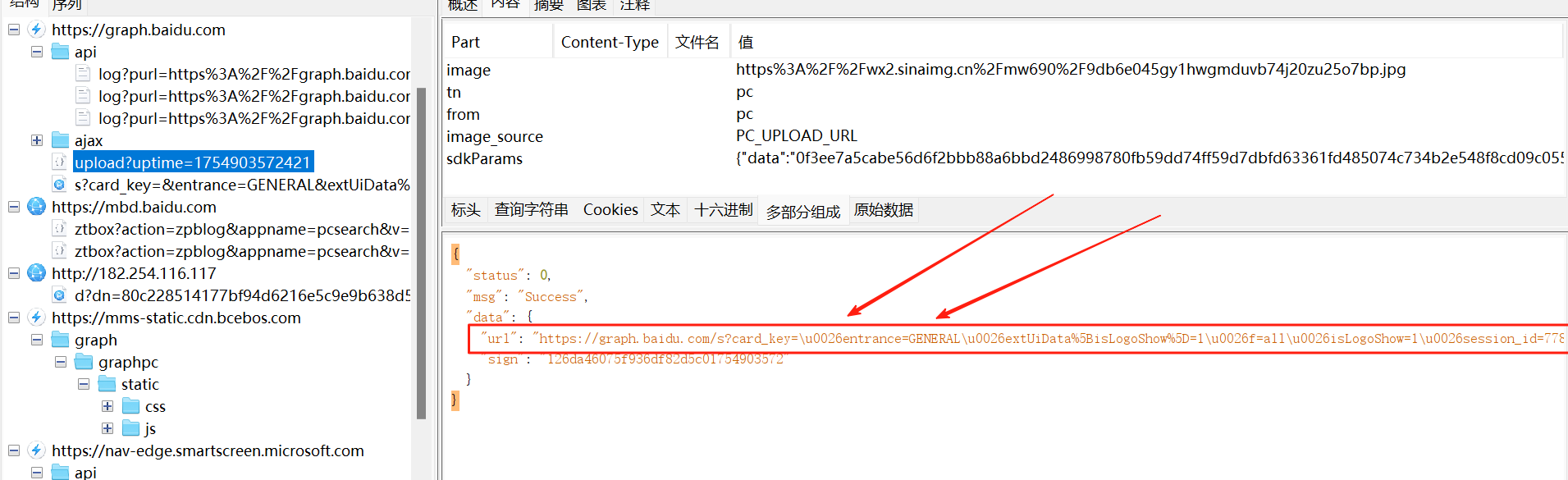
注意:直接拿返回结果会存在转义序列,如\u0026,需要手动或使用工具类转成"&"
2) 访问步骤一返回的页面地址,就能得到JSON格式的相似图片列表,里面包含了图片的缩略图和原图地址:
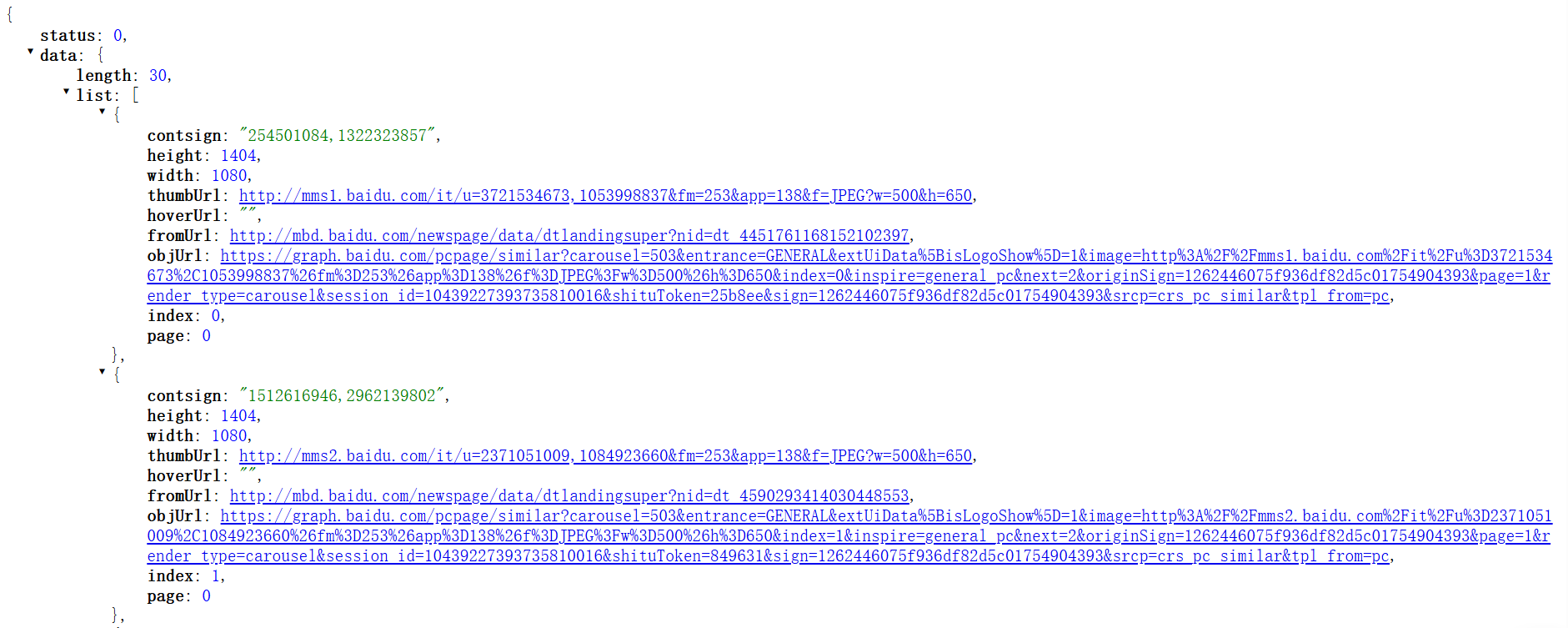
3)通过处理JSON格式的数据,就能得到缩略图和原图地址的集合。
三、代码实现
1、新建图片搜索结果类,用于接受API的返回值:
import lombok.Data;

@Data
public class ImageSearchResult {

    /**
     * 缩略图地址
     */
    private String thumbUrl;

    /**
     * 来源地址
     */
    private String fromUrl;
}
2、通过向百度发送POST请求,获取给定图片的相似图片页面地址。
import cn.hutool.core.util.RandomUtil;
import cn.hutool.core.util.URLUtil;
import cn.hutool.http.HttpRequest;
import cn.hutool.http.HttpResponse;
import cn.hutool.http.HttpStatus;
import cn.hutool.json.JSONUtil;
import com.b2bwings.cc.common.exception.BusinessException;
import lombok.extern.slf4j.Slf4j;
import shade.okhttp3.internal.http2.ErrorCode;

import java.nio.charset.StandardCharsets;
import java.util.HashMap;
import java.util.Map;

@Slf4j
public class GetImagePageUrlApi {

    /**
     * 获取图片页面地址
     *
     * @param imageUrl
     * @return
     */
    public static String getImagePageUrl(String imageUrl) {
        // 1. 准备请求参数
        Map<String, Object> formData = new HashMap<>();
        formData.put("image", imageUrl);
        formData.put("tn", "pc");
        formData.put("from", "pc");
        formData.put("image_source", "PC_UPLOAD_URL");
        // 获取当前时间戳
        long uptime = System.currentTimeMillis();
        // 请求地址
        String url = "https://graph.baidu.com/upload?uptime=" + uptime;

        try {
            // 2. 发送 POST 请求到百度接口
            HttpResponse response = HttpRequest.post(url)
                    .header("acs-token", RandomUtil.randomString(1))
                    .form(formData)
                    .timeout(5000)
                    .execute();
            // 判断响应状态
            if (HttpStatus.HTTP_OK != response.getStatus()) {
                throw new BusinessException(ErrorCode.COMPRESSION_ERROR.getHttpCode(), "接口调用失败");
            }
            // 解析响应
            String responseBody = response.body();
            Map<String, Object> result = JSONUtil.toBean(responseBody, Map.class);

            // 3. 处理响应结果
            if (result == null || !Integer.valueOf(0).equals(result.get("status"))) {
                throw new BusinessException(ErrorCode.COMPRESSION_ERROR.getHttpCode(), "接口调用失败");
            }
            Map<String, Object> data = (Map<String, Object>) result.get("data");
            String rawUrl = (String) data.get("url");
            // 对 URL 进行解码
            String searchResultUrl = URLUtil.decode(rawUrl, StandardCharsets.UTF_8);
            // 如果 URL 为空
            if (searchResultUrl == null) {
                throw new BusinessException(ErrorCode.COMPRESSION_ERROR.getHttpCode(), "未返回有效结果");
            }
            return searchResultUrl;
        } catch (Exception e) {
            log.error("搜索失败", e);
            throw new BusinessException(ErrorCode.COMPRESSION_ERROR.getHttpCode(), "搜索失败");
        }
    }

    public static void main(String[] args) {
        // 测试以图搜图功能
        String imageUrl = "https://wx2.sinaimg.cn/mw690/9db6e045gy1hwgmduvb74j20zu25o7bp.jpg";
        String result = getImagePageUrl(imageUrl);
        System.out.println("搜索成功,结果 URL:" + result);
    }
}
3、获取相似图片列表页面地址:通过jsoup爬取HTML页面,提取其中包含firstUrl的JavaScript脚本,并返回图片列表的页面地址(返回结果的页面地址)
import com.b2bwings.cc.common.exception.BusinessException;
import lombok.extern.slf4j.Slf4j;
import org.jsoup.Jsoup;
import org.jsoup.nodes.Document;
import org.jsoup.nodes.Element;
import org.jsoup.select.Elements;
import shade.okhttp3.internal.http2.ErrorCode;

import java.util.regex.Matcher;
import java.util.regex.Pattern;

@Slf4j
public class GetImageFirstUrlApi {

    /**
     * 获取图片列表页面地址
     *
     * @param url
     * @return
     */
    public static String getImageFirstUrl(String url) {
        try {
            // 使用 Jsoup 获取 HTML 内容
            Document document = Jsoup.connect(url)
                    .timeout(5000)
                    .get();

            // 获取所有 <script> 标签
            Elements scriptElements = document.getElementsByTag("script");

            // 遍历找到包含 `firstUrl` 的脚本内容
            for (Element script : scriptElements) {
                String scriptContent = script.html();
                if (scriptContent.contains("\"firstUrl\"")) {
                    // 正则表达式提取 firstUrl 的值
                    Pattern pattern = Pattern.compile("\"firstUrl\"\\s*:\\s*\"(.*?)\"");
                    Matcher matcher = pattern.matcher(scriptContent);
                    if (matcher.find()) {
                        String firstUrl = matcher.group(1);
                        // 处理转义字符
                        firstUrl = firstUrl.replace("\\/", "/");
                        return firstUrl;
                    }
                }
            }

            throw new BusinessException(ErrorCode.INTERNAL_ERROR.getHttpCode(), "未找到 url");
        } catch (Exception e) {
            log.error("搜索失败", e);
            throw new BusinessException(ErrorCode.INTERNAL_ERROR.getHttpCode(), "搜索失败");
        }
    }

    public static void main(String[] args) {
        // 请求目标 URL
        String url = "https://graph.baidu.com/s?card_key=&entrance=GENERAL&extUiData[isLogoShow]=1&f=all&isLogoShow=1&session_id=10439227393735810016&sign=1262446075f936df82d5c01754904393&tpl_from=pc";
        String imageFirstUrl = getImageFirstUrl(url);
        System.out.println("搜索成功,结果 URL:" + imageFirstUrl);
    }
}
4、获取图片列表:通过调用百度接口返回的JSON数据,提取其中的图片列表并返回。
import cn.hutool.http.HttpResponse;
import cn.hutool.http.HttpUtil;
import cn.hutool.json.JSONArray;
import cn.hutool.json.JSONObject;
import cn.hutool.json.JSONUtil;
import com.b2bwings.cc.common.exception.BusinessException;
import lombok.extern.slf4j.Slf4j;

import java.util.List;

@Slf4j
public class GetImageListApi {

    /**
     * 获取图片列表
     *
     * @param url
     * @return
     */
    public static List<ImageSearchResult> getImageList(String url) {
        try {
            // 发起GET请求
            HttpResponse response = HttpUtil.createGet(url).execute();

            // 获取响应内容
            int statusCode = response.getStatus();
            String body = response.body();

            // 处理响应
            if (statusCode == 200) {
                // 解析 JSON 数据并处理
                return processResponse(body);
            } else {
                throw new BusinessException("接口调用失败");
            }
        } catch (Exception e) {
            log.error("获取图片列表失败", e);
            throw new BusinessException( "获取图片列表失败");
        }
    }

    /**
     * 处理接口响应内容
     *
     * @param responseBody 接口返回的JSON字符串
     */
    private static List<ImageSearchResult> processResponse(String responseBody) {
        // 解析响应对象
        JSONObject jsonObject = new JSONObject(responseBody);
        if (!jsonObject.containsKey("data")) {
            throw new BusinessException("未获取到图片列表");
        }
        JSONObject data = jsonObject.getJSONObject("data");
        if (!data.containsKey("list")) {
            throw new BusinessException("未获取到图片列表");
        }
        JSONArray list = data.getJSONArray("list");
        return JSONUtil.toList(list, ImageSearchResult.class);
    }

    public static void main(String[] args) {
        String url = "https://graph.baidu.com/ajax/pcsimi?carousel=503&entrance=GENERAL&extUiData%5BisLogoShow%5D=1&inspire=general_pc&limit=30&next=2&render_type=card&session_id=10439227393735810016&sign=1262446075f936df82d5c01754904393&tk=1e35c&tpl_from=pc";
        List<ImageSearchResult> imageList = getImageList(url);
        System.out.println("搜索成功" + imageList);
    }
四、图片搜索服务(门面模式)
门面模式:通过提供一个统一的接口来简化多个接口的调用,是的客户端不需要关注内部的具体是实现。
数据抓取分为三个步骤,也就有多个API的实现,需要整合这三个API到一个门面类中,简化调用过程。
@Slf4j
public class ImageSearchApiFacade {

    /**
     * 搜索图片
     *
     * @param imageUrl
     * @return
     */
    public static List<ImageSearchResult> searchImage(String imageUrl) {
        String imagePageUrl = GetImagePageUrlApi.getImagePageUrl(imageUrl);
        String imageFirstUrl = GetImageFirstUrlApi.getImageFirstUrl(imagePageUrl);
        List<ImageSearchResult> imageList = GetImageListApi.getImageList(imageFirstUrl);
        return imageList;
    }

    public static void main(String[] args) {
        // 测试以图搜图功能
        String imageUrl = "https://www.codefather.cn/logo.png";
        List<ImageSearchResult> resultList = searchImage(imageUrl);
        System.out.println("结果列表" + resultList);
    }
}

有“AI”的1024 = 2048,欢迎大家加入2048 AI社区
更多推荐


 22
22 0
0- 0


 已为社区贡献2条内容

所有评论(0)