Failed with result ‘start-limit-hit‘.导致ssh无法连接如何解决【浪浪云用户售后2025年8月6日】
【摘要】用户反馈SSH连接突然失败,排查发现是systemd服务启动限制导致。日志显示短时间内频繁启动触发保护机制(10秒内失败5次)。解决方案:1)执行systemctl reset-failed sshd重置计数器;2)可选调整限制参数(如延长间隔至30秒/允许10次失败);3)重启SSH服务后恢复正常。整个过程通过系统日志定位问题,快速解决了服务启动被限制的情况。
·

用户反馈ssh连接不上
之前好好的,今天突然登录不上了
售后排查过程
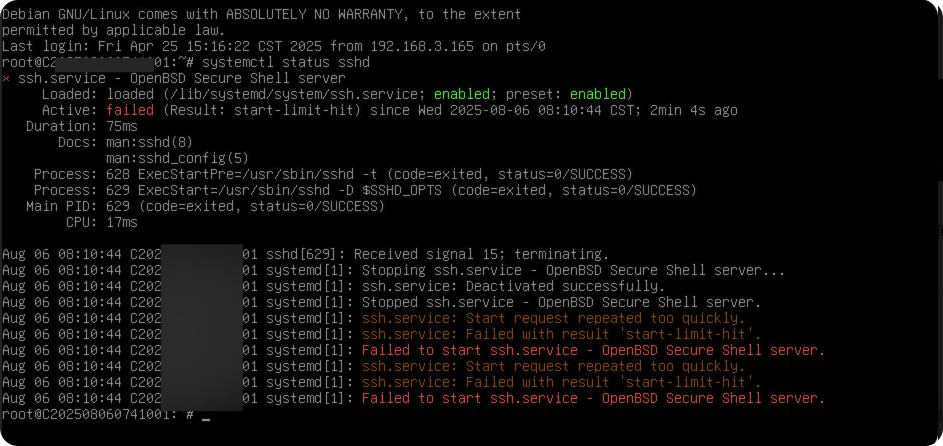
- 获取用户授权后登录到服务器检查ssh服务状态
1. 问题原因
- 日志关键信息:systemd 因短时间内频繁尝试启动而触发了保护限制
  ssh.service: Start request repeated too quickly.
  Failed with result 'start-limit-hit'.
- 触发机制:
systemd 默认在 10秒内 若服务启动失败超过 5次(StartLimitBurst),会强制暂停启动(start-limit-hit)。
2. 解决步骤
手动重置限制计数器
systemctl reset-failed sshd
3:调整 systemd 启动限制(可选)**
编辑 SSH 的 systemd 单元文件:
sudo systemctl edit sshd
添加以下内容(放宽限制):
[Service]
StartLimitIntervalSec=30s
StartLimitBurst=10

[Unit]
StartLimitIntervalSec=0
保存后重载配置:
systemctl daemon-reload
4:重启 SSH 服务**
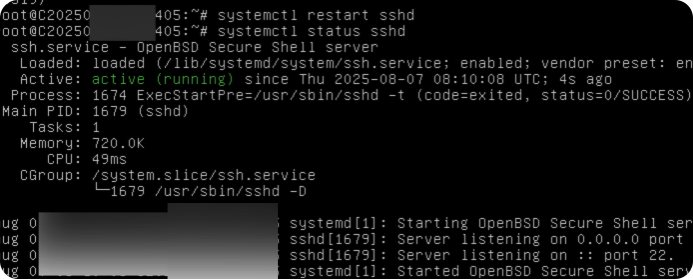
systemctl restart sshd
查看ssh状态 解决
systemctl status sshd

有“AI”的1024 = 2048,欢迎大家加入2048 AI社区
更多推荐



 3
3 0
0- 0


 已为社区贡献1条内容

所有评论(0)