《基于RFID智能工具柜》工具管理:怎么将新增的界面搞成并列的效果?
怎么将新增的界面搞成并列的效果?
问题描述:
我的与标准的区别:
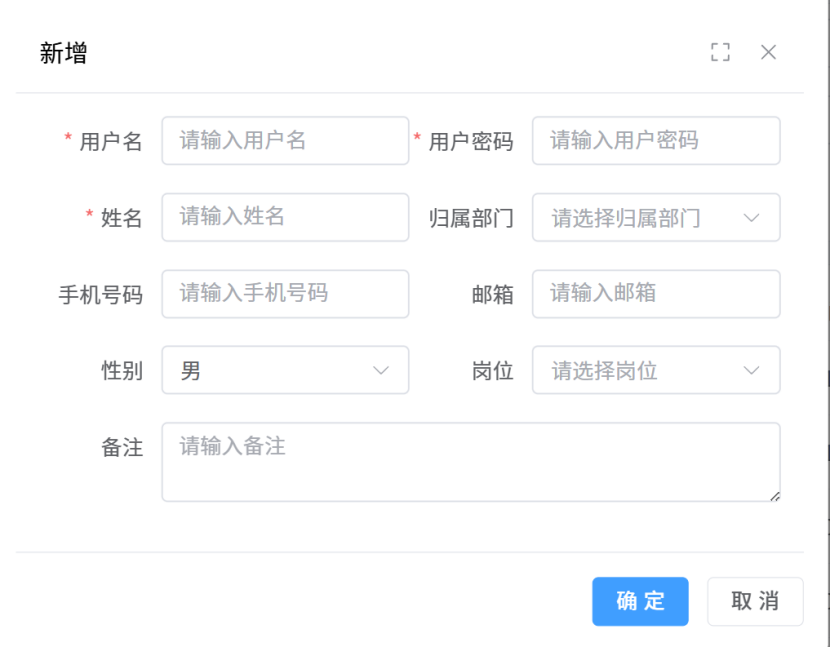
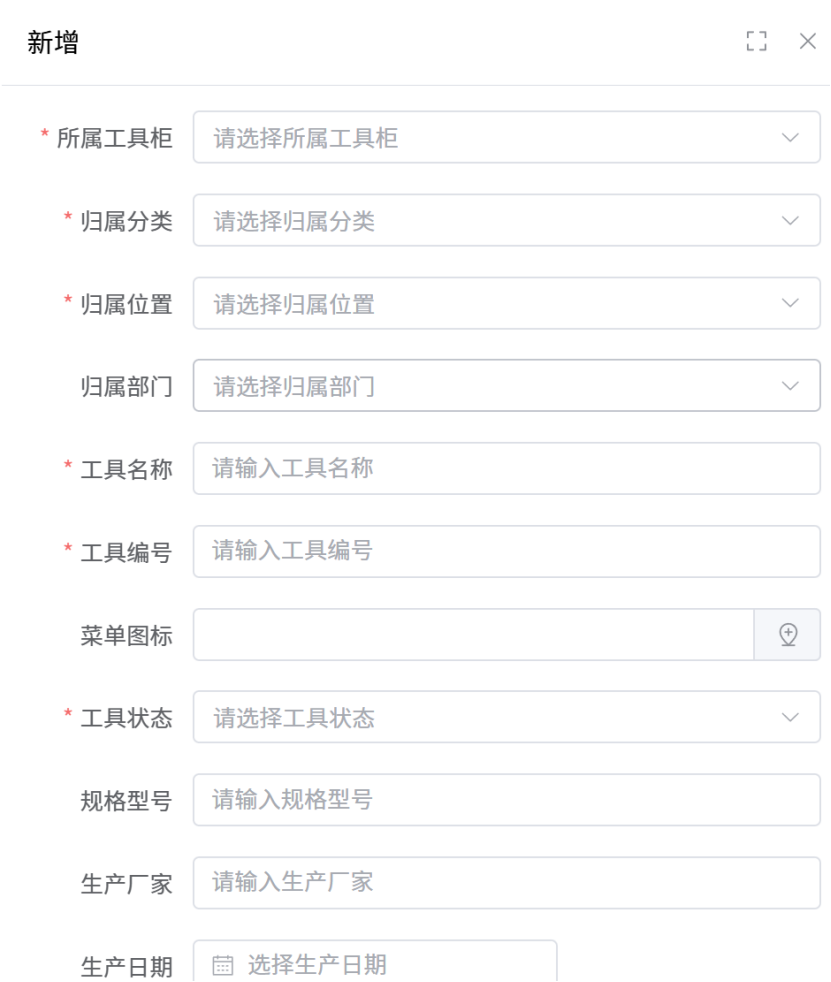
<template>
<el-row :gutter="20">
<!-- 左侧:工具树(占4列,移动端占满24列) -->
<el-col :span="4" :xs="24">
<ContentWrap class="h-1/1">
<DeptTree @node-click="handleToolNodeClick" />
</ContentWrap>
</el-col>
<el-col :span="20" :xs="24">
<!-- 搜索 -->
<ContentWrap>
<el-form
class="-mb-15px"
:model="queryParams"
ref="queryFormRef"
:inline="true"
label-width="68px"
>
<el-form-item label="关键字" prop="keyword">
<el-input
v-model="queryParams.keyword"
placeholder="请输关键字"
clearable
@keyup.enter="handleQuery"
class="!w-240px"
/>
</el-form-item>
<el-form-item>
<el-button @click="handleQuery"><Icon icon="ep:search" />搜索</el-button>
<el-button @click="resetQuery"><Icon icon="ep:refresh" />重置</el-button>
<el-button type="primary" plain @click="openForm('create')">
<Icon icon="ep:plus" /> 新增工具
</el-button>
<el-button type="warning" plain @click="handleImport">
<Icon icon="ep:upload" /> 批量导入
</el-button>
</el-form-item>
</el-form>
</ContentWrap>
<!-- 列表 -->
<ContentWrap>
<el-table v-loading="loading" :data="list" :stripe="true" :show-overflow-tooltip="false">
<el-table-column label="工具编号" align="center" prop="toolCode" />
<el-table-column label="工具名称" align="center" prop="toolName" />
<el-table-column label="工具类型" align="center" prop="categoryName" />
<el-table-column label="工具状态" align="center" prop="status">
<template #default="scope">
<el-tag
:color="{
'0': '#e8f5e9', // 在库 - 浅绿
'1': '#e3f2fd', // 出库 - 浅蓝
'2': '#ffebee', // 报废 - 浅红
'3': '#fff8e1', // 变卖 - 浅黄
'4': '#f3e5f5' // 调拨 - 浅紫
}[scope.row.status]"
:style="{
color: {
'0': '#2e7d32', // 深绿
'1': '#1565c0', // 深蓝
'2': '#c62828', // 深红
'3': '#ff8f00', // 深橙
'4': '#6a1b9a' // 深紫
}[scope.row.status]
}"
>
{{ {
'0': '在库',
'1': '出库',
'2': '报废',
'3': '变卖',
'4': '调拨'
}[scope.row.status] }}
</el-tag>
</template>
</el-table-column>
<el-table-column label="所属部门" align="center" prop="deptName" />
<el-table-column label="存放位置" align="center" prop="locationName" />
<el-table-column label="库存数量" align="center" prop="quantity" />
<el-table-column label="操作" align="center" width="199">
<template #default="scope">
<div class="flex items-center justify-center">
<el-button type="primary" link @click="openForm('update', scope.row.id)">
<Icon icon="ep:edit" class="mr-5px" /> 编辑
</el-button>
<el-button link type="primary" @click="openLinkForm('link', scope.row.id)">
<Icon icon="ep:link" class="mr-5px" /> 关联标签
</el-button>
<el-dropdown @command="(command) => handleCommand(command, scope.row)">
<el-button type="primary" link>
<Icon icon="ep:d-arrow-right" class="mr-2px"/> 更多
</el-button>
<template #dropdown>
<el-dropdown-menu>
<el-dropdown-item command="handleDelete">
<Icon icon="ep:delete" class="mr-5px"/> 删除
</el-dropdown-item>
<el-dropdown-item command="handleResetPwd">
<Icon icon="ep:tickets" class="mr-5px"/>工具详情
</el-dropdown-item>
<el-dropdown-item command="handleRole">
<Icon icon="ep:circle-check" class="mr-5px"/>使用记录
</el-dropdown-item>
</el-dropdown-menu>
</template>
</el-dropdown>
</div>
</template>
</el-table-column>
</el-table>
<Pagination
:total="total"
v-model:page="queryParams.pageNo"
v-model:limit="queryParams.pageSize"
@pagination="getList"
/>
</ContentWrap>
</el-col>
</el-row>
<!-- 对话框组件 -->
<ToolManageForm ref="formRef" @success="getList" />
<UserImportForm ref="importFormRef" @success="getList" />
<UserAssignRoleForm ref="assignRoleFormRef" @success="getList" />
</template>
前端可采用ai写,现在需要让归属信息的树默认展开怎么搞?
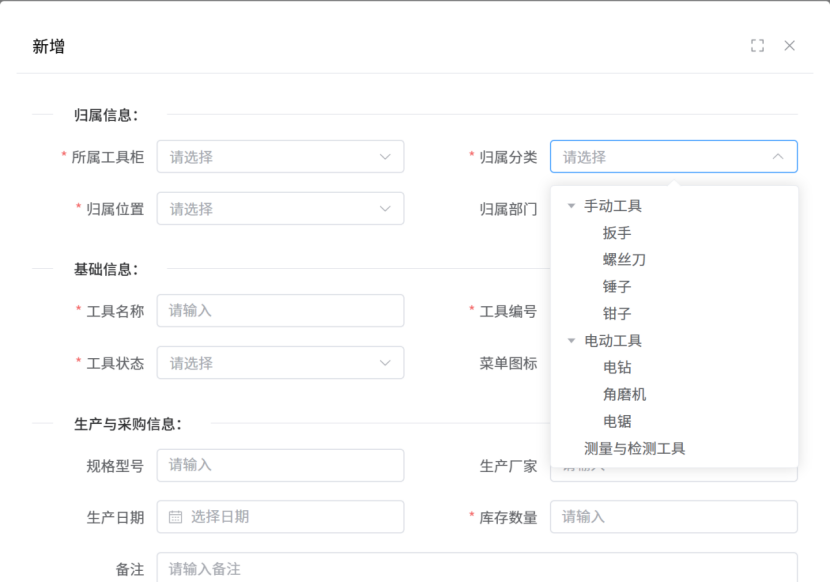
default-expand-all只需要添加这个就行了。

有“AI”的1024 = 2048,欢迎大家加入2048 AI社区
更多推荐

 5
5 0
0- 0


 已为社区贡献1条内容

所有评论(0)