学习020-01-03 Mail Merge(邮件合并)
Mail Merge(邮件合并)
This topic describes how to enable and use the Mail Merge feature in ASP.NET Core Blazor, Windows Forms, or ASP.NET Web Forms applications.
本主题介绍如何在ASP.NET Core Blazor、Windows Forms或ASP.NET Web Forms应用程序中启用和使用邮件合并功能。
To enable Mail Merge, set the RichTextMailMergeDataType property to the type you use for storing document templates.
若要启用邮件合并,请将“RichTextMailMergeDataType”属性设置为用于存储文档模板的类型。
In .NET Applications(在 .NET 应用程序中)
Specify the type as one of office module options.
将类型指定为办公模块选项之一。
File: YourSolutionName.Blazor.Server/Startup.cs or YourSolutionName.Win/Startup.cs.
ASP.NET Core Blazor
using DevExpress.ExpressApp.ApplicationBuilder;
using DevExpress.ExpressApp.Blazor.ApplicationBuilder;
using DevExpress.Persistent.BaseImpl.EF;
// ...
public class Startup {
   // ...
    public void ConfigureServices(IServiceCollection services) {
        // ...
        services.AddXaf(Configuration, builder => {
            builder.UseApplication<YourSolutionNameBlazorApplication>();
            builder.Modules
                // ...
                .AddOffice(options => {
                    options.RichTextMailMergeDataType = typeof(RichTextMailMergeData);
                })
            // ...
        });
        // ...
    }
}
Windows Forms
using DevExpress.ExpressApp.ApplicationBuilder;
using DevExpress.ExpressApp.Win.ApplicationBuilder;
// ...
public class ApplicationBuilder : IDesignTimeApplicationFactory {
    public static WinApplication BuildApplication(string connectionString) {
        var builder = WinApplication.CreateBuilder();
        builder.UseApplication<YourSolutionNameWindowsFormsApplication>();
        builder.Modules
            // ...
            .AddOffice(options => {
                options.RichTextMailMergeDataType = typeof(PeAppre);
            })
        // ...
    }
    // ...
}
In .NET Applications Without Application Builder or .NET Framework Applications(在没有应用程序生成器的 .NET 应用程序或 .NET Framework 应用程序中)
Specify the type when you add the office module:
添加办公模块时请指定类型:
File: MyApplication.Blazor.Server/MyApplication.Designer.cs or MyApplication.Win/MyApplication.Designer.cs.
C#
using Devexpress.Persistent.BaseImpl.EF
// ...
partial class MyApplication {
    private void InitializeComponent() {
        // ...
        this.officeModule = new DevExpress.ExpressApp.Office.OfficeModule();
        this.officeModule.RichTextMailMergeDataType = typeof(RichTextMailMergeData);
        // ...
    }
    // ...
}
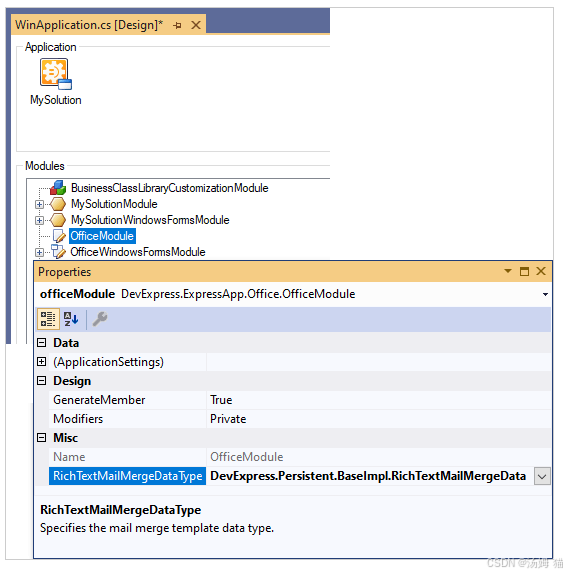
In .NET Framework Applications(在 .NET Framework 应用程序中)
Use the Application Designer:
使用应用程序设计器:
Data Types(数据类型)
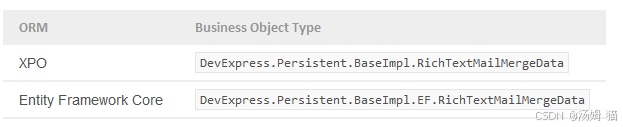
You can use one of the following built-in types, depending on your ORM:
根据你使用的对象关系映射(ORM),你可以使用以下内置类型之一:
Important
If you use Entity Framework (Core), register the DevExpress.Persistent.BaseImpl.EF.RichTextMailMergeData type in the DbContext (see Ways to Add a Business Class - Import Classes from a Business Class Library or Module). If you use the Application Designer, you must register the type before you open the designer window.
如果您使用实体框架(核心),请在DbContext中注册DevExpress.Persistent.BaseImpl.EF.RichTextMailMergeData类型(请参阅“添加业务类的方法 - 从业务类库或模块导入类”)。如果您使用应用程序设计器,则必须在打开设计器窗口之前注册该类型。
Mail Merge Template(邮件合并模板)
Run the application and invoke the Reports | Mail Merge Template navigation item to create new and access existing document templates.
运行该应用程序,然后调用“报表”|“邮件合并模板”导航项,以创建新的文档模板并访问现有文档模板。
ASP.NET Core Blazor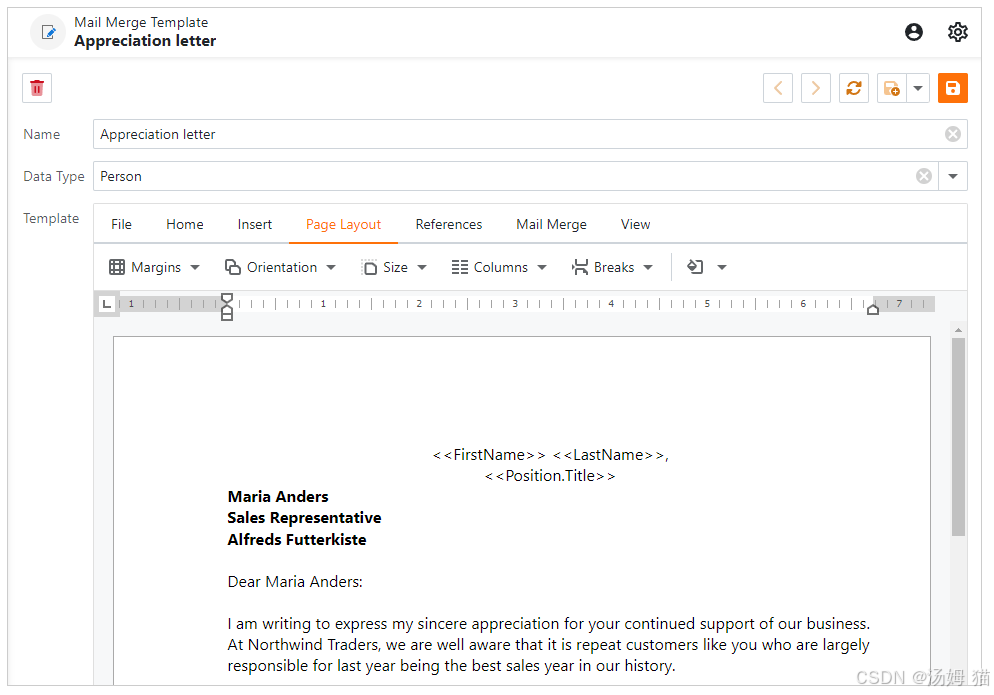
Windows Forms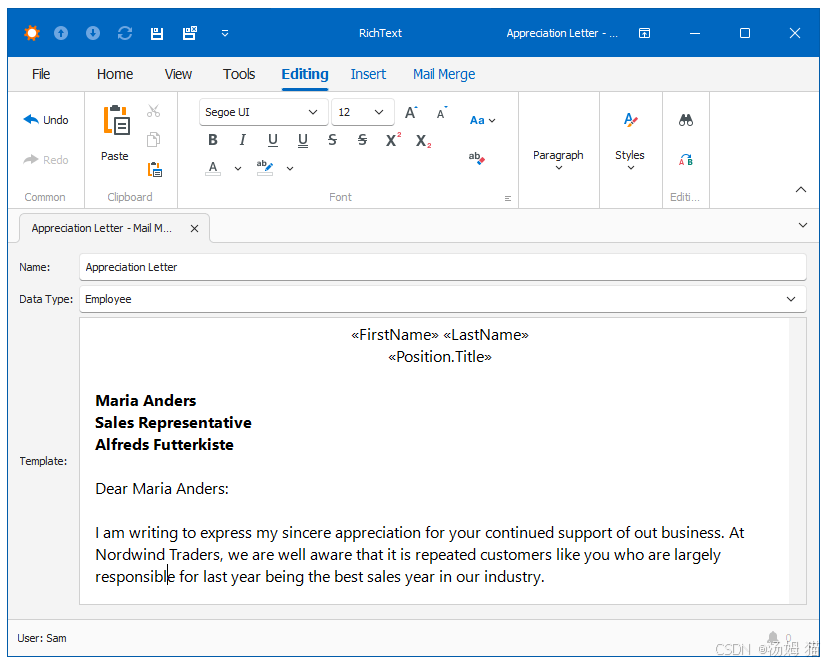
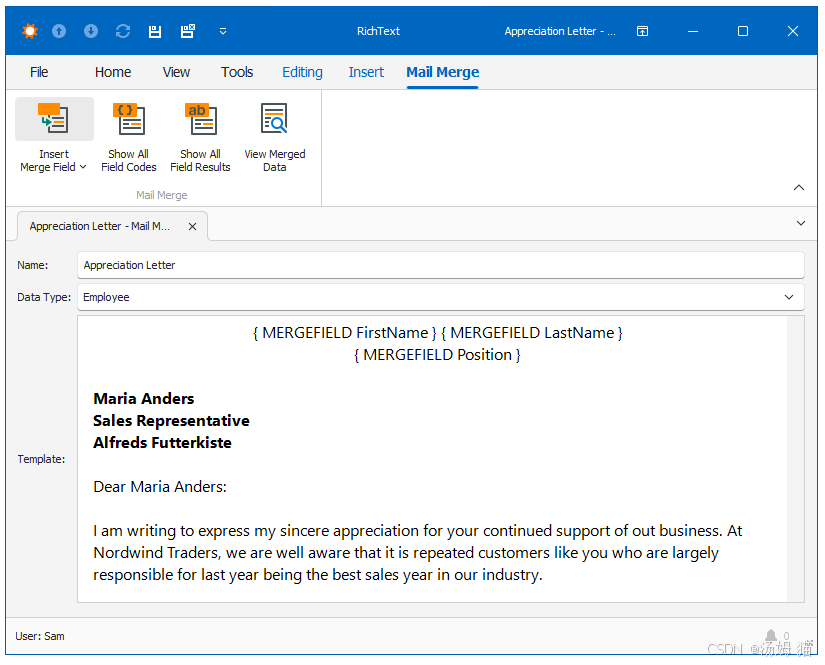
Use the Data Type field to specify the business class to be used as the document’s data source. In the Insert Merge Field dropdown (Windows Forms) and Insert Merge Field popup window (ASP.NET Core Blazor and ASP.NET Web Forms), you can choose the Data Type’s fields to add to the document template.
使用“数据类型”字段指定用作文档数据源的业务类。在“插入合并域”下拉列表(Windows 窗体)以及“插入合并域”弹出窗口(ASP.NET Core Blazor 和 ASP.NET Web 窗体)中,您可以选择数据类型的字段添加到文档模板中。
Note
If the Data Type field does not list the class, use one of the fixes below:
如果“数据类型”字段未列出类,请使用以下修复方法之一:
- Apply the VisibleInReportsAttribute (with the parameter set to true) or DefaultClassOptionsAttribute to the class.
将VisibleInReportsAttribute(参数设置为true)或DefaultClassOptionsAttribute应用于该类。- Set the IModelClassReportsVisibility.IsVisibleInReports property of the corresponding BOModel | <Class> node to true.
将相应的 BOModel | 节点的 IModelClassReportsVisibility.IsVisibleInReports 属性设置为 true。
The subfields are not displayed in Insert Merge Field, but you can type them manually: click Show All Field Codes and type the field using the { MERGEFIELD ObjectProperty.SubProperty } notation.
这些子字段不会在“插入合并域”中显示,但您可以手动输入它们:单击“显示所有域代码”,然后使用 { MERGEFIELD ObjectProperty.SubProperty } 表示法输入该域。
ASP.NET Core Blazor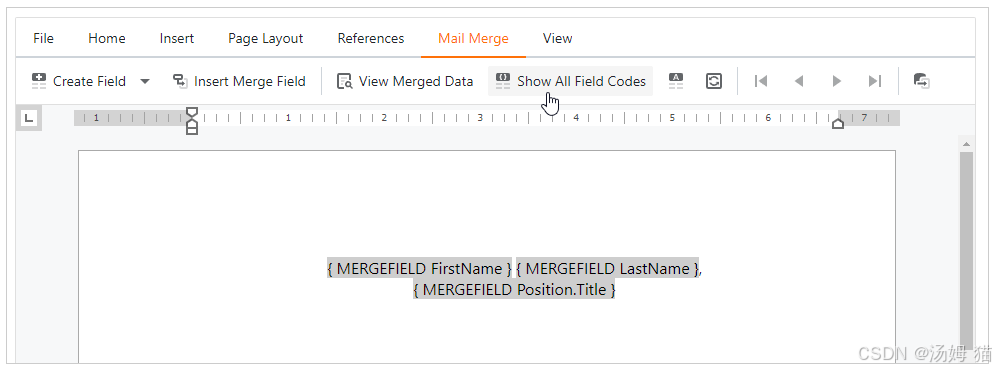
Windows Forms
Note
In ASP.NET Web Forms applications, create the INCLUDEPICTURE field and specify the name of a BLOB image property to include an image field in the document.
在ASP.NET Web Forms应用程序中,创建INCLUDEPICTURE字段并指定BLOB图像属性的名称,以便在文档中包含图像字段。
To view the records merged with the specified document template, select the required business objects in a List View (or open a single object’s Detail View) and click Show in document. The ShowInDocument Action lets you view the records merged with the specified mail merge template directly from ListView.
要查看与指定文档模板合并的记录,请在列表视图中选择所需的业务对象(或打开单个对象的详细信息视图),然后单击“在文档中显示”。“在文档中显示”操作使您可以直接从列表视图中查看与指定邮件合并模板合并的记录。
ASP.NET Core Blazor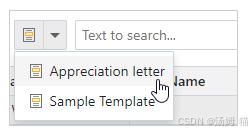
Windows Forms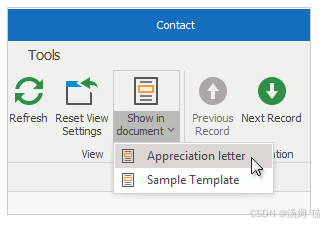
Note
The ShowInDocument Action uses the in-place documents cache to generate and store the Action’s items. Note that this cache is not updated automatically. Refer to the InplaceDocumentCacheStorageBase class description for information on how to update this cache.
“ShowInDocument”操作使用就地文档缓存来生成并存储该操作的项。请注意,此缓存不会自动更新。有关如何更新此缓存的信息,请参阅“InplaceDocumentCacheStorageBase”类说明。

有“AI”的1024 = 2048,欢迎大家加入2048 AI社区
更多推荐

 27
27 0
0- 0


 已为社区贡献11条内容

所有评论(0)