[ java Thread 线程 ] 由“一对一“到“一对多“
目录
5.1 wait() notify() notifyAll() 方法
1.程序 进程 线程
(1)程序 : 安装在电脑上的静态文件
(2)进程 : 运行中的应用程序,是操作系统分配资源的最小单位 例如:运行中的QQ
(3)线程 : 操作系统进行任务调度的最小单元 (线程是进程中最小的任务单元,是进程进一步细化)
注意 : 一个进程中可以包含多个线程 且该进程内的所有线程共享该进程的内存资源 例如聊天窗口
一个进程至少包含一个线程(即 线程不能脱离进程) 在主线程中可以创建并启动其他线程
2.单线程
2.1定义:
程序中所有任务按照顺序排队执行,即一个任务完成后,下一个任务才开始执行. 故是 线性 可预测的 . main也是一个线程,称为主线程
2.2 创建单线程的方式
(1)继承Thread类的方式
注意: 启动线程要调用start(),不是调用run()方法
package singlethread.jicheng;
//方法1:继承Thread类
public class MyThread extends Thread{
    @Override
    public void run() {
        //线程中要执行的任务都写在run()方法中
        for (int i = 0; i < 1000; i++) {
            System.out.println("run"+i);
        }
    }
}
package singlethread.jicheng;
public class Test {
    //main方法是主线程,单线程是从上到下执行,多线程是多个线程同时执行的
    public static void main(String[] args) {
       MyThread myThread = new MyThread();
                myThread.start();//启动线程要调用start(),不是调用run()方法
        for (int i = 0; i < 1000; i++) {
            //此方法属于main线程
            System.out.println("main"+i);
        }
    }
}
(2)实现Runnable接口的方式
注意:
1.实现Runnable接口的类,并不是线程,只是把要执行的任务放在此run()中,这个类可以看做任务类
2.好处: 实现了接口的类 还可以继承一个其他类和实现其他接口,不影响后续继承和实现多个接口
3.线程中的常用方法:
Thread.currentThread() 返回当前正在执行此任务的线程对象
getName() 返回线程的名字 每个线程默认有一个名字,也可以自定义名字
getId() 返回线程id 每个线程都会有一个id setPriority() 设置优先级(有默认值) 取值范围[1,10] setName() 为线程自定义名字 sleep() 线程休眠时间(毫秒) 休眠要在对应线程里面执行 join() 其他线程需要等待调用了join()的线程执行结束
package singlethread.jiekou;
//方法2: 实现接口(implement Runnable)方法
public class Task1 implements Runnable{
    @Override
    public void run() {//run()方法中写线程要执行的任务
        for (int i = 0; i < 100; i++) {
            System.out.println(Thread.currentThread().getName()
                               +Thread.currentThread().getPriority());

        }
    }
}
package singlethread.jiekou;

public class Test1 {
    public static void main(String[] args) throws InterruptedException {
        Task1 task= new Task1();//创建任务对象
        Thread thread1= new Thread(task);//创建线程对象,并添加一个要执行的任务
               //thread1.getName();//获取线程名字
               thread1.setName("线程1");//为线程对象自定义名字
        Thread thread2 = new Thread(task,"窗口2");//为线程对象自定义名字
               //run()和 start()
               thread1.run();//这是普通的方法调用,不是启动线程
               thread1.start();//启动线程
               thread2.start();
               //设置优先级(有默认值) 取值范围[1,10]
               thread1.setPriority(10);
               thread2.setPriority(3);
        System.out.println(11111111);
    }
}
package singlethread.jiekou;
import java.util.Date;
//方法2: 实现接口(implement Runnable)方法
public class Task2 implements Runnable{
    @Override
    public void run() {//run()方法中写线程要执行的任务
        int i=0;
        while (i<10){
           i++;
           try {
               Thread.sleep(1000);//线程休眠时间(毫秒) 休眠要在对应线程里面执行
               System.out.println(new Date());
           } catch (InterruptedException e) {
               throw new RuntimeException(e);
           }
       }
    }
}
package singlethread.jiekou;

public class Test2 {
    public static void main(String[] args) throws InterruptedException {
        Task2 task= new Task2();//创建任务对象
        Thread thread1= new Thread(task);//创建线程对象,并添加一个要执行的任务
               thread1.start();//启动线程
               thread1.join();//其他线程需要等待调用了join()的线程执行结束

        System.out.println(Thread.currentThread().getPriority());//主线程
    }
}
3.线程状态(生命周期)
新建----就绪----运行----阻塞----死亡
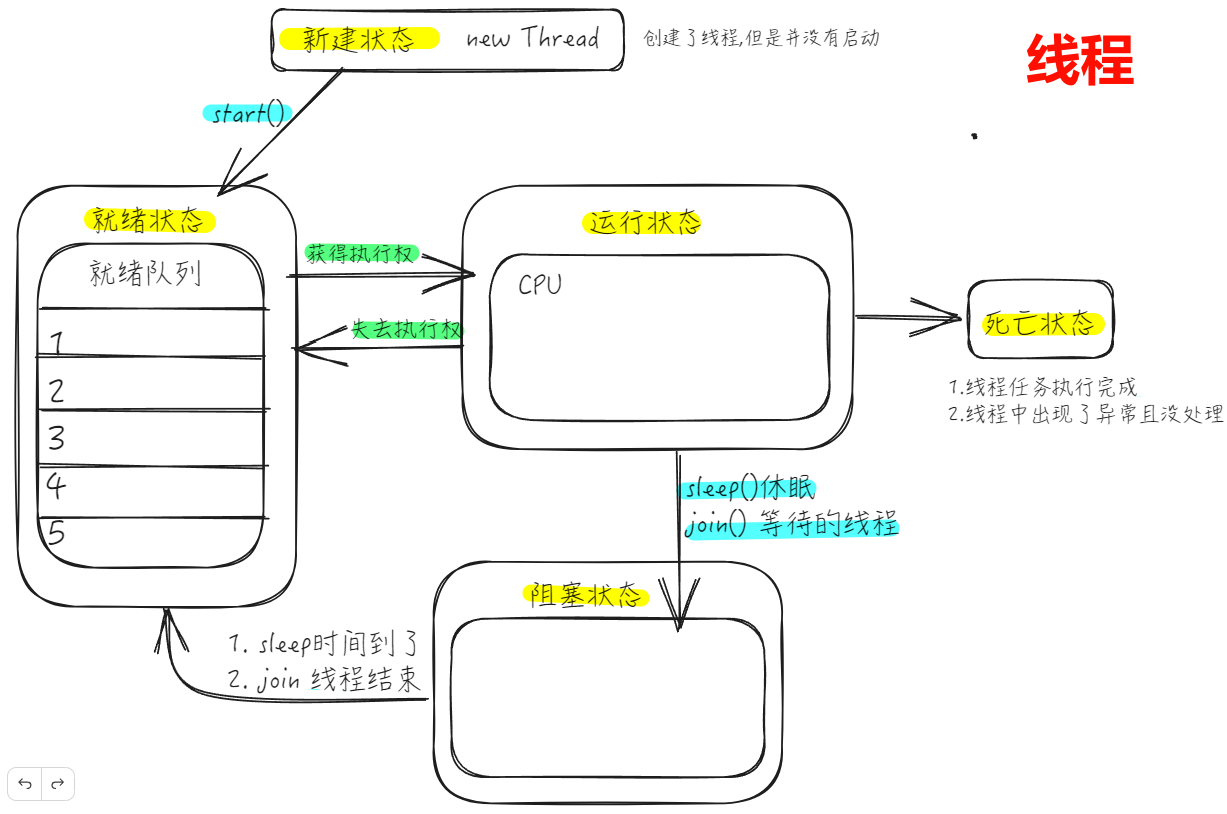
4.多线程 (重要)
4.1 定义
4.2 解释
根据操作系统任务调度策略-----时间片 和 抢占式(高优先级的线程抢占CPU) :
计算机只有一个CPU,线程获得CPU的使用权才能执行任务.但是一个线程拿到CPU使用权也不一定会执行完全,而是执行一段时间就更换下一个线程执行. 让每个线程轮流执行.又因为CPU运行的速率很快,近似可以看为多个线程同时执行 优先级较高的线程有更多获得CPU的机会
4.3多线程的优点和缺点
1.优点:
(1)提升程序响应的速度 (2)提升CPU的速度 (3)改善代码结构(例如将一个大任务拆分为多个小任务)
2.缺点:
4.4 创建多线程的方式
(1)继承Thread类的方式
a.synchronized(同步锁对象){}修饰代码块
注意 :1.同步锁对象可以是java中任意类的一个对象(用来记录是否有线程进去到同步代码块中) 2.此对象必须是唯一的(必须用static修饰) 3.synchronized(同步锁){ }要写在while里面
举例 : 在一个有两个窗口(两个线程)的卖票站(一个任务)买票----卖票机制
package multithread.jicheng.demo1;
public class TicketThread extends Thread{
    static int a = 1000;//票数 设为静态的,相当于让两个线程(窗口)共用一个售票站,而不是两个售票站
    static Object object = new Object();//同步锁对象 设为静态的,确保两个线程分开执行,即两个窗口不会买到同一张票
    @Override
    public void run(){
        while(true){
            synchronized(object){
            //注意: synchronized()要写在while里面,不然只会有一个线程进来一直while循环
                try {//添加休眠之后更容易暴露出线程中问题
                    TicketThread.sleep(1000);
                } catch (InterruptedException e) {
                    throw new RuntimeException(e);
                }
                if(a>0){
                    System.out.println(Thread.currentThread().getName()+"买到了"+a);
                    a--;
                }else
                    break;
            }
        }
    }
}
注意: 为了确保一个时间点只有一个线程访问共享资源。
可以给共享资源加一把锁,哪个线程获取了这把锁,才有访问该共享资源的权利
package multithread.jicheng.demo1;
public class Test {
    public static void main(String[] args) {
        TicketThread ticketThread1 =new TicketThread();
                     ticketThread1.setName("窗口一");
        TicketThread ticketThread2 =new TicketThread();
                     ticketThread2.setName("窗口二");

                     ticketThread1.start();
                     ticketThread2.start();
    }
}
b. synchronized 修饰方法
注意 : 1.synchronized修饰的方法为同步方法,这时同步锁对象就不需要我们自己提供
2.当该方法是非静态方法时,锁对象是this(new出几个对象,就会有几个this,就有几把锁,线程不安全);当该方法是静态方法时,锁对象是类对象(一个类只有一个,即只有一把锁,线程安全) 故需添加static
package multithread.jicheng.demo2;
public class TicketThread extends Thread{
    static int n = 1000;//票数 设为静态的,相当于让两个线程(窗口)共用一个售票站
    @Override
    public void run(){
        while (true){
            this.print();
            if(n<=0){
                break;
            }
        }
    }
    public static synchronized void print(){
        if(n>0){
            System.out.println(Thread.currentThread().getName()+"买到了:"+n);
            n--;
        }
    }
}
package multithread.jicheng.demo2;
public class Test {
    public static void main(String[] args) {
        TicketThread ticketThread1 =new TicketThread();
                     ticketThread1.setName("窗口一");
        TicketThread ticketThread2 =new TicketThread();
                     ticketThread2.setName("窗口二");

                     ticketThread1.start();
                     ticketThread2.start();
    }
}
(2)实现Runnable接口的方式
a. synchronized 修饰代码块
注意:在多线程实现接口的方法中,object可以换成this,因为任务只有一个,即对象(this)只有一个
package multithread.jiekou.demo2;
public class TicketTast implements Runnable {
    int n =10;
    Object object = new Object();
    @Override
    public void run() {
        while(true){
            synchronized (object){//object也可以换成 this,因为任务只有一个,即对象(this)只有一个
                if(n>0){
                    System.out.println(Thread.currentThread().getName()+"买到了:"+n);
                    n--;
                }else
                    break;
            }
        }
    }
}
package multithread.jiekou.demo2;

public class Test {
    public static void main(String[] args) {
        TicketTast ticketTast = new TicketTast();
        //售票任务只创建了一个,创建了两个线程执行售票
        Thread thread1 = new Thread(ticketTast,"窗口1");
        Thread thread2 = new Thread(ticketTast,"窗口2");
                thread1.start();
                thread2.start();

    }
}
b. synchronized 修饰方法
package multithread.jiekou.demo1;
public class TicketTast implements Runnable {
    int n =1000;
    @Override
    public void run() {
           while (true){
               this.print();//多个线程进入循环,同时调用print()方法
               if (n<=0) {
                   break;
               }
           }
    }
    public synchronized void print(){//给print()方法加上synchronized锁,一次只能进一个线程
        if (n>0){
            System.out.println(Thread.currentThread().getName()+n);
            n--;
        }
    }
}
package multithread.jiekou.demo1;
public class Test {
    public static void main(String[] args) {
        TicketTast ticketTast = new TicketTast();
        //售票任务只创建了一个,创建了两个线程执行售票
        Thread thread1 = new Thread(ticketTast,"窗口1");
        Thread thread2 = new Thread(ticketTast,"窗口2");
                thread1.start();
                thread2.start();

    }
}
(3)实现Callable接口
优点 : 1.可以返回结果 2.可以抛出异常
缺点 : 因为Thread里面传的参数需要实现Runnable接口,而FutureTask继承了Runnable接口 ,所以需要构造FutureTask对象来接收实现了Callable接口的实现类
package callable;

import java.util.concurrent.Callable;
//新增创建线程的方法---实现Callable接口:1.可以返回结果 2.可以抛出异常

public class SumTask implements Callable<Integer> {
    @Override
    public Integer call() throws Exception {
        Integer a=0;
        for (int i = 0; i < 10; i++) {
            a+=i;
        }
        System.out.println(a);
        return a;
    }
}
package callable;
import java.util.concurrent.ExecutionException;
import java.util.concurrent.FutureTask;

public class Test {
    public static void main(String[] args) {
        SumTask sumTask = new SumTask();//创建任务对象
        FutureTask<Integer> futureTask = new FutureTask(sumTask);//类型转换
        //构造FutureTask对象来接收 实现了Callable接口的实现类
        Thread thread =new Thread(futureTask); //由于Thread里面传的参数需要实现Runnable接口,而FutureTask继承了Runnable接口
               thread.start();
        try {
            Integer sum = futureTask.get();//获取到call方法返回的结果
            System.out.println(sum);
        } catch (InterruptedException e) {
            throw new RuntimeException(e);
        } catch (ExecutionException e) {
            throw new RuntimeException(e);
        }


    }
}
5.线程通讯
5.1 wait() notify() notifyAll() 方法
wait() 使当前线程进入阻塞状态,并释放同步锁对象。
notify() 唤醒被wait的一个线程,如果有多个线程被wait,就唤醒优先级高的那个
notifyAll() 唤醒所有被wait的线程
注意 : wait() notify() notifyAll() 这三个方法必须使用在同步代码块或同步方法中
package wait_notifthread_;
public class PrintNumTask implements Runnable {
    int num = 0;
    @Override
    public void run() {
        while (true) {
            synchronized (this) {
                //notify()和 wait() 必须在同步代码块中使用 且 要通过同步锁对象进行调用
                //也可以自己创建 Object object = new Object();通过object对象进行调用notify()和 wait()方法
                this.notify();//唤醒被wait的一个线程,如果有多个线程被wait,就唤醒优先级高的那个
                try {//进来先唤醒
                    Thread.sleep(1000);
                } catch (InterruptedException e) {
                    throw new RuntimeException(e);
                }
                if (num < 100) {
                    System.out.println(Thread.currentThread().getName()+":"+(++num));
                } else
                    break;
                try {
                    this.wait();//让该线程等待,释放同步锁对象
                } catch (InterruptedException e) {
                    throw new RuntimeException(e);
                }
            }
        }
    }
}
package wait_notifthread_;
public class Test {
public static void main(String[] args) {
PrintNumTask printNumTask = new PrintNumTask();
Thread thread1 = new Thread(printNumTask,"线程1");
Thread thread2 = new Thread(printNumTask,"线程2");
thread1.start();
thread2.start();
}
}
5.2 生产者和消费者模型
package productor_customer;

public class Counter {
    int i = 0;//商品数量
    // add()和sub()两个方法都来自于同一个任务对象(),只有一把锁
    public synchronized void add(){//添加商品---生产者
        if (i==1){//柜台有商品
            try {
                this.wait();//生产者不用生产,等待
            } catch (InterruptedException e) {
                throw new RuntimeException(e);
            }
        }else{//柜台没有商品
            System.out.println("生产者生产了1件商品");
            i=1;
            this.notify();
        }
    }

    public synchronized void sub(){//取走商品---消费者
        if(i==0){//柜台没有商品了
            try {
                this.wait();//消费者无法取走商品,等待
            } catch (InterruptedException e) {
                throw new RuntimeException(e);
            }
        }else{//柜台有商品
            System.out.println("消费者取走了一件商品");
            i=0;//消费者取走商品
            this.notify();//唤醒生产者
        }
    }
}
package productor_customer;
//生产者线程
public class ProductorThread extends  Thread {
    private Counter counter;//共享柜台对象
    public ProductorThread(Counter counter) {
        this.counter = counter;
    }
    @Override
    public void run() {
        while(true){
            try {
                Thread.sleep(1000);
            } catch (InterruptedException e) {
                throw new RuntimeException(e);
            }
            counter.add();
        }
    }
}
package productor_customer;
//消费者线程
public class CustomerThread extends  Thread{
    private  Counter counter;//共享柜台
    public CustomerThread(Counter counter) {
        this.counter = counter;
    }
    @Override
    public void run() {//重写run方法
        while (true){
            try {
                Thread.sleep(1000);
            } catch (InterruptedException e) {
                throw new RuntimeException(e);
            }
            counter.sub();//消费者取走商品
        }
    }
}
package productor_customer;

public class Test {
    public static void main(String[] args) {
        //创建唯一的柜台对象
        Counter counter = new Counter();
        CustomerThread  customer = new CustomerThread(counter);//消费者线程
        ProductorThread productor = new ProductorThread(counter);//生产者线程
                        customer.start();//启动线程
                        productor.start();
    }
}

有“AI”的1024 = 2048,欢迎大家加入2048 AI社区
更多推荐


 27
27 0
0- 0


 已为社区贡献1条内容

所有评论(0)