学习019-01-02-04 Open a Detail View When the Grid Row is Clicked in the Dashboard (WinForms and ASP.NE
Open a Detail View When the Grid Row is Clicked in the Dashboard (WinForms and ASP.NET Web Forms)(在仪表板中单击网格行时打开详细信息视图(WinForms 和 ASP.NET Web Forms))
This topic describes how to invoke a Detail View when a user clicks a row in the GridDashboardItem created using the Dashboards Module. In the invoked Detail View, a user can view or edit a business object corresponding to the clicked row.
本主题介绍了如何在用户单击使用仪表板模块创建的GridDashboardItem中的某一行时调用明细视图。在调用的明细视图中,用户可以查看或编辑与所单击行对应的业务对象。
WinForms Example(WinForms示例)
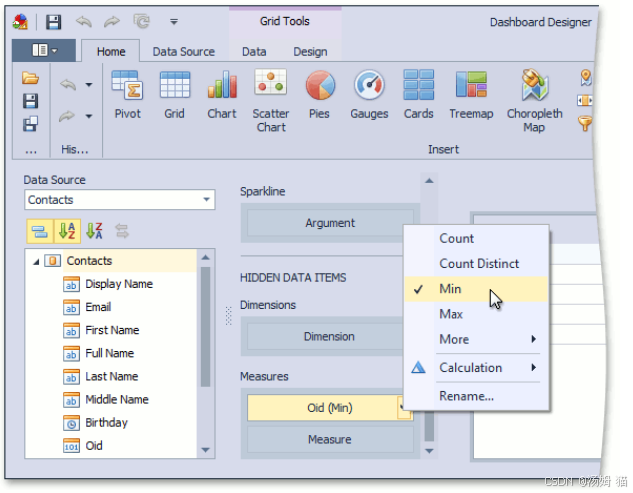
- Add a key property to the hidden measures of a Dashboard and set its summary type to Min or Max. The key property in this example is Oid.
为仪表板的隐藏度量添加一个键属性,并将其汇总类型设置为最小值或最大值。在此示例中,键属性为Oid。
-
Add a View Controller to the WinForms module project (MySolution.Module.Win). If your solution does not contain this project, add the Controller to the WinForms application project (MySolution.Win).
向WinForms模块项目(MySolution.Module.Win)添加视图控制器。如果您的解决方案中没有此项目,请将控制器添加到WinForms应用程序项目(MySolution.Win)中。 -
Access the WinDashboardViewerViewItem, as described in the How to: Access the Dashboard Control topic.
如“如何:访问仪表板控件”主题中所述,访问 WinDashboardViewerViewItem。 -
In the ViewItem.ControlCreated event handler, subscribe to the DashboardViewer.DashboardItemControlCreated event.
在ViewItem.ControlCreated事件处理程序中,订阅DashboardViewer.DashboardItemControlCreated事件。 -
In the DashboardItemControlCreated event handler, access the DashboardViewer and subscribe to the DashboardViewer.DashboardItemDoubleClick event.
在DashboardItemControlCreated事件处理程序中,访问DashboardViewer并订阅DashboardViewer.DashboardItemDoubleClick事件。 -
In the DashboardItemDoubleClick event handler, get the key property value using the DashboardItemMouseActionEventArgs arguments.
在仪表板项双击事件处理程序中,使用DashboardItemMouseActionEventArgs参数获取键属性值。 -
Add a ParametrizedAction to the Controller and force its execution in the DashboardItemDoubleClick event handler. The Action in the example is invisible because its category (“Dashboard”) does not match any existing Action Container. However, you still can execute it in code using the DoExecute method.
向控制器添加一个参数化操作,并在仪表板项双击事件处理程序中强制执行该操作。示例中的操作是不可见的,因为其类别(“仪表板”)与任何现有操作容器都不匹配。但是,您仍然可以使用 DoExecute 方法在代码中执行它。 -
In the ParametrizedAction.Execute event handler, create a new Object Space and find the clicked object using the IObjectSpace.FirstOrDefault method.
在参数化操作的执行事件处理程序中,创建一个新的对象空间,并使用IObjectSpace.FirstOrDefault方法查找被点击的对象。 -
Pass the found object to the XafApplication.CreateDetailView method to create a Detail View.
将找到的对象传递给XafApplication.CreateDetailView方法以创建一个明细视图。 -
Pass the created Detail View to the ShowViewParameters.CreatedView event argument to display it.
将创建的详细信息视图传递给 ShowViewParameters.CreatedView 事件参数以显示它。
WinShowDetailViewFromDashboardController.cs
using DevExpress.DashboardCommon;
using DevExpress.DashboardCommon.ViewerData;
using DevExpress.DashboardWin;
using DevExpress.Data.Filtering;
using DevExpress.ExpressApp;
using DevExpress.ExpressApp.Actions;
using DevExpress.ExpressApp.Dashboards.Win;
using DevExpress.Persistent.Base;
using ShowDetailViewFromDashboard.Module.BusinessObjects;
using System;
using System.Linq;
// ...
public class WinShowDetailViewFromDashboardController : ObjectViewController<DetailView, IDashboardData>
{
    private ParametrizedAction openDetailViewAction;

    protected override void OnActivated()
    {
        base.OnActivated();
        WinDashboardViewerViewItem dashboardViewerViewItem = View.FindItem("DashboardViewer") as WinDashboardViewerViewItem;
        if (dashboardViewerViewItem != null)
        {
            if (dashboardViewerViewItem.Viewer != null)
            {
                dashboardViewerViewItem.Viewer.DashboardItemDoubleClick += Viewer_DashboardItemDoubleClick;
            }
            dashboardViewerViewItem.ControlCreated += DashboardViewerViewItem_ControlCreated;
        }
    }

    private void DashboardViewerViewItem_ControlCreated(object sender, EventArgs e)
    {
        WinDashboardViewerViewItem dashboardViewerViewItem = sender as WinDashboardViewerViewItem;
        dashboardViewerViewItem.Viewer.DashboardItemDoubleClick += Viewer_DashboardItemDoubleClick;
    }
    private bool IsGridDashboardItem(Dashboard dashboard, string dashboardItemName)
    {
        DashboardItem dashboardItem = dashboard.Items.SingleOrDefault(item => item.ComponentName == dashboardItemName);
        return dashboardItem is GridDashboardItem;
    }
    private static string GetOid(DashboardItemMouseActionEventArgs e)
    {
        MultiDimensionalData data = e.Data.GetSlice(e.GetAxisPoint());
        MeasureDescriptor descriptor = data.GetMeasures().SingleOrDefault(item => item.DataMember == "Oid");
        MeasureValue measureValue = data.GetValue(descriptor);
        return measureValue.Value.ToString();
    }
    private void Viewer_DashboardItemDoubleClick(object sender, DashboardItemMouseActionEventArgs e)
    {
        Dashboard dashboard = ((DashboardViewer)sender).Dashboard;

        if (IsGridDashboardItem(dashboard, e.DashboardItemName) &&
            openDetailViewAction.Enabled && openDetailViewAction.Active)
        {
            openDetailViewAction.DoExecute(GetOid(e));
        }
    }

    private void OpenDetailViewAction_Execute(object sender, ParametrizedActionExecuteEventArgs e)
    {
        IObjectSpace objectSpace = Application.CreateObjectSpace(typeof(Contact));
        Contact contact = objectSpace.FirstOrDefault<Contact>(c => c.Oid == e.ParameterCurrentValue.ToString();
        if (contact != null)
        {
            e.ShowViewParameters.CreatedView = Application.CreateDetailView(objectSpace, contact, View);
        }
    }

    protected override void OnDeactivated()
    {
        WinDashboardViewerViewItem dashboardViewerViewItem = View.FindItem("DashboardViewer") as WinDashboardViewerViewItem;
        if (dashboardViewerViewItem != null)
        {
            dashboardViewerViewItem.ControlCreated -= DashboardViewerViewItem_ControlCreated;
        }
        base.OnDeactivated();
    }
    public WinShowDetailViewFromDashboardController()
    {
        openDetailViewAction = new ParametrizedAction(this, "Dashboard_OpenDetailView", "Dashboard", typeof(string));
        openDetailViewAction.Caption = "OpenDetailView";
        openDetailViewAction.SelectionDependencyType = SelectionDependencyType.RequireSingleObject;
        openDetailViewAction.Execute += OpenDetailViewAction_Execute;
    }
}
ASP.NET Web Forms Example(ASP.NET Web Forms示例)
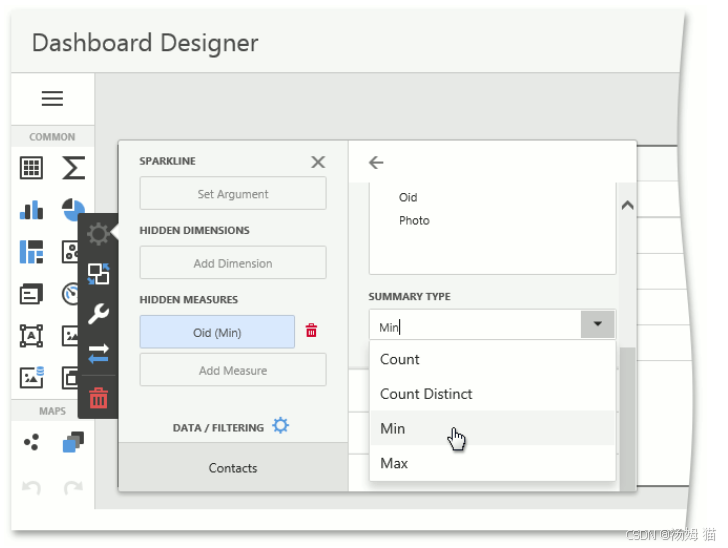
- Add a key property to the hidden measures of a Dashboard and set its summary type to Min or Max. The key property in this example is Oid.
为仪表板的隐藏度量添加一个键属性,并将其汇总类型设置为“最小值”或“最大值”。在此示例中,键属性为Oid。
-
Add a View Controller to the ASP.NET Web Forms module project.
向ASP.NET Web Forms模块项目添加一个视图控制器。 -
Access the WebDashboardViewerViewItem, as described in the How to: Access the Dashboard Control topic.
如“如何:访问仪表板控件”主题中所述,访问 WebDashboardViewerViewItem。 -
Add a handler to the client-side ASPxClientDashboard.ItemClick event.
向客户端 ASPxClientDashboard.ItemClick 事件添加一个处理程序。 -
In this event handler, get the key property value using the ASPxClientDashboardItemClickEventArgs arguments.
在此事件处理程序中,使用 ASPxClientDashboardItemClickEventArgs 参数获取键属性值。 -
Generate a callback on the client side (in the ASPxClientDashboard item click handler) and process it on the server side (see Custom UI Logic Using Client-Side Events and Server-Side Callbacks (ASP.NET Web Forms)).
在客户端(在ASPxClientDashboard项单击处理程序中)生成回调,并在服务器端对其进行处理(请参阅“使用客户端事件和服务器端回调的自定义用户界面逻辑(ASP.NET Web Forms)”)。 -
Add a ParametrizedAction to the Controller and force its execution in the IXafCallbackHandler.ProcessAction method implementation. The Action in the example is invisible because its category (“Dashboard”) does not match any existing Action Container. However, you still can execute it in code using the DoExecute method.
向控制器添加一个参数化操作,并在IXafCallbackHandler.ProcessAction方法实现中强制执行该操作。示例中的操作是不可见的,因为其类别(“仪表板”)与任何现有操作容器都不匹配。但是,你仍然可以使用DoExecute方法在代码中执行它。 -
In the ParametrizedAction.Execute event handler, create a new Object Space and find the clicked object using the IObjectSpace.FirstOrDefault method.
在参数化操作的执行事件处理程序中,创建一个新的对象空间,并使用IObjectSpace.FirstOrDefault方法查找被点击的对象。 -
Pass the found object to the XafApplication.CreateDetailView method to create a Detail View.
将找到的对象传递给XafApplication.CreateDetailView方法以创建一个详细视图。 -
Pass the created Detail View to the ShowViewParameters.CreatedView event argument to display it.
将创建的详细信息视图传递给 ShowViewParameters.CreatedView 事件参数以显示它。
WebShowDetailViewFromDashboardController.cs
using DevExpress.DashboardWeb;
using DevExpress.Data.Filtering;
using DevExpress.ExpressApp;
using DevExpress.ExpressApp.Actions;
using DevExpress.ExpressApp.Dashboards.Web;
using DevExpress.ExpressApp.Web;
using DevExpress.ExpressApp.Web.Templates;
using DevExpress.Persistent.Base;
using ShowDetailViewFromDashboard.Module.BusinessObjects;
using System;
// ...
public class WebShowDetailViewFromDashboardController : ObjectViewController<DetailView, IDashboardData>, IXafCallbackHandler
{
    private const string HandlerName = "WebShowDetailViewFromDashboardController";
    private ParametrizedAction openDetailViewAction;

    protected override void OnActivated()
    {
        base.OnActivated();
        WebDashboardViewerViewItem dashboardViewerViewItem = View.FindItem("DashboardViewer") as WebDashboardViewerViewItem;
        if (dashboardViewerViewItem != null)
        {
            if (dashboardViewerViewItem.DashboardDesigner != null)
            {
                CustomizeDashboardViewer(dashboardViewerViewItem.DashboardDesigner);
            }
            dashboardViewerViewItem.ControlCreated += DashboardViewerViewItem_ControlCreated;
        }
    }
    private void DashboardViewerViewItem_ControlCreated(object sender, EventArgs e)
    {
        WebDashboardViewerViewItem dashboardViewerViewItem = sender as WebDashboardViewerViewItem;
        CustomizeDashboardViewer(dashboardViewerViewItem.DashboardDesigner);
    }
    private void CustomizeDashboardViewer(ASPxDashboard dashboardControl)
    {
        XafCallbackManager callbackManager = ((ICallbackManagerHolder)WebWindow.CurrentRequestPage).CallbackManager;
        callbackManager.RegisterHandler(HandlerName, this);
        string widgetScript = @"function getOid(s, e) {{
                                    function findMeasure(measure) {{
                                        return measure.DataMember === 'Oid';
                                    }}
                                    if (e.ItemName.includes('gridDashboardItem')) {{
                                            var itemData = e.GetData(),
                                            dataSlice = itemData.GetSlice(e.GetAxisPoint()),
                                            oidMeasure = dataSlice.GetMeasures().find(findMeasure).Id,
                                            measureValue = dataSlice.GetMeasureValue(oidMeasure);
                                            {0}
                                    }}
                                }}";
        dashboardControl.ClientSideEvents.ItemClick = string.Format(widgetScript, callbackManager.GetScript(HandlerName, "measureValue.GetValue()"));
    }
    public void ProcessAction(string parameter)
    {
        openDetailViewAction.DoExecute(parameter);
    }
    private void OpenDetailViewAction_Execute(object sender, ParametrizedActionExecuteEventArgs e)
    {
        IObjectSpace objectSpace = Application.CreateObjectSpace(typeof(Contact));
        Contact contact = objectSpace.FirstOrDefault<Contact>(c => c.Oid == e.ParameterCurrentValue.ToString();
        if (contact != null)
        {
            e.ShowViewParameters.CreatedView = Application.CreateDetailView(objectSpace, contact, View);
        }
    }


    protected override void OnDeactivated()
    {
        WebDashboardViewerViewItem dashboardViewerViewItem = View.FindItem("DashboardViewer") as WebDashboardViewerViewItem;
        if (dashboardViewerViewItem != null)
        {
            dashboardViewerViewItem.ControlCreated -= DashboardViewerViewItem_ControlCreated;
        }
        base.OnDeactivated();
    }
    public WebShowDetailViewFromDashboardController()
    {
        openDetailViewAction = new ParametrizedAction(this, "Dashboard_OpenDetailView", "Dashboard", typeof(string));
        openDetailViewAction.Caption = "OpenDetailView";
        openDetailViewAction.SelectionDependencyType = SelectionDependencyType.RequireSingleObject;
        openDetailViewAction.Execute += OpenDetailViewAction_Execute;
    }
}

有“AI”的1024 = 2048,欢迎大家加入2048 AI社区
更多推荐

 12
12 0
0- 0


 已为社区贡献11条内容

所有评论(0)