学习019-01-02-03 Open a Detail View When the Grid Row is Clicked in the Dashboard (Blazor)(在仪表板中(Blazo
Blazor仪表板网格行点击打开详情视图实现方案 本方案实现了在Blazor应用中点击仪表板网格行时打开对应业务对象详情视图的功能,主要包含三个部分: 仪表板隐藏度量:通过添加Oid键属性并设置汇总类型,建立网格行与业务对象的关联 客户端脚本: 处理行点击事件,获取被点击对象的ID 通过DotNetInvokable方法将ID传递给服务器端 服务器端控制器: 注册JS可调用方法 根据接收的ID打开
*Open a Detail View When the Grid Row is Clicked in the Dashboard (Blazor)(*在仪表板中(Blazor)单击网格行时打开详细信息视图)
This topic describes how to invoke a Detail View when a user clicks a row in GridDashboardItem. In the invoked Detail View, a user can view or edit a business object corresponding to the clicked row.
本主题介绍了用户在 GridDashboardItem 中单击某一行时如何调用明细视图。在调用的明细视图中,用户可以查看或编辑与所单击行对应的业务对象。
This example consists of the following parts:
这个例子由以下部分组成:
-
Dashboard Hidden Measure(仪表板隐藏度量)
Allows you to get an identifier of an object displayed in a clicked row.
允许你获取在点击行中显示的对象的标识符。 -
Client-Side Script(客户端脚本)
Handles row clicks and delegates Detail View invocation to the server side.
处理行点击操作,并将详情视图调用委托给服务器端。 -
Server-Side Controller(服务器端控制器)
Registers a reference to itself on the client side and opens the Detail View.
在客户端注册对自身的引用并打开详细信息视图。
Add a Dashboard Hidden Measure(添加一个仪表板隐藏度量)
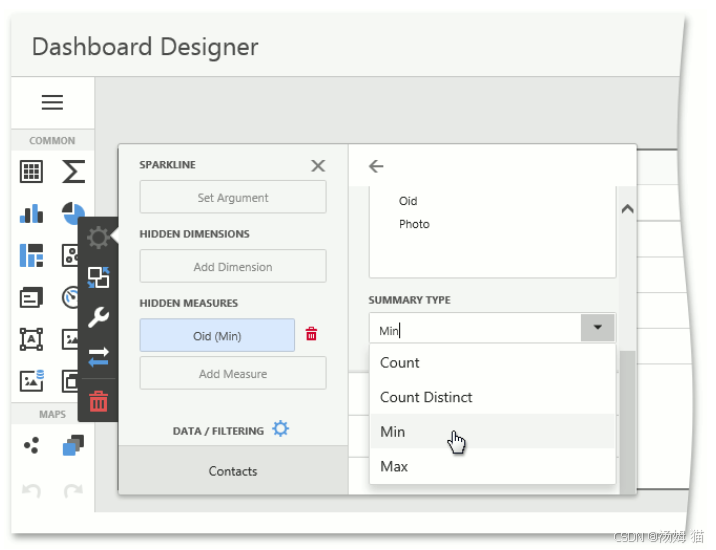
Add a key property to the Dashboard hidden measures and set the summary type to Min or Max. The key property in this example is Oid. Since Oid values are unique in the underlying dataset, the Min or Max function generates a list of identifiers that are unique within the aggregated data. This associates each row with Oid of the underlying object.
为仪表板隐藏度量添加一个键属性,并将汇总类型设置为“最小值”或“最大值”。在此示例中,键属性为Oid。由于Oid值在基础数据集中是唯一的,“最小值”或“最大值”函数会生成一个在聚合数据中唯一的标识符列表。这会将每一行与基础对象的Oid相关联。
Create a Client-Side Script(创建一个客户端脚本)
In your Blazor application project (MySolution.Blazor.Server), add a new JavaScript file to the wwwroot/js folder. In this file, declare an object (customScript) and implement the following methods in it:
在你的Blazor应用程序项目(MySolution.Blazor.Server)中,向wwwroot/js文件夹添加一个新的JavaScript文件。在这个文件中,声明一个对象(customScript)并在其中实现以下方法:
registerController
Stores a reference to the server-side Controller that calls this method.
存储对调用此方法的服务器端控制器的引用。
processItemClick
A callback that retrieves the ID of the object clicked in the Dashboard grid item and passes this ID to the server-side Controller’s ShowDetailView method.
一个回调函数,用于获取在仪表板网格项中点击的对象的ID,并将此ID传递给服务器端控制器的ShowDetailView方法。
onBeforeRender
Registers processItemClick as a callback that the Dashboard control invokes when a user clicks a grid row.
注册 processItemClick 作为回调,当用户点击网格行时,仪表板控件会调用该回调。
File: MySolution.Blazor.Server\wwwroot\js\customScript.js.
JavaScript
"use strict";

globalThis.customScript = {
    showDetailViewController: null,
    onBeforeRender: function (dashboardControl) {
        const viewerApi = dashboardControl.findExtension("viewerApi");
        viewerApi.on("itemClick", globalThis.customScript.processItemClick);
    },
    registerController: function (controller) {
        globalThis.customScript.showDetailViewController = controller;
    },
    processItemClick: function (args) {
        const itemData = args.getData(),
            dataSlice = itemData.getSlice(args.getAxisPoint()),
            oidMeasure = dataSlice.getMeasures().find((measure) => measure.dataMember === 'Oid').id,
            measureValue = dataSlice.getMeasureValue(oidMeasure),
            objectId = measureValue.getValue();
        globalThis.customScript.showDetailViewController.invokeMethodAsync("ShowDetailView", objectId);
    }
}
In the same file, create the globalThis.xafBlazorDashboardUserScripts array if it does not exist and add the customScript object to it. This ensures that the object’s onBeforeRender method is called before the Dashboard control is rendered.
在同一文件中,如果 globalThis.xafBlazorDashboardUserScripts 数组不存在,则创建该数组,并将 customScript 对象添加到其中。这可确保在呈现仪表板控件之前调用该对象的 onBeforeRender 方法。
File: MySolution.Blazor.Server\wwwroot\js\customScript.js.
JavaScript
// ...
if (!globalThis.xafBlazorDashboardUserScripts) {
    globalThis.xafBlazorDashboardUserScripts = [];
}
globalThis.xafBlazorDashboardUserScripts.push(globalThis.customScript);
Reference this script in the _Host.cshtml file in a <script> tag:
在_Host.cshtml文件的<script>标签中引用此脚本:
File: MySolution.Blazor.Server\Pages_Host.cshtml.
CSHTML
<!-- ... -->
<html lang="en">
<!-- ... -->
<body>
    <!-- ... -->
    <script src="_framework/blazor.server.js"></script>
    <script src="js/customScript.js"></script>
    <!-- ... -->
</body>
</html>
Create a Server-Side Controller(创建一个服务器端控制器)
Declare a BlazorShowDetailViewFromDashboardController ObjectViewController<ViewType, ObjectType> with the DetailView and IDashboardData generic parameters in the ASP.NET Core Blazor module project (MySolution.Module.Blazor). If your solution does not contain this project, add this Controller to the application project (MySolution.Blazor.Server). Customize the Controller as outlined below:
在ASP.NET Core Blazor模块项目(MySolution.Module.Blazor)中声明一个带有DetailView和IDashboardData泛型参数的BlazorShowDetailViewFromDashboardController ObjectViewController<ViewType, ObjectType>。如果您的解决方案不包含此项目,请将此控制器添加到应用程序项目(MySolution.Blazor.Server)中。按以下概述自定义控制器:
-
Create a DotNetObjectReference that stores the reference to this Controller.
创建一个存储对该控制器引用的DotNetObjectReference。 -
In the overridden OnActivated method, use the IJSRuntime service to register a reference to this Controller on the client side. To do this, call the customScript.registerController method with this reference.
在重写的 OnActivated 方法中,使用 IJSRuntime 服务在客户端注册对此控制器的引用。为此,使用此引用调用 customScript.registerController 方法。 -
Declare the ShowDetailView method and decorate it with the JSInvokable attribute. This method is called from the client side and opens the Detail View for the clicked object.
声明ShowDetailView方法,并使用JSInvokable特性对其进行修饰。此方法从客户端调用,用于打开被点击对象的详细信息视图。
File:
MySolution.Blazor.Server\Controllers\BlazorShowDetailViewFromDashboardController.cs in solutions without the ASP.NET Core Blazor-specific module project. (在没有特定于ASP.NET Core Blazor的模块项目的解决方案中。)MySolution.Module.Blazor\Controllers\BlazorShowDetailViewFromDashboardController.cs in solutions with the ASP.NET Core Blazor-specific module project.(在使用ASP.NET Core Blazor特定模块项目的解决方案中。)
C#
using System;
using DevExpress.ExpressApp;
using DevExpress.ExpressApp.Blazor;
using DevExpress.Persistent.Base;
using Microsoft.Extensions.DependencyInjection;
using Microsoft.JSInterop;
// ...
public class BlazorShowDetailViewFromDashboardController : ObjectViewController<DetailView, IDashboardData> {
    private IJSRuntime JSRuntime { get; set; }
    private DotNetObjectReference<BlazorShowDetailViewFromDashboardController> controllerReference;
    public BlazorShowDetailViewFromDashboardController() {
        controllerReference = DotNetObjectReference.Create(this);
    }
    protected override void OnActivated() {
        base.OnActivated();
        var application = (BlazorApplication)Application;
        JSRuntime = application.ServiceProvider.GetRequiredService<IJSRuntime>();
        _ = JSRuntime.InvokeVoidAsync("customScript.registerController", controllerReference).Preserve();
    }
    protected override void Dispose(bool disposing) {
        base.Dispose(disposing);
        controllerReference.Dispose();
    }
    [JSInvokable]
    public void ShowDetailView(string oidString) {
        if(!Guid.TryParse(oidString, out var oid)) {
            return;
        }
        var objectSpace = Application.CreateObjectSpace(typeof(Employee));
        var item = objectSpace.FirstOrDefault<Employee>(employee => employee.Oid == oid);
        if(item is not null) {
            var detailView = Application.CreateDetailView(objectSpace, item);
            Frame.SetView(detailView);
        }
        else {
            objectSpace.Dispose();
        }
    }
}

有“AI”的1024 = 2048,欢迎大家加入2048 AI社区
更多推荐

 16
16 0
0- 0


 已为社区贡献11条内容

所有评论(0)