多模态AI技术:跨越感官边界的智能革命
多模态AI技术正在重新定义人机交互的边界,从单一感官到全方位感知,从被动响应到主动创造。随着技术的不断成熟,我们即将迎来一个真正智能化的多模态世界,在这个世界里,AI不仅能理解我们的语言,还能感知我们的视觉世界,聆听我们的声音,甚至创造出超越想象的内容。
·
🎨 多模态AI技术:跨越感官边界的智能革命
🚀 引言:从单一模态到多模态融合,AI正在突破传统感知边界,实现视觉、听觉、语言的深度融合。本文将深入探索多模态AI的核心技术、前沿应用以及未来发展趋势。
📋 目录
🖼️ 文本到图像生成:DALL-E、Midjourney、Stable Diffusion {#文本到图像生成}
🌟 技术革命的起点
文本到图像生成技术代表了AI创造力的重大突破,让机器能够理解自然语言描述并生成相应的视觉内容。
timeline
    title 文本到图像生成发展历程
    2021年1月 : DALL-E 1.0发布
              : 120亿参数
              : GPT-3 + 图像生成
    2022年4月 : DALL-E 2.0
              : 扩散模型架构
              : 分辨率大幅提升
    2022年8月 : Stable Diffusion开源
              : 潜在扩散模型
              : 社区生态爆发
    2023年3月 : Midjourney V5
              : 艺术风格优化
              : 商业化成功
🔬 DALL-E系列:OpenAI的创意引擎
DALL-E 2核心架构:
- CLIP编码器:理解文本语义
- Prior网络:文本到图像特征映射
- 扩散解码器:生成高质量图像
# DALL-E风格的文本到图像生成核心概念
import torch
import torch.nn as nn
from transformers import CLIPTextModel, CLIPTokenizer

class TextToImageGenerator:
    def __init__(self, model_path):
        self.tokenizer = CLIPTokenizer.from_pretrained("openai/clip-vit-base-patch32")
        self.text_encoder = CLIPTextModel.from_pretrained("openai/clip-vit-base-patch32")
        self.diffusion_model = self.load_diffusion_model(model_path)

    def encode_text(self, prompt):
        """将文本提示编码为特征向量"""
        tokens = self.tokenizer(
            prompt,
            padding="max_length",
            max_length=77,
            return_tensors="pt"
        )

        with torch.no_grad():
            text_embeddings = self.text_encoder(tokens.input_ids)[0]

        return text_embeddings

    def generate_image(self, prompt, num_inference_steps=50):
        """根据文本提示生成图像"""
        # 1. 编码文本
        text_embeddings = self.encode_text(prompt)

        # 2. 初始化噪声
        latents = torch.randn((1, 4, 64, 64))

        # 3. 扩散去噪过程
        for step in range(num_inference_steps):
            # 预测噪声
            noise_pred = self.diffusion_model(
                latents,
                step,
                encoder_hidden_states=text_embeddings
            ).sample

            # 去噪步骤
            latents = self.scheduler.step(noise_pred, step, latents).prev_sample

        # 4. 解码为图像
        image = self.vae_decoder(latents)
        return image

# 使用示例
generator = TextToImageGenerator("stable-diffusion-v1-5")
image = generator.generate_image(
    "一只穿着宇航服的猫在月球表面漫步,背景是地球和星空,超现实主义风格"
)
🎨 Midjourney:艺术创作的新范式
核心特色:
- 艺术风格优化:专注于美学质量
- 社区驱动:Discord平台集成
- 迭代优化:V1到V6的持续进化
提示词工程最佳实践:
class PromptEngineer:
    def __init__(self):
        self.style_modifiers = {
            "photography": "shot on Canon EOS R5, 85mm lens, shallow depth of field",
            "digital_art": "digital painting, concept art, trending on ArtStation",
            "anime": "anime style, Studio Ghibli, cel shading",
            "realistic": "photorealistic, hyperdetailed, 8K resolution"
        }

        self.quality_boosters = [
            "masterpiece", "best quality", "highly detailed",
            "professional", "award winning"
        ]

    def craft_prompt(self, subject, style="realistic", mood="neutral"):
        """构建优化的提示词"""
        base_prompt = f"{subject}"

        # 添加风格修饰符
        if style in self.style_modifiers:
            base_prompt += f", {self.style_modifiers[style]}"

        # 添加质量提升词
        quality_terms = ", ".join(self.quality_boosters[:3])
        base_prompt += f", {quality_terms}"

        # 添加情绪描述
        if mood != "neutral":
            base_prompt += f", {mood} atmosphere"

        return base_prompt

# 示例使用
pe = PromptEngineer()
optimized_prompt = pe.craft_prompt(
    "一座未来主义城市",
    style="digital_art",
    mood="cyberpunk"
)
print(f"优化后的提示词: {optimized_prompt}")
⚡ Stable Diffusion:开源生态的力量
技术优势:
- 潜在扩散模型:在低维潜在空间操作,计算效率高
- 开源架构:社区可自由修改和优化
- 可控生成:支持ControlNet等精确控制技术
架构深度解析:
# Stable Diffusion核心组件实现
import torch
import torch.nn as nn
from diffusers import StableDiffusionPipeline, DDIMScheduler

class StableDiffusionCore:
    def __init__(self, model_id="runwayml/stable-diffusion-v1-5"):
        self.pipe = StableDiffusionPipeline.from_pretrained(
            model_id,
            torch_dtype=torch.float16,
            safety_checker=None,
            requires_safety_checker=False
        )

        # 使用DDIM调度器提高生成质量
        self.pipe.scheduler = DDIMScheduler.from_config(
            self.pipe.scheduler.config
        )

    def generate_with_controlnet(self, prompt, control_image, controlnet_type="canny"):
        """使用ControlNet进行精确控制的图像生成"""
        from diffusers import StableDiffusionControlNetPipeline, ControlNetModel

        # 加载ControlNet模型
        controlnet = ControlNetModel.from_pretrained(
            f"lllyasviel/sd-controlnet-{controlnet_type}",
            torch_dtype=torch.float16
        )

        # 创建ControlNet管道
        control_pipe = StableDiffusionControlNetPipeline.from_pretrained(
            "runwayml/stable-diffusion-v1-5",
            controlnet=controlnet,
            torch_dtype=torch.float16
        )

        # 生成图像
        image = control_pipe(
            prompt=prompt,
            image=control_image,
            num_inference_steps=20,
            guidance_scale=7.5,
            controlnet_conditioning_scale=1.0
        ).images[0]

        return image

    def img2img_generation(self, prompt, init_image, strength=0.75):
        """图像到图像的生成"""
        from diffusers import StableDiffusionImg2ImgPipeline

        img2img_pipe = StableDiffusionImg2ImgPipeline.from_pretrained(
            "runwayml/stable-diffusion-v1-5",
            torch_dtype=torch.float16
        )

        image = img2img_pipe(
            prompt=prompt,
            image=init_image,
            strength=strength,
            guidance_scale=7.5
        ).images[0]

        return image

# 高级应用示例
sd_core = StableDiffusionCore()

# 文本到图像
text_prompt = "一幅梵高风格的星空画,包含现代城市天际线"
generated_image = sd_core.pipe(text_prompt).images[0]

# 保存结果
generated_image.save("generated_artwork.png")
🎵 音频AI:语音合成、音乐生成、语音识别 {#音频AI}
🗣️ 语音合成技术演进
语音合成技术经历了从拼接式合成到神经网络合成的重大变革。
🎤 现代语音合成架构
Tacotron 2 + WaveNet架构:
import torch
import torch.nn as nn
import torchaudio
from transformers import SpeechT5Processor, SpeechT5ForTextToSpeech

class AdvancedTTS:
    def __init__(self):
        self.processor = SpeechT5Processor.from_pretrained("microsoft/speecht5_tts")
        self.model = SpeechT5ForTextToSpeech.from_pretrained("microsoft/speecht5_tts")

    def text_to_speech(self, text, speaker_embeddings=None):
        """将文本转换为语音"""
        # 文本预处理
        inputs = self.processor(text=text, return_tensors="pt")

        # 如果没有提供说话人嵌入,使用默认的
        if speaker_embeddings is None:
            speaker_embeddings = torch.zeros((1, 512))  # 默认说话人

        # 生成语音
        with torch.no_grad():
            speech = self.model.generate_speech(
                inputs["input_ids"],
                speaker_embeddings,
                vocoder=None
            )

        return speech

    def voice_cloning(self, text, reference_audio_path):
        """基于参考音频进行语音克隆"""
        # 提取参考音频的说话人特征
        reference_audio, sample_rate = torchaudio.load(reference_audio_path)

        # 这里应该使用专门的说话人编码器
        # 简化示例,实际需要更复杂的特征提取
        speaker_embeddings = self.extract_speaker_features(reference_audio)

        # 使用提取的特征进行语音合成
        synthesized_speech = self.text_to_speech(text, speaker_embeddings)

        return synthesized_speech

    def extract_speaker_features(self, audio):
        """提取说话人特征(简化版本)"""
        # 实际实现需要使用专门的说话人编码器如x-vector
        # 这里返回随机特征作为示例
        return torch.randn(1, 512)

# 使用示例
tts_system = AdvancedTTS()

# 基础文本到语音
text = "欢迎来到多模态AI技术的精彩世界!"
speech_output = tts_system.text_to_speech(text)

# 保存音频文件
torchaudio.save("synthesized_speech.wav", speech_output.unsqueeze(0), 22050)
🎼 AI音乐生成:创造力的新边界
核心技术栈:
- Transformer架构:处理音乐序列
- VAE模型:学习音乐潜在表示
- GAN网络:生成高质量音频
import torch
import torch.nn as nn
import numpy as np
from music21 import stream, note, chord, duration

class MusicTransformer(nn.Module):
    def __init__(self, vocab_size, d_model=512, nhead=8, num_layers=6):
        super().__init__()
        self.d_model = d_model
        self.embedding = nn.Embedding(vocab_size, d_model)
        self.pos_encoding = self.create_positional_encoding(5000, d_model)

        encoder_layer = nn.TransformerEncoderLayer(
            d_model=d_model,
            nhead=nhead,
            dim_feedforward=2048,
            dropout=0.1
        )
        self.transformer = nn.TransformerEncoder(encoder_layer, num_layers)
        self.output_layer = nn.Linear(d_model, vocab_size)

    def create_positional_encoding(self, max_len, d_model):
        """创建位置编码"""
        pe = torch.zeros(max_len, d_model)
        position = torch.arange(0, max_len).unsqueeze(1).float()

        div_term = torch.exp(torch.arange(0, d_model, 2).float() *
                           -(np.log(10000.0) / d_model))

        pe[:, 0::2] = torch.sin(position * div_term)
        pe[:, 1::2] = torch.cos(position * div_term)

        return pe.unsqueeze(0)

    def forward(self, x):
        seq_len = x.size(1)

        # 嵌入 + 位置编码
        x = self.embedding(x) * np.sqrt(self.d_model)
        x = x + self.pos_encoding[:, :seq_len, :]

        # Transformer编码
        x = x.transpose(0, 1)  # (seq_len, batch, d_model)
        x = self.transformer(x)
        x = x.transpose(0, 1)  # (batch, seq_len, d_model)

        # 输出层
        output = self.output_layer(x)
        return output

class AIComposer:
    def __init__(self, model_path=None):
        self.vocab_size = 128  # MIDI音符范围
        self.model = MusicTransformer(self.vocab_size)

        if model_path:
            self.model.load_state_dict(torch.load(model_path))

        self.model.eval()

    def generate_melody(self, seed_notes, length=100, temperature=1.0):
        """生成旋律"""
        generated = seed_notes.copy()

        with torch.no_grad():
            for _ in range(length):
                # 准备输入
                input_tensor = torch.tensor([generated[-50:]]).long()

                # 模型预测
                output = self.model(input_tensor)
                logits = output[0, -1, :] / temperature

                # 采样下一个音符
                probs = torch.softmax(logits, dim=-1)
                next_note = torch.multinomial(probs, 1).item()

                generated.append(next_note)

        return generated

    def notes_to_midi(self, notes, output_path="generated_music.mid"):
        """将音符序列转换为MIDI文件"""
        score = stream.Stream()

        for note_value in notes:
            if note_value == 0:  # 休止符
                rest = note.Rest(duration.Duration(0.5))
                score.append(rest)
            else:
                music_note = note.Note(note_value, duration=duration.Duration(0.5))
                score.append(music_note)

        score.write('midi', fp=output_path)
        return output_path

# 使用示例
composer = AIComposer()

# 种子旋律(C大调音阶)
seed_melody = [60, 62, 64, 65, 67, 69, 71, 72]  # C4到C5

# 生成新旋律
generated_melody = composer.generate_melody(seed_melody, length=64)

# 转换为MIDI文件
midi_file = composer.notes_to_midi(generated_melody)
print(f"生成的音乐已保存为: {midi_file}")
🎧 语音识别:从声音到文字
现代ASR架构演进:
import torch
import torchaudio
from transformers import Wav2Vec2Processor, Wav2Vec2ForCTC
import whisper

class AdvancedASR:
    def __init__(self):
        # Wav2Vec2模型(适合英文)
        self.wav2vec_processor = Wav2Vec2Processor.from_pretrained(
            "facebook/wav2vec2-base-960h"
        )
        self.wav2vec_model = Wav2Vec2ForCTC.from_pretrained(
            "facebook/wav2vec2-base-960h"
        )

        # Whisper模型(多语言支持)
        self.whisper_model = whisper.load_model("base")

    def transcribe_with_wav2vec(self, audio_path):
        """使用Wav2Vec2进行语音识别"""
        # 加载音频
        speech_array, sampling_rate = torchaudio.load(audio_path)

        # 重采样到16kHz
        if sampling_rate != 16000:
            resampler = torchaudio.transforms.Resample(sampling_rate, 16000)
            speech_array = resampler(speech_array)

        # 预处理
        inputs = self.wav2vec_processor(
            speech_array.squeeze().numpy(),
            sampling_rate=16000,
            return_tensors="pt",
            padding=True
        )

        # 推理
        with torch.no_grad():
            logits = self.wav2vec_model(inputs.input_values).logits

        # 解码
        predicted_ids = torch.argmax(logits, dim=-1)
        transcription = self.wav2vec_processor.batch_decode(predicted_ids)[0]

        return transcription

    def transcribe_with_whisper(self, audio_path, language=None):
        """使用Whisper进行多语言语音识别"""
        result = self.whisper_model.transcribe(
            audio_path,
            language=language,
            task="transcribe"
        )

        return {
            "text": result["text"],
            "language": result["language"],
            "segments": result["segments"]
        }

    def real_time_transcription(self, audio_stream):
        """实时语音识别(简化版本)"""
        # 这里需要实现音频流的实时处理
        # 实际应用中需要使用WebRTC或类似技术
        pass

# 使用示例
asr_system = AdvancedASR()

# 使用Wav2Vec2识别英文
english_result = asr_system.transcribe_with_wav2vec("english_audio.wav")
print(f"英文识别结果: {english_result}")

# 使用Whisper识别多语言
multilingual_result = asr_system.transcribe_with_whisper("multilingual_audio.wav")
print(f"多语言识别结果: {multilingual_result['text']}")
print(f"检测到的语言: {multilingual_result['language']}")
🎬 视频AI:视频生成、编辑与理解 {#视频AI}
📹 视频生成技术前沿
视频生成是多模态AI的最具挑战性领域之一,需要同时处理时间一致性、空间连贯性和语义准确性。
🎥 Runway ML与视频生成
import torch
import torch.nn as nn
from diffusers import StableDiffusionPipeline
import cv2
import numpy as np

class VideoGenerator:
    def __init__(self):
        self.image_generator = StableDiffusionPipeline.from_pretrained(
            "runwayml/stable-diffusion-v1-5",
            torch_dtype=torch.float16
        )

    def text_to_video(self, prompt, num_frames=16, fps=8):
        """从文本生成视频(简化版本)"""
        frames = []

        # 为每一帧生成略有不同的提示
        for i in range(num_frames):
            # 添加时间变化的描述
            frame_prompt = f"{prompt}, frame {i+1} of {num_frames}"

            # 生成图像帧
            image = self.image_generator(frame_prompt).images[0]

            # 转换为numpy数组
            frame = np.array(image)
            frames.append(frame)

        return self.create_video_from_frames(frames, fps)

    def image_to_video(self, input_image, motion_prompt, num_frames=16):
        """从图像生成视频动画"""
        frames = [input_image]

        for i in range(1, num_frames):
            # 基于运动提示生成下一帧
            motion_description = f"{motion_prompt}, step {i}"

            # 使用img2img生成下一帧
            next_frame = self.image_generator(
                prompt=motion_description,
                image=frames[-1],
                strength=0.3  # 保持连续性
            ).images[0]

            frames.append(next_frame)

        return self.create_video_from_frames(frames)

    def create_video_from_frames(self, frames, fps=8, output_path="generated_video.mp4"):
        """将帧序列合成为视频"""
        if not frames:
            return None

        # 获取帧尺寸
        height, width = frames[0].shape[:2]

        # 创建视频写入器
        fourcc = cv2.VideoWriter_fourcc(*'mp4v')
        video_writer = cv2.VideoWriter(output_path, fourcc, fps, (width, height))

        # 写入每一帧
        for frame in frames:
            # 确保帧格式正确
            if len(frame.shape) == 3:
                frame_bgr = cv2.cvtColor(frame, cv2.COLOR_RGB2BGR)
            else:
                frame_bgr = frame

            video_writer.write(frame_bgr)

        video_writer.release()
        return output_path

# 高级视频编辑功能
class VideoEditor:
    def __init__(self):
        self.style_transfer_model = self.load_style_transfer_model()

    def load_style_transfer_model(self):
        """加载风格迁移模型"""
        # 这里应该加载实际的风格迁移模型
        # 例如Neural Style Transfer或AdaIN
        return None

    def apply_style_transfer(self, video_path, style_image_path, output_path):
        """对视频应用风格迁移"""
        cap = cv2.VideoCapture(video_path)
        fps = cap.get(cv2.CAP_PROP_FPS)
        width = int(cap.get(cv2.CAP_PROP_FRAME_WIDTH))
        height = int(cap.get(cv2.CAP_PROP_FRAME_HEIGHT))

        # 创建输出视频写入器
        fourcc = cv2.VideoWriter_fourcc(*'mp4v')
        out = cv2.VideoWriter(output_path, fourcc, fps, (width, height))

        # 加载风格图像
        style_image = cv2.imread(style_image_path)

        while True:
            ret, frame = cap.read()
            if not ret:
                break

            # 应用风格迁移(这里需要实际的风格迁移实现)
            styled_frame = self.neural_style_transfer(frame, style_image)

            out.write(styled_frame)

        cap.release()
        out.release()

        return output_path

    def neural_style_transfer(self, content_frame, style_image):
        """神经风格迁移(简化版本)"""
        # 实际实现需要使用预训练的风格迁移模型
        # 这里返回原始帧作为占位符
        return content_frame

    def video_inpainting(self, video_path, mask_path, output_path):
        """视频修复/填充"""
        # 实现视频中物体移除和背景填充
        pass

    def temporal_consistency_enhancement(self, video_path):
        """增强视频时间一致性"""
        # 使用光流和时间滤波提高视频质量
        pass

# 使用示例
video_gen = VideoGenerator()
video_editor = VideoEditor()

# 文本到视频生成
video_prompt = "一只可爱的小猫在花园里追蝴蝶,阳光明媚的下午"
generated_video = video_gen.text_to_video(video_prompt, num_frames=24, fps=12)
print(f"生成的视频保存为: {generated_video}")

# 风格迁移
styled_video = video_editor.apply_style_transfer(
    generated_video,
    "style_reference.jpg",
    "styled_output.mp4"
)
🔍 视频理解与分析
import torch
import torchvision.transforms as transforms
from transformers import VideoMAEForVideoClassification, VideoMAEImageProcessor

class VideoAnalyzer:
    def __init__(self):
        self.processor = VideoMAEImageProcessor.from_pretrained(
            "MCG-NJU/videomae-base-finetuned-kinetics"
        )
        self.model = VideoMAEForVideoClassification.from_pretrained(
            "MCG-NJU/videomae-base-finetuned-kinetics"
        )

    def classify_video_action(self, video_path):
        """视频动作分类"""
        # 加载视频帧
        frames = self.load_video_frames(video_path)

        # 预处理
        inputs = self.processor(frames, return_tensors="pt")

        # 推理
        with torch.no_grad():
            outputs = self.model(**inputs)
            predictions = torch.nn.functional.softmax(outputs.logits, dim=-1)

        # 获取top-5预测
        top5_predictions = torch.topk(predictions, 5)

        results = []
        for i, (score, idx) in enumerate(zip(top5_predictions.values[0], top5_predictions.indices[0])):
            action_label = self.model.config.id2label[idx.item()]
            confidence = score.item()
            results.append({
                "action": action_label,
                "confidence": confidence
            })

        return results

    def load_video_frames(self, video_path, max_frames=16):
        """加载视频帧"""
        cap = cv2.VideoCapture(video_path)
        frames = []

        total_frames = int(cap.get(cv2.CAP_PROP_FRAME_COUNT))
        frame_indices = np.linspace(0, total_frames-1, max_frames, dtype=int)

        for idx in frame_indices:
            cap.set(cv2.CAP_PROP_POS_FRAMES, idx)
            ret, frame = cap.read()
            if ret:
                frame_rgb = cv2.cvtColor(frame, cv2.COLOR_BGR2RGB)
                frames.append(frame_rgb)

        cap.release()
        return frames

    def extract_video_features(self, video_path):
        """提取视频特征向量"""
        frames = self.load_video_frames(video_path)
        inputs = self.processor(frames, return_tensors="pt")

        with torch.no_grad():
            # 获取最后一层隐藏状态作为特征
            outputs = self.model(**inputs, output_hidden_states=True)
            features = outputs.hidden_states[-1].mean(dim=1)  # 平均池化

        return features.squeeze().numpy()

    def video_similarity(self, video1_path, video2_path):
        """计算两个视频的相似度"""
        features1 = self.extract_video_features(video1_path)
        features2 = self.extract_video_features(video2_path)

        # 计算余弦相似度
        similarity = np.dot(features1, features2) / (
            np.linalg.norm(features1) * np.linalg.norm(features2)
        )

        return similarity

# 使用示例
analyzer = VideoAnalyzer()

# 视频动作分类
action_results = analyzer.classify_video_action("sample_video.mp4")
print("检测到的动作:")
for result in action_results:
    print(f"  {result['action']}: {result['confidence']:.3f}")

# 视频相似度计算
similarity_score = analyzer.video_similarity("video1.mp4", "video2.mp4")
print(f"视频相似度: {similarity_score:.3f}")
🔄 跨模态学习与融合技术 {#跨模态学习与融合技术}
🌐 多模态融合的核心挑战
跨模态学习旨在让AI系统能够理解和处理来自不同感官通道的信息,实现真正的多模态智能。
🧠 CLIP:视觉-语言理解的突破
import torch
import torch.nn as nn
from transformers import CLIPModel, CLIPProcessor
from PIL import Image
import requests

class MultiModalCLIP:
    def __init__(self, model_name="openai/clip-vit-base-patch32"):
        self.model = CLIPModel.from_pretrained(model_name)
        self.processor = CLIPProcessor.from_pretrained(model_name)

    def encode_text(self, texts):
        """编码文本为特征向量"""
        inputs = self.processor(text=texts, return_tensors="pt", padding=True)

        with torch.no_grad():
            text_features = self.model.get_text_features(**inputs)
            # L2归一化
            text_features = text_features / text_features.norm(dim=-1, keepdim=True)

        return text_features

    def encode_image(self, images):
        """编码图像为特征向量"""
        inputs = self.processor(images=images, return_tensors="pt")

        with torch.no_grad():
            image_features = self.model.get_image_features(**inputs)
            # L2归一化
            image_features = image_features / image_features.norm(dim=-1, keepdim=True)

        return image_features

    def compute_similarity(self, images, texts):
        """计算图像和文本的相似度"""
        image_features = self.encode_image(images)
        text_features = self.encode_text(texts)

        # 计算余弦相似度
        similarity = torch.matmul(image_features, text_features.T)

        return similarity

    def zero_shot_classification(self, image, candidate_labels):
        """零样本图像分类"""
        # 构建分类提示
        text_prompts = [f"a photo of a {label}" for label in candidate_labels]

        # 计算相似度
        similarity = self.compute_similarity([image], text_prompts)

        # 应用softmax获得概率分布
        probabilities = torch.softmax(similarity * 100, dim=-1)

        # 返回结果
        results = []
        for i, label in enumerate(candidate_labels):
            results.append({
                "label": label,
                "probability": probabilities[0][i].item()
            })

        return sorted(results, key=lambda x: x["probability"], reverse=True)

    def image_search(self, query_text, image_database):
        """基于文本查询搜索图像"""
        # 编码查询文本
        query_features = self.encode_text([query_text])

        # 编码图像数据库
        image_features = self.encode_image(image_database)

        # 计算相似度
        similarities = torch.matmul(query_features, image_features.T)

        # 排序并返回最相似的图像索引
        sorted_indices = torch.argsort(similarities[0], descending=True)

        return sorted_indices.tolist()

# 使用示例
clip_model = MultiModalCLIP()

# 加载示例图像
image_url = "https://example.com/cat.jpg"
image = Image.open(requests.get(image_url, stream=True).raw)

# 零样本分类
labels = ["cat", "dog", "bird", "car", "tree"]
classification_results = clip_model.zero_shot_classification(image, labels)

print("零样本分类结果:")
for result in classification_results:
    print(f"  {result['label']}: {result['probability']:.3f}")
🎭 DALL-E与多模态生成
class MultiModalGenerator:
    def __init__(self):
        self.clip_model = MultiModalCLIP()
        self.text_generator = self.load_text_generator()
        self.image_generator = self.load_image_generator()

    def load_text_generator(self):
        """加载文本生成模型"""
        from transformers import GPT2LMHeadModel, GPT2Tokenizer

        tokenizer = GPT2Tokenizer.from_pretrained("gpt2")
        model = GPT2LMHeadModel.from_pretrained("gpt2")

        return {"model": model, "tokenizer": tokenizer}

    def load_image_generator(self):
        """加载图像生成模型"""
        from diffusers import StableDiffusionPipeline

        return StableDiffusionPipeline.from_pretrained(
            "runwayml/stable-diffusion-v1-5",
            torch_dtype=torch.float16
        )

    def image_to_text(self, image, max_length=50):
        """图像描述生成"""
        # 使用CLIP获取图像特征
        image_features = self.clip_model.encode_image([image])

        # 这里需要一个专门的图像描述模型
        # 简化示例,实际需要使用BLIP或类似模型

        # 候选描述
        candidate_descriptions = [
            "a beautiful landscape with mountains",
            "a cute animal in nature",
            "a person doing an activity",
            "an object on a table",
            "a building or architecture"
        ]

        # 找到最匹配的描述
        similarities = self.clip_model.compute_similarity([image], candidate_descriptions)
        best_match_idx = torch.argmax(similarities)

        return candidate_descriptions[best_match_idx]

    def text_to_image_to_text(self, initial_text):
        """文本→图像→文本的循环生成"""
        # 1. 文本生成图像
        generated_image = self.image_generator(initial_text).images[0]

        # 2. 图像生成描述
        image_description = self.image_to_text(generated_image)

        # 3. 基于描述生成新文本
        tokenizer = self.text_generator["tokenizer"]
        model = self.text_generator["model"]

        input_ids = tokenizer.encode(image_description, return_tensors="pt")

        with torch.no_grad():
            output = model.generate(
                input_ids,
                max_length=input_ids.shape[1] + 30,
                num_return_sequences=1,
                temperature=0.7,
                do_sample=True
            )

        generated_text = tokenizer.decode(output[0], skip_special_tokens=True)

        return {
            "original_text": initial_text,
            "generated_image": generated_image,
            "image_description": image_description,
            "final_text": generated_text
        }

    def multimodal_reasoning(self, image, question):
        """多模态推理:基于图像回答问题"""
        # 获取图像和问题的特征
        image_features = self.clip_model.encode_image([image])
        question_features = self.clip_model.encode_text([question])

        # 计算相关性
        relevance = torch.matmul(image_features, question_features.T)

        # 基于相关性生成答案(简化版本)
        if relevance > 0.3:
            answer = "基于图像内容,这个问题的答案是肯定的。"
        else:
            answer = "基于图像内容,无法确定答案。"

        return {
            "question": question,
            "answer": answer,
            "confidence": relevance.item()
        }

# 使用示例
multimodal_gen = MultiModalGenerator()

# 多模态循环生成
result = multimodal_gen.text_to_image_to_text(
    "一座神秘的古堡在月光下闪闪发光"
)

print(f"原始文本: {result['original_text']}")
print(f"图像描述: {result['image_description']}")
print(f"生成文本: {result['final_text']}")

# 多模态推理
reasoning_result = multimodal_gen.multimodal_reasoning(
    result['generated_image'],
    "这张图片中有建筑物吗?"
)

print(f"\n推理结果: {reasoning_result['answer']}")
print(f"置信度: {reasoning_result['confidence']:.3f}")
🔗 跨模态注意力机制
class CrossModalAttention(nn.Module):
    def __init__(self, d_model, num_heads=8):
        super().__init__()
        self.d_model = d_model
        self.num_heads = num_heads
        self.head_dim = d_model // num_heads

        self.q_linear = nn.Linear(d_model, d_model)
        self.k_linear = nn.Linear(d_model, d_model)
        self.v_linear = nn.Linear(d_model, d_model)
        self.out_linear = nn.Linear(d_model, d_model)

        self.dropout = nn.Dropout(0.1)

    def forward(self, query_modality, key_value_modality, mask=None):
        batch_size = query_modality.size(0)

        # 线性变换
        Q = self.q_linear(query_modality)
        K = self.k_linear(key_value_modality)
        V = self.v_linear(key_value_modality)

        # 重塑为多头格式
        Q = Q.view(batch_size, -1, self.num_heads, self.head_dim).transpose(1, 2)
        K = K.view(batch_size, -1, self.num_heads, self.head_dim).transpose(1, 2)
        V = V.view(batch_size, -1, self.num_heads, self.head_dim).transpose(1, 2)

        # 计算注意力
        attention_scores = torch.matmul(Q, K.transpose(-2, -1)) / np.sqrt(self.head_dim)

        if mask is not None:
            attention_scores = attention_scores.masked_fill(mask == 0, -1e9)

        attention_weights = torch.softmax(attention_scores, dim=-1)
        attention_weights = self.dropout(attention_weights)

        # 应用注意力权重
        attended_values = torch.matmul(attention_weights, V)

        # 重塑并通过输出层
        attended_values = attended_values.transpose(1, 2).contiguous().view(
            batch_size, -1, self.d_model
        )

        output = self.out_linear(attended_values)

        return output, attention_weights

class MultiModalTransformer(nn.Module):
    def __init__(self, d_model=512, num_heads=8, num_layers=6):
        super().__init__()
        self.d_model = d_model

        # 模态特定编码器
        self.text_encoder = nn.TransformerEncoder(
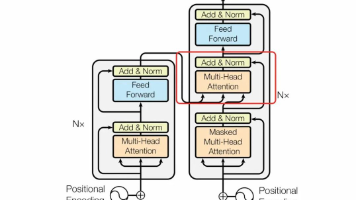
            nn.TransformerEncoderLayer(d_model, num_heads),
            num_layers
        )

        self.image_encoder = nn.TransformerEncoder(
            nn.TransformerEncoderLayer(d_model, num_heads),
            num_layers
        )

        # 跨模态注意力层
        self.cross_attention_layers = nn.ModuleList([
            CrossModalAttention(d_model, num_heads) for _ in range(num_layers)
        ])

        # 融合层
        self.fusion_layer = nn.MultiheadAttention(d_model, num_heads)
        self.output_projection = nn.Linear(d_model, d_model)

    def forward(self, text_features, image_features):
        # 模态内编码
        text_encoded = self.text_encoder(text_features)
        image_encoded = self.image_encoder(image_features)

        # 跨模态注意力
        text_to_image, _ = self.cross_attention_layers[0](text_encoded, image_encoded)
        image_to_text, _ = self.cross_attention_layers[1](image_encoded, text_encoded)

        # 特征融合
        fused_features = torch.cat([text_to_image, image_to_text], dim=1)

        # 最终融合
        fused_output, _ = self.fusion_layer(
            fused_features, fused_features, fused_features
        )

        output = self.output_projection(fused_output)

        return output

# 使用示例
multimodal_transformer = MultiModalTransformer()

# 模拟输入
text_features = torch.randn(1, 50, 512)  # (batch, seq_len, d_model)
image_features = torch.randn(1, 196, 512)  # (batch, patches, d_model)

# 前向传播
fused_output = multimodal_transformer(text_features, image_features)
print(f"融合输出形状: {fused_output.shape}")
🌟 结语:多模态AI技术正在重新定义人机交互的边界,从单一感官到全方位感知,从被动响应到主动创造。随着技术的不断成熟,我们即将迎来一个真正智能化的多模态世界,在这个世界里,AI不仅能理解我们的语言,还能感知我们的视觉世界,聆听我们的声音,甚至创造出超越想象的内容。
技术的进步永无止境,让我们一起见证多模态AI技术的精彩未来! 🚀✨

有“AI”的1024 = 2048,欢迎大家加入2048 AI社区
更多推荐

 13
13 0
0- 0


 已为社区贡献4条内容

所有评论(0)