学习018-01-12-04 How to: Access the Report Preview Controls (ASP.NET Web Forms)(如何:访问报表预览控件(ASP.NET We
本文介绍了如何在ASP.NET Web Forms XAF应用程序中访问报表预览控件。文章提供了两种不同报表查看器类型(HTML5和ASP)的代码示例,演示如何通过创建控制器来访问ASPxWebDocumentViewer或ASPxDocumentViewer控件。方法包括设置目标视图ID(ReportViewer_DetailView_V2),获取报表查看器视图项,并处理其ControlCrea
How to: Access the Report Preview Controls (ASP.NET Web Forms)(如何:访问报表预览控件(ASP.NET Web 窗体))
This example demonstrates how to access the ASPxWebDocumentViewer control used to display reports in ASP.NET Web Forms XAF applications.
此示例演示了如何在ASP.NET Web Forms XAF应用程序中访问用于显示报表的ASPxWebDocumentViewer控件。
In this topic, it is assumed that you have an XAF application that uses the Reports V2 Module, and you have created one or more reports (see Reports V2 Module Overview).
在本主题中,假设您有一个使用报表V2模块的XAF应用程序,并且您已经创建了一个或多个报表(请参阅报表V2模块概述)。
When a user previews a report in an ASP.NET Web Forms XAF application, a Detail View is displayed in a popup or main window (depending on the ReportsAspNetModuleV2.DesignAndPreviewDisplayMode value). This Detail View contains a single View Item which creates a web control used to display a report. The particular View Item and control types depend on the ReportsAspNetModuleV2.ReportViewerType property value (HTML5 or ASP).
当用户在ASP.NET Web Forms XAF应用程序中预览报表时,将在弹出窗口或主窗口中显示详细信息视图(具体取决于ReportsAspNetModuleV2.DesignAndPreviewDisplayMode值)。此详细信息视图包含单个视图项,该视图项创建用于显示报表的Web控件。特定的视图项和控件类型取决于ReportsAspNetModuleV2.ReportViewerType属性值(HTML5或ASP)。
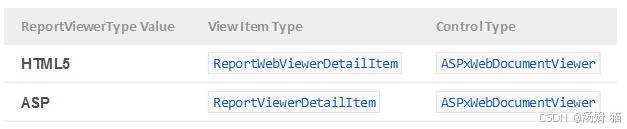
To access this View Item, implement a Controller that targets the ReportViewer_DetailView_V2 Detail View (this Detail View identifier is specified via the ReportsAspNetModuleV2.ReportViewDetailViewWebName constant). Pass the View Item type as the generic parameter of the CompositeView.GetItems method. The first element of the returned list will be the required View Item, because there is a single report viewer item in the View. Then, you can handle the View Item’s ViewItem.ControlCreated event and use the ReportViewer property to access the ASPxWebDocumentViewer control.
要访问此视图项,请实现一个控制器,该控制器以ReportViewer_DetailView_V2 明细视图为目标(此明细视图标识符通过ReportsAspNetModuleV2.ReportViewDetailViewWebName 常量指定)。将视图项类型作为CompositeView.GetItems 方法的泛型参数传递。返回列表的第一个元素将是所需的视图项,因为视图中只有一个报表查看器项。然后,你可以处理视图项的ViewItem.ControlCreated 事件,并使用ReportViewer 属性来访问ASPxWebDocumentViewer 控件。
Example for an ASPxWebDocumentViewer (ReportViewerType is HTML5)(ASPxWebDocumentViewer(ReportViewerType为HTML5)的示例)
C#
using DevExpress.ExpressApp;
using DevExpress.ExpressApp.ReportsV2.Web;
using DevExpress.ExpressApp.Web.Utils;
// ...
public class CustomizeReportViewerController : ViewController<DetailView> {
    public CustomizeReportViewerController() {
        TargetViewId = ReportsAspNetModuleV2.ReportViewDetailViewWebName;
    }
    protected override void OnActivated() {
        base.OnActivated();
        ReportWebViewerDetailItem reportViewItem = View.GetItems<ReportWebViewerDetailItem>()[0];
        reportViewItem.ControlCreated += (s, e) => {
            // Access client-side events of the ASPxWebDocumentViewer control
            ClientSideEventsHelper.AssignClientHandlerSafe(
                reportViewItem.ReportViewer,
                "Init",
                "function(s, e) { s.previewModel.reportPreview.zoom(0.7); }",
                nameof(CustomizeReportViewerController));
        };
    }
}
Example for an ASPxDocumentViewer (ReportViewerType is ASP)(ASPxDocumentViewer示例(ReportViewerType为ASP))
C#
using DevExpress.ExpressApp;
using DevExpress.ExpressApp.ReportsV2.Web;
// ...
public class CustomizeReportViewerController : ViewController<DetailView> {
    public CustomizeReportViewerController() {
        TargetViewId = ReportsAspNetModuleV2.ReportViewDetailViewWebName;
    }
    protected override void OnActivated() {
        base.OnActivated();
        ReportViewerDetailItem reportViewItem = View.GetItems<ReportViewerDetailItem>()[0];
        reportViewItem.ControlCreated += (s, e) => {
            // Access settings of the ASPxDocumentViewer control
            reportViewItem.ReportViewer.SettingsReportViewer.PageByPage = false;
        };
    }
}
Important
A reference to the DevExpress.XtraReports.v24.1.Web.dll assembly is required to compile these examples.
要编译这些示例,需要引用DevExpress.XtraReports.v24.1.Web.dll程序集。

有“AI”的1024 = 2048,欢迎大家加入2048 AI社区
更多推荐

 21
21 0
0- 0


 已为社区贡献11条内容

所有评论(0)