OpenCV 【十】——Gamma校正 ——图像灰度变化
Gamma校正(C++、OpenCV实现)1.作用:Gamma校正是对输入图像灰度值进行的非线性操作,使输出图像灰度值与输入图像灰度值呈指数关系:伽玛校正由以下幂律表达式定义:2.函数原型void calcHist( const Mat* images, int nimages,const int* channels, InputArra...
Gamma校正(C++、OpenCV实现)
1.作用:
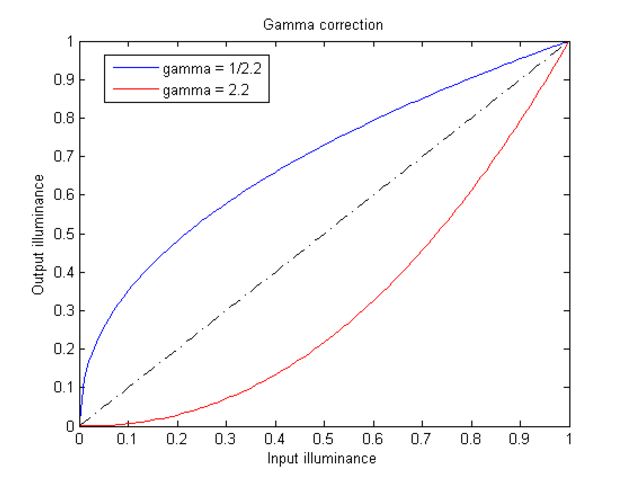
Gamma校正是对输入图像灰度值进行的非线性操作,使输出图像灰度值与输入图像灰度值呈指数关系:
伽玛校正由以下幂律表达式定义:

2.函数原型
void calcHist( const Mat* images, int nimages,
               const int* channels, InputArray mask,
               OutputArray hist, int dims, const int* histSize,
               const float** ranges, bool uniform=true, bool accumulate=false );
//1.输入的图像数组   2.输入数组的个数             3.通道数              4.掩码                5.直方图
//6.直方图维度       7.直方图每个维度的尺寸数组   8.每一维数组的范围    9.直方图是否是均匀   10.累加标志
参数详解:
images:输入的图像的指针,可以是多幅图像,所有的图像必须有同样的深度(CV_8U or CV_32F)。同时一副图像可以有多个channes。
nimages:输入图像的个数
channels:需要统计直方图的第几通道。用来计算直方图的channes的数组。比如输入是2副图像,第一副图像有0,1,2共三个channel,第二幅图像只有0一个channel,那么输入就一共有4个channes,如果int channels[3] = {3, 2, 0},那么就表示是使用第二副图像的第一个通道和第一副图像的第2和第0个通道来计算直方图。
3.实现:
void GetGammaCorrection(Mat& src, Mat& dst, const float fGamma)
{
	unsigned char bin[256];
	for (int i = 0; i < 256; ++i)
	{
		bin[i] = saturate_cast<uchar>(pow((float)(i / 255.0), fGamma) * 255.0f);
	}
	dst = src.clone();
	const int channels = dst.channels();
	switch (channels)
	{
	case 1:
	{
		MatIterator_<uchar> it, end;
		for (it = dst.begin<uchar>(), end = dst.end<uchar>(); it != end; it++)
			*it = bin[(*it)];
		break;
	}
	case 3:
	{
		MatIterator_<Vec3b> it, end;
		for (it = dst.begin<Vec3b>(), end = dst.end<Vec3b>(); it != end; it++)
		{
			(*it)[0] = bin[((*it)[0])];
			(*it)[1] = bin[((*it)[1])];
			(*it)[2] = bin[((*it)[2])];
		}
		break;
	}
	}
}

int main()
{
	Mat image = imread("C:\\Users\\Administrator\\Desktop\\ir\\2ir.bmp");
	if (image.empty())
	{
		cout << "Error: Could not load image" << endl;
		return 0;
	}

	Mat dst;
	float fGamma = 1 / 2.0;
	GetGammaCorrection(image, dst, fGamma);
	imshow("Source Image", image);
	imshow("Dst", dst);
	std::string filename = "C:\\Users\\Administrator\\Desktop\\ir\\dst2ir.bmp";
	cv::imwrite(filename, dst);

	cv::waitKey(0);

	return 0;
}
void GetGammaCorrection(Mat& src, Mat& dst, const float fGamma)
{
	unsigned char bin[256] = {0, 0, 0, 0, 0, 0, 0, 1, 1, 1, 1, 2, 2, 2, 3, 3, 4, 4, 4, 5, 5, 6, 6, 6, 7, 7, 8, 8, 9, 9, 10, 10, 11,
		22, 23, 24, 24, 25, 26, 26, 27, 28, 29, 29, 30, 31, 32, 32, 33, 34, 35, 35, 36, 37, 38, 39, 39, 40, 41, 42, 43, 43, 44, 45, 46, 47,
		64, 65, 66, 67, 68, 69, 70, 71, 72, 73, 74, 75, 76, 77, 78, 79, 80, 81, 82, 83, 84, 85, 86, 87, 88, 89, 90, 91, 92, 93, 94, 96, 97,
		118, 119, 120, 122, 123, 124, 125,  126,  127,  129,  130,  131,  132,  133,  135,  136,  137,  138,  140,  141, 142,  143,  144,  146,  147,  148,  149,  151,  152,  153,  155,  156,  157,
		182,  183,  185,  186,  187,  189,  190,  191,  193,  194,  196,  197,  198,  200,  201,  202,  204,  205,  207,  208,  209,  211,  212,  214,  215,  217,  218,  219,  221,  222,  224,  225,  227,
		11,   12,   12 ,  13,   14,   14,   15,   15,   16,   17,  17,   18,   18,   19,   20,   20,   21,   22,
		48,   49,   49,   50,   51,   52,   53,   54,   55,   56,   57,   57,   58 ,  59,   60,   61,   62,   63,
		98,   99,  100,  101,  102,  103,  104,  105,  107,  108,  109,  110,  111,  112,  113,  115,  116,  117,
		158,  160,  161,  162,  164,  165,  166,  167,  169,  170,  171,  173,  174,  175,  177,  178,  179,  181,
		228,  229,  231,  232,  234,  235,  237,  238,  240,  241,  243 , 244,  246,  247,  249,  250,  252 , 253
	};
	dst = src.clone();
	uchar* ptr = dst.ptr<uchar>(0);
	for (int i = 0; i < 400 * 640; ++i)
	{
		ptr[i] = bin[ptr[i]];
	}
}

int main()
{
	Mat src = imread("C:\\Users\\Administrator\\Desktop\\ir\\ir8_3.bmp", IMREAD_UNCHANGED);
	std::cout<< src.channels()<< std::endl;
	if (src.empty())
	{
		cout << "Error: Could not load image" << endl;
		return 0;
	}

	Mat gamma_dst;
	clock_t start_time, end_time;
	float fGamma = 1 / 1.5;
	start_time = clock();
	for (int i = 0; i < 100; ++i) {
		GetGammaCorrection(src, gamma_dst, fGamma);
	}


	end_time = clock();
	double duration = (double)(end_time - start_time) / CLOCKS_PER_SEC;
	std::cout << "duration = " << duration*1000<< std::endl;

	imshow("Dst", src);
	std::string filename = "C:\\Users\\Administrator\\Desktop\\ir\\gamma_ir8_3.bmp";
	cv::imwrite(filename, src);

	cv::waitKey(0);
	return 0;
}
4.效果
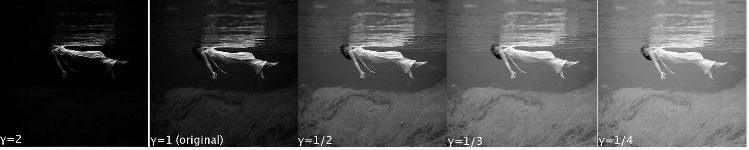
未经gamma校正和经过gamma校正保存图像信息如图:
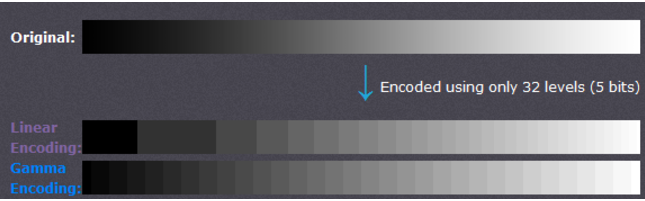
能够观察到,未经gamma校正的情况下,低灰度时,有较大范围的灰度值被保存成同一个值,造成信息丢失;同一时候高灰度值时,非常多比較接近的灰度值却被保存成不同的值,造成空间浪费。经过gamma校正后,改善了存储的有效性和效率。
5.原理
6.参考
【1】 http://www.cambridgeincolour.com/tutorials/gamma-correction.htm

有“AI”的1024 = 2048,欢迎大家加入2048 AI社区
更多推荐

 0
0 0
0- 0


 已为社区贡献17条内容

所有评论(0)