3dTile技术研究-概念详述(2)
上篇:3dTile技术研究-概念详述(1)1. Transforms1.1 Tile transforms为了支持局部坐标系,比如,这样位于一个城市tileset中的一个建筑的tileset就可以定义在它自己的局部坐标系中,同样在建筑云中的点云tile可以定义在其自己的坐标系中。每个tile都有一个可选的transform属性。transform属性是一个4x4的仿射矩阵,以列优先顺序存储,它从t
1. Transforms
1.1 Tile transforms
为了支持局部坐标系,比如,这样位于一个城市tileset中的一个建筑的tileset就可以定义在它自己的局部坐标系中,同样在建筑云中的点云tile可以定义在其自己的坐标系中。每个tile都有一个可选的transform属性。
transform属性是一个4x4的仿射矩阵,以列优先顺序存储,它从tile的局部坐标系转换到tile的parent坐标系中,而对于root tile来说就是转换到tileset的坐标系中。
需要将transform应用于
tile.content- Each feature's position.
- Each feature's normal should be transformed by the top-left 3x3 matrix of the inverse-transpose of
transformto account for correct vector transforms when scale is used. content.boundingVolume, except whencontent.boundingVolume.regionis defined, which is explicitly in EPSG:4979 coordinates.
tile.boundingVolume, except whentile.boundingVolume.regionis defined, which is explicitly in EPSG:4979 coordinates.tile.viewerRequestVolume, except whentile.viewerRequestVolume.regionis defined, which is explicitly in EPSG:4979 coordinates.
如是前面博客说的那样,feature、model更多的指基本对象,比如构件。
transform属性不需要作用于geometricError,也就是transform中的缩放因子不需要作用于geometricError,geometricError总以米定义。
当没有定义 transform时,它默认是单位矩阵:
[
1.0, 0.0, 0.0, 0.0,
0.0, 1.0, 0.0, 0.0,
0.0, 0.0, 1.0, 0.0,
0.0, 0.0, 0.0, 1.0
]从每个tile的局部坐标系到tileset的全局坐标系的转换是通过对tileset进行自上而下的遍历,以及通过将child的transform与其parent的进行后乘运算来计算的,就像计算机图形学中的传统场景图或节点层次结构那样。
图形学中的矩阵运算一般都是后乘,即m1 × m2 × point 意味着先将point通过m2进行一次转换,再对结果(仍是一个point)通过m1进行转换,
换一种角度(m1 × m2)× point 并不意味着先将m1作用于point,实际上表达的是先将m2作用于point,再对将m1作用于前述运算的结果。只不过对于数学运算来说是后乘的。
可参考博主的其他文章
1.2 glTF transforms
Batched 3D Model 和 Instanced 3D Model tiles 嵌入了glTF,glTF定义了它自己的节点层次结构并且使用Y-UP的坐标系。所有针对tile格式的转换矩阵包括tile.transform属性须在glTF的矩阵计算后才能应用。
1.2.1 glTF 节点层次结构
首先,glTF节点层次矩阵通过 glTF specification所述的那样被应用。
1.2.2 y-up to z-up
其次,对于3D Tiles与z-up一致的坐标系来说,在运行时必须将glTF从y-up 转换到 z-up。这可以通过将模型绕着x轴旋转π/2弧度来完成。同等的,应用如下的转换矩阵(以行优先方式展示):
[
1.0, 0.0,  0.0, 0.0,
0.0, 0.0, -1.0, 0.0,
0.0, 1.0,  0.0, 0.0,
0.0, 0.0,  0.0, 1.0
]
更广泛的说,转换矩阵的次数是:
- glTF node hierarchy transformations
- glTF y-up to z-up transform
- Any tile format specific transforms.
- Batched 3D Model Feature Table may define
RTC_CENTERwhich is used to translate model vertices. - Instanced 3D Model Feature Table defines per-instance position, normals, and scales. These are used to create per-instance 4x4 affine transform matrices that are applied to each instance.
- Batched 3D Model Feature Table may define
- Tile transform
实现注意项: 当使用本身就是z-up的源数据,比如在 WGS 84 坐标系或是一个局部的z-up坐标系的数据,一个通用的工作流程是:
- Mesh 数据, 包括 positions 和 normals, 不需要修改 - 它们已是z-up的。
- 将root节点的矩阵指定为列优先的从z-up转换到y-up的。这将源数据转换到glTF要求的y-up坐标系中。
- 在运行时,通过上述的矩阵将glTF从y-up转换回z-up。上面的矩阵就被有效的抵消了。
Example glTF root node:
"nodes": [
 {
   "matrix": [1,0,0,0,0,0,-1,0,0,1,0,0,0,0,0,1],
   "mesh": 0,
   "name": "rootNode"
 }
]
1.3 Example
有关tileset的计算转换的示例(在上面的代码中的transformToRoot),请考虑:
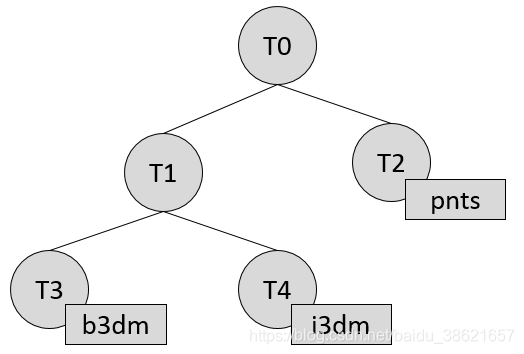
每个tile的计算转换矩阵为:
TO:[T0]T1:[T0][T1]T2:[T0][T2]T3:[T0][T1][T3]T4:[T0][T1][T4]
在tile内容中的positions 和 normals也可能有特定于tile的转换矩阵应用于它们,在应用tile的转换矩阵之前(前面提到的对于仿射变换要后乘)。一些例子是:
b3dm和i3dmtile中嵌入glTF,后者定义了自己的节点层次和坐标系。tile.transform在这些转换计算后再应用。请参阅glTF转换。i3dm的 Feature Table定义了每个实例的 position, normals, 和 scales。这些用于创建按实例的4x4仿射变换矩阵,该矩阵在应用tile.transform之前应用于每个实例。- 压缩的属性,如在
i3dm和pnts的Feature Tables中的POSITION_QUANTIZED,在pnts中的NORMAL_OCT16P,在任何其他变换矩阵之前需要被解压缩。
因此,以上示例的完整计算转换为:
TO:[T0]T1:[T0][T1]T2:[T0][T2][pnts-specific transform, including RTC_CENTER (if defined)]T3:[T0][T1][T3][b3dm-specific transform, including RTC_CENTER (if defined), coordinate system transform, and glTF node hierarchy]T4:[T0][T1][T4][i3dm-specific transform, including per-instance transform, coordinate system transform, and glTF node hierarchy]
实现的例子:
本章节是非规范性的
下面的JavaScript代码展示了如何使用Cesium的Matrix4和Matrix3去计算这些。
function computeTransforms(tileset) {
    var t = tileset.root;
    var transformToRoot = defined(t.transform) ? Matrix4.fromArray(t.transform) : Matrix4.IDENTITY;

    computeTransform(t, transformToRoot);
}

function computeTransform(tile, transformToRoot) {
    // Apply 4x4 transformToRoot to this tile's positions and bounding volumes

    var inverseTransform = Matrix4.inverse(transformToRoot, new Matrix4());
    var normalTransform = Matrix4.getRotation(inverseTransform, new Matrix3());
    normalTransform = Matrix3.transpose(normalTransform, normalTransform);
    // Apply 3x3 normalTransform to this tile's normals

    var children = tile.children;
    var length = children.length;
    for (var i = 0; i < length; ++i) {
        var child = children[i];
        var childToRoot = defined(child.transform) ? Matrix4.fromArray(child.transform) : Matrix4.clone(Matrix4.IDENTITY);
        childToRoot = Matrix4.multiplyTransformation(transformToRoot, childToRoot, childToRoot);
        computeTransform(child, childToRoot);
    }
}
虽然关于矩阵的这部分内容较多,概念和细节描述也较多,但整体上逻辑相对清晰简洁,需要注意理解。
传送:

有“AI”的1024 = 2048,欢迎大家加入2048 AI社区
更多推荐


 1
1 0
0- 0


 已为社区贡献5条内容

所有评论(0)