顾客喜好分析项目(用户画像)
·
注意:本文引用自专业人工智能社区Venus AI
更多AI知识请参考原站 ([www.aideeplearning.cn])
项目背景
客户个性分析是对公司理想客户的详细分析,有助于企业更好地了解其客户,以满足不同类型客户的特定需求、行为和关注点。通过客户个性分析,企业可以更精确地调整其产品、服务和市场策略,提高客户满意度和业务绩效。
项目目标
本项目的主要目标是进行客户个性分析,通过聚类客户,识别不同类型的客户群体。我们的目标是回答以下问题:
- 人们对产品的评价:是什么决定了客户对产品的态度。
- 人们做了什么:揭示了人们在做什么,而不是他们对产品的评价。
项目应用
客户个性分析在市场营销和业务决策中具有广泛的应用。一些潜在的应用包括:
- 定制市场策略:根据不同客户群体的需求和偏好,调整产品推广和定价策略。
- 提高客户满意度:根据客户个性,提供更个性化的客户支持和服务。
- 产品优化:根据客户反馈和行为,改进产品设计和功能。
数据集
我们使用的数据集包含了客户的各种属性,包括出生年份、教育程度、婚姻状况、家庭年收入、家庭成员数量、投诉历史、购买历史等。这些属性将帮助我们了解客户的特点和行为。
属性
- ID:客户的唯一标识符
- Year_Birth:客户的出生年份
- Education:客户的教育程度
- Marital_Status:客户的婚姻状况
- Income:客户的家庭年收入
- Kidhome:客户家庭中的儿童数量
- Teenhome:客户家庭中青少年的数量
- Dt_Customer:客户在公司注册的日期
- Recency:自客户上次购买以来的天数
- Complain:如果客户在过去 2 年内投诉过,则为 1,否则为 0 产品
- MntWines:过去 2 年在葡萄酒上的花费金额
- MntFruits:过去 2 年在水果上花费的金额
- MntMeatProducts:过去 2 年在肉类上的花费金额
- MntFishProducts:过去 2 年在鱼类上花费的金额
- MntSweetProducts:过去 2 年在糖果上花费的金额
- MntGoldProds:过去 2 年促销中花费在黄金上的金额
- NumDealsPurchases:折扣购买数量
- AcceptedCmp1:如果客户在第一个活动中接受了优惠,则为 1,否则为 0
- AcceptedCmp2:如果客户在第二次活动中接受了优惠,则为 1,否则为 0
- AcceptedCmp3:如果客户在第三次活动中接受了报价,则为 1,否则为 0
- AcceptedCmp4:如果客户在第四次活动中接受了报价,则为 1,否则为 0
- AcceptedCmp5:如果客户在第五次活动中接受了报价,则为 1,否则为 0
- Response:如果客户在上次活动中接受了优惠,则为 1,否则为 0 放置
- NumWebPurchases:通过公司网站进行的购买数量
- NumCatalogPurchases:使用目录进行的购买数量
- NumStorePurchases:直接在商店购买的数量
- NumWebVisitsMonth:上个月公司网站的访问次数
模型方法
项目的主要方法包括以下步骤:
- 数据收集和分析:导入数据集,分析数据的行数、列数和缺失值,并对二进制属性列进行可视化。
- 数据预处理:填充缺失值、合并相似属性列、删除无用的列。
- 探索性数据分析:使用Matplotlib、Seaborn和Plotly进行数据可视化,帮助我们更好地了解数据分布和关联。
- 客户聚类:使用K-Means聚类算法将客户分为不同的群体,找到合适的聚类数量。
- 可视化和报告:将不同客户群体与其他属性进行可视化,并撰写报告以总结客户个性类型。
结果可视化
![图片[1]-顾客喜好分析项目(用户画像)-VenusAI](https://i-blog.csdnimg.cn/blog_migrate/a300de71e73f8ef570afa277cc62e3f2.png)
![图片[2]-顾客喜好分析项目(用户画像)-VenusAI](https://i-blog.csdnimg.cn/blog_migrate/ae618ede68a61d064bb5ab1cf9ceb5f9.png)
代码实现
import pandas as pd
import pandas as pd
import seaborn as sns
import plotly.express as px
import plotly.graph_objects as plt
import matplotlib.pyplot as plt
%matplotlib inline
import warnings
warnings.filterwarnings('ignore')
# 加载数据
main_df = pd.read_csv('marketing_campaign.csv', sep='\t')
df = main_df.copy()
df.head(10)| ID | Year_Birth | Education | Marital_Status | Income | Kidhome | Teenhome | Dt_Customer | Recency | MntWines | ... | NumWebVisitsMonth | AcceptedCmp3 | AcceptedCmp4 | AcceptedCmp5 | AcceptedCmp1 | AcceptedCmp2 | Complain | Z_CostContact | Z_Revenue | Response | |
|---|---|---|---|---|---|---|---|---|---|---|---|---|---|---|---|---|---|---|---|---|---|
| 0 | 5524 | 1957 | Graduation | Single | 58138.0 | 0 | 0 | 04-09-2012 | 58 | 635 | ... | 7 | 0 | 0 | 0 | 0 | 0 | 0 | 3 | 11 | 1 |
| 1 | 2174 | 1954 | Graduation | Single | 46344.0 | 1 | 1 | 08-03-2014 | 38 | 11 | ... | 5 | 0 | 0 | 0 | 0 | 0 | 0 | 3 | 11 | 0 |
| 2 | 4141 | 1965 | Graduation | Together | 71613.0 | 0 | 0 | 21-08-2013 | 26 | 426 | ... | 4 | 0 | 0 | 0 | 0 | 0 | 0 | 3 | 11 | 0 |
| 3 | 6182 | 1984 | Graduation | Together | 26646.0 | 1 | 0 | 10-02-2014 | 26 | 11 | ... | 6 | 0 | 0 | 0 | 0 | 0 | 0 | 3 | 11 | 0 |
| 4 | 5324 | 1981 | PhD | Married | 58293.0 | 1 | 0 | 19-01-2014 | 94 | 173 | ... | 5 | 0 | 0 | 0 | 0 | 0 | 0 | 3 | 11 | 0 |
| 5 | 7446 | 1967 | Master | Together | 62513.0 | 0 | 1 | 09-09-2013 | 16 | 520 | ... | 6 | 0 | 0 | 0 | 0 | 0 | 0 | 3 | 11 | 0 |
| 6 | 965 | 1971 | Graduation | Divorced | 55635.0 | 0 | 1 | 13-11-2012 | 34 | 235 | ... | 6 | 0 | 0 | 0 | 0 | 0 | 0 | 3 | 11 | 0 |
| 7 | 6177 | 1985 | PhD | Married | 33454.0 | 1 | 0 | 08-05-2013 | 32 | 76 | ... | 8 | 0 | 0 | 0 | 0 | 0 | 0 | 3 | 11 | 0 |
| 8 | 4855 | 1974 | PhD | Together | 30351.0 | 1 | 0 | 06-06-2013 | 19 | 14 | ... | 9 | 0 | 0 | 0 | 0 | 0 | 0 | 3 | 11 | 1 |
| 9 | 5899 | 1950 | PhD | Together | 5648.0 | 1 | 1 | 13-03-2014 | 68 | 28 | ... | 20 | 1 | 0 | 0 | 0 | 0 | 0 | 3 | 11 | 0 |
10 rows × 29 columns
数据分析
#shape of the dataset
df.shape
(2240, 29)
# basic information of dataset
df.info()
<class 'pandas.core.frame.DataFrame'> RangeIndex: 2240 entries, 0 to 2239 Data columns (total 29 columns): # Column Non-Null Count Dtype --- ------ -------------- ----- 0 ID 2240 non-null int64 1 Year_Birth 2240 non-null int64 2 Education 2240 non-null object 3 Marital_Status 2240 non-null object 4 Income 2216 non-null float64 5 Kidhome 2240 non-null int64 6 Teenhome 2240 non-null int64 7 Dt_Customer 2240 non-null object 8 Recency 2240 non-null int64 9 MntWines 2240 non-null int64 10 MntFruits 2240 non-null int64 11 MntMeatProducts 2240 non-null int64 12 MntFishProducts 2240 non-null int64 13 MntSweetProducts 2240 non-null int64 14 MntGoldProds 2240 non-null int64 15 NumDealsPurchases 2240 non-null int64 16 NumWebPurchases 2240 non-null int64 17 NumCatalogPurchases 2240 non-null int64 18 NumStorePurchases 2240 non-null int64 19 NumWebVisitsMonth 2240 non-null int64 20 AcceptedCmp3 2240 non-null int64 21 AcceptedCmp4 2240 non-null int64 22 AcceptedCmp5 2240 non-null int64 23 AcceptedCmp1 2240 non-null int64 24 AcceptedCmp2 2240 non-null int64 25 Complain 2240 non-null int64 26 Z_CostContact 2240 non-null int64 27 Z_Revenue 2240 non-null int64 28 Response 2240 non-null int64 dtypes: float64(1), int64(25), object(3) memory usage: 507.6+ KB
- Here we have only 3 object type datatype and rest are numerical
# 检查特征唯一值数量
df.nunique()
ID 2240 Year_Birth 59 Education 5 Marital_Status 8 Income 1974 Kidhome 3 Teenhome 3 Dt_Customer 663 Recency 100 MntWines 776 MntFruits 158 MntMeatProducts 558 MntFishProducts 182 MntSweetProducts 177 MntGoldProds 213 NumDealsPurchases 15 NumWebPurchases 15 NumCatalogPurchases 14 NumStorePurchases 14 NumWebVisitsMonth 16 AcceptedCmp3 2 AcceptedCmp4 2 AcceptedCmp5 2 AcceptedCmp1 2 AcceptedCmp2 2 Complain 2 Z_CostContact 1 Z_Revenue 1 Response 2 dtype: int64
- 在上面的单元格中,“Z_CostContact”和“Z_Revenue”在所有行中都有相同的值,这就是为什么它们不会在模型构建中做出任何贡献。 这样我们就可以放弃它们
# 检查空值
df.isna().any()
ID False Year_Birth False Education False Marital_Status False Income True Kidhome False Teenhome False Dt_Customer False Recency False MntWines False MntFruits False MntMeatProducts False MntFishProducts False MntSweetProducts False MntGoldProds False NumDealsPurchases False NumWebPurchases False NumCatalogPurchases False NumStorePurchases False NumWebVisitsMonth False AcceptedCmp3 False AcceptedCmp4 False AcceptedCmp5 False AcceptedCmp1 False AcceptedCmp2 False Complain False Z_CostContact False Z_Revenue False Response False dtype: bool
# Checking number of null values
df.isnull().sum()
ID 0 Year_Birth 0 Education 0 Marital_Status 0 Income 24 Kidhome 0 Teenhome 0 Dt_Customer 0 Recency 0 MntWines 0 MntFruits 0 MntMeatProducts 0 MntFishProducts 0 MntSweetProducts 0 MntGoldProds 0 NumDealsPurchases 0 NumWebPurchases 0 NumCatalogPurchases 0 NumStorePurchases 0 NumWebVisitsMonth 0 AcceptedCmp3 0 AcceptedCmp4 0 AcceptedCmp5 0 AcceptedCmp1 0 AcceptedCmp2 0 Complain 0 Z_CostContact 0 Z_Revenue 0 Response 0 dtype: int64
- 收入列中有一些缺失值,因此我们需要用maean或中位数来填充它。
# Checking number of null values
df.isnull().sum()
<Axes: >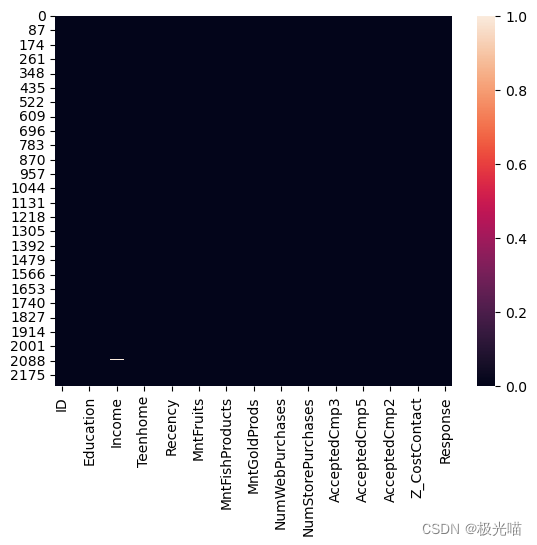
# 删除该列,因为它们不会对模型构建做出贡献
df = df.drop(columns=["Z_CostContact", "Z_Revenue"], axis=1)
df.head(10)| ID | Year_Birth | Education | Marital_Status | Income | Kidhome | Teenhome | Dt_Customer | Recency | MntWines | ... | NumCatalogPurchases | NumStorePurchases | NumWebVisitsMonth | AcceptedCmp3 | AcceptedCmp4 | AcceptedCmp5 | AcceptedCmp1 | AcceptedCmp2 | Complain | Response | |
|---|---|---|---|---|---|---|---|---|---|---|---|---|---|---|---|---|---|---|---|---|---|
| 0 | 5524 | 1957 | Graduation | Single | 58138.0 | 0 | 0 | 04-09-2012 | 58 | 635 | ... | 10 | 4 | 7 | 0 | 0 | 0 | 0 | 0 | 0 | 1 |
| 1 | 2174 | 1954 | Graduation | Single | 46344.0 | 1 | 1 | 08-03-2014 | 38 | 11 | ... | 1 | 2 | 5 | 0 | 0 | 0 | 0 | 0 | 0 | 0 |
| 2 | 4141 | 1965 | Graduation | Together | 71613.0 | 0 | 0 | 21-08-2013 | 26 | 426 | ... | 2 | 10 | 4 | 0 | 0 | 0 | 0 | 0 | 0 | 0 |
| 3 | 6182 | 1984 | Graduation | Together | 26646.0 | 1 | 0 | 10-02-2014 | 26 | 11 | ... | 0 | 4 | 6 | 0 | 0 | 0 | 0 | 0 | 0 | 0 |
| 4 | 5324 | 1981 | PhD | Married | 58293.0 | 1 | 0 | 19-01-2014 | 94 | 173 | ... | 3 | 6 | 5 | 0 | 0 | 0 | 0 | 0 | 0 | 0 |
| 5 | 7446 | 1967 | Master | Together | 62513.0 | 0 | 1 | 09-09-2013 | 16 | 520 | ... | 4 | 10 | 6 | 0 | 0 | 0 | 0 | 0 | 0 | 0 |
| 6 | 965 | 1971 | Graduation | Divorced | 55635.0 | 0 | 1 | 13-11-2012 | 34 | 235 | ... | 3 | 7 | 6 | 0 | 0 | 0 | 0 | 0 | 0 | 0 |
| 7 | 6177 | 1985 | PhD | Married | 33454.0 | 1 | 0 | 08-05-2013 | 32 | 76 | ... | 0 | 4 | 8 | 0 | 0 | 0 | 0 | 0 | 0 | 0 |
| 8 | 4855 | 1974 | PhD | Together | 30351.0 | 1 | 0 | 06-06-2013 | 19 | 14 | ... | 0 | 2 | 9 | 0 | 0 | 0 | 0 | 0 | 0 | 1 |
| 9 | 5899 | 1950 | PhD | Together | 5648.0 | 1 | 1 | 13-03-2014 | 68 | 28 | ... | 0 | 0 | 20 | 1 | 0 | 0 | 0 | 0 | 0 | 0 |
10 rows × 27 columns
- 让我们计算出过去两年客户投诉的数量以及正面或负面的回复数量。
# Complain: 1 if customer complained in the last 2 years, 0 otherwise
label_complain = ["No Complain","Complain"]

count_complain = pd.value_counts(df['Complain'], sort=True)
count_complain.plot(kind='bar', rot=0,color=['Green','Red'])
plt.title("Complain class Distribution")
plt.xticks(range(2),label_complain)
plt.xlabel("Complain")
plt.ylabel("Count of Complain")
Text(0, 0.5, 'Count of Complain')
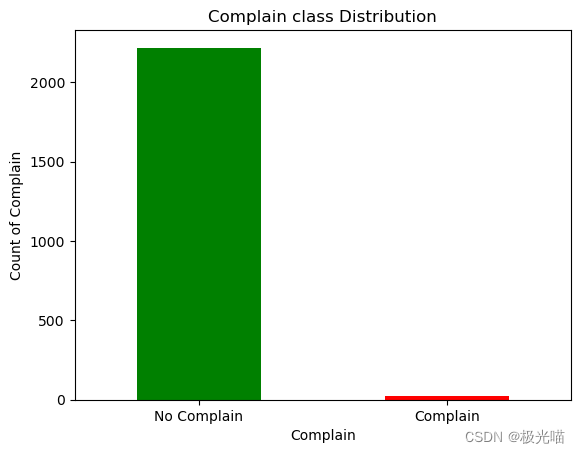
df['Complain'].value_counts()
# 1 if customer complained in the last 2 years, 0 otherwise
0 2219 1 21 Name: Complain, dtype: int64
- 从上图可以看出,顾客的投诉并不多。
# 让我们检查一下响应

# 响应:如果客户在最近 2 次活动中接受了优惠,则为 1,否则为 0
label_response = ["Denied","Accepted"]

count_response = pd.value_counts(df['Response'], sort=True)
count_response.plot(kind='bar', rot=0,color=['Green','Red'])
plt.title("Reponse class Distribution")
plt.xticks(range(2),label_response)
plt.xlabel("Respons")
plt.ylabel("Count of Response")
Text(0, 0.5, 'Count of Response')
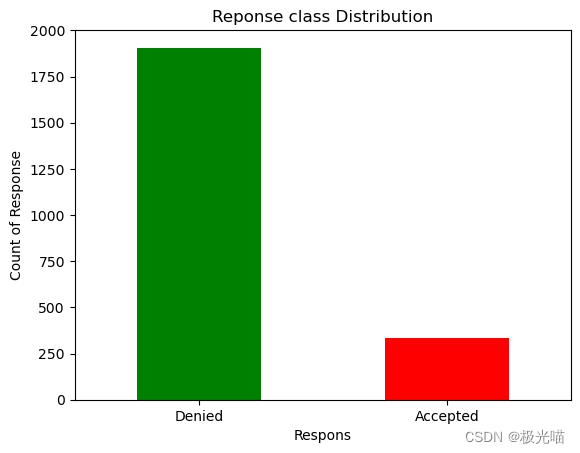
df['Response'].value_counts()0 1906 1 334 Name: Response, dtype: int64
- 此图显示最后的优惠已被大多数客户拒绝
查看所有情况
- AcceptedCmp1:如果客户在第一个活动中接受了优惠,则为 1,否则为 0
- AcceptedCmp2:如果客户在第二次活动中接受了优惠,则为 1,否则为 0
- AcceptedCmp3:如果客户在第三次活动中接受了优惠,则为 1,否则为 0
- AcceptedCmp4:如果客户在第四次活动中接受了优惠,则为 1,否则为 0
- AcceptedCmp5:如果客户在第五次活动中接受了优惠,则为 1,否则为 0
- 响应:如果客户在上次活动中接受了优惠,则为 1,否则为 0
#Campagin 1

labels_c1 = ["Denied", "Accepted"]

count_c1 = pd.value_counts(df['AcceptedCmp1'], sort=True)
count_c1.plot(kind='bar', rot=0,color=['Green','Red'])
plt.title("AcceptedCmp1 class Distribution")
plt.xticks(range(2),labels_c1)
plt.xlabel("Campaign 1")
plt.ylabel("Count of Campagin1")
Text(0, 0.5, 'Count of Campagin1')
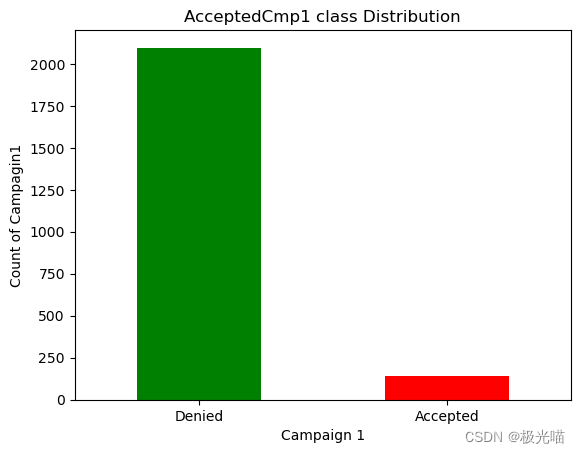
df['AcceptedCmp1'].value_counts()0 2096 1 144 Name: AcceptedCmp1, dtype: int64
#Campagin 2

labels_c2 = ["Denied", "Accepted"]

count_c2 = pd.value_counts(df['AcceptedCmp2'], sort=True)
count_c2.plot(kind='bar', rot=0,color=['Green','Red'])
plt.title("AcceptedCmp2 class Distribution")
plt.xticks(range(2),labels_c2)
plt.xlabel("Campaign 2")
plt.ylabel("Count of Campagin2")
Text(0, 0.5, 'Count of Campagin2')
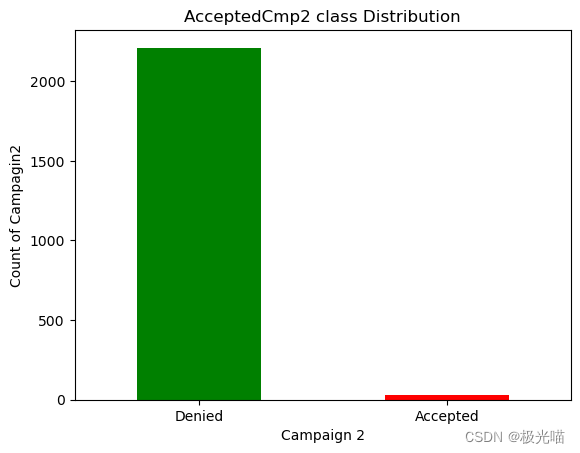
df["AcceptedCmp2"].value_counts()0 2210 1 30 Name: AcceptedCmp2, dtype: int64
#Campagin 3

labels_c3 = ["Denied", "Accepted"]

count_c3 = pd.value_counts(df['AcceptedCmp3'], sort=True)
count_c3.plot(kind='bar', rot=0,color=['Green','Red'])
plt.title("AcceptedCmp3 class Distribution")
plt.xticks(range(2),labels_c3)
plt.xlabel("Campaign 3")
plt.ylabel("Count of Campagin3")
Text(0, 0.5, 'Count of Campagin3')
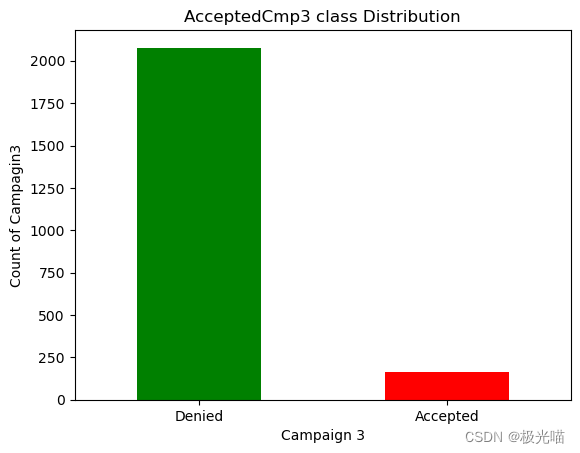
df["AcceptedCmp3"].value_counts()0 2077 1 163 Name: AcceptedCmp3, dtype: int64
#Campagin 4

labels_c4 = ["Denied", "Accepted"]

count_c4 = pd.value_counts(df['AcceptedCmp4'], sort=True)
count_c4.plot(kind='bar', rot=0,color=['Green','Red'])
plt.title("AcceptedCmp4 class Distribution")
plt.xticks(range(2),labels_c4)
plt.xlabel("Campaign 4")
plt.ylabel("Count of Campagin4")
Text(0, 0.5, 'Count of Campagin4')

df["AcceptedCmp4"].value_counts()0 2073 1 167 Name: AcceptedCmp4, dtype: int64
活动接受度比较。
- 从上面的数据我们可以清楚地看到,所有活动中的大部分优惠都被顾客拒绝了。
- 但活动 4 的接受度更高。
- 活动 4 > 活动 3 > 活动 1 > 活动 2
#Finding the correlation between the feature column

plt.figure(figsize=(20,18))
sns.heatmap(df.corr(), annot=True)
plt.show()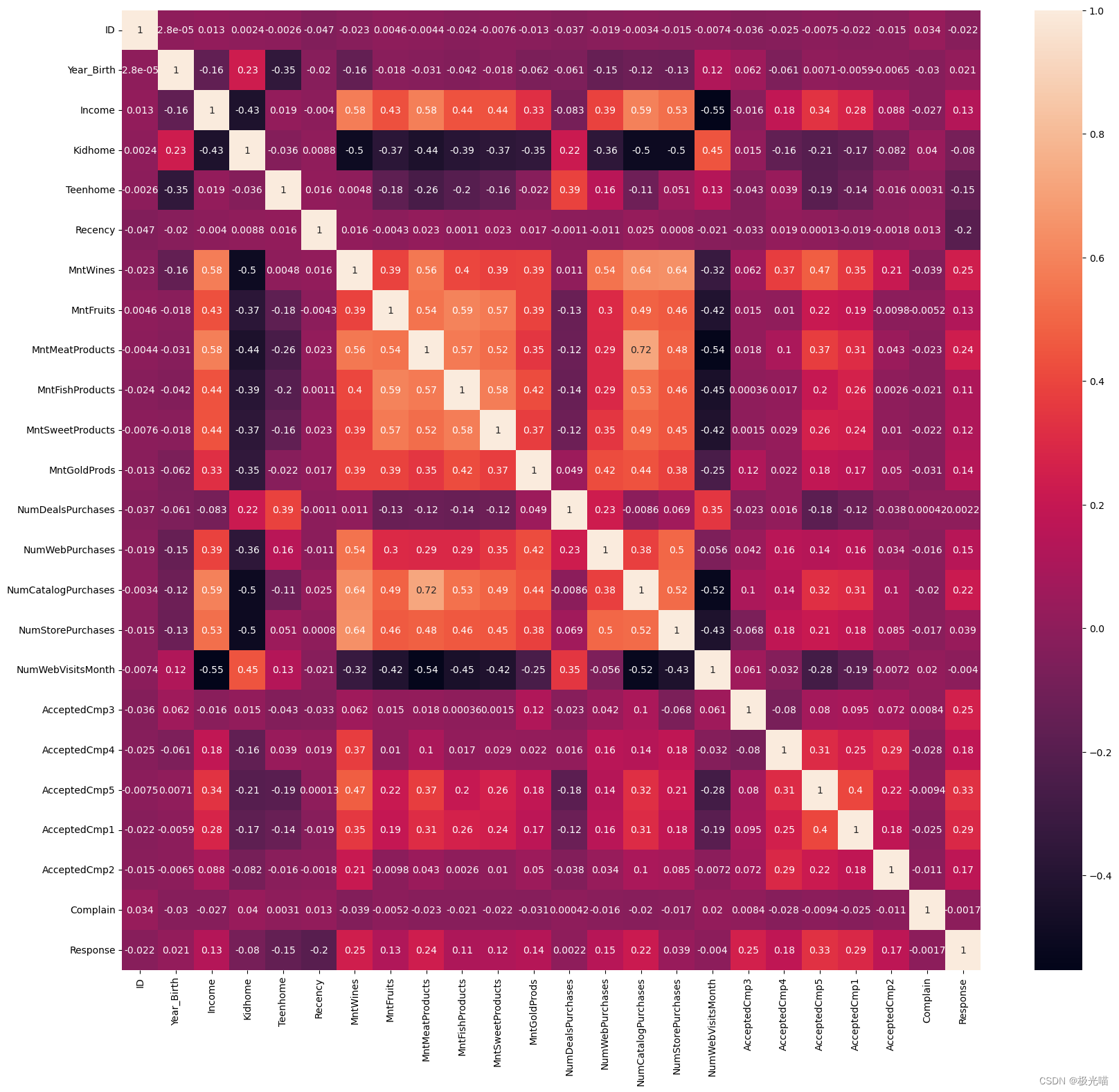
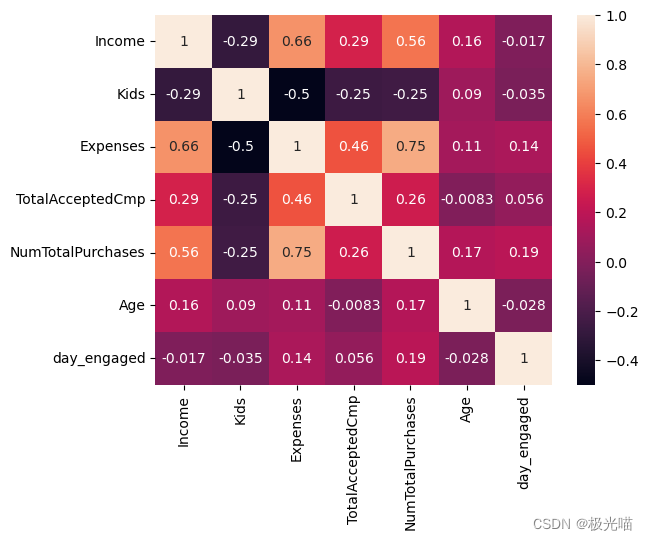
- 没有两列彼此有太多相关性,因此我们不能删除任何列
数据预处理
# Filling the missing value in the income by mean
df['Income'] = df['Income'].fillna(df['Income'].mean())
df.isnull().sum()
ID 0 Year_Birth 0 Education 0 Marital_Status 0 Income 0 Kidhome 0 Teenhome 0 Dt_Customer 0 Recency 0 MntWines 0 MntFruits 0 MntMeatProducts 0 MntFishProducts 0 MntSweetProducts 0 MntGoldProds 0 NumDealsPurchases 0 NumWebPurchases 0 NumCatalogPurchases 0 NumStorePurchases 0 NumWebVisitsMonth 0 AcceptedCmp3 0 AcceptedCmp4 0 AcceptedCmp5 0 AcceptedCmp1 0 AcceptedCmp2 0 Complain 0 Response 0 dtype: int64
- 数据集中没有空值
df.head()| ID | Year_Birth | Education | Marital_Status | Income | Kidhome | Teenhome | Dt_Customer | Recency | MntWines | ... | NumCatalogPurchases | NumStorePurchases | NumWebVisitsMonth | AcceptedCmp3 | AcceptedCmp4 | AcceptedCmp5 | AcceptedCmp1 | AcceptedCmp2 | Complain | Response | |
|---|---|---|---|---|---|---|---|---|---|---|---|---|---|---|---|---|---|---|---|---|---|
| 0 | 5524 | 1957 | Graduation | Single | 58138.0 | 0 | 0 | 04-09-2012 | 58 | 635 | ... | 10 | 4 | 7 | 0 | 0 | 0 | 0 | 0 | 0 | 1 |
| 1 | 2174 | 1954 | Graduation | Single | 46344.0 | 1 | 1 | 08-03-2014 | 38 | 11 | ... | 1 | 2 | 5 | 0 | 0 | 0 | 0 | 0 | 0 | 0 |
| 2 | 4141 | 1965 | Graduation | Together | 71613.0 | 0 | 0 | 21-08-2013 | 26 | 426 | ... | 2 | 10 | 4 | 0 | 0 | 0 | 0 | 0 | 0 | 0 |
| 3 | 6182 | 1984 | Graduation | Together | 26646.0 | 1 | 0 | 10-02-2014 | 26 | 11 | ... | 0 | 4 | 6 | 0 | 0 | 0 | 0 | 0 | 0 | 0 |
| 4 | 5324 | 1981 | PhD | Married | 58293.0 | 1 | 0 | 19-01-2014 | 94 | 173 | ... | 3 | 6 | 5 | 0 | 0 | 0 | 0 | 0 | 0 | 0 |
5 rows × 27 columns
# 检查“Marital_Status”中存在的唯一类别的数量

df['Marital_Status'].value_counts()
Married 864 Together 580 Single 480 Divorced 232 Widow 77 Alone 3 Absurd 2 YOLO 2 Name: Marital_Status, dtype: int64
df['Marital_Status'] = df['Marital_Status'].replace(['Married', 'Together'],'relationship')
df['Marital_Status'] = df['Marital_Status'].replace(['Divorced', 'Widow', 'Alone', 'YOLO', 'Absurd','single'],'Single')- 在上面的单元格中,我们将“已婚”、“在一起”分组为“关系”
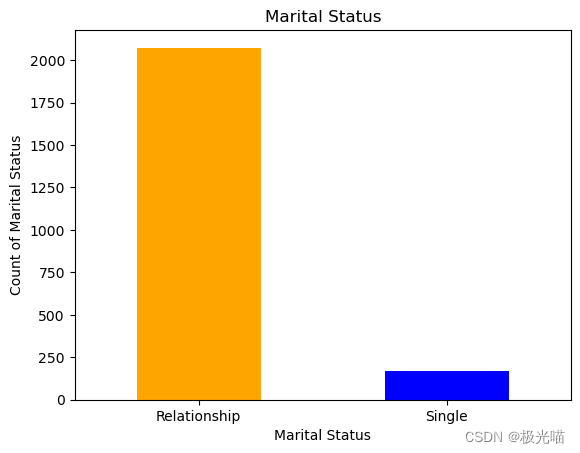
- 而“离婚”、“寡妇”、“孤独”、“YOLO”、“荒谬”则为“单身”
df['Marital_Status'].value_counts()relationship 1444 Single 796 Name: Marital_Status, dtype: int64
# Relationship vs Single

labels_status = ["Relationship", "Single"]

count_status = pd.value_counts(df['Marital_Status'], sort=True)
count_c4.plot(kind='bar', rot=0,color=['Orange','Blue'])
plt.title("Marital Status")
plt.xticks(range(2),labels_status)
plt.xlabel("Marital Status")
plt.ylabel("Count of Marital Status")
Text(0, 0.5, 'Count of Marital Status')
将不同的数据帧组合成一列以减少维数
df['Kids'] = df['Kidhome'] + df['Teenhome']
df['Expenses'] = df['MntWines'] + df['MntFruits'] + df['MntMeatProducts'] + df['MntFishProducts'] + df['MntSweetProducts'] + df['MntGoldProds']
df['TotalAcceptedCmp'] = df['AcceptedCmp1'] + df['AcceptedCmp2'] + df['AcceptedCmp3'] + df['AcceptedCmp4'] + df['AcceptedCmp5'] + df['Response']
df['NumTotalPurchases'] = df['NumWebPurchases'] + df['NumCatalogPurchases'] + df['NumStorePurchases'] + df['NumDealsPurchases']
#保存表格数据
df.to_csv('data_visuals.csv')# 删除一些列以减少模型的维度和复杂性
col_del = ["AcceptedCmp1" , "AcceptedCmp2", "AcceptedCmp3" , "AcceptedCmp4","AcceptedCmp5", "Response","NumWebVisitsMonth", "NumWebPurchases","NumCatalogPurchases","NumStorePurchases","NumDealsPurchases" , "Kidhome", "Teenhome","MntWines", "MntFruits", "MntMeatProducts", "MntFishProducts", "MntSweetProducts", "MntGoldProds"]
df=df.drop(columns=col_del,axis=1)
df.head()| ID | Year_Birth | Education | Marital_Status | Income | Dt_Customer | Recency | Complain | Kids | Expenses | TotalAcceptedCmp | NumTotalPurchases | |
|---|---|---|---|---|---|---|---|---|---|---|---|---|
| 0 | 5524 | 1957 | Graduation | Single | 58138.0 | 04-09-2012 | 58 | 0 | 0 | 1617 | 1 | 25 |
| 1 | 2174 | 1954 | Graduation | Single | 46344.0 | 08-03-2014 | 38 | 0 | 2 | 27 | 0 | 6 |
| 2 | 4141 | 1965 | Graduation | relationship | 71613.0 | 21-08-2013 | 26 | 0 | 0 | 776 | 0 | 21 |
| 3 | 6182 | 1984 | Graduation | relationship | 26646.0 | 10-02-2014 | 26 | 0 | 1 | 53 | 0 | 8 |
| 4 | 5324 | 1981 | PhD | relationship | 58293.0 | 19-01-2014 | 94 | 0 | 1 | 422 | 0 | 19 |
# Adding 'Age' column

df['Age'] = 2015 - df['Year_Birth']df['Education'].value_counts()Graduation 1127 PhD 486 Master 370 2n Cycle 203 Basic 54 Name: Education, dtype: int64
# 仅将类别更改为 UG 和 PG

df['Education'] = df['Education'].replace(['PhD','2n Cycle','Graduation', 'Master'],'PG')
df['Education'] = df['Education'].replace(['Basic'], 'UG')
# 客户与公司互动的天数
# 将 bt_customer 更改为时间戳格式
df['Dt_Customer'] = pd.to_datetime(df.Dt_Customer)
df['first_day'] = '01-01-2015'
df['first_day'] = pd.to_datetime(df.first_day)
df['day_engaged'] = (df['first_day'] - df['Dt_Customer']).dt.daysdf=df.drop(columns=["ID", "Dt_Customer", "first_day", "Year_Birth", "Dt_Customer", "Recency", "Complain"],axis=1)
df.shape(2240, 9)
df.head()| Education | Marital_Status | Income | Kids | Expenses | TotalAcceptedCmp | NumTotalPurchases | Age | day_engaged | |
|---|---|---|---|---|---|---|---|---|---|
| 0 | PG | Single | 58138.0 | 0 | 1617 | 1 | 25 | 58 | 997 |
| 1 | PG | Single | 46344.0 | 2 | 27 | 0 | 6 | 61 | 151 |
| 2 | PG | relationship | 71613.0 | 0 | 776 | 0 | 21 | 50 | 498 |
| 3 | PG | relationship | 26646.0 | 1 | 53 | 0 | 8 | 31 | 91 |
| 4 | PG | relationship | 58293.0 | 1 | 422 | 0 | 19 | 34 | 347 |
数据可视化
fig = px.bar(df, x='Marital_Status', y='Expenses', color="Marital_Status")
fig.show()
# Less number of single customer
fig = px.histogram (df, x = "Expenses", facet_row = "Marital_Status", template = 'plotly_dark')
fig.show ()fig = px.histogram (df, x = "Expenses", facet_row = "Education", template = 'plotly_dark')
fig.show ()fig = px.histogram (df, x = "NumTotalPurchases", facet_row = "Education", template = 'plotly_dark')
fig.show ()fig = px.histogram (df, x = "Age", facet_row = "Marital_Status", template = 'plotly_dark')
fig.show ()fig = px.histogram (df, x = "Income", facet_row = "Marital_Status", template = 'plotly_dark')
fig.show ()fig = px.pie (df, names = "Marital_Status", hole = 0.4, template = "gridon")
fig.show ()- 35% 的客户是单身,而 64% 的客户是恋爱中的客户。
fig =  px.pie (df, names = "Education", hole = 0.4, template = "plotly_dark")
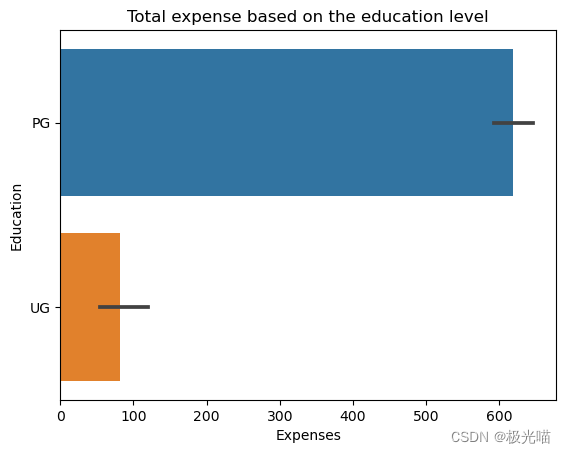
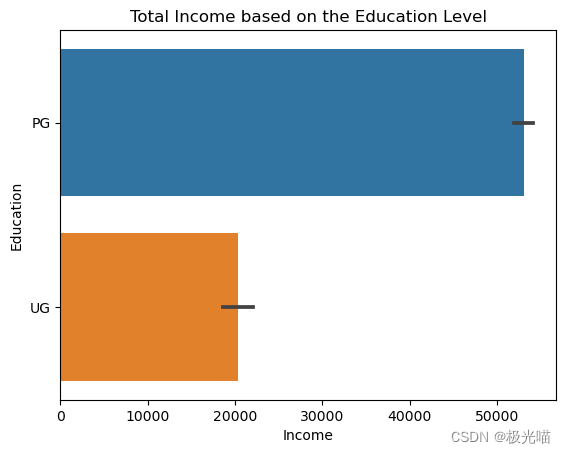
fig.show ()- 超过97%的客户来自PG背景。 和大约。 2%来自UG。
sns.barplot(x=df['Expenses'], y=df['Education'])
plt.title('Total expense based on the education level')
Text(0.5, 1.0, 'Total expense based on the education level')
sns.barplot(x=df['Income'], y=df['Education'])
plt.title('Total Income based on the Education Level')
Text(0.5, 1.0, 'Total Income based on the Education Level')
df.describe()| Income | Kids | Expenses | TotalAcceptedCmp | NumTotalPurchases | Age | day_engaged | |
|---|---|---|---|---|---|---|---|
| count | 2240.000000 | 2240.000000 | 2240.000000 | 2240.000000 | 2240.000000 | 2240.000000 | 2240.000000 |
| mean | 52247.251354 | 0.950446 | 605.798214 | 0.446875 | 14.862054 | 46.194196 | 538.043304 |
| std | 25037.797168 | 0.751803 | 602.249288 | 0.890543 | 7.677173 | 11.984069 | 232.229893 |
| min | 1730.000000 | 0.000000 | 5.000000 | 0.000000 | 0.000000 | 19.000000 | 26.000000 |
| 25% | 35538.750000 | 0.000000 | 68.750000 | 0.000000 | 8.000000 | 38.000000 | 366.750000 |
| 50% | 51741.500000 | 1.000000 | 396.000000 | 0.000000 | 15.000000 | 45.000000 | 539.000000 |
| 75% | 68289.750000 | 1.000000 | 1045.500000 | 1.000000 | 21.000000 | 56.000000 | 711.250000 |
| max | 666666.000000 | 3.000000 | 2525.000000 | 5.000000 | 44.000000 | 122.000000 | 1089.000000 |
sns.heatmap(df.corr(),annot=True)<Axes: >
obj = []
for i in df.columns:
    if(df[i].dtypes=="object"):
        obj.append(i)

print(obj)
['Education', 'Marital_Status']
# Label Encoding
from sklearn.preprocessing import LabelEncoderdf['Marital_Status'].value_counts()relationship 1444 Single 796 Name: Marital_Status, dtype: int64
lbl_encode = LabelEncoder()
for i in obj:
    df[i] = df[[i]].apply(lbl_encode.fit_transform)
df1 = df.copy()
df1.head()| Education | Marital_Status | Income | Kids | Expenses | TotalAcceptedCmp | NumTotalPurchases | Age | day_engaged | |
|---|---|---|---|---|---|---|---|---|---|
| 0 | 0 | 0 | 58138.0 | 0 | 1617 | 1 | 25 | 58 | 997 |
| 1 | 0 | 0 | 46344.0 | 2 | 27 | 0 | 6 | 61 | 151 |
| 2 | 0 | 1 | 71613.0 | 0 | 776 | 0 | 21 | 50 | 498 |
| 3 | 0 | 1 | 26646.0 | 1 | 53 | 0 | 8 | 31 | 91 |
| 4 | 0 | 1 | 58293.0 | 1 | 422 | 0 | 19 | 34 | 347 |
数据标准化
from sklearn.preprocessing import StandardScalerscaled_features = StandardScaler().fit_transform(df1.values)
scaled_features_df = pd.DataFrame(scaled_features, index=df1.index, columns=df1.columns)scaled_features_df.head()| Education | Marital_Status | Income | Kids | Expenses | TotalAcceptedCmp | NumTotalPurchases | Age | day_engaged | |
|---|---|---|---|---|---|---|---|---|---|
| 0 | -0.157171 | -1.346874 | 0.235327 | -1.264505 | 1.679417 | 0.621248 | 1.320826 | 0.985345 | 1.976745 |
| 1 | -0.157171 | -1.346874 | -0.235826 | 1.396361 | -0.961275 | -0.501912 | -1.154596 | 1.235733 | -1.667011 |
| 2 | -0.157171 | 0.742460 | 0.773633 | -1.264505 | 0.282673 | -0.501912 | 0.799685 | 0.317643 | -0.172468 |
| 3 | -0.157171 | 0.742460 | -1.022732 | 0.065928 | -0.918094 | -0.501912 | -0.894025 | -1.268149 | -1.925433 |
| 4 | -0.157171 | 0.742460 | 0.241519 | 0.065928 | -0.305254 | -0.501912 | 0.539114 | -1.017761 | -0.822831 |
肘部法则确定聚类数量
from sklearn.cluster import KMeanswcss = []
for i in range(1,11):
kmeans = KMeans(n_clusters=i, init='k-means++', random_state=42)
kmeans.fit(scaled_features_df)
wcss.append(kmeans.inertia_)
# inetia_: Sum of squared distances of samples to their closest cluster center, weighted by the sample weights if provided.
plt.figure(figsize=(16,8))
plt.plot(range(1,11), wcss, 'bx-')
plt.title('The Elbow Maethod')
plt.xlabel('Number of Clusters')
plt.ylabel('WCSS')
plt.show()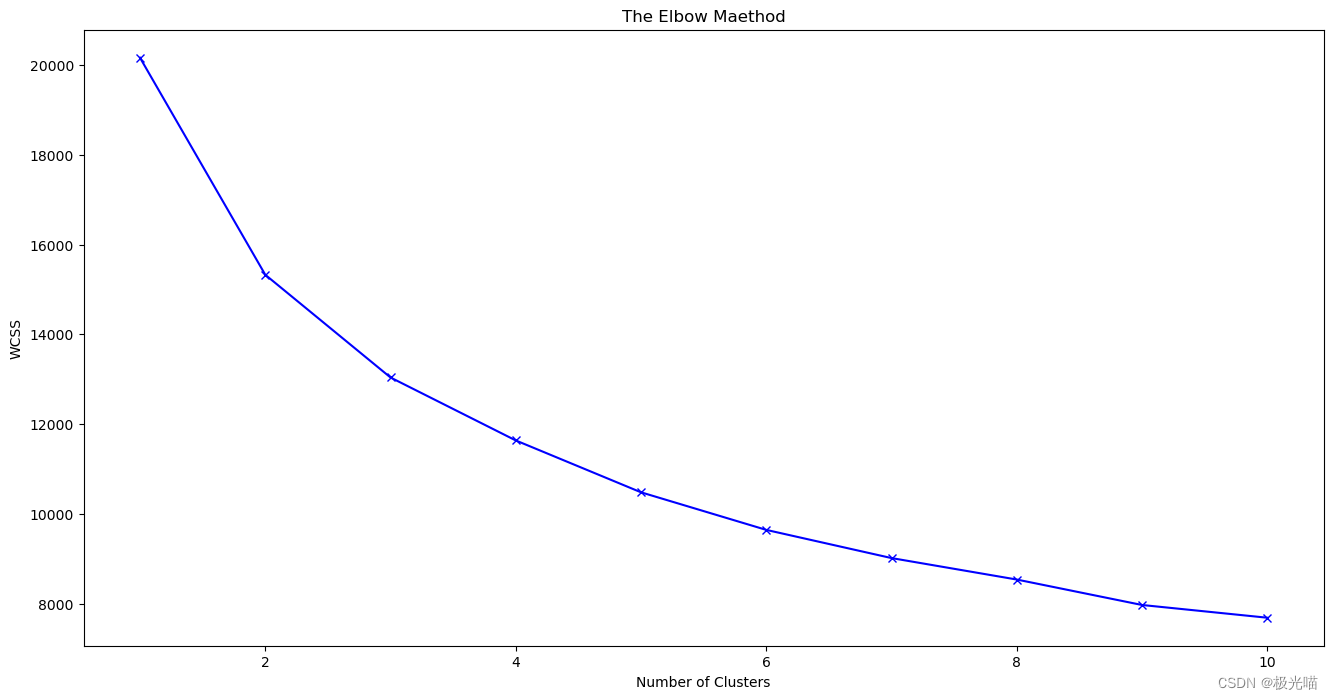
拐点不清晰,肘法中并不太清楚应该选择哪个K值
剪影系数
from sklearn.metrics import silhouette_scoresilhouette_scores = []
for i in range(2,10):
m1 = KMeans(n_clusters=i, random_state=42)
c = m1.fit_predict(scaled_features_df)
silhouette_scores.append(silhouette_score(scaled_features_df, m1.fit_predict(scaled_features_df)))
plt.bar(range(2,10), silhouette_scores)
plt.xlabel('Number of clusters', fontsize=20)
plt.ylabel('S(i)', fontsize=20)
plt.show()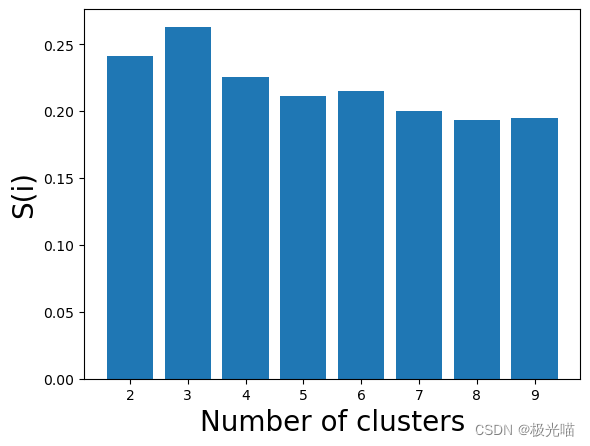
# 现在我们用Silhouette Score来衡量K的值
silhouette_scores
[0.24145101432627075, 0.2630066765900862, 0.22547869857815794, 0.2112495373878677, 0.2149228429852001, 0.1997135405176978, 0.19301680336746188, 0.19495794809915995]
# 获取轮廓分数的最大值并在索引中添加2 因为索引从2开始

sc = max(silhouette_scores)
num_of_clusters = silhouette_scores.index(sc)+2
print("Number of Cluster Required is: ", num_of_clusters)
Number of Cluster Required is: 3
建立模型
# 使用 K 均值算法训练预测。

kmeans = KMeans(n_clusters = num_of_clusters, random_state=42).fit(scaled_features_df)
pred = kmeans.predict(scaled_features_df)predarray([1, 0, 1, ..., 1, 1, 0])
# 添加这些聚类值到 main dataframe (without standardization)中
df['cluster'] = pred + 1df.head()| Education | Marital_Status | Income | Kids | Expenses | TotalAcceptedCmp | NumTotalPurchases | Age | day_engaged | cluster | |
|---|---|---|---|---|---|---|---|---|---|---|
| 0 | 0 | 0 | 58138.0 | 0 | 1617 | 1 | 25 | 58 | 997 | 2 |
| 1 | 0 | 0 | 46344.0 | 2 | 27 | 0 | 6 | 61 | 151 | 1 |
| 2 | 0 | 1 | 71613.0 | 0 | 776 | 0 | 21 | 50 | 498 | 2 |
| 3 | 0 | 1 | 26646.0 | 1 | 53 | 0 | 8 | 31 | 91 | 1 |
| 4 | 0 | 1 | 58293.0 | 1 | 422 | 0 | 19 | 34 | 347 | 1 |
# 保存数据
df.to_csv('data_visuals2.csv')
pl = sns.countplot(x=df["cluster"])
pl.set_title("Distribution Of The Clusters")
plt.show()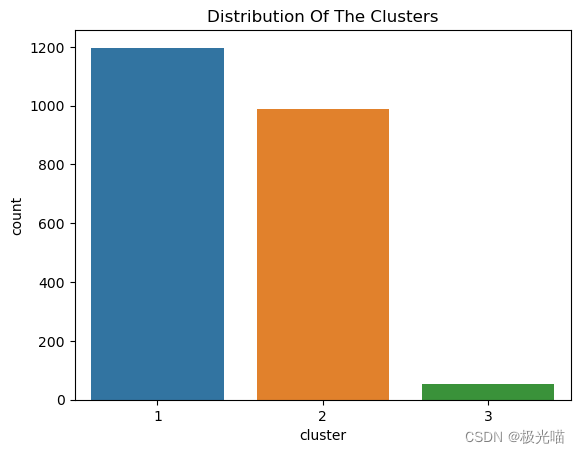
正如我们在这里看到的,与其他聚类相比,聚类 1 中的权重更大。
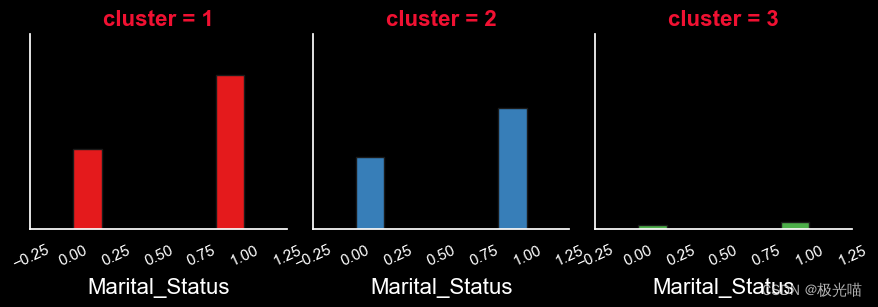
sns.set(rc={'axes.facecolor':'black', 'figure.facecolor':'black', 'axes.grid' : False})
for i in df:
    diag = sns.FacetGrid(df, col="cluster", hue="cluster", palette="Set1")
    diag.map(plt.hist, i, bins=6, ec="k")
    diag.set_xticklabels(rotation=25, color='white')
    diag.set_yticklabels(color='white')
    diag.set_xlabels(size=16, color='white')
    diag.set_titles(size=16, color='#f01132', fontweight="bold")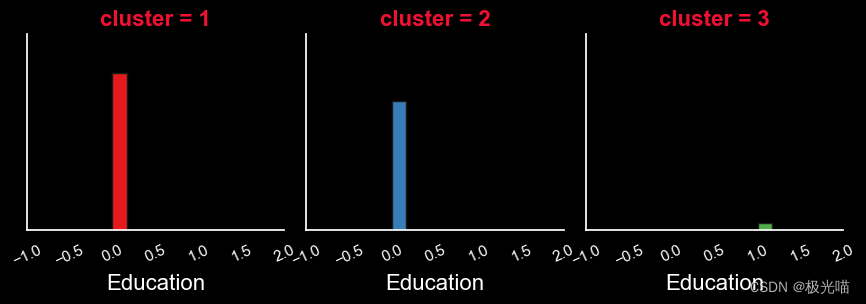
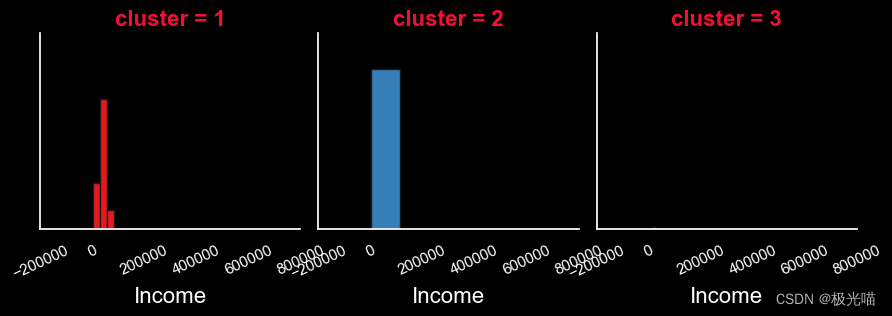

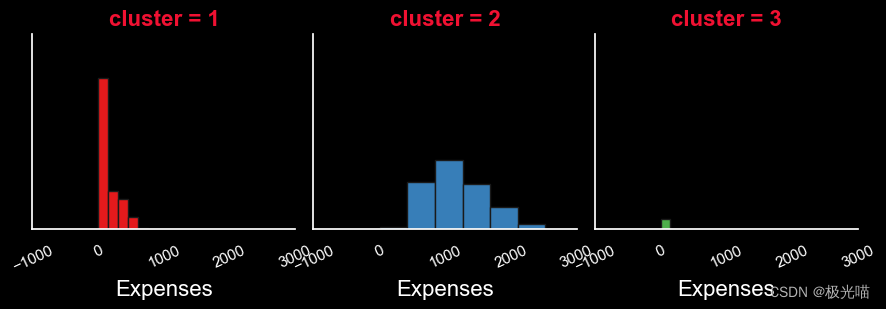
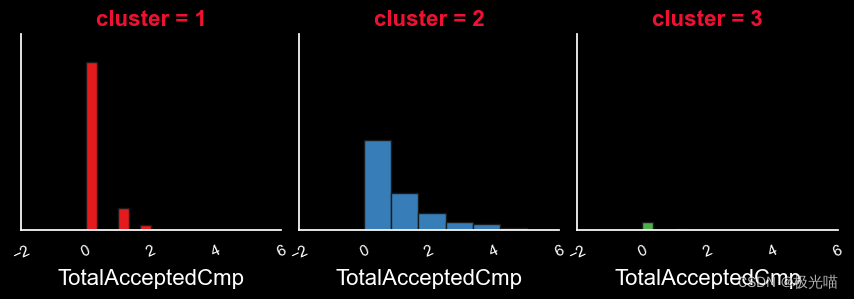
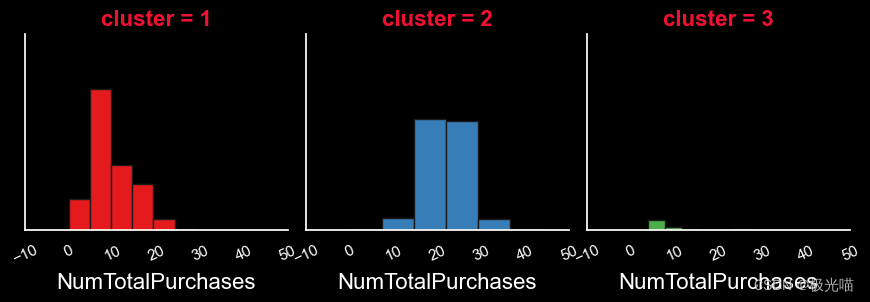
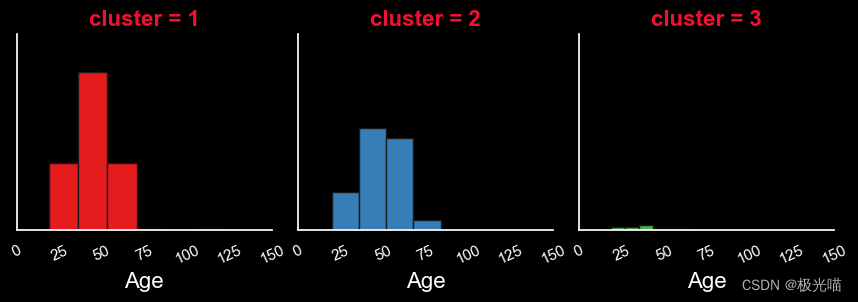
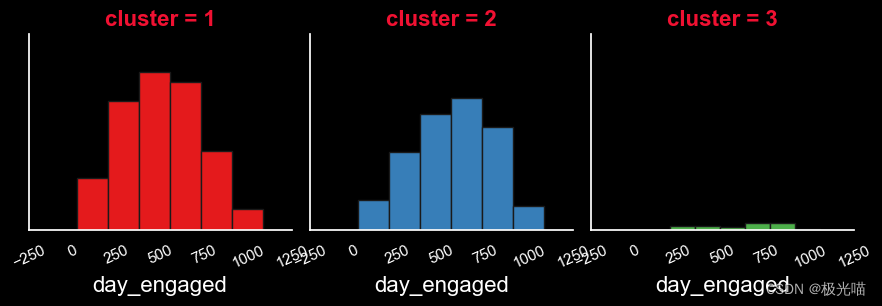
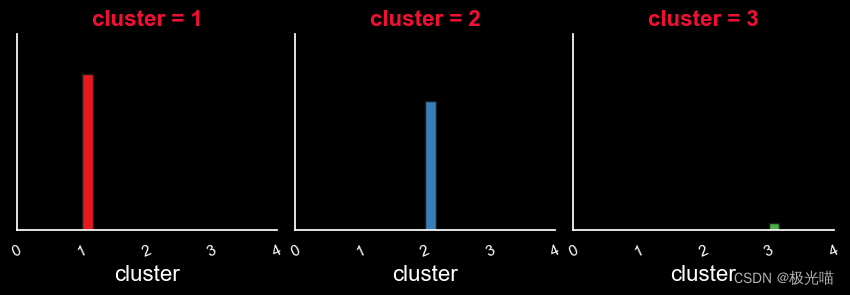
报告
根据以上信息,我们可以将客户分为三部分:-
- 高度活跃客户:这些客户属于集群一。
- 中等活跃客户:- 这些客户属于集群二。
- 最不活跃的客户 :- 这些客户属于第三集群。
高度活跃客户的特征
-
在教育方面
- 高活跃客户来自PG背景
-
就婚姻状况而言
- 恋爱关系中的人数约为。 单身人士的两倍
-
就收入而言
- 高度活跃客户的收入略低于中等活跃客户。
-
就孩子而言
- 与其他顾客相比,高度活跃的顾客拥有更多的孩子(平均 1 个孩子)。
-
就费用而言
- 高度活跃客户的费用低于中等客户。
- 这些客户的平均花费。 约。 100-200单位钱。
-
就年龄而言
- 这些顾客的年龄在25岁至75岁之间。
- 顾客年龄上限为 40 至 50 岁。
-
就参与天数而言
- 高度活跃的客户由于与公司接触的时间较长而更加忠诚。
中等活跃客户的特征
-
在教育方面
- 中等活跃客户也来自PG背景
-
就婚姻状况而言
- 与单身人士相比,恋爱中的人数略多。
-
就收入而言
- 中等活跃客户的收入高于其他客户。
-
就孩子而言
- 与高度活跃的客户相比,中等活跃的客户的子女数量较少(最多客户没有子女)。
-
就费用而言
- 与活跃客户相比,中等活跃客户的费用更高。
- 这些客户的平均花费。 约。 500-2000单位钱。
-
就年龄而言
- 这些顾客的年龄在25岁至75岁之间。
- 顾客年龄上限为 35 至 60 岁。
-
就参与天数而言
- 与高度活跃的客户相比,中等活跃的客户与公司的互动程度略低
代码与数据集下载

有“AI”的1024 = 2048,欢迎大家加入2048 AI社区
更多推荐

 25
25 0
0- 0


 已为社区贡献8条内容

所有评论(0)