C# PaddleDetection 证件分类 驾驶证、行驶证、身份证分类
C# PaddleDetection 证件分类 驾驶证、行驶证、身份证分类
目录
项目
VS2022+.net4.8+OpenCvSharp4+Sdcb.PaddleDetection
效果
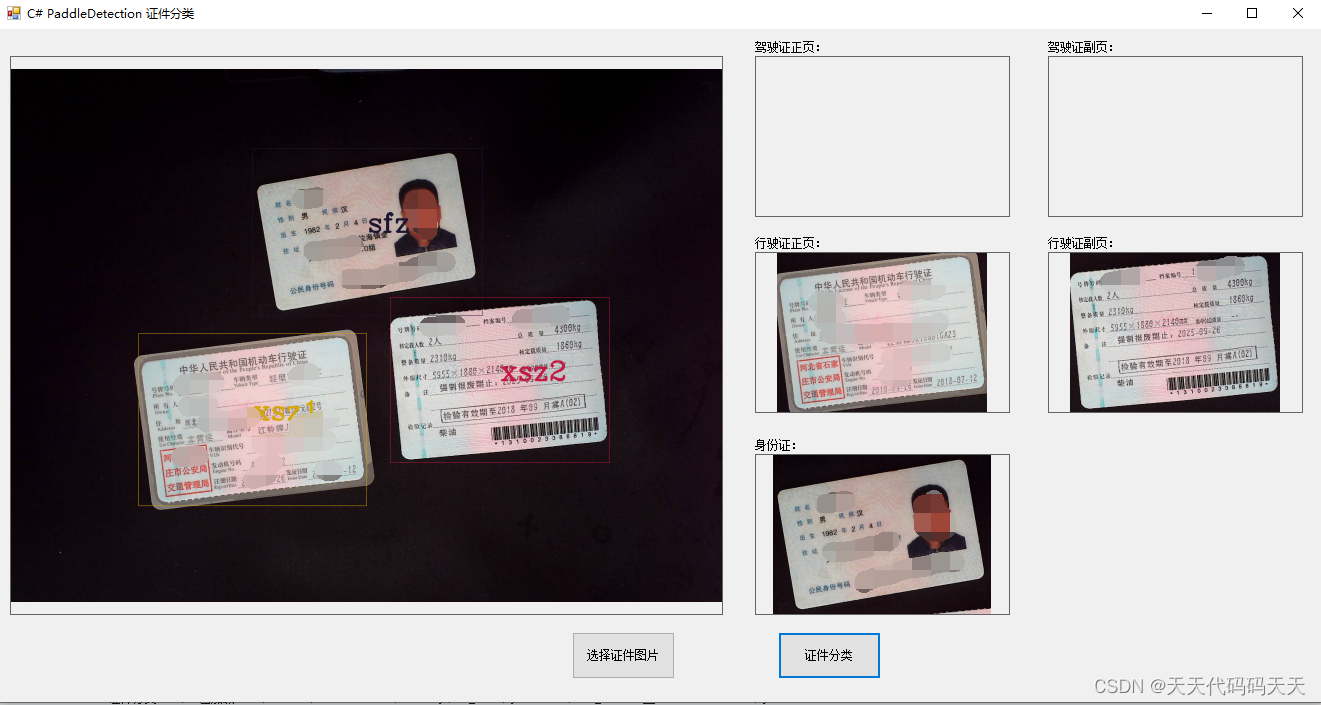
代码
using OpenCvSharp;
using OpenCvSharp.Extensions;
using Sdcb.PaddleDetection;
using Sdcb.PaddleInference;
using System;
using System.Drawing;
using System.Windows.Forms;
using YamlDotNet;

namespace PaddleDetection_证件分类
{
    public partial class Form1 : Form
    {
        public Form1()
        {
            InitializeComponent();
        }


        Bitmap bmp;
        string fileFilter = "*.*|*.bmp;*.jpg;*.jpeg;*.tiff;*.tiff;*.png";
        string img = "";

        double fontScale = 2D;
        int thickness = 4;
        LineTypes lineType = LineTypes.Link4;

        PaddleConfig paddleConfig;
        PaddleDetector d;
        String startupPath;
        float confidence = 0.75f;

        private void button1_Click(object sender, EventArgs e)
        {
            OpenFileDialog ofd = new OpenFileDialog();
            ofd.Filter = fileFilter;
            if (ofd.ShowDialog() != DialogResult.OK) return;

            pictureBox1.Image = null;
            pic_jsz1.Image = null;
            pic_jsz2.Image = null;
            pic_sfz.Image = null;
            pic_xsz1.Image = null;
            pic_xsz2.Image = null;

            img = ofd.FileName;
            bmp = new Bitmap(img);
            pictureBox1.Image = new Bitmap(img);
        }

        /// <summary>
        /// 剪裁图片
        /// </summary>
        /// <param name="src">原图片</param>
        /// <param name="left">左坐标</param>
        /// <param name="top">顶部坐标</param>
        /// <param name="right">右坐标</param>
        /// <param name="bottom">底部坐标</param>
        /// <returns>剪裁后的图片</returns>
        public Image CutImage(Image src, int left, int top, int right, int bottom)
        {
            Bitmap srcBitmap = new Bitmap(src);
            int width = right - left;
            int height = bottom - top;
            Bitmap destBitmap = new Bitmap(width, height);
            using (Graphics g = Graphics.FromImage(destBitmap))
            {
                g.Clear(Color.Transparent);
                //设置画布的描绘质量
                g.CompositingQuality = System.Drawing.Drawing2D.CompositingQuality.HighQuality;
                g.SmoothingMode = System.Drawing.Drawing2D.SmoothingMode.HighQuality;
                g.InterpolationMode = System.Drawing.Drawing2D.InterpolationMode.HighQualityBicubic;
                g.DrawImage(srcBitmap, new Rectangle(0, 0, width, height), left, top, width, height, GraphicsUnit.Pixel);
            }
            return destBitmap;
        }

        private void button2_Click(object sender, EventArgs e)
        {
            Mat src = Cv2.ImRead(img);
            DetectionResult[] r = d.Run(src);

            for (int i = 0; i < r.Length; i++)
            {
                if (r[i].Confidence > confidence)
                {
                    Image temp = CutImage(bmp, r[i].Rect.X, r[i].Rect.Y, r[i].Rect.X + r[i].Rect.Width, r[i].Rect.Y + r[i].Rect.Height);
                    if (r[i].LabelName == "sfz")
                    {
                        pic_sfz.Image = temp;
                    }
                    else if (r[i].LabelName == "xsz1")
                    {
                        pic_xsz1.Image = temp;
                    }
                    else if (r[i].LabelName == "xsz2")
                    {
                        pic_xsz2.Image = temp;
                    }
                    else if (r[i].LabelName == "jsz1")
                    {
                        pic_jsz1.Image = temp;
                    }
                    else if (r[i].LabelName == "jsz2")
                    {
                        pic_jsz2.Image = temp;
                    }

                    Scalar scalar = Scalar.RandomColor();
                    Cv2.Rectangle(src, r[i].Rect, scalar, 1, LineTypes.Link8, 0);
                    Cv2.PutText(src, r[i].LabelName, new OpenCvSharp.Point(r[i].Rect.X + r[i].Rect.Width / 2, r[i].Rect.Y + r[i].Rect.Height / 2), HersheyFonts.HersheyComplex, fontScale, scalar, thickness, lineType, false);
                }
            }

            //Cv2.ImShow("src", src);
            pictureBox1.Image = BitmapConverter.ToBitmap(src);
        }

        private void Form1_Load(object sender, EventArgs e)
        {
            startupPath = System.Windows.Forms.Application.StartupPath;
            paddleConfig = PaddleConfig.FromModelDir(startupPath + "\\models\\");
            string configYmlPath = startupPath + "\\models\\infer_cfg.yml";
            d = new PaddleDetector(paddleConfig, configYmlPath);
        }
    }
}
using OpenCvSharp;
using OpenCvSharp.Extensions;
using Sdcb.PaddleDetection;
using Sdcb.PaddleInference;
using System;
using System.Drawing;
using System.Windows.Forms;
using YamlDotNet;
namespace PaddleDetection_证件分类
{
public partial class Form1 : Form
{
public Form1()
{
InitializeComponent();
}
Bitmap bmp;
string fileFilter = "*.*|*.bmp;*.jpg;*.jpeg;*.tiff;*.tiff;*.png";
string img = "";
double fontScale = 2D;
int thickness = 4;
LineTypes lineType = LineTypes.Link4;
PaddleConfig paddleConfig;
PaddleDetector d;
String startupPath;
float confidence = 0.75f;
private void button1_Click(object sender, EventArgs e)
{
OpenFileDialog ofd = new OpenFileDialog();
ofd.Filter = fileFilter;
if (ofd.ShowDialog() != DialogResult.OK) return;
pictureBox1.Image = null;
pic_jsz1.Image = null;
pic_jsz2.Image = null;
pic_sfz.Image = null;
pic_xsz1.Image = null;
pic_xsz2.Image = null;
img = ofd.FileName;
bmp = new Bitmap(img);
pictureBox1.Image = new Bitmap(img);
}
/// <summary>
/// 剪裁图片
/// </summary>
/// <param name="src">原图片</param>
/// <param name="left">左坐标</param>
/// <param name="top">顶部坐标</param>
/// <param name="right">右坐标</param>
/// <param name="bottom">底部坐标</param>
/// <returns>剪裁后的图片</returns>
public Image CutImage(Image src, int left, int top, int right, int bottom)
{
Bitmap srcBitmap = new Bitmap(src);
int width = right - left;
int height = bottom - top;
Bitmap destBitmap = new Bitmap(width, height);
using (Graphics g = Graphics.FromImage(destBitmap))
{
g.Clear(Color.Transparent);
//设置画布的描绘质量
g.CompositingQuality = System.Drawing.Drawing2D.CompositingQuality.HighQuality;
g.SmoothingMode = System.Drawing.Drawing2D.SmoothingMode.HighQuality;
g.InterpolationMode = System.Drawing.Drawing2D.InterpolationMode.HighQualityBicubic;
g.DrawImage(srcBitmap, new Rectangle(0, 0, width, height), left, top, width, height, GraphicsUnit.Pixel);
}
return destBitmap;
}
private void button2_Click(object sender, EventArgs e)
{
Mat src = Cv2.ImRead(img);
DetectionResult[] r = d.Run(src);
for (int i = 0; i < r.Length; i++)
{
if (r[i].Confidence > confidence)
{
Image temp = CutImage(bmp, r[i].Rect.X, r[i].Rect.Y, r[i].Rect.X + r[i].Rect.Width, r[i].Rect.Y + r[i].Rect.Height);
if (r[i].LabelName == "sfz")
{
pic_sfz.Image = temp;
}
else if (r[i].LabelName == "xsz1")
{
pic_xsz1.Image = temp;
}
else if (r[i].LabelName == "xsz2")
{
pic_xsz2.Image = temp;
}
else if (r[i].LabelName == "jsz1")
{
pic_jsz1.Image = temp;
}
else if (r[i].LabelName == "jsz2")
{
pic_jsz2.Image = temp;
}
Scalar scalar = Scalar.RandomColor();
Cv2.Rectangle(src, r[i].Rect, scalar, 1, LineTypes.Link8, 0);
Cv2.PutText(src, r[i].LabelName, new OpenCvSharp.Point(r[i].Rect.X + r[i].Rect.Width / 2, r[i].Rect.Y + r[i].Rect.Height / 2), HersheyFonts.HersheyComplex, fontScale, scalar, thickness, lineType, false);
}
}
//Cv2.ImShow("src", src);
pictureBox1.Image = BitmapConverter.ToBitmap(src);
}
private void Form1_Load(object sender, EventArgs e)
{
startupPath = System.Windows.Forms.Application.StartupPath;
paddleConfig = PaddleConfig.FromModelDir(startupPath + "\\models\\");
string configYmlPath = startupPath + "\\models\\infer_cfg.yml";
d = new PaddleDetector(paddleConfig, configYmlPath);
}
}
}

有“AI”的1024 = 2048,欢迎大家加入2048 AI社区
更多推荐


 3
3 0
0- 0


 已为社区贡献15条内容

所有评论(0)