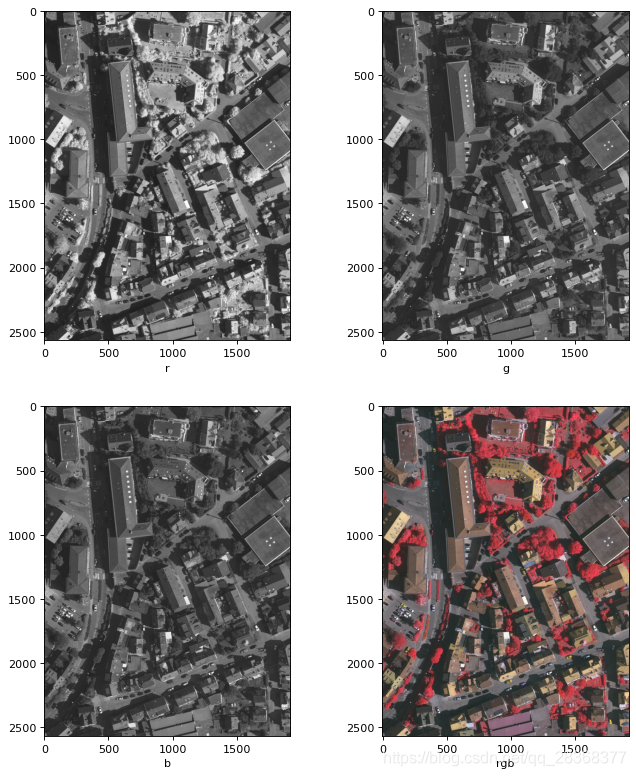
彩色rgb图像拆分为rgb三个通道,并重新合并为彩色图像
import numpy as npimport imageioimport matplotlib.pyplot as pltimg = imageio.imread(r'E:\Vaihingen\data\orginalimages\top_mosaic_09cm_area1.tif')# 将图像拆分为r,g,br,g,b = np.dsplit(img,3)plt.figure(figsize
·
import numpy as np
import imageio
import matplotlib.pyplot as plt


img = imageio.imread(r'E:\Vaihingen\data\orginalimages\top_mosaic_09cm_area1.tif')

# 将彩色rgb图像拆分为r,g,b
r,g,b = np.dsplit(img,3)

# 将r,g,b图像合并为彩色rgb图像
rgb_img = np.dstack((r,g,b))

plt.figure(figsize=(10,12),dpi= 80)

plt.subplot(221)
plt.imshow(r,cmap='gray')
plt.xlabel('r')
plt.subplot(222)
plt.imshow(g,cmap='gray')
plt.xlabel('g')
plt.subplot(223)
plt.imshow(b,cmap='gray')
plt.xlabel('b')
plt.subplot(224)
plt.imshow(rgb_img)
plt.xlabel('rgb')
plt.show()

有“AI”的1024 = 2048,欢迎大家加入2048 AI社区
更多推荐

 7
7 0
0- 0


 已为社区贡献14条内容

所有评论(0)