MCP server 实现一个查询公历,阴历,假期
如何简易的用 MCP server 实现一个 公历,阴历,假期查询
·
Step1.环境配置和Cherry Studio安装配置请查看我的另一篇文章MCP Server 实现一个 天气查询
Step2. 实现 MCP Server
calendar_server.py
from zhdate import ZhDate
import holidays
from datetime import datetime

# ================================
# 3) 查询日历的核心逻辑
# ================================
def get_calendar_info() -> str:
    today = datetime.today()
    gregorian = today.strftime("%Y-%m-%d")
    weekday = "星期" + "一二三四五六日"[today.weekday()]
    lunar = ZhDate.today().chinese()  # 中文农历,比如 "二月十八"

    # 获取最近的节假日
    cn_holidays = holidays.China(years=today.year)
    upcoming = [(date, name) for date, name in sorted(cn_holidays.items()) if date >= today.date()]

    if upcoming:
        next_holiday_date, holiday_name = upcoming[0]
        days_left = (next_holiday_date - today.date()).days
        holiday_info = f"{holiday_name}({next_holiday_date},还有{days_left}天)"
    else:
        holiday_info = "今年内无更多法定节假日"

    return (
        f"📅 公历: {gregorian}\n"
        f"🌕 农历: {lunar}\n"
        f"🗓 星期: {weekday}\n"
        f"🎉 最近假期: {holiday_info}"
    )
修改MCP Server 定义
# ================================
# 3) MCP Server 定义
# ================================
app = Server("mcp-weather")

# (A) 工具调用处理器:根据工具名称选择执行逻辑
@app.call_tool()
async def call_tool_handler(
    name: str, arguments: dict
) -> list[types.TextContent | types.ImageContent | types.EmbeddedResource]:
    """
    MCP 工具调用处理器
    """
    if name == "query_weather":
        if "city" not in arguments:
            raise ValueError("Missing required argument 'city'")
        # 调用上面封装好的 get_weather
        weather_info = get_weather(arguments["city"])
        return [types.TextContent(type="text", text=weather_info)]
    elif name == "query_calendar":
        calendar_info = get_calendar_info()
        return [types.TextContent(type="text", text=calendar_info)]
    else:
        raise ValueError(f"Unsupported tool name: {name}")


# (B) 工具列表:告知 MCP 端都有哪些可调用的工具
@app.list_tools()
async def list_tools() -> list[types.Tool]:
    """
    定义可用的 MCP 工具列表
    """
    return [
        types.Tool(
            name="query_weather",
            description="查询指定城市天气信息(基于和风天气API)",
            inputSchema={
                "type": "object",
                "required": ["city"],
                "properties": {
                    "city": {
                        "type": "string",
                        "description": "要查询的城市名(中文)"
                    }
                },
            },
        ),
        types.Tool(
            name="query_calendar",
            description="获取今天的几号、公历、农历和最近假期信息",
            inputSchema={
                "type": "object",
                "properties": {},
                "required": []
            }
        ),
    ]
写一个 client.py 测试下
import asyncio
from mcp.client.sse import sse_client  # 导入 SSE 客户端连接器
from mcp.client.session import ClientSession  # 导入 MCP 客户端会话管理类

async def main():
    # 连接到指定的 SSE 服务地址,建立数据传输流
    async with sse_client("http://localhost:8081/sse") as streams:
        # 使用返回的输入和输出流创建 MCP 客户端会话
        async with ClientSession(streams[0], streams[1]) as session:
            # 初始化会话,可能包括握手、认证等操作
            await session.initialize()
            # 获取服务器上注册的工具列表
            tools = await session.list_tools()
    # 打印工具列表信息
    print("Available tools:", tools.tools)
    return session

if __name__ == "__main__":
    asyncio.run(main())
运行结果
Available tools: [Tool(name='query_weather', description='查询指定城市天气信息(基于和风天气API)', inputSchema={'type': 'object', 'required': ['city'], 'properties': {'city': {'type': 'string', 'description': '要查询的城市名(中文)'}}}), Tool(name='query_calendar', description='获取今天的公历、农历和最近假期信息', inputSchema={'type': 'object', 'properties': {}, 'required': []})]

进程已结束,退出代码为 0
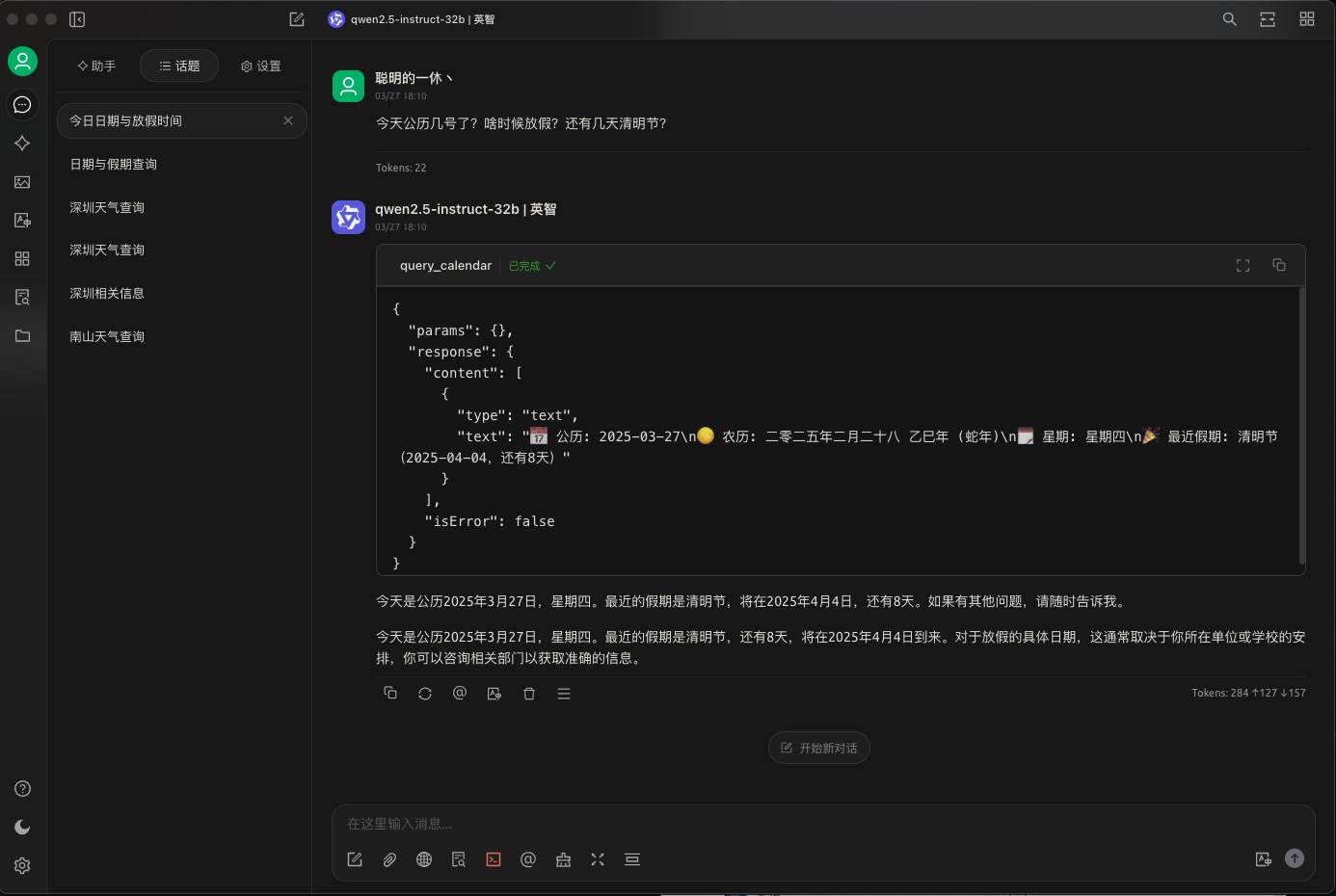
Step3. 在Cherry Studio上使用

有“AI”的1024 = 2048,欢迎大家加入2048 AI社区
更多推荐
 8
8 0
0- 0


 已为社区贡献2条内容

所有评论(0)