Linux服务器使用GPU技巧
进行深度学习实验的时候用pytorch-gpu,经常要与GPU打交道;所以经常遇到奇奇怪怪的问题;
·
进行深度学习实验的时候用pytorch-gpu,经常要与GPU打交道;
所以经常遇到奇奇怪怪的问题;
查看GPU占用情况
watch -n 10 nvidia-sminvidia-smi
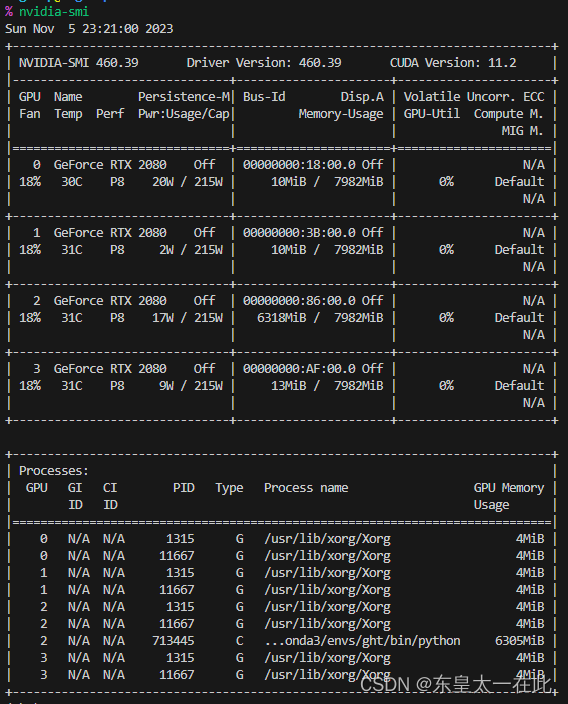
杀死进程
kill PID
使用技巧
指定在哪张GPU上运行
有两种方法,建议用第二种
1. cuda() , torch.cuda.set_device()
在代码内部指定;
model.cuda(1)
2. os.environ[“CUDA_VISIBLE_DEVICES”]
在程序前面写如下语句:
os.environ["CUDA_DEVICE_ORDER"] = "PCI_BUS_ID"
os.environ["CUDA_VISIBLE_DEVICES"] = "2, 3"
此时系统会只调用原来的2, 3卡,并重新编号成0, 1,所以你在后面再调用cuda:0实际上在用原来的2卡了;(官网上也建议用这种方法)
查看变量在哪个设备上
查看model在哪张卡上:
if torch.cuda.is_available():
    # 获取当前模型所在的设备
    device = next(model.parameters()).device
    print("Model is on device:", device)
else:
    print("Model is on CPU")
torch.nn.DataParallel()
CLASStorch.nn.DataParallel(module, device_ids=None, output_device=None, dim=0)
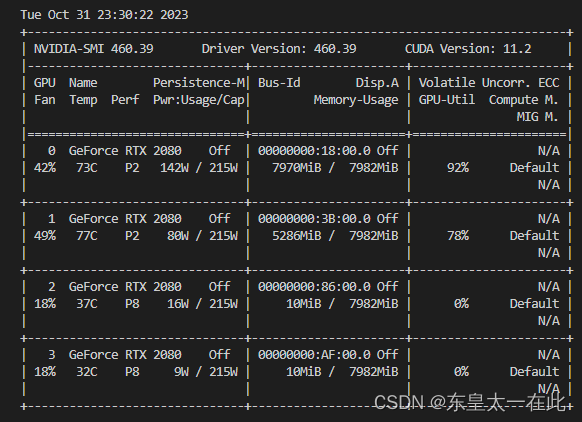
可以看得到第一张卡用的多一些,这是因为虽然是并行,但是在做output_loss的时候默认是在第一张卡上跑的;参考[1]
Debug
1. RuntimeError: CUDA out of memory.
RuntimeError: CUDA out of memory. Tried to allocate 392.00 MiB (GPU 0; 7.80 GiB total capacity; 6.48 GiB already allocated; 131.88 MiB free; 6.71 GiB reserved in total by PyTorch)
之所以会爆是因为·torch.nn.DataParallel()`上述原因;
参考

有“AI”的1024 = 2048,欢迎大家加入2048 AI社区
更多推荐



 1
1 0
0- 0


 已为社区贡献3条内容

所有评论(0)